

YouTube Search Scraper | Videos, Shorts, Channels & Views
Pricing
from $0.84 / 1,000 search results
YouTube Search Scraper | Videos, Shorts, Channels & Views
Get YouTube search results by keyword in website order: result type (video, Short, live, channel, playlist, movie), title, channel, view count, duration and position. Many keywords per run, YouTube filters incl. Last hour, country, optional exact likes and dates. No login.
Pricing
from $0.84 / 1,000 search results
Rating
0.0
(0)
Developer

Flowo
Maintained by CommunityActor stats
0
Bookmarked
2
Total users
1
Monthly active users
5 days ago
Last modified
Categories
Features
Share
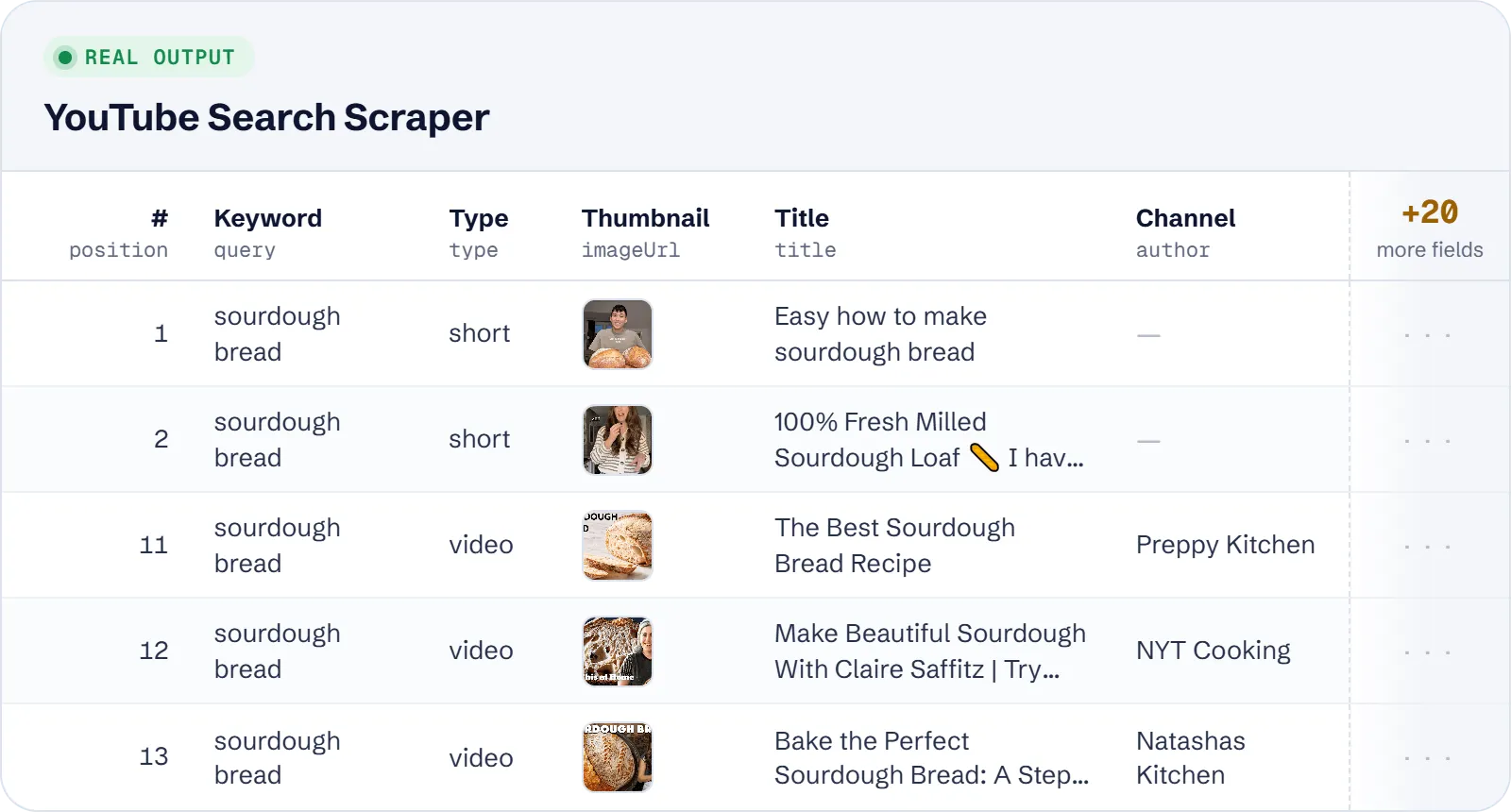
Search YouTube by keyword and get the results in the same order as the website: the result type (video, Short, live stream, channel, playlist or movie), title, channel name and handle, view count, duration, relative upload time and the rank of each result for its keyword. Turn on details to add the exact view count, like count and publish date, and the channel of every Short. Many keywords per run, one flat table, no login or API key.
What does YouTube Search Scraper do?
You give it a list of keywords; it runs each one through YouTube's own web search and returns one row per search result. It supports the website's filters (type, upload date including the hidden "Last hour", duration, features such as 4K or Live, Relevance or Popularity sort) and the YouTube location (country). It is built for marketers and SEO people tracking rankings, creators researching a niche, agencies looking for channels to sponsor, and data teams or AI agents feeding YouTube results into pipelines.
How to scrape YouTube search results
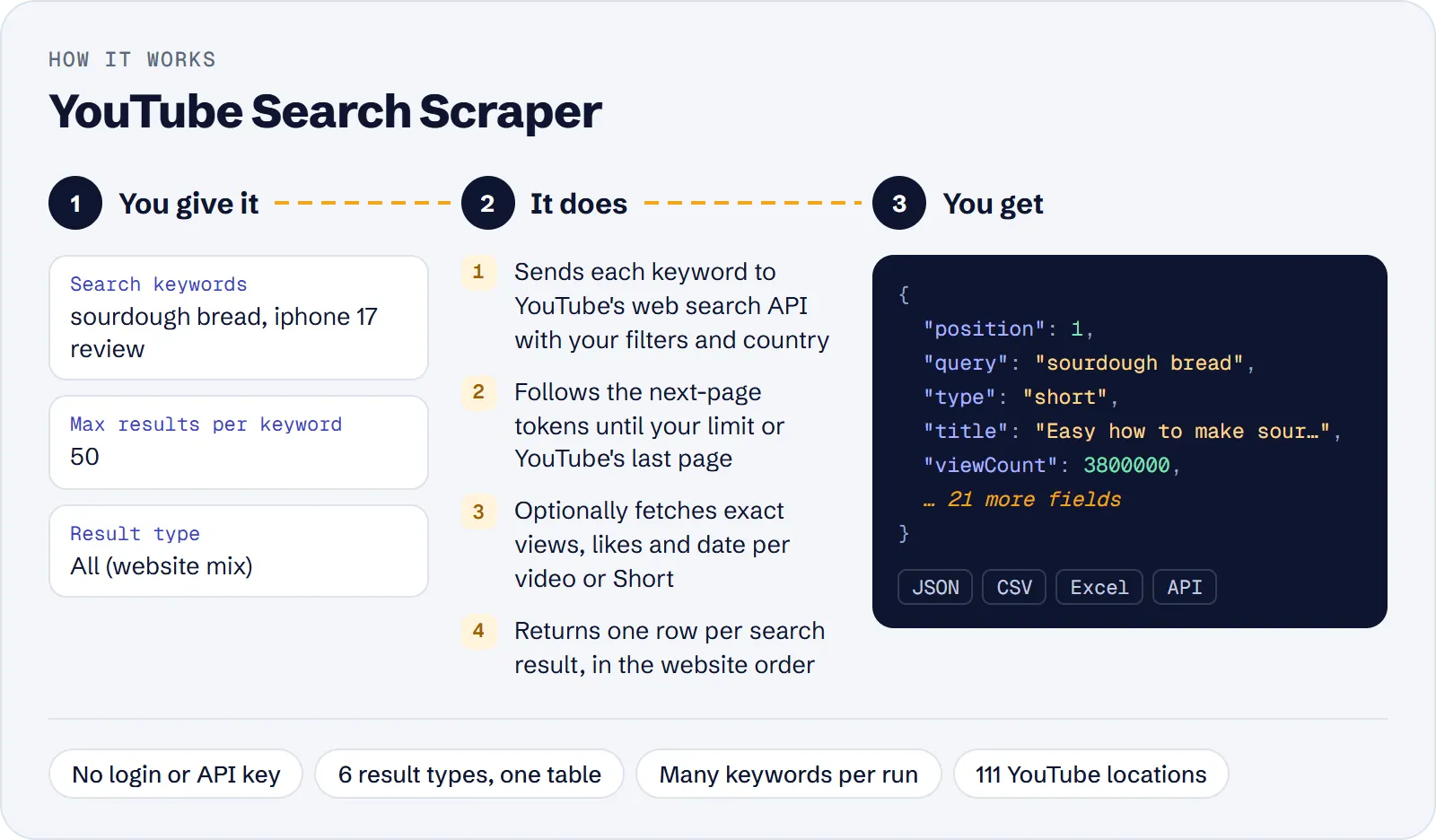
- Open the actor in Apify Console and enter one or more keywords in Search keywords, one per line.
- Set Max results per keyword (default 50).
- Optionally choose a Result type, Sort by, Upload date, Duration, Features and Country.
- Turn on Exact stats and dates (details) if you need exact views, likes and publish dates.
- Click Start and download the results as JSON, CSV or Excel, or read them through the API.
How much does it cost to scrape YouTube search results?
Price per event by Apify plan:
| Event | Free | Bronze | Silver | Gold and above |
|---|---|---|---|---|
| Search result | $1.20 per 1,000 | $1.08 per 1,000 | $0.96 per 1,000 | $0.84 per 1,000 |
| Actor start | $0.00005 | $0.00005 | $0.00005 | $0.00005 |
A test run with the API example input below returned 100 rows in 11 s.
You pay per search result saved to the dataset: one event search-result per row. Videos, Shorts, live streams, channels, playlists and movies all cost the same, and the details (exact views, likes, dates) are included at no extra cost. Duplicates — the same result repeated within one keyword — are skipped and not charged. Every run also has a small start fee.
| Scenario | Results (events) | Cost on the Free plan |
|---|---|---|
| 2 keywords × 50 results (default) | 100 | about $0.12 |
| 1 keyword, all results YouTube shows (type Videos) | about 460 | about $0.55 |
| 20 keywords × 50 results with details | 1,000 | about $1.20 |
| 100 keywords × 100 results | 10,000 | about $12.00 |
Costs include the start fee of $0.00005. Higher Apify plans get a lower price per result.
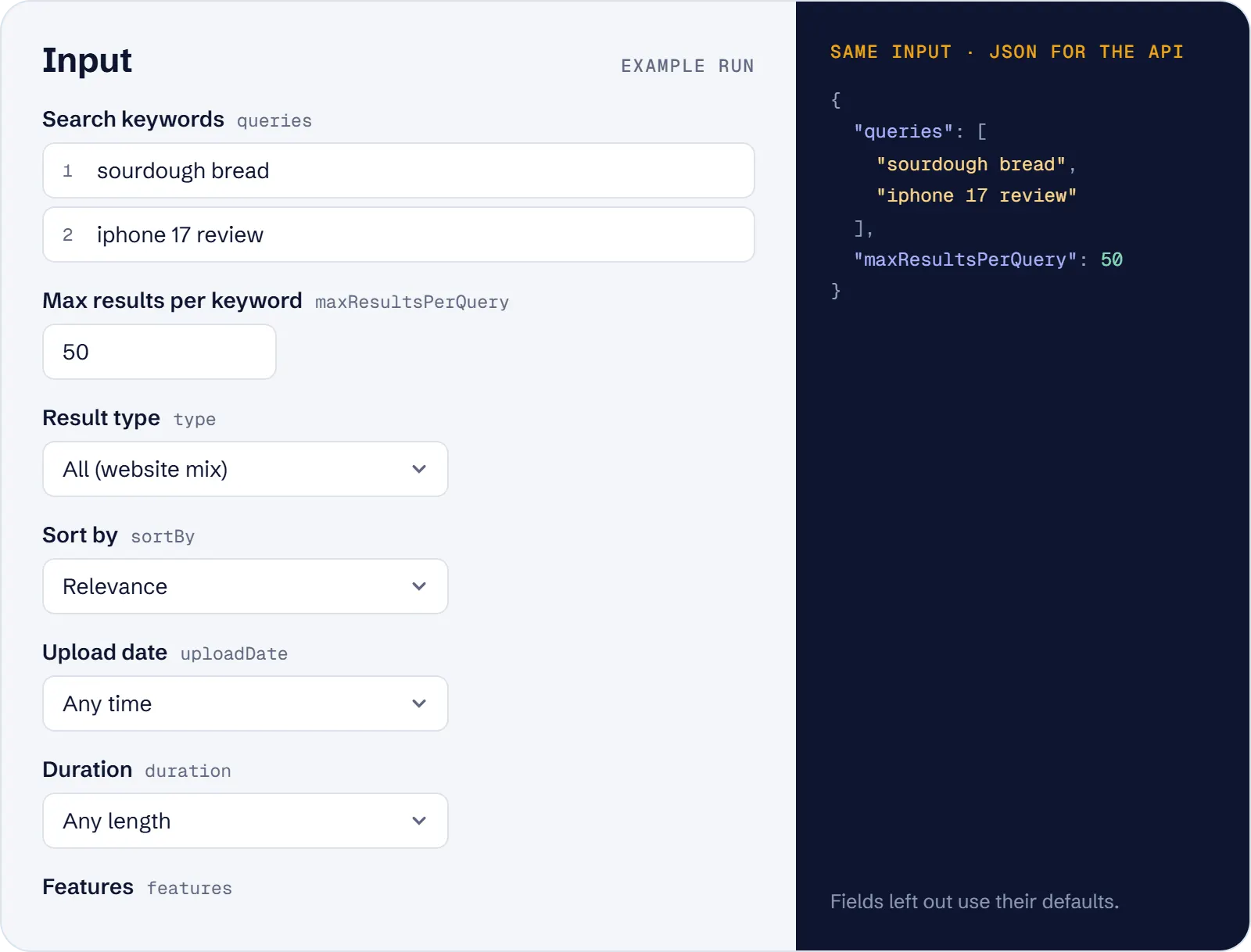
Input
| Field | What it does |
|---|---|
queries (required) | Keywords to search, one per line; each is searched separately. |
maxResultsPerQuery | Max results per keyword, 1–1000, default 50. |
type | all (website mix), video, shorts, channel, playlist or movie. |
sortBy | relevance (default) or popularity (most viewed first). |
uploadDate | any, hour, today, week, month or year. |
duration | any, under3, 3to20 or over20 minutes. |
features | Any of live, 4k, hd, subtitles, creativeCommons, hdr, 360, vr180, 3d (all must match). |
country | Two-letter YouTube location, default US; changes the ranking. |
disableAutocorrect | Search exactly what you typed instead of YouTube's correction. |
fetchDetails | Adds exact view count, like count, publish date and the channel of Shorts. |
maxItems | Optional cap on all results of the run. |
proxyConfiguration | Apify datacenter proxy by default. |
Example — this month's most viewed videos for a keyword, with exact stats:
What data can you extract from YouTube search?
Every row has the same keys; a field that does not apply to the result type is null.
| Field | Description |
|---|---|
type | video, short, live, movie, channel or playlist |
id, url | Video, channel or playlist id and its YouTube URL |
query, position | The keyword and the 1-based rank of the result for it |
title, description, imageUrl | Title, description snippet and thumbnail |
author, authorUrl, channelId, channelHandle, channelVerified | The channel behind the result |
viewCount, viewCountText | Views as a number and as shown on YouTube |
watchingCount | Current viewers of a live stream, when YouTube shows them |
likeCount, publishedAt | Like count and publish date (YYYY-MM-DD) — with details only |
publishedText | Relative upload time, e.g. "2 months ago" |
duration, durationSeconds | Length as shown and in seconds |
badges | Badges such as "4K" or "Earns commission" |
subscriberCount, subscriberCountText | Subscribers of a channel result |
videoCount | Number of videos in a playlist result |
scrapedAt | When the row was scraped |
A real video row (search for "sourdough bread", without details; thumbnail URL shortened):
Use cases
- Keyword ranking — track which videos and Shorts rank for your keywords in a given country, with their position.
- Niche research — find what is most viewed this month for a topic and how long the top videos are.
- Channel discovery — search with type Channels to get handles, subscriber counts, verified badges and descriptions of channels to sponsor or partner with.
- Shorts research — collect Shorts for a keyword with exact views, likes, dates and the channel behind each Short.
- Localized and exact-term search — compare rankings across countries, or search brand names and slang without autocorrect.
Limitations
- YouTube shows at most about 450–500 results per keyword and filter set, even when it estimates millions. The log tells you when a keyword ran out before your limit.
likeCountandpublishedAtare filled only with details on, and only for videos, Shorts and live streams.publishedAtisnullwhen YouTube gives only a relative time such as "5 hours ago".- Without details, Shorts have a rounded view count (from "3.8M views") and no channel name or handle.
- Subscriber counts of channels are rounded as YouTube shows them; hidden counts are
null. - Sorting by upload date or rating, and the "Purchased" and "Location" features, are not offered: YouTube no longer applies them.
- The interface language is English, so counts and relative dates are parsed reliably; titles and descriptions stay in their original language.
- Comments, tags and channel totals are not part of search results.
Tips and troubleshooting
- Get more rows per request: with type All, Popularity sort returns only a few results per page; choose type Videos for large popular lists.
- Only new uploads: use Upload date = Last hour or Today and schedule the run.
- Filters that do not combine are rejected before any request, with a message naming the fields: Channels and Playlists cannot use Upload date, Duration or Features; Shorts cannot use Duration or Live; Live cannot be combined with other features or Upload date; Movies cannot use Popularity sort.
- 0 rows for a keyword: YouTube found nothing for that keyword and filter set (common with Shorts or Movies and short periods); the log has a warning per keyword. Widen the upload date or remove a feature.
- Country error: use one of the 111 YouTube locations (e.g. US, GB, DE, JP); CN, IR and KP are not YouTube locations.
- Details make runs slower (one extra request per video, two per Short), but the price per result stays the same.
API, MCP and integrations
Run the actor from your code with the same JSON input as in Console. Your API token is in Console → Settings → API & Integrations.
Python (pip install apify-client):
Node.js (npm install apify-client):
HTTP — one request runs the actor and returns the results (runs up to 5 minutes; longer ones: run asynchronously):
AI agents (MCP). Add the actor as a tool of the Apify MCP server. Claude Code:
Claude Desktop, Cursor or VS Code: {"mcpServers": {"apify": {"url": "https://mcp.apify.com?tools=genial_candlestand/youtube-search-scraper"}}}. Then ask, for example:
- "Find the 100 most viewed YouTube videos about iphone 17 review uploaded this month, with likes and dates"
- "List YouTube channels for sourdough bread with handles and subscriber counts"
- "Get the top 50 YouTube results for ラーメン 作り方 as ranked in Japan"
Integrations. Run it on a schedule with Apify Schedules and send the results to Google Sheets, Slack, Zapier, Make, n8n or your webhook — see Apify integrations.
FAQ
Is it legal to scrape YouTube search results?
The actor collects only public data that YouTube shows to any logged-out visitor in its search. You are responsible for how you use the data, including copyright and privacy rules that apply to you.
Do I need a YouTube API key or a login?
No. The actor uses YouTube's web search, not the YouTube Data API, so there is no key, quota or login.
Why did I get fewer results than Max results per keyword?
YouTube stops at about 450–500 results per keyword and filter set. The log reports, per keyword, how many results were reached and how many YouTube estimated.
How is it different from other YouTube search actors?
It takes many keywords per run with query and position on every row, returns all six result types in one flat table in the website order, adds exact views, likes and dates (also for Shorts) at no extra cost, and has a no-autocorrect switch. The price is $1.20 per 1,000 results on the Free plan; the most used YouTube search actor in the Store charges $1.00 per 1,000 but takes one keyword per run and returns videos only.
Does the same video appear twice?
Not within one keyword: repeats are skipped and not charged. The same video found by two keywords appears once for each keyword, with its own position.
Also useful
- YouTube Channel Scraper — get full details of channels you found: subscribers, exact views, country, links and their videos
- YouTube Comments Scraper — collect comments and replies of the videos you found, with likes and dates
- Google Trends Scraper — check search interest over time and by region for the same keywords
- Google News Scraper — find news articles for the same keywords, with source and publish time


