

WeChat Article Search Scraper | 公众号 Articles by Keyword
Pricing
from $2.98 / 1,000 articles
WeChat Article Search Scraper | 公众号 Articles by Keyword
Get WeChat Official Account (公众号) articles by keyword: title, digest, account name and __biz, cover image, exact publish time and a permanent mp.weixin.qq.com link. About 20–30 results per keyword, many keywords per run, date filter. No login.
Pricing
from $2.98 / 1,000 articles
Rating
0.0
(0)
Developer

Flowo
Maintained by CommunityActor stats
0
Bookmarked
2
Total users
1
Monthly active users
2 hours ago
Last modified
Categories
Features
Share
Search WeChat Official Account (公众号) articles by keyword and get one row per article: the headline, the digest, the account name and its __biz account identifier, the cover image, the exact publish time in UTC and Beijing time, and the article's permanent mp.weixin.qq.com link. The data comes from WeChat's public web search, with no login or WeChat account. You can add many keywords per run and keep only articles published after a date.
What does WeChat Article Search Scraper do?
You enter one or more keywords in Chinese or Latin script, for example 人工智能 or Tesla Model Y. The actor opens WeChat search on so.qq.com in a real browser, reads the result page of each keyword (about 20–30 articles) and saves each unique article as a flat JSON row. Every row carries a permanent mp.weixin.qq.com link that opens in any browser, plus the WeChat identifiers of the account and the push (accountBiz, articleMid, articleIdx). It is made for brand and market analysts, PR teams monitoring Chinese media, data teams building article lists, and AI agents that need recent WeChat articles about a topic.
How to scrape WeChat articles by keyword
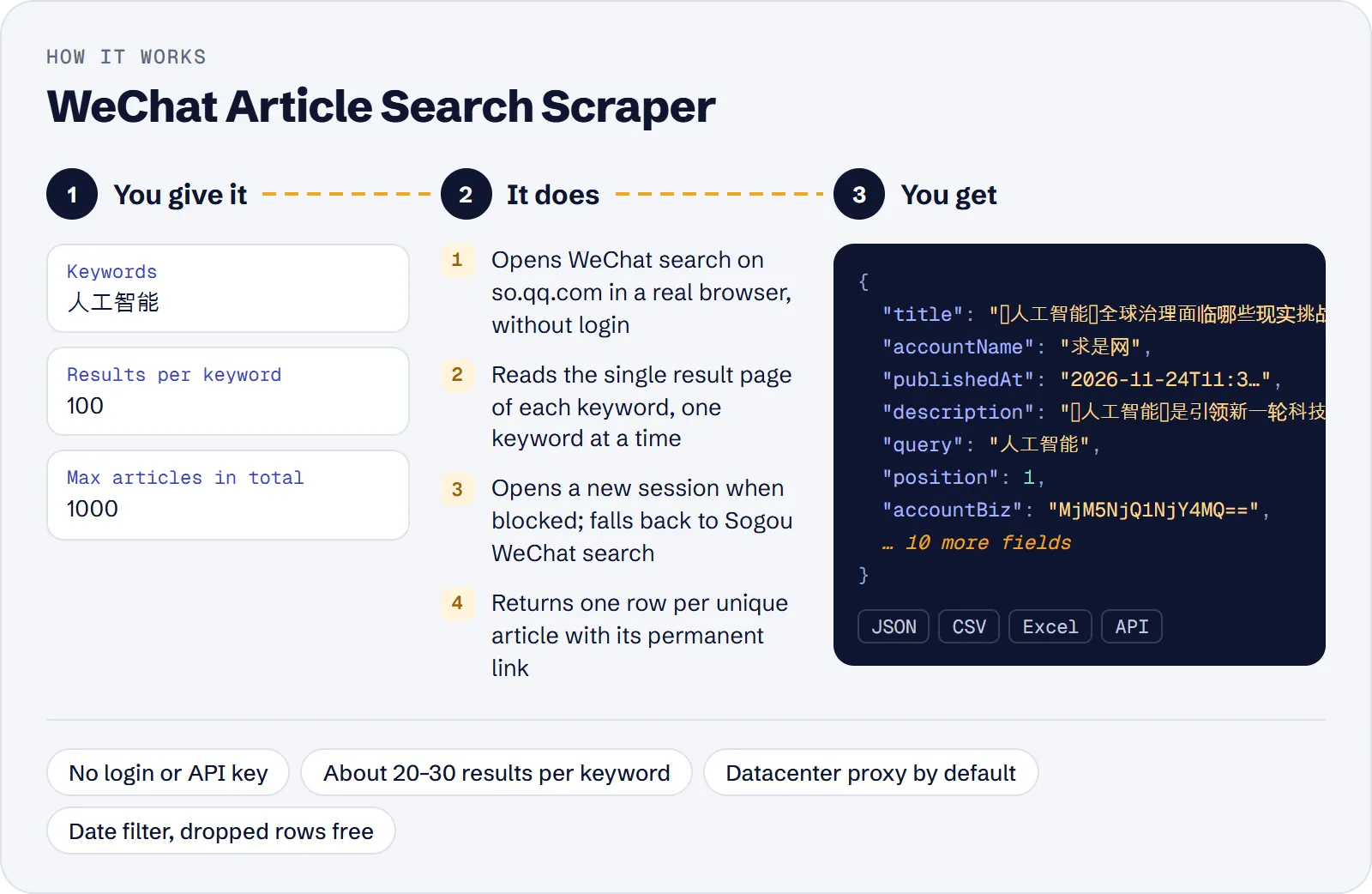
- Open the actor in Apify Console.
- Add your keywords in Keywords, one per line.
- Optionally set Results per keyword, Max articles in total and Published after (e.g.
7 daysor2026-11-01). - Click Start and download the results as JSON, CSV, Excel or HTML, or read them through the API.
How much does it cost to scrape WeChat articles?
Price per event by Apify plan:
| Event | Free | Bronze | Silver | Gold and above |
|---|---|---|---|---|
| Article | $3.50 per 1,000 | $3.325 per 1,000 | $3.15 per 1,000 | $2.975 per 1,000 |
| Article link | $0.30 per 1,000 | $0.285 per 1,000 | $0.27 per 1,000 | $0.255 per 1,000 |
| Actor start | $0.00005 | $0.00005 | $0.00005 | $0.00005 |
A test run with the API example input below returned 29 rows in 17 s.
You pay per result. One Article event ($0.0035) is one unique article saved to the dataset, so 1,000 articles cost $3.50 on the Free plan. The Actor start event ($0.00005) is charged per GB of memory when the run starts: the actor runs with 2 GB, so that is $0.0001 per run.
Not charged: duplicate articles (found by two keywords), articles dropped by the date filter, and keywords with no results. The Article link event is never charged by this version: the permanent link is already in every row. The event texts in the price list still describe the previous version (WeChat id, verified flag, Sogou link); the rows contain only the fields listed under "What data can you extract".
| Scenario | Events | Cost (Free plan) |
|---|---|---|
| 1 keyword, about 30 articles | 30 articles + start | $0.1051 |
| 3 keywords, 10 per keyword, capped at 25 articles | 25 articles + start | $0.0876 |
| 40 keywords, about 25 articles each | 1,000 articles + start | $3.5001 |
| A keyword with no results | start only | $0.0001 |
Input
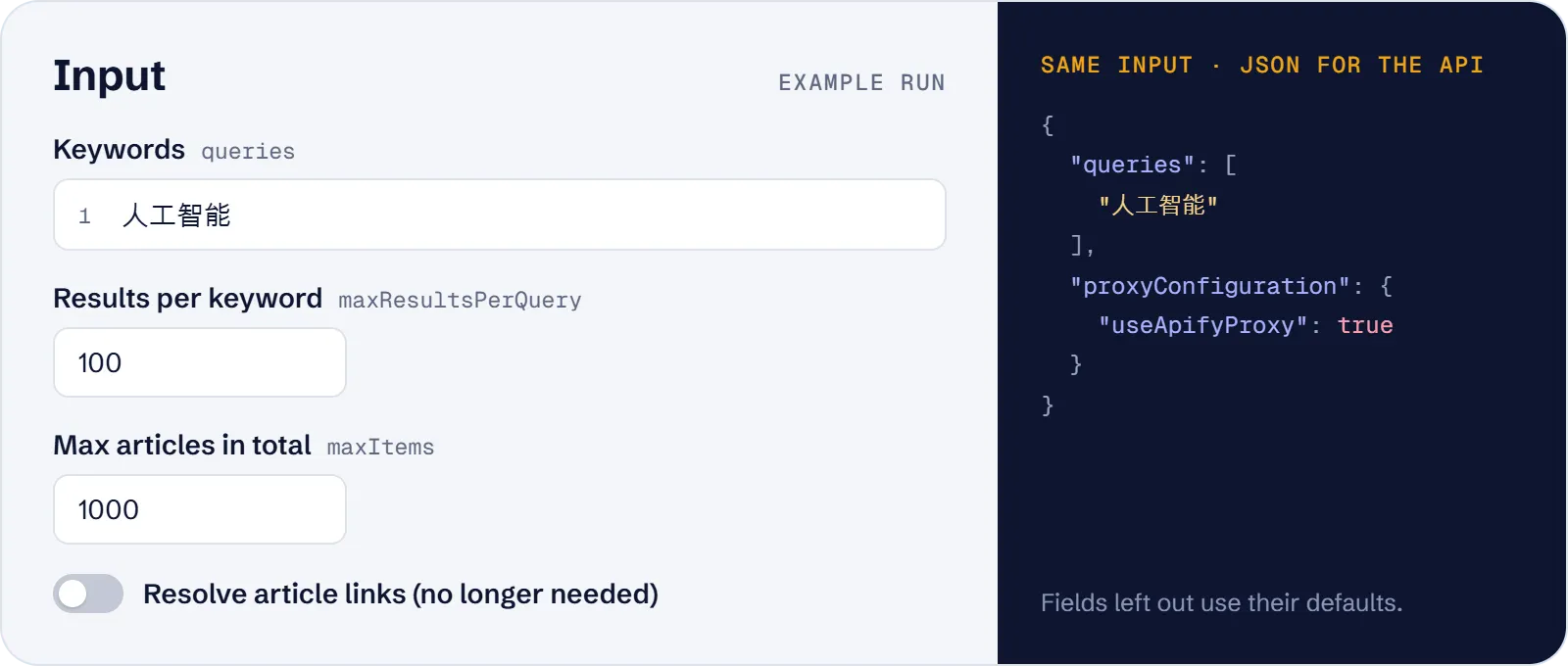
| Field | Type | Default | What it does |
|---|---|---|---|
queries | array of strings (required) | — | Keywords, one per line. Chinese and Latin text both work. Blank lines and repeated keywords are ignored. |
maxResultsPerQuery | integer 1–100 | 100 | Most articles kept per keyword, by rank. The source shows about 20–30 per keyword (7–10 from the backup source) and no further pages, so values above 30 return everything it shows. |
maxItems | integer ≥ 1 | 1000 | Stops the run after this many articles across all keywords. |
publishedAfter | date: absolute (2026-11-01) or relative (7 days, 1 month) | — | Keeps only articles published on or after this moment. Applied to the results read per keyword. Must not be in the future. |
resolveArticleUrls | boolean | false | No longer needed and has no effect: every row already has its permanent link. Kept so saved tasks and API calls keep working. |
proxyConfiguration | proxy | Apify datacenter proxy | The datacenter proxy works (a new IP is taken when one is blocked); no proxy also works. Residential was not tested. |
Example input:
What data can you extract from WeChat articles?
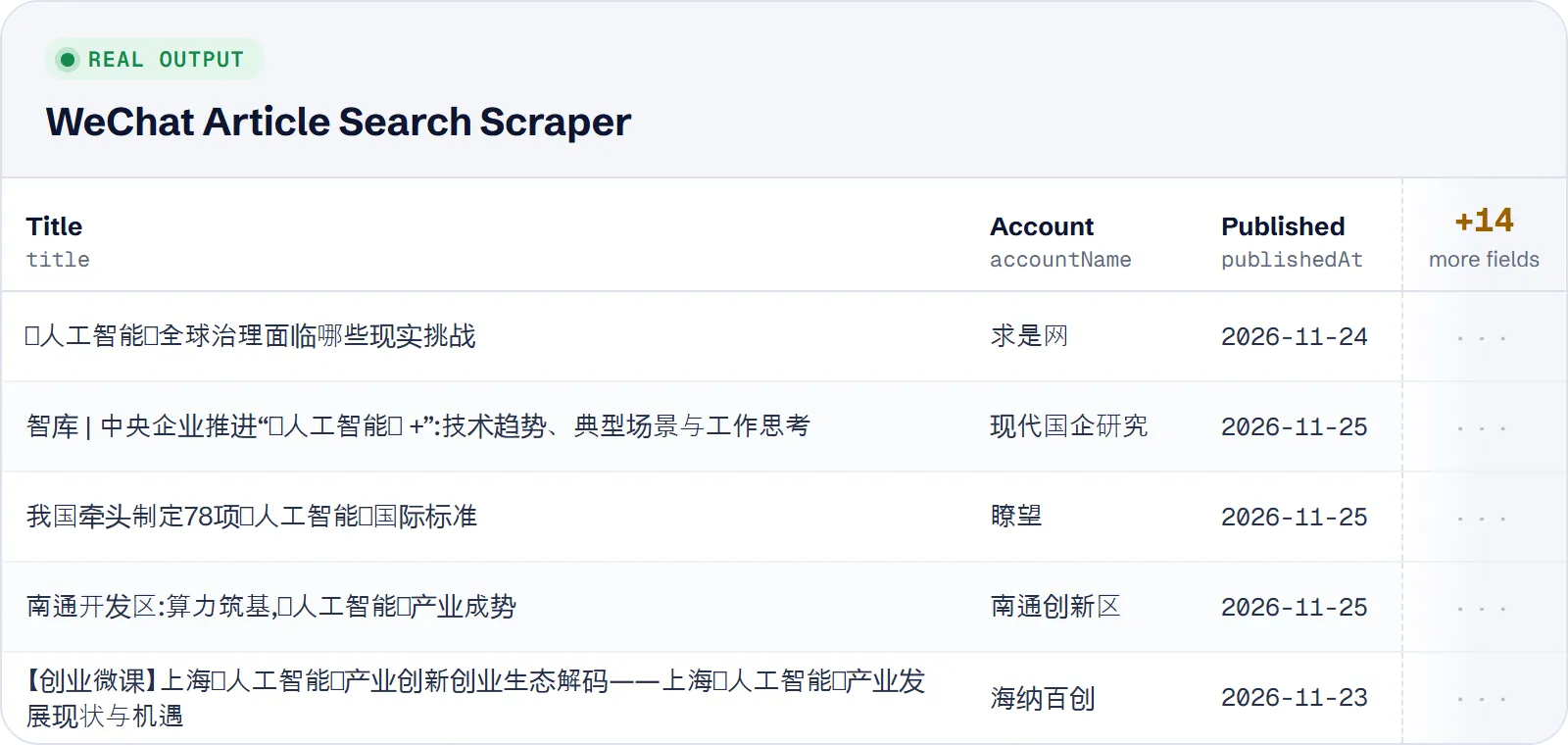
| Field | Description |
|---|---|
title | Article headline |
description | Digest shown in search (may end with ...) |
accountName | Display name of the Official Account |
accountBiz | __biz of the account: WeChat's permanent account identifier, the same in every article link of that account |
articleMid, articleIdx | WeChat message id of the push and the article's position in it (1 = headline article) |
imageUrl | Cover image (mmbiz.qpic.cn) |
publishedAt | Publish time, ISO 8601 UTC |
publishedAtLocal | Publish time in Beijing time, YYYY-MM-DD HH:mm:ss |
url, articleUrl | Permanent mp.weixin.qq.com article link (both hold the same link; articleUrl is kept for older integrations) |
id | Search document id of the article, used to remove duplicates |
query, position, page | The keyword that found the article, its 1-based rank, and the page (always 1) |
searchSource | so.qq.com (main source) or sogou (Sogou WeChat search, the backup) |
scrapedAt | When the row was extracted |
Example item from a real run (links shortened):
Use cases
- Topic scan: get about 30 articles about a topic such as 人工智能, with the account, publish time and permanent link of each.
- Brand monitoring on a schedule: run daily with keywords like 茅台 and Moutai and
publishedAfter: "1 day"to keep only the last 24 hours. The search index leans towards recent articles. - Many keywords, capped spend: search several brands at once (新能源汽车, 比亚迪, 特斯拉) and stop at a set number of articles with
maxItems. - Account tracking: group articles by
accountBizto see which Official Accounts write about a theme; the identifier stays the same across runs even when the display name changes. - Reading lists and pipelines: feed the permanent links into your own reader, archive or text-analysis pipeline.
Limitations
- About 20–30 results per keyword, one page. Without login the source shows a single result page; further pages need a WeChat login, which the actor does not use. Add more, narrower keywords to get more articles.
- Backup source gives fewer results. When so.qq.com stays blocked for a keyword, the actor uses Sogou WeChat search instead, which shows 7–10 articles; those rows have
searchSource: "sogou". - No sort by date and no server-side time filter.
publishedAfterfilters the results that were read, so it can leave fewer rows, or none, for a keyword. Rows without a publish time are dropped when the filter is set. - No full text, author, images inside the article, read counts, likes or comments. You get the digest and the cover only.
- No longer returned since version 0.2: the account's WeChat id, openid, avatar and verified flag, Sogou links, the video flag and Sogou's total result count. The old Sogou endpoint was retired, and the current search does not show these.
accountBizis the stable account identifier now. - Fields that can be
null:description,accountName,accountBiz,articleMid,articleIdx,imageUrl,publishedAt,publishedAtLocalandarticleUrl. - An article found by two keywords is saved once, under the keyword that reached it first.
- Only article search is supported, not Official Account search.
Tips and troubleshooting
- Need more articles? Add more specific keywords; each keyword gives its own page of about 20–30 results.
- Only new articles: schedule the actor with a relative
publishedAftersuch as1 day. - 0 rows for a keyword: check the log. It says whether the search had no results or the date filter dropped everything that was read. Search operators like
site:and very long keywords are treated as plain text and often find nothing. - Fewer rows than expected: look at
searchSource. Rows markedsogoucame from the backup source, which shows fewer articles. - Speed: keywords are searched one after another in one browser; on the datacenter proxy a keyword takes about 40 seconds including the browser warm-up.
- An empty
querieslist, an invalid date or a future date inpublishedAfterstops the run with an input error before any request.
API, MCP and integrations
Run the actor from your code with the same JSON input as in Console. Your API token is in Console → Settings → API & Integrations.
Python (pip install apify-client):
Node.js (npm install apify-client):
HTTP — one request runs the actor and returns the results (runs up to 5 minutes; longer ones: run asynchronously):
AI agents (MCP). Add the actor as a tool of the Apify MCP server. Claude Code:
Claude Desktop, Cursor or VS Code: {"mcpServers": {"apify": {"url": "https://mcp.apify.com?tools=genial_candlestand/wechat-article-search-scraper"}}}. Then ask, for example:
- "Find the latest WeChat articles about 人工智能 with account name and publish time"
- "List WeChat articles mentioning 茅台 or Moutai published in the last day"
- "Get WeChat articles about 故宫 with their mp.weixin.qq.com links, grouped by account"
Integrations. Run it on a schedule with Apify Schedules and send the results to Google Sheets, Slack, Zapier, Make, n8n or your webhook — see Apify integrations.
FAQ
Do I need a WeChat or Sogou account?
No. The actor uses WeChat's public web search without login or cookies from you. It never solves captchas; a blocked page is retried with a new session.
Can I search in English?
Yes. Latin and multi-word keywords such as Tesla Model Y work the same as Chinese ones.
Do the article links expire?
No. url is the permanent mp.weixin.qq.com link with __biz, mid, idx, sn and chksm, which opens in any browser.
How is it different from other WeChat article actors?
Every row has the permanent article link and the account's __biz, the push id (articleMid) and the position in the push (articleIdx), plus Beijing-time publish time. There is no per-run cap: maxItems defaults to 1000. The article price is $3.50 per 1,000, against $5.99 per 1,000 search results for the most used WeChat article actor in the Store.
Is it legal to scrape WeChat articles?
The actor collects only data that WeChat search shows publicly about published articles and the public accounts that published them. You are responsible for how you use the data, including copyright and data protection rules in your country.
Also useful
- Bilibili Scraper — follow the same topic on Bilibili: videos, views, comments, danmaku and uploaders
- Google News Scraper — add news coverage of the same brand or topic from Google News
- Goofish Xianyu Scraper — check second-hand listings of a Chinese brand on Xianyu: prices, cities and want counts
- Google Trends Scraper — compare search interest in the keywords you monitor over time


