

Bilibili Scraper | Videos, Comments, Danmaku & Uploaders
Pricing
from $1.53 / 1,000 result rows
Bilibili Scraper | Videos, Comments, Danmaku & Uploaders
Get Bilibili videos with views, likes, coins, tags and uploader, UP主 profiles with follower counts, comments with replies, danmaku, the top 100 ranking, popular feed and hot searches. Mix keywords, video and uploader URLs in one run, no login.
Pricing
from $1.53 / 1,000 result rows
Rating
0.0
(0)
Developer

Flowo
Maintained by CommunityActor stats
0
Bookmarked
2
Total users
1
Monthly active users
7 days ago
Last modified
Categories
Features
Share
Get public Bilibili (bilibili.com, B站) data as flat rows: video title, view count, likes, coins, favourites, danmaku and comment counts, tags and the uploader's name; uploader (UP主) profiles with follower count, video count and level; comments with replies; danmaku bullet comments with their video time and colour; the all-site top 100 ranking, the popular feed and hot search keywords. Keywords, video URLs, uploader URLs and charts can all be mixed in one run, with no login.
What does Bilibili Scraper do?
You give it any mix of search keywords, video URLs or ids, uploader URLs or ids and site-wide charts. It returns one dataset where every row has a type column: video, user (uploader profile), comment, danmaku or hotSearch, plus a source column that says how the row was found. It is built for marketers researching Chinese creators, brand and game teams monitoring a topic, and analysts building video datasets.
How to scrape Bilibili videos, uploaders and comments
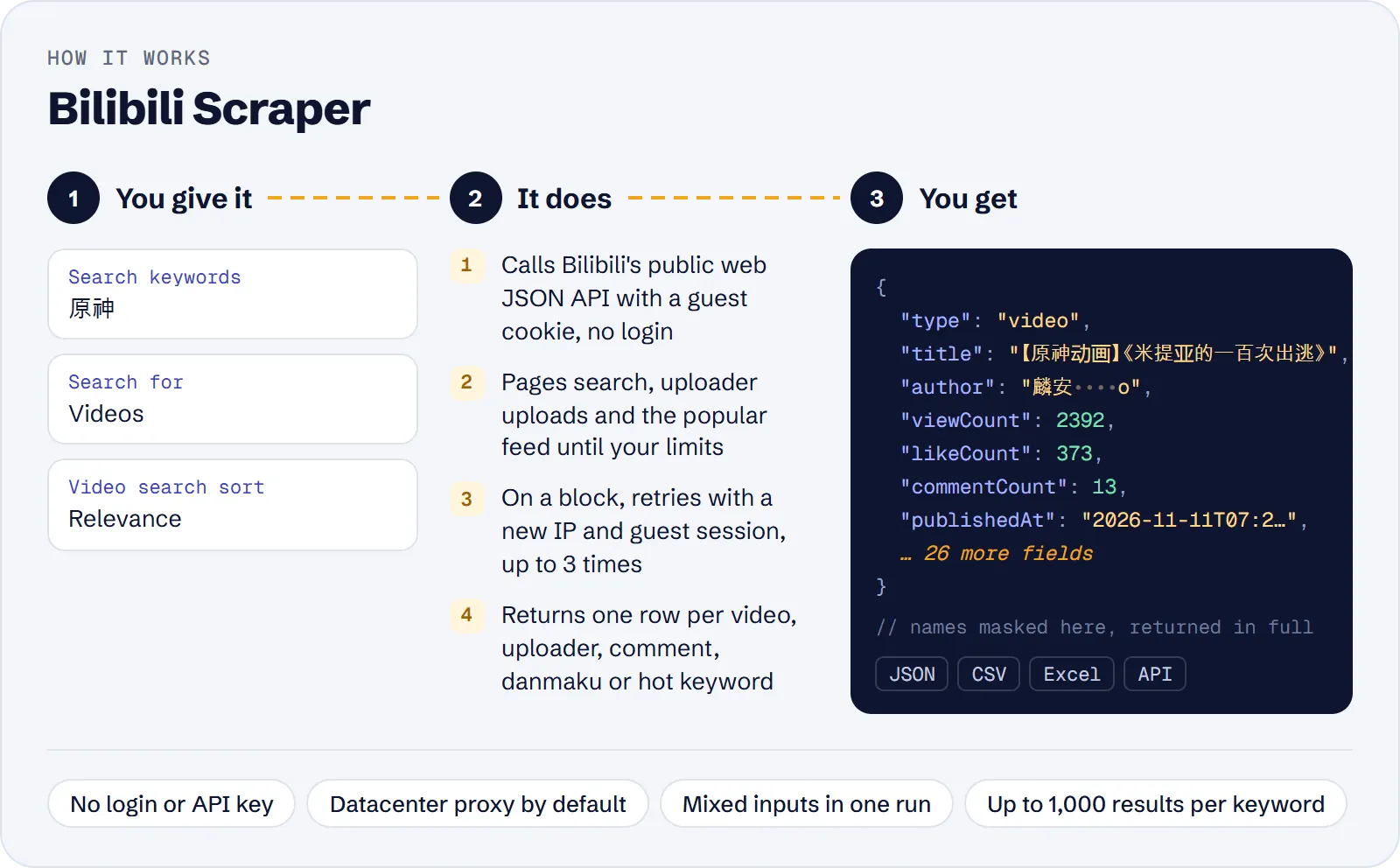
- Open the actor in Apify Console.
- Add search keywords (Chinese or English, e.g. 原神 or minecraft) and choose whether they find videos, uploaders or both.
- Optionally add video URLs (BV or av ids, b23.tv short links) and uploader URLs (space.bilibili.com/
- Optionally pick charts: Top 100 ranking, Popular videos, Hot search keywords.
- Set the comment and danmaku limits if you need them, and the total row cap in Max rows in total.
- Click Start and download the dataset as JSON, CSV, Excel or via the API.
How much does it cost to scrape Bilibili?
Price per event by Apify plan:
| Event | Free | Bronze | Silver | Gold and above |
|---|---|---|---|---|
| Result row | $1.80 per 1,000 | $1.71 per 1,000 | $1.62 per 1,000 | $1.53 per 1,000 |
| Actor start | $0.00005 | $0.00005 | $0.00005 | $0.00005 |
A test run with the API example input below returned 41 rows in 25 s.
One paid event is one dataset row of any type: a video, an uploader profile, a comment, a danmaku or a hot search keyword. Every type has the same price, $0.0018 per row ($1.80 per 1,000 rows), plus a start fee of $0.00005 per run. Videos or uploaders that are not found, hidden or invalid, and blocked requests, produce no row and are not charged. Duplicate rows (the same video found by two keywords) are output and charged once.
| Scenario | Rows (events) | Cost on the Free plan |
|---|---|---|
| Prefill run: 20 search videos, 1 full video, 1 uploader + 20 uploads, ~10 hot keywords | 52 | about $0.094 |
| Top 100 ranking + 100 popular videos + ~10 hot keywords | ~210 | about $0.38 |
| 1,000 videos for one keyword | 1,000 | about $1.80 |
| 1 video + 60 comments + 1,000 danmaku | 1,061 | about $1.91 |
Input
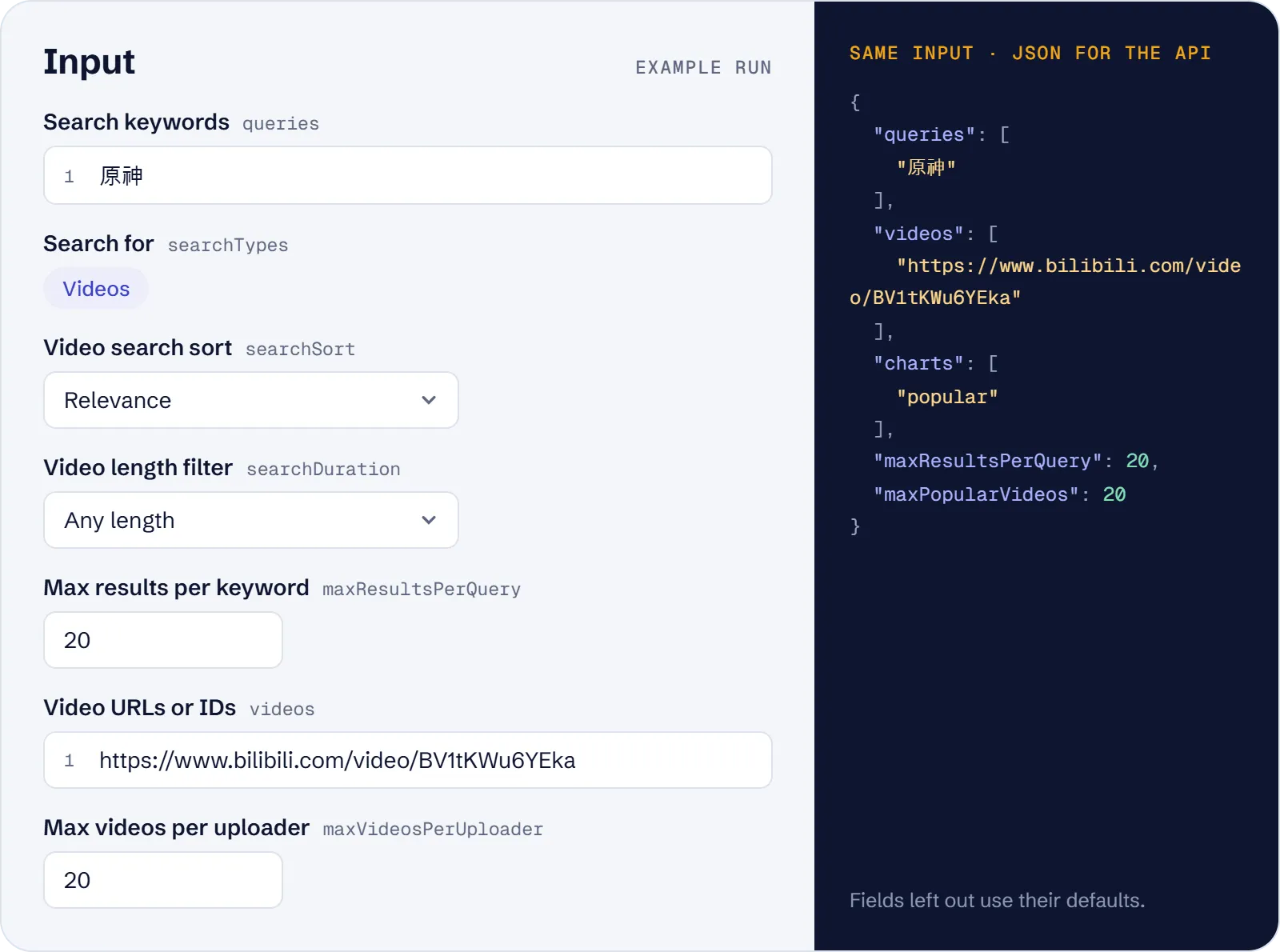
At least one of Search keywords, Video URLs or IDs, Uploader URLs or IDs or Charts and trending is required; an empty input fails with an input error before any request.
- Search keywords (
queries) — searched once per value of Search for (searchTypes:video,useror both; defaultvideo). Up to 1,000 results per keyword (Bilibili's own cap), set by Max results per keyword (maxResultsPerQuery, 1–1000, default 20, 20 per page). - Video search sort (
searchSort): relevance (totalrank), most viewed (click), newest (pubdate), most danmaku (dm), most favorited (stow), most commented (scores). - Video length filter (
searchDuration): any, under 10 min, 10–30, 30–60, over 60 min. - Published after / before (
dateFrom,dateTo) — YYYY-MM-DD or relative (e.g.30 days);dateFrommust not be later thandateTo. Sort, length and dates apply only to video search; uploader search ignores them with a warning. - Video URLs or IDs (
videos) — bilibili.com/video/BV… or …/video/av… URLs, bare BV ids, av ids or b23.tv short links. These always get full details (coins, shares, tags, parts). - Uploader URLs or IDs (
uploaders) — space.bilibili.com/ - Charts and trending (
charts):ranking(top 100),popular,hotSearch. Max popular videos (maxPopularVideos, 1–1000, default 20) applies to the popular feed. - Full details for found videos (
videoDetails, default off) — opens every video found by search, uploader lists and charts to add coins, shares, likes, tags and parts (2 extra requests per video). Needed for comments and danmaku of found videos. - Max comments per video (
maxCommentsPerVideo, 0–200, default 0) and Comment sort (commentSort:hot,newest,both). - Max danmaku per video (
maxDanmakuPerVideo, 0–10000, default 0) — from the first part of the video. - Max rows in total (
maxItems, default 1000) — stops the whole run. - Proxy (
proxyConfiguration) — Apify datacenter proxy by default.
What data can you extract from Bilibili?
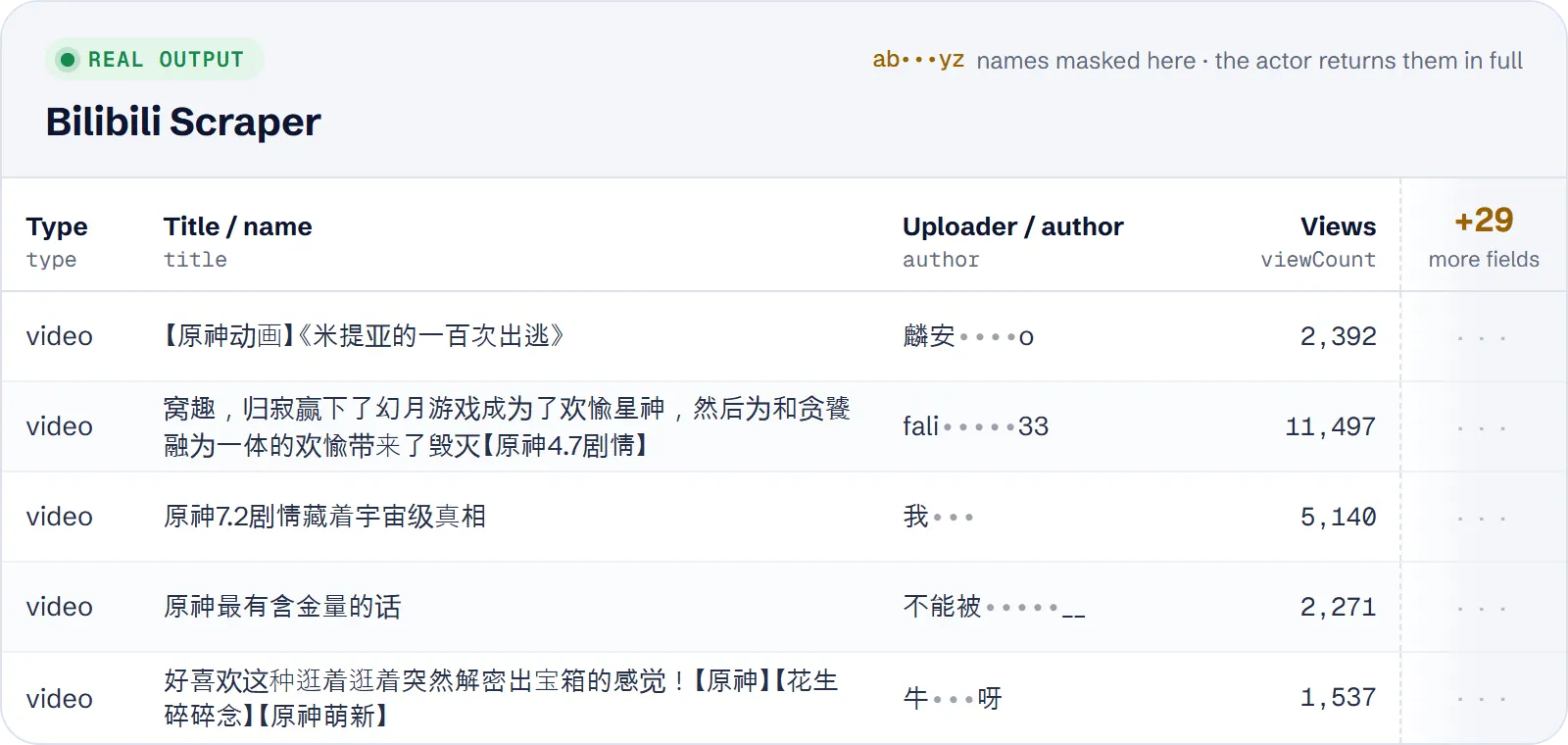
Every row has type, id, url, source and scrapedAt. Fields that do not apply to a row type are null.
| Row type | Fields |
|---|---|
video | bvid, aid, title, description, imageUrl (cover), publishedAt, durationSec, category, tags, viewCount, likeCount, coinCount, favoriteCount, shareCount, danmakuCount, commentCount, pageCount, cid, isOriginal, recommendReason (popular feed), location (charts), authorId, author, authorUrl, authorAvatarUrl, position, query, input |
user | title (name), description (signature), imageUrl (avatar), gender, followerCount, followingCount, likeCount, videoCount, level, verified, verificationTitle, position, query, input |
comment | videoBvid, parentId (null for top comments), text, likeCount, replyCount, authorId, author, authorUrl, authorAvatarUrl, authorLevel, publishedAt, location |
danmaku | videoBvid, cid, text, videoTimeSec, danmakuMode, color (#RRGGBB), publishedAt, authorHash |
hotSearch | keyword, title, position, heatScore |
source is one of search, video, uploader, ranking, popular, hotSearch, comments, danmaku.
A real video row from a video URL (shortened):
Use cases
- Topic research: the 200 most viewed videos for 原神 with views, likes, favourites, danmaku and comment counts, tags and uploader.
- Creator (KOL) research: find uploaders for a keyword such as 美食 with followers, video count, level and verification, then pull a creator's profile and 500 latest uploads.
- Audience analysis: comments with replies and danmaku of chosen videos for sentiment and peak moments.
- Trend monitoring: the top 100 ranking, the popular feed and hot search keywords in one scheduled run.
- Deep datasets: search results with full details (coins, shares, tags) plus their top comments.
Limitations
- Comments: Bilibili shows logged-out visitors only 3 top comments per sort and the first 20 replies of each, so expect at most about 63 comments per sort per video (about twice that with
both). There is no login option. - Danmaku: only the latest pool is served (usually 600–3,600 per video), and only for the first part of multi-part videos.
- Search: at most 1,000 results per keyword and sort.
- Fields by source:
coinCount,shareCount,pageCountandisOriginalcome from full details and charts; upload-list rows carry views but not likes, favourites, danmaku or comment counts unless Full details is on.categoryis often empty on detail rows;location,verificationTitleandauthorAvatarUrlare often empty. - Risk control: Bilibili sometimes blocks requests depending on time and IP. Blocked parts are retried on a new IP; if they still fail, the run keeps the other rows and logs a warning.
Tips and troubleshooting
- To get more than 1,000 videos for a keyword, run it with different sorts or date ranges (
dateFrom/dateTo). - For comments or danmaku of searched, uploader or chart videos, turn on Full details for found videos; otherwise they apply only to Video URLs or IDs.
- Raise Max rows in total when you combine many inputs: the run stops at that number, and comments and danmaku count toward it.
- If a run returns fewer rows than expected, check the log: each not-found, hidden or unparsable video or uploader gets its own warning.
- Keep the default datacenter proxy; residential is slower on Bilibili and not needed.
API, MCP and integrations
Run the actor from your code with the same JSON input as in Console. Your API token is in Console → Settings → API & Integrations.
Python (pip install apify-client):
Node.js (npm install apify-client):
HTTP — one request runs the actor and returns the results (runs up to 5 minutes; longer ones: run asynchronously):
AI agents (MCP). Add the actor as a tool of the Apify MCP server. Claude Code:
Claude Desktop, Cursor or VS Code: {"mcpServers": {"apify": {"url": "https://mcp.apify.com?tools=genial_candlestand/bilibili-scraper"}}}. Then ask, for example:
- "Get the 200 most viewed Bilibili videos for 原神 with likes, danmaku and comment counts"
- "Fetch the Bilibili profile of uploader 946974 and their 500 latest uploads"
- "Get today's Bilibili top 100 ranking and the current hot search keywords"
Integrations. Run it on a schedule with Apify Schedules and send the results to Google Sheets, Slack, Zapier, Make, n8n or your webhook — see Apify integrations.
FAQ
Do I need a Bilibili account or cookies?
No. The actor uses only data that Bilibili shows to logged-out visitors.
Can I get all comments of a video?
No. Without a login, Bilibili shows only 3 top comments per sort with up to 20 replies each. Choose both in Comment sort to get roughly twice as many.
How is it different from other Bilibili actors?
Keywords, videos, uploaders and charts run together in one run, and every row type has the same price ($1.80 per 1,000 rows) instead of separate prices for search rows, full videos and uploaders. Comments, danmaku and hot search keywords come in the same dataset.
Is it legal to scrape Bilibili?
The actor collects only public data that Bilibili shows to any visitor without login. You are responsible for how you use it, including personal data rules (such as GDPR or PIPL) and Bilibili's terms. Danmaku senders appear only as Bilibili's hash, not their user id.
Also useful
- YouTube Scraper — compare creators on YouTube: videos, channels, Shorts and comments
- YouTube Comments Scraper — collect full YouTube comment threads with replies for the same sentiment study
- TikTok Video Details Scraper — add TikTok video stats, author and transcript to your creator research
- YouTube Channel Scraper — get a YouTube channel's details and every video, Short and stream
- Google Trends Scraper — check search interest over time and by region for the topics you track


