Website Crawler - Markdown Scraper for AI & RAG avatar

Website Crawler - Markdown Scraper for AI & RAG

Pricing

from $2.00 / 1,000 results

Go to Apify Store
Website Crawler - Markdown Scraper for AI & RAG

Website Crawler - Markdown Scraper for AI & RAG

Crawl public websites, docs, blogs, and help centers into clean Markdown. Extract content with source URLs and page titles, or split it into chunks for RAG, chatbots, and AI agents. Export JSON or CSV. HTTP crawler for server-rendered pages; no AI API key needed.

Pricing

from $2.00 / 1,000 results

Rating

0.0

(0)

Developer

Group Oject

Group Oject

Maintained by Community

Actor stats

1

Bookmarked

2

Total users

0

Monthly active users

17 hours ago

Last modified

Share

Turn public documentation, help centers, and blogs into clean Markdown chunks for RAG, semantic search, and AI agents. Give this HTTP-based website crawler one or more start URLs. It follows links within your page and depth limits, removes common navigation and page clutter, and writes one structured dataset item per chunk. No source-site login, browser session, or AI model key is needed.

Start with one page to inspect the result. If you need JavaScript rendering, authenticated pages, PDFs, or file downloads, see When to choose another crawler before running a large job.

See a real input-to-output example

The following images and 9-second MP4 walkthrough show a verified local run against the public Python.org About page. The images are labeled demo renders of the actual input and dataset output, not Apify Console screenshots. That one-page run produced five Markdown chunks and no failed pages on September 27, 2026. Website content and counts can change.

Website to Markdown crawler input example with one start URL and bounded chunk settings

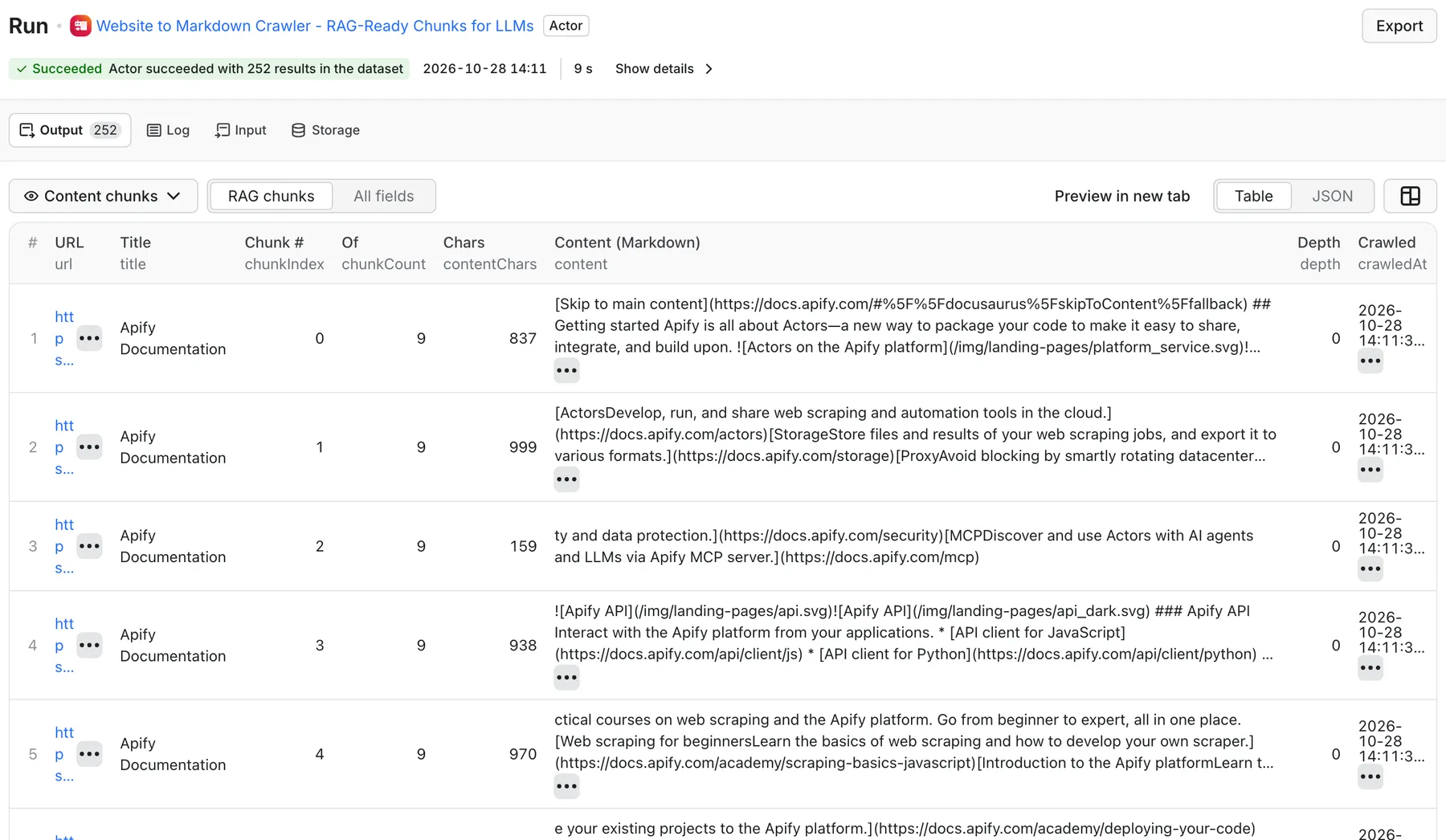
RAG crawler output example showing a Markdown chunk, source URL, and run counts

Watch the input-to-output demo (MP4, 9 seconds). The screenshots also remain useful if your browser does not play the video.

Quick start: crawl one website page

  1. Open the Actor input form and switch to JSON.
  2. Paste the input below. It requests only one public page, so it is a small first test.
  3. Start the Actor. Open its default dataset to inspect content, url, title, and chunkIndex.
  4. Check the SUMMARY record in the run's default key-value store for page and chunk counts. Export dataset items as JSON or CSV, or fetch them through the API.
  5. Increase maxCrawlPages and maxCrawlDepth only after the sample content looks right.
{
"startUrls": [{ "url": "https://www.python.org/about/" }],
"maxCrawlPages": 1,
"maxCrawlDepth": 0,
"chunkContent": true,
"chunkSize": 1000,
"chunkOverlap": 100
}

In the verified example above, one page yielded five dataset items. A page limit is not a result or cost limit: each page can produce several billable chunks. Set a maximum run charge before broad crawls.

What this website-to-Markdown crawler does

This Actor is designed for accessible, server-rendered HTML. It uses an HTTP crawler rather than a headless browser, which keeps simple documentation crawls lightweight. For each fetched page, it removes common navigation, headers, footers, sidebars, scripts, ads, and subscription elements. It prefers the main article or content region, then converts the remaining HTML into Markdown. Links inside the Markdown are resolved against the source page, so relative paths remain usable after you move the chunk into a vector database or prompt.

With chunkContent: true, the Actor groups paragraphs into overlapping chunks and writes one row per chunk. Each row carries its source URL, page title, description, chunk position, crawl depth, and timestamp. With chunking disabled, it writes one whole-page Markdown row instead. The Actor does not generate embeddings or summaries; you choose the embedding model, vector database, and refresh policy downstream.

The default dataset contains the content. The default key-value store also contains SUMMARY, including pagesCrawled, pagesFailed, totalChunks, averageChunkChars, duration, and warnings, plus an OUTPUT record with the summary and counts. Apify schedules, API calls, and integrations can be used to refresh the crawl. A scheduled run writes a new dataset; it does not automatically replace old vectors in your own database.

Common RAG and AI-agent use cases

GoalSuggested configurationWhat you get
Documentation to RAGOne docs root, shallow depth, chunkContent: trueSource-labeled Markdown chunks for embeddings
Help-center chatbotStart at a public help center; narrow with URL globsSupport article chunks for retrieval
Website to Markdown exportchunkContent: falseOne Markdown row per successfully extracted page
AI-agent knowledge refreshSave the input as a task and schedule repeat runsFresh snapshots to compare or re-index downstream
Blog corpusInclude the blog path and exclude tag/archive URLsCleaner editorial text for semantic search
Competitor documentation monitoringCrawl only publicly accessible docs or changelog pagesDated text snapshots, not change alerts by itself

For AI agents, use the Apify API or Apify MCP connection to start a run and read dataset items. The Actor supplies the web content; your agent must decide when to call it and how to cite or store the result.

Input reference

FieldDefaultMeaning
startUrlsRequiredOne or more URLs, as strings or { "url": "..." } objects. URL strings without a scheme are normalized to HTTPS.
maxCrawlPages50Maximum crawler requests, from 1 to 10,000. Failed or near-empty requests can still consume this budget.
maxCrawlDepth1Link hops from each start URL. 0 fetches start URLs only.
sameDomainOnlytrueRestricts discovered links to the supplied start hosts.
includeUrlGlobsEmptyOnly enqueue discovered URLs matching one of these patterns.
excludeUrlGlobsEmptyDo not enqueue discovered URLs matching these patterns.
chunkContenttrueSplit Markdown into dataset chunks; false returns whole pages.
chunkSize1000Approximate target characters per chunk, from 200 to 20,000.
chunkOverlap100Characters carried between chunks; must be smaller than chunkSize.
minChunkChars50Prefer to drop shorter chunks; a fallback may retain a short chunk rather than discard a page.
saveHtmlfalseInclude cleaned main-content HTML in output rows. This can substantially enlarge the dataset.
maxConcurrency10Maximum pages being fetched in parallel, from 1 to 50.
proxyConfigurationNoneOptional Apify Proxy configuration for reachable sites that require a different route.
debugModefalseMore detailed run logging.

URL glob matching supports * and ?. Use full URL patterns such as https://example.com/docs/*; this is not a complete shell-glob language. Include/exclude globs apply to discovered links, not the start URLs you explicitly provide. Start with a small page cap to verify a pattern before scaling it.

Example: public documentation section

{
"startUrls": [{ "url": "https://example.com/docs/" }],
"maxCrawlPages": 30,
"maxCrawlDepth": 2,
"sameDomainOnly": true,
"includeUrlGlobs": ["https://example.com/docs/*"],
"excludeUrlGlobs": ["https://example.com/docs/search*"],
"chunkContent": true,
"chunkSize": 1200,
"chunkOverlap": 120
}

The output cap may be reached before all discovered links are visited. A start URL may redirect; inspect the resulting url and SUMMARY before relying on URL-level identity. The Actor does not implement canonical-tag deduplication or incremental crawl state.

Output schema and sample result

The example below is an abridged item from the Python.org run. The complete content field is longer. One page produced five rows with the same source URL and chunkIndex values 0 through 4.

{
"url": "https://www.python.org/about/",
"title": "About Python™ | Python.org",
"description": "The official home of the Python Programming Language",
"chunkIndex": 0,
"chunkCount": 5,
"content": "## Getting Started\n\nPython can be easy to pick up...",
"contentChars": 822,
"depth": 0,
"crawledAt": "2026-09-27T15:18:43.812Z"
}

contentChars describes the full emitted chunk, not the abridged text above. When saveHtml is enabled, the row also includes html. Rows are suitable for JSON or CSV export, but embedding vectors are not created by this Actor.

For a retrieval index, embed content and store url, title, chunkIndex, chunkCount, and crawledAt as metadata. When refreshing, upsert or replace records by your own stable document identity. Do not assume a chunk index stays fixed if the source page changes.

Chunking and content quality tips

  • Start around 800-1,200 characters and 10-15% overlap for concise documentation, then tune against your retrieval evaluation set. Character counts are not token counts.
  • Keep maxCrawlDepth low until you confirm the crawler follows the sections you want. One homepage can link to many irrelevant pages.
  • Use include and exclude globs to avoid search pages, tag archives, login URLs, and repeated navigation destinations.
  • Turn chunkContent off when your own pipeline performs semantic splitting. One row per page is easier to deduplicate but can be much larger.
  • Compare a few dataset items with their source pages. Main-content selection is heuristic and may include extra text or miss unusual layouts.
  • Review SUMMARY.warnings and pagesFailed. A completed run with zero output is not evidence that the target site had no content; DNS, blocking, redirects, or JavaScript-only rendering may be involved.

Run through the Apify API

Use a secret Apify API token in the Authorization header, not in a shared URL. This synchronous endpoint returns dataset items and is best for short runs; larger crawls may exceed its request timeout, so use the asynchronous run endpoint and fetch the dataset afterward.

curl -L -X POST \
"https://api.apify.com/v2/actors/groupoject~ai-rag-web-crawler/run-sync-get-dataset-items" \
-H "Authorization: Bearer $APIFY_TOKEN" \
-H "Content-Type: application/json" \
-d '{
"startUrls": [{"url": "https://www.python.org/about/"}],
"maxCrawlPages": 1,
"maxCrawlDepth": 0,
"chunkContent": true,
"chunkSize": 1000,
"chunkOverlap": 100
}'

The Apify API documentation covers asynchronous runs, dataset exports, and bearer authentication. Never place API tokens in public tasks, examples, screenshots, or support posts.

Pricing: pages versus dataset items

This is a pay-per-event Actor. At the base result rate checked September 27, 2026, one default-dataset item costs $0.002 ($2.00 per 1,000 items). A separate Actor-start event is $0.00005 per billable start unit, with one unit per GB of configured memory and a minimum of one. Check the live Pricing tab for the current rate, discounts, and any additional usage charges.

Illustrative outputResult fees at the base rate
5 chunks from a one-page example$0.01
100 chunks across any number of pages$0.20
500 chunks across any number of pages$1.00

These figures exclude the start event and any separately charged platform usage. A 50-page crawl can yield far more than 50 items when chunking is on; returned counts depend on page length, extraction, and filtering. Set a maximum run charge for an unfamiliar target. The free Apify account can try the Actor subject to its current credits and spending limits; no core crawler feature is intentionally gated by account tier.

When to choose another crawler

This Actor is intentionally narrower than a browser-based website content crawler. Choose it when you need fast HTTP extraction of public HTML into source-labeled Markdown chunks. Choose a browser-capable crawler when the target renders most content through JavaScript, needs clicks or scrolling, or requires cookies/login. Choose a file-capable crawler if you need PDF, DOCX, or spreadsheet downloads. This Actor does not solve CAPTCHAs, bypass access controls, or extract private content.

It does not create AI summaries, embeddings, change notifications, or a vector database. Those belong in the downstream workflow. If you need a general CSS-selector HTTP extractor instead of article-style Markdown, see Cheerio Web Scraper. For page health and technical SEO checks, see Technical SEO Audit Tool.

Troubleshooting and FAQ

Why did my run produce no rows?

Open SUMMARY and the run log. A page may be empty after extraction, blocked, unavailable, or rendered only in the browser. Verify the URL directly, reduce to one start URL, set depth to 0, and try a public server-rendered page. If requests failed, the summary includes failed-page counts and warnings. A proxy can help with some network routes, but it will not make browser-only content appear in raw HTML.

Can I crawl multiple domains?

Yes. Supply multiple start URLs. With sameDomainOnly: true, discovered links are restricted to the supplied start hosts. This is host-based, not a broad organizational-domain policy; subdomains may need their own start URLs.

Does it respect robots.txt automatically?

Do not assume so. You are responsible for target selection, permissions, site terms, and applicable robots policies. Crawl only pages you may access and avoid private, paywalled, or personal data unless you have a lawful basis and appropriate permission.

Are chunks guaranteed to be exactly chunkSize characters?

No. The setting is a target. Paragraph boundaries, overlap, and the minimum-chunk fallback can change the final length. Inspect real output before selecting an embedding model's token limit.

Is a source page charged once?

Not necessarily. Billing follows emitted dataset items. A long page may become many chunks. Use chunkContent: false for a single row per successfully extracted page.

How do I get help or report a bad extraction?

Open the Actor's Issues tab with a public URL, expected section, observed output, and the run's warning summary. Do not post credentials, private URLs, or confidential page content. See the changelog for updates.