
Google Ads Transparency Scraper
Pricing
from $0.90 / 1,000 ads
Google Ads Transparency Scraper
Google Ads Transparency scraper: get every ad creative from the Google Ads Transparency Center by domain, advertiser ID, URL or advertiser name, with format, first/last shown dates, regions, platforms, impressions, ad text, landing URL and media links. Monitor new ads.
Pricing
from $0.90 / 1,000 ads
Rating
0.0
(0)
Developer

Group Oject
Maintained by CommunityActor stats
0
Bookmarked
2
Total users
1
Monthly active users
21 hours ago
Last modified
Categories
Share
Google Ads Transparency Scraper pulls every public ad a company runs on Google — Search, YouTube, Shopping, Maps and Play — from the Google Ads Transparency Center into a clean dataset. Give it a domain, an advertiser ID, a Transparency Center link or a brand name and get each ad's format, run dates, regions, platforms, impression ranges, ad copy and media links.
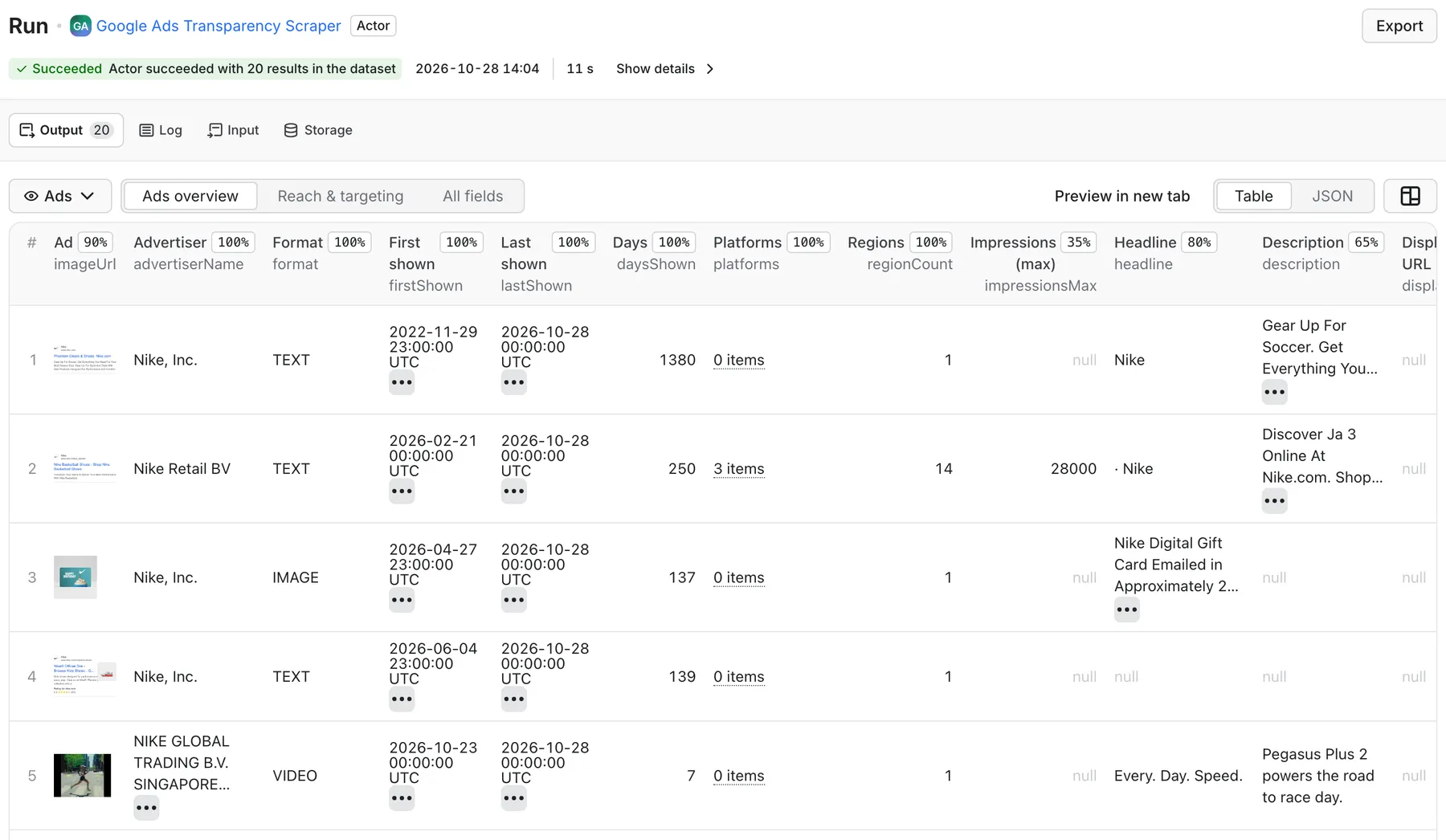
Real output from a default run of Google Ads Transparency Scraper in Apify Console.
What can it do?
- Four ways to pick advertisers — domains (
nike.com), advertiser IDs (AR…), Transparency Center URLs (advertiser, single ad or domain pages) and advertiser-name search (Nike). - All filters the Transparency Center has — country (240+ regions), date range, format (text, image, video) and platform (Google Search, YouTube, Google Shopping, Google Maps, Google Play). Filters inside a pasted URL are respected.
- Ad copy, not just a screenshot — reads Google's rendered preview to return headline, description, display URL, call to action, YouTube video ID and, when Google exposes it, the landing URL. All visible preview text is kept in
adTextLines. - Reach and targeting — regions where each ad ran, per-region first/last shown dates, impression ranges per platform (where Google publishes them) and the audience-selection categories the advertiser used.
- Advertiser facts — legal name, country and whether Google verified the advertiser's identity, plus a per-advertiser rollup in the key-value store.
- Monitoring mode —
onlyNewAdsremembers what earlier runs returned, so a scheduled run outputs only ads you haven't seen. - Fast mode — switch off details and previews to list about 1,000 ads per minute when you only need IDs, formats, dates and image links.
- Built to keep running — browser-grade request headers, a new proxy IP on every retry, automatic residential fallback when Google throttles datacenter IPs, and a timeout guard that saves everything collected so far.
What data you get
| Field | Description |
|---|---|
advertiserId, advertiserName | Google advertiser ID (AR…) and display name |
advertiserLegalName, advertiserCountry, advertiserVerified | Verified legal name, home country, identity-verified flag |
creativeId | Google creative ID (CR…), unique per ad |
format | TEXT, IMAGE or VIDEO |
firstShown, lastShown, daysShown | Run dates (YYYY-MM-DD) and number of days served |
regions, regionCount, regionStats | Countries the ad ran in; per region: first/last shown, impressions, per-platform impressions |
platforms | Google Search, YouTube, Google Shopping, Google Maps, Google Play (where published) |
impressionsMin, impressionsMax | Impression range summed across regions (mainly EU/EEA and Türkiye) |
headline, longHeadline, description | Ad copy read from the preview (best effort) |
displayUrl, destinationUrl, callToAction | Display URL, landing URL when exposed, CTA label |
adTextLines | Every visible text line of the rendered preview |
imageUrl, imageUrls | Main image / archived snapshot and all variation images |
videoId, videoUrl, thumbnailUrl | YouTube video for video ads |
previewUrl, previewType, variationCount | Google's preview script, preview kind (Single Ad, Local Ad, Product Listing Ad…), number of variations |
targeting | Demographics / geography / contextual / customer-list targeting with included/excluded flags |
transparencyUrl, advertiserUrl | Links back to the Transparency Center |
input, inputType, filterRegion, scrapedAt | Which input produced the row, region filter, timestamp |
The key-value store also gets ADVERTISERS (one entry per advertiser: verification, total ads Google reports, ads saved, formats, platforms, regions, date span), SUMMARY (totals, filters, field fill rates, request and byte counts) and ERRORS (only when something failed). These are free — only ad rows are billed.
How much does it cost to scrape Google Ads?
You pay per ad saved: $1.20 per 1,000 ads ($0.0012 per ad), plus Apify's tiny per-run start fee. Advertiser summaries, the run summary and error records are never charged, and duplicate ads (the same creative reached through two inputs) are saved once.
On paid Apify plans the per-result price drops automatically (Bronze and above get volume discounts); the Pricing tab shows your exact rate.
- Example 1: all ads a competitor showed in the US in the last 30 days, 300 ads → about $0.36.
- Example 2: a weekly monitor on 5 competitor domains that returns ~40 new ads per run → about $0.05 per week.
Set a maximum charge per run in Apify Console and the Actor stops exactly at that budget. maxTotalAds is a second hard cap.
How to use Google Ads Transparency Scraper
- Open the Actor in Apify Console and click Try for free.
- Add one or more advertiser domains (e.g.
nike.com), advertiser IDs, Transparency Center URLs or advertiser names. - Optionally choose a region, date range, format and platform.
- Set Max ads per advertiser (Google lists the most recently shown ads first).
- Click Start. Download the ads as JSON, CSV, Excel or HTML, or read them through the API.
Tip: for brands, a domain is usually the most complete input — it covers every advertiser account Google links to that website (resellers and agencies included). Advertiser-name search matches account names, not ad copy.
Input example
Output example
Use with the API
cURL — run and get the ads in one call:
Python (pip install apify-client):
JavaScript (npm install apify-client):
Use with AI agents / MCP
Connect the Actor to Claude, Cursor or any MCP client through the Apify MCP server:
Example prompt: "Use google-ads-transparency-scraper to list the YouTube ads competitor.com ran in Germany in the last 30 days and summarise their headlines and calls to action."
Integrations
Send results to Google Sheets, Make, Zapier, n8n, Slack or your own webhooks using Apify integrations. A common setup: schedule a daily run with onlyNewAds: true and post each new competitor ad to a Slack channel or append it to a Google Sheet.
FAQ
Is it legal to scrape the Google Ads Transparency Center?
The Transparency Center is a public library Google publishes so anyone can see who advertises and what they show. This Actor reads only that public data, without logging in, and does not collect personal data about private individuals. You are still responsible for how you use the data; check your local laws and Google's terms for your use case.
Why do some ads have no headline or description?
Google archives many text ads only as a rendered image. For those, the copy is inside the image (imageUrl) and there is no text to read. Dynamic Search Ads and keyword-insertion ads show placeholders such as {KeyWord:Running Shoes} because Google fills the text at serving time. adTextLines always holds whatever text the preview contains.
Why are impressions and platforms empty for many ads?
Google publishes impression ranges and platform breakdowns mainly for ads shown in the EU/EEA and Türkiye (under the Digital Services Act). For other regions only the regions and dates are public, so those fields stay null or empty instead of being guessed.
Why did I get fewer ads than the Transparency Center count, or none at all?
Check the filters: a region plus a short date range can legitimately be empty, and Google applies date filters only to roughly the last 12 months. Age-restricted ads are hidden from logged-out visitors, so they are not available. A typo in the domain or ID is reported in the ERRORS record. The count Google shows is an estimate (e.g. "~50K").
How fast is it, and how many ads can I get?
With details and previews on (default) a run enriches roughly 70–120 ads per minute (in our tests: 347 ads in about 3 minutes). With both switched off it lists up to 100 ads per request — about 1,000 ads per minute in our tests. There is no fixed cap: set maxAdsPerAdvertiser, maxTotalAds or a maximum charge to stop where you want.
Do I need proxies?
No setup needed. The default Apify Proxy (datacenter) is used and each retry gets a new IP. If Google throttles most datacenter requests, the run switches to Apify residential proxy automatically (you can turn that off). No cookies, logins or CAPTCHA solving are used.
How do I monitor a competitor's new Google ads?
Turn on Only new ads, give the monitor a name, and schedule the Actor (daily or weekly) in Apify Console. The first run records everything it finds; later runs output only creatives not returned before. Pair it with a webhook, Slack or Google Sheets integration to get alerts.
Can I scrape a single ad?
Yes. Paste its Transparency Center link (/advertiser/AR…/creative/CR…) into Transparency Center URLs.
Related actors
- Facebook Ads Library Scraper — Meta Ad Library, No Login: the same competitor-ad research for Facebook and Instagram.
- Google AI Overview Tracker: see whether your brand and competitors are cited in Google AI Overviews.
- Keyword Difficulty Checker: score how hard it is to rank organically for the keywords your competitors bid on.


