

Weibo Scraper - Posts, Comments, Hot Search & Profiles
Pricing
from $3.79 / 1,000 result rows
Weibo Scraper - Posts, Comments, Hot Search & Profiles
Weibo scraper for 微博 posts by keyword, user timelines, post comments and replies, user profiles and the hot search board. No login or cookies. Date filters, only-new monitoring, clean English fields, JSON/CSV/Excel.
Pricing
from $3.79 / 1,000 result rows
Rating
0.0
(0)
Developer

Group Oject
Maintained by CommunityActor stats
0
Bookmarked
2
Total users
1
Monthly active users
5 days ago
Last modified
Categories
Share
Weibo Scraper extracts public data from Sina Weibo (微博): posts by keyword, any user's timeline, single posts with their comments and replies, user profiles, and the live hot search board (微博热搜). No Weibo account, no cookies, no proxies to set up. Every row has the same clean English field names, ISO timestamps and numeric counts, ready for spreadsheets, BI tools and AI pipelines.
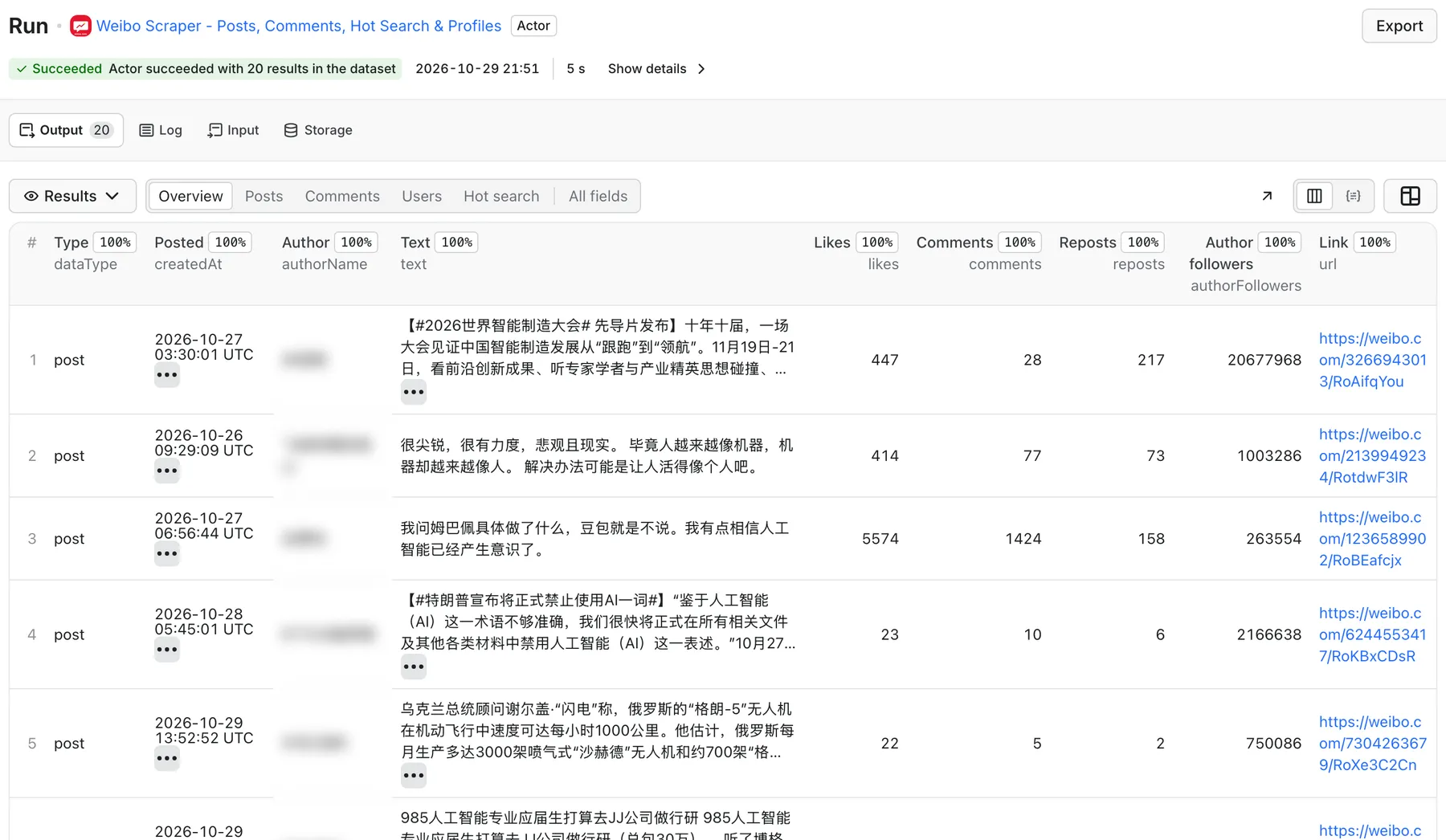
Real output from a default run of Weibo Scraper in Apify Console.
What can Weibo Scraper do?
- 🔎 Search Weibo posts by keyword: top, latest or hot results, with optional date range, verified/media-only authors, original-only, and image or video filters.
- 👤 Scrape a user's posts: paste numeric UIDs or profile URLs (
weibo.com/u/…,m.weibo.cn/u/…,weibo.com/customname). No cookie needed. - 💬 Scrape comments and replies: for any post you found or pasted, with per-post and per-comment limits.
- 📇 Get user profiles: followers, following, post count, verification type and reason, bio, location, lifetime likes.
- 🔥 Track the hot search board: the realtime 热搜榜 (about 50 topics with heat values and badges) or the society, entertainment, technology, life, sports and games boards.
- 🔁 Monitor for new posts: turn on Only new posts, schedule the actor, and each run returns only posts earlier runs did not deliver, per keyword or per user.
- 🧾 Long posts in full: optionally fetch the complete text of 长微博 that Weibo cuts in lists.
What data do you get?
Every row has a dataType (post, comment, user or trend) and shares common fields (id, url, text, createdAt, scrapedAt).
| Field | Rows | Description |
|---|---|---|
id, shortId, url | post | Numeric post ID (mid), short ID (mblogid) and full https://weibo.com/<uid>/<shortId> link |
text, isLongText, textTruncated | post, comment | Original Chinese text; whether Weibo cut it |
createdAt | post, comment | Publish time, ISO 8601 (UTC) |
authorId, authorName, authorUrl, authorAvatarUrl | post, comment | Author identity |
authorVerified, authorVerifiedType, authorVerifiedReason, authorFollowers | post, comment | Verification badge (personal / organization / creator) and follower count |
likes, comments, reposts | post | Engagement counts as numbers |
images, videoUrl, videoCoverUrl, videoDurationSec, videoPlays | post | Full-size image URLs and the best MP4 |
hashtags, mentions | post, comment | #话题# topics and @ mentions |
location, source | post, comment | IP region shown by Weibo (e.g. 广东) and the client/byline |
isRepost, repostOfId, repostOfUrl, repostOfText, repostOfAuthorName | post | The original post behind a repost |
isAd, isPinned, searchKeyword, sourceType | post | Promoted / pinned flags and where the row came from |
postId, isReply, parentCommentId, replyToCommentId, replyToUserName, replyCount, isByPostAuthor, floor | comment | Thread structure |
name, followers, following, postsCount, verifiedType, verifiedReason, description, gender, totalLikes, totalInteractions | user | Profile and lifetime stats |
rank, heat, label, hashtag, board, isPinned | trend | Hot search position, heat value and badge (热 / 新 / 沸 / 爆) |
How much does it cost to scrape Weibo?
You pay per result row: $4.99 per 1,000 rows (posts, comments, users or trends), plus a small start fee of $0.003 per run. On paid Apify plans the per-row price drops automatically (Bronze and above get volume discounts); the Pricing tab shows your exact rate.
A few options look each post or profile up individually, and add a detail lookup of $0.004 per row: post details mode, user profiles mode, full text of long posts, and the full-data fill-in for date-filtered or latest searches. Nothing else is charged; errors are never billed.
- Daily hot search snapshot: about 50 topics = $0.25 + $0.003 per run, about $7.60 a month at one run a day.
- Brand monitoring: 500 posts for 咖啡 with their top 20 comments each (about 10,500 rows) = about $52. The same 500 posts without comments = $2.50.
- 10 competitor profiles: 10 × ($0.00499 + $0.004) = $0.09.
Your run's maximum charge setting is always respected: the actor stops before it would exceed it and keeps what it collected.
On the Apify free plan, each run returns a preview of up to 20 results; any paid Apify plan unlocks full results.
How to use Weibo Scraper
- Click Try for free and open the Input tab.
- Pick What to scrape: keyword search, user posts, post details, user profiles or hot search.
- Fill the matching field: keywords, user IDs/URLs or post URLs. Hot search needs nothing else.
- Set Max posts per keyword / user and, if you want, turn on comments, replies or date filters.
- Click Start. Download the results as JSON, CSV, Excel or HTML, or read them over the API.
Tip: Weibo is indexed in Chinese. Search for 星巴克 rather than Starbucks to get many more posts.
Input example
Output example
A hot search row looks like {"dataType": "trend", "rank": 1, "text": "…", "heat": 134414, "label": "热", "board": "realtime", "url": "https://s.weibo.com/weibo?q=%23…%23"}.
Use with the API
cURL
Python
JavaScript
Use with AI agents (MCP)
Add the actor to Claude, Cursor or any MCP client through the Apify MCP server:
https://mcp.apify.com?tools=groupoject/weibo-scraper
Example prompt: "Use the Weibo scraper to get today's top 20 hot search topics and summarize them in English."
Integrations
Send results to Google Sheets, Make, Zapier, n8n, Slack or any webhook with Apify integrations. For alerts, schedule the actor (for example every hour) with Only new posts on, and connect a webhook or Slack integration to the run's dataset.
FAQ
Is it legal to scrape Weibo?
The actor reads only public data that anyone can see on Weibo without logging in. You are responsible for how you use it: respect Weibo's terms, copyright in post content, and data protection laws (PIPL, GDPR) when you store personal data such as names and avatars.
Do I need a Weibo account, cookies or proxies?
No. Everything, including user timelines and comments, works without your login or cookies, and you don't configure proxies.
How many posts can I get per keyword?
Weibo's own search stops at about 50 pages per query (roughly 500 posts for top/hot results, fewer for date-filtered searches). Split long periods into several date windows, or add related keywords, to go further.
Why does a post have empty like or comment counts?
Date-filtered and latest searches use Weibo's web search, which doesn't show counts. Keep Full data for date-filtered searches on (default) and each post is looked up to fill them in.
Why is the text cut off?
Weibo shortens long posts (长微博) in lists; those rows have textTruncated: true. Turn on Full text of long posts, or use post details mode, to get the whole text.
Why did I get fewer results than I asked for?
Weibo had no more matching posts, the date window was narrow, Only new posts skipped posts delivered before, or your run's maximum charge was reached. The run's SUMMARY record says why it stopped, and ERRORS lists inputs that failed (never billed).
Why did I only get 20 results?
You are on the Apify free plan, where each run returns a preview of up to 20 results. Upgrade to any paid Apify plan to get full results; the run's status message and SUMMARY (freePlanPreview: true) show when the preview limit applied.
How do I monitor a keyword or account?
Turn on Only new posts, give the monitor its own State key, set sort to Latest, and create a schedule in Apify. The first run saves the current posts as a baseline; later runs return only newer posts.
How fast is it?
A 20-post search finishes in under 10 seconds; 100 posts take about 30 seconds. Comments add about one request per 20 comments.
Related actors
- Reddit Scraper: posts and comments from Reddit.
- X Profile & Post Monitor: new posts and profile changes on X/Twitter.
- YouTube Comments Scraper: comments and replies from YouTube videos.
- TrendPulse Keyword Monitor: track keyword trends over time.
- Google News Scraper: news coverage for the same topics.


