

V2EX Scraper — Topics, Nodes & Replies
Pricing
from $0.001 / topic scraped
V2EX Scraper — Topics, Nodes & Replies
Scrape V2EX tech-community topics: title, content, author, node, reply count and timestamps. Hot, latest or by node.
Pricing
from $0.001 / topic scraped
Rating
0.0
(0)
Developer

Hipersoft
Maintained by CommunityActor stats
0
Bookmarked
3
Total users
3
Monthly active users
8 days ago
Last modified
Categories
Share
V2EX Scraper — Topics, Nodes, Replies & Authors
Scrape V2EX, the popular Chinese tech and developer community, into clean JSON, CSV or Excel. This V2EX scraper extracts title, content, author, node, reply count and timestamps for the hottest topics, the newest topics, or every topic in the nodes you choose. Fast and reliable.
Perfect for tech-trend monitoring, developer-community research, topic discovery and creator analytics.
What does V2EX Scraper do?
The V2EX Scraper collects discussion topics from V2EX and returns them as structured data. It supports three modes — hottest topics, latest topics, or topics from specific nodes — and extracts the title, full content, author, node and engagement metrics for each topic, so you can build a complete developer-community dataset.
What data can you scrape from V2EX?
| Category | Fields |
|---|---|
| 📝 Topic | title, content, node, node title, topic URL |
| 👤 People | author, last reply by |
| 💬 Engagement | reply count |
| 🕒 Timestamps | created date, last touched date, collected date |
Output
Each topic is returned as one clean record. Example output:
Output schema
| Field | Type | Description |
|---|---|---|
id | integer | Unique topic identifier. |
title | string | Topic title. |
content | string | Full topic body text. |
author | string | Username of the topic author. |
node | string | Node the topic belongs to. |
nodeTitle | string | Display title of the node. |
replies | integer | Number of replies on the topic. |
lastReplyBy | string | Username of the last person to reply. |
createdAt | string (ISO date) | When the topic was created. |
lastTouchedAt | string (ISO date) | When the topic was last active. |
url | string (URL) | Direct link to the topic. |
collectedAt | string (ISO date) | Timestamp when the record was collected. |
Use cases
- Tech-trend monitoring — track what developers are discussing across nodes.
- Developer-community research — analyze topics, engagement and active authors.
- Topic discovery — surface hot and rising threads by reply count.
- Creator analytics — study which authors and nodes drive discussion.
- Sentiment and content analysis — feed topic text into your own models.
- Job and hiring signals — watch job-related nodes for opportunities.
How to scrape V2EX data
- Add the V2EX Scraper to your Apify account.
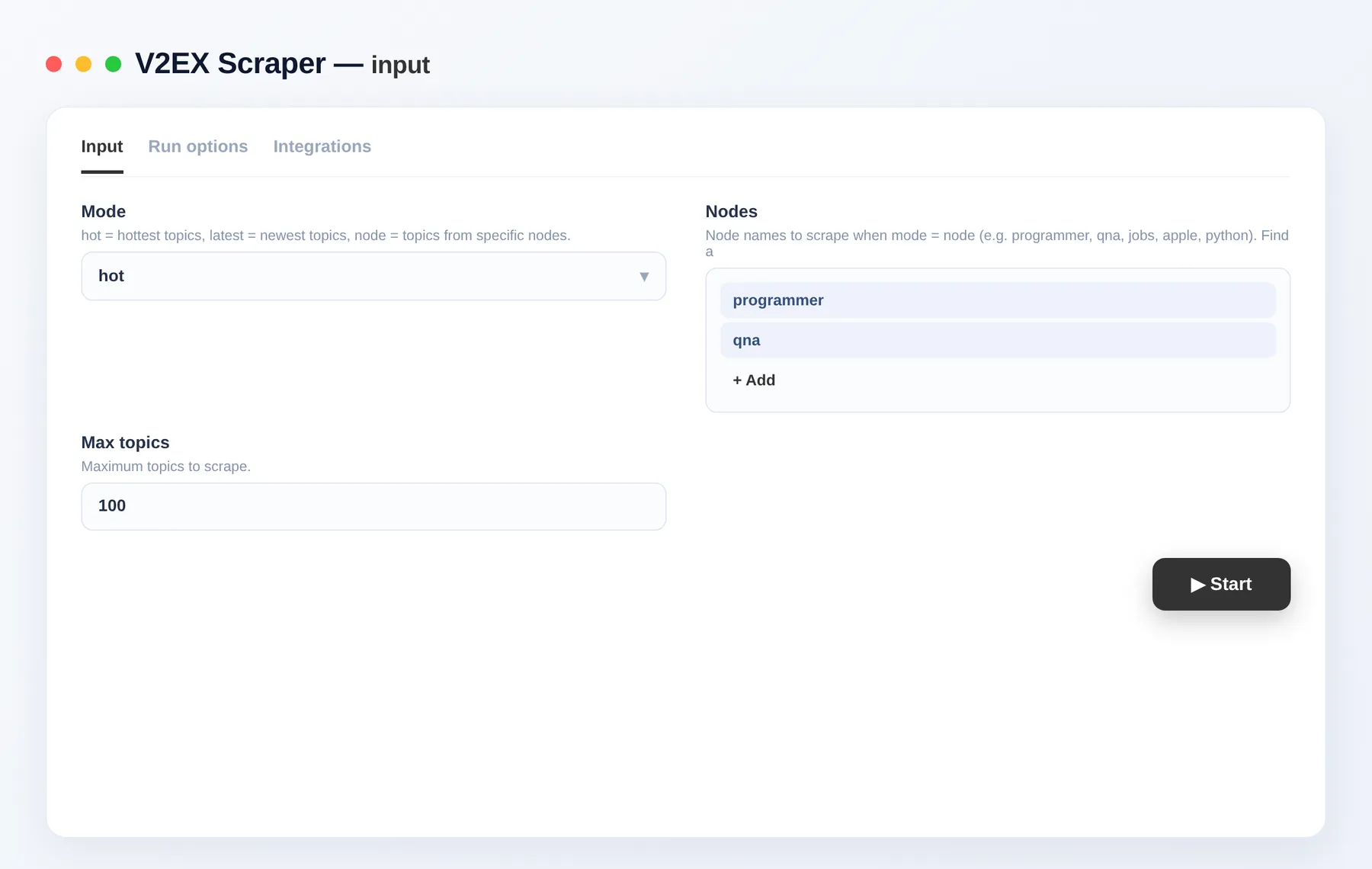
- Pick a mode — hot, latest, or node.
- For node mode, add the node names you want (e.g.
programmer,qna). - Set the maximum number of topics and click Run.
- Export the results as JSON, CSV, Excel or XML, or pull them via the Apify API.
Input
| Field | Type | Description |
|---|---|---|
mode | string | hot (hottest), latest (newest), or node (topics from chosen nodes). |
nodes | array | Node names for node mode, e.g. programmer, qna, jobs, python. A node's name is in its URL: v2ex.com/go/<name>. |
maxItems | integer | Maximum number of topics to scrape. |
Need more developer and tech data?
FAQ
How many topics can I scrape?
As many as you like — set maxItems to cap the run, or leave it high to pull everything available.
Do I need any setup or a login? No setup and no login. Just add the actor, choose a mode, and run.
How do I scrape a specific node?
Use node mode and add the node name(s). Find a node's name in its URL: v2ex.com/go/<name>.
What export formats are supported? JSON, CSV, Excel and XML, plus programmatic access through the Apify API.
How does billing work? You pay only per item you get, so costs scale with the number of topics you scrape.
Is the data only public data? Yes — the scraper returns only publicly available topic information.
Can I integrate this with other tools? The V2EX Scraper can be connected with almost any cloud service or web app thanks to integrations on the Apify platform. It works with Make, Zapier, Slack, Airbyte, GitHub, Google Drive and many more, plus the Apify API, JavaScript/Python clients and MCP. Or use webhooks to trigger an action whenever a run finishes.
Related Actors
Notes
Original clean-room implementation. Returns only public data; you are responsible for compliance with V2EX's terms. Not affiliated with V2EX.


