

Website Screenshot API: Screenshot URL to PNG, JPEG or PDF
Pricing
from $0.68 / 1,000 screenshot takens
Website Screenshot API: Screenshot URL to PNG, JPEG or PDF
Website screenshot API: screenshot a URL list to PNG, JPEG or PDF (URL to image), full page up to 4,000 CSS px or exact size, with final URL, HTTP status, title. HTML strings to PDF too: A4/Letter, landscape, margins. Bench 10-10: 17 of 18 checks passed. $0.80 per 1,000; dead links free.
Pricing
from $0.68 / 1,000 screenshot takens
Rating
0.0
(0)
Developer

hiver
Maintained by CommunityActor stats
0
Bookmarked
2
Total users
1
Monthly active users
23 days ago
Last modified
Categories
Share
Website Screenshot API: screenshot any URL to PNG, JPEG or PDF
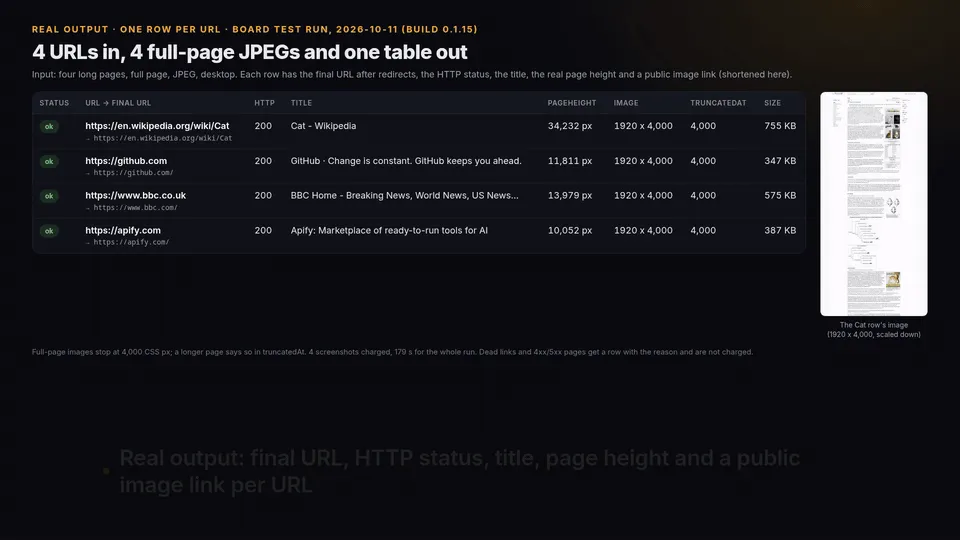
Paste a list of URLs and get a screenshot of every URL in one run (PNG, JPEG or PDF), or call it as a URL screenshot API from your code. Or send HTML strings (invoices, reports) and get one PDF per item on A4, Letter or Legal paper, portrait or landscape, with your margins: the pdfkit.from_string job without the wkhtmltopdf binary. You get one PNG, JPEG or PDF per page, each with a public link, plus a table with the final URL after redirects, the HTTP status, the page title and the file size. Dead links and error pages show up in the table and cost nothing.
$0.80 per 1,000 screenshots on the free plan ($0.68 on Business). Apify platform usage is included in that price.
Current full-page PNG/JPEG limit: 4,000 CSS pixels. Longer pages are intentionally clipped; each row reports pageHeight and truncatedAt: 4000. Viewport resolution and PDF output are unchanged. The historical measurements below used the older 16,000 px cap, not this safeguard.
Watch the 2-minute walkthrough (MP4) · Free example on GitHub: weekly screenshots of your pages, changes posted to Slack or Discord
Measured against the alternatives
Our board's Lab bench ran this Actor (build 0.1.10) and three other Store Actors that take a list of URLs on 2026-10-10 11:23 UTC: Apify's own screenshot Actor (apify/screenshot-url), fourwake/screenshot-api and fetch_cat/website-screenshot-generator. Each got the same 9 URLs in three runs: (1) a plain page, an http:// link that redirects to https, the BBC home page with its cookie banner and a small business site; (2) two normal sites and a domain that does not exist; (3) two long Wikipedia articles captured full page (the English "Cat" article, 34,232 px tall with dozens of lazy-loaded photos, and the Chinese "Emoji" article). Each answer was checked against the real pages: page title, final URL, image saved, and for the long pages the real page height and no images still loading.
| This Actor | apify/screenshot-url | fourwake/screenshot-api | fetch_cat/website-screenshot-generator | |
|---|---|---|---|---|
| Runs that succeeded | 3 of 3 | 1 of 2 measured | 2 of 3 | 2 of 3 |
| Fields filled (URL, final URL, HTTP status, title, image link, width, height) | 100% | 43% (2 runs) | 43% | 67% |
| Checks passed against the real pages | 17 of 18 | 4 of 11 (2 runs) | 6 of 18 | 12 of 18 |
| Long pages full page: checks passed | 7 of 7 | not measured (see below) | 1 of 7 (run hit the 5-minute limit) | 6 of 7 |
| Price per 1,000 screenshots in these runs (dead links free) | $0.68 | no per-screenshot price | $3.00 | $9.17 |
| Run time per run | 49 s average | 300 s (hit the limit) and 10 s | 109 s average | 17 s average |
- Read it fairly: 9 URLs are a small sample. fetch_cat/website-screenshot-generator is much faster (17 s vs 49 s a run) and filled every field on the long pages too; its run on the list with the dead domain failed. Apify's own Actor did not start on the long-page run because the bench asked it for JPEG, a format it does not offer, so that run is left out of its column (not measured, not a failure of that Actor). The bench also caps every Actor at 1,024 MB, half the 2,048 MB Apify's Actor uses by default, so its time-out on run 1 may come from that cap. Later builds have not been benched again yet.
- Tested example (Apify run, build 0.1.10, 2026-10-10): the 34,232 px Cat article came back as a 1920x16,000 JPEG (the 16,000 px cap) with text and photos all the way down and
imagesPending: 0; the Chinese Emoji article came back full height (4,442 px) with Chinese text and the inline emoji rendered, not empty boxes. We looked at both images. - Historical test and reliability caveat (build 0.1.14, 2026-10-10): run
lyaywgV4p0bghNCacsaved all four full-page images, but recheckhmNdzt27v0kh243rpsaved only two of four within 299 seconds. This build uses an explicit 4,000 CSS px safeguard instead of the historical 16,000 px limit. The old recheck did not pass; a new board health verdict is pending.
Common screenshot problems, and the setting that fixes each
| Problem | Setting |
|---|---|
| A full-page screenshot of a long page is blank or has empty boxes below the first screen | fullPage: true captures the page screen by screen and waits up to 5 seconds for the images in view. Every row reports pageHeight and imagesPending, so a page that was still loading shows up in the data instead of in your report |
| You need every image at one exact size, for example 1200x630 for link previews | device: custom with viewportWidth and viewportHeight, fullPage off: each image is exactly that size (times deviceScaleFactor) |
| You only want the top of the page, not the whole scroll | fullPage off (the default) captures the first screen only |
| The screenshot shows a spinner or half-loaded page | waitUntil: networkidle, waitForSelector with a CSS selector that appears when the page is ready, or delayMs |
| A cookie banner or chat widget covers the page | hideCookieBanners (on by default), plus your own CSS selectors in hideSelectors |
| You paid for URLs that did not load | Nothing to set: failed URLs and 4xx/5xx error pages are listed with the reason and not charged |
| You need to know where each URL ended up | Every row has the final URL after redirects, the HTTP status and the page title |
HTML to PDF (invoices, reports, wkhtmltopdf and pdfkit jobs)
Put HTML in html instead of (or next to) urls, set format: pdf, and you get one PDF per item, rendered in headless Chromium.
html: one HTML string, a list of strings, or{"name": "invoice-1001", "html": "..."}objects (the name goes into the file name and thenamecolumn). Up to 2 MiB per item. HTML and URLs can go in the same run.- Paper:
pageSizeA4 (default), Letter, Legal, A3, A5 or Tabloid;landscape: true;marginas one CSS length ("0.5in","10mm") or an object withtop,right,bottom,left;printBackground(on by default). - JavaScript runs in a current Chromium, so
Promise,fetchand arrow functions work. - Empty, non-string or over-2-MiB items come back as rows with the reason and are not charged.
- Tested example (board run
xCcB7tEdn6snKVWj8, build 0.1.19, 2026-10-14): 3 HTML strings and 1 URL (the Wikipedia "Cat" article) in, 4 PDFs out, every page 792 x 612 pt (US Letter landscape), 0 error rows, 4screenshot-takencharges, 37 s for the run. One of the HTML strings writes its text withPromiseandfetch, and that text is in its PDF. - Price: the same $0.80 per 1,000 as screenshots (free plan, lower on paid plans), one charge per saved PDF however many pages it has.
| wkhtmltopdf / pdfkit | This Actor |
|---|---|
pdfkit.from_string(html, ...) | html |
pdfkit.from_url(url, ...) | urls |
--page-size Letter | pageSize: "Letter" |
-O Landscape | landscape: true |
--margin-top 0.5in (and right, bottom, left) | margin: {"top": "0.5in"}, or margin: "0.5in" for all four sides |
--no-background | printBackground: false |
Margins default to 0 here, not to wkhtmltopdf's defaults, so set margin if your layout relied on them. Chromium's layout and page breaks will not match wkhtmltopdf byte for byte.
Ready-made input: HTML strings to PDF, Letter landscape.
Calling pdfkit from Python? The free pdfkit-alternative module (MIT) keeps your pdfkit.from_string and pdfkit.from_url calls: change import pdfkit to import pdfkit_compat as pdfkit and each call runs this Actor once with your own Apify token and a charge cap. It maps page-size, orientation, the margin-* options and print-media-type; any other option stops with an error before a run starts.
What you can do with it
- Thumbnails for directories, link previews, reports and client decks
- A visual archive of what a list of pages looked like on a given day
- Checks of how pages render at desktop, laptop, tablet and mobile sizes
- Before and after a site launch or redesign: run it twice and compare
- A weekly screenshot of your own pages with a changed / unchanged / failed report in Slack or Discord: free GitHub Actions template (see the FAQ)
- Broken links in a list: every row says
ok,http_errororfailed, with the reason - HTML or URL to PDF where wkhtmltopdf / pdfkit no longer installs: one PDF per HTML string or URL, A4, Letter or Legal, portrait or landscape, rendered in Chromium (see HTML to PDF above)
Input
Supply urls, html, or both. Inline HTML supports PNG, JPEG and PDF; no wkhtmltopdf binary is needed. For HTML, html accepts a single string, a list of strings, or { "name": "invoice", "html": "<h1>Invoice</h1>" } objects. htmlNames optionally names list entries. Each HTML item gets its own file even when two entries contain the same markup. Names are sanitized and the item position is included to prevent collisions.
HTML renders on about:blank, with local file/internal browser access blocked and non-HTTP(S) embedded-frame navigations disallowed. Use absolute HTTPS URLs for external CSS, images and scripts; relative URLs have no website base unless you supply an HTTPS <base> tag. JavaScript runs in Chromium; use waitForSelector or delayMs when your application needs extra time. Empty HTML, non-string entries, entries over 2 MiB (UTF-8 bytes), and render failures produce free error rows. Do not put secrets in HTML input.
PDF defaults remain A4, portrait, zero margins, backgrounds on. Paper sizes: A4, Letter, Legal, A3, A5, Tabloid. margin accepts a CSS length (px, pt, in, cm, mm, or zero), or an object with top, right, bottom, left; omitted sides are zero. PDF pagination follows Chromium's print layout. The page options do not change PNG/JPEG output.
| Field | What it does |
|---|---|
urls | One URL per line. example.com is fine, https:// is added. Duplicates are skipped. |
html, htmlNames | Inline HTML string/list or named objects, optionally mixed with URLs |
format | png, jpeg or pdf |
pageSize, landscape, margin, printBackground | PDF paper, orientation, margins and backgrounds |
fullPage | Capture the scrollable page up to 4,000 CSS px; longer pages report truncatedAt: 4000 |
device | desktop 1920x1080, laptop 1366x768, tablet 820x1180, mobile 390x844 @2x, or custom width/height |
deviceScaleFactor | 1 to 3, for sharper images |
waitUntil, waitForSelector, delayMs | Wait for load, network idle, a CSS selector, and/or a pause before capture |
hideCookieBanners | Clicks common "accept" buttons and hides known consent pop-ups |
hideSelectors | Your own CSS selectors to hide (chat widgets, sticky bars) |
darkMode, blockAds, userAgent, timeoutSecs, maxConcurrency | Fine control |
proxyConfiguration | Off by default. Turn on for sites that block data-centre IPs. |
Output
One dataset row per URL or HTML item. HTML rows have source: "html", url: null, zero-based htmlIndex, and name; URL rows retain their existing fields. PDF rows add pageSize, landscape, pages (page count); width/height are the first page's actual MediaBox dimensions in points (72 pt/in), not viewport pixels.
status is ok, http_error (the server answered 4xx/5xx: the error page is still saved, but not charged) or failed (DNS error, timeout, bad URL; error says why). Images are in the run's key-value store, so the links work without logging in.
width and height are the actual PNG/JPEG pixel dimensions, including device scaling. pageHeight is the scrollable page height in CSS pixels before capture; full-page images stop at 4,000 CSS pixels even if the page is longer. imagesPending counts visible <img> elements inside the capture that are still loading after a wait of up to five seconds. Zero means none are pending, not that every image loaded successfully (broken images can be complete). truncatedAt is the CSS pixel cutoff when a full-page image is capped, otherwise null. Full-page PNG/JPEG captures use viewport-sized tiles stitched into one image, without resizing the viewport. Sticky elements keep their document position; fixed overlays are hidden after the first tile to avoid repetition. Raster capture has a total budget of 10 seconds plus 5 seconds per tile (30 seconds for 4 desktop tiles), capped at 90 seconds, and a 10-second budget per tile; both are bounded by the run deadline with five seconds reserved for saving/reporting. Pages are asked for reduced motion; Finite CSS reveal animations are fast-forwarded; infinite CSS animations, JavaScript animation-frame loops and playing videos are paused during tiled raster capture, then restored afterward. Each full-page URL uses a fresh browser to reclaim decoded-image and compositor memory. Navigation waits up to ten additional seconds for main-frame redirects to settle; current-document readiness probes allow up to five seconds for a CPU-busy renderer, within that settlement limit. A document change or destroyed execution context during redirect settlement or preparation/capture retries the complete capture once, never stitches different documents together. When waitUntil: load times out after the current document reached DOMContentLoaded, capture continues and reports loadState: domcontentloaded; explicit networkidle and selector timeouts still fail. loadState records the reached navigation state and navigationRetries counts the one permitted redirect retry. A capture timeout returns a failed, uncharged row rather than a partial image. captureTiles and captureSeconds expose tile count and raster/stitching time; a failed raster still reports elapsed capture time and its timeout stage in error. Full-page raster URLs run serially to bound CPU/memory contention; viewport captures keep maxConcurrency. These fields also appear in the Results dataset view. PDF uses Chromium's print layout on the pageSize paper (A4 by default).
Pricing
Pay per event: you pay per screenshot that loads (HTTP 2xx/3xx). Failed URLs and error pages are free. Apify platform usage is included in the price. Higher Apify plans get a discount automatically:
| Event, per 1,000 | Free | Starter (Bronze) | Scale (Silver) | Business (Gold) |
|---|---|---|---|---|
Screenshot taken (screenshot-taken) | $0.80 | $0.76 | $0.72 | $0.68 |
Worked example: 5,000 screenshots on the Free plan cost 5,000 × $0.0008 = $4.00; on Gold, 5,000 × $0.00068 = $3.40. Dead links and error pages in the list cost nothing.
Known limits
- Pages behind a login are not supported.
- Some sites block data-centre IPs or show a bot check; try the proxy option.
- Cookie-banner removal covers the common consent tools, not every site's custom one; add its selector in
hideSelectors. - Full-page PNG/JPEG capture stops at 4,000 CSS px tall. Longer pages and endless-scroll feeds are cut there with
truncatedAt: 4000. PDF is unaffected. - PDF output ignores
fullPageand device size; paper size, orientation and margins followpageSize,landscape, andmargin(defaults: A4, portrait, zero). Large documents can have multiple pages but are charged once per saved PDF. - Capture only pages you are allowed to capture.
Input example
FAQ
How many URLs per run?
As many as you list; runs are bounded by the Actor timeout you set. Start with a few dozen and scale up.
Which pages work?
Public pages that load in a browser without login. Pages behind logins, captchas or bot blocks return an error row and are not charged.
Are cookie banners always removed?
The option hides the common consent banners; unusual ones can remain visible.
Can I get a weekly screenshot of my pages and an alert when one changes?
Yes, with the free website-screenshot-monitor repo (MIT): a GitHub Actions template runs this Actor weekly with your own Apify token, compares each image with the last good capture, and posts a changed / unchanged / failed report to Slack or Discord. Failed URLs stay in the report and never replace a good baseline.
Coming from wkhtmltopdf, pdfkit or imgkit?
wkhtmltopdf's GitHub repo is archived (last push November 2022) and Debian removed its package from testing on 2025-02-05. Debian 13, the base of today's python:3.13-slim image, has no wkhtmltopdf package, so apt-get install wkhtmltopdf finds nothing and pdfkit.from_url() stops at "No wkhtmltopdf executable found" (imgkit: "No wkhtmltoimage executable found"; checked on Debian 13 on 2026-10-12, pdfkit 1.0.0, imgkit 1.2.3). Its engine is a 2012 QtWebKit. The last upstream .deb (0.12.6.1, built for Debian 12) still runs on Debian 13 if you install it by hand, but in the same check it had no Promise, fetch or arrow functions and crashed on 2 of 6 public pages (react.dev and a Wikipedia article: floating point exception and segmentation fault), where headless Chromium printed all 6. This Actor renders in headless Chromium (Playwright) instead: send HTML strings in html (the pdfkit.from_string case) or URLs in urls, with pageSize, landscape and margin in place of --page-size, -O and the --margin-* options (table in HTML to PDF above); png or jpeg gives images (the imgkit case). Ready-made inputs: HTML strings to PDF, Letter landscape and wkhtmltopdf alternative, URL list to PDF.
Is this official?
No. Unofficial and not affiliated with, endorsed by or sponsored by any company or site named in the results or this README.
Something looks wrong or you need a field added?
Open an issue from the Actor's Issues tab with the input and run link.


