

LinkedIn Post Comments Scraper, No Login
Pricing
from $0.64 / 1,000 comments
LinkedIn Post Comments Scraper, No Login
LinkedIn comment scraper for post comments, no login or cookie: post, comment or article links or company pages in. Each comment: text, exact date, commenter name, profile link and picture, reactions, links, mentions, images, the post's comment count. Commenter pages, tags on request. Misses free.
Pricing
from $0.64 / 1,000 comments
Rating
0.0
(0)
Developer

Hyperbach
Maintained by CommunityActor stats
0
Bookmarked
2
Total users
1
Monthly active users
3 days ago
Last modified
Categories
Features
Share
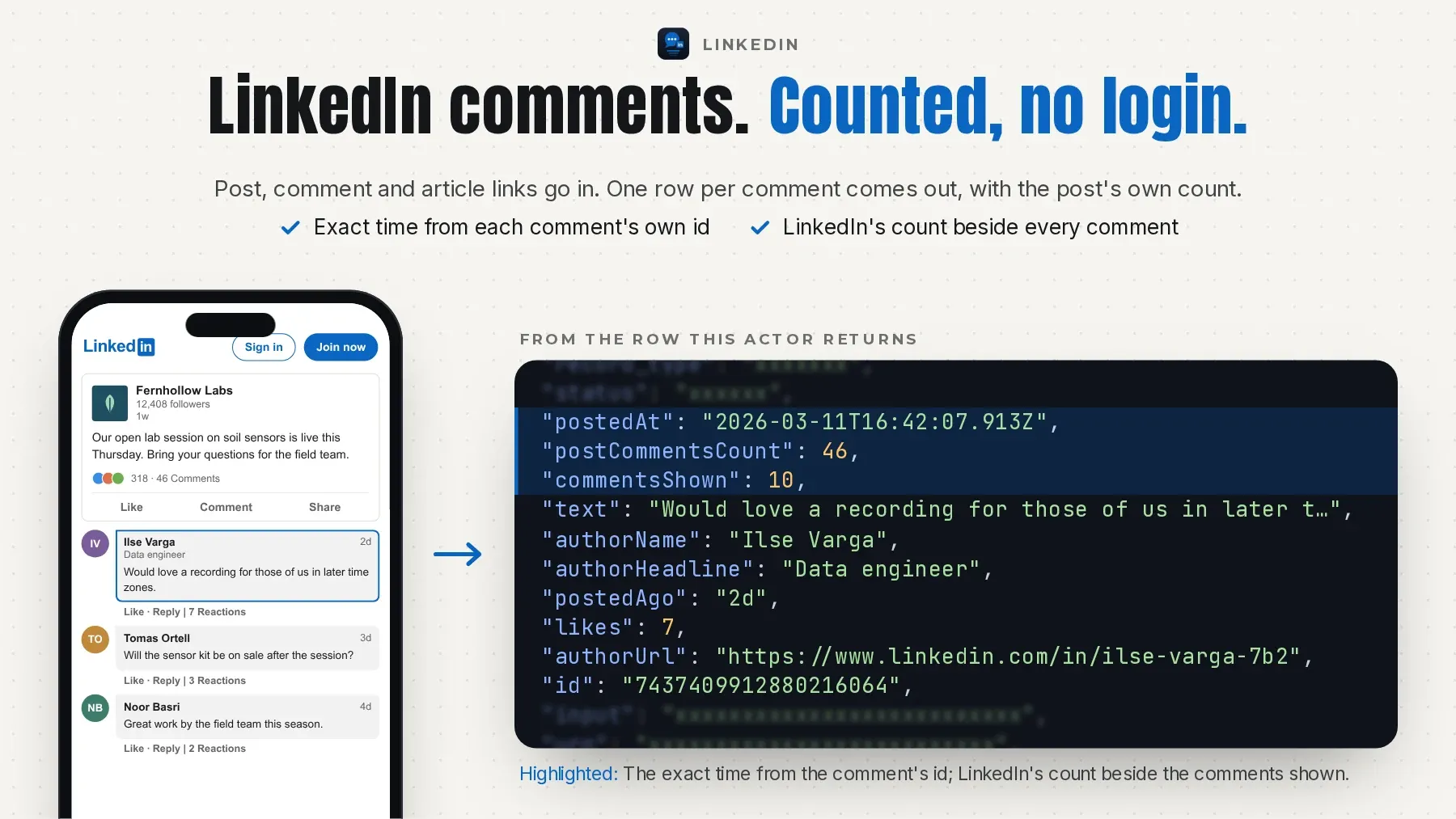
LinkedIn comments as data, logged out: post, comment and article links (or company and person pages) in, one row per comment out — the text with its links, mentions and images, the exact date from the comment's own id, the commenter's name, profile link, type, picture and headline where LinkedIn shows it, the reactions count, and LinkedIn's comment count of the post beside every row. A free row per post says how many comments LinkedIn showed against its own count. A missing or empty post is a free row, never charged. No login, no LinkedIn account, no cookie, proxies handled for you.
From $1.275 per 1,000 rows (comment) on the Free plan, $1.08375 on Starter; every row and add-on is priced under Pricing below. A run start is $0.00154. The default input returns about 22 rows for about $0.025765. A missing post, a post with no comment, a comment link LinkedIn no longer shows and a value that names nothing are free rows.
How it compares
- 2 times cheaper than harvestapi's LinkedIn Post Comments Scraper, with more data: $0.97 per 1,000 comments, against $2.00; 24 fields per comment, against 13. It is faster: 21 comments in 8.2 s, against our 19 comments in 10 s.
- 5 times cheaper than apimaestro's Post Comments & Engagements Scraper for LinkedIn, with more data: $0.97 per 1,000 comments, against $5.00; 24 fields per comment, against 10.
- Cheaper than scraping_solutions's LinkedIn Engagers, with more data: $0.97 per 1,000 comments, against $1.20; 24 fields per comment, against 8.
- Cheaper than datadoping's Linkedin Post Comments Scraper, with more data: $0.97 per 1,000 comments, against $1.30; 24 fields per comment, against 15.
- 7 times cheaper than unseenuser's LinkedIn Post Comment & Reaction Extractor, with more data: $0.97 per 1,000 comments, against $7.09; 24 fields per comment, against 12.
Measured on 2026-11-18. Each line compares one job, run by both scrapers at the same time. Prices are per 1,000 comments: Apify Actors at the Scale plan's prices.
Tested head-to-head on 2026-11-18
The job: The comments of two posts and one comment link (the input schema's example: LinkedIn's T1, T2 and T3 of the lane study). Every Actor ran on it the same day from the same harness; every run's cost is at the Scale plan's prices: a rival's charged events at its price for that plan, this Actor's at its list price. Fields counts the filled fields of a typical row. Each rival reads the same two posts and one comment link, at most 7 comments a post (datadoping 10, its minimum): harvestapi/linkedin-post-comments is the most used, apimaestro and scraping_solutions the next post-comment sellers, datadoping and unseenuser the others that take post links. Re-measured monthly.
| Actor | Rows | First row | Run time | Cost | Fields | Failures |
|---|---|---|---|---|---|---|
| this Actor | 19 | 3.1 s | 10 s | $0.018 | 24 | none |
harvestapi/linkedin-post-comments | 21 | 8.4 s | 8.2 s | $0.042 | 13 | none |
apimaestro/linkedin-post-comments-replies-engagements-scraper-no-cookies | 22 | 4.2 s | 4.1 s | $0.11 | 10 | none |
scraping_solutions/linkedin-posts-engagers-likers-and-commenters-no-cookies | 21 | 7.5 s | 10 s | $0.025 | 8 | none |
datadoping/linkedin-post-comments-scraper | 30 | 3.9 s | 14 s | $0.039 | 15 | none |
unseenuser/linkedin-post-comment-reaction-extractor-no-cookies | 7 | 4.0 s | 10 s | $0.050 | 12 | none |
Why this LinkedIn comments scraper
- No login, ever. Every comment is read from LinkedIn's public pages as a logged-out visitor sees them: no cookie, no account to lose (the lane's reviews name cookie expiry and signed-out sessions), nothing of yours sent to LinkedIn.
- The post's count beside every comment, never a silent short list. LinkedIn shows a logged-out reader the first 9-10 comments of a post (at most 10 on 331 of 331 post pages our source study read on 2026-11-18; the rest of the list is shown to signed-in members only). Every comment row carries LinkedIn's own count and the comments shown, and every post gets a free row with the verdict: COMPLETE when the comments shown reach the count, TRUNCATED with the count otherwise ("9 of 112 comment(s) shown").
- Exact dates. The date is the comment id's own creation time to the millisecond (equal to the page's own date to the second on 1,088 of 1,089 comments our source study checked on 2026-11-18), never a "2w" turned into a date.
- Every input answered, only comments charged. A missing post (asked under every urn kind and on a second connection), a post with no comment, a comment link LinkedIn no longer shows and a value that names nothing each get a free row that says so; a run that delivers no comment charges nothing.
- Comment and reply links, articles and pages. A comment link gives that one comment (asked again in the post's own urn form when LinkedIn's link does not focus it); a reply link gives that reply with its parent's id; an article gives its comments through its share post; a company or person page gives the comments on its newest posts.
- One comment, one row, one charge. A comment two of your inputs show is delivered and charged once; the second sight is a free duplicate row.
maxItemsandmaxCommentsPerPostare exact, and no summary row is ever charged. - Fast. One page gives a post's comments, read with no browser and several posts at once. Over 11 runs of build 0.1.7 on 2026-11-18 (no add-on; 1 to 25 posts, comment links or company pages a run) the first comment came at 2.5-5.9 seconds of run time (median 3.7), and a run of 25 posts had its 200 comments out at 9.4 seconds. The add-ons are slower: each commenter's page is its own read.
Who it's for
- Sales and growth teams — the people who comment on a competitor's or an industry leader's posts, with their profile links, as a lead list; the optional tags mark questions and buying signals.
- Marketers and community managers — the comments on a brand's own or a competitor's posts with their reactions and dates, the sentiment of each on request, a company page's newest posts in one run.
- Researchers and analysts — public reactions to a post or an article with exact dates and the post's own count to reconcile against, sentiment, intent and language tags on request.
- Developers and data teams — links in, typed rows out keyed by the comment id, a free row for every post LinkedIn does not show, the leader's input names read as they are, a run summary to check a pipeline against.
Quick start
The comments of three posts (the leader's own example)
A company's newest posts and their comments
Comments with the commenters' public pages and tags
One comment by its link
Switching from harvestapi/linkedin-post-comments?
Your input works as it is. Each name in the left column is read as this Actor's own field and the run log says so (read <theirs> as <ours>); a name marked not read is ignored with a note. A value in the other Actor's shape, an object list or its own date form, is read too.
| harvestapi/linkedin-post-comments | this Actor | what to know |
|---|---|---|
posts | postUrls | The same post links, read as postUrls; also comment, reply and article links and bare ids. |
maxItems | maxItems | Read as the leader means it when its input names the posts under posts (and none under postUrls): each post's comments, as maxCommentsPerPost (1-10, the most LinkedIn shows a logged-out reader); the run's notes say so. With postUrls, maxItems caps the whole run. |
postedLimit | newerThan | The same values (any, 24h, week, month, 3months, 6months, year), checked on each comment's own date; newerThan also takes a date or an age. |
scrapeReplies | not read | Not read: the replies under a comment are shown to signed-in members only. A reply link in postUrls gives that reply. |
profileScraperMode | authorDetails | short reads no profile; main (or full) reads each commenter's public page, as authorDetails does: LinkedIn showed the page to a logged-out reader for between 1 commenter in 4 and 1 in 12 in our runs of 2026-11-18 (25 of 106, 12 of 56 and 26 of 299 persons on ordinary posts). |
What differs:
- The leader logs in to LinkedIn; this Actor never does. A post gives the first 9-10 comments LinkedIn shows a logged-out reader, where the leader pages the whole list newest first; every row and the post's free row carry LinkedIn's full count beside the comments shown.
- Replies, the reactions per type, pinned and edited flags and who reacted need a login: a reply link gives that one reply, and the rows carry the reactions total.
- The leader's maxItems counts each post's comments; with the leader's posts it is read so here too (as maxCommentsPerPost, 1-10), and with this Actor's postUrls, maxItems counts the whole run's comments.
- The rows are flat columns (authorName, authorUrl, postedAt, likes) where the leader nests objects (actor, createdAt, reactionTypeCounts); the date is the same exact time.
Output
One row per comment (and one free row per post and per page you give):
| field | meaning |
|---|---|
record_type | comment on a comment row (charged when status is ok); post, profile or input on a free row. |
status | ok, or why an input or a post gave no comment (no_comments, not_found, comment_not_found, not_public, no_posts, invalid_input, failed, not_read), or duplicate. |
input | The link or page this row answers, as you gave it. |
id | The comment's id (on a post row, the post's id). |
urn | The comment's urn (urn:li:comment:( |
url | The comment's permalink (on a post row, the post's or the article's link). |
text | The comment's text, line breaks kept; a link shows as its text. Null on an image-only comment. |
postedAt | When the comment was created (UTC, to the millisecond, from its own id). |
postedAtTimestamp | The same time in epoch milliseconds. |
postedAgo | The relative time as LinkedIn shows it ("2d", "1w"). |
authorName | The commenter's name (a person or a company). |
authorUrl | The commenter's LinkedIn page, on the www host (/in/ |
authorPublicId | The commenter's public id (the /in/ or /company/ part of the link). |
authorType | person or company. |
authorHeadline | The commenter's headline where LinkedIn shows it beside the comment; null otherwise. |
authorImage | The commenter's photo or the company's logo; null for LinkedIn's blank picture. |
isPostAuthor | True when the post's own author wrote the comment. |
authorLocation | With authorDetails: the commenter's location from their public page. |
authorFollowers | With authorDetails: the commenter's followers (on a profile row: the page's followers). |
authorConnections | With authorDetails: the commenter's connections as LinkedIn writes them ("500+"). |
authorCurrentCompany | With authorDetails: the commenter's current company where the page shows it. |
authorMemberId | With authorDetails: the commenter's numeric member id. |
authorDetailsStatus | With authorDetails: served (LinkedIn served the commenter's public page and it was read; the details fee is charged on these rows only), not_public (two connections that served other profiles were refused), refused (no connection was shown the page), not_asked (a company commenter, or the charge limit left no room), cut (the run's time limit or an abort stopped the read), failed. |
likes | The comment's reactions total as LinkedIn shows it (0 when none). |
links | The links in the comment's text (LinkedIn's tracking parameter cut). |
mentions | The people and companies the comment links to [{name, url, type}]. |
hashtags | The hashtags of the text, without #. |
images | The images or GIFs attached to the comment. |
position | The comment's place among the comments the post's page shows (1 = first). |
parentCommentId | On a reply asked by its link: the id of the comment it replies to. |
repliesNote | On a comment asked by its link: that its replies are shown to signed-in members only. |
postId | The post's id (the number of its urn), the same on a post row and on its comment rows: join them by it. A share post's comments name its activity urn, so its post row's postId is that activity's id and its id keeps the share's. |
postUrn | The post's urn (urn:li:ugcPost:…, urn:li:activity:… or urn:li:share:…). |
postUrl | The post's id-only link. |
postCommentsCount | LinkedIn's comment count of the post (replies included). |
commentsShown | The comments the post's page shows a logged-out reader (at most 10). |
postText | On a post row: the post's text. |
postAuthorName | On a post row: the post's author. |
postAuthorUrl | On a post row: the post author's LinkedIn page. |
postPostedAt | On a post row: when the post was created (UTC, from its id). |
postLikes | On a post row: the post's reactions total. |
analysis_sentiment | With tagComments: the comment's sentiment from -1 (negative) to 1 (very positive). |
analysis_intent | With tagComments: question, praise, agreement, criticism, buying_signal, experience, self_promotion, job_seeking or other. |
analysis_language | With tagComments: the comment's language code (en, de, fr, es, pt, it, nl, hi, ar, zh, ja, other). |
analysis_confidence | With tagComments: the model's confidence in each answer, 0-1. |
verdict | On a post row: COMPLETE (the comments shown reach LinkedIn's count), TRUNCATED (LinkedIn shows a logged-out reader fewer than its count), PARTIAL (your maxItems, the charge limit or the run's time limit cut it). On a comment link's post row: COMPLETE when the asked comment was delivered (commentsShown 1: the one comment asked). On a profile row: COMPLETE (your maxPostsPerProfile), TRUNCATED or LIST_END (the page's own list), PARTIAL. |
rows_delivered | On a post, profile or input row: the comments it delivered. |
posts_listed | On a profile row: the posts the page listed. |
posts_read | On a profile row: the posts read for their comments. |
note | Why a free row has the status or the verdict it has ("9 of 112 comment(s) shown; …"). |
scraped_at | When this row was read (UTC). |
Example record:
Pricing
Pay for the comments a run delivers, plus one run start. No platform usage is billed to you, and the price falls with your Apify plan.
| event | unit | Free | Starter | Scale | Business |
|---|---|---|---|---|---|
Comment (comment) | per 1,000 | $1.275 | $1.08375 | $0.8925 | $0.6375 |
Comment tags (comment-tags, with tagComments) | per 1,000 | $0.50 | $0.50 | $0.50 | $0.50 |
Commenter details (author-details, with authorDetails) | per 1,000 | $1.70 | $1.445 | $1.19 | $1.08 |
Run start (start) | per run | $0.00154 | $0.00154 | $0.00154 | $0.00154 |
A comment is $1.275 per 1,000 on the Free plan ($0.001275 a comment) and $1.08375 on Starter, with everything its row carries, whether it came from a post, comment, reply or article link or from a company or person page. With tagComments, each comment the model tagged adds $0.0005. With authorDetails, each comment whose commenter's public page LinkedIn served adds $0.0017 on the Free plan; a commenter LinkedIn does not show logged out (not_public, refused), a company commenter and a page the run did not reach add nothing. Each run that delivers a charged comment pays the run start, $0.00154 once.
So the example (two posts and one comment link, 19 comments on 2026-11-18) costs $0.025765 on the Free plan and $0.02213125 on Starter; 100 comments $0.12904 and $0.109915; 10 comments with their tags $0.01929 and $0.0173775. Free: every post, page and input row (the post's own fields, LinkedIn's count and the verdict), a missing post, a post with no comment, a comment link LinkedIn no longer shows, a value that names nothing, a comment the run already delivered (one row, one charge), a comment your filters leave out, an input left unread at a cap, and a run that delivered no charged comment (no run start either). A run that stops early (a timeout, an abort, the charge limit) is charged for the comments it delivered.
Before the first request the log names the prices at your plan and what the run can cost: "at most" under the bounds the run holds (one comment a comment link, maxCommentsPerPost a post, maxPostsPerProfile posts a page, maxItems the run, each comment with the add-ons you asked for) and your charge limit. Enterprise plans have their own rates: the Actor's Pricing tab shows the price for your plan.
Usage patterns
- Links —
postUrlstakes LinkedIn links in any form (www or a country host, with or without parameters, a link wrapped in a redirect): a post (/posts/…,/feed/update/urn:li:activity|ugcPost|share:…, also a bare post id or urn), a comment link (commentUrn=…, as LinkedIn's share menu gives it: that one comment), a reply link (replyUrn=…: that reply, withparentCommentId) or an article (/pulse/…: its comments through its share post). Every post is read by its id; a bare id is asked as an activity, then a ugcPost, then a share.profilestakes company, showcase and person pages: the comments on each page's newest posts (maxPostsPerProfile, 3 by default; a company's feed goes to its newest 70, a person's page lists 8-9), and a post whose card counts 0 comments is a free row with no read (a card that shows no count at all is read: it can hold comments). A person's link inpostUrlsgives a free row that points atprofiles: the comments a person wrote on other posts are shown to signed-in members only. - What a row is —
record_type=comment,status=ok: one comment (charged);statusduplicate: a comment another input of the run already delivered (free).record_type=post: the post's free row — its own fields (postText,postAuthorName,postPostedAt,postLikes), LinkedIn'spostCommentsCountagainstcommentsShown,rows_delivered, theverdictand itsnote, or the state that gave no comment (no_comments,not_found,comment_not_found,failed,not_read).record_type=profile: a page's free summary (posts_listed,posts_read,rows_delivered, the verdict).record_type=input: a value that names nothing (invalid_input) or another form of a link already given (duplicate). - How far a post goes — LinkedIn shows a logged-out reader the first 9-10 comments of a post in its own order (the relevance order; no sort parameter changes it), and the rest of the list, the replies, the reactions per type and who reacted to signed-in members only. So a post gives up to 10 comment rows, and its post row says COMPLETE when they reach LinkedIn's count, else TRUNCATED with the count (the count includes replies).
sortBynewest sorts the comments shown by their own dates;maxCommentsPerPostkeeps the first of them;maxItemscaps the whole run (PARTIAL on the input it cut). A run cut by its time limit or an abort writes PARTIAL with what it delivered. - Options —
authorDetailsreads each distinct person commenter's public page once forauthorLocation,authorFollowers,authorConnections,authorCurrentCompanyandauthorMemberId; LinkedIn showed a logged-out reader between 1 commenter in 4 and 1 in 12 in our runs of 2026-11-18 (25 of 106, 12 of 56 and 26 of 299 persons on ordinary posts), so most rows keepauthorDetailsStatusnot_public(two connections that served other profiles were refused) orrefused(no connection was shown the page), with no details fee. A company commenter is not read (not_asked).tagCommentsaddsanalysis_sentiment,analysis_intentandanalysis_languagefrom a classification model.newerThan,olderThan,textContains,minLikesandexcludePostAuthorCommentsdrop comments free.maxConcurrencysets the links read at once (4 by default).
Input configuration
| field | type | default | what it does |
|---|---|---|---|
postUrls | array | [] | LinkedIn links in any form (www or a country host such as uk.linkedin.com, with or without parameters, a link wrapped in a redirect): a post (/posts/… or /feed/update/urn:li:activity |
profiles | array | [] | Company, showcase or person page links (/company/…, /showcase/…, /in/…): the comments on each page's newest posts, up to Posts per profile. A company's page lists its newest posts (up to 70 by its feed), a person's page its newest 8-9. A post whose card counts no comment is a free row with no read. The comments a person wrote on other people's posts are shown to signed-in members only and are not read. |
maxPostsPerProfile | integer | 3 | How many of a profile's newest posts to read, each for its comments (1-70; a person's page lists 8-9). |
maxCommentsPerPost | integer | 10 | The most comments one post delivers (1-10). LinkedIn shows a logged-out reader at most 10 comments of a post; the post's own row gives LinkedIn's full count. |
sortBy | relevance / newest | "relevance" | Relevance keeps LinkedIn's own order of the comments it shows. Newest sorts those comments by their own dates, newest first (it sorts the 9-10 comments LinkedIn shows, not the post's whole list). |
maxItems | integer | 0 | The most charged comments of the whole run; 0 = no cap beyond your charge limit. Free rows (a post's or a profile's row, missing or empty posts, duplicates, comments a filter drops) do not count. |
newerThan | string | Only comments posted on or after this: a date (2026-10-01, or a time in UTC such as 2026-10-01T12:00:00Z), a window (24h, week, month, 3months, 6months, year) or an age (7 days, 48 hours). Checked on each comment's own date; a comment outside is dropped free. | |
olderThan | string | Only comments posted on or before this: a date, a window or an age, as for Posted on or after. | |
textContains | array | [] | Only comments whose text holds at least one of these words or phrases as whole words, any case ("price" keeps "what's the price?", not "priceless"); the others are dropped free. |
minLikes | integer | 0 | Only comments with at least this many reactions; the others are dropped free. |
excludePostAuthorComments | boolean | false | Drops the comments the post's author wrote on their own post (free). |
authorDetails | boolean | false | For each distinct person who commented, reads their public profile page once for the location, the followers, the connections, the current company and the numeric member id. LinkedIn showed a logged-out reader between 1 commenter in 4 and 1 in 12 in our runs of 2026-11-18 (25 of 106, 12 of 56 and 26 of 299 persons on ordinary posts); the others keep the comment with authorDetailsStatus not_public or refused and no fee for the details. The headline is not on that page. Charged per comment whose commenter's public page LinkedIn served (authorDetailsStatus served). |
tagComments | boolean | false | Adds analysis_sentiment (-1 to 1), analysis_intent (question, praise, agreement, criticism, buying_signal, experience, self_promotion, job_seeking, other) and analysis_language to each comment with text, read by a classification model, with the confidence of each answer. Charged per tagged comment; a comment with no text (an image or a GIF) is not tagged. |
maxConcurrency | integer | 4 | Links and profiles read in parallel, each on its own connection. |
feedback | string | A note to the people who maintain this Actor: what you needed and did not get. For example a missing field, a wrong or empty result, or the Actor you switch from or to, and why. The run does not read it: the rows and the charges stay the same. A person reads every note. |
Errors
A run does not fail because of your input. When an input cannot be used — a date that is not a date, an id in the wrong form, two settings that contradict each other — the run ends Succeeded, charges nothing, and says what to change:
- the status message starts with
INPUT REJECTED; - the dataset holds one row,
{"error": true, "code": "…", "message": "…"}, and no results; - the key-value store record
ERRORholds the same object.
From code, check error on the first row before reading results.
A link that gives no comment is not an error: the dataset holds its free post row (its status or verdict says why) and nothing is charged. A run that ends Failed is a fault on our side, never your input; it charges nothing, and we are alerted.
FAQ
Why only 9-10 comments of a post?
LinkedIn shows a logged-out reader the first 9-10 comments of a post; the rest of the list is for signed-in members (we tried every page, link form, app route and a real browser logged out: none shows more). This Actor never logs in, so each post gives those comments, and every row and the post's own row carry LinkedIn's full count beside them, with the verdict TRUNCATED when the count is higher.
Are replies included?
A reply link gives that reply (with its parent comment's id). The replies under a comment are shown to signed-in members only, so a post's rows are its top-level comments as LinkedIn shows them; a comment link's row says so in repliesNote.
Why is the commenter's headline empty on most rows?
LinkedIn shows a commenter's headline beside the comment for some commenters only (51 of 1,122 comments in our source study's reads of 2026-11-18), and the public profile page hides it from logged-out readers too. The row carries it where LinkedIn shows it.
Does it need a LinkedIn account, cookies or an API key?
No. Everything is read logged out with a plain HTTP client; no member cookie is accepted and none is used.
Which status is which?
A comment row: ok (charged), duplicate (another input of the run delivered it; free). A post row: ok with its verdict, no_comments (the post shows no comment: none yet, or comments turned off), not_found (LinkedIn answered the sign-up page under every urn kind on two connections), comment_not_found (the comment link's page does not show the comment, asked twice), failed (the page could not be read on several connections), not_read (left at maxItems, the charge limit or the run's time limit). A profile row: ok, not_public, not_found, no_posts, failed, not_read. An input row: invalid_input, duplicate. None of them is charged.
Can I get the commenter's e-mail, the commenter's company data, or who reshared or liked the post?
Not here. The e-mail is not on a commenter's public page and this Actor does not guess one. The commenter's current company comes with authorDetails where the public page shows it (authorCurrentCompany); the company's own data (size, industry, followers) is a company page's, which a LinkedIn company scraper reads by its link. Who reshared or reacted to a post is shown to signed-in members only, so it is not delivered; the post row carries the reactions total.
Can I get only new comments every day?
Schedule the run with newerThan 24h (or week): each comment's own date is checked, so only the comments of the window are delivered and charged. Keep in mind that a logged-out reader sees LinkedIn's first 9-10 comments of a post, which on a busy post are not always the newest.
Do I need Apify Proxy or my own proxy?
No. The Actor uses its own connections, at no extra cost to you.
Integration
JavaScript
Python
CLI
REST
AI agents and MCP
Apify's MCP server offers this Actor as a tool to Claude, Cursor, VS Code and any other MCP client. Connect https://mcp.apify.com?tools=hyperbach/linkedin-post-comments-scraper and ask, for example: "Get the comments on this LinkedIn post with each commenter's name, profile link, comment text, date and reactions". The agent fills the input from the table above and reads the rows from the run's dataset. A field under the name another Actor gives it is read as this Actor's own: posts, postUrl, post, urls as postUrls; profileUrls, companyUrls, companies, profileUrl as profiles; maxComments, commentsLimit, commentsPerPost, limitPerPost as maxCommentsPerPost; maxPosts, postsLimit, postsPerProfile, maxPostsPerTarget as maxPostsPerProfile (and more). An agent or a person can add feedback to any run and say what was needed and not delivered: a missing field, a wrong or empty result, the Actor switched from or to, and why. The run returns the same rows at the same price, and a person reads every note.
n8n, Make and Zapier
The Apify node in n8n, the Apify app in Make and the Apify integration in Zapier run this Actor on a schedule or from a trigger and read its dataset. A webhook on the run's end (Integrations on the Actor page) sends the rows on to your own endpoint. Nothing to install on our side.
Support
Disagree with a charge? Write to apify@hyperbach.com with the run ID. We will ask Apify to compensate you, and the charge comes back to your Apify account as platform credit.
Did it do the job? A short review on the Store, at any rating, helps the next buyer choose.
See also
- LinkedIn Jobs Scraper — LinkedIn job listings for keywords and a location, with the applicants count, the salary block and the company's facts.
- LinkedIn Ad Library Scraper — every ad a company runs on LinkedIn, with the full detail page: payer, impressions by country and the targeting the advertiser chose.
- LinkedIn Profile Scraper & People Search — LinkedIn profiles logged out, by link or people search: name, headline, location, about, followers, connections, companies and schools.
- LinkedIn Posts Scraper — LinkedIn posts logged out, by profile, company or post link or by search words: text, author, date, reactions, comments and media.
This page is generated from the Actor's schemas and a live sample — it cannot describe a field the Actor does not have.


