

Contact Details & Email Scraper — Phones, Socials, Email Types
Pricing
from $2.40 / 1,000 website with contacts
Contact Details & Email Scraper — Phones, Socials, Email Types
E-mails sorted by type (sales, support, management, legal…), phones, WhatsApp, social profiles, company legal name and address from any list of websites, each with its source page. Plain HTTP, fast. Pay only per website with contacts. Lead enrichment for any domain list.
Pricing
from $2.40 / 1,000 website with contacts
Rating
0.0
(0)
Developer

Insane Developer
Maintained by CommunityActor stats
0
Bookmarked
8
Total users
2
Monthly active users
4 days ago
Last modified
Categories
Features
Share
What is Contact Details & Email Scraper?
Contact Details & Email Scraper takes a list of websites and returns, for each one, the e-mail addresses sorted by type (sales, support, management, legal, press, personal…), phone numbers, WhatsApp and other messengers, social profiles, contact-form pages, and the company's legal name and postal address. Every value comes with the page it was found on.
You pay $3 per 1,000 websites with contacts ($2.70 on Scale, $2.40 on Business), and the first 10 are free for every Apify account. A website where nothing is found, that is down or that blocks us costs nothing. To try it, keep the three example domains in the input and click Start.
Who uses it?
- Sales and lead-generation teams turn a list of company domains into e-mails, phones and LinkedIn pages.
- Agencies and freelancers enrich a CRM export or a Google Maps result list with contact details.
- Lead enrichment: give it the domains from a lead list and each row comes back with the company's typed e-mails,
phones, socials, legal name, address and VAT number, matched by
domain. It does not verify mailboxes, so run the e-mails through your usual verifier before a cold campaign. - Marketplaces and directories check that the contacts they list still match the company's website.
- Researchers collect the legal name and registered address of companies from their imprint pages.
What can it do?
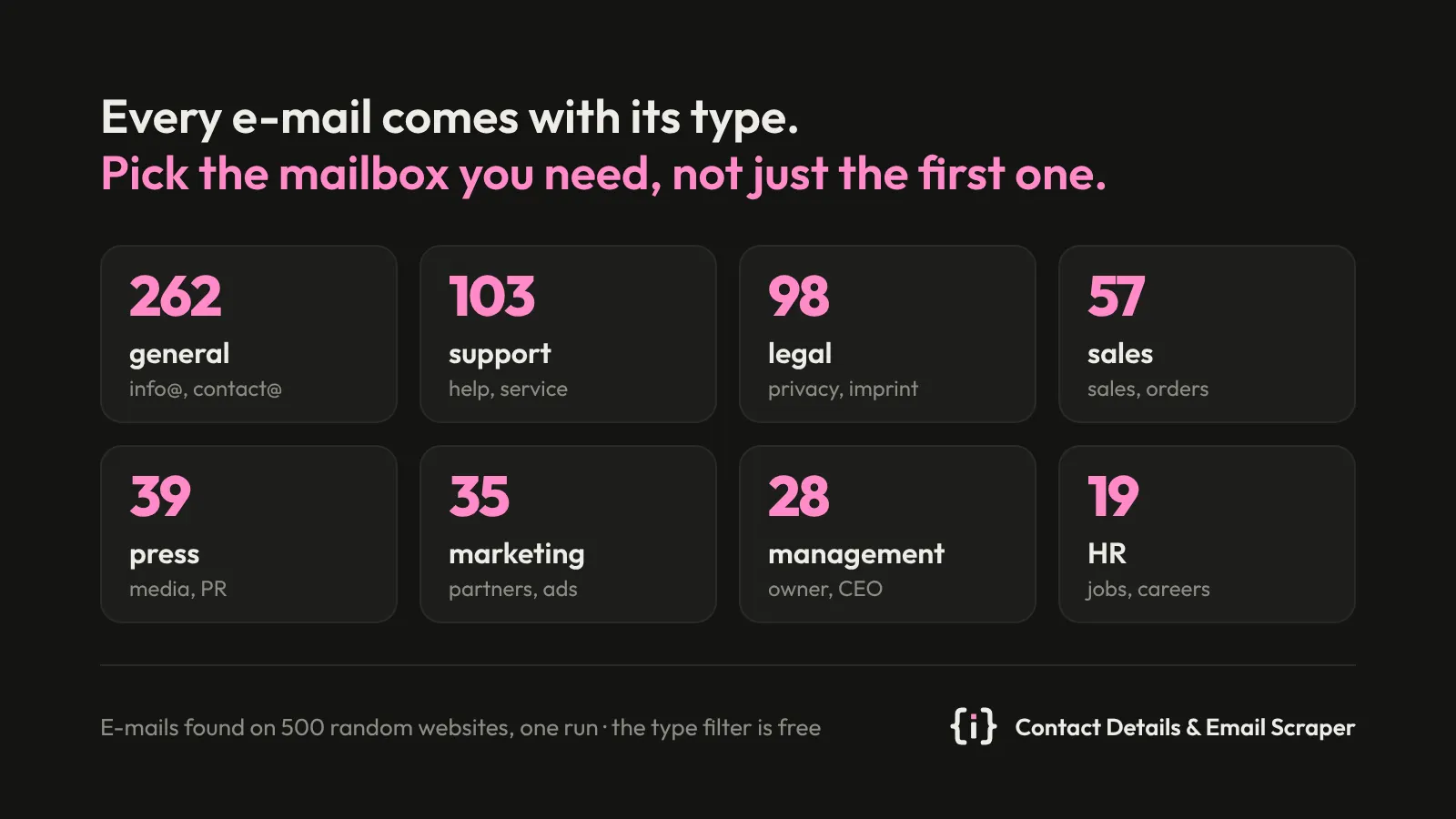
- E-mail types. Every e-mail is tagged general, support, sales, marketing, management, legal, billing, HR, press, personal or technical, from the mailbox name, the words around it on the page and the page itself. Set Only these e-mail types to keep, say, sales and support mailboxes only. The filter is free.
- It reads the homepage, then the contact, imprint (Impressum, mentions légales, aviso legal),
about, team, support and privacy or terms pages it links to, found by keywords in a dozen languages. When the menu
has no such link, it reads the sitemap, then common paths such as
/contactand/impressum. - It decodes Cloudflare's e-mail protection (
[email protected]on the page), spelled-out addresses ("info [at] example [dot] com"), HTML-entity and URL-encoded addresses,mailto:links and schema.org data. - Phones come from
tel:links, schema.org data, numbers after a label (Phone, Tel., Telefon, Téléphone…), international+CCnumbers and North American numbers. - Social profiles: LinkedIn company page, Facebook, Instagram, X, YouTube, TikTok, Pinterest, Snapchat, Telegram, Threads and Discord, one profile per network, without share buttons or platform pages.
- Messengers: WhatsApp, Telegram, Viber, Signal, Facebook Messenger, LINE, Skype and WeChat when the site links to them, and the pages that carry a contact form (for sites that publish no e-mail).
- Optional: technical mailboxes the domain publishes in DNS (DMARC reports, SOA hostmaster), only on the domain itself.
- Company details: legal name (schema.org, or a name with a legal form such as GmbH, Ltd or LLC in the footer or imprint), postal address, EU VAT number and commercial register number (HRB, UK company number, SIRET, KvK).
- Plain HTTP, no browser, many websites in parallel through Apify Proxy. A page behind a bot check is retried with a Chrome-like connection, then through residential proxy; websites that time out get a second try at the end of the run.
- A website your account read in the last 7 days with the same options comes back from your own key-value store
contact-details-scraperat once, without reading it again (switch off with Reuse results of the last 7 days).
What data does it return?
One row per website:
| Field | Description |
|---|---|
domain | The website's domain |
status | ok (contacts found, the only billed status), noContacts, noMatchingContacts, failed, blocked |
emails | The site's own domain first, then other domains; contact mailboxes (info@, sales@) before others |
emailDetails | Each e-mail with its type and the page it came from: {email, type, sourceUrl} |
phones | Digits with an optional leading + |
whatsapp | Numbers from wa.me links |
socials | One profile per network: linkedin, facebook, instagram, x, youtube, tiktok… |
messengers | telegram, viber, signal, messenger, line, skype, wechat when present |
contactForms | Pages with a contact form |
legalName | The company behind the site |
vatId | EU VAT number from the imprint or footer (DE123456789) |
registrationNumber | Commercial register or company number (HRB 123456, UK company number, SIRET, KvK) |
address | Postal address |
sources | Every value with the page it came from: {type, value, sourceUrl} |
url | Homepage after redirects |
pagesFetched | Pages read for this website |
A real row (shortened):
Contact Details & Email Scraper vs. vdrmota Contact Details Scraper
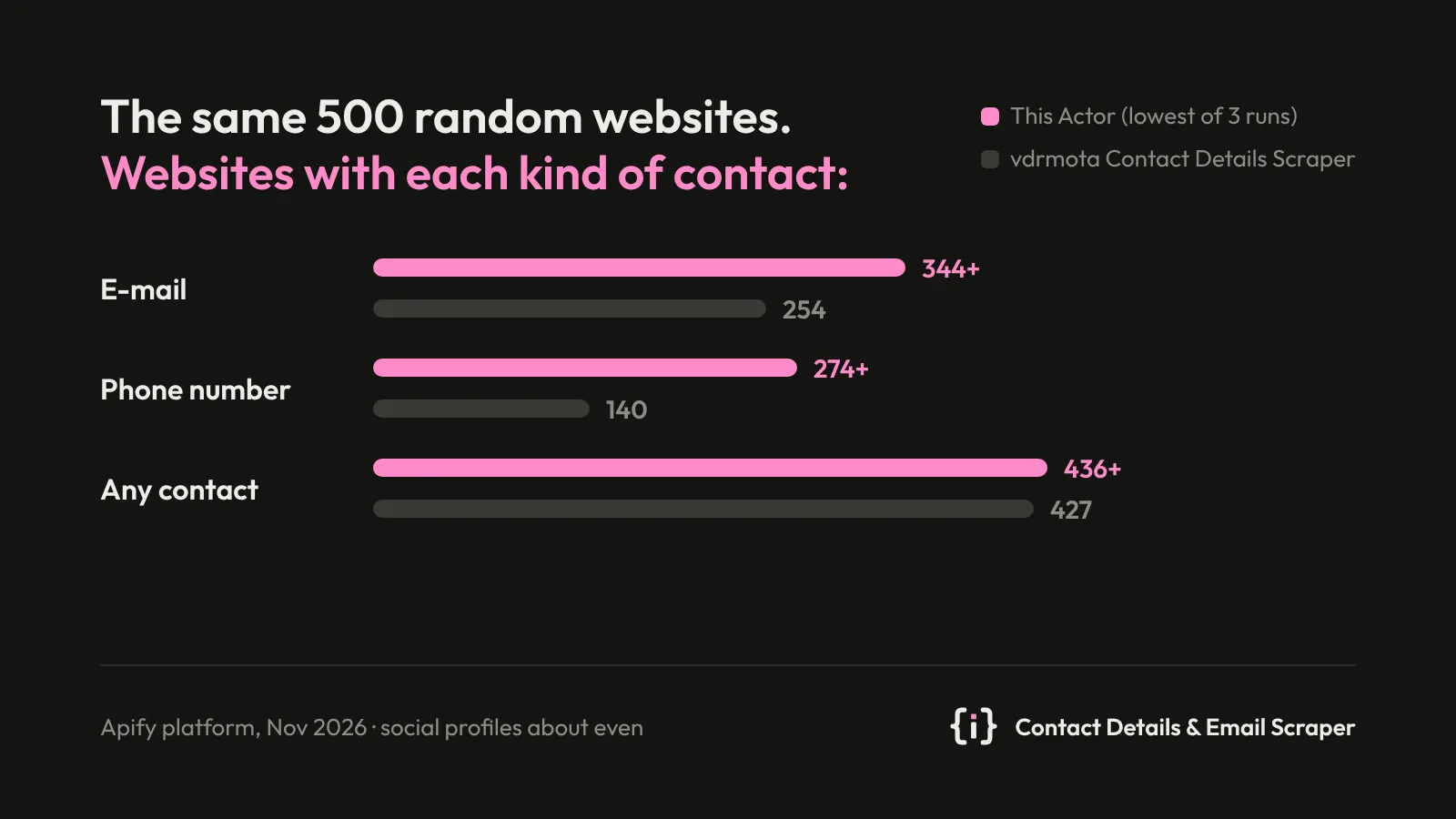
Both Actors on the same 500 random websites (small businesses, colleges, media and shops in the UK, US, Canada, Germany and France), on the Apify platform on 2 November 2026. Our three clean runs give the ranges:
| Contact Details & Email Scraper (this Actor) | vdrmota Contact Details Scraper | |
|---|---|---|
| Websites with an e-mail | 344–364 of 500 | 254 of 500 |
| Websites with a phone number | 274–285 of 500 | 140 of 500 |
| Websites with a social profile | 368–391 of 500 | 392 of 500 (384 with a real profile) |
| Websites with any contact | 436–455 of 500 | 427 of 500 |
| Time for 500 websites | 5.2–5.8 min (1 GB memory) | 9.1 min (4 GB memory) |
| Paid for these 500 websites | $1.31–1.37 (436–455 with contacts) | $3.82 (1,906 pages) |
| Per 1,000 websites with an e-mail | about $3.70–3.90 | about $15 |
On 8 of its 392 websites the only "social profile" is a share button, an embedded YouTube video or a Facebook category page; we leave those out. With its default input (only the list of websites) the other scraper is not usable for a list: on the same 500 it crawled two sites deep, hit its request limit and returned 2 rows.
vdrmota was run with its own settings: up to 4 pages per website, link depth 1, same domain only (run
BFTJC0fUSXioZHg3S). Most of the difference comes from contact and imprint pages that it doesn't reach within its page
limit, and from e-mails hidden by Cloudflare. It charged for all 1,906 pages it read, including 89 pages on 37 websites
where it found no contact at all.
| Contact Details & Email Scraper | vdrmota Contact Details Scraper | |
|---|---|---|
| E-mail type (sales, support, legal…) | yes, free | no |
| Legal name, address, VAT number | yes | no |
| Page each value was found on | yes | no |
| Contact-form pages, messengers | yes (Telegram, Viber, Signal, LINE, Skype…) | WhatsApp, Telegram |
| How you pay | per website with contacts | per page read, plus add-ons |
How much does it cost?
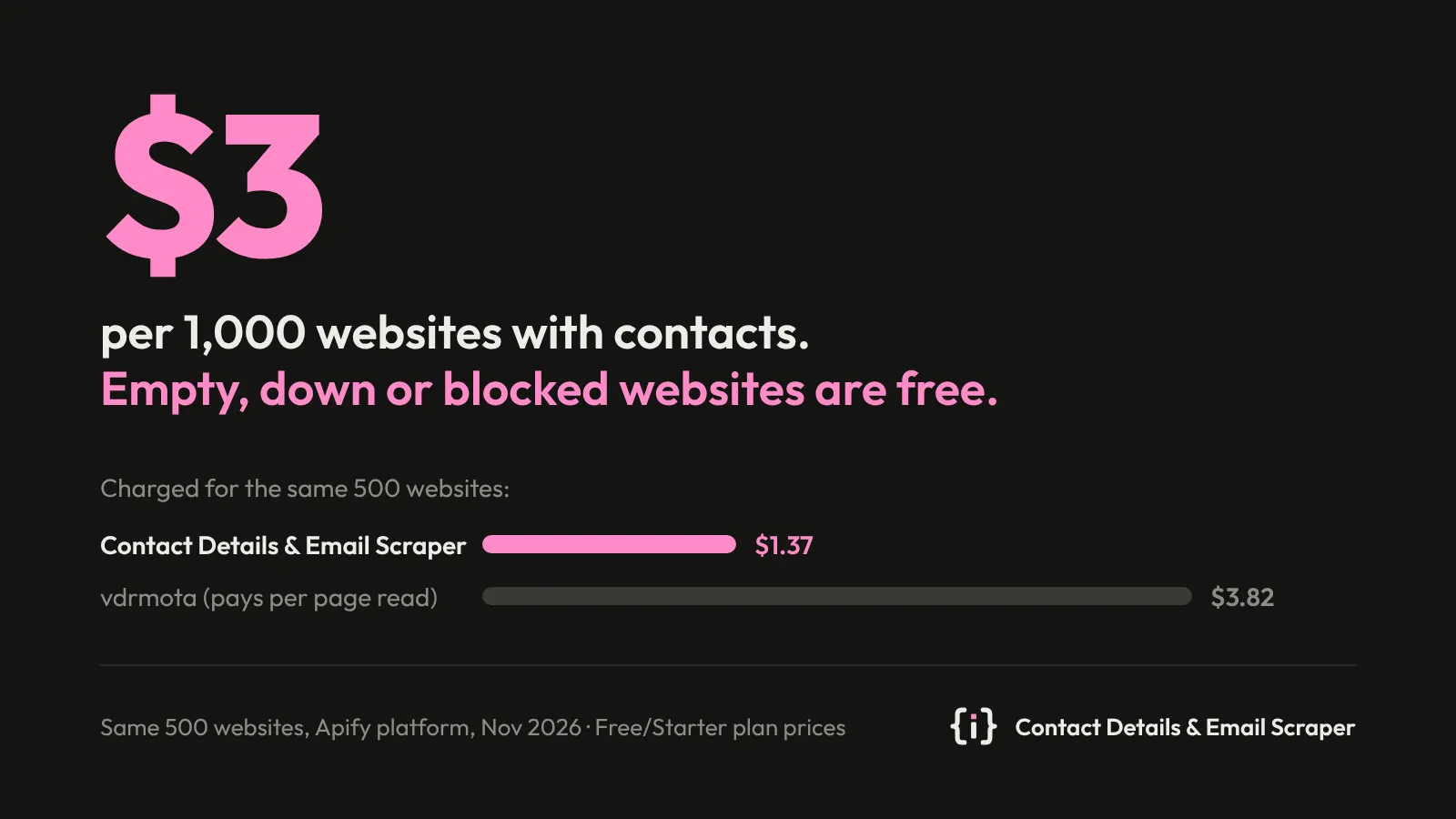
Our price looks higher than "$2 per 1,000" in the Store list because it counts websites, not pages. A pay-per-page scraper reads about 4 pages on every website, so 1,000 websites cost around $7.70 there, and it charges for every page read, including on websites where it finds no contact (89 pages on 37 such websites in our 500-site test). Here you pay only for websites with contacts; empty, unreachable and blocked websites are free.
| Websites with contacts | Free and Starter plans | Scale plan | Business plan |
|---|---|---|---|
| 100 | $0.30 | $0.27 | $0.24 |
| 1,000 | $3 | $2.70 | $2.40 |
| 10,000 | $30 | $27 | $24 |
The first 10 websites with contacts are free for every Apify account.
Pay only for what you need. By default any contact counts: e-mail, phone, social profile or messenger. In
Pay only for websites with you can pick, say, only E-mail. A website with just a Facebook link is then free and comes
back without contacts (status noMatchingContacts).
Apify's free plan includes $5 of credit a month, enough for about 1,600 websites with contacts. Set Maximum cost per run in the run options and the run stops before going over it.
How do I use it?
- Click Try for free.
- Paste your websites into Websites, one per line (
example.comor a full URL both work). - Optional: raise Max pages per website for large sites (default 5).
- Click Start.
- Download the results as CSV, Excel or JSON, or open the Contacts view.
Input example:
If you already use another contact scraper, startUrls with {"url": "https://…"} objects works too.
How do I get e-mails for my Google Maps Scraper results?
Copy the dataset ID of your Google Maps Scraper run (Console → the run → Storage → Dataset ID) into
Websites from datasets and click Start. The Actor reads the website of every place; places without a
website are skipped and cost nothing. Each result row has the domain, so you can join it back to your places.
With billableContacts: ["email"] you pay only for websites where an e-mail was found. The same works for any
dataset with a website, url or domain field (our
Shopify Store Leads gives domain, a CSV you uploaded as a dataset
gives whatever its column is called: name it in Website field in those datasets). Console links to a dataset
work as well as bare IDs. Up to 100,000 items are read per run.
How do I use it in Clay?
Clay runs Apify Actors as an enrichment, one table row at a time.
- In Clay, open Settings → Connections → Add Connection → Apify and paste your Apify API token (Console → Settings → API & Integrations).
- In your table, click Add enrichment, search for Apify and pick Run Apify Actor.
- Choose
insanedev/contact-details-scraperand paste this input, with your website column in place ofWebsite:
- Run it on a few rows, then add columns from the result:
emails(all e-mails),emailDetails(each e-mail with its type, e.g. keepsalesandpersonal),phones,socials.linkedin,legalName,address.
Each row is one website, so it costs $0.003 when an e-mail is found and nothing when it isn't. For thousands of rows,
one run with all websites (or a dataset, see above) is faster than one run per row; import the results back by
domain.
Can I use it from the API, Make, Zapier or an AI agent?
Yes. Run it through the Apify API, the JavaScript or Python client, on a schedule, from Make, Zapier or n8n, or from an AI agent through the Apify MCP server.
What does it not do?
- It reads only what the website itself publishes. It doesn't guess e-mail patterns, look up people on LinkedIn or verify mailboxes.
- A few websites behind a strict bot check (1 of our 50 test sites) still don't open. For them the Actor reads
search-engine snippets of the website's own pages instead. Websites that are down or show an error page are not
searched unless you turn on Search also for websites that are down. When nothing is found, the row comes back
as
blockedorfailed, free of charge. - Pages built only in the browser by JavaScript show fewer contacts; most sites still render their footer and contact page on the server.
Is it legal to collect contact details from websites?
The Actor collects business contact details that companies publish on their own websites. Some of them, such as an employee's work e-mail, can be personal data under GDPR and similar laws. How you store and use the results, for example for outreach, is your responsibility; check the rules that apply to you.
Results of the last 7 days are kept in your own Apify key-value store contact-details-scraper (the contacts found per
website, compressed), so a list read again is answered at once; delete that store to clear them.
At the end of each run, the Actor sends its developer an anonymous summary: the event counts and prices, the run cost,
your Apify plan level (free or paid), your pricing tier and how the run was started (Console, API or schedule). It also
carries a random customer tag, made on your first run of any of our Actors and kept in your own insanedev-customer
key-value store (not derived from your account; deleting that store starts a new one), the days since your previous run,
and how the run was set up: whether it came from a task you saved, the band of the maximum cost you set, and the API
client by name (such as Python, n8n or Make; never the IP address). The summary contains no input, output or account
identifiers.
Troubleshooting
| What you see | What to do |
|---|---|
failed, unreachable | The site didn't answer, twice. Try it again later. |
blocked, challenge | The site shows a bot check. Not billed. |
noContacts on a large site | Raise Max pages per website to 10 or 15. |
| A value you don't expect | sources shows the page it came from. |
Support
Questions, a website where it misses contacts, or a field you need: open an issue in the Issues tab.


