

Audio to MIDI Converter (Basic Pitch)
Pricing
Pay per event
Audio to MIDI Converter (Basic Pitch)
Convert songs, recordings and stems to MIDI files with Spotify's Basic Pitch AI. Polyphonic transcription for piano, guitar, bass, vocals and any instrument, with tempo and key detection, a note list in JSON and an audio preview. MP3, WAV, FLAC, M4A, video and more.
Pricing
Pay per event
Rating
0.0
(0)
Developer

Jumble Mog
Maintained by CommunityActor stats
0
Bookmarked
2
Total users
1
Monthly active users
9 days ago
Last modified
Categories
Security
Limited permissionsShare
Convert songs, recordings and stems into MIDI files with Basic Pitch, the open-source note-transcription AI from Spotify's Audio Intelligence Lab. Give it an MP3, WAV, FLAC, M4A or even a video, and get back a standard .mid file you can drop into Ableton, FL Studio, Logic, GarageBand, MuseScore or any DAW, plus the tempo, the key, a JSON list of every note and an MP3 preview of the transcription. Polyphonic (chords work), any instrument, no GPU and no plugin to install.
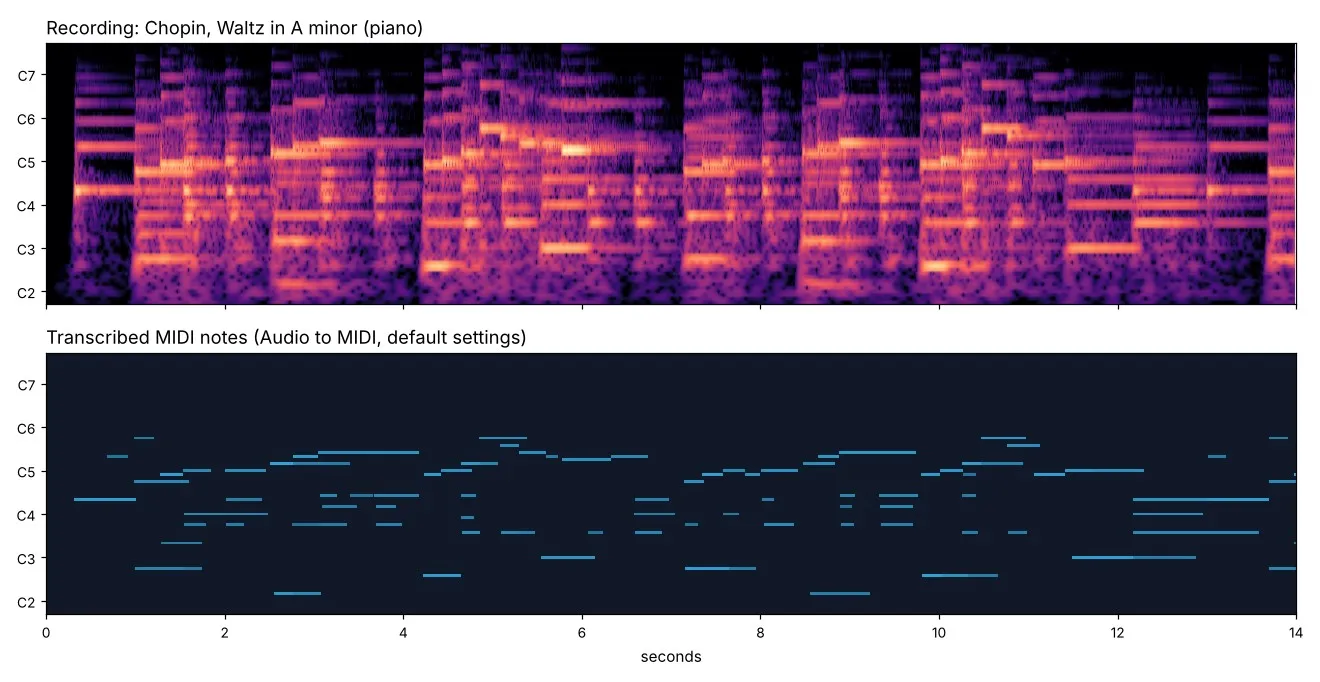
Listen: the piano recording (20 s), the transcribed notes played back, and the MIDI file for the whole piece (1,113 notes, key detected as A minor, correct). Sample: Chopin, Waltz No. 19 in A minor, recorded by Musopen (CC0).
What it does
- Transcribes notes, chords and melodies from any instrument or voice: piano, guitar, bass, strings, winds, synths and singing.
- MIDI that lines up with your DAW: the tempo is detected and written into the file, so bars and beats match the recording. Or set the tempo yourself.
- Instrument presets: piano, guitar, bass or vocals limit notes to the instrument's range (fewer stray notes) and set a fitting MIDI sound.
- Single melody line for vocals, whistling and solo melodies: one note at a time, the loudest wins.
- Pitch bends (optional) follow slides, vibrato and bent guitar strings.
- Key detection: the most likely key (for example "E minor"), worked out from the transcribed notes.
- Note list as JSON: start and end in seconds, MIDI pitch, note name (C4, F#3...) and velocity for every note, ready for code, analysis and AI agents.
- MP3 preview that plays the transcribed notes, so you can check the result without opening a DAW.
- Takes files from anywhere: direct links, Google Drive and Dropbox share links, or uploads. Audio and video files up to 2 GB and 30 minutes.
- Fast and cheap: a 2-minute piano piece takes about 10 seconds. You pay per minute of audio; files that fail cost nothing.
Who it's for
- Producers and beatmakers who want the MIDI of a riff, bassline, chord progression or melody to edit, re-voice or layer.
- Musicians and teachers turning recordings into notes to learn, arrange or notate (open the MIDI in MuseScore for sheet music).
- Songwriters capturing hummed or sung ideas as MIDI.
- App developers and AI agents adding music transcription, key and tempo detection to their products and workflows.
- Music researchers extracting notes from many recordings at once.
How to use it
- Paste links to audio or video files, or upload them. For the cleanest MIDI, use a recording of one instrument or a separated stem (vocals, bass, piano).
- Pick the instrument, or keep "any instrument".
- Click Start. Each file appears in the Output tab with links to the MIDI file, the note list and the preview.
You can also run it through the Apify API, on a schedule, or from Make, n8n, Zapier and other integrations.
How-to examples
How to convert an MP3 or WAV to MIDI
Result: a .mid file in midiUrl with the tempo written in, so bars line up in your DAW, plus a JSON note list, an MP3 preview of the notes, the detected key and notesFound. A 2-minute piano piece takes about 10 seconds.
How to turn a bassline or guitar stem into MIDI
Result for a 95-second bass stem: 212 notes from E1 to A3, a detected tempo of 112.3 BPM and the key of E minor. The bass preset keeps notes in the bass's range, so fewer stray notes come through.
How to transcribe a sung melody to MIDI
Result: one note at a time (the loudest wins), with pitch bends that follow slides and vibrato. For a song with a band, separate the vocals first, for example with Vocal Remover.
How to let an AI agent read the notes of a recording
Add this Actor to the Apify MCP server with https://mcp.apify.com/?tools=jumblemog/audio-to-midi. The note list (notesUrl) gives every note's start, end, pitch, name and velocity, so the agent can work out chords, the key or a melody without listening.
FAQ
Which model does it use? Basic Pitch, Spotify's open-source note-transcription model. It handles chords and several notes at once.
Does it work on full songs? It does, but every instrument's notes end up in one track, with some wrong ones. One instrument or a separated stem gives the cleanest MIDI.
Can it transcribe drums? No. It transcribes pitched notes.
Which files work? MP3, WAV, FLAC, M4A and other audio files, and video files, up to 2 GB and 30 minutes, from links, Google Drive, Dropbox or uploads.
Does it work with Zapier, Make or n8n? Yes. Call the Actor with its Apify app or an HTTP request and pass midiUrl on.
Input
| Field | What it does |
|---|---|
audioUrls | Links to audio or video files, or Google Drive and Dropbox share links. |
files | Files uploaded from your computer or picked from an Apify key-value store. |
instrument | auto (default, full range), piano, guitar, bass or vocals. |
sensitivity | normal (default), high for soft and fast notes, low for clear notes only. |
minNoteMs | Notes shorter than this are dropped (default 128 ms). |
singleMelody | true keeps one note at a time, for vocals and solo melodies. |
pitchBends | true adds pitch bends for slides and vibrato. |
tempoBpm | Empty (default) detects the tempo; or set one, such as 120. |
saveNoteList | Save the JSON note list (default true). |
savePreview | Save the MP3 preview (default true). |
maxFiles | Stop after this many files (default 100). |
Example:
Output
Each file becomes one dataset item, and the files are saved in the run's key-value store:
The note list file:
A file that couldn't be downloaded or read gets status: "failed" and an error that says why, and isn't billed. Download your files within your plan's data retention period, or copy them to your own storage, because run storage expires.
Pricing
You pay per started minute of audio, at the price shown on this page. A 3-minute song is 3 minutes; a 20-second clip is 1 minute. Files that fail are never charged. If you set a maximum cost per run, the Actor stops before a file that wouldn't fit.
Speed
Measured on Apify at the default 2 GB of memory: a 2-minute piano piece took about 10 seconds and a 20-second clip about 2 seconds, plus a few seconds to start the run. Transcription runs on the CPU, and giving the run more memory gives it more CPU.
Tips and limits
- One instrument at a time works best. A full band mix gives a MIDI file with every instrument's notes in one track, including some wrong ones. Separate the stems first (for example the vocals or bass) for clean results. Drums aren't transcribed.
- Use the instrument preset to cut stray notes outside the instrument's range, and single melody line for singing.
- The MIDI keeps the performance's exact timing; it isn't quantized to the grid. Quantize in your DAW if you need it.
- The tempo is an estimate. Rubato and tempo changes can make it differ from the written tempo; set
tempoBpmif you know it. - Only the first audio track of a file is used, mixed to mono.
- Links to YouTube, TikTok, Instagram, SoundCloud and Spotify aren't supported, because those platforms' terms don't allow downloading. Use your own copy of the file.
For AI agents and developers
This Actor works with the Apify MCP server, so AI agents can call it as a tool: pass audioUrls and read midiUrl, key, tempoBpm or the note list from each dataset item. Every item has the same documented fields, and status tells you whether a file succeeded. For a direct API call:
Privacy
Files are downloaded into the run, processed there and saved only to your own Apify storage. Nothing is sent to an outside service.
Credits
- Note transcription: Basic Pitch by Spotify's Audio Intelligence Lab (Apache-2.0), from the paper "A Lightweight Instrument-Agnostic Model for Polyphonic Note Transcription and Multipitch Estimation" (Bittner et al., ICASSP 2022). This Actor isn't affiliated with or endorsed by Spotify.
- Tempo estimation: librosa. MIDI writing: pretty_midi. Audio decoding: FFmpeg.


