

Cut List Optimizer: Sheet, Panel & Lumber Cutting Plans
Pricing
Pay per event
Cut List Optimizer: Sheet, Panel & Lumber Cutting Plans
Optimize cutting plans for plywood, MDF, melamine, glass and sheet metal, and for lumber, bars and pipes. Kerf, grain, edge banding, offcuts and costs; panel-saw, strip or CNC layouts. Diagrams, workshop PDF, Excel, CSV and DXF. Text, JSON or CSV input. For AI agents.
Pricing
Pay per event
Rating
0.0
(0)
Developer

Jumble Mog
Maintained by CommunityActor stats
0
Bookmarked
2
Total users
1
Monthly active users
8 days ago
Last modified
Categories
Security
Limited permissionsShare
Get the cutting plan that wastes the least material, with every saw cut in order. List the parts you need and the sheets or lengths you have, as short text lines like Side: 720 x 560, qty 2, grain, JSON, CSV or a Google Sheet, and it works out where every part goes on plywood, MDF, particleboard, melamine, glass, acrylic or sheet metal, or along lumber, bars, tubes, pipes and profiles. It handles kerf, edge trim, grain direction, edge banding, several stock sizes with prices and limited quantities, offcuts you already have and different materials. Every plan comes back with each part's position, the saw cuts in order, the offcuts worth keeping, the material cost and yield, plus a diagram (PNG and SVG), a workshop PDF, an Excel workbook, a CSV, a DXF for CAD and CNC, and Markdown. It runs fast packing heuristics and Google's OR-Tools solvers, and says when a plan is proven to use the fewest sheets or lengths possible. Made for woodworkers, cabinet and furniture makers, kitchen and closet designers, builders, glaziers, sign makers and metal fabricators, for developers of cut-to-size shops and quoting tools, and for AI agents that need a real cutting plan from one API call.
What it does
- Sheet goods: parts placed on sheets in two dimensions, with the fewest sheets (or the lowest cost) it can find, and offcuts kept large and in one piece where it can.
- Lengths: pieces cut from lumber, bars, tubes, pipes, extrusions or rebar, solved as a cutting stock problem. Plans for lengths are usually proven the best possible.
- Three ways to cut: panel saw, table saw or track saw layouts where every cut runs straight across the piece being cut (guillotine cuts), listed in order with where to set the fence; strip layouts, the simplest to cut; and free layouts for a CNC router, laser or waterjet that place parts anywhere.
- The details that make a plan usable: the saw kerf, trimming chipped factory edges, grain that must run along a part's length, parts that may turn, and edge banding totals.
- Your stock as it is: several sheet or length sizes with prices, limited quantities ("3 sheets left"), and offcuts from earlier jobs, which the least-waste and lowest-cost goals use before new stock. Parts go on stock of their own material ("material: MDF", or a name like "Back panel, hardboard"), and each material is planned on its own.
- Choose the goal: least waste (the default), lowest cost when stock has prices, or fewest sheets or lengths.
- Honest numbers: how much of the stock goes into parts, into offcuts worth keeping and into waste, the material cost, the number and length of saw cuts, and a lower bound. When the plan meets the bound, the result says no plan can use less.
- Files for the workshop and the office: a diagram of every layout (PNG and SVG), a PDF with a summary page, one page per sheet layout with its parts and saw cuts, and the lengths, an Excel workbook (summary, parts, stock, layouts, saw cuts, offcuts, lengths), a CSV of every part's position, a DXF (layers for sheets, parts, offcuts, cuts and labels) for CAD and CNC software, and Markdown for a chat reply or an email.
- Reads what you have: text lines in millimeters, centimeters, meters, inches with fractions (
23 5/8",23-5/8,23⅝) or feet and inches (8' 4"), JSON objects with many spellings of each field, CSV or TSV, Excel files, or a Google Sheet link. - Many cut lists in one run: one per cabinet, room or customer order, up to 50, each with its own parts, stock and settings.
Who it's for
- Woodworkers, cabinet and furniture makers, DIYers: plywood, MDF and melamine cut lists for cabinets, wardrobes, shelves, desks and built-ins, with grain and edge banding.
- Kitchen, closet and furniture designers: sheet counts and material cost for quotes, and cut lists to send to the workshop or a panel-cutting service.
- Builders and deck or frame builders: lumber cut lists (2x4, 2x6) that buy the right mix of 8, 10 and 12 ft boards.
- Metal fabricators and welders: tubes, angle, flat bar, pipe and extrusions, with the saw kerf and the drops worth keeping.
- Glass, acrylic and sign shops, CNC and laser users: free layouts for sheets of glass, acrylic, aluminum composite and sheet metal.
- Developers: a cutting optimization API for cut-to-size web shops, quoting tools, ERP and no-code flows (Make, n8n, Zapier), billed per plan with no monthly plan.
- AI agents and LLM apps: language models can't pack parts onto sheets or count cuts reliably. An agent can pass the parts and stock as plain text and get back a checked plan, its numbers and its files.
How to use it
- List the parts in Parts to cut, one per line, such as
Side: 720 x 560, qty 2, grain. The form starts with a kitchen base cabinet, so you can click Start right away. - List what you can cut from in Stock to cut from, such as
Birch ply 18mm: 2440 x 1220, $52or2x4: 8 ft, $4.50. - Set the Kerf (empty means 3 mm, or 1/8" in inches), the Cut style and anything else that differs from the defaults.
- Click Start. The Plans view shows the diagram and summary, Parts every part and where it went, Sheet layouts and Length layouts each layout with its cuts, Stock what was used and what it cost, and Not placed any part that couldn't be cut, with the reason.
You can also run it through the Apify API, from Make, n8n, Zapier and other integrations, or as a tool for AI agents.
Writing parts and stock
A part as text: the name (before a colon or first on the line), the size (length x width, or just a length for lumber, bars and pipes), then any of these, separated by commas or semicolons:
| Part | Examples |
|---|---|
| Size | 720 x 560, 720x560, 23 5/8 x 11 1/4, 8' 4" x 2', 72,5 x 56 cm, 1200 (a length) |
| Quantity | qty 2, 2 pcs, x 2, (2), 2x Door 715 x 397, or a third number (720 x 560 x 2) |
| Grain | grain (the part's length runs along the sheet's length), grain: width, no grain |
| Edge banding | banding: all, banding: front, banding: L1 L2, banding: 2L 1W |
| Material | material: MDF, or a stock name in the line (Back panel, hardboard), or a thickness (18mm) |
| Note | # left side or note: drill for hinges |
A lumber size in front of a length is the lumber's profile: 2x4 x 92 5/8, qty 10 or Joist 2x4: 92 5/8 is a 92 5/8" piece of 2x4.
A part as an object (field names are matched loosely, so Name, qty, w, edge banding or grain direction work too):
Stock as text: the name (which is also the material parts are matched to), the size, the price and how many there are, which you leave out for as many as needed:
| Stock | Examples |
|---|---|
| Sheets | Birch ply 18mm: 2440 x 1220, $52, 10 sheets, MDF 2800 x 2070 @ 38.50, 4x8 sheet: 96 x 48, $45 |
| Lengths | 2x4: 8 ft, $4.50, Steel tube 40x40x2: 6 m, 20 pcs, 12.40 each, Bar: 6000 |
| Offcuts | Offcut: 900 x 600 (one of each unless you give a count), Remnant 1200 x 800, trim 0 |
| Price | $52, €41,50, £85 per sheet, cost 30 EUR, 12.40 each |
Stock as an object: {"name": "Birch ply 18mm", "length": 2440, "width": 1220, "quantity": 10, "price": 52}, with offcut, material, thickness and trim as options.
As a table: paste CSV or TSV into Parts as CSV or Stock as CSV with a header row such as name,length,width,quantity,material,grain,banding (or name,length,width,quantity,price for stock), or give a link to a CSV, Excel or JSON file or a Google Sheet. Without a header the columns are name, length, width and quantity.
Units: sizes take the unit written with them. Bare numbers take the most common written unit, or are guessed from the stock: 96 x 48 is inches, 244 x 122 centimeters and 2440 x 1220 millimeters, and the notes say what was assumed. Set Units to be sure.
Examples
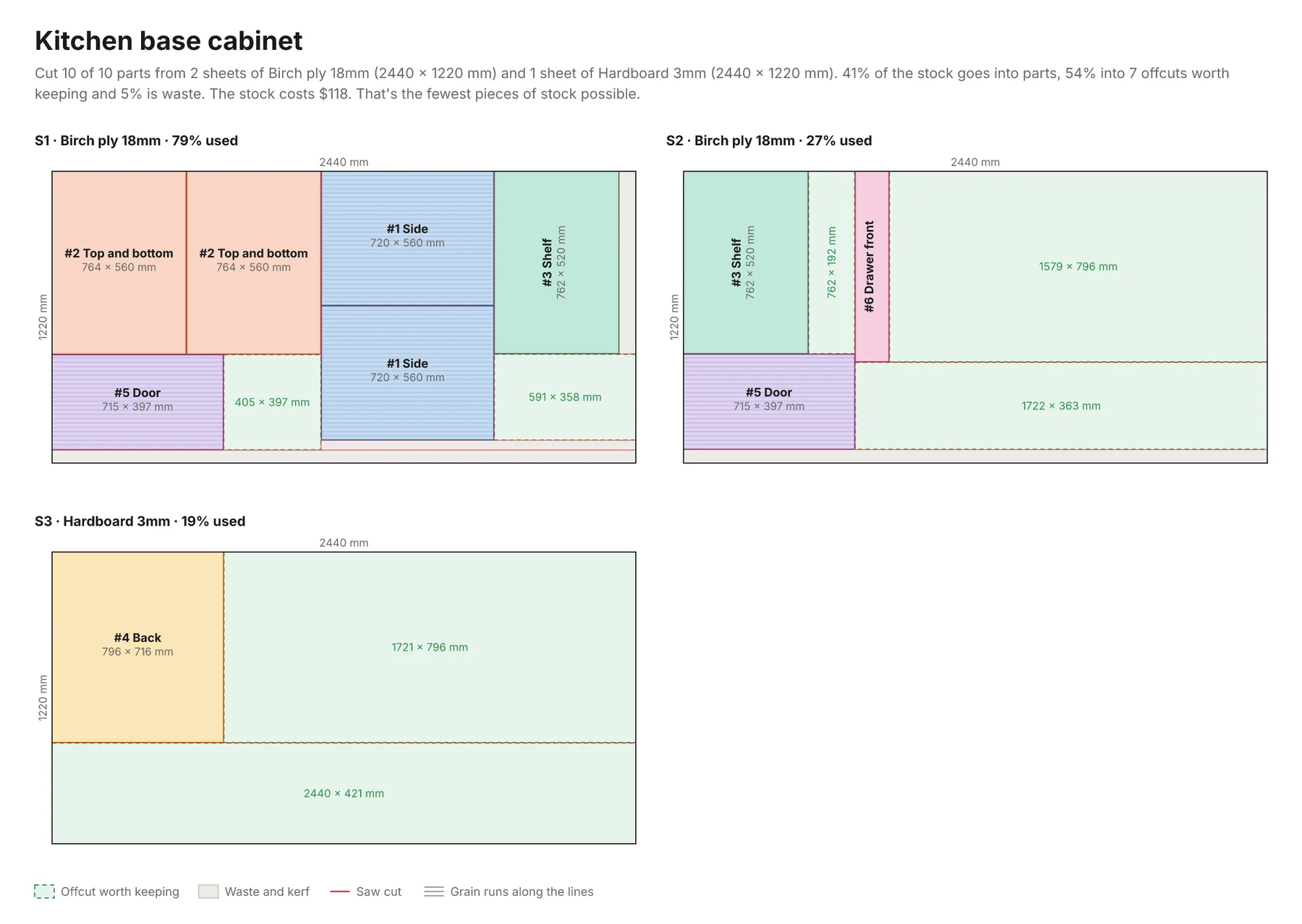
A kitchen base cabinet in millimeters (the form's example):
Cut 10 of 10 parts from 2 sheets of Birch ply 18mm (2440 × 1220 mm) and 1 sheet of Hardboard 3mm (2440 × 1220 mm). 41% of the stock goes into parts, 54% into 7 offcuts worth keeping and 5% is waste. The stock costs $118. That's the fewest pieces of stock possible.
A deck frame in feet and inches, choosing between 8 and 10 ft boards:
Cut 20 of 20 parts from 4 lengths of 2x4 (96"), 6 lengths of 2x4 (120") and 4 lengths of 2x6 (96"). 84% of the stock goes into parts, 13% into 4 offcuts worth keeping and 3% is waste. The stock costs $86.40. No plan uses less material.
Steel tube frames from a CSV, with a 2 mm saw kerf:
Cut 26 of 26 parts from 5 lengths of Square tube 40x40x2 (6000 mm). 82% of the stock goes into parts, 16% into 2 offcuts worth keeping and 2% is waste. The stock costs $62.50. That's the fewest pieces of stock possible.
Acrylic signs on a laser cutter (a free layout with a 0.2 mm kerf):
A wardrobe as objects, choosing the cheaper of two sheet sizes, with 10 mm trimmed off every sheet edge:
Several cut lists in one run: settings given at the top apply to every job unless a job sets its own, and a job with its own parts or stock doesn't take the shared ones.
How-to examples
These are examples from Examples above; the result lines are what their runs say in summary.
How to make a plywood cutting plan for a cabinet
Result: "Cut 10 of 10 parts from 2 sheets of Birch ply 18mm (2440 × 1220 mm) and 1 sheet of Hardboard 3mm (2440 × 1220 mm). 41% of the stock goes into parts, 54% into 7 offcuts worth keeping and 5% is waste. The stock costs $118. That's the fewest pieces of stock possible." Every saw cut is listed in order, with where to set the fence.
How to work out how many boards to buy for a deck
Result: "Cut 20 of 20 parts from 4 lengths of 2x4 (96"), 6 lengths of 2x4 (120") and 4 lengths of 2x6 (96"). 84% of the stock goes into parts, 13% into 4 offcuts worth keeping and 3% is waste. The stock costs $86.40. No plan uses less material." Inches with fractions and feet both work.
How to cut steel tube or pipe lengths with the least waste
Result: "Cut 26 of 26 parts from 5 lengths of Square tube 40x40x2 (6000 mm). 82% of the stock goes into parts, 16% into 2 offcuts worth keeping and 2% is waste. The stock costs $62.50. That's the fewest pieces of stock possible."
How to let an AI agent make cut lists
Add this Actor to the Apify MCP server with https://mcp.apify.com/?tools=jumblemog/cut-list-optimizer. The agent writes the parts and stock as short lines like Side: 720 x 560, qty 2, grain and gives the user the summary, the diagram and the PDF.
FAQ
Does it work for both sheets and lengths? Yes: plywood, MDF and melamine sheets in two dimensions, and lumber, bars, tubes, pipes and rebar in one.
Does it allow for the saw blade? Yes. Set kerf to the blade's width, and trim chipped factory edges if you need to.
Can the cuts be made on a table saw? Yes. Guillotine layouts, where every cut runs straight across the piece, are the default. Strip layouts and free layouts for CNC and laser cutters are there too.
Does it keep the wood grain the right way? Yes. Parts marked grain aren't turned.
Which files do I get? A diagram of every layout (PNG and SVG), a PDF with one page per sheet, an Excel workbook, a CSV of part positions and a DXF for CAD and CNC software.
Input
| Field | What it's for |
|---|---|
parts | The parts: text lines or objects with name, length, width (none for lengths), quantity, grain, banding, material, note. |
stock | What to cut from: text lines or objects with name, length, width, quantity (none for as many as needed), price, offcut, material, trim. |
partsCsv, stockCsv | The same as CSV or TSV text, or a link to a CSV, Excel or JSON file or a Google Sheet. |
units | auto (default), mm, cm, m, in or ft: the unit of bare numbers and of the results. |
kerf | The width of each cut, such as 3 mm, 1/8" or 0 for a shear (default 3 mm or 1/8"). |
edgeTrim | How much to trim off every sheet edge and each end of a length first (default none). |
cutStyle | guillotine (default, panel or table saw), strips or nested (CNC, laser, waterjet). |
allowRotation | Let parts without grain turn a quarter turn (default on). |
goal | least-waste (default), lowest-cost or fewest-stock. |
minOffcut | The smallest leftover listed as an offcut to keep (default 150 mm or 6" across for sheets, 300 mm or 12" for lengths). |
currency, title | The currency of prices (default the one written with them, or $) and the plan's name. |
timeLimitSeconds | How long to search for a better plan (default 10, up to 300). |
jobs | Several cut lists in one run. |
Output
One dataset item per cut list (shortened here):
Positions are measured from the sheet's left end (x, along its length) and top edge (y, across it). Each saw cut says where to set the fence on the piece being cut: a rip runs along the sheet's length and a cross-cut across it, and cuts are listed in the order they can be made. Lengths come back in bars, each with its pieces in order ("piecesText": "#1 92 5/8\", #2 22 1/2\""), the offcut and whether it's worth keeping. A cut list with parts that couldn't be placed is incomplete, and unplaced says why, such as "Bigger than any stock it can be cut from: the largest is 2440 × 1220 mm after trim." or "Not enough stock: every Ply sheet there is was used."
cutList is the whole plan as Markdown, ready for a chat reply, an email or a wiki. The run's OUTPUT record holds every plan as one JSON object, so the run-sync API endpoint answers with them directly.
How it works
Sizes are turned into exact whole numbers (micrometers, or 1/64,000 inch), rounding parts up and stock down, with the kerf added to every part and to the usable stock, so plans are exact and parts always come out at least as large as asked.
Sheets are packed by a portfolio of fast heuristics (guillotine, maximal-rectangles and strip packing with different part orders and placement rules), then improved by repeatedly taking the emptiest sheet and a few others and packing their parts onto fewer sheets, with an exact constraint programming search (OR-Tools CP-SAT) for free layouts of up to 40 parts. Area and part-size lower bounds tell when the number of sheets can't go lower. Panel-saw and strip plans are built as a tree of straight cuts, which gives the saw cuts in order.
Lengths are solved as a cutting stock problem: column generation (OR-Tools' GLOP with a knapsack search for new patterns) finds the best mix of cutting patterns and a lower bound, CP-SAT turns it into whole bars, and an exact arc-flow model (SCIP) settles smaller cases. Plans with one stock length are usually proven optimal, and a last pass uses as few different patterns as it can at the same cost, so the saw stop is moved less often.
Several materials or stock groups are planned separately, sharing the time limit, and offcuts you list are used before new stock under the least-waste goal.
Checks
Every plan in the tests is checked by separate code from the solvers': each part inside its sheet and the edge trim, at least a kerf from every other part, at its size, never turned against its grain, and placed exactly as many times as asked (or reported as not placed); every saw cut on the sheet and clear of every part; pieces on a length in order, a kerf apart and within the length; and no more stock used than there is. The length solver is checked on Wikipedia's cutting stock example (73 rolls, proven). 102 tests pass, and the same checks hold on jobs of over 400 parts in each cut style.
Pricing
You pay per cutting plan made, at the price shown on this page, with every file included. Plans that can't be made are never charged. Solving past the first 30 seconds of a plan adds a small solver time charge per started 10 seconds, so with the default 10-second time limit it never applies. If you set a maximum cost per run, the Actor checks before each plan that it fits and shortens the time limit to stay within it.
Speed
Most cut lists (up to a few dozen parts) are finished in a second or two, often proven optimal, and a run through the API answers in about 10 to 15 seconds, including the cloud container starting and the files being saved. Hundreds of parts use more of the time limit: in tests, 430 mixed parts on 2440 × 1220 sheets reached about 95% yield in 6 seconds. Give large jobs 30 to 60 seconds to search further.
Tips and limits
- Grain:
grainkeeps a part's length along the sheet's length (the way the grain runs on plywood and wood-look melamine). Write the part's length in the grain direction, or usegrain: width. - Rotation: parts without grain may turn a quarter turn unless Allow rotation is off.
- Kerf and trim: the kerf is taken off between parts, not at the sheet's edges; use Edge trim for chipped or uneven factory edges.
- Materials: a part goes on stock whose name or material matches its own (
material: MDFmatchesMDF 18mm: 2800 x 2070). Parts that name no material go on the first material listed, and the notes say so when other stock was left unused. - Offcuts: leftovers at least Minimum offcut across are listed as offcuts to keep; anything smaller counts as waste. List last job's offcuts as stock to use them first.
- Three numbers:
720 x 560 x 2is two parts, and720 x 560 x 18 mm(a unit, or a fraction like3/4) is the thickness. The notes and warnings say how anything unusual was read. - Limits: 5,000 part lines and 5,000 stock lines per job, 5,000 sheet parts in all (counting quantities) and 200,000 pieces cut from lengths, 50 jobs per run, and up to 300 seconds of solving per plan. A run stops once jobs that can't be planned have taken 3 minutes.
- Links: CSV, TSV, JSON and Excel files, GitHub file links and Google Sheets links (shared as "Anyone with the link" or published to the web). Every site's robots.txt is checked first.
For AI agents and developers
This Actor works with the Apify MCP server, so AI agents can call it as a tool: send the parts and stock as text lines and read summary, cutList, unplaced and the file links from the result. A direct API call that waits for the answer:
run-sync instead returns the run's OUTPUT: the status, how many plans were made and every plan as JSON.
In Python, with the apify-client package:
Credits
- Optimization: Google OR-Tools with its CP-SAT, GLOP, knapsack and SCIP solvers (Apache License 2.0).
- Files: openpyxl (MIT) for Excel, vl-convert (BSD-3-Clause) for the PNG and PDF pages, pypdf (BSD-3-Clause) to join them, and the Inter font (SIL Open Font License), subset with fontTools (MIT).


