

Route Optimizer: Vehicle Routing & Delivery Route Planner
Pricing
Pay per event
Route Optimizer: Vehicle Routing & Delivery Route Planner
Plan optimal delivery and service routes for one or more vehicles with Google OR-Tools: capacities, time windows, working hours, pickups and deliveries, skills. Stops from a list, CSV, Google Sheets or Google Maps Scraper results. Maps, times, Google Maps links. For AI agents.
Pricing
Pay per event
Rating
0.0
(0)
Developer

Jumble Mog
Maintained by CommunityActor stats
0
Bookmarked
2
Total users
1
Monthly active users
3 days ago
Last modified
Categories
Share
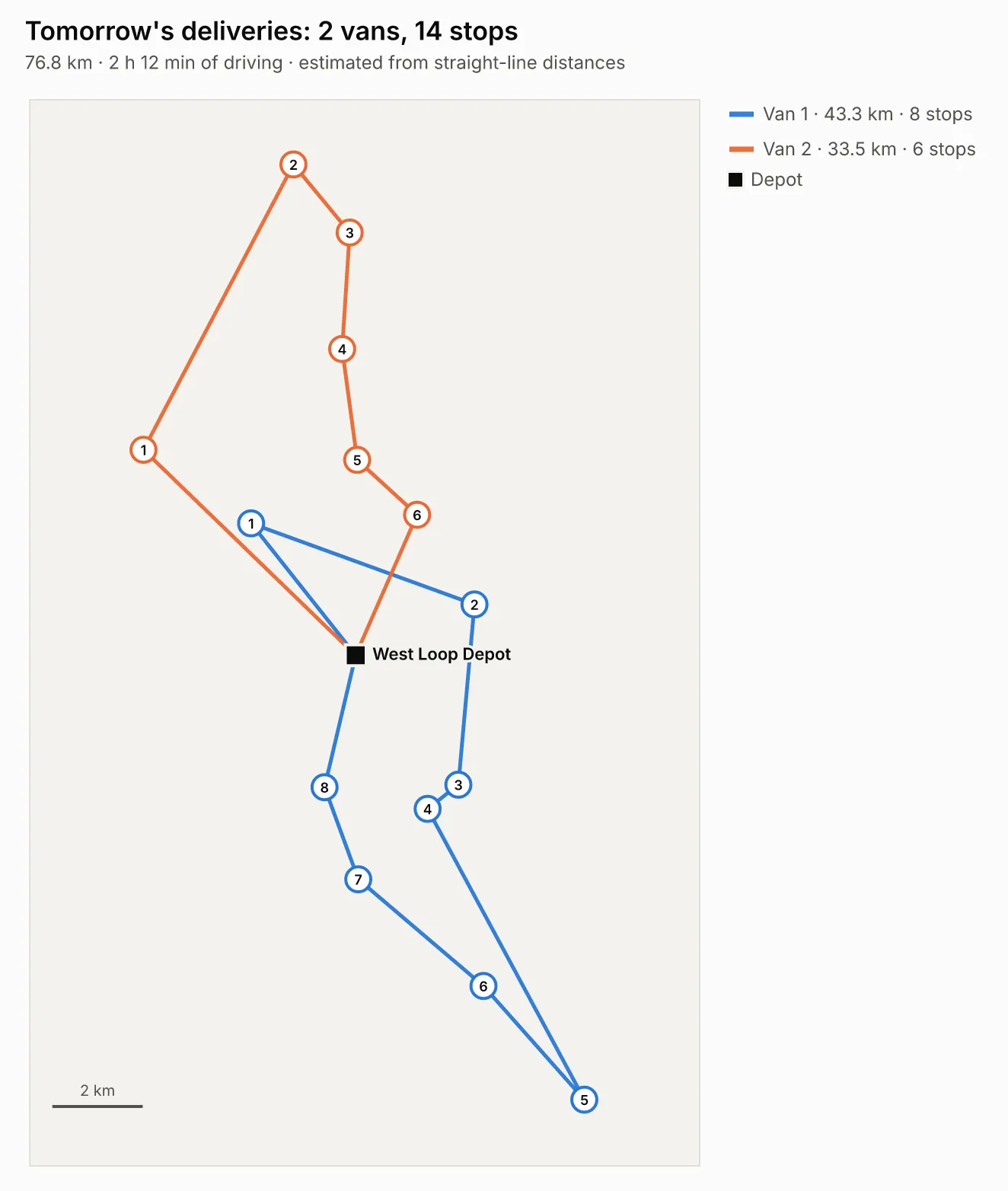
Plan the best routes for your vehicles and get every stop in order with its arrival time. Give it a list of stops (a JSON list, CSV, a Google Sheet, a link or an Apify dataset such as Google Maps Scraper results) and how many vehicles you have, and it works out which vehicle visits which stops in which order, keeping to capacities, time windows, service times, working hours, pickups and deliveries, skills and route limits. Every plan comes back with each route's stops and arrival times, loads, Google Maps navigation links, a route map, a CSV, a GeoJSON file, the distance saved and the reason for every stop that couldn't fit. It uses Google's OR-Tools, the open-source solver behind many commercial route planners. Made for delivery businesses, field service teams, sales reps, logistics developers, automations and AI agents that need real route optimization from one API call.
What it does
- The traveling salesman problem: the shortest round trip (or one-way path) through any number of places, up to 1,000.
- Vehicle routing for a fleet: splits the stops between several vehicles and orders each route, using as few vehicles as the constraints need. Vehicles can differ in capacity, start and end point, working hours, skills and cost.
- Capacities: each stop's demand (parcels, kg, crates, seats) against each vehicle's capacity, in one unit or several at once, such as weight and volume.
- Time windows: stops that must be served between set times, several windows per stop if needed, with service time at each stop. Vehicles wait when they arrive early, and the plan avoids long waits when a short detour does.
- Working hours and route limits: shift start and end, the longest route in hours or distance (an electric van's range) and the most stops per vehicle.
- Pickups and deliveries: loads carried from one place to another on the same vehicle, pickup first, as couriers and food delivery work; and returns collected on delivery routes.
- Skills and assigned vehicles: stops that need a refrigerated van, a lift or a certified technician only go to vehicles that have it, and a stop can be fixed to one vehicle.
- Objectives: the shortest total distance, the least total time, balanced routes (even workloads), the fewest vehicles, or the lowest cost from your cost per km, per hour and per vehicle.
- Never stuck: when not every stop fits, it plans the rest and lists the ones left out with the reason, such as "the vehicles are full: together they carry 50, and the stops need 60" or "its time window (06:00-07:00) closes before any vehicle can get there".
- Distances your way: estimated from coordinates with no API key, from a distance or travel-time matrix you paste (an OSRM, OpenRouteService or Google Distance Matrix answer works as it is), or from your own OSRM server for real road times.
- Results people and programs can use: arrival, service and departure times for every stop, loads after each stop, totals, how much shorter the plan is than the order given, Google Maps links for turn-by-turn directions, a map image (PNG, SVG, PDF or interactive HTML), a CSV of every stop, a GeoJSON file of the routes and a link that opens them on an interactive street map.
- Many plans in one run: one per day, region or depot, up to 100, each with its own stops and settings.
Who it's for
- Delivery businesses: florists, bakeries, pharmacies, grocers, furniture and appliance stores planning tomorrow's drops for a few vans.
- Field service teams: plumbers, electricians, cleaners, installers and inspectors with appointment windows, job durations and skills.
- Sales reps and merchandisers: the best order to visit 20 accounts, ending at home instead of the office.
- Couriers and transport: pickups and deliveries, school and staff shuttles, waste collection and recurring rounds.
- Developers and automations: a route optimization API for apps, spreadsheets and no-code flows (Make, n8n, Zapier), billed per use with no monthly plan.
- AI agents and LLM apps: language models can't solve routing problems reliably in their heads. An agent can send the stops and get back an optimized plan it can act on and explain.
- Apify users: plan routes straight through Google Maps Scraper results, such as every shop in a list of leads.
How to use it
- Put your stops in Stops (or paste CSV, give a link or pick an Apify dataset). Each stop needs a name and coordinates; demand, service time and a time window are optional. Mark the depot with
"type": "depot"or set Depot. The form starts with 14 deliveries around Chicago for two vans, so you can click Start right away. - Set Number of vehicles and their Capacity, or list different vehicles in Vehicles, and the Working hours.
- Click Start. The Plans view shows the map, the summary and the totals, and the Routes view every route's stops in order with arrival times and loads. The CSV and GeoJSON links are in each result.
You can also run it through the Apify API, on a schedule, or from Make, n8n, Zapier and other integrations.
Examples
The best order to visit a list of places (a round trip from the first one):
Routes through Google Maps Scraper results, starting from a warehouse and ending wherever the last stop is:
Deliveries with vans, capacities and time windows (CSV works the same way, with one column per field):
Technicians with skills, their own start points and shifts, for the least total time:
Pickups and deliveries (each order picked up before it's delivered, on the same vehicle):
Real road distances: paste the answer of a matrix service (OSRM table, OpenRouteService matrix or Google Distance Matrix) with the places in the same order as the stops, in Routing service response, or set OSRM server to your own OSRM server.
A week of plans in one run, sharing the vehicles and settings:
How-to examples
Each example below is a complete input. The result line is what the run says in summary.
How to find the shortest route through a list of addresses or stops
Give coordinates; the first stop is where the round trip starts and ends.
Result: "1 vehicle serves all 4 stops: 23.6 km and 40 min of driving, estimated from straight-line distances. The route runs from 08:00 to 08:40. Visiting the stops in the order given would take 31.8 km, so this route is 26% shorter." Each route has a Google Maps link with the stops in order.
How to plan delivery routes for several vans with capacities and time windows
Result: "2 vehicles serve all 3 stops: 28.4 km and 49 min of driving in total, estimated from straight-line distances. Routes run from 08:24 to 14:34. Vehicle 1: 2 stops, 20.9 km, 42 min; Vehicle 2: 1 stop, 7.4 km, 13 min." Every stop gets its arrival time and the van's load.
How to route the places from a Google Maps scrape
Result: the scraped places split between 3 vehicles of up to 25 stops each, with a map picture, a CSV of the stops and a link that opens the routes on an interactive map. Stop names and coordinates are read from the dataset's own fields.
How to let an AI agent plan routes
Add this Actor to the Apify MCP server with https://mcp.apify.com/?tools=jumblemog/route-optimizer. The agent sends the stops as JSON and reads summary, routes (each with its stops in order, times and a Google Maps link) and leftOut for any stop that didn't fit.
FAQ
Does it need a Google Maps API key? No. Distances are estimated from the coordinates. For exact road times, paste a distance matrix from OSRM, OpenRouteService or Google, or give your own OSRM server.
Does it find addresses? No. Stops need latitude and longitude. Google Maps scraper results and most store lists already have them.
How many stops can it handle? Up to 1,000 stops and 100 vehicles per plan.
Can it skip stops that don't fit? Yes. Stops that can't be served in the vehicles' shifts or capacity are listed in leftOut with the reason, and you aren't charged for them.
Does it work with Zapier, Make or n8n? Yes. Call the Actor with its Apify app or an HTTP request, and send the Google Maps links to the drivers.
Input
| Field | What it's for |
|---|---|
stops | The stops: name, lat, lng and optional demand, pickup, serviceMinutes, timeWindow, priority, optional, skills, vehicle, address, id. Field names are matched loosely (latitude, quantity, service_time, time_window, Google Maps Scraper's location). |
stopsCsv, dataUrl, datasetId | The same stops as CSV text, a link (CSV, JSON, Excel, Google Sheets, GitHub) or an Apify dataset. |
depot | Where vehicles start and finish. Or mark a stop "type": "depot"; otherwise the first stop is the depot. |
vehicleCount, capacity | Identical vehicles and what each carries. |
vehicles | Different vehicles: name, count, capacity (a number or {"weight": 1000, "volume": 12}), start, end, shiftStart, shiftEnd, skills, maxStops, maxDistance, maxRouteHours, costPerKm, costPerHour, fixedCost. |
shiftStart, shiftEnd, maxRouteHours, maxRouteDistance, maxStopsPerVehicle | Working hours and route limits for all vehicles. |
returnToDepot, startAnywhere | Round trips, or routes that end at the last stop; and routes with no fixed start. |
objective | distance (default), time, balanced, vehicles or cost. |
allowSkipping | On (default): plan what fits and list the rest with reasons. Off: fail with the reasons. |
shipments | Pickup-and-delivery pairs with their load. |
units, distanceSource, averageSpeed, roadFactor | Kilometers or miles, and how distances are worked out. |
distanceMatrix, durationMatrix, routingResponse, osrmUrl | Your own road distances and times. |
costPerDistance, costPerHour, costPerVehicle | Costs for the cheapest plan and the cost estimate. |
chart, chartFormats, chartTheme, title | The map: PNG, SVG, PDF or interactive HTML, light or dark. |
timeLimitSeconds | Solving time; 0 picks it from the size. |
plans | Several plans in one run. |
Output
One dataset item per plan (shortened here):
For a single route that serves every stop, comparison gives the distance of the order you gave and how much shorter the plan is. Stops left out are listed in leftOut with the reason. The run's OUTPUT record holds all plans as one JSON object.
How it works
The plan is a vehicle routing problem solved by OR-Tools' routing library: a first solution by cheapest insertion, then guided local search, which keeps improving the routes until the solving time runs out (about 1 second for 10 stops, 8 for 100 and a minute for 1,000, a little more with time windows or pickups). Capacities, time windows, working hours and route limits are hard rules; a stop that can't be served is left out with a penalty, so the solver always returns the best plan that fits, and the reason is worked out afterwards. Vehicles leave as late as they can without arriving after a window closes, so nobody waits longer than needed.
By default, distances are estimated: the straight-line distance between coordinates times a road factor of 1.3, driven at 35 km/h (22 mph) on average. That's good for comparing orders and splitting stops between vehicles, and needs no map service; for exact road times, give a matrix from your routing service or an OSRM server.
Accuracy
On OR-Tools' own documented examples:
| Problem | Best known | This Actor |
|---|---|---|
| Traveling salesman, 13 US cities | 7,293 miles (checked by exact search) | 7,293 miles |
| Capacitated routing, 16 stops and 4 vehicles of capacity 15 | 6,208 | 6,208 |
Every finished plan in the tests is checked against its rules: service inside each time window, loads within capacity, pickups before their deliveries on the same vehicle, and skills.
Pricing
You pay per route plan and per routed stop (each stop on the finished routes), at the prices shown on this page, with the map, CSV, GeoJSON and Google Maps links included. Stops left out aren't charged, and plans that can't be made are never charged. If you set a maximum cost per run, the Actor checks before each plan that it fits.
Speed
A plan through the API answers in about 10 seconds for a few dozen stops, most of it the cloud container starting and the solver searching. Larger plans take as long as the solving time: about 12 seconds for 100 stops with time windows, 45 seconds for 300 and a minute for 1,000.
Tips and limits
- Coordinates: every stop needs latitude and longitude unless you give a distance matrix. To get coordinates from addresses, run a geocoder first, or use Google Maps Scraper, whose results this Actor reads as they are.
- Times: 09:00, 9:30 am, 14h and 2026-10-24T09:00 all work; windows can span midnight (22:00-02:00). Service times take 10, "10 min", "1h30" or "90s".
- Demand without capacity is reported as loads but doesn't limit anything; set Capacity to make it count.
- Priorities: when not everything fits, stops with a higher
priorityare kept first, andoptionalstops go first. - Limits: 1,000 stops per plan (a shipment counts as two), 100 vehicles, 100 plans per run, files up to 30 MB, and OSRM tables up to 400 places. Solving time goes up to 30 seconds for plans of up to 50 stops, then 0.6 seconds per stop (600 for 1,000), and a run stops once plans that can't be made have taken 3 minutes.
- Datasets: Apify lets this Actor read only the dataset picked in its Apify dataset field.
- Links: CSV, TSV, JSON and Excel files, GitHub file links, Gist links and Google Sheets links (shared as "Anyone with the link" or published to the web). Every site's robots.txt is checked first.
- Directions: each route's Google Maps links hold up to 9 stops between start and end (Google's limit), so longer routes get several links in order.
For AI agents and developers
This Actor works with the Apify MCP server, so AI agents can call it as a tool: send the stops and read summary, routes and leftOut from the result. A direct API call that waits for the answer:
run-sync instead returns the run's OUTPUT: the status, how many plans were made and every plan as JSON.
In Python, with the apify-client package:
Credits
- Routing: Google OR-Tools (Apache License 2.0) and NumPy (BSD-3-Clause).
- Data files: openpyxl (MIT).
- Maps: Vega-Lite (BSD-3-Clause) through vl-convert (BSD-3-Clause), with the Inter font (SIL Open Font License). Directions open in Google Maps and street maps at geojson.io.
- Test problems: the traveling salesman and capacitated routing examples from the OR-Tools documentation.


