

Diagram Renderer: Mermaid, PlantUML, Graphviz, LaTeX to PNG/SVG
Pricing
Pay per event
Diagram Renderer: Mermaid, PlantUML, Graphviz, LaTeX to PNG/SVG
Render Mermaid diagrams, PlantUML, Graphviz DOT graphs, Vega-Lite and Vega charts, and LaTeX math to PNG, SVG or PDF files. Built for AI agents and automations: send the code, get a download link, or the exact error message to fix the code.
Pricing
Pay per event
Rating
0.0
(0)
Developer

Jumble Mog
Maintained by CommunityActor stats
0
Bookmarked
2
Total users
1
Monthly active users
15 hours ago
Last modified
Categories
Share
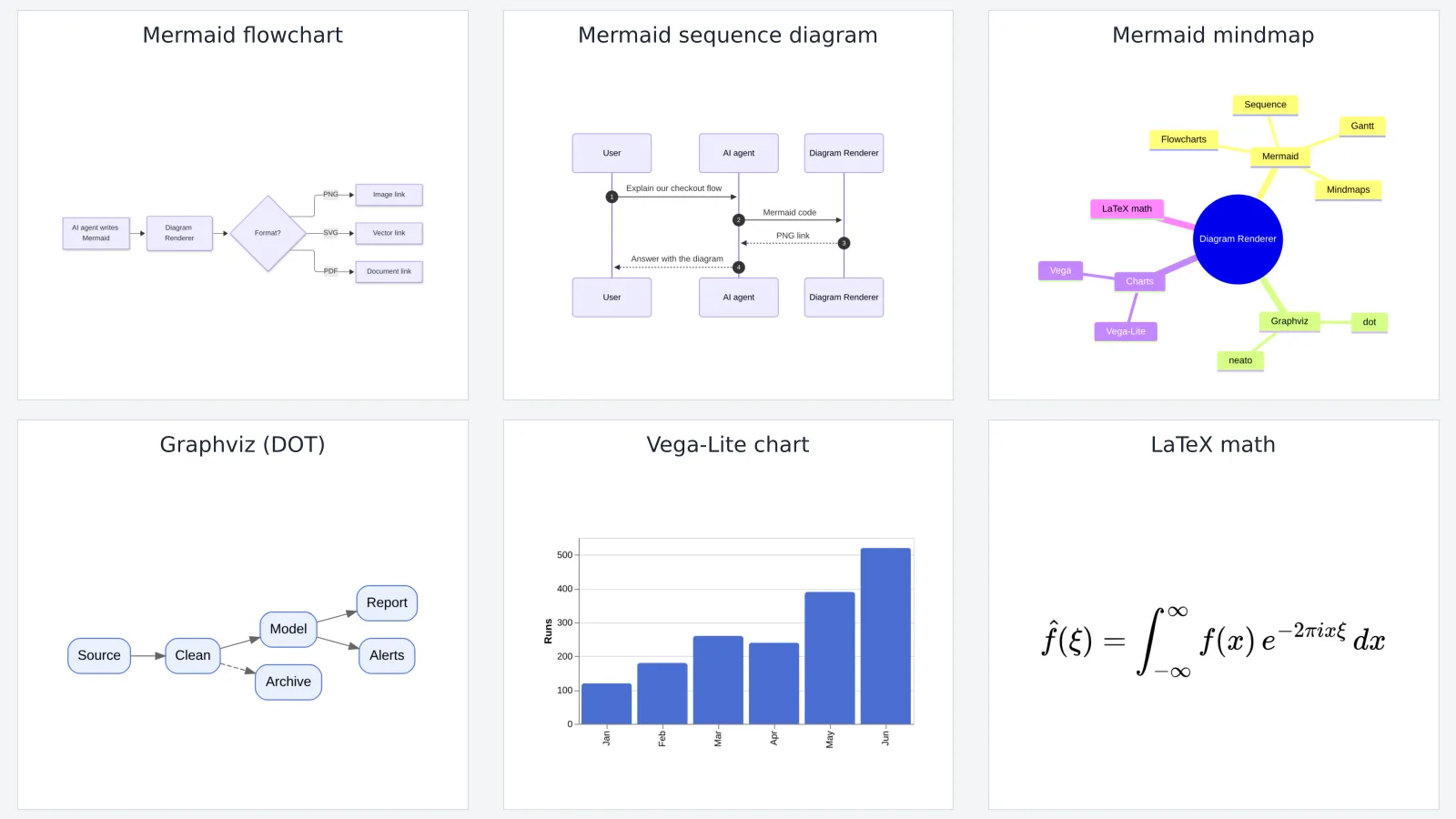
Turn diagram code into image files. Send Mermaid code (flowcharts, sequence, class, state and ER diagrams, Gantt charts, mindmaps, timelines and more), PlantUML diagrams, Graphviz DOT graphs, Vega-Lite and Vega chart specs, or LaTeX math, and get back a PNG, SVG or PDF with a download link. When the code has a mistake, you get the renderer's exact error message (line, position and what it expected), so a person or an AI agent can fix it and try again. Many diagrams per run, pay per diagram, and failed ones are free.
What it does
- Mermaid: all the diagram types built into Mermaid 12.2, such as flowchart, sequence, class, state, ER, Gantt, pie, mindmap, timeline, gitGraph, user journey, quadrant, Sankey, XY chart, block, packet, kanban, architecture, C4, requirement, radar and treemap. Themes: default, dark, forest, neutral, and base for your own colors.
- PlantUML: sequence, use case, class, activity, component, state, deployment and timing diagrams, mind maps, WBS, Gantt charts and more, including the bundled standard library (such as C4 with
!include <C4/C4_Context>) and!includefrom https URLs. - Graphviz: DOT graphs with the dot, neato, fdp, sfdp, circo and twopi layout engines.
- Charts: Vega-Lite and Vega JSON specs, including data loaded from a URL.
- LaTeX math: formulas rendered with MathJax, with or without
$$ ... $$around them. - Detects the kind of code automatically, or set it yourself. Code wrapped in Markdown fences (
```mermaid ... ```), the way AI models usually write it, works as it is, even with text around it. - PNG, SVG or PDF: PNG at 1× to 4× pixel density, PDF sized to the diagram, and SVG with fixed pixel sizes. Mermaid SVG files use real SVG text instead of HTML inside the SVG, so the labels also show up in design tools, office apps and image converters, not only in browsers.
- Any background: white, transparent or any color, in every format. The dark theme comes with a matching dark background.
- Useful errors: syntax errors come back in the
errorfield with the renderer's own message, and aren't charged. - Batch rendering: send a list of diagrams, each with its own name, format, theme and background.
- Image straight from the API: the first file is also the run's
OUTPUT, so the run-sync endpoint answers with the image itself. - No outside services: Mermaid, PlantUML, Graphviz and MathJax are built into the Actor, so nothing is sent to a third-party rendering API.
Who it's for
- AI agents and LLM apps that write Mermaid, PlantUML, DOT, chart specs or LaTeX and need a picture to show, send or put in a document.
- Automation builders in n8n, Make or Zapier who generate reports, docs or emails with diagrams and charts.
- Developers who want diagrams as code in docs, wikis, tickets and slides without installing Mermaid CLI, PlantUML, Java, Graphviz or a headless browser.
- Teachers and writers turning formulas and diagrams into images for slides, worksheets and posts.
How to use it
- Paste your diagram code into Diagram code, or put several diagrams in More diagrams.
- Pick the file format (PNG by default) and, if you like, a theme and background.
- Click Start. Each diagram appears in the Output tab with a download link, or with the error message if it couldn't be drawn.
You can also run it through the Apify API, on a schedule, or from Make, n8n, Zapier and other integrations.
Input
| Field | What it does |
|---|---|
code | One diagram's code: Mermaid, PlantUML, Graphviz DOT, a Vega-Lite or Vega spec, or LaTeX. |
diagrams | More diagrams: a list of code strings, or objects with code and optional name, type, format, theme and background. |
type | auto (default), mermaid, plantuml, graphviz, vegalite, vega or math. |
format | png (default), svg or pdf. |
theme | default, dark, forest, neutral or base. dark also styles charts and math. PlantUML uses !theme in its own code. |
background | white, transparent, a color name such as lightgray, or a hex color such as #f5f5f5. Empty (default): white, or dark gray with the dark theme. |
scale | PNG pixel density, 1 to 4 (default 2). |
graphvizEngine | dot (default), neato, fdp, sfdp, circo or twopi. |
mermaidConfig | Extra Mermaid settings, such as {"fontFamily": "Arial"} or {"theme": "base", "themeVariables": {"primaryColor": "#ffcc00"}}. |
includeSvg | true also puts the SVG code into each result (default false). |
maxDiagrams | Stop after this many diagrams (default 100). |
Example with a batch:
Output
Each diagram becomes one dataset item, and the files are saved in the run's key-value store:
When the code has a mistake, the item says so and isn't billed:
Download your files within your plan's data retention period, or copy them to your own storage, because run storage expires.
Pricing
You pay per diagram rendered, at the price shown on this page. Diagrams that fail to render are never charged. If you set a maximum cost per run, the Actor stops when the next diagram wouldn't fit.
Speed
Rendering is fast: measured on Apify at the default 2 GB of memory, a batch of 8 diagrams (Mermaid, Graphviz, LaTeX and a Vega-Lite chart with 400 points) finished in 7 seconds once the run had started, and each diagram after the first took 0.2 to 0.7 seconds. The first PlantUML diagram in a run takes about 4 seconds while Java starts, and the next ones about 0.3 seconds each. Starting a run adds a few seconds, more when a server downloads the Actor for the first time. For many diagrams, one run with a batch is much quicker than one run per diagram.
Tips and limits
- Mermaid runs with its strict security level: links and HTML in labels are sanitized, and scripts don't run.
- PlantUML runs with its internet security profile:
!includeworks for https URLs and the standard library, not for local files. Ditaa and LaTeX formulas inside PlantUML aren't part of this build; use themathtype for formulas. PlantUML code without@startumlis wrapped automatically. - Vega and Vega-Lite specs can load data from public URLs; relative paths such as
data/cars.jsonload the Vega example datasets. Graphviz images (imageattributes and<IMG>in labels) aren't supported, because the Actor doesn't read local files. - Chinese, Japanese and Korean text and emoji are supported. For a specific font, set it in
mermaidConfigor in the DOT or chart code; fonts that aren't installed fall back to a similar one. - Very large graphs can take a while in Graphviz; the sfdp engine is the fastest for thousands of nodes. Each diagram has a 60-second limit.
- Code can be up to 200,000 characters per diagram.
For AI agents and developers
This Actor works with the Apify MCP server, so AI agents can call it as a tool: pass code (or diagrams) and read fileUrl from each dataset item. Code can come straight from a model's answer, Markdown fences and all. If status is failed, the error field holds the renderer's message: fix the code and call again. For a direct API call that waits for the result:
To get the image itself as the response, call run-sync instead. It returns the run's OUTPUT, which is the first rendered file (or the error as JSON):
Credits
- Mermaid (MIT), PlantUML (its MIT-licensed build, run with OpenJDK), Graphviz (EPL), vl-convert with Vega and Vega-Lite (BSD-3-Clause), and MathJax (Apache-2.0), drawn in headless Chromium through Playwright. This Actor isn't affiliated with these projects.


