

Markdown to PDF & Word: Reports with Diagrams, Math & Tables
Pricing
Pay per event
Markdown to PDF & Word: Reports with Diagrams, Math & Tables
Convert Markdown to PDF, Word (DOCX) or HTML with tables, code highlighting, Mermaid diagrams, LaTeX math, a table of contents and page numbers. Built for AI agents and automations: send Markdown or links, get file links back.
Pricing
Pay per event
Rating
0.0
(0)
Developer

Jumble Mog
Maintained by CommunityActor stats
0
Bookmarked
2
Total users
1
Monthly active users
15 hours ago
Last modified
Categories
Share
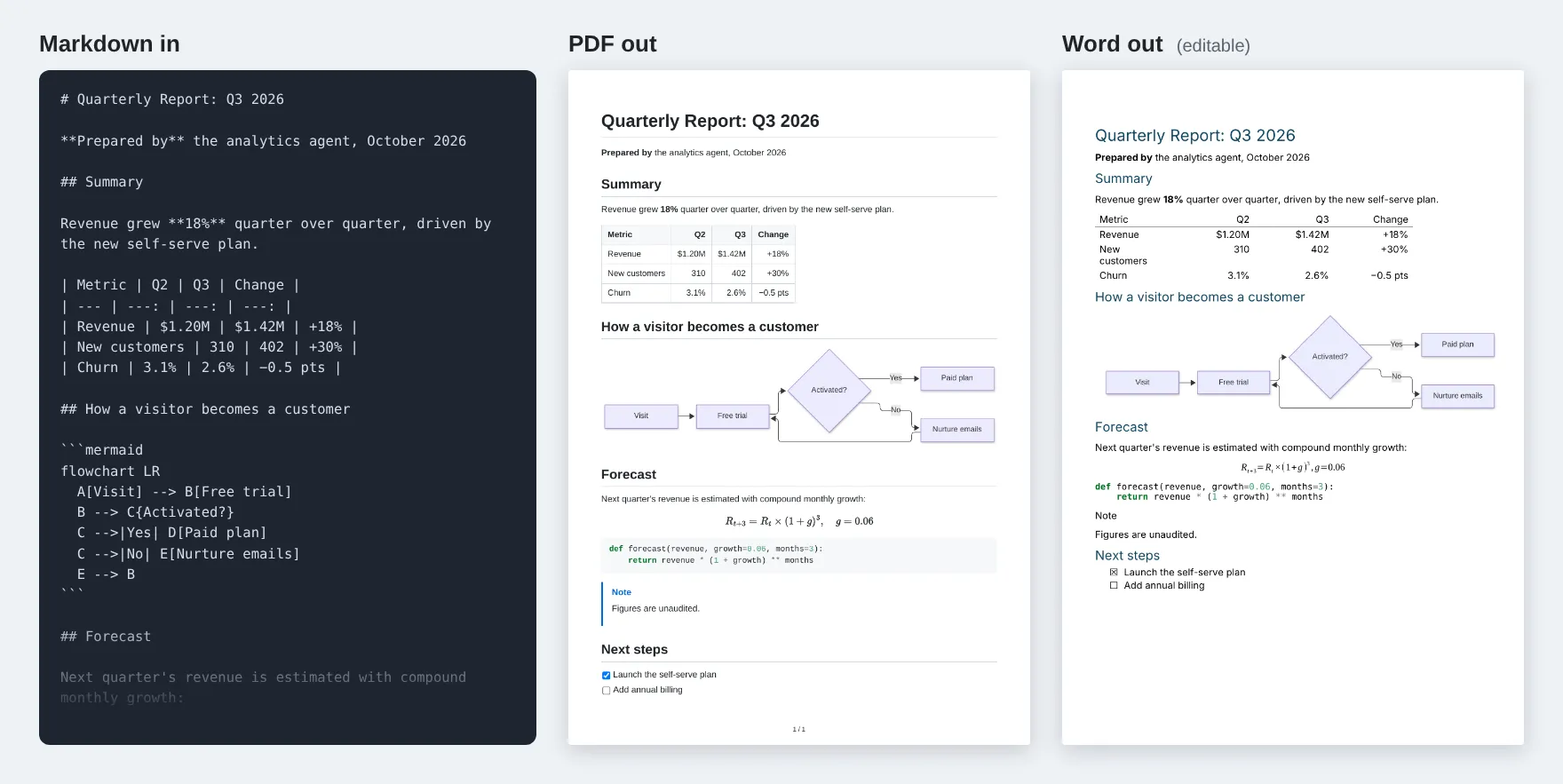
Turn Markdown into polished PDF, Word and HTML documents. Send Markdown text or links to .md files and get back download links for a PDF, an editable Word (DOCX) file or a standalone HTML page, with tables, highlighted code, Mermaid diagrams, LaTeX math, task lists, footnotes, GitHub alerts, a table of contents and page numbers. Built for AI agents and automations that write Markdown and need a real document to send, attach or archive. Many documents per run, pay per document, and failed ones are free.
What it does
- GitHub-style Markdown: headings, lists, tables with column alignment, task lists, footnotes, definition lists, strikethrough, emoji shortcodes such as
:rocket:, GitHub alerts (> [!NOTE],> [!WARNING]and the others), and YAML front matter withtitle,subtitle,authoranddatefor a title block. - Mermaid diagrams:
```mermaidblocks become real diagrams, sharp vector graphics in PDF and HTML and pictures in Word. Flowcharts, sequence, class, state, ER and Gantt diagrams, mindmaps, timelines and the other types built into Mermaid 12.2. If a diagram has a mistake, it's shown as code and the run tells you Mermaid's exact error. - LaTeX math:
$inline$and$$display$$formulas, and also\( \),\[ \]and bare\begin{align}blocks, the way ChatGPT, Claude and other models usually write them. PDF and HTML get crisp vector formulas (MathJax), and Word gets native, editable Word equations. - Code highlighting for over 100 languages.
- Three formats from one input:
- PDF: A4, Letter, Legal, A5 or Tabloid, portrait or landscape, three margin sizes, page numbers ("3 / 12").
- Word (DOCX): real headings, lists, tables, equations and pictures, so it opens and edits cleanly in Microsoft Word, Google Docs and LibreOffice.
- HTML: one self-contained file with the diagrams and formulas inline and no scripts.
- Themes: Default (clean sans-serif), Serif report and Compact, any font size from 8 to 16 pt, and your own CSS on top for brand colors and fonts.
- Table of contents built from the headings, on its own page.
- Page breaks where you want them: a line with
\newpageor\pagebreak, or<div style="page-break-after: always"></div>. - Links to Markdown files: direct links, GitHub and GitLab file pages, Google Drive and Dropbox share links. Relative images load from next to the file, so a GitHub README comes out with its logo and screenshots.
- Images from the web (PNG, JPEG, GIF, WebP, SVG). In Word files, SVG images such as badges and logos are turned into PNG so every Word version shows them.
- Safe with untrusted Markdown: raw HTML is kept for layout (centered logos,
<details>sections, which are opened in the PDF), but scripts, frames, embedded objects and event attributes are removed, and local files are never read. - Batch conversion: send a list of documents, each with its own name, and get one result per document.
- The file straight from the API: the first file is also the run's
OUTPUT, so the run-sync endpoint answers with the PDF itself. - No outside services: pandoc, Mermaid and MathJax run inside the Actor, so your documents aren't sent to a third-party conversion API.
Who it's for
- AI agents and LLM apps that write reports, summaries, proposals, meeting notes or research in Markdown and need to hand over a PDF or Word file.
- Automation builders in n8n, Make or Zapier who turn data into weekly reports, client updates, handouts or archives.
- Developers who want docs, READMEs and changelogs as PDF or Word without installing pandoc, LaTeX, Chromium or Mermaid CLI.
- Students, teachers and writers with notes full of formulas and diagrams.
How to use it
- Paste your Markdown into Markdown, or add links in Links to Markdown files.
- Pick the formats (PDF by default) and, if you like, a theme, page size and table of contents.
- Click Start. Each document appears in the Output tab with its download links.
You can also run it through the Apify API, on a schedule, or from Make, n8n, Zapier and other integrations.
Input
| Field | What it does |
|---|---|
markdown | One document in Markdown. |
markdownUrls | Links to Markdown files: direct links, GitHub or GitLab file pages, Google Drive or Dropbox share links. |
documents | More documents: a list of Markdown strings, or objects with markdown or url and an optional name. |
formats | Any of pdf (default), docx and html. Each document is saved in all of them. |
theme | default, serif or compact. |
pageSize | A4 (default), Letter, Legal, A5 or Tabloid. |
landscape | true for landscape pages (default false). |
margins | normal (18 mm, default), narrow (12 mm) or wide (25 mm). |
fontSize | Body text size in points, 8 to 16 (default 11). |
tableOfContents | true adds a table of contents built from the headings (default false). |
pageNumbers | Page numbers at the bottom of PDF pages (default true). |
customCss | Your own CSS for PDF and HTML, added after the theme. |
maxDocuments | Stop after this many documents (default 100). |
Example with a batch:
Output
Each document becomes one dataset item, and the files are saved in the run's key-value store:
warnings lists anything that didn't come out as written but didn't stop the document, such as a Mermaid diagram with a mistake (shown as code instead) or an image that couldn't be downloaded:
A document that can't be read is reported with the reason, and isn't billed:
Download your files within your plan's data retention period, or copy them to your own storage, because run storage expires.
Pricing
You pay per document converted, at the price shown on this page, whichever formats you ask for: a PDF, a Word file and an HTML page of the same document count as one. Documents that fail are never charged. If you set a maximum cost per run, the Actor stops when the next document wouldn't fit.
Speed
Converting is quick: measured on Apify at the default 2 GB of memory, a batch of five documents saved as PDF, Word and HTML (a report with a Mermaid diagram and a formula, a GitHub README with its logo and badges, a Chinese and Japanese note, and two short documents) took 10 seconds of work in total once the run had started. A plain document takes about half a second, one with Mermaid diagrams 2 to 3 seconds, plus the time to download its images. Starting a run adds a few seconds, more when a server downloads the Actor for the first time. For many documents, one run with a batch is much quicker than one run per document.
Tips and limits
- Word files follow Word's own styles rather than the theme or custom CSS, so they're easy to restyle in Word. Mermaid diagrams become pictures and formulas become Word equations. Raw HTML other than images and page breaks is left out of Word files.
- In Word files, the table of contents is a Word field that Word fills in when it opens the file; click Yes if it asks to update fields.
- Images have to be on the web (http or https). Images that don't load within 30 seconds are left out, with a warning.
- Chinese, Japanese and Korean text and emoji are supported.
- Web fonts work in custom CSS, for example
@import url('https://fonts.googleapis.com/css2?family=Inter:wght@400;600&display=swap'); :root { --font-body: Inter, sans-serif; }. The themes read their fonts from--font-body,--font-headingand--font-code. - Markdown can be up to 2,000,000 characters per document, and files from links up to 5 MB.
For AI agents and developers
This Actor works with the Apify MCP server, so AI agents can call it as a tool: pass the Markdown in markdown (or a list in documents) and read pdfUrl, docxUrl or htmlUrl from each dataset item. Markdown can come straight from a model's answer, math and Mermaid included. For a direct API call that waits for the result:
To get the file itself as the response, call run-sync instead. It returns the run's OUTPUT, which is the first document in the first format you listed (or the error as JSON):
Credits
- pandoc (GPL-2.0-or-later, run as a separate program), Mermaid (MIT), MathJax (Apache-2.0) and librsvg (LGPL), with pages laid out and printed by headless Chromium through Playwright. This Actor isn't affiliated with these projects.


