

AutoML API: Train, Predict & Explain from CSV/Excel
Pricing
Pay per event
AutoML API: Train, Predict & Explain from CSV/Excel
Predict any column of a CSV, Excel, Google Sheet or dataset: compares models by cross-validation, explains what drives the result and scores new rows. No code.
Pricing
Pay per event
Rating
0.0
(0)
Developer

Jumble Mog
Maintained by CommunityActor stats
0
Bookmarked
2
Total users
1
Monthly active users
a day ago
Last modified
Categories
Share
Predict any column of a table, without writing code. Give a CSV, Excel file, Google Sheet, JSON rows or an Apify dataset and name the column to predict (price, churned, species, Survived ...). The Actor trains several machine learning models, compares them fairly by cross-validation, keeps the best, tells you which columns drive the result and how, and predicts new rows.
- Classification or regression, picked from the column: a class (yes/no, a category) or a number. You can force either.
- Models compared on the same folds: logistic or ridge regression, random forest and gradient boosting, against a baseline (always guessing the most common class or the average), so you see whether the data predicts anything at all.
- Honest scores: every row is scored by a model that never saw it (out-of-fold). R², RMSE, MAE and MAPE for numbers; ROC AUC, accuracy, balanced accuracy, macro F1 and log loss for classes; a confusion matrix.
- Explanations: each column's permutation importance on held-out rows, and its effect: the average prediction as the column moves across its range (bigger house → higher price; first class → better survival).
- Predictions for new rows you send, and for rows of the data with an empty target, with class probabilities or an 80% range, in the results and as a CSV file.
- Data handled for you: numbers with $, % or thousands separators, categories, dates (split into year, month, weekday), missing values; ID columns, constant columns, free text and links are left out and listed with the reason.
It's made for:
- AI agents and chatbots that need a real model behind a "what will happen" or "what drives this" question, instead of a guess. Language models can't fit models in their heads.
- Analysts and teams who want a quick, well-validated baseline model for churn, lead scoring, pricing, demand or risk, with the drivers explained.
- No-code pipelines (Zapier, Make, n8n) and scrapers that score new records as they arrive.
How to use it
- Add Requests, one per table. The form has two examples: the Titanic passenger list (predict Survived and score two new passengers) and car fuel economy (predict mpg).
- Optionally pick an Apify dataset to learn from (for requests without their own data), and the number of cross-validation folds.
- Click Start. Each table is a row in the results, with the summary, scores, explanations, predictions, chart and report.
What you can send
A line of text: predict price from https://example.com/houses.csv. The link can point to a CSV, TSV, JSON or Excel (.xlsx) file, a Google Sheet shared with anyone who has the link, or a file on GitHub.
Or an object:
| Field | What it takes |
|---|---|
data | A link, CSV or JSON text, or a list of rows. Leave it out to use the Apify dataset picked in the input. |
target | The column to predict (any case; ad spend finds ad_spend). |
predict | New rows to predict: a list of rows, CSV text or a link. Missing columns are treated as missing values. |
task | auto (default), classification or regression. |
features | Only these columns are used. |
exclude | These columns are left out (for example one that is only known after the fact). |
models | Some of logistic/linear, random forest, gradient boosting (all by default). |
folds | Cross-validation folds, 2 to 10 (5 up to 5,000 rows, 3 above). |
positiveClass | For two classes: the one whose chance is reported (by default 1, yes or true, else the rarer class). |
predictMissing | Predict the data's rows with an empty target too (true by default). |
title | A title for the result. |
Examples
- Titanic passengers, predict
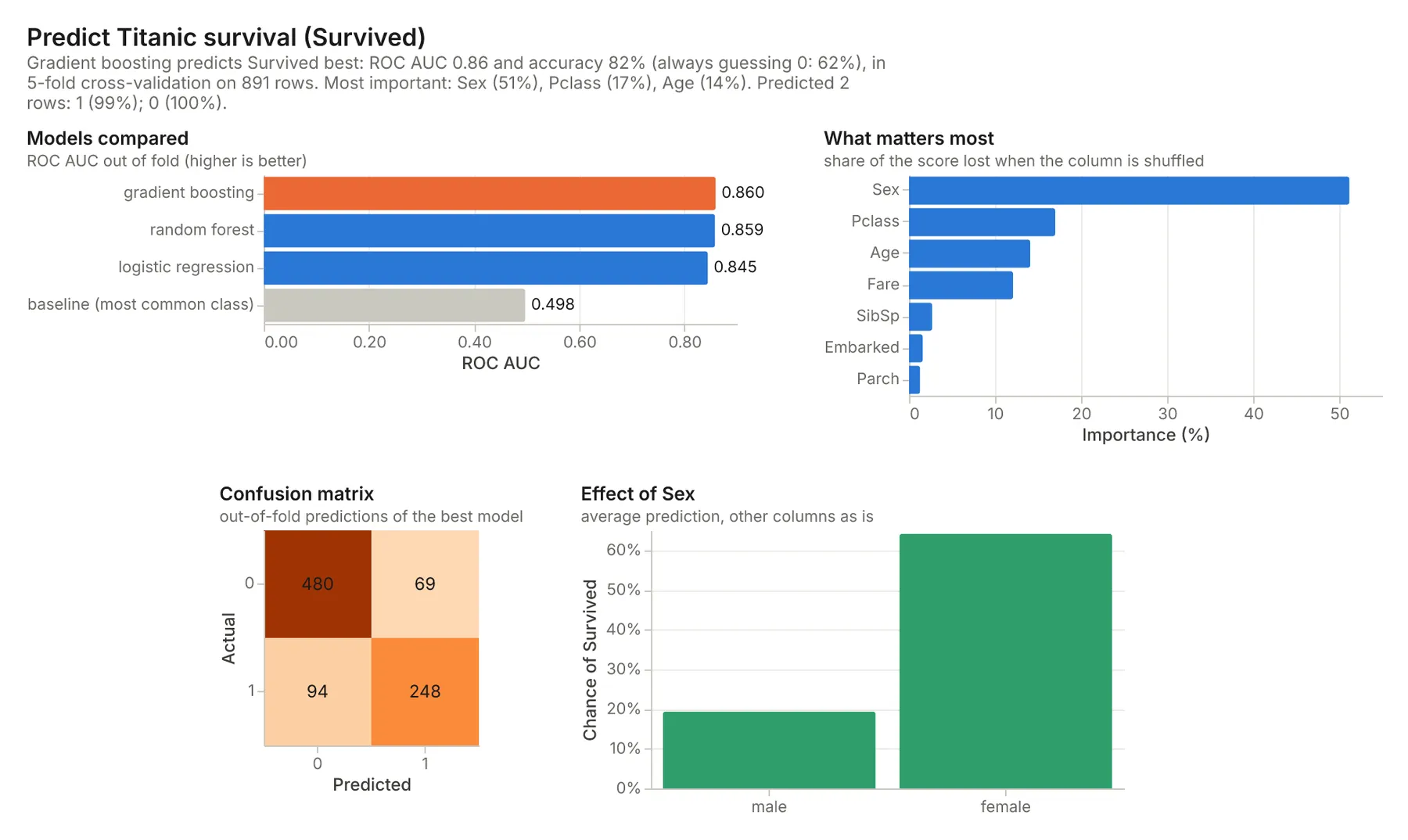
Survived→ gradient boosting, ROC AUC 0.86 and 82% accuracy against 62% for always guessing "died"; Sex 51% of the importance, then Pclass, Age and Fare. Name, Ticket, Cabin and PassengerId are left out as IDs and near-unique text. A 29-year-old woman in first class: survives (99%); a 25-year-old man in third: doesn't. - Car fuel economy,
predict mpg→ gradient boosting, R² 0.88 and a typical error of 2.7 mpg (7.8 for guessing the average); weight and model year matter most; predicted mpg falls from 29 to 20 as weight goes from 1,900 to 4,500 lb. - Palmer penguins, predict
species→ logistic regression, 99% accuracy across three species; bill length matters most. - 54,000 diamonds, predict
price→ gradient boosting, R² 0.98; carat and size matter most (models compared on 20,000 rows, the best one then trained on all 54,000).
How-to examples
These are the two examples in the input form; the results are from runs of the Actor.
How to predict a column of a CSV file without code
Result: gradient boosting wins, with ROC AUC 0.86 and 82% accuracy against 62% for always guessing "died". The 29-year-old woman in first class survives (99%) and the 25-year-old man in third class doesn't. Name, Ticket, Cabin and PassengerId are left out by themselves as IDs and near-unique text.
How to train a regression model in one line
Result: gradient boosting, R² 0.88 and a typical error of 2.7 mpg (against 7.8 for guessing the average). Weight and model year matter most, and predicted mpg falls from 29 to 20 as weight goes from 1,900 to 4,500 lb.
How to find what drives churn, sales or prices
Send your table with the column to explain as target, such as {"data": "https://docs.google.com/spreadsheets/d/YOUR_SHEET_ID/edit", "target": "churned"}. The result lists each column's share of the importance and its effects: how the prediction rises or falls as that column changes. Rows with an empty target are predicted too, so a list of current customers comes back scored.
How to let an AI agent make predictions from data
Add this Actor to the Apify MCP server with https://mcp.apify.com/?tools=jumblemog/tabular-automl. The agent names the table and the column, and passes on the summary, the cross-validated scores and the predictions, instead of guessing from a few rows it read.
FAQ
Which models does it try? Logistic or linear regression, random forest and gradient boosting from scikit-learn, compared with cross-validation. The best one is trained on all the data.
Do I need to clean the data first? No. Column types are found, IDs and near-unique text are dropped, and missing values, categories and dates are handled.
How do I know the model is any good? Every result has cross-validated scores and compares them with a simple baseline, such as always guessing the most common answer or the average.
Does importance mean cause? No. Importance and effects say what the model uses to predict, not what causes the outcome.
Does it work with Zapier, Make or n8n? Yes. Call the Actor with its Apify app or an HTTP request, and send the predictions on.
Output
One dataset item per table, also saved together in the run's OUTPUT record:
Regression items carry low and high (an 80% range) with each prediction and rmse, r2, mae and mapePct per model. Every item has target (the classes with counts, or the column's spread), warnings (weak or suspiciously perfect results, small data, columns missing from the rows to predict), notes, links to the chart (imageUrl, svgUrl), the predictions CSV (predictionsUrl) and the Markdown report. A table that can't be modeled has "status": "failed" and the reason in error, and isn't billed.
How it works
- Reading the columns: numbers (including "$1,200", "45%", "1.2k"), dates, and categories (the 30 most common values, the rest grouped); missing values are filled with the median or a "(missing)" category, with a flag for numbers. IDs, row numbers, constant columns, near-unique text and links are left out.
- Comparing models: scikit-learn pipelines (preprocessing inside each fold, so nothing leaks) are scored with k-fold cross-validation, stratified for classes. The best model is picked by ROC AUC (two classes), macro F1 (more) or RMSE (numbers), then trained on all labeled rows.
- Explaining: permutation importance on each fold's held-out rows; effects by setting one column to each of several values for a sample of rows and averaging the predictions.
- Predicting: the final model scores the new rows; a number's 80% range comes from the model's cross-validated errors.
Pricing
You pay one price per table modeled, at the price shown on this page, however many rows you predict. The chart, report and predictions file are included. Requests that fail are never charged. If you set a maximum cost per run, the Actor stops before a table that wouldn't fit.
Speed
A table of a few hundred rows takes a few seconds of work and 50,000 rows about half a minute. A run through the API answers in about 15 seconds for a small table, including the cloud container starting.
Tips and limits
- Garbage in, garbage out: a model only finds patterns that are in the columns. The baseline's score next to the best one shows how much the data really tells. A near-perfect score from one column usually means it leaks the answer (it's filled in after the fact); the Actor warns about it.
- Causes: importance and effects describe what the model uses, not cause and effect.
- No time series: rows are shuffled into folds, so for forecasting a series over time use a forecasting tool instead.
- Models aren't stored: send the rows to predict with the data; training again takes seconds and gives the same model.
- Limits: 20 tables per run; 500,000 rows (200,000 used for the final model, 20,000 for comparing models); 200 columns; 50 classes.
For AI agents and developers
This Actor works with the Apify MCP server, so AI agents can call it as a tool. Send requests with data, target and predict, and read summary, best, importance, effects, predictions and warnings. A direct API call that waits for the answer:
run-sync instead returns the run's OUTPUT: the status, the counts and every result as JSON.
In Python, with the apify-client package, scoring new leads with a model trained on past ones:
Credits
- Models and metrics: scikit-learn (BSD-3-Clause), with pandas and NumPy.
- Charts: Vega-Lite and vl-convert (BSD-3-Clause), with the Inter font (SIL Open Font License).
- Example data: the Titanic passenger list (Data Science Dojo's copy) and the Auto MPG data from the UCI Machine Learning Repository (seaborn-data copy).


