

Facebook Page Posts Scraper: Reactions, Media
Pricing
from $1.75 / 1,000 posts
Facebook Page Posts Scraper: Reactions, Media
Posts of public Facebook Pages: the newest, a period, or only new ones on a schedule. Text, date, photos, video, links, reactions by kind, comments and shares, and a run that says which Pages it read to the end.
Pricing
from $1.75 / 1,000 posts
Rating
0.0
(0)
Developer

Kaleidoscope Labs
Maintained by CommunityActor stats
1
Bookmarked
2
Total users
0
Monthly active users
6 days ago
Last modified
Categories
Features
Share
Scrape Facebook Page posts: give this Facebook Page Posts Scraper one or more public Pages and get their posts as clean records, with text, date, photos, video, links, and the counts of reactions by kind, comments and shares.

- 📄 Read the newest posts of any public Facebook Page, or every post in a period you choose
- 📊 Get each post's reactions by kind (like, love, care, haha, wow, sad, angry), comments, shares and video views
- 🖼️ Get the post's photos, video file and links as plain URLs
- 🔔 Monitor Pages on a schedule and get only the posts you have not had before, for a small check per Page
- ✅ Know what the run read: which Pages it read to the end, which show no public Page, and what any record lacks
No Facebook account or login is needed: the Actor reads what Facebook shows a visitor who is not signed in.
What data do you get from Facebook Page posts?
One record per post. The fields you decide on:
| Field | What it is |
|---|---|
postId, url | Facebook's ID of the post, and its address |
pageId, pageName, pageUrl | The Page that published it |
pageFollowers, pageCategory, pagePictureUrl | The Page's followers as Facebook shows the number (rounded), its category and its picture |
publishedAt | When it was published, in UTC |
text | The post's text |
hashtags, mentions, links | What the text links: hashtags, Pages and profiles, web addresses |
type | photo, album, video, reel, link, event, share, text or other |
images, imagesCount, imageDescriptions | The photos' addresses, how many photos the post has, and Facebook's own description of each photo |
collaborators | The other Pages a post names as its authors |
videoUrl, thumbnailUrl, videoDurationSecs | The video file, its still image and its length |
reactionsCount, reactions | All reactions, and each kind's count |
commentsCount, sharesCount, viewsCount | Comments, shares, and views of a video |
sharedPost | For a post that shares another: that post's ID, address, Page and text |
missing | The parts this record lacks, each with its reason; empty when nothing is missing |
scrapedAt | When the run read the post |
Every field is described in the dataset schema, and every record has every field, so a sheet's columns stay the same.
What can you use Facebook Page posts for?
- Automate social media monitoring of competitors' and clients' Pages: schedule a run with
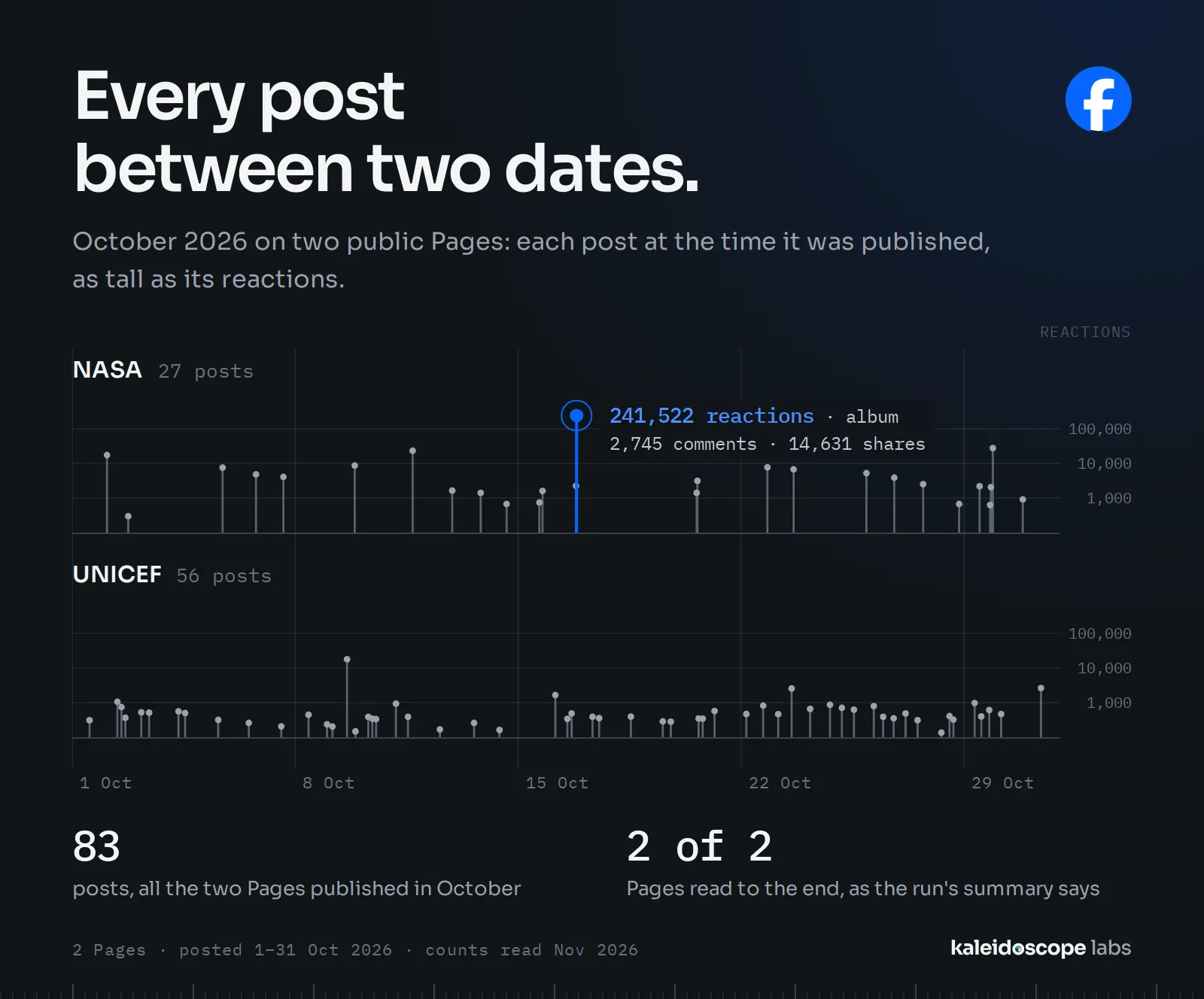
modeset tonewand each run stores only the posts published since the last one. - Report on a period: every post of a list of Pages between two dates, with engagement, for a monthly report or a study.
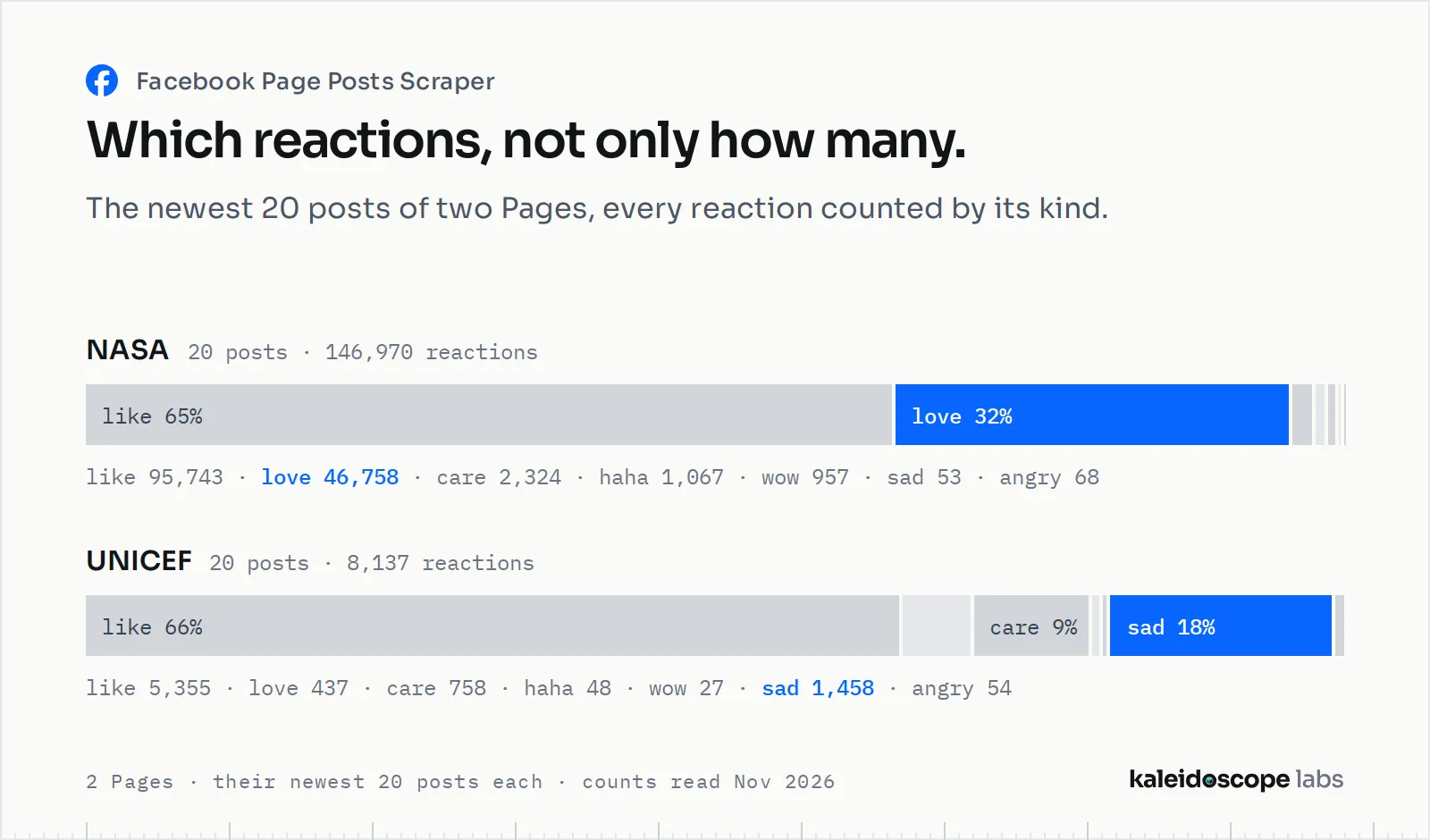
- Benchmark content: compare reactions by kind, comments and shares across Pages and post types.
- Lead generation: see which businesses' Pages are active, how often they post and how their audience responds, with each Page's category and followers.
- Feed posts into your own tools: rows for a sheet, a database, a dashboard or an AI pipeline.
How to scrape Facebook Page posts
- Create a free Apify account and open this Actor.
- Enter the Pages, one per line: an address (
https://www.facebook.com/nasa) or a name (nasa). - Choose how many posts to read from each Page, or a period (
Posted after,Posted before). - Click Start. Download the posts as JSON, CSV or Excel, or read them through the API.
How much does it cost to scrape Facebook posts?
You pay per post stored: $2.50 per 1,000 posts. There is no extra charge for a period. The platform also charges $0.00005 when a run starts.
Prices shown are for Apify's free plan; on paid plans they are up to 30% lower. Apify's free plan credit of $5 a month covers about 2,000 posts.
| What you run | Posts | Cost |
|---|---|---|
| The newest 20 posts of one Page | 20 | $0.05 |
| The last 7 days of 20 Pages, about 10 posts each | 200 | $0.50 |
| Every post of 100 Pages for a month, about 40 each | 4,000 | $10.00 |
A monitor (mode set to new) also charges a Page check of $0.002 for each Page a run reads, whether the Page has new posts or not. How often you schedule it sets that part of the cost:
| A monitor of 10 Pages for a month | Page checks | Checks cost | With 300 new posts |
|---|---|---|---|
| Once a day | 300 | $0.60 | $1.35 |
| Every hour | 7,200 | $14.40 | $15.15 |
A monitor's first run also stores each Page's newest posts (20 a Page unless you set it: 200 posts, $0.50, for these 10 Pages), and every run has the start charge.
An address that shows no Page and a post that could not be read are never charged. A Page with no posts in the period is charged nothing, except its check in a monitor. A run stops before your maximum charge.
Input
The newest posts of a few Pages
Everything published in the last 7 days
Only new posts, on a schedule (a monitor)
A period between two dates, at most 100 posts a Page
Output
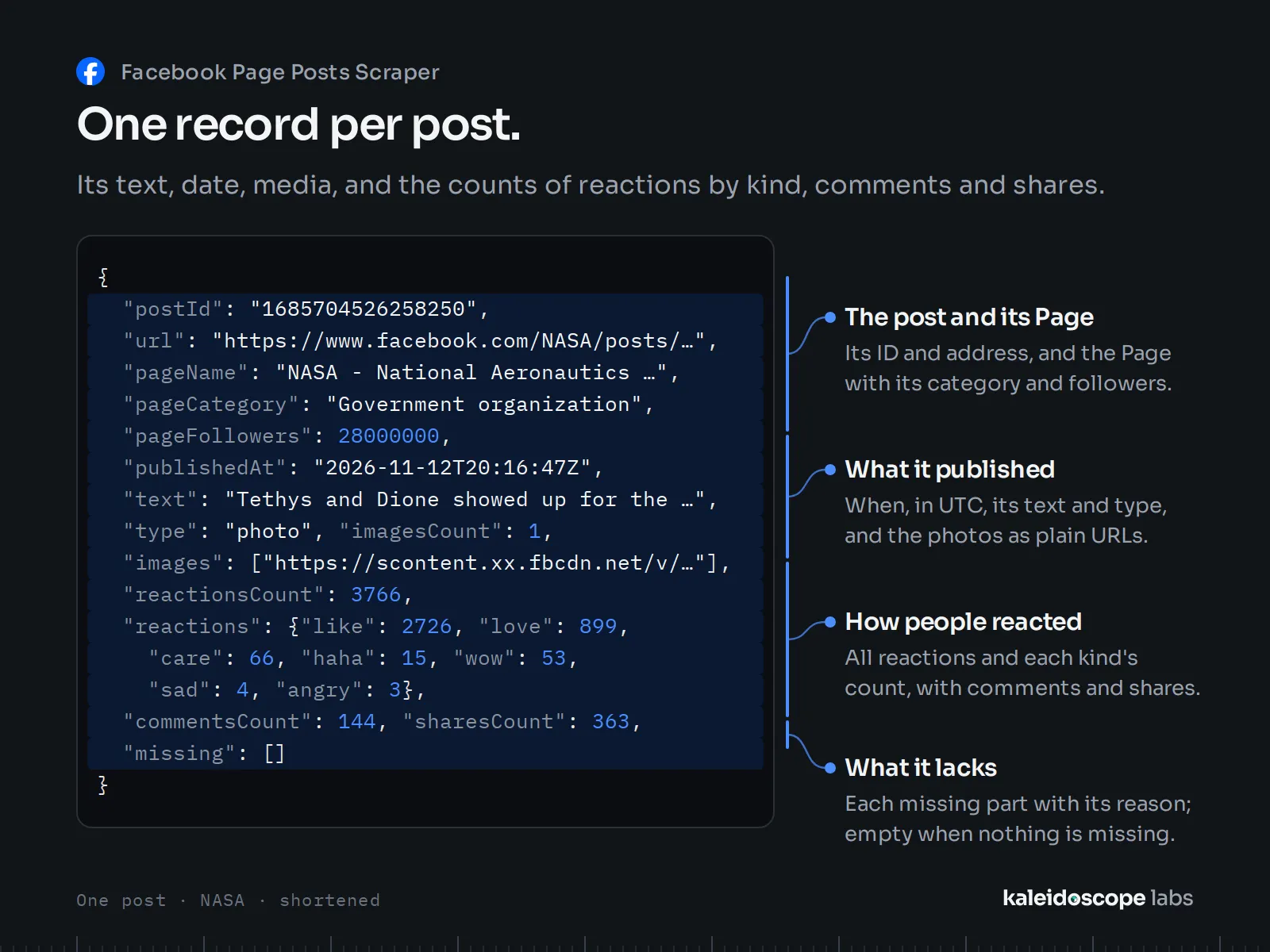
One post, every field, with long texts and addresses shortened (…):
Monitoring: only the posts you have not had
With mode set to new, the Actor remembers the posts it stored for each Page. The first run stores each Page's newest posts (postsPerPage, or a period); every later run stores only the posts published since, all of them, and nothing when there is none. A run with nothing new ends with an empty dataset and the status "No new posts"; it charges the Page checks and no post. Daily runs suit most Pages; hourly runs suit Pages you need to react to. The memory lives in a key-value store in your account named facebook-page-posts-monitor: delete a Page's record there to start it over. Use monitorName to keep several monitors of the same Pages apart.
Let one run of a monitor end before its next one starts: two runs of the same monitor at the same time can store, and charge, the same posts twice.
A new post is stored by the next run. A post that appears later below the Page's newest one (published with an earlier date) is stored within a day, if its date is no more than 24 hours before the newest post.
The period you asked for, and a run that says what it read
A period is read from its own newest post, by the minute: postedAfter and postedBefore take a date, a date and time, or an age such as 36 hours. The run's summary (RUN_SUMMARY in the key-value store) names each Page as read, not finished, not shown or without posts, and says complete: true only when every Page was read as far as you asked. A run stopped by its timeout, an abort or your maximum charge says so in ended; the Pages it had not come to are in none of the lists. A Page the run could not read to the end is never reported as read.
Integrations and the API
Run it from the Apify API, on a schedule, or from Make, Zapier, n8n and Clay.
Building on this Actor
- Output: fields are added, never renamed or removed within a major version; every change is in the changelog.
- What a run's end means: a finished run read every Page or names it in the summary. A run that could not reach Facebook fails; it does not succeed empty. An input that cannot be read ends as succeeded with nothing read or charged, the reason in the status message and in the summary's
inputError. - Cost: the event
postper stored post, and in a monitor's run the eventcheckonce per Page read. Your maximum charge holds. - Record-level reasons:
missinglists a part with the reason "notGiven" (Facebook did not give it) or "unexpectedValue" (it came in a form that was not read).
For AI agents
AI agents can call it through the Apify MCP server (setup prompt for your agent). Minimal input: {"pageUrls": ["<page address or name>"], "postsPerPage": 10}. Add postedAfter (a date or an age such as 7 days) for recent posts only. Read text, publishedAt, url, type, reactionsCount, commentsCount and sharesCount. An empty dataset with complete: true in RUN_SUMMARY means the Page has no posts for the input; pagesNotShown there lists addresses with no public Page. A record's missing names any part it lacks.
Tips
- Try one Page with
postsPerPage: 10first: it costs $0.025. - With
postedAfterand nopostsPerPage, each Page is read to the end of the period. WithoutpostedAfter,postsPerPageis 20 when left empty. - An age (
7 days) counts back from the run's start. To track Pages on a schedule usemode: "new"instead: it goes by the posts it has stored, not by the clock, so a run that comes late misses nothing. - Media addresses are Facebook's own and expire within a few days, some videos sooner: download what you need to keep.
Did it save you time? A rating on this page helps others find it; an Issue tells us what to fix.
FAQ
Is there an official Facebook API for Page posts? Meta's Graph API gives a Page's posts to an app that the Page's admin authorised, or to an app Meta approved in review to read public Pages. This Actor needs neither: it reads what a public Page shows any visitor.
Why does a Page return nothing? Facebook shows some Pages only to signed-in visitors: Pages restricted by age or country (alcohol brands, for example). A Page that was removed or renamed shows nothing at its old address either. The run names them in pagesNotShown and charges nothing.
Why does an album have fewer images than imagesCount? Facebook lists an album's first photos to a visitor who is not signed in. The record gives those, the full count, and names images in missing.
Is it legal to scrape Facebook Page posts? The Actor reads only what Pages publish to everyone. How you use the data is your responsibility: follow the laws that apply to you, including copyright and data protection law.
Does it collect personal data? Pages are mostly run by organisations, but a post's text, mentions and media can name or show people, and some Pages belong to public figures. If you process personal data, you need a lawful basis under GDPR, KVKK or the law that applies to you.
Limits
- Public Pages only, as shown to a visitor who is not signed in. Groups, private profiles and restricted Pages are not read.
- Comments are counted, not collected.
- Counts are what Facebook shows at the time of the run.
- Up to 500 Pages a run.
- Speed: about 150 posts a minute across the Pages of a run, and about 40 a minute from any one Page, whose posts are read in order. A run's timeout is 4 hours unless you change it in the run options: enough for 500 Pages at 20 posts each (about 70 minutes). A run that reaches its timeout keeps what it stored and says
ended: "timedOut"andcomplete: falsein its summary; the Pages not yet inpagesReadare the ones left, and resurrecting the run continues with them. Raise the timeout for a longer job, such as many thousands of posts of one Page.
Support and feedback
Open an Issue on the Actor's page: we answer within 24 hours. If the Actor is useful to you, a bookmark helps others find it.
Other Actors
| Actor | Use it with this one to |
|---|---|
| Meta Ad Library & Facebook Ad Library Checker | See whether the Pages you track run Facebook and Instagram ads, how many, and the day the newest started |
| Reddit Scraper: Subreddit Posts and Comments | Read what people say about the same brands in the subreddits that discuss them |
Facebook Page Posts Scraper is an independent tool, not affiliated with, endorsed by or sponsored by Meta Platforms, Inc. Facebook is a trademark of Meta Platforms, Inc.


