
LinkedIn Ad Library Checker: Company Ads
Pricing
from $2.80 / 1,000 lookups
LinkedIn Ad Library Checker: Company Ads
LinkedIn ads scraper and LinkedIn Ad Library checker: see whether a company runs LinkedIn ads, how many, how many in the last 30 days, and its latest ads with text, format and media. Enter company IDs, links or advertiser names; a company with no ads is answered too.
Pricing
from $2.80 / 1,000 lookups
Rating
0.0
(0)
Developer

Kaleidoscope Labs
Maintained by CommunityActor stats
1
Bookmarked
2
Total users
1
Monthly active users
6 days ago
Last modified
Categories
Features
Share
What can this LinkedIn ads scraper do?
A LinkedIn ads scraper for the LinkedIn Ad Library: check whether a company runs LinkedIn ads, how many, how many in the last 30 days, and its latest ads, one record per company or name.

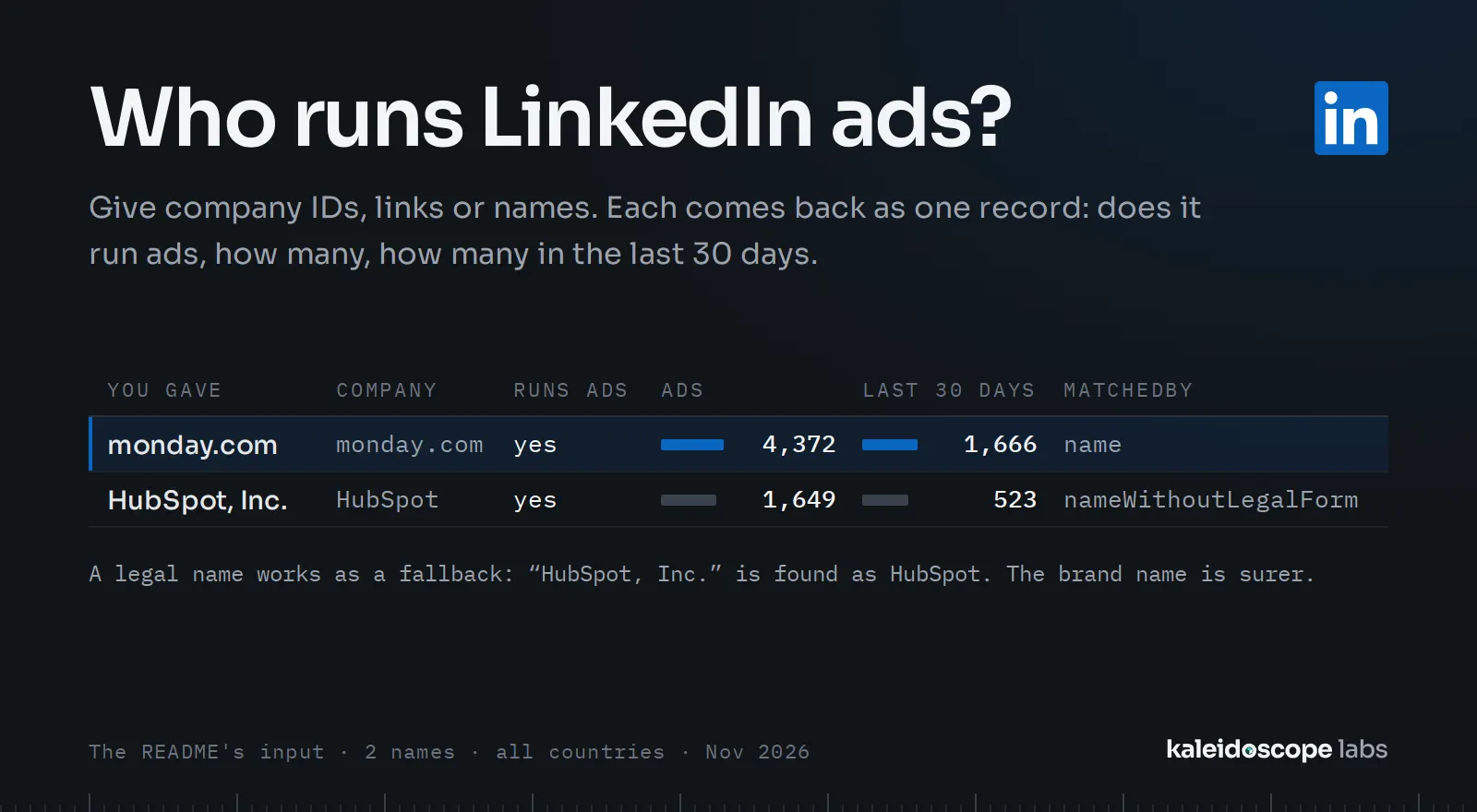
- 🔎 Is it advertising? Each company gets a clear answer under your filter, a company with no ads included.
- 🔢 How many ads: the LinkedIn Ad Library's own count, for a country or anywhere, for all time, the last 30 days, this month, this year or last year.
- 📅 Lately: the same count for the last 30 days.
- 🖼️ The latest ads: up to 24 per company, with their text, headline, format and media links.
- 🔔 Monitor: on a schedule, only the ads a company has newly shown.
- 🔗 Company IDs and links: a sure answer.
- 🏷️ Advertiser names: enter a name as it appears on its ads; the run takes the first company whose ads carry that exact name or, if the search lists none to its end, that name without its legal form (GmbH, Inc., B.V.). Give the brand name the company advertises under, or the numeric company ID / a link containing it, not a legal name. A name can also be a person who advertises under their own profile: the record then carries their latest ads, with no company, whatever the country or date range.
Use it to track competitors' LinkedIn ads, or to generate leads from the companies that advertise on LinkedIn.
Run it from Apify Console, through the API, on a schedule, or from an AI agent.
What data can you get from the LinkedIn Ad Library?
One record per company or name:
| Data | Field |
|---|---|
| Whether the company runs ads under the filter | runsAds |
| The library's count of its ads, and for the last 30 days | adCount, adsLast30Days |
| The company's ID, name, link and logo | companyId, companyName, companyUrl, companyLogoUrl |
| How the company was found | matchedBy |
| Its latest ads: ID, link, format, text, headline, description, images, video thumbnail, carousel cards, event | ads |
| With a monitor: its new ads, how many ads and pages the run read, whether it read them all, and whether anything changed | newAds, adsChecked, pagesRead, complete, changed |
| The filters the record was read under, and when | country, dateOption, scrapedAt |
| What the record lacks, and why | missing |
Records carry no impressions, targeting or spend.
The library keeps about a year of ads, so runsAds: false means none in that time. For a company ID it says nothing of the ID itself: the library answers an ID no company has the same way, so check the ID if a "no" surprises you.
A name that matches no advertiser says company: notFound. With ads: notRead beside it, the library's search had more ads than the run read, so the advertiser may be further down: a company ID gives a sure answer.
Media links are LinkedIn's. The logo link (companyLogoUrl) is signed to end about three weeks after the run: save the logo if you need it later.
How to use LinkedIn Ad Library Checker
- Create a free Apify account and open LinkedIn Ad Library Checker.
- In LinkedIn company IDs or links, enter companies, one per line, for a sure answer; or in Advertiser names, enter names, for the best match. A run takes up to 1,000 companies and names together.
- Choose the Country (a two-letter code, or ALL), the Date range (all time unless set), and how many of each company's latest ads you want. The count,
runsAdsand the ads are under the date range;adsLast30Daysis always the last 30 days. A monitor takes all time only. - Click Start. Records appear in the Output tab; export them as JSON, CSV or Excel, or read them from the API.
How to monitor companies for new ads
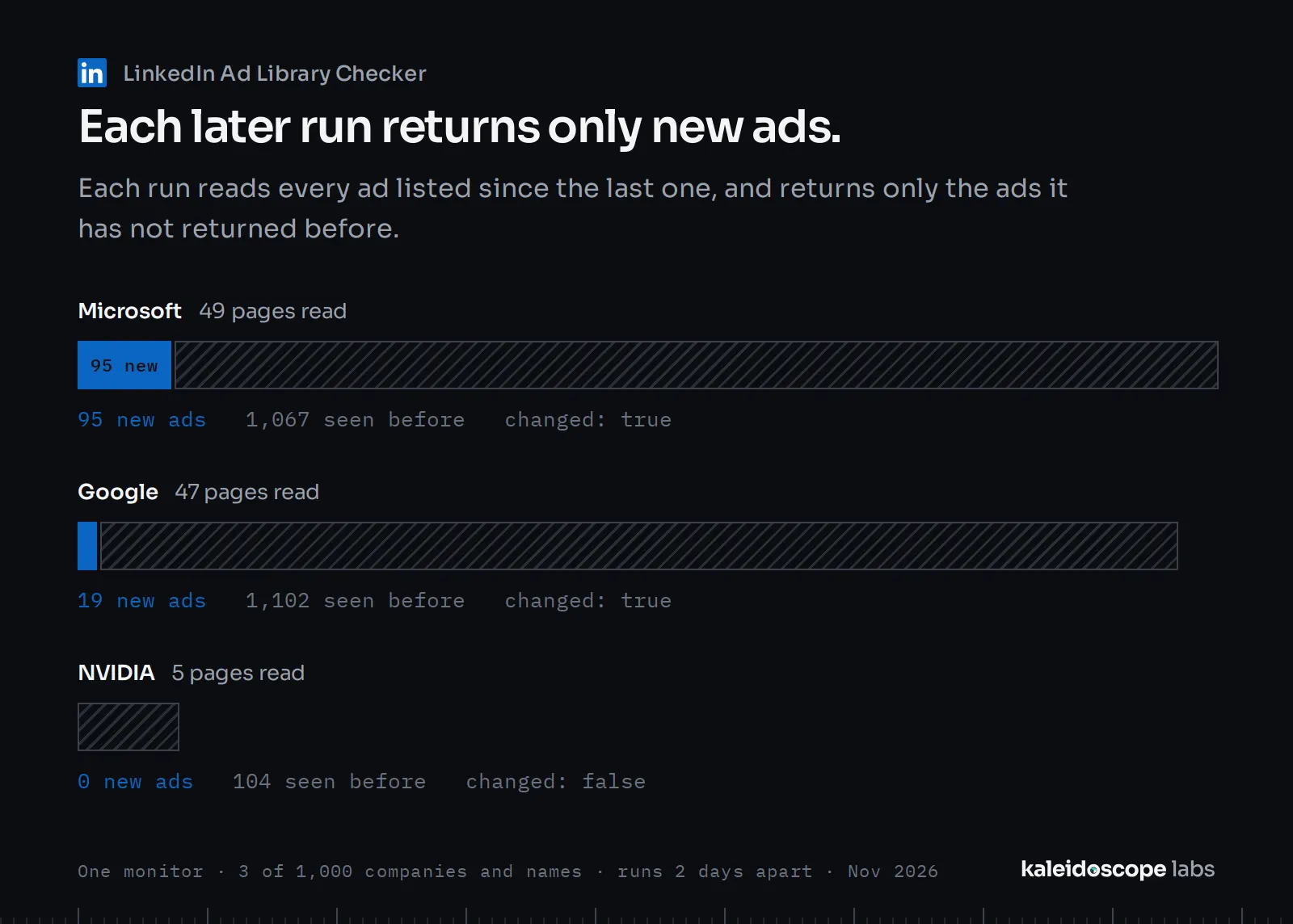
Enter a Monitor name and run the same input on a schedule. Each run checks every company and name, one record each, and carries only ads the monitor has not seen before:
newAdscounts the ads the run read that the monitor had not seen. The record carries the first of them, up to 24 unless Latest ads per company is set; the rest are counted, not returned, and later runs do not return them. With 0 the monitor counts new ads and returns none.adsCheckedis how many ads the run read: every ad the library lists for the company since the monitor's last run, page by page (24 ads a page), up to Pages per company (50 unless set).pagesReadis how many pages that took.completeis true when this run and the last one read every ad the company ran since, sonewAdsholds every new ad. It is false when Pages per company cut a read or a page could not be read; raise the setting to read them all. The run after you raise it counts the ads the earlier, shorter reads did not reach as new, and marks those companieschanged, once. It is always false for a name whose advertiser has no company, such as a person advertising under their own profile: the monitor cannot read their ads page by page.- A run reads the library up to two days before the day it starts, because the library lists the last days late. So a new ad comes in the first run at least two days after it started showing.
changedis true when the company has new ads, or started or stopped showing ads, since the monitor's last run. Filter onchangedfor alerts.- Each company's first run returns its latest ads as a lookup does, 3 unless Latest ads per company is set, and
newAdsandchangedare absent: there is no earlier run to compare with. The monitor starts from that run, and every ad it read then is not new later.
The monitor keeps the IDs of the ads it has seen in a key-value store of its own in your account, li-ads-monitor-<name>. If a run cannot save what it found, after trying again at its end, it says so in its status, and its next run may return those ads again. To start a monitor over, delete that store or use a new name; a company checked under another Country starts over too. Let a monitor's runs not overlap: two at once may both return the same new ads. A company given twice in one input (by its ID and by a name that finds it) is checked twice, and its new ads come in one of the two records. Each check is charged as a lookup, each ad a record carries as an ad, and each page of a company's ads read after the first as an extra page.
How much does it cost to check a company's LinkedIn ads?
| Event | Price | When |
|---|---|---|
| Lookup | $0.004 each | each company or name looked up, whether it runs ads or not; a name not found among the results read, with more left unread, is not charged |
| Ad | $0.00075 each | each ad a record carries: Latest ads per company, 3 when left empty (a monitor's later runs: up to 24 new ads), 0 for the check only; an ad the library shows only as its ID and format (a follower or job ad) is listed but not charged |
| Extra page | $0.001 each | with a monitor: each page of a company's ads read after the first, up to Pages per company |
| Example | Latest ads per company | Cost |
|---|---|---|
| 1,000 companies or names | 0 (the check only) | $4.00 |
| 1,000 companies or names | 3 (the default) | $6.25 |
| 1,000 companies or names | 24 | $22.00 |
Prices shown are for Apify's free plan; on paid plans they are up to 30% lower. The platform also charges $0.00005 when a run starts. The prefilled input (one name, a lookup with 3 ads) costs at most $0.00625, plus the start. Apify's free plan gives you $5 of usage a month, which covers about 1,250 checks, or 800 lookups with 3 ads each.
Input
Enter company IDs, company links or advertiser names. A line that is none of these is skipped, not charged, and its record says so.
For example, two names, the check only:
Output
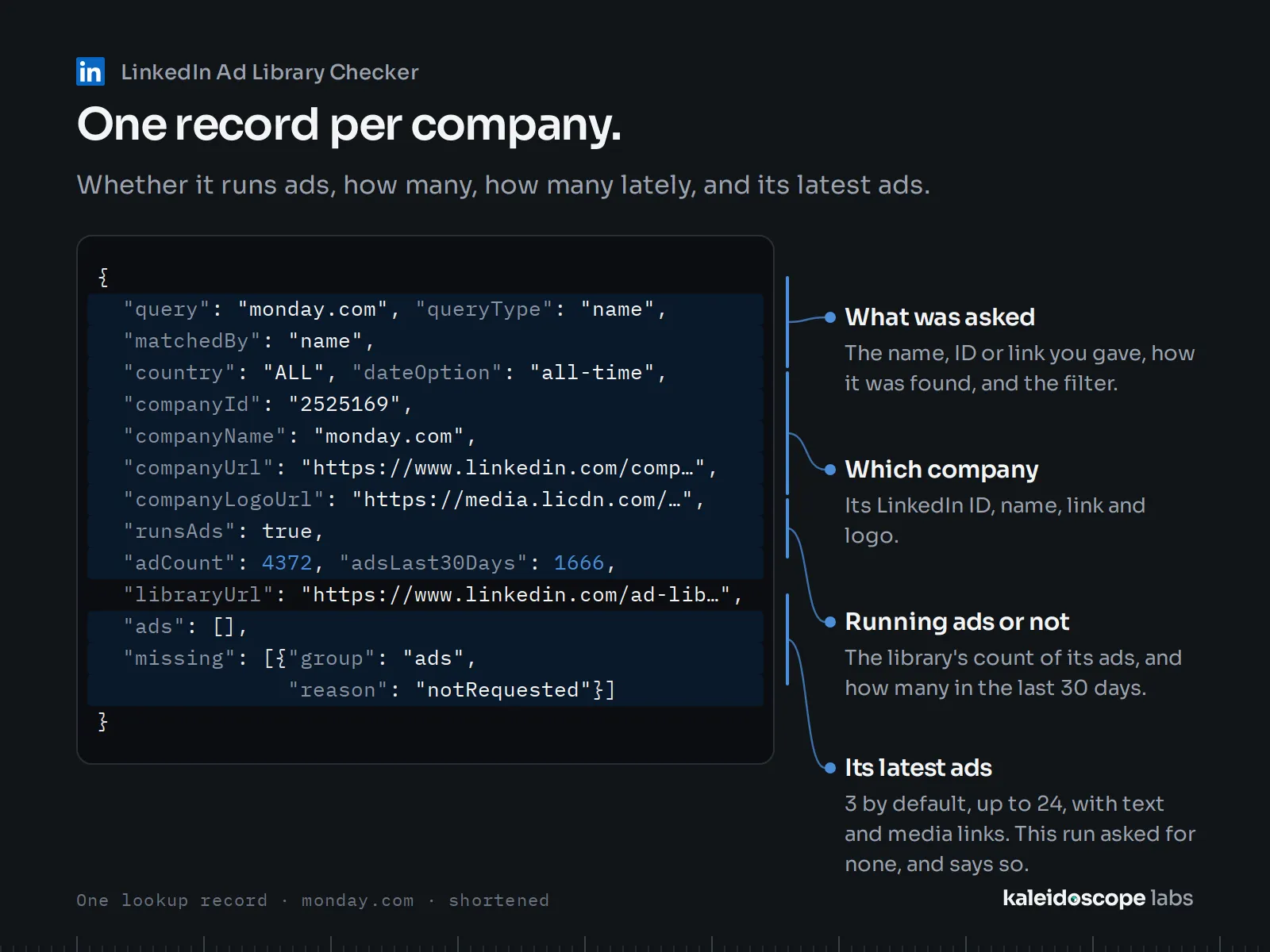
The first record of that input's run, as the run returned it; only the logo link's signed query is shortened to …:
The second, HubSpot, Inc., comes back as HubSpot with "matchedBy": "nameWithoutLegalForm": a legal name works only as a fallback, and the brand name is surer.
FAQ
Is it legal to read the LinkedIn Ad Library?
The library is public, and shows what large platforms must publish about ads. This Actor reads it signed out, and never logs in. Whether your use is allowed depends on what you do with the data and where you are; ask a lawyer when in doubt.
Does it collect personal data?
It reads public Ad Library pages, signed out. Some fields can carry personal data: the name, headline and picture of a member on a thought-leader ad, the name of a person who advertises under their own profile, the name and picture of a message ad's sender, and ad text, which can name people. Turn off Members and senders to leave the first three out. You are responsible for how you use and store the results under the GDPR, the KVKK or similar laws; ask a lawyer when in doubt.
Why does a name give no company?
The run takes an advertiser named exactly so among the library's first results. The record's missing says which case it is: company: notFound alone means the search found nothing to read further, and with ads: notRead it had more ads than the run read. A company ID gives a sure answer.
Other Actors
| Actor | Use it with this one to |
|---|---|
| Meta Ad Library & Facebook Ad Library Checker | See whether the same companies run ads on Facebook and Instagram too: how many, and the day the newest started |
| Ads Transparency Center: Google Ads Scraper | See whether the same companies advertise on Google too, and what their ads say |
LinkedIn Ad Library Checker is an independent tool, not affiliated with, endorsed by or sponsored by LinkedIn Corporation. LinkedIn is a trademark of LinkedIn Corporation.


