G2 Reviews Scraper (It works)
Pricing
from $5.00 / 1,000 results
G2 Reviews Scraper (It works)
G2 reviews scraper that pulls full customer reviews from any G2 product page, so you can keep tabs on what people actually think about your competitors.
Pricing
from $5.00 / 1,000 results
Rating
0.0
(0)
Developer

Kawsar
Maintained by CommunityActor stats
2
Bookmarked
20
Total users
3
Monthly active users
a month ago
Last modified
Categories
Share
G2 Reviews Scraper
Scrape full customer reviews from any G2 product page. You get reviewer names, job titles, company sizes, star ratings, full pros and cons text, vendor responses, and trust badges. Works with filtered URLs and pages automatically to go well beyond what the G2 interface shows.
What this actor does
G2 is a software review platform where verified buyers leave detailed feedback about products they actually use. This actor pulls that data out so you can work with it.
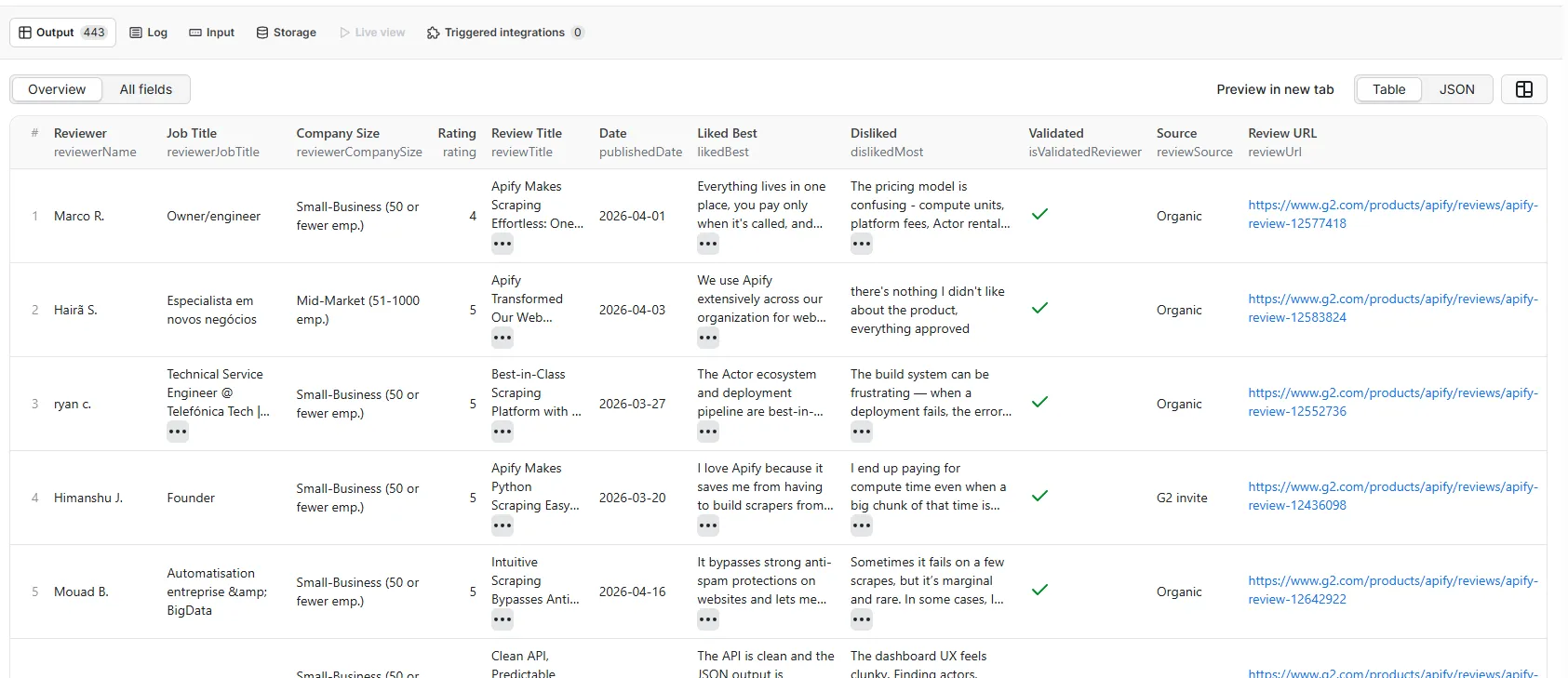
Paste a G2 product reviews URL and it returns structured records. Each record covers everything on the page: who left the review, what they liked and disliked, how they rated the product, whether their account was validated, and whether the submission was organic or came from an incentivized invite.
It pages automatically. G2 shows 10 reviews per page; the actor keeps going until it hits your limit or runs out of reviews. The default is 10 (first page), and you can go up to 5,000,000.
Why this data is useful
G2 reviews are written by people with opinions, not by marketing teams. A single detailed review often tells you more about a competitor's real weaknesses than any analyst report.
Some practical uses:
- Schedule the actor weekly on a competitor's page sorted by
most_recent. When a new wave of complaints appears, you know about it before your next sales call. - Pull reviews from people who mention a specific pain point your product addresses. That reviewer's job title, company size, and G2 profile is right there in the output.
- Run it on your own product to feed structured feedback into your roadmap. The
likedBest,dislikedMost, andproblemsSolvedfields are already separated out. - Scrape several competitors at once and aggregate the ratings into a single spreadsheet for comparison.
- Feed review data into an LLM to generate weekly competitor intelligence summaries automatically.
- Filter by
isIncentivizedto separate organic opinions from review campaigns, useful when evaluating the credibility of a product's rating. - Use
reviewerJobTitleandreviewerCompanySizeto segment feedback by role or company size, so you know whether complaints are coming from enterprise buyers or small teams. - Track a product's average rating over time by storing scraped data in a database and running the actor on a schedule.
What you can do with G2 review data
Competitive intelligence. Software buyers often describe exactly what they switched from, what they miss, and what they wish were different. That language is useful. If 40 reviewers of a competitor all say the same thing about a missing feature, that's a pattern worth knowing.
Sales and prospecting. Reviewers are named, with job titles and company sizes. Someone who wrote a negative review of a direct competitor is a warm lead. They've already told you what they don't like about the alternative.
Product research. Your own G2 reviews are structured feedback you don't need to manually read through one by one. Scrape them into a spreadsheet, run a sentiment pass, and you have a prioritized list of what's working and what isn't.
Reputation monitoring. Set up a daily or weekly schedule and connect the dataset to a Slack webhook or Google Sheet. You'll see new reviews in near real time without having to check the G2 page manually.
Market research. Scrape reviews across an entire software category to understand what buyers in that market care about, what language they use, and what they're willing to pay for.
Sample output
Input
| Field | Type | Default | Description |
|---|---|---|---|
| startUrl | string | required | Full G2 product reviews URL |
| maxItems | integer | 10 | Max reviews to collect (up to 5,000,000) |
| requestTimeoutSecs | integer | 300 | Per-request timeout in seconds |
URL formats
Plain reviews URL:
Filtered URL (the actor preserves your filters and sort order):
Deep pagination URL:
A note on pagination
G2's page navigation caps out at around 10 pages in the UI. The data goes much further. This actor uses the reviews_and_filters endpoint with a page parameter to reach any page in the history. A product with 5,000 reviews is fully accessible; just raise maxItems and let it run.
Output fields
| Field | Description |
|---|---|
| reviewId | G2 internal review ID |
| reviewerId | G2 internal reviewer ID |
| reviewUrl | Direct permalink to the review on G2 |
| productName | Product name |
| productId | G2 product ID |
| reviewerName | Reviewer name (first name + last initial) |
| reviewerJobTitle | Job title as listed on G2 |
| reviewerCompanySize | Company size (e.g. "Small-Business (50 or fewer emp.)") |
| rating | Star rating out of 5 |
| reviewTitle | Review headline |
| publishedDate | Date published (YYYY-MM-DD) |
| likedBest | Full text of "What do you like best?" |
| dislikedMost | Full text of "What do you dislike?" |
| problemsSolved | Full text of "What problems is X solving?" |
| badges | Array of trust badges on the review |
| isValidatedReviewer | Reviewer was validated via business email |
| isCurrentUser | Reviewer verified as a current user |
| isIncentivized | Review was incentivized |
| reviewSource | Source label ("Organic", "G2 invite", etc.) |
| videoReview | Review includes video |
| vendorResponse | Full vendor response text, if any |
| sourceUrl | The input URL you provided |
| scrapedAt | ISO 8601 scrape timestamp |
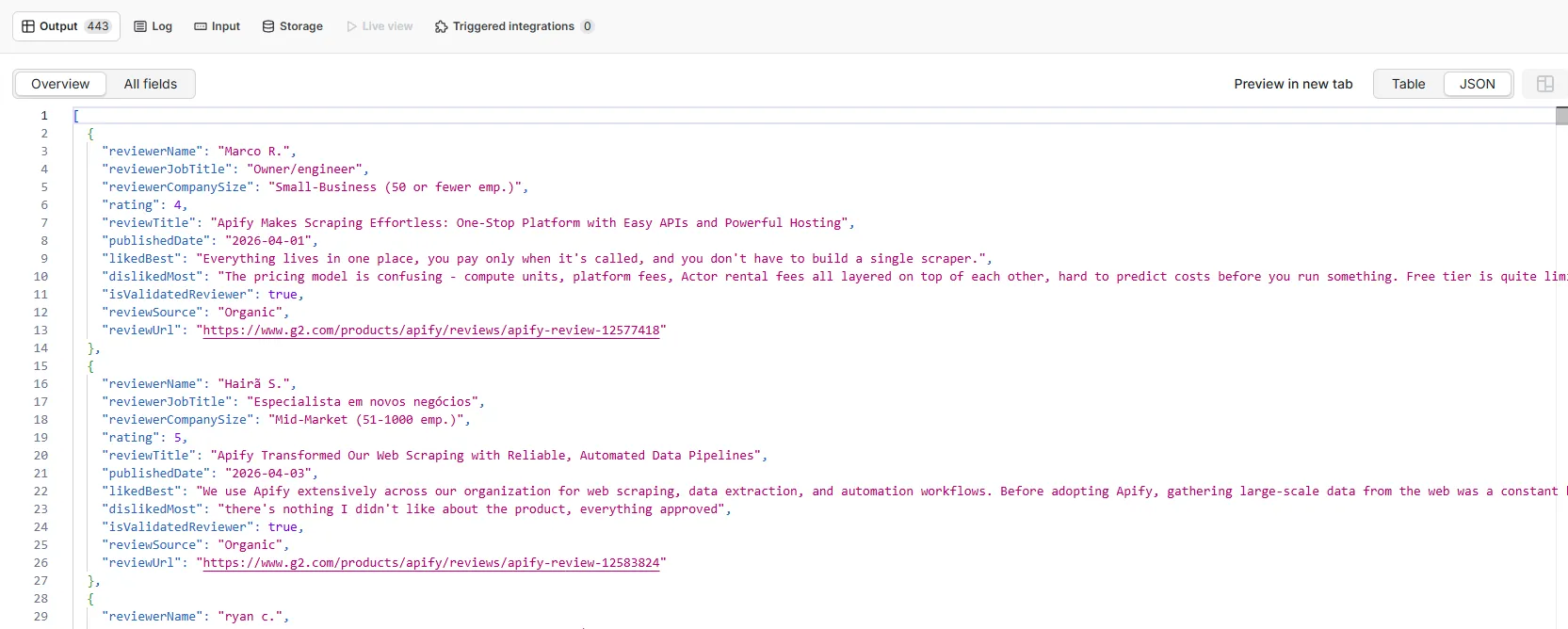
Example output
Scheduling for continuous monitoring
To catch new reviews as they come in, set up a schedule in Apify. Go to your actor's Schedules tab and configure it to run daily or weekly. Use a URL sorted by order=most_recent so you always get the newest reviews first. New records accumulate in the dataset over time and can feed a webhook, a spreadsheet sync, or any downstream pipeline.
Other review platforms
If you're building a cross-platform review monitoring pipeline, these actors cover complementary platforms:
- GetApp Scraper covers many of the same software products as G2
- Capterra Reviews Scraper pulls structured reviews from Capterra
- Capterra Scraper covers broader Capterra product data