Getapp.Com Scraper
Pricing
from $7.00 / 1,000 results
Getapp.Com Scraper
GetApp.com scraper that collects listings, ratings, and review breakdowns from any category page, so you can watch a market without checking it by hand.
Pricing
from $7.00 / 1,000 results
Rating
0.0
(0)
Developer

Luffy
Maintained by CommunityActor stats
0
Bookmarked
5
Total users
1
Monthly active users
a month ago
Last modified
Categories
Share
GetApp.com Scraper
Extract software listings from GetApp.com category and search pages, including ratings, review breakdowns, features, and direct product URLs.
What it does
GetApp.com organizes thousands of business software tools into categories. This scraper takes any category or search page URL and collects all listings, paginating automatically.
For each listing it collects:
- Product name, slug, and direct URL
- Logo URL and tagline
- Overall average rating and total review count
- Star breakdown (1 through 5 stars)
- Sub-scores: value for money, features, ease of use, customer support, and likelihood to recommend
- Popular features
- Category name and URL
- Premium status and Category Leader flag
Why it matters
GetApp.com is owned by Gartner Digital Markets, the same group behind Capterra and Software Advice. Reviews are verified. Ratings split into sub-scores rather than collapsing to a single number, so you can see whether a product scores well on features but poorly on support, or vice versa.
Schedule it and it gets more useful. Weekly runs give you a time-series. You can catch a competitor's rating dropping after a bad release, or see a new tool building momentum months before it shows up in analyst reports.
Input
| Field | Type | Default | Description |
|---|---|---|---|
urls | Array of strings | required | One or more GetApp.com category or search page URLs |
maxItems | Integer | 50 | Maximum listings to collect across all URLs |
requestTimeoutSecs | Integer | 30 | Per-request timeout in seconds (5 to 120) |
Example input
Each page shows 25 listings. maxItems: 50 gets you 2 pages per URL. Set it to 100000 to pull everything in a category.
Popular category URLs to try
Marketing
- https://www.getapp.com/marketing-software/marketing-automation/
- https://www.getapp.com/marketing-software/lead-generation/
- https://www.getapp.com/marketing-software/email-marketing/
- https://www.getapp.com/marketing-software/social-media/
Sales & CRM
- https://www.getapp.com/customer-management-software/crm/
- https://www.getapp.com/sales-software/sales-force-automation/
- https://www.getapp.com/customer-management-software/customer-engagement/
HR & People
- https://www.getapp.com/hr-human-resources-software/human-resources/
- https://www.getapp.com/hr-human-resources-software/applicant-tracking/
- https://www.getapp.com/hr-human-resources-software/payroll/
Finance & Accounting
- https://www.getapp.com/finance-accounting-software/accounting/
- https://www.getapp.com/finance-accounting-software/billing-and-invoicing/
Project Management & Collaboration
- https://www.getapp.com/project-management-planning-software/project-management/
- https://www.getapp.com/collaboration-productivity-software/collaboration/
- https://www.getapp.com/collaboration-productivity-software/task-management/
Customer Support
- https://www.getapp.com/customer-service-support-software/help-desk/
- https://www.getapp.com/customer-service-support-software/live-chat/
Filtered by business size
- https://www.getapp.com/marketing-software/marketing-automation/org/small-business/
- https://www.getapp.com/customer-management-software/crm/org/enterprise/
Tip: append ?page=2, ?page=3, etc. to jump to a specific page, or just set maxItems high and let the actor handle pagination.
Output
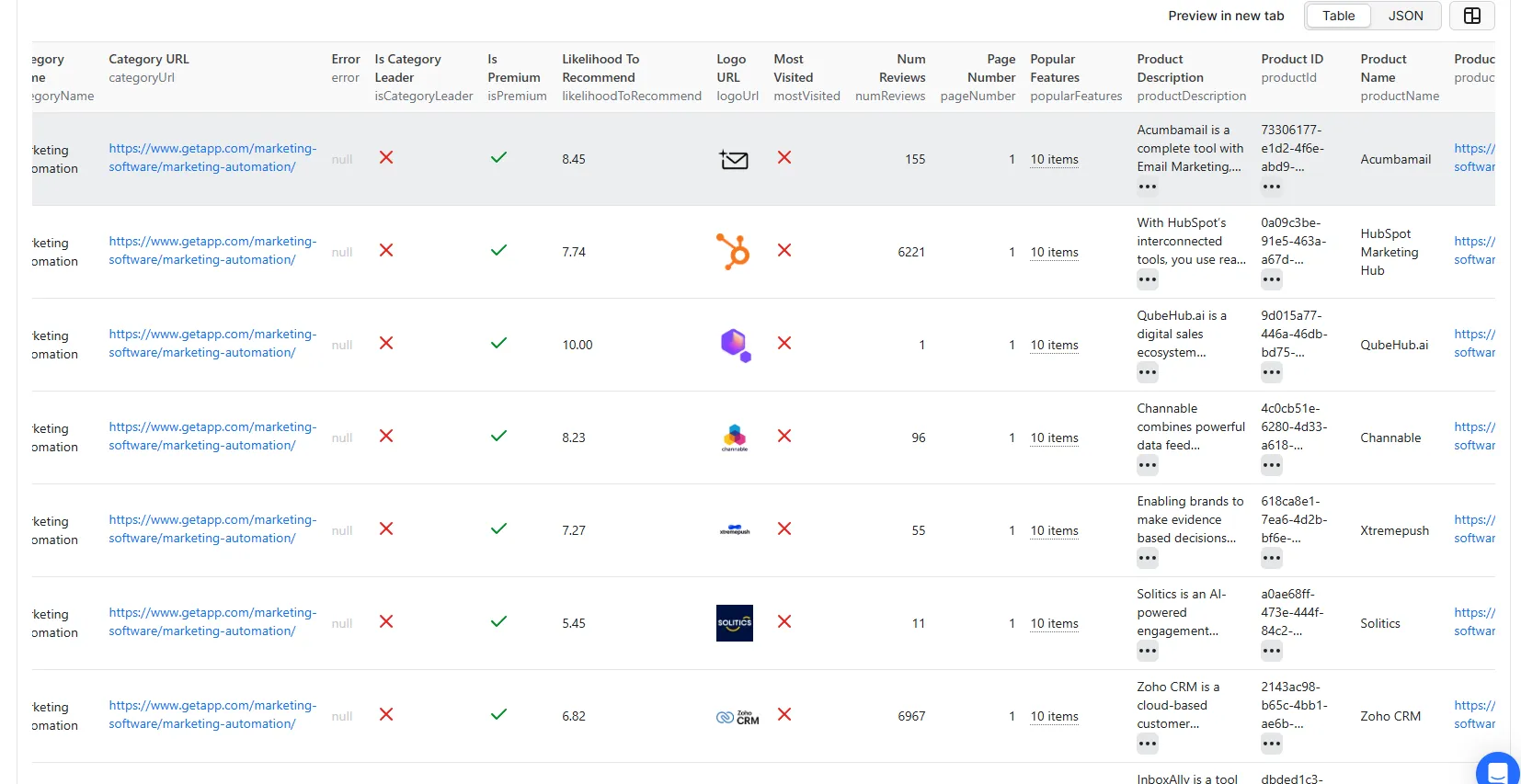
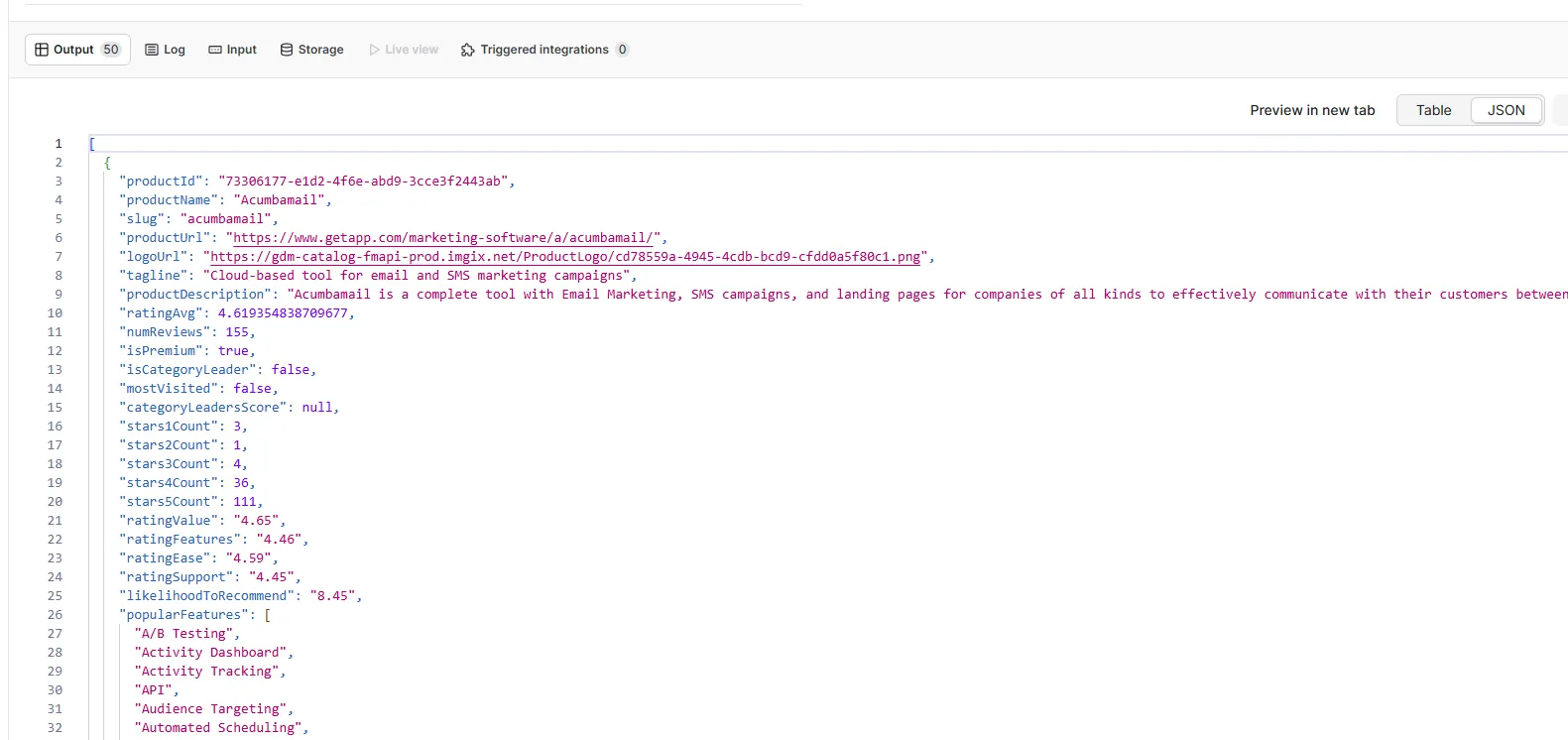
Each item represents one software listing.
Output in Apify table view
Output in Apify JSON view
Pagination
The actor reads the total page count from each page and paginates automatically.
maxItems: 25= 1 page per URLmaxItems: 50= 2 pages per URLmaxItems: 250= 10 pages per URLmaxItems: 100000= everything available
Scheduled runs
- Open your actor and click Schedules
- Set a cron expression.
0 8 * * 1runs every Monday at 8 AM - Save
Each run appends fresh data to your dataset. After a few weeks you have a time-series you can use to track rating trends, spot new entrants, or catch reputation drops early.
Best practices
Start small. Set maxItems to 25 or 50 on your first run to confirm the category URL is correct and the output looks right before scaling up.
One URL per category. Splitting categories into separate runs makes it easier to identify which URL a result came from and to re-run a single category without re-scraping everything.
Use filters in the URL. GetApp.com lets you filter by business size and other facets directly in the URL (e.g. /org/small-business/). Pass those filtered URLs directly rather than post-processing large result sets.
Set a schedule. A single snapshot is useful. A weekly series is much more useful. Even a monthly run is enough to track meaningful rating shifts in most categories.
Export to Google Sheets. In Apify, connect your dataset to Google Sheets via the integration tab. New runs append rows automatically, giving you a live spreadsheet that updates on every scheduled run.
Watch isCategoryLeader. Products with the Category Leader badge have cleared a threshold on ratings and review volume. Filtering to isCategoryLeader: true is a quick way to build a shortlist of credible options in any category.
Use cases
Useful for competitive tracking (watch ratings shift week to week), procurement research (sub-scores beat single-number averages when shortlisting vendors), content and SEO work (find where feature coverage in a category is thin), and building company lists from actual category data rather than ad-hoc searches.
About GetApp.com
GetApp.com is a software review platform owned by Gartner Digital Markets, alongside Capterra and Software Advice. It covers thousands of software categories with verified buyer reviews. The Category Leader badge is calculated from ratings, review volume, and engagement — products with it appear at the top of category pages.
Related actors
If you work with software review platforms, these actors cover the rest of the Gartner Digital Markets family:
- Capterra Scraper — scrape software listings and category pages from Capterra
- Capterra Reviews Scraper — collect individual user reviews from Capterra product pages