G2.Com Scraper (It works)
Pricing
from $10.00 / 1,000 results
G2.Com Scraper (It works)
G2.com scraper that pulls software listings, ratings, pros and cons, and market segment data from any category page, so you can track a market without checking it manually.
Pricing
from $10.00 / 1,000 results
Rating
5.0
(3)
Developer

Luffy
Maintained by CommunityActor stats
9
Bookmarked
63
Total users
8
Monthly active users
0.079 hours
Issues response
a month ago
Last modified
Categories
Share
G2.com Scraper
Extract software listings from G2.com category pages, including ratings, reviews, pricing, pros and cons highlights, market segment breakdowns, and direct product URLs.
What it does
G2.com is a peer-to-peer software review platform with millions of verified reviews. This scraper takes any G2.com category page URL and collects all listings, paginating automatically.
For each listing it collects:
- Product name, slug, and direct URL to the G2 reviews page
- Logo URL
- Vendor name and vendor page URL
- Average star rating and total review count
- Entry level pricing
- Full product description
- Pros highlights (top positive aspects from reviewers)
- Cons highlights (top negative aspects from reviewers)
- Typical user roles and industries
- Market segment breakdown (Small-Business / Mid-Market / Enterprise percentages)
- Category name and ID
Why it matters
G2 ratings come from verified buyers. The market segment field is the one worth paying attention to — a 4.2 from mostly SMB users reads differently than a 4.2 from enterprise teams. Same number, different story.
The pros and cons are aggregated from reviewer text. You get the recurring themes rather than individual opinions. When "Learning Curve" shows up in the cons column for five tools in a row, that's the category telling you something.
Schedule it and you get a running record. Useful for watching what happens to a competitor's score after a rough release, or spotting a newer product quietly picking up reviews before it shows up anywhere else.
Input
| Field | Type | Default | Description |
|---|---|---|---|
urls | Array of strings | required | One or more G2.com category page URLs |
maxItems | Integer | 25 | Maximum listings to collect across all URLs (up to 50000) |
requestTimeoutSecs | Integer | 30 | Per-request timeout in seconds (5 to 120) |
Example input
G2.com shows 15 listings per page. maxItems: 15 = 1 page, maxItems: 150 = 10 pages. Maximum supported value is 50000.
Popular category URLs
Marketing and sales
- https://www.g2.com/categories/crm
- https://www.g2.com/categories/marketing-automation
- https://www.g2.com/categories/email-marketing
- https://www.g2.com/categories/lead-generation
- https://www.g2.com/categories/sales-intelligence
- https://www.g2.com/categories/sales-engagement
Customer support
- https://www.g2.com/categories/help-desk
- https://www.g2.com/categories/live-chat
- https://www.g2.com/categories/customer-success
HR and finance
- https://www.g2.com/categories/core-hr
- https://www.g2.com/categories/applicant-tracking-systems
- https://www.g2.com/categories/payroll
- https://www.g2.com/categories/accounting
Collaboration and productivity
- https://www.g2.com/categories/project-management
- https://www.g2.com/categories/team-collaboration
- https://www.g2.com/categories/video-conferencing
- https://www.g2.com/categories/task-management
Tip: G2 category slugs are predictable. If you know the category name, try /categories/the-category-name with hyphens. Most work on the first guess.
Output
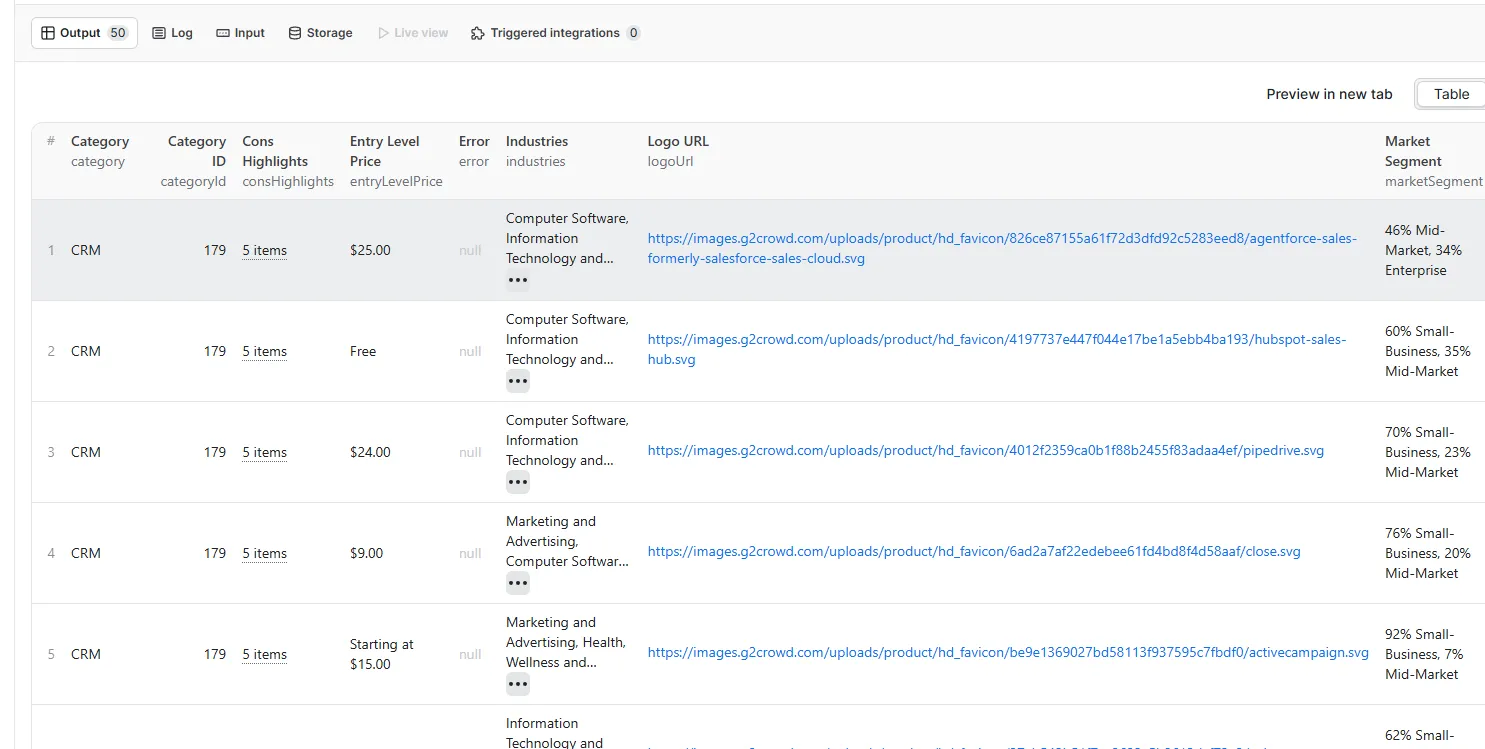
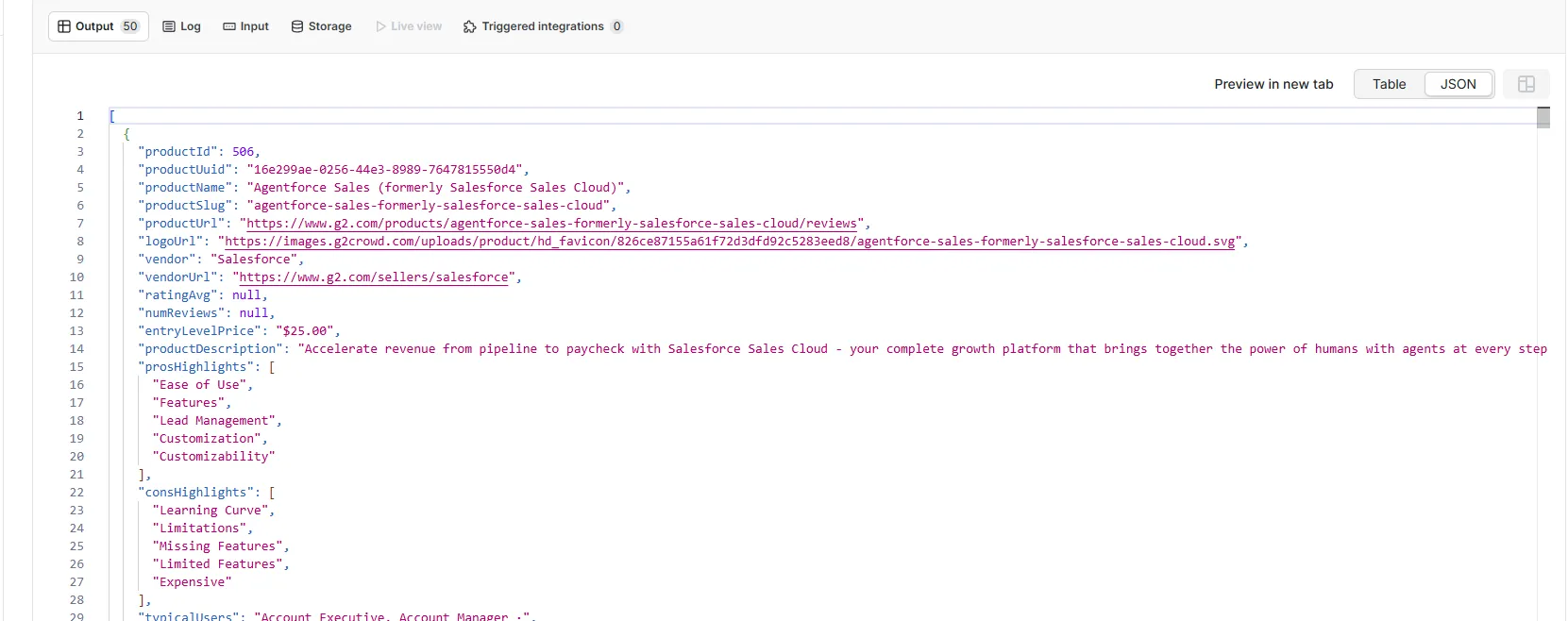
Each item represents one software listing.
Output in Apify table view
Output in Apify JSON view
Pagination
The actor reads the total page count from each category page and paginates automatically.
maxItems: 15= 1 page per URLmaxItems: 150= 10 pages per URLmaxItems: 975= 65 pages (full CRM category)maxItems: 50000= maximum supported value
Scheduled runs
- Open your actor and click Schedules
- Set a cron expression.
0 8 * * 1runs every Monday at 8 AM - Save
Each run appends fresh data. Run weekly for a few months and you have a genuine time-series of category ratings, review counts, and market segment shifts.
Best practices
Run with maxItems: 15 first to confirm the URL works before scaling up.
Market segment data only appears when enough users from each company size have reviewed a product. Newer or lightly-reviewed products may return null here — that's expected.
The pros and cons highlights are G2's own aggregation of reviewer language, not individual quotes. They're better for bulk comparison across a category than reading individual reviews one by one.
If you want to track a specific set of tools rather than a whole category, collect the full category once, filter to the products you care about, then use their individual G2 review URLs for deeper scraping.
Export to Google Sheets via the Apify integration tab. New runs append rows automatically, giving you a live sheet that updates on every scheduled run without any manual work.
About G2.com
G2.com is a software review platform with millions of verified reviews across thousands of categories. Reviews are verified through LinkedIn or business email. The G2 Score is calculated from satisfaction ratings, review volume, and market presence data. Products that clear a threshold on these metrics earn a G2 Leader badge and appear at the top of their category.
Related actors
These actors cover other major software review platforms in the same family:
- GetApp.com Scraper — software listings from GetApp.com category pages
- Capterra Scraper — software listings from Capterra category pages
- Capterra Reviews Scraper — individual user reviews from Capterra product pages