
Google Play Reviews Scraper - Android Reviews & Replies
Pricing
from $0.06 / 1,000 reviews
Google Play Reviews Scraper - Android Reviews & Replies
Google Play reviews scraper and Google Play reviews API for any Android app by package id, URL or name: stars, review text, author, date, thumbs-up, app version and the developer's reply and its date. Several languages and countries per run, star filter and date cutoff. No login, no Google account.

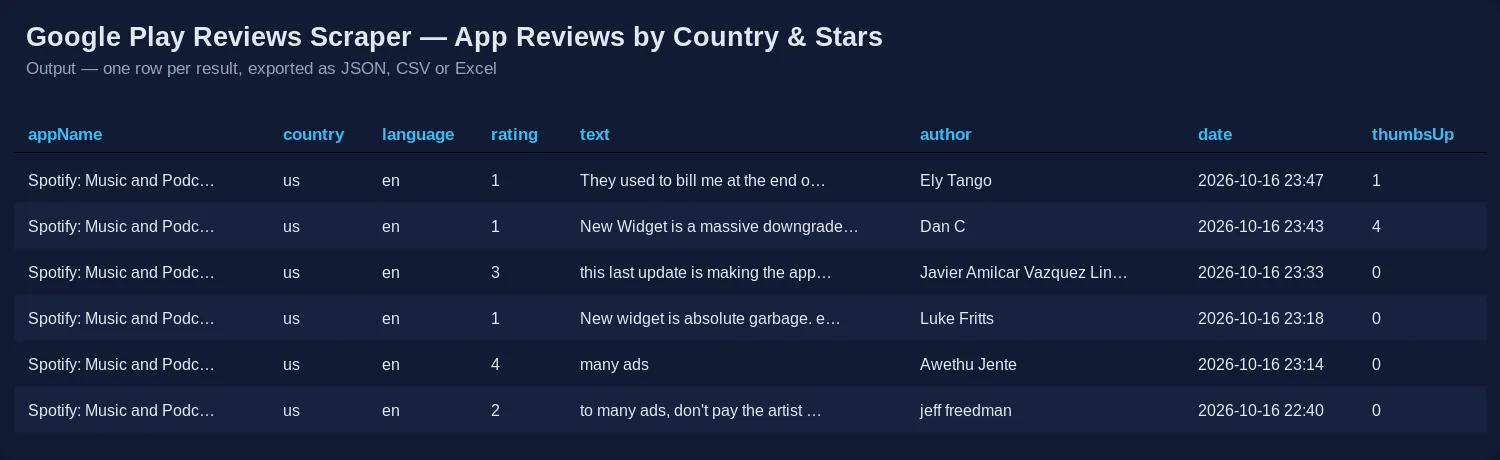
Google Play Reviews Scraper extracts Google Play Store reviews for any Android app — by package id, Play Store link or app name — and returns one row per review with stars, review text, author, date, thumbs-up count, the app version the reviewer used, and the developer's reply (text and date). One run can cover several apps, several languages and several countries, filtered by stars and by date.
$0.08 per 1,000 reviews on the Apify Free plan, from $0.07 per 1,000 on paid plans. No start fee, no login, no Google account, no API key, no browser. Reviews outside your filters, duplicates, unknown apps and bad inputs are free.
What is Google Play Reviews Scraper?
A Google Play reviews API for people who read what Android users say about apps: product managers, ASO specialists, app marketers, customer-support leads, UX researchers, investors — and AI agents that summarise feedback. It reads the same public review list the Play Store web page loads when you click "See all reviews", and turns it into a flat table you can sort, filter, chart or feed to an LLM. No official Google Play API or developer-console access is needed, and it works for any app, not only your own.
Each row is one review. The first columns tell you which app, country and language it came from; the rest are the review itself and the developer's answer. Typical jobs:
- Complaint mining — set Maximum stars to 2 and read the 1- and 2-star reviews of your app or a competitor's. Google filters by stars on its side, so a 4.6-star app's complaints come back as fast as its praise.
- Release monitoring — run daily with Newest first and Only reviews newer than: 1 day, then group by
appVersionto see what a release broke. - Support quality audits —
hasDeveloperReply,replyTextandreplyDateshow which reviews got an answer and how quickly. - International feedback — the same app in English, German, Spanish, Brazilian Portuguese and Hindi in one run.
- AI analysis — clean text rows for sentiment, topic clustering, feature-request extraction or a weekly summary.
This Actor is the reviews-only door to our general Google Play Scraper, which also lists apps from search, charts and developers. If you need Apple reviews too, use its twin, App Store Reviews Scraper.
What data can Google Play Reviews Scraper extract?
💬 Review rows (type: review)
| Field | Example | Meaning |
|---|---|---|
appId | com.spotify.music | Google Play package id |
appName | Spotify: Music and Podcasts | App name |
country, language | us, en | Where and in which language the review was read |
reviewId | ad1d9be2-0959-… | Google Play review id (stable, use it to de-duplicate) |
rating | 3 | Stars, 1–5 |
text | I love music, it's the only thing… | The review |
author, authorImageUrl | Angel Mead | Reviewer name and avatar as shown on Google Play |
date | 2026-04-10T00:04:24.771Z | When the review was written or last edited (ISO 8601) |
thumbsUp | 56 | How many people marked it helpful |
appVersion | 9.1.36.1948 | App version the reviewer had installed (empty when Google does not show it — 15–20% of reviews in our tests) |
criteria | [{"criteria": "vaf_app_quality_ads_presence", "rating": 1}] | Google's feature ratings the reviewer added (ads, battery, streaming…); null when there are none |
hasDeveloperReply | true | Whether the developer answered |
replyAuthor, replyText, replyDate | Spotify AB, Hi. We'll pass this on… | The developer's answer and its date |
url | https://play.google.com/store/apps/details?id=…&reviewId=… | Link to the review |
sortedBy | newest | The order the review was read in |
ℹ️ App summary rows (type: app, off by default)
Turn on Add an app summary row to get one extra row per app and country: rating (average), ratingsCount, reviewsCount, the star histogram stars5 … stars1, installs, minInstalls, version, updatedAt, developer, category, free, price, currency, url, iconUrl. The number of written reviews and the currency differ by country — in our test Duolingo showed 957,958 reviews in the US, 204,754 in the UK and 781,098 in India.
The dataset comes with two table views: Reviews and App summary. Both start with the type column.
💰 How much does it cost to scrape Google Play reviews?
Pay per result, nothing per run:
| Row | Free plan | Starter (Bronze) | Scale (Silver) | Business (Gold) |
|---|---|---|---|---|
| Review | $0.00008 — $0.08 per 1,000 | $0.00007 — $0.07 per 1,000 | $0.00006 — $0.06 per 1,000 | $0.00006 — $0.06 per 1,000 |
| App summary row (only when you turn it on) | $0.001 | $0.0009 | $0.0008 | $0.0007 |
| Reviews outside your star or date filter, duplicates, unknown apps, bad inputs | $0 | $0 | $0 | $0 |
Platinum and Diamond plans pay the Business price.
Examples on the Starter plan (Free plan in brackets):
- The default run (100 newest Spotify reviews in English): $0.007 ($0.008).
- 1,000 reviews of one app: $0.07 ($0.08).
- 10 apps × 3 languages × 500 reviews = 15,000 reviews: $1.05 ($1.20).
The two most-used Google Play reviews Actors on the Apify Store charge $0.10 per 1,000 reviews flat and $0.15 per 1,000 on the Free plan ($0.13 on Starter); this Actor is 20–40% cheaper than the first and 40–47% cheaper than the second, depending on your plan (checked on 13 October 2026). The Actor is HTTP-only and needs no proxy, so you are not billed for proxy traffic either. On the Apify free plan the monthly platform credit covers tens of thousands of reviews.
How to scrape Google Play reviews
- Open the Actor and put your apps into 📱 Apps, one per line. Any of these works:
- a package id:
com.spotify.music - a Play Store link:
https://play.google.com/store/apps/details?id=com.duolingo&hl=en - an app name:
Headspace(matched to the Google Play search result whose title contains every word you typed)
- a package id:
- Choose 🗣️ Languages (
en,de,es,pt-BR,hi,ja…) and, if you need them, 🌍 Countries (us,gb,in,br…). - Pick ↕️ Sort reviews by and 💯 Reviews per app, country and language.
- Optionally narrow it down with ⭐ Minimum / Maximum stars and 📅 Only reviews newer than.
- Press Start. Download the table as JSON, CSV, Excel or HTML, or read it through the API.
The default run collects the 100 newest English reviews of Spotify and finishes in a few seconds.
⬇️ Input
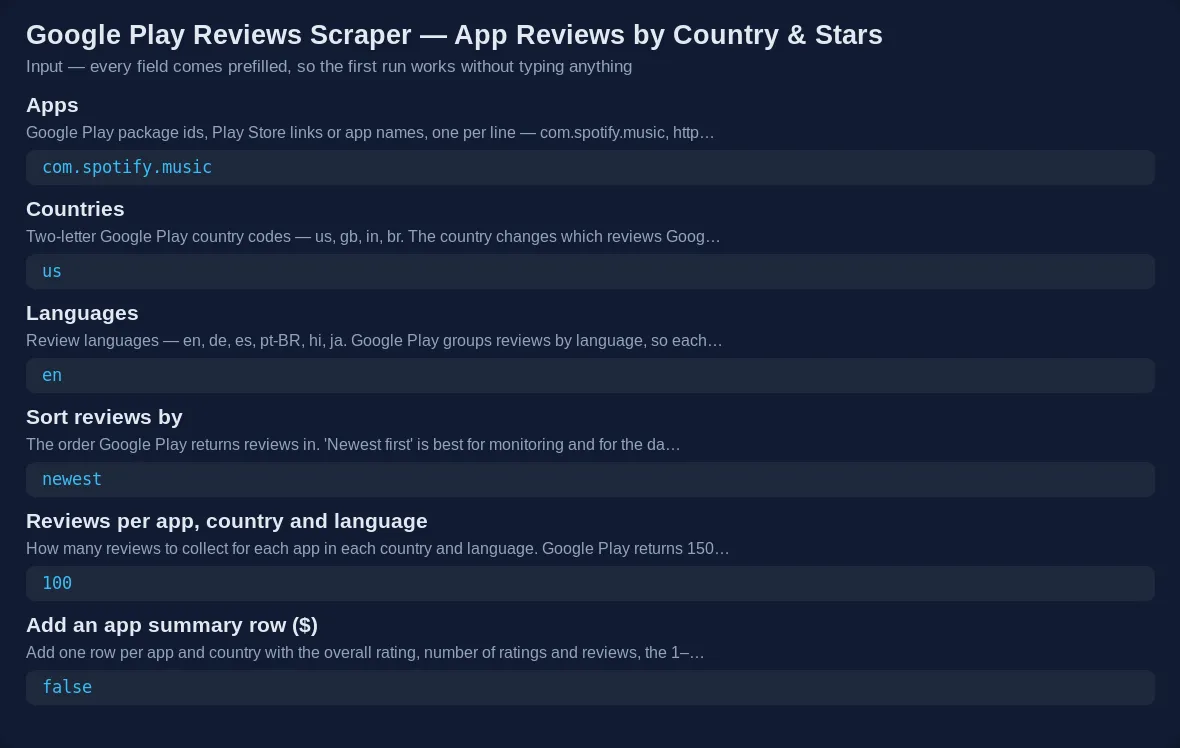
| Field | What it does |
|---|---|
📱 apps | Package ids, Play Store links or app names |
🌍 countries | Two-letter Google Play country codes (default us) |
🗣️ languages | Review language codes (default en) |
↕️ sortBy | newest, relevant (Google's "Most relevant") or rating (highest first) |
💯 maxReviewsPerApp | Reviews per app, country and language (default 100) |
⭐ minRating, maxRating | Star range, e.g. maxRating: 2 for complaints only |
📅 reviewsNewerThan | 2026-09-01, 7 days, 2 weeks or 1 month |
ℹ️ includeAppInfo | Adds the app summary row ($0.001 per app and country) |
Languages and countries — how Google Play really splits reviews
Google Play groups reviews by language. Each language gives its own set of reviews, so adding de next to en adds German reviews. The country matters less: the newest-first list is the same in every country for one language, and only the Most relevant ranking changes by country (in our test Duolingo's English "most relevant" list in the UK shared one review in fifty with the US list). The Actor removes reviews it has already delivered for the same app, so a second country never makes you pay twice for the same review — repeats are counted in the run summary as "duplicates skipped (free)".
Star filter
With a star filter Google filters on its side, one star value at a time, and the Actor merges the lists (newest first when you sort by date). That is why maxRating: 2 on WhatsApp returned 300 complaints in 6 seconds instead of paging through thousands of 5-star reviews.
Date cutoff
reviewsNewerThan keeps only reviews written after the date. With Newest first the Actor stops reading as soon as it reaches older reviews, which makes daily monitoring runs tiny: Headspace's last 14 days were 17 reviews and 4 seconds.
With Most relevant or Highest rating first recent reviews are scattered through the whole list, so the Actor keeps reading (up to 9,000 reviews per app, language and star value) and keeps only the recent ones until it has your number. Skipped older reviews are free. For "every review of the last month", Newest first is faster and complete.
⬆️ Output
An app summary row (when turned on) looks like this:
Error rows
Anything the Actor cannot use becomes a free row with type: "error", the input and a plain-English error, instead of a failed run: an unknown package id, a link that is not a Play Store link, an app name with no match, an Apple App Store id pasted by mistake, a country code like usa, a language like english, a date it cannot read, or a minimum star value above the maximum. Error rows are never charged. A run that finds no reviews for your filters ends successfully with one free type: "notice" row that says so, and costs nothing.
Use cases for Google Play review data
Product and ASO teams
Track the rating of every release by grouping reviews by appVersion, find the bugs users mention most, and compare your app with five competitors in the same languages.
Customer support
Find unanswered 1- and 2-star reviews (hasDeveloperReply: false), measure how long replies take (replyDate − date), and read how competitors answer the same complaints.
Market and investment research
Pull reviews of a whole category — fintech, food delivery, language learning — in the languages of the markets you care about, and quantify what users love or hate before you build or invest.
AI and LLM workflows
Feed review text into a sentiment model, cluster topics, extract feature requests, or let an agent write a weekly "what users said" digest. Rows are flat and the field names explain themselves.
Integrations
- Apify API — start runs and read results over HTTP:
POST https://api.apify.com/v2/acts/lergassy~google-play-reviews-scraper/run-sync-get-dataset-items?token=<TOKEN>with the input JSON as the body returns the reviews in one call. - Python and JavaScript clients:
- No-code — send reviews to Google Sheets, Airtable, Slack, Notion, Jira or a database through n8n, Make or Zapier; schedule daily runs in Apify and get a webhook when each run finishes.
- MCP server — the Apify MCP server exposes this Actor as a tool to Claude, ChatGPT, Cursor and other agents: "get the 1- and 2-star Google Play reviews of Duolingo from the last month and group them by app version".
🤖 For AI agents & LLM apps
Actor lergassy/google-play-reviews-scraper. Purpose: returns Google Play reviews of Android apps as flat rows, one per review.
Minimal input: {"apps": ["com.spotify.music"]} — defaults: country us, language en, newest first, 100 reviews.
Output fields: type, appId, appName, country, language, reviewId, rating, text, author, authorImageUrl, date, thumbsUp, appVersion, hasDeveloperReply, replyAuthor, replyText, replyDate, url, sortedBy, scrapedAt. Optional type: app rows add rating, ratingsCount, reviewsCount, stars5–stars1, installs, version, updatedAt, developer, category, price, currency.
Behaviours: maxReviewsPerApp is per app × country × language. Reviews are grouped by language; countries only change the "relevant" ranking, and repeated reviews are dropped free. Use minRating / maxRating and reviewsNewerThan instead of post-filtering — they are cheaper. Billed: review per review row, app per summary row; errors free. Reviewer names are public display names; there are no reviewer ids or e-mails.
❓ FAQ
Is it legal to scrape Google Play reviews?
The Actor reads reviews that Google Play shows publicly to anyone, without logging in. Reviewers appear under the display names they chose. You are responsible for how you use the data — respect Google's terms, copyright in the review texts and privacy laws such as GDPR, and ask a lawyer if you are unsure.
Do I need a Google account, a developer account or an API key?
No. It works for any public Android app, not only apps you publish.
How many reviews can I get per app?
Set Reviews per app, country and language up to 20,000. Google Play pages through its full list for popular apps — in our tests WhatsApp gave 2,000 English and 2,000 Spanish reviews in 25 seconds. Smaller apps simply have fewer reviews; the run stops when Google's list ends.
Why did a second country give me no new reviews?
Because Google Play shares one newest-first list across countries of the same language. Add a language instead, or switch to Most relevant, where each country has its own ranking. Repeats are skipped and never charged.
Can I get only negative reviews?
Yes — set Maximum stars to 2 (or 1). Google filters on its side, so this is fast even for apps with millions of 5-star ratings.
Can I use Google Play Reviews Scraper with the Apify API?
Yes. Every run can be started and read through the Apify API and the official Python and JavaScript clients; see the snippet above.
Can I use it through an MCP server?
Yes. Connect the Apify MCP server to Claude, ChatGPT, Cursor or any MCP client and the agent can call this Actor as a tool.
Can I integrate it with other apps?
Yes — Google Sheets, Airtable, Slack, Zapier, Make, n8n, webhooks and databases through Apify integrations.
How much will my run cost?
On the Free plan $0.08 per 1,000 reviews ($0.07 on Starter, $0.06 on Scale and Business), plus the app summary row if you turn it on ($0.0009 on Starter, $0.001 on Free). Errors, duplicates and filtered-out reviews are free, and there is no start fee.
Does one row equal one review?
Yes. Each review row is one Google Play review; the optional app summary is a separate row type with its own table view.
Does it work for iPhone apps?
No — this Actor reads Google Play. For Apple apps use App Store Reviews Scraper; the main columns (appId, appName, country, rating, text, author, appVersion, date) have the same names, so the two tables stack easily.
Your feedback
Missing a field, found a bug, or need a feature? Open an issue on the Issues tab — we answer quickly and ship fixes fast. If the Actor saved you time, a rating on the Store helps other people find it.
You might also like
| Actor | What it does |
|---|---|
| Google Play Scraper | Google Play apps from search, top charts and developers: installs, rating, price, version, developer contacts — reviews optional |
| App Store Reviews Scraper | Apple App Store reviews by country and stars — the iOS twin of this Actor |
| App Store Scraper | App Store apps from search, charts and developers |
| Software Reviews Scraper | G2, Capterra and TrustRadius reviews of B2B software |
| Trustpilot Reviews API | Company reviews from Trustpilot |


