

Software Reviews Scraper — Capterra, GetApp, TrustRadius
Pricing
from $0.84 / 1,000 review scrapeds
Software Reviews Scraper — Capterra, GetApp, TrustRadius
Scrape B2B software reviews from Capterra, Software Advice, GetApp and TrustRadius into one schema: pros, cons, sub-ratings, reviewer job title, industry and company size, vendor replies and incentive flags. Ratings are normalized to a 5-point scale, so sites compare directly.
Pricing
from $0.84 / 1,000 review scrapeds
Rating
5.0
(2)
Developer

Matvey
Maintained by CommunityActor stats
1
Bookmarked
41
Total users
24
Monthly active users
a day ago
Last modified
Categories
Share
Scrape B2B software reviews from Capterra, Software Advice, GetApp and TrustRadius and get every source back in the same fields. Pros and cons as separate columns, five sub-ratings, reviewer job title, industry and company size, vendor replies, incentive flags and the exact publication date. No login, no cookies, no API key.
What is Software Reviews Scraper?
Software Reviews Scraper is a software review API for four review sites: Capterra, Software Advice, GetApp and TrustRadius. Give it a product page — or a product name on Software Advice and TrustRadius, which are the two sites that serve an automated search — and it returns one row per review plus one summary row per product.
Most review scrapers cover a single site and invent their own field names, so comparing a product across two sites means writing a translation layer first. This Actor normalises everything: a review from Capterra and a review from Software Advice arrive with identical keys, so overallRating means the same thing wherever the row came from.
| What you give it | What you get back |
|---|---|
A product name, such as Slack | The matching product on each site you pick, with its reviews |
| A Capterra product URL | Every review, in the order the site lists them, with pros, cons and sub-ratings |
| A Software Advice product URL | The same fields, same names |
| Several products at once | One dataset you can group by product and by site |
| A rating or date filter | Only the reviews you asked for |
Which review sites are supported?
| Site | Reviews available | Rating scale | Notes |
|---|---|---|---|
| Capterra | Full history, 25 per page | 1-5 | Richest source: sub-ratings, alternatives considered, switching reasons. Needs a product URL — Capterra's search page refuses automated requests |
| Software Advice | Full history, 25 per page | 1-5 | Adds usage frequency and length of use |
| TrustRadius | Full history, 10 per page | 1-10 | Longest review text, plus reviewer company, department and years of experience |
| GetApp | The short review quotes the product page publishes (about 6; the pros or the cons of each review, no ratings — GetApp no longer publishes full reviews) | 1-5 | Product ratings and totals are complete. Needs a product URL — GetApp publishes no search page |
Capterra, Software Advice and GetApp run on one review database, so a review carries the same reviewId wherever it appears — useful for de-duplicating across those three. TrustRadius is a separate site with its own reviewers.
Ratings on two different scales
TrustRadius rates out of 10 while the other three rate out of 5. Both numbers are returned: overallRating keeps the site's own scale, ratingScale says which scale that is, and normalizedRating converts everything to 1-5 so a sort or an average across sites means something. Rating filters work on the normalized value, so maxRating: 3 returns the same band of unhappy customers on every site.
What data can Software Reviews Scraper extract?
| Field | Type | Example |
|---|---|---|
source | string | capterra |
sourceLabel | string | Capterra |
productName | string | Slack |
productUrl | string | https://www.capterra.com/p/135003/Slack/reviews/ |
productRating | number | 4.4642 |
productReviewCount | integer | 11145 |
reviewId | string | Capterra___7189737 |
title | string | Slack: Essential for Desk Based Workforces |
publishedAt | string | 2026-07-25 |
overallRating | number | 5 |
easeOfUseRating | number | 5 |
functionalityRating | number | 5 |
valueForMoneyRating | number | 4 |
customerSupportRating | number | 5 |
pros | string | Slack is the best way for a desk based workforce to communicate… |
cons | string | Occasionally there will be a bug… |
comments | string | I love Slack and could not run my business without it… |
reviewerName | string | Richard M. |
reviewerJobTitle | string | Founder |
reviewerIndustry | string | Marketing and Advertising |
reviewerCompanySize | string | Self-employed |
reviewerCompanySizeCode | string | C |
reviewerCompany | string | SDLC Corp |
reviewerDepartment | string | Information Technology |
reviewerYearsExperience | integer | 4 |
ratingScale | integer | 10 |
normalizedRating | number | 4.5 |
reviewUrl | string | https://www.trustradius.com/reviews/slack-2026-08-05-00-29-43 |
reviewerVerified | boolean | true |
timeUsed | string | Less than 2 years |
usageFrequency | string | Daily |
incentivized | boolean | false |
incentiveType | string | NominalGift |
reasonsForChoosing | string | Price and integrations |
alternativeProducts | array | ["Microsoft Teams", "Discord"] |
switchedFrom | array | ["Skype"] |
ratingBreakdown | object | {"5": 17379, "4": 5725, "3": 911} (product rows) |
status / errorCode / errorMessage | string | ok, or why a URL failed |
scrapedAt | string | 2026-09-05T04:20:11+00:00 |
A note on company size
Capterra publishes a readable range such as 11-50 employees, which lands in reviewerCompanySize. Software Advice and GetApp publish a single letter (A to I) instead, and neither site publishes what those letters mean. Rather than guess, the Actor passes the letter through in reviewerCompanySizeCode and leaves reviewerCompanySize empty. Nothing is invented.
How much does it cost to scrape software reviews?
Pay-per-event pricing, so the bill follows the rows you keep.
| Event | Price | When it is charged |
|---|---|---|
| Review scraped | $0.0012 | Per review written to the dataset |
| Product scraped | $0.003 | Per product summary row |
Failed URLs are never charged. A dead link, a page that does not exist, or a site that refuses the request comes back as an error row at no cost.
| Job | Cost |
|---|---|
| 1,000 reviews for one product | $1.20 |
| 10,000 reviews across 10 products | $12.03 |
| 200 recent reviews for 25 competitors | $6.08 |
| Product ratings only, 100 products | $0.30 |
Other review Actors on the Apify Store charged between $0.90 and $4.99 per 1,000 reviews when checked on 24 September 2026, most of them for a single site. This one sits near the bottom of that range while covering four sites in one schema. There is no proxy charge on your bill: any proxy a site needs is included in the row price.
The Apify Free plan includes $5 of monthly usage, which is about 4,000 reviews before you pay anything.
Bulk export
This Actor is built for bulk jobs — put hundreds of inputs into one run, or call it from the API on a schedule. There is no fee per run, no fee per page and no proxy charge: you pay for the rows you keep, and error rows are free, so a 50,000-row job costs exactly 50,000 × the row price with nothing added on top.
How to scrape Capterra reviews
- Click Try for free and sign in to Apify.
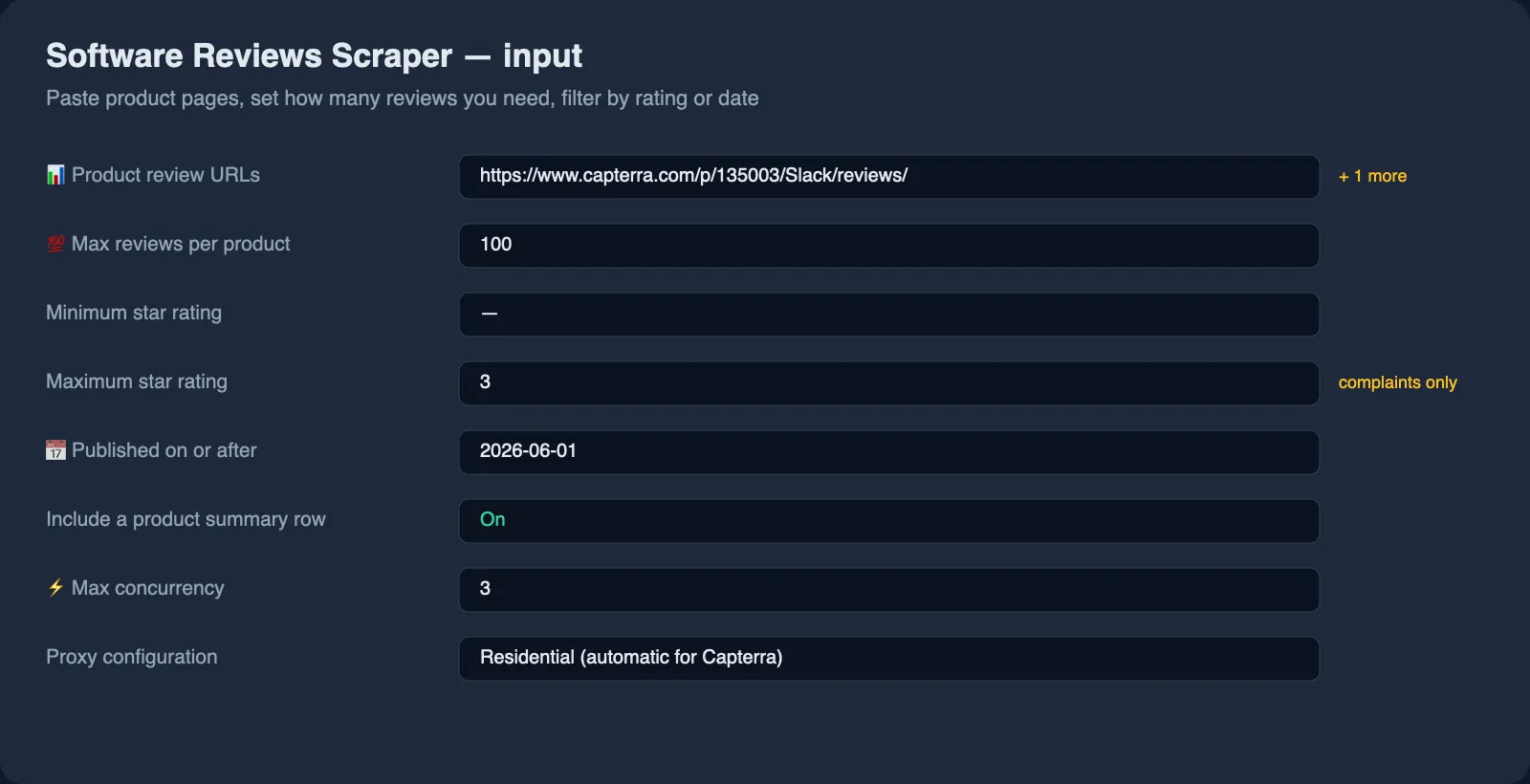
- Paste one or more product URLs into Product review URLs. A plain product link works; the reviews path is added for you.
- Set Max reviews per product. Reviews come in the order the site lists them, which is not strictly by date — for recent reviews only, set Published on or after as well.
- Optionally set a rating or date filter —
maxRating: 3collects complaints only. - Press Start, then open the Output tab or export as JSON, CSV or Excel.
⬇️ Input
Searching by product name
Put product names in 🔍 Product names and skip the URL hunt. Each name is looked up on
every site in Sites to search, and the best match is scraped — so Slack returns the
Slack reviews from Software Advice and from TrustRadius in one dataset, ready to compare.
Capterra and GetApp are scraped by product URL instead: neither site serves an automated
search, so paste their product links into Product review URLs.
Matching prefers products whose name carries the words you typed, then the one with the
most reviews, which keeps integrations and add-ons from stealing the slot: Zoom resolves
to Zoom Workplace and its 14,000 reviews, not to a small app called ZooM. Every row that
came from a search carries the searchTerm it was found by.
Raise Products per name above 1 to pull the closest alternatives alongside the product itself — a quick way to build a category comparison from a single keyword.
GetApp has no search page of its own and its URLs need a category that no other site
publishes, so GetApp is reachable by URL only. A name that matches nothing on a site comes
back as an error row naming the site and the term; the other sites still run.
Choosing products
Any product page on the four sites works. These are all valid:
https://www.capterra.com/p/135003/Slack/https://www.capterra.com/p/135003/Slack/reviews/https://www.softwareadvice.com/project-management/slack-profile/reviews/https://www.getapp.com/collaboration-software/a/slack/reviews/https://www.trustradius.com/products/slack/reviews
Sorting what comes back
Sort reviews by orders the rows: newest, oldest, highest or lowest rating, or the order
the site itself published them. It sorts what the run collected — the sites offer no sort
of their own — so to control which reviews are collected, use the rating and date filters
below. Asking for maxRating: 2 finds every one- and two-star review by paging until it
has them, which is what a "lowest rating first" sort is usually a proxy for.
Collecting only the reviews you need
minRating and maxRating filter on the overall star rating. publishedAfter and publishedBefore take YYYY-MM-DD dates. Filters are applied while paging, so a run set to 300 complaints keeps reading until it has found 300 or the site runs out of reviews.
Proxies
Not required. The Actor reaches all three sites directly, which is why the price carries no proxy surcharge. The proxy field exists only as a fallback if a site starts refusing your particular runs.
⬆️ Output
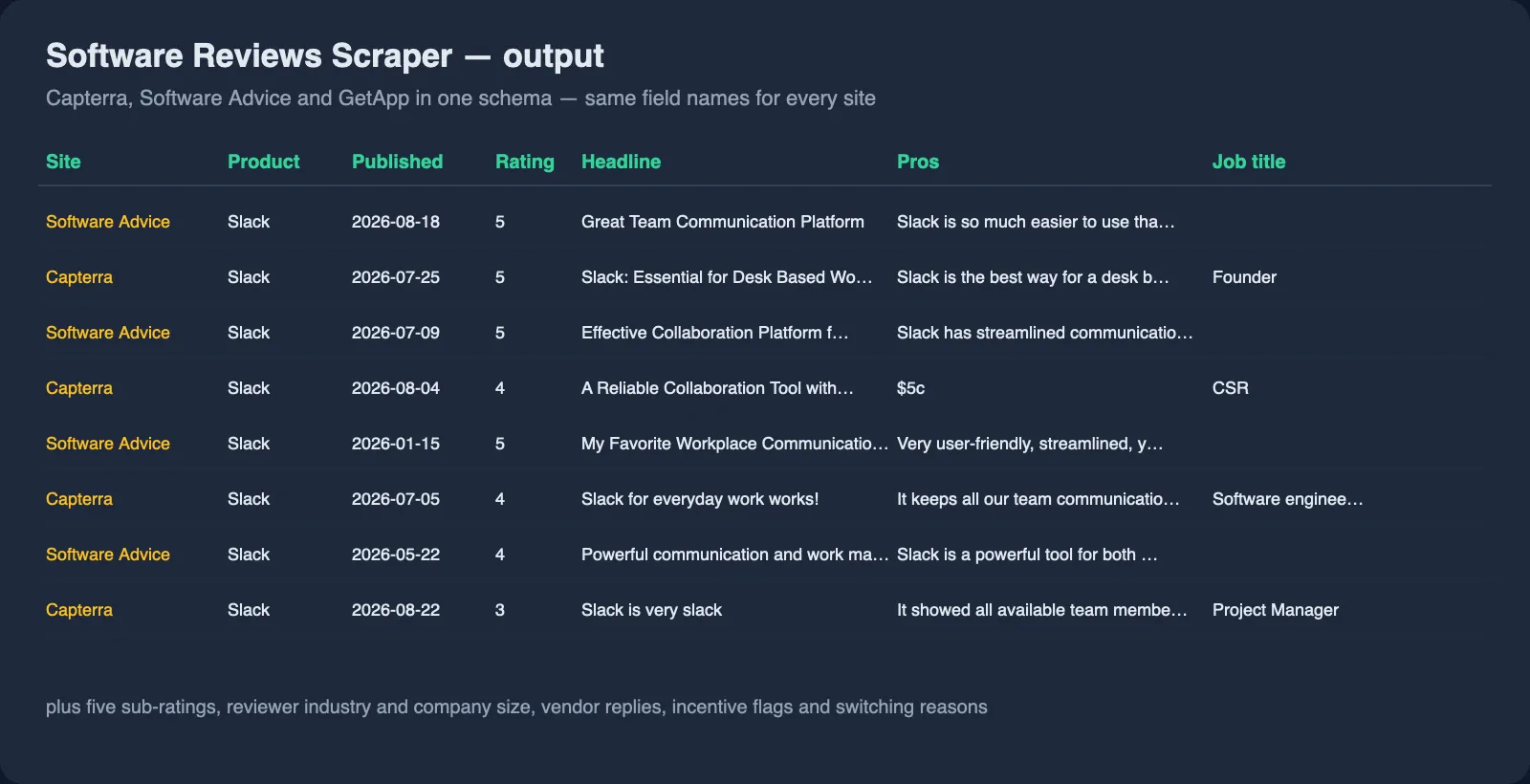
One row per review:
And one summary row per product:
Why one schema matters
Run the same product on two sites and the rows line up column for column. Capterra rates Slack 4.46 across 11,145 reviews; Software Advice rates the same product 4.66 across 24,190. That gap is visible in one sort, without reconciling two field naming schemes first.
Error rows
errorCode | Meaning |
|---|---|
unsupported-site | The URL is not one of the three supported sites |
not-found | The product page does not exist |
blocked | The site refused the request; retry, or add a proxy |
http-error | The site answered with an unexpected status |
network-error | The site could not be reached |
Use cases for software review data
Competitor and win-loss research
Pull every review of your competitors, filter to maxRating: 3, and read what their customers complain about. reasonsForSwitching and switchedFrom name the products buyers left behind.
Product feedback and roadmap input
Collect your own reviews with publishedAfter set to the last quarter and group cons by reviewerIndustry or job title to see which segment is unhappy.
Feeding an LLM or a RAG pipeline
Every review arrives as clean text with a date and a rating, which is what a summarisation or sentiment prompt needs. Because pros and cons are separate fields, you can prompt each side independently instead of asking a model to split the text again.
Lead generation and sales research
reviewerJobTitle, reviewerIndustry and the products a reviewer switched away from describe a buying decision already made in public.
Market and category monitoring
Schedule a run weekly across a category, keep the product rows, and track how average ratings and review volumes move over time.
Integrations
- API:
POST https://api.apify.com/v2/acts/lergassy~software-reviews-scraper/runs - Python:
ApifyClient(token).actor('lergassy/software-reviews-scraper').call(run_input={'productUrls': [...]}) - JavaScript:
await client.actor('lergassy/software-reviews-scraper').call({ productUrls: [...] }) - n8n: use the Apify node and set a max total charge so a scheduled run cannot exceed your budget.
- Make, Zapier, Google Sheets, Airtable: map the dataset straight into a sheet or table.
- MCP: available through the Apify MCP server, so Claude, Cursor and other MCP clients can call it as a tool.
- Webhooks: fire a webhook when a run finishes and pass the dataset onward.
🤖 For AI agents and LLM apps
- One row per review;
rowTypeseparatesreview,productanderrorrows. - Field names never change between sites, so a prompt written once works for all three.
prosandconsare separate strings — no text splitting needed.incentivizedflags reviews written in exchange for a gift, which matters when weighing sentiment.- Failed URLs are returned as rows and are never charged, so agent retries stay cheap.
❓ FAQ
Is it legal to scrape software reviews?
The Actor reads pages that are public and require no login, and it collects the review text and the reviewer details each site already publishes. How you may store and use that data depends on your jurisdiction and on the sites' terms, so review both before running at scale. This is not legal advice.
Do I need a proxy or an API key?
No. The three sites are reached directly, with no key, cookie or proxy.
How many reviews can I get for one product?
As many as the site publishes. Capterra and Software Advice page through their whole history 25 reviews at a time; popular products have tens of thousands. GetApp no longer publishes full reviews — its review pages redirect to the product page, which shows about six short quotes (the pros or the cons of a review, with the reviewer and the date). The Actor returns those quotes and says so in the product row's warnings; the full reviews are on Capterra and Software Advice under the same reviewId.
Can I search by product name instead of hunting for URLs?
Yes, on Software Advice and TrustRadius: put the names in Product names and pick those sites in Sites to search. Capterra and GetApp need a product URL instead — GetApp publishes no search page, and Capterra's search refuses automated requests even through a residential proxy, while its product pages are served normally. Paste those links into Product review URLs. Searching costs nothing extra — you pay for the reviews and product rows you get back.
Does it scrape G2?
No. G2 sits behind a bot-protection service that this Actor deliberately does not try to defeat. Capterra, Software Advice, GetApp and TrustRadius cover the same buyers and are reachable cleanly.
How are TrustRadius scores out of 10 handled?
Both ways. overallRating keeps the 9-out-of-10 the site published, ratingScale records that it was a 10-point scale, and normalizedRating gives you 4.5 so the row lines up with a Capterra review.
Can I get only negative reviews?
Yes: set Maximum star rating to 2 or 3. The Actor keeps paging until it has collected the number you asked for.
Can I use it with the Apify API?
Yes, like any Apify Actor: start a run, then read the dataset.
Can I use it through an MCP server?
Yes, it is exposed through the Apify MCP server as a callable tool.
Why is company size sometimes a single letter?
Because that is what Software Advice and GetApp publish. See the note above — the letter is passed through untouched rather than guessed at.
How fresh is the data?
Reviews are read live at run time, so a run reflects the site at that moment. The sites do not list them strictly by date: on 24 September 2026 the first 20 Capterra reviews of Slack ran from 5 September back to March, while newer ones sat further down — use Published on or after to get only recent reviews.
Your feedback
Missing a field, or a site you need covered? Open an issue on the Issues tab or leave a review — issues are answered quickly, and requests shape what gets built next.
You might also like
| Actor | What it does |
|---|---|
| Document Text Extractor | PDF, Word, Excel and PowerPoint to Markdown, tables and RAG chunks |
| Email & Phone Verifier | Validate e-mail addresses and phone numbers, find contacts on a website |
| US Business Leads | New business registrations from US state and city registries |
| Agoda Reviews Scraper | Hotel reviews and ratings from Agoda and Booking.com |


