

Pinterest Search Scraper — Pins, Boards, People & Links
Pricing
from $1.12 / 1,000 results
Pinterest Search Scraper — Pins, Boards, People & Links
[$1.60/1K results] Pinterest search for any keyword: pins with title, outbound link and domain, full-size image, video, topic tags, hashtags, reactions, pinner and board — or boards and people. Optional saves, comments, shares. Promoted pins free. No login, no run fee.
Pricing
from $1.12 / 1,000 results
Rating
0.0
(0)
Developer

Matvey
Maintained by CommunityActor stats
0
Bookmarked
23
Total users
16
Monthly active users
3 days ago
Last modified
Categories
Security
Limited permissionsShare
Pinterest Search Scraper scrapes Pinterest search results by keyword and returns pins as JSON — title, description, outbound link and its domain, full-size image, video file, Pinterest's topic tags, hashtags, reactions, pinner with follower count, board and date — or, if you choose, boards or people (profiles) matching the keyword. Board followers and full profiles are one switch away.
Saves, comments and shares, 3 November 2026. Pinterest stopped giving search results a public pin id (they now arrive as an opaque token,
e1_AfqPShz…), and its pin endpoint answers "Pin not found" for those tokens. Saves, comments and shares therefore cannot be read for a pin that came out of search — the Actor no longer asks for them and says so in the run's status message instead of shipping empty columns. Everything else in the row is unaffected, 📊 Add details still works for Boards (followers) and People (bio, website, monthly views, join date), and reactions still come with every pin.
$0.0016 per result — 1,000 pins for $1.60. No start fee, no login, no browser. Promoted pins are skipped and never charged; searches that fail are free.
Tested head-to-head — 15 October 2026
The same search ("bali villa", 20 pins) on this Actor and the five most-used Pinterest search Actors we could run with a $0.10 cost cap, each on a fresh free-plan account:
| This Actor | Other Pinterest search Actors | |
|---|---|---|
| Pins returned of 20 | 20 of 20 | 20 of 20 for three; one stopped at 10, one returned 3 boards instead of pins |
| Cost of the run on the free plan | $0.032 | $0.033 (for 10 pins) – $0.098 (for 3 rows) |
| Start fee | none | none to $0.09 per run |
| Time | 2 s | 2 – 90 s |
| Columns | 36 flat columns — topic tags, link domain, pinner followers, board size side by side | 13–21 flat columns, or 63–759 nested raw fields |
What is Pinterest Search Scraper?
A trend, content and competitor research tool for marketers, e-commerce brands, content creators, agencies and AI agents. It asks Pinterest the same question the search box does and turns every result into a clean row: what people pin for "minimalist kitchen", which websites those pins send traffic to, which creators and boards dominate a topic.
Typical uses:
- Content and trend research — what images, titles and descriptions win for your keyword this week.
- Traffic source discovery —
linkDomainshows which websites Pinterest sends clicks to for a topic; a list of competitors comes out of one search. - Creator and board discovery — switch What to search to People or Boards and get the accounts to partner with, with follower counts.
- Video pin research — Video pins returns the video file and duration for every result.
- Image datasets — full-size originals with width, height and dominant colour.
What is in every row
| Field | Meaning |
|---|---|
pinId, url, title, description, altText | The pin |
link, linkDomain | Where the pin sends people — the website behind it |
imageUrl, imageWidth, imageHeight, dominantColor | The full-size original image |
isVideo, videoUrl, videoDurationSec | For video pins |
thumbnailUrl | A small 236 px preview of the same image |
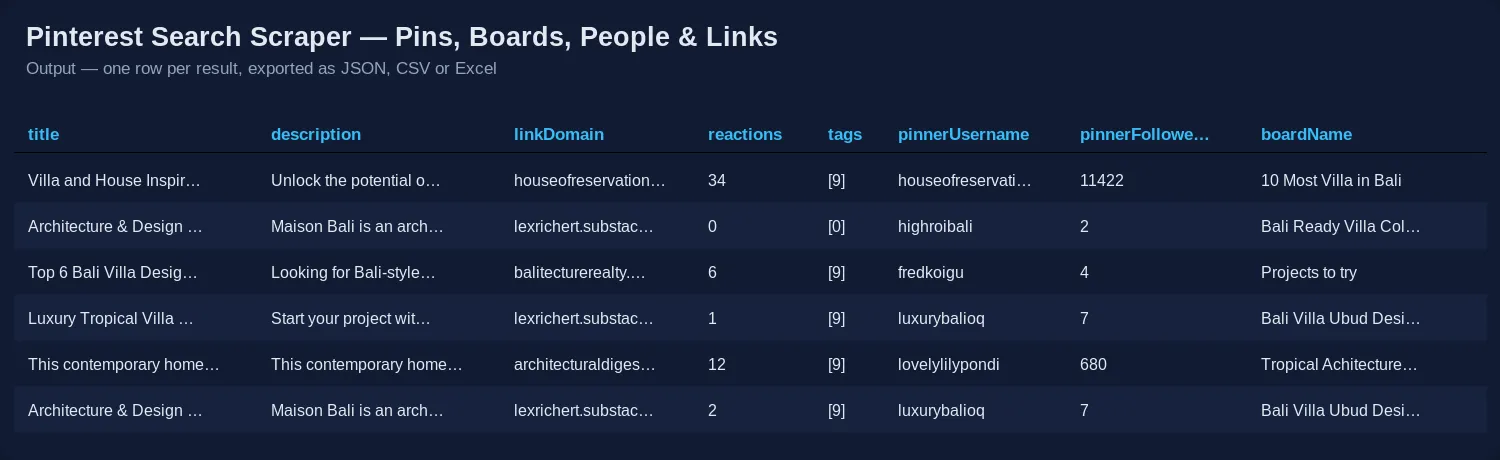
tags, hashtags | Topic labels Pinterest attaches to the pin ("Bali Villa Floor Plan", "Modern Courtyard") and the #hashtags from its description |
reactions | Reactions shown on the pin |
saves, comments, shares | Not available for search results since 3 November 2026 (see the note at the top) — left out of the row rather than sent empty |
pinnerId, pinnerUsername, pinnerName, pinnerFollowers, pinnerUrl, pinnerAvatarUrl | Who saved the pin |
boardId, boardName, boardUrl, boardPinCount | The board it sits on |
createdAt, isPromoted | Date; promoted flag |
price, priceCurrency | Shopping pins only (left out on other pins) |
query, searchType, page, position | Which search and where in the results |
searchedAs | Only when Pinterest corrected your spelling: the words it actually searched ("minimalst kitchn" → "minimalist kitchen") |
Board rows (type: board): boardId, name, url, description, pins, sections, isCollaborative, ownerUsername, ownerName, coverImageUrl, lastPinnedAt — plus followers with 📊 Add details.
Profile rows (type: profile): username, name, url, followers, pins, boards, isVerified, websiteVerified, lastPinAt, avatarUrl, userId — plus about (bio), website, following, monthlyViews, createdAt (join date), isBusiness and isPrivate with 📊 Add details (Pinterest's people search does not say whether an account is a business one, so without details the field is left out rather than guessed).
Error rows (type: error, free) explain a search that found nothing, a URL that is not a Pinterest search, or a keyword with no letters — always at the end of the dataset, so the table starts with data.
How much does it cost?
$0.0016 per result — pin, board or profile, one row, one charge. Cheaper on higher Apify plans: $0.00144 (Bronze), $0.00128 (Silver), $0.00112 (Gold and up).
- Promoted pins: skipped and $0.
- Searches that fail or find nothing, inputs that are not searches: $0. No start fee, no proxy charge.
- 📊 Add details: same price per row. Boards and people take about twice as long; pin searches are not slowed down, because there is nothing left to ask for.
| Job | This Actor | Most-used Pinterest search Actor |
|---|---|---|
| 1,000 pins | $1.60 | $3.99 |
| 10,000 pins across 50 keywords | $16 | $39.90 |
Checked on the Apify Store on 14 October 2026 against the Pinterest search Actor with the most monthly users ($0.00399 per result on the free plan, $0.00199 on Gold). Other popular Pinterest search Actors charge $0.002–0.00345 per result, some plus a start fee of $0.01–0.09 per run.
Set Max cost per run in the run options to cap a run: the Actor stops by itself, green, once the cap is reached, and everything written is paid for.
How to use it in three steps
- Type keywords into 🔍 Search keywords, one per line — or paste Pinterest search URLs.
- Pick What to search (Pins, Video pins, Boards or People) and how many Results per search.
- Press Start, then download JSON, CSV or Excel — or call the run from the API, n8n, Make, Zapier or an AI agent.
⬇️ Input
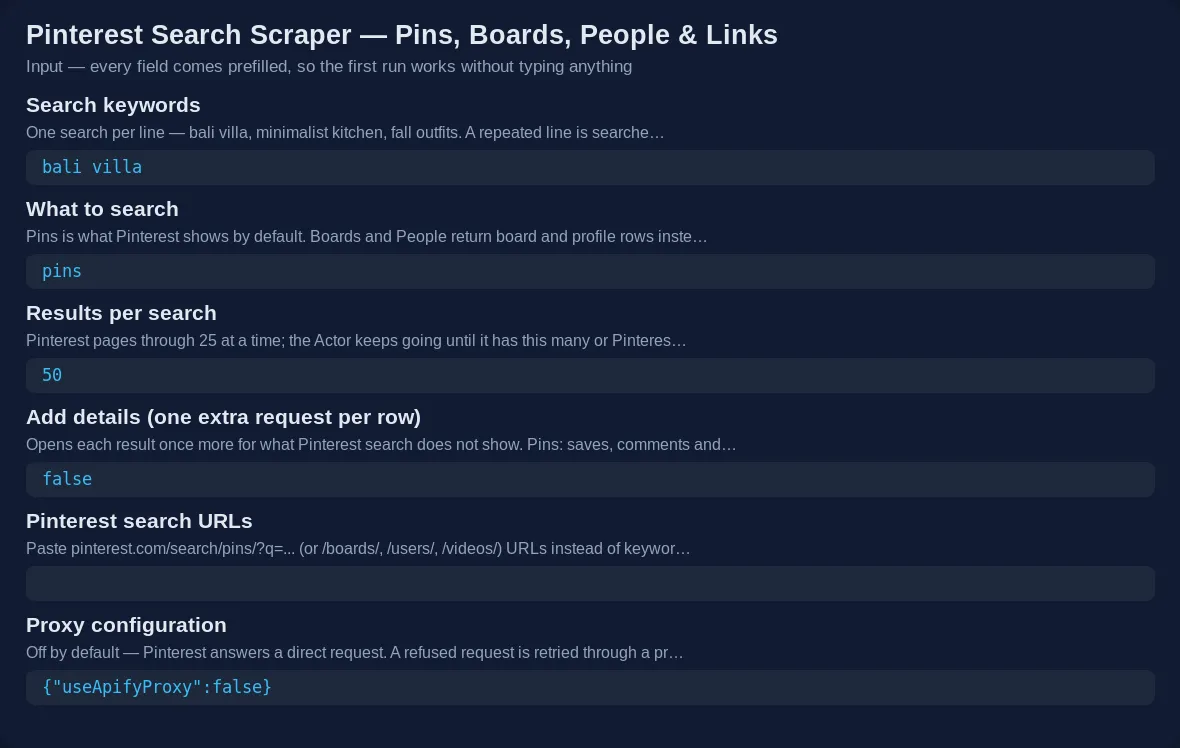
fetchPinStats is the 📊 Add details switch (the API also accepts fetchDetails).
⬆️ Output
A real row from {"keywords": ["bali villa"], "searchType": "pins"} (3 November 2026, shortened):
Tips
- Find the websites behind a niche: run a keyword with 500 results and group rows by
linkDomain. - Engagement ranking:
reactionsis the only engagement number search still carries — sort by it. Saves are no longer public for search results. - Topic map: count
tagsacross 500 pins of a keyword — the labels Pinterest itself uses for the niche. - Typos: Pinterest quietly searches a corrected spelling; the run's status message and
searchedAstell you when it did. A keyword Pinterest does not recognise at all still returns loose matches — the status message warns about it. - Deep searches: on popular keywords Pinterest keeps paging well past 100 results; niche terms run out sooner.
Integrations and API
Run it from the Apify API, the JavaScript and Python clients, a schedule, or a webhook, and push results to Google Sheets, Airtable, Slack or a database through n8n, Make or Zapier. The Apify MCP server exposes it to Claude, ChatGPT and other agents as a tool: "find the 100 most-saved Pinterest pins about Bali villas and the sites they link to".
For AI agents
- Minimal input:
{"keywords": ["bali villa"]}— 50 pins. Add"searchType": "boards"or"people"for boards or profiles,"maxItemsPerQuery": 200for more. - Returns:
type: "pin","board"or"profile"rows;type: "error"rows (free) only at the end of the dataset. Every row carriesqueryandposition. - Cost: $0.0016 per row, nothing per run; failed and empty searches are free.
FAQ
Is it legal to scrape Pinterest? The Actor reads public search results any visitor sees without an account. Profile names and usernames are public business or creator information; you are responsible for how you use the data and for complying with Pinterest's terms and the privacy laws that apply to you (GDPR, CCPA).
Do I need a Pinterest account or API key? No.
Why is link empty on some pins? Those pins were uploaded straight to Pinterest and point nowhere — Pinterest shows them as "Uploaded by user".
You might also like
- Pinterest Scraper — the all-in-one version: search, profiles, boards and pin URLs in one run.
- Pinterest Profile Scraper — full profiles, their boards and their pins.
- Threads Scraper — posts, profiles and replies from Threads.
- TikTok Influencer Scraper — creator reach and engagement.


