

YouTube Transcript Scraper
Pricing
from $2.80 / 1,000 video transcribeds
YouTube Transcript Scraper
Extract YouTube transcripts with timecodes from videos, playlists and whole channels: transcript text, timed segments, chapters, title, channel, views, duration and the caption language used. Returns SRT, WebVTT and RAG chunks. Export data, run via API, schedule runs, or call it from an AI agent.

YouTube Transcript Scraper turns YouTube captions into clean rows: the full transcript with timecodes for a single video, a playlist or an entire channel, plus title, channel, publish date, duration, views, likes, tags and chapters on the same row. It reads the caption tracks YouTube serves to any visitor, so it needs no login, no API key and no cookies, and it never touches an account of yours.
Paste video URLs, a playlist or a channel handle, press Start, and download JSON, CSV or Excel — or pull the rows through the Apify API into Google Sheets, n8n, Make, Zapier, a vector database or an AI agent.
$8 per 1,000 transcripts — $4 per 1,000 until 2 October 2026. A video without captions is a free error row, and there is no start fee.
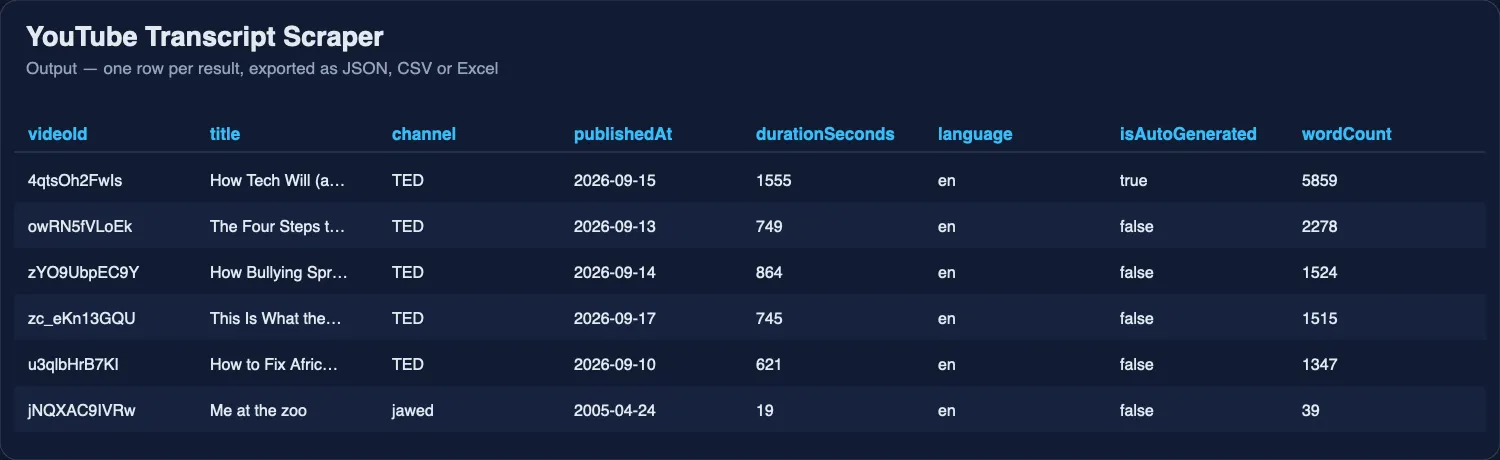
One run over a channel: six videos in, six transcripts out with metadata on the same row.
Tested head-to-head — 24 September 2026
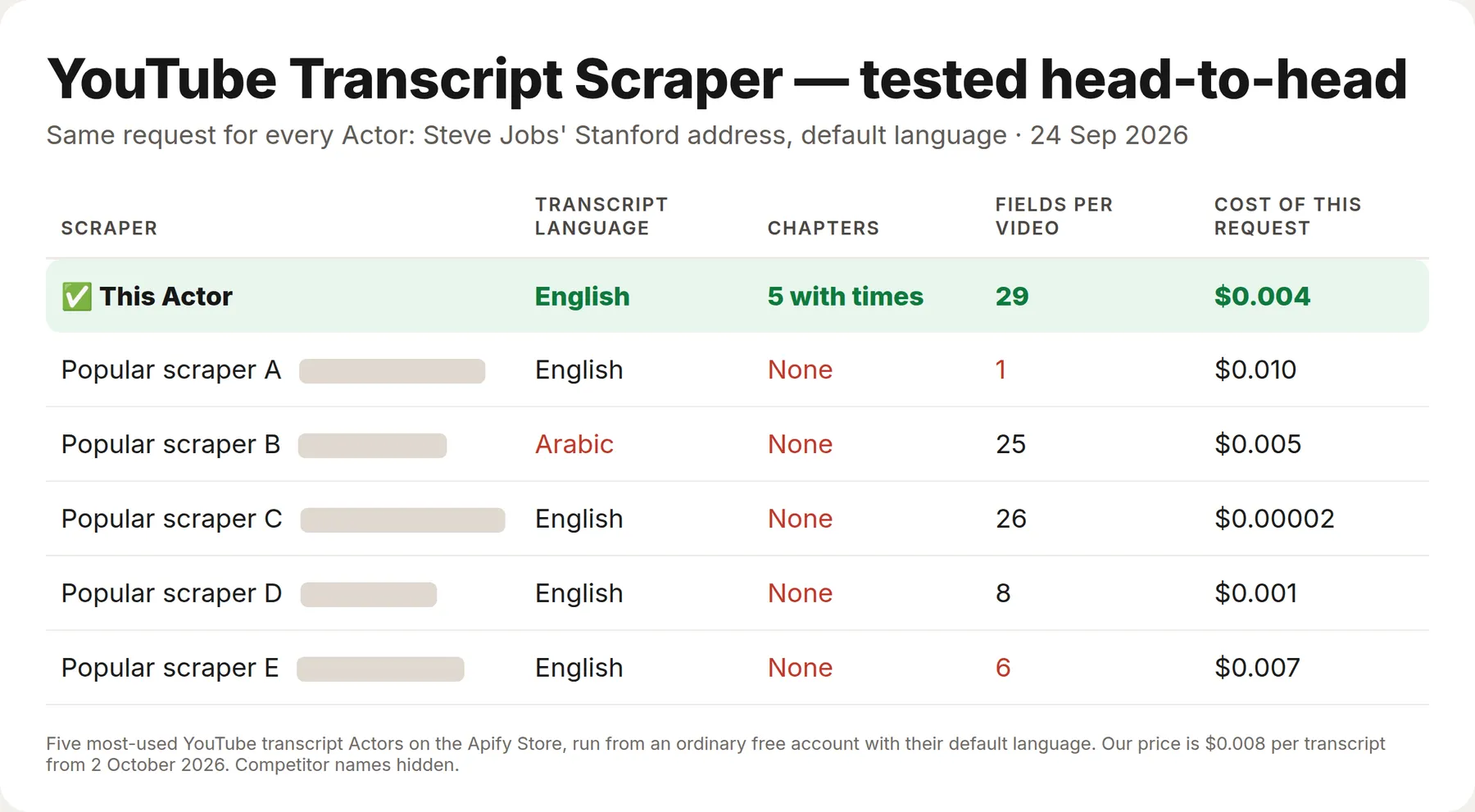
The same request went to this Actor and to the five most-used YouTube transcript Actors on the Apify Store on the same afternoon, from a fresh free account: the transcript of Steve Jobs' 2005 Stanford commencement address, each Actor with its default language setting. Four returned the English transcript and one returned an Arabic track; what came with the text differed more.
| This Actor | The 5 others | |
|---|---|---|
| The video's chapters with start and end times | Yes — all 5 | None of the five |
| Fields per video | 29 | 1 – 26 |
What is YouTube Transcript Scraper?
YouTube has no public API for captions. The official Data API returns video metadata but not the transcript text, and the caption endpoint needs the channel owner's OAuth token. This Actor is a YouTube transcript API alternative for everyone who needs what was said in a video as data rather than as a sidebar: summarisation, RAG and semantic search over video libraries, competitor and creator research, SEO and keyword work, accessibility and subtitle files, media monitoring, academic research, and AI agents asked "what does this video actually say".
It accepts every form of YouTube address people actually paste:
| You paste | It understands |
|---|---|
https://www.youtube.com/watch?v=dQw4w9WgXcQ | a single video |
https://youtu.be/dQw4w9WgXcQ | a single video |
https://www.youtube.com/shorts/kJQP7kiw5Fk | a Short |
https://www.youtube.com/embed/dQw4w9WgXcQ and /live/… | a single video |
dQw4w9WgXcQ | a bare video ID |
https://www.youtube.com/playlist?list=… | every video in the playlist |
https://www.youtube.com/@zdfheute or /channel/UC… | the channel's latest videos, capped by you |
What other YouTube transcript scrapers get wrong — and what this one does instead
The issue trackers of the most-used YouTube transcript Actors on Apify repeat the same complaints. The leader in this niche carries a 3.7 rating across 49 reviews and 30 issues, and the issues cluster into four groups. Each one is a design decision here.
| Complaint on other Actors | YouTube Transcript Scraper |
|---|---|
| "No caption was found!" · "There is def. a caption on this URL, but it keeps failing" | Captions are matched by language prefix, so a track YouTube labels en-eEY6OEpapPo counts as English. With language: auto the Actor takes the captions the video actually has — English first, then the language the video states it is in, then any other track — so a video captioned only in Spanish returns a Spanish transcript instead of an error |
| "targetLanguage param not respected, captions are always returned in English" | Every row carries language — the track that was really used — and isAutoGenerated, so you can always see what you got rather than assume |
| "What if I'm not sure about the target language?" | The auto default answers it, and when a video genuinely has nothing, the free error row lists availableLanguages so your next run can ask for one that exists |
| "Stopped working" · "Returns empty string" · "Bring back zero data" · "no results returned" | One video failing never stops the run: each video is retried on a different proxy exit, transport errors and rate limits back off and retry, and anything still unresolved becomes a row that says why in words |
| "ERROR API failed." | Errors are named, not numbered: no-captions, private-video, video-unavailable, age-restricted, rate-limited, invalid-input. Each one carries a sentence a human can act on |
| "Can anybody specify if $7 for 1000 items means $7 for 1000 transcriptions?" | The unit is one video, not one dataset row: $8 per 1,000 transcripts delivered, one video one charge. Error rows cost nothing and there is no per-run fee |
What data does YouTube Transcript Scraper extract?
One row per video. Values below are from a real run on dQw4w9WgXcQ.
The transcript
| Field | Example |
|---|---|
transcript | "[♪♪♪] ♪ We're no strangers to love ♪ ♪ You know the rules and so do I ♪ …" |
wordCount, charCount, segmentCount | 481 · 2066 · 60 |
language, isAutoGenerated | en · false |
availableLanguages | ["en","de","ja","pt","es","ab","aa","af",…] |
segments (optional) | [{"start": 1.36, "duration": 1.68, "text": "[♪♪♪]"}, …] |
subtitles (optional) | SRT or WebVTT as a single string, ready to save as a .srt file |
chunks, chunkCount (optional) | [{"index": 0, "chapter": null, "start": 1.36, "end": 95.6, "startTimecode": "00:00:01", "text": "…"}] · 3 |
The video
| Field | Example |
|---|---|
videoId, url | dQw4w9WgXcQ · https://www.youtube.com/watch?v=dQw4w9WgXcQ |
title | Rick Astley - Never Gonna Give You Up (Official Video) (4K Remaster) |
channel, channelId, channelUrl | Rick Astley · UCuAXFkgsw1L7xaCfnd5JJOw · https://www.youtube.com/channel/UCuAXFkgsw1L7xaCfnd5JJOw |
publishedAt, durationSeconds | 2009-10-25 · 213 |
viewCount, likeCount, commentCount | 1817142723 · 19397146 · 2400000 |
tags, categories | ["rick astley","Never Gonna Give You Up","nggyu",…] · ["Music"] |
thumbnail, isLive | https://i.ytimg.com/vi_webp/dQw4w9WgXcQ/maxresdefault.webp · false |
description (optional) | the full video description |
chapters | [{"title": "Intro", "start": 0, "end": 42}] when the uploader defined them |
status, errorCode, errorMessage, scrapedAt | ok · null · null · 2026-09-18T14:43:46+00:00 |
How much does it cost to scrape YouTube transcripts?
$8 per 1,000 transcripts delivered — one charge per video that came back with text. Until 2 October 2026 the launch price of $4 per 1,000 still applies. Videos discovered inside a channel or playlist cost $0.50 per 1,000 listed, charged when they are found, before any transcript is fetched, so a channel run's discovery cost is visible separately from its transcript cost.
- A video with no captions is free. So is a private, removed or age-restricted video, and so is a malformed URL. You are charged for transcripts, not for attempts.
- There is no start fee and no monthly rental. A run that returns nothing costs nothing.
- The $5 of free platform credit on Apify's free plan is about 625 transcripts before you pay anything.
- Higher Apify plans pay less per transcript: Bronze $7.20, Silver $6.40, Gold and above $5.60 per 1,000.
For comparison, the most-used Actor in this niche charges $10 per 1,000 dataset rows at every plan level, with no tier discount. Here the unit is the video, and the discount ladder brings it down to $5.60.
Bulk export: what 50,000 transcripts actually cost
This Actor is built for bulk jobs — put hundreds of inputs into one run, or call it from the API on a schedule. There is no fee per run, no fee per page and no proxy charge: you pay for the rows you keep, and error rows are free. That is what decides the bill once you pull a whole market rather than a single channel.
| Job | This Actor | Most-used Actor in this category |
|---|---|---|
| 50,000 transcripts across 100 runs | $400 ($200 until 2 October 2026) | $500 |
Checked on the Apify Store on 24 September 2026 against the Actor with the most monthly users in this category; its per-run fee is counted in, as ours would be if we charged one. Some Actors here ask less per row — this table compares against the one buyers actually use most.
How to scrape YouTube transcripts with this Actor
- Click Try for free and sign in to Apify.
- Paste one or more video URLs, a playlist URL or a channel handle into ▶️ Videos, playlists or channels.
- Leave 🔤 Transcript language on
autounless you specifically need one language. - Turn on Timed segments, SRT/WebVTT or RAG chunks if you need them.
- Press Start. A handful of videos finishes in seconds; a channel takes as long as the number of videos you asked for.
- Open the Output tab, or download JSON, CSV or Excel — or fetch the dataset through the API.
⬇️ Input
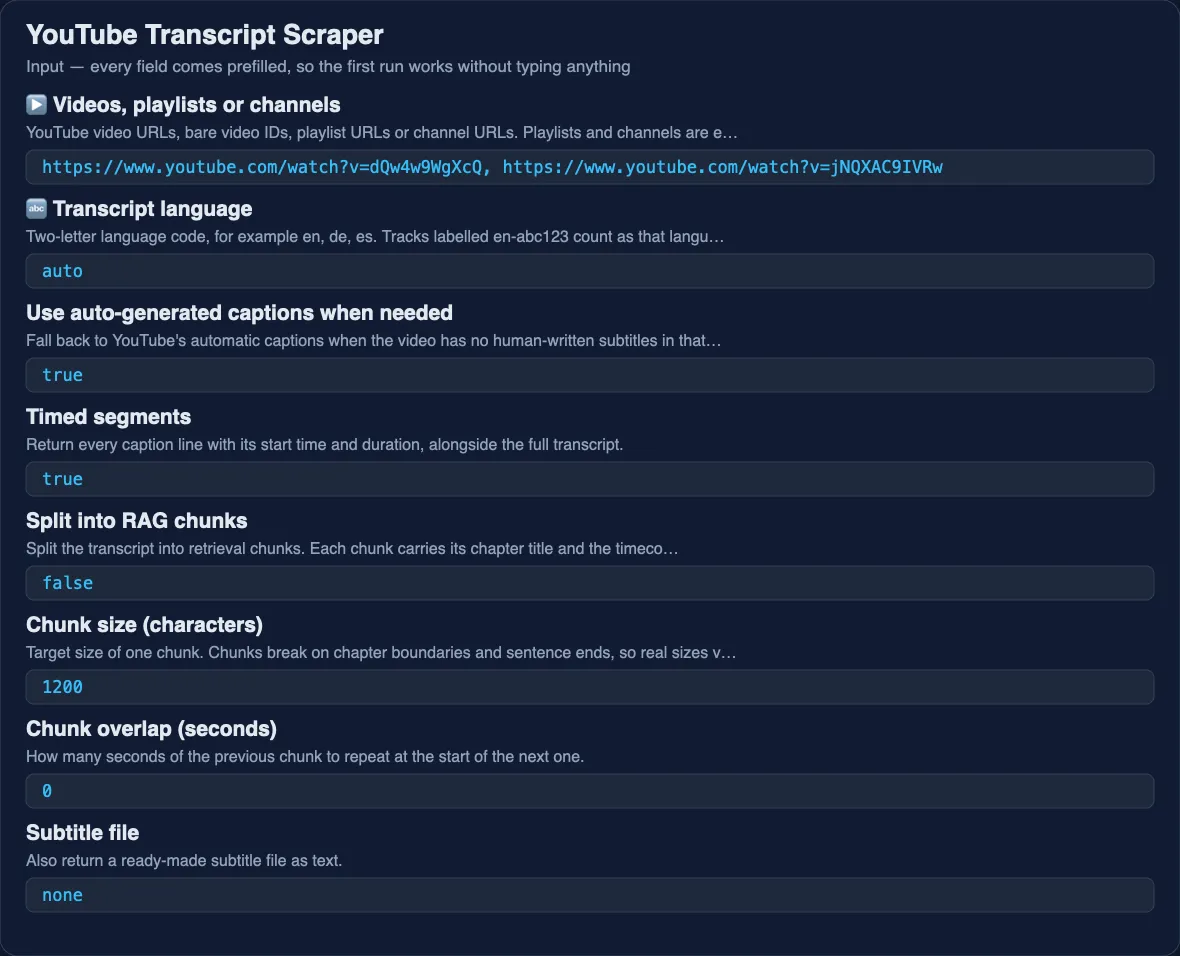
▶️ Videos, playlists or channels
A list of video URLs, bare video IDs, playlist URLs or channel URLs, mixed freely in one run. Playlists and channels are expanded into their videos automatically.
🔤 Transcript language
A two-letter code such as en, de, es, or auto. On auto the Actor takes English when it exists, then the language the video states it is in, then any other track. Tracks labelled en-abc123 count as English.
⚙️ Auto-generated captions
On by default. Turn it off to accept only captions a human wrote or reviewed — useful for anything where machine mistakes matter, and the reason availableLanguages on an error row only lists what your current settings could actually return.
🧩 RAG chunks
Splits the transcript into retrieval chunks that keep their timecodes, breaking on chapter boundaries first and on sentence ends second, so a retrieved passage can be quoted with the moment in the video where it was said. chunkSize sets the target size in characters; chunkOverlapSeconds repeats a few seconds of context at each seam.
💬 Subtitle format
none, srt or vtt. The result is a ready-to-save subtitle string in the subtitles field.
📺 Videos per channel
How many of a channel's or playlist's latest videos to take. Keeps a first run on a large channel cheap and quick.
⬆️ Output
With subtitleFormat: "srt" the same row also carries:
Use cases for YouTube transcript data
RAG and semantic search over a video library
chunkForRag produces passages that already carry start, end and startTimecode, so an answer built from them can link straight to the second in the video where the claim was made. Chunks break on chapters first, which keeps a retrieved passage inside one topic instead of straddling two.
Summarising and repurposing content
Run a channel, take transcript plus title, publishedAt and durationSeconds, and feed the rows to an LLM to produce summaries, show notes, newsletters, blog drafts or social posts. wordCount tells you what a summarisation call will cost before you make it.
Competitor and creator research
A channel run returns every video's transcript alongside viewCount, likeCount, commentCount and tags. That is enough to ask which topics a competitor covers, which phrasing they repeat, and which of their videos earned the most attention per minute of runtime.
SEO and keyword research
Transcripts are the text Google reads when it ranks video results. Pull the transcripts of everything ranking for your keyword and you have the vocabulary the winners use, in their own words.
Subtitles and accessibility
subtitleFormat returns SRT or WebVTT you can save directly, for translation workflows, for re-uploading captions to another platform, or for making a library searchable by people who cannot listen to it.
Media monitoring and research
Schedule a run over the channels you watch and get an alert when a topic is mentioned. Academic and journalistic work gets a citable, timecoded record of what was said and when.
AI agents
The Actor is pay-per-event with limited permissions and no Standby, which makes it callable from the Apify MCP server and from agent frameworks. One question, one run: "what does this video say", "summarise this channel's last ten videos", "find where this playlist discusses pricing".
Integrations
Everything on Apify works here: API, scheduler, webhooks, and the ready-made connectors for n8n, Make, Zapier, Google Sheets, Slack, Airbyte, LangChain and LlamaIndex.
Run it from the API
Python
JavaScript
MCP server
Point an MCP-capable agent at https://mcp.apify.com?tools=lergassy/youtube-transcript-scraper and it can call this Actor as a tool. Useful natural-language requests: "Get the transcript of this YouTube video", "Summarise the last 20 videos on this channel", "Export SRT subtitles for this playlist".
Error rows and troubleshooting
Every problem becomes a row in the dataset rather than a failed run, and none of them are charged.
errorCode | What it means | What to do |
|---|---|---|
no-captions | The video has no captions your settings could return | Read availableLanguages on the same row and re-run asking for one of them, or leave language on auto |
private-video | Private or members-only | Nothing to do — the captions are not public |
video-unavailable | Removed, or the ID does not exist | Check the URL |
age-restricted | YouTube requires a signed-in adult account | Not retrievable without a login, which this Actor deliberately does not use |
rate-limited | YouTube throttled the request after retries | Re-run; lower maxConcurrency for very large jobs |
invalid-input | The value is not a YouTube video, playlist or channel | Fix the URL |
fetch-failed / scrape-failed | Something unexpected, with the original message attached | Open an issue with the video URL and I will look at it |
❓ FAQ
Is it legal to scrape YouTube transcripts?
This Actor reads caption tracks that YouTube publishes to any visitor, without a login and without bypassing any protection. Public data is generally scrapable in the EU and the US, but the way you use the text — republishing, training, redistribution — is a separate question governed by copyright and by YouTube's terms. Use the output for analysis, search and research, and take legal advice before republishing someone's content.
Does it work on videos without captions?
No, and it does not pretend to. If a video has no caption track, this Actor returns a free error row instead of charging you for a guess. If you need audio transcribed, run the video's audio through Speech to Text (below) instead.
How many videos can one run handle?
There is no hard cap. Runs of a few videos finish in seconds; channel runs are limited by Videos per channel, which exists so a first run cannot surprise you with a large bill.
Can I get transcripts in a specific language?
Yes — set language to the two-letter code. If that language is missing, the row tells you which languages the video does have. Note that most non-English tracks on YouTube are auto-translations rather than human subtitles; isAutoGenerated says which you got.
Can I use it with the Apify API?
Yes. See the curl, Python and JavaScript examples above. Runs can also be scheduled and can fire webhooks when they finish.
Can I use it through an MCP server?
Yes — see the MCP section above.
Does one video always produce exactly one row?
Yes. One video, one row, one charge — whether it came from a URL you pasted or from inside a channel. Duplicates in your input are removed before anything is fetched.
Do I need a proxy?
No. Proxy configuration is available for large jobs, but the default works without any setup.
Your feedback
If a video that should work comes back empty, open an Issue on this Actor with the URL — that is the fastest way to get it fixed, and it usually is fixed the same day. If the Actor did the job, a short review helps more than anything I can write about it myself.
You might also like
| Actor | What it does |
|---|---|
| Speech to Text | Transcribes audio and video files that have no captions at all |
| YouTube Comments Scraper | Comments, replies and engagement from any public video |
| YouTube Creator Contacts | Channel audience, links and business e-mail |
| SRT Subtitle Generator | Turns audio into ready-to-use subtitle files |
| Threads Scraper | Posts, replies, profiles and keyword search on Meta Threads |


