
Google Trends Scraper & Keyword Monitor
Pricing
from $4.00 / 1,000 keywords
Google Trends Scraper & Keyword Monitor
Enter keywords, get Google Trends interest over time, related queries and interest by region as flat rows, plus one summary row per keyword: latest value, change vs previous period, change since your last run, spike flag. No browser. Pay per keyword that returns data; no start fee.
Pricing
from $4.00 / 1,000 keywords
Rating
0.0
(0)
Developer

SUNGHWAN CHO
Maintained by CommunityActor stats
0
Bookmarked
2
Total users
0
Monthly active users
10 days ago
Last modified
Features
Share
Google Trends Scraper & Keyword Monitor | Interest Over Time, Related Queries, Change Since Last Run (2026)
Languages: English · 한국어
Enter a list of keywords and get Google Trends data as flat JSON rows: interest over time (0-100), top and rising related queries, interest by region, and one summary row per keyword with the latest value, the change versus the previous period, the peak, and the change and spike flag since your last run. No Google account, no browser, no proxy setup.
It is built for people who look up the same keywords again and again: SEO and content teams, e-commerce sourcing, market researchers, n8n or Make reports, and AI agents that need to know whether a keyword is rising.
Free plan: Apify's $5 monthly credit covers about 1,000 keyword lookups with this Actor.
Why choose this Actor?
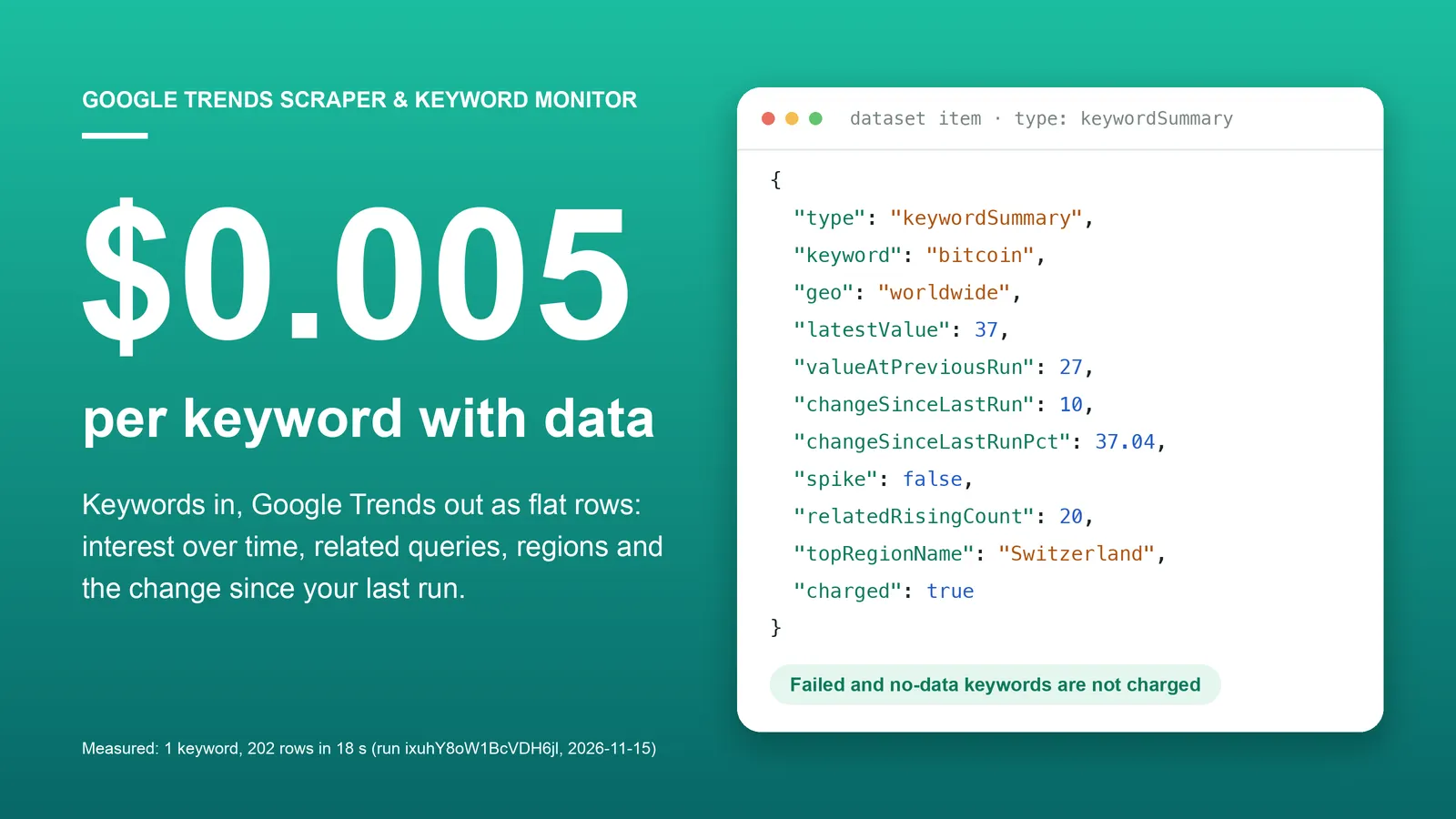
$0.005 per keyword, whatever you ask for.
You pay one keyword event for each keyword and geo that completes with data. The time series, related queries and regions are all included, there is no start fee, and dataset rows are not charged. A 5-year series costs the same as a 30-day one.
Failed and empty keywords are free.
Keywords that end as failed, partial, budgetLimited or notStarted, and keywords Google has no data for, are stored with their status and not charged.
Change since your last run, on one scale.
Google rescales every response, so yesterday's 42 and today's 42 are not the same number. The Actor remembers each keyword's last value and reads the value for that same moment out of today's series (valueAtPreviousRun), so changeSinceLastRun compares like with like.
Rate limits are handled inside the run.
Each keyword starts on a new proxy session. A request Google refuses (HTTP 429) is retried alone, and a keyword that still fails is tried once more at the end of the run.
A status for every keyword.
Each summary row has status and stopReason. If Google changes its response format, the keyword is reported as unexpectedResponse instead of being stored as broken data.
Measured, not estimated. One keyword with all three parts gave 202 rows (93 time points, 45 related queries, 63 regions, 1 summary) in 18 seconds at 256 MB, with 5 requests and no retries, for one $0.005 event (run ixuhY8oW1BcVDH6jl, build 0.1.13, 2026-11-15).
Quick start
One keyword, worldwide, past 90 days. This is the default input and costs $0.005 at the Free-plan price.
Open the Actor, enter keywords, pick a country and a time range, and click Start. Only keywords is required. Export the dataset as JSON, CSV or Excel.
Copy to your AI assistant
Paste this into ChatGPT, Claude, Cursor or another assistant so it can call the Actor for you:
Use it over MCP
Add this server to Claude Desktop, Cursor, VS Code or any MCP client, authenticated with your Apify token:
The agent only has to fill keywords; everything else has a default. With "include": [] it gets one small summary row per keyword.
Key features
- Three data types in one run. Interest over time, related queries (up to 25 top and 25 rising per keyword) and interest by region, selected with
include. - A summary row per keyword. Latest value, 7-day and 30-day averages, change versus the previous period, peak, top rising query, top region.
- Change since last run and spike flag.
changeSinceLastRun,changeSinceLastRunPctandspike, kept in a named history store in your account. - New rising queries. With a history, each rising query has
isNewSinceLastRun, and the summary hasnewRisingQueryCount. - Nine time ranges plus custom dates, from the past hour to 2004 - present.
- Any country, several at once.
worldwide, a country code, a region code such asUS-CA, or several countries in one string. - Compare mode. Up to 5 keywords on one shared scale, as on the Google Trends website.
- 25 top-level categories to narrow an ambiguous word such as "apple".
- Keywords in any language. Korean, Japanese and Chinese keywords were part of the tests.
- Unfinished last point kept apart. Google's partial last point is stored as
partialValueand never used for averages, changes or the peak. - Clean stop at your cost limit. A keyword is only fetched when it can still be charged; the rest are marked
budgetLimited.
How to scrape Google Trends
Monitor keywords every day
Schedule this input once a day. From the second run on, every summary row carries the change since the previous run. 다이소 is Daiso, a Korean retail chain; keywords can be in any language.
Find rising related queries for content ideas
Compare brands on one scale
Up to 5 keywords share one 0-100 scale. With more than 5, the list is split into groups of 5 in list order, and values from different groups are not comparable.
Several countries with a regional breakdown
Every keyword is looked up, and billed, once per country: 2 keywords in 3 countries are 6 events. 올리브영 is Olive Young, a Korean beauty retailer; category 44 is Beauty & Fitness.
A fixed date range
customTimeRange overrides timeRange.
Hourly spike alerts
Hourly points for the past 7 days, summary rows only. Schedule it every hour and alert on spike: true.
Input parameters
| Field | Type | Default | Description |
|---|---|---|---|
keywords | array of strings | required | Search terms in any language, one per item, as people type them into Google. Up to 100 characters each; duplicates are removed. |
geo | string | worldwide | worldwide or a two-letter ISO country code in upper case (US, GB, DE, KR, JP, TW). Several countries: one string, "US,KR,JP". A region code such as US-CA also works. Country names are not accepted. |
timeRange | string | today 3-m | now 1-H, now 4-H, now 1-d, now 7-d, today 1-m, today 3-m, today 12-m, today 5-y, all. |
include | array of strings | ["interestOverTime"] | Detail rows to output: interestOverTime, relatedQueries, interestByRegion. The summary row is always output; [] gives summary rows only. |
compareMode | boolean | false | false: each keyword has its own 0-100 scale. true: keywords are sent in groups of up to 5 and share one scale. |
customTimeRange | string | — | "YYYY-MM-DD YYYY-MM-DD" (start, space, end). The start must be before the end. Overrides timeRange. |
category | string | "0" | Google Trends top-level category ID, for example "7" Finance, "18" Shopping, "71" Food & Drink, "44" Beauty & Fitness, "5" Computers & Electronics, "67" Travel. |
historyStoreName | string | google-trends-monitor-history | Key-value store in your account that remembers each keyword's last value. Letters, digits and hyphens, 3-63 characters. "" turns the comparison off. |
spikeThresholdPct | integer | 50 | 1 to 1000. spike is true when the latest value is at least this many percent, and at least 10 points, above the baseline. |
proxyMode | string | auto | auto: datacenter proxies first, residential for retries and rate-limited stretches. datacenter or residential: that type only. |
maxRequests | integer | automatic | Minimum 10. Upper limit of HTTP requests in the run, retries included. Empty means about 3 times what the keywords need. |
proxyConfiguration | object | — | Advanced. Only used when you pick Apify Proxy groups or enter your own proxy URLs; it then replaces proxyMode. |
Time range and resolution
timeRange | Covers | One point per |
|---|---|---|
now 1-H, now 4-H | Past hour, past 4 hours | Minute |
now 1-d | Past day | 8 minutes |
now 7-d | Past 7 days | Hour |
today 1-m, today 3-m | Past 30 days, past 90 days | Day |
today 12-m, today 5-y | Past 12 months, past 5 years | Week |
all | 2004 - present | Month |
How "change since last run" works
With historyStoreName set (it is by default), the Actor stores the latest complete point of every keyword + geo + time range + category. On the next run it reports:
previousRunAtandpreviousLatestValue: what the last run saw, on the last run's scale.valueAtPreviousRun: the value for that same point in today's series.changeSinceLastRunandchangeSinceLastRunPct:latestValueminusvalueAtPreviousRun, on today's scale.spike:truewhen the latest value is at leastspikeThresholdPctpercent and at least 10 points above that baseline. On a first run the baseline is the average of the previous period (spikeBasis: "previousPeriod").
The baseline moves only after a keyword's rows were stored, so a failed run does not hide a change. Runs with the same store name share one history; use different names for separate schedules. If the history store cannot be opened, the run continues without the comparison and reports historyAvailable: false in RUN_SUMMARY.
What data can you extract from Google Trends?
One dataset. The type field tells the rows apart. Numbers are numbers, missing values are null, times are ISO 8601 in UTC.
Every row has keyword, geo, timeRange, category, url (the same query on the Google Trends website), scrapedAt, source (google_trends) and schemaVersion (1).
Keyword summary rows ("type": "keywordSummary", one per keyword and geo, always output):
| Field | Type | Description |
|---|---|---|
status | string | completed, partial, failed, budgetLimited or notStarted. |
stopReason, errorMessage | string | completed, noData, rateLimited, invalidRequest, unexpectedResponse, httpError, networkError, chargeLimitReached, requestBudget, timeLimit, blocked, datasetWriteFailed. |
charged, hasData | boolean | charged is true only when status is completed and hasData is true. |
scale, comparedWith | string | single or compared; in compare mode, the other keywords of the group. |
pointCount, resolution | number / string | Points in the series and their step: minute, hour, day, week or month. |
latestValue, latestTime | number / string | Latest complete point (0-100) and its time. |
partialValue, partialTime | number / string | Google's unfinished last point, kept separate. |
avg7Days, avg30Days | number | null when the series is shorter than 7 or 30 days. |
comparePeriod, changeVsPreviousPeriodPct | string / number | Mean of the last period versus the period before it. The period follows the length of the series: 15m, 1h, 4h, 1d, 7d, 28d, 91d or 365d. |
peakValue, peakTime | number / string | Peak of the series. |
previousRunAt, previousLatestValue, valueAtPreviousRun | string / number | See "How change since last run works". null on a first run. |
changeSinceLastRun, changeSinceLastRunPct | number | Change on today's scale; null on a first run. |
spike, spikeBasis | boolean / string | Spike flag and its baseline: previousRun or previousPeriod. |
relatedTopCount, relatedRisingCount, breakoutQueryCount | number | Filled with relatedQueries. |
topRisingQuery, topRisingQueryValue, newRisingQueryCount | string / number | Filled with relatedQueries. newRisingQueryCount needs an earlier run that also had related queries. |
regionCount, topRegionName | number / string | Filled with interestByRegion. |
interestOverTimeStatus, relatedQueriesStatus, interestByRegionStatus | string | ok, failed, notAvailable, notStarted or notRequested per part. |
requests, retries | number | HTTP requests used for this keyword. |
Timeline rows ("type": "timelinePoint", with interestOverTime): time, value (0-100), hasData (false where Google has not enough data; value is then 0, as on Google's chart), isPartial (true for the unfinished last point), scale, comparedWith.
Related query rows ("type": "relatedQuery", with relatedQueries): kind (top or rising), rank, query, value (0-100 for top; growth in percent for rising), formattedValue (Google's label, such as +4,200% or Breakout), isBreakout, isNewSinceLastRun (null for top queries and when there is no earlier rising list), queryUrl.
Region rows ("type": "regionInterest", with interestByRegion): rank, regionCode, regionName (English), value. Countries for worldwide, states or provinces for a country. Regions without enough data are left out.
Run summary. The key-value store record RUN_SUMMARY lists every keyword with status, stopReason, charged, requests and retries, plus totals, rows stored per type, proxy fallbacks, historyAvailable and whether your charge limit was reached. The Output tab has five table views: All rows, Keyword summaries, Interest over time, Related queries and Interest by region.
Output example: keyword summary
From run ixuhY8oW1BcVDH6jl (2026-11-15, build 0.1.13), input {"keywords": ["bitcoin"], "include": ["interestOverTime", "relatedQueries", "interestByRegion"]} with the default history store. The previous run with that store was three days earlier, so the change fields are filled. Unedited.
spike is false here because a rise from 27 to 37 is +37%, below the default 50% threshold. newRisingQueryCount is null because the earlier run had not asked for related queries.
The rescaling is visible in the run before it (xUNjkcuE5Oso7zY4a, 2026-11-12): the row had previousLatestValue: 25 but valueAtPreviousRun: 27 and latestValue: 27, so changeSinceLastRun was 0, not +2.
Output example: timeline point
Same run, the unfinished last point of the series.
Output example: related query
Same run, the third rising query.
Output example: region
Same run, rank 1 of 63 regions.
Advanced usage
A wide table in pandas
Moving from pytrends
build_payload(kw_list, timeframe, geo, cat) maps to keywords, timeRange (same strings), geo and category. interest_over_time(), related_queries() and interest_by_region() map to the three include values, and 5 keywords in one kw_list to compareMode: true. related_topics(), trending_searches() and suggestions() have no equivalent here.
Separate histories for separate schedules
A daily schedule and an hourly schedule over the same keywords use different time ranges, so they already keep separate baselines. Two schedules with the same keywords, geo, time range and category should use different historyStoreName values, or each will see the other's run as "the last run".
One call from the command line
How much does it cost to scrape Google Trends?
Pay per event, no subscription. Prices below are the Free-plan prices, in effect since 2026-11-11; paid Apify plans get the discount shown.
| Event | Price | Bronze / Silver / Gold and above | When |
|---|---|---|---|
keyword | $0.005 per keyword and geo | $0.00475 / $0.0045 / $0.004 | Once for each keyword and geo that completed and returned data. |
There is no start fee and no charge per dataset row. Proxy traffic and retries are included. The price is the same for every time range and every combination of include.
Not charged: keywords with status failed, partial, budgetLimited or notStarted; keywords that complete without data (stopReason: "noData"); summary rows and the run summary.
Worked examples at the Free-plan price:
| Job | Events | Cost |
|---|---|---|
| 1 keyword, once | 1 | $0.005 |
| 5 keywords, every day for 30 days | 150 | $0.75 |
| 20 keywords, once a week for 4 weeks | 80 | $0.40 |
| 5 keywords in 3 countries, every day for 30 days | 450 | $2.25 |
| 100 keywords, every day for 30 days | 3,000 | $15.00 |
In compare mode every keyword of a completed group that has data is one event. Set Maximum cost per run in the console to cap a run: the Actor only fetches keywords that still fit the budget and marks the rest budgetLimited. RUN_SUMMARY.totals.charged equals the number of summary rows with charged: true.
Scheduling and integrations
- Schedules. In Apify Console, create a daily, weekly or hourly schedule. Keep the same
historyStoreNameso each run is compared with the one before. - Alerts. In n8n, Make or Zapier, run the Actor through the Apify integration, keep rows where
typeiskeywordSummary, and branch onspikebeingtrue. - Sheets and BI tools. Export the dataset as CSV or Excel, or use the "Keyword summaries" view for one line per keyword.
- API clients. Any HTTP client works; official clients exist for Python and JavaScript (
apify-client).
FAQ
Is this the official Google Trends API? Do I need a Google account or my own proxies? No. The Actor reads the public data behind the Google Trends website and is not affiliated with Google. You need only an Apify account; proxies are included in the price.
Are the values search volumes?
No. Google Trends publishes relative interest from 0 to 100. By default 100 is the keyword's own peak within the chosen geo and time range, so a 60 for "bitcoin" and a 60 for "nvidia" say nothing about which is searched more. Use compareMode for that, with up to 5 keywords.
Why is latestValue different from what I saw yesterday for the same day?
Google rescales the series on every request, and the scale moves when a new peak appears. Compare with valueAtPreviousRun, which is read from today's series.
What happens when Google rate-limits a request?
A refused request (HTTP 429) is retried alone, on a new proxy session and after a pause; a keyword that still fails is tried once more at the end of the run, without fetching again what was already saved. In auto mode retries go through residential proxies. After 30 refused requests in a row the run stops. A keyword that still fails is failed with stopReason: "rateLimited" and is not charged; partial means the time series was saved but related queries or regions kept failing, and is not charged either. The run itself fails only when no keyword could be saved.
How reliable is it? On one day of cloud tests (2026-10-02), a run of 120 keywords across 9 geos and 7 time ranges completed 120 of 120 lookups (19 needed a retry) in 7 minutes 18 seconds, and seven later runs completed 118 of 118. That is a one-day sample, not a promised success rate; Google can tighten its limits at any time.
How fast is it, and how many keywords fit in one run? Four keywords are fetched in parallel. In the same tests a run with one keyword took 16 to 24 seconds and a run with 60 keywords about 3 minutes 20 seconds. There is no fixed keyword limit; the largest run tested had 120 keywords. Split longer lists into several runs.
Can I monitor hourly?
Yes. Use now 1-d or now 7-d with an hourly schedule and one historyStoreName.
Why does a keyword have hasData: false?
Google has too little search data for that keyword in that geo and time range. This is common for low-volume keywords and short time ranges. The row is stored with stopReason: "noData" and is free.
Can I compare more than 5 keywords on one scale?
No. Google allows 5 keywords per comparison. With compareMode and more keywords, the list is split into groups of 5, each with its own scale.
More Actors from this maintainer
| Actor | What you put in → what you get |
|---|---|
| Naver DataLab Search Trends Scraper | Korean keywords → Naver search interest (0-100) per day, week or month. The Korean counterpart of this Actor. |
| Naver Search Scraper | Keywords → the Naver search page as flat rows, with related keywords. |
| Naver Shopping Scraper & Keyword Rank Tracker | Shopping keywords → ranked products with price, reviews and rank change. |
| Naver AI Briefing Scraper | Search queries → Naver's AI answer and its cited sources. |
| Polymarket & Kalshi Scraper | Market filters → one row per outcome with probability and recent change. |
| YouTube Video Tracker | Video or channel links → views, likes and comments with the change since your last run. |
| TikTok Video Tracker | Video links → plays, likes and shares with the change since your last run. |
| Workday, Greenhouse, Lever & Ashby Jobs Scraper | Company job boards → one row per open job, with new and changed flags. |
한국어 안내 (Korean)
키워드 목록을 넣으면 구글 트렌드 데이터가 평평한 행으로 나옵니다. 시간별 관심도(timelinePoint), 상위·급상승 관련 검색어(relatedQuery), 지역별 관심도(regionInterest)와 함께, 키워드마다 최신 값·7일과 30일 평균·직전 기간 대비 변화율·최고점·지난 실행 대비 변화와 급등 표시(spike)를 담은 요약 행(keywordSummary)이 붙습니다. 한국어 키워드와 KR 지역을 쓸 수 있고, 구글 계정이나 브라우저 없이 동작합니다. 요금은 데이터가 나온 키워드×국가 1건당 $0.005(Free 플랜 기준, 상위 플랜 할인)이며 시작 비용과 행당 요금은 없습니다. 실패·부분 수집·데이터 없음 키워드는 과금되지 않습니다. 값은 0~100의 상대 지수이고 검색량이 아니며, 구글이 요청마다 척도를 다시 잡으므로 지난 실행과 비교할 때는 valueAtPreviousRun을 기준으로 봐야 합니다. 절대 검색량, 관련 주제(related topics), 실시간 인기 검색어(Trending now), 이미지·뉴스·쇼핑·유튜브 검색, 하위 카테고리는 제공하지 않습니다. 한 척도로 비교할 수 있는 키워드는 구글 제한에 따라 5개까지입니다. 공식 API가 아니므로 구글이 응답 형식을 바꾸면 해당 키워드는 unexpectedResponse로 표시됩니다.
Notes
- Not offered: absolute search volume, related topics (Google returned an empty list for them in our tests), "Trending now", Image, News, Shopping and YouTube search, and sub-categories (top-level categories only).
- Values are sampled and rescaled by Google. The same day can show a slightly different value on a later request.
- Tested inputs (2026-10-02): 10 geos including
worldwide,US,KR,JPandUS-CA, all nine time ranges, custom date ranges, all 25 top-level categories, and Korean, Japanese and Chinese keywords. datacenterproxy mode can be rate-limited on long keyword lists;autois the recommended setting.- Public data only. The Actor collects aggregated search interest. It does not log in to any account, does not collect personal data and does not solve captchas.
- Google Trends is a trademark of Google LLC. This Actor is an independent tool, not affiliated with or endorsed by Google. You are responsible for using the data in line with Google's terms and applicable law.
Support
Missing a field, another input mode, a different output format? Tell us in the Issues tab with the run ID. We answer every issue.


