

Redfin Scraper — Property Details, Redfin Estimate & Agents
Pricing
from $2.00 / 1,000 results
Redfin Scraper — Property Details, Redfin Estimate & Agents
Redfin scraper: search by URL or keyword, or look up homes by street address or Redfin property ID. Price history, tax, schools, Redfin Estimate, flood risk, walk, transit and bike scores, agents and emails across sale, sold and rental. Optional market report. JSON or CSV.
Pricing
from $2.00 / 1,000 results
Rating
5.0
(6)
Developer

Muhamed Didovic
Maintained by CommunityActor stats
8
Bookmarked
130
Total users
18
Monthly active users
2 hours ago
Last modified
Categories
Features
Share
Redfin Scraper — Listings + Housing Market Analytics + Agent Database (Email & Phone)
Pull Redfin agent contacts instantly from a pre-collected database of 10,800+ agents across all 50 US states + DC — email, phone, brokerage, ratings, deal stats — or live-scrape any Redfin search, property, housing market, or agent-directory URL for sale, sold, rental listings and housing market analytics. You can also look up a home by street address or Redfin property ID. Every property row starts with flat columns for the Redfin Estimate, price per sq ft, HOA dues, annual tax and tax rate, walk / transit / bike scores, flood factor, FEMA flood zone, view popularity and demand signals, followed by the full detail: price history, tax records, schools, flood / fire / heat / wind / air risk and neighborhood stats.
💰 Unbeatable Value ($0.002 / result): Competitors charge $0.010–$0.030 per property detail and $0.012–$0.025 per market row. With this actor, you get Property Details, Listing Demand Signals, AND Redfin Market Analytics (Compete Scores & 60-month trends) included at a flat $0.002 per result (5x to 15x cheaper).
🚀 The only Redfin scraper on Apify with agent contacts: returns verified agent contact info (email + phone).
⚡ Instant Redfin Agent Database — 11,400+ agents, all 50 states
The fastest way to get Redfin agent contacts: skip scraping entirely and pull straight from our continuously-growing database of 11,480 Redfin agents covering all 50 US states + DC, zero gaps — instant, with nothing to configure.
How to use it: in the ⚡ Instant Database Mode section of the input, set a State (2-letter code, e.g. CA) — optionally narrow by City or Brokerage, or filter to only agents with an email or phone on file — and run. Leave the live-scraping start URLs empty. You're billed only per agent delivered.
Each database agent includes: name, email, phone, brokerage, job title, license info, star rating & review count, past-year and lifetime deal counts, lifetime transaction volume, active listings, premier/veteran/active status, languages, primary service regions, property types, neighborhoods, bio, and photo.
Coverage: 11,480 agents total — 99.99% with an email on file, 18% with a phone number. The roster is a mix of Redfin's own in-house agents and the partner/external brokerage agents (Compass, NextHome, and others) that Redfin's agent-directory pages surface. Top states: California (2,024), Florida (920), Texas (795), Illinois (677), Washington (636), New York (479), Pennsylvania (465).
Need a whole state as a clean CSV, or pushed to your CRM via API? Reach out via the Support section below for bulk or full-state datasets.
Why Use This Scraper?
- 💰 Flat $0.002 per result — 5x to 15x cheaper than competitors charging $0.010–$0.030 for details and analytics
- ✅ Listing Demand Signals Included — View popularity (
viewCount,isTop10Percent,relativePercentile), buyer favorites (favoriteCount), tour insights, and price-drop history in every detail row - ✅ Redfin Housing Market Analytics & Compete Score (0-100) — Scrape city & ZIP
/housing-marketpages for Compete Scores, avg offers, DOM, sale-to-list ratios, 60-month median price & sales volume trends, and recently sold comps - ✅ The only Redfin scraper with agent contacts — 11,400+ agents with email, instantly, no live scraping needed
- ✅ All 50 states + DC covered, verified with zero gaps
- ✅ Sale, sold AND rental listings in one actor, plus a
soldTimeframewindow for comps - ✅ Look up by street address or Redfin property ID — one row per home; an address or ID that matches no single property is skipped and not charged
- ✅ Headline numbers as flat columns —
redfinEstimate,pricePerSqft,hoaDues,annualTax,taxRate,walkScore,transitScore,bikeScore,floodFactor,femaFloodZone,viewCount,favoriteCount, ready for a spreadsheet - ✅ The full property record behind them — price history, tax records, schools, flood / fire / heat / wind / air risk, amenities and neighborhood stats
- ✅ Beats the ~350-result search cap — pulls the full result set for a search
- ✅ Optional market summary — median price, $/sqft, days-on-market and breakdowns by type/city/zip, computed at no extra request cost
- ✅ No login or API key needed — public Redfin data only
Overview
This actor serves two audiences from one tool: lead-gen teams and brokerages who want Redfin agent contacts without scraping, and investors, analysts, and proptech teams who want deep property data for sale, sold, and rental listings.
Agent runs (Instant Database, or a live agent-directory / profile scrape) emit a flat agent row per agent. Property runs (search URL, property URL, keyword, street address or property ID) emit one row per home: the flat headline columns first, then the same sections Redfin shows on the page, so the row is large and nested by design. Set flattenOutput: true for a shorter, grouped view.
Supported Inputs
Instant Database filters (no URL needed)
| Field | Example | Notes |
|---|---|---|
dbState | CA | 2-letter state code |
dbCity | Los Angeles | optional, matches the agent's service regions |
dbBrokerage | Compass | optional, substring match on brokerage name |
dbHasEmail | true | only return agents with an email on file |
dbHasPhone | true | only return agents with a phone on file |
instantDatabase | true | force Instant Database mode (auto-triggers if any filter above is set) |
Live-scrape URL types
| URL type | Pattern | Example |
|---|---|---|
| Search | any Redfin search page, with on-page filters | https://www.redfin.com/city/30772/TX/Austin/filter/property-type=house,min-price=200k |
| Property detail | a single listing page | https://www.redfin.com/TX/Austin/1204-2nd-Ave-NW-55912/home/64446623 |
| Housing Market Analytics | city, ZIP, or neighborhood market page | https://www.redfin.com/city/30818/TX/Austin/housing-market |
| Agent profile | an individual agent's public profile | https://www.redfin.com/real-estate-agents/jane-doe |
Redfin retired the per-city agent directory (
/city/<id>/<ST>/<City>/real-estate-agents) — it now redirects to the city listings page, and the scraper fails such a URL with a message rather than returning listings you did not ask for. For agents in bulk use Instant Database mode (dbState/dbCity/dbBrokerage); for one agent use the profile URL above. | Short link | aredf.in/...short URL | resolved automatically to its full target |
Street addresses and Redfin property IDs
| Field | Example | Notes |
|---|---|---|
addresses | 1600 Pennsylvania Ave NW, Washington, DC 20500 | Street number, street, city and state. For an apartment or condo add the unit, e.g. 2838 Montebello Rd #C14, Austin, TX 78746 |
propertyIds | 31536703 or 31536703:226508292 | The number at the end of a Redfin property URL (…/home/31536703). propertyId:listingId asks for one particular listing of that home |
Each entry returns the same property row a property URL returns. An address that matches no Redfin property, matches several units of one building, or an ID Redfin does not know is skipped and not charged; the run log and the run's status message name it.
Copy-pasteable startUrls
Keyword / search mode
Search filters and the details switch
The price, bed, bath and property-type fields apply to every search: Start URLs, the search keyword and ZIP codes. A filter that a pasted search URL already carries wins over the same field in the form, so …/filter/min-price=1M with minPrice: 300000 keeps the $1M floor. Filters do not apply to property URLs, addresses or IDs.
includeDetails (on by default) decides how much each property row carries. Switch it off for a fast, cheaper list: one row per search result with address, city, state, zip, latitude, longitude, priceInfo, beds, baths, sqftInfo, lotSize, yearBuilt, daysOnMarket, mlsStatus, photoUrl and url, marked detailsIncluded: false. Full-detail rows are marked detailsIncluded: true. Email enrichment needs full details.
Unsupported inputs
- ❌ Content behind a Redfin login (saved searches, saved agents, messaging)
- ❌ Countries outside Redfin's US coverage
- ❌ Non-redfin.com domains
Use Cases
| Audience | Use case |
|---|---|
| Lead-gen teams / brokerages | Pull thousands of Redfin agent contacts instantly by state or city — no scraping |
| Recruiters / roster building | Build brokerage rosters filtered by state, brokerage name, or review count |
| Investors / iBuyers | Price history + Redfin Estimate + days-on-market to spot mispriced or stale listings |
| Lenders / insurers | Annual tax, tax rate, HOA dues, flood factor and FEMA zone per address |
| Market analysts | The market-summary record — median price, $/sqft and inventory by city/zip |
| Relocation / proptech | Schools, walk/transit scores and neighborhood stats for any address |
How It Works
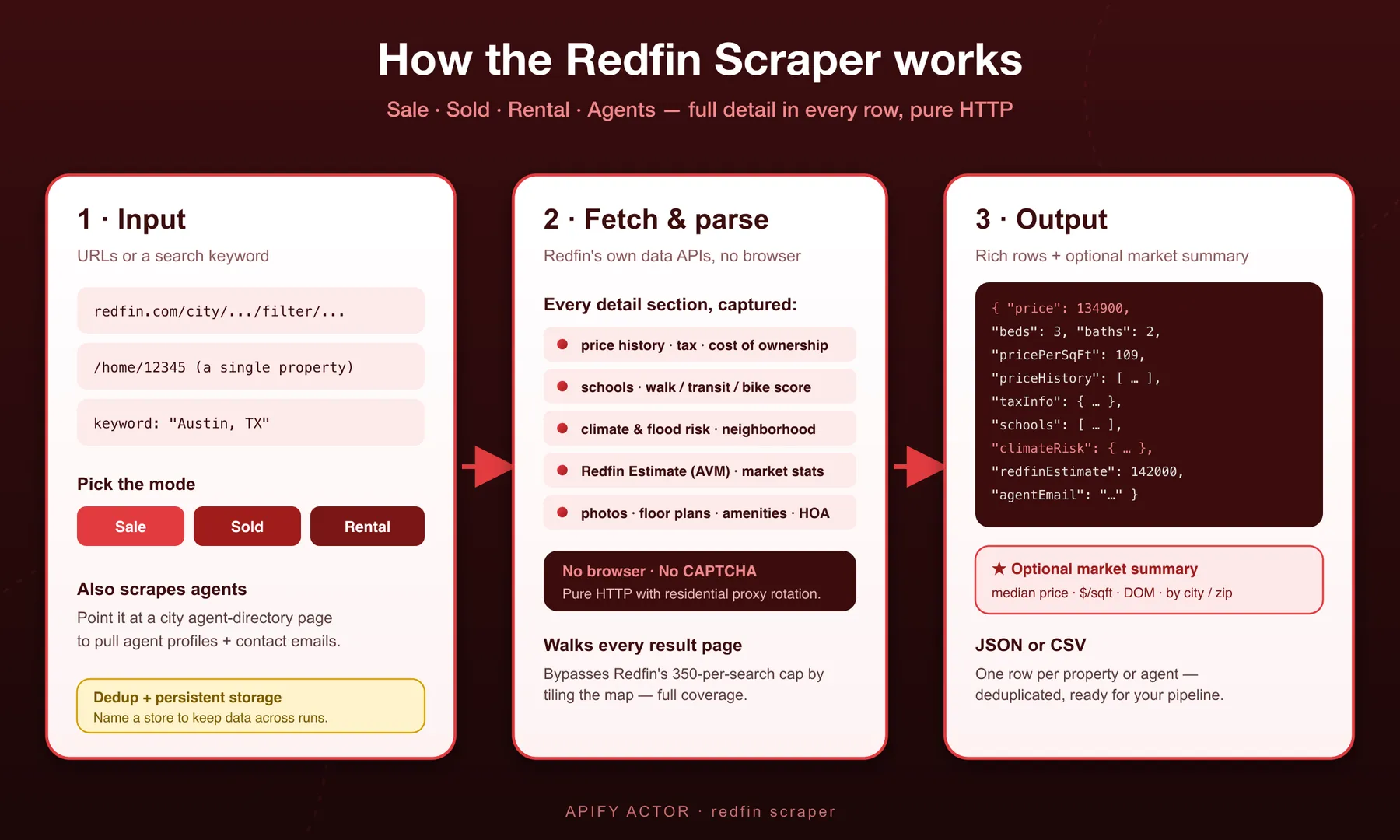
- Choose a mode — Instant Database (state/city/brokerage filters) for agent contacts, or live scrape (search URL, property URL, agent-directory URL, keyword, street address or property ID) for listings
- Instant Database path — the actor queries our pre-collected store and returns matching agents in seconds; no requests to Redfin at all
- Live-scrape path — the actor reads each listing, pulls the full result set past the ~350-result search cap, and captures every detail section: price history, tax, schools, flood / fire / heat risk, walk score, Redfin Estimate, market stats, the main photo, floor plans, amenities
- Optional enrichment — a market-summary rollup, or best-effort email enrichment on live agent scrapes
- Output — one row per agent or property, JSON or CSV
Input Configuration
Input fields
| Field | Type | Default | Notes |
|---|---|---|---|
dbState | string | — | Instant Database: 2-letter state code |
dbCity | string | — | Instant Database: city / region, optional |
dbBrokerage | string | — | Instant Database: brokerage name contains, optional |
dbHasEmail | boolean | false | Instant Database: only agents with an email |
dbHasPhone | boolean | false | Instant Database: only agents with a phone |
instantDatabase | boolean | false | Force Instant Database mode |
startUrls | array | — | Redfin search / property / agent-directory URLs (live scrape) |
searchKeyword | string | — | Build a search from a place name instead of a URL |
searchMode | string | sale | sale, sold, or rental |
soldTimeframe | string | 1mo | Window for sold comps |
addresses | array | — | Street addresses, one property row each |
propertyIds | array | — | Redfin property IDs (31536703) or propertyId:listingId pairs, one property row each |
zipCodes | array | — | 5-digit US ZIP codes (78704), one search each, in the chosen searchMode and with the filters below |
minPrice / maxPrice | integer | — | Price range in dollars (monthly rent in rent mode), e.g. 300000 / 600000 |
minBeds / maxBeds | integer | — | Bedroom range |
minBaths | string | — | At least this many bathrooms: 1, 1.5, 2, 2.5, 3, 4, 5 |
propertyTypes | array | all | Any of house, condo, townhouse, multifamily, land, manufactured, co-op, other |
includeDetails | boolean | true | Full property details. On: every property row carries the full record (price history, tax records, schools, risk scores, Redfin Estimate, agent and more). Off: one fast row per search result with address, price, beds, baths, square feet, lot size, year built, status, days on market, coordinates, photo and URL, at the lower per-row price. Property URLs, addresses and IDs follow the same switch |
maxItems | integer | 1000 | Cap on rows (also caps Instant Database delivery). 0 = no cap: deliver as many rows as the run's max cost per run affords |
monitoringMode | boolean | false | Paid-only. Only emit listings not seen in previous runs (cross-run dedup) — a new-listings delta feed |
detectPriceChanges | boolean | false | Needs monitoringMode. Emit a price_changed row per listing price move across runs → redfin-changes-<runId> dataset, billed at the low additional-data rate |
detectRemovedListings | boolean | false | Needs monitoringMode + a full scan. Emit a removed row per listing gone since the previous run → redfin-removed-<runId> dataset, additional-data rate. Set maxItems ≥ the search total, or 0 with a max cost per run that covers it; truncated runs are skipped so nothing is false-flagged |
includeProfileDetails | boolean | false | Deep agent-profile detail on live agent-directory runs |
includeMarketSummary | boolean | false | Append one market-summary record (live scrape only) |
enrichEmails | boolean | false | Best-effort contact-email lookup per result on live scrape (billed separately, see Pricing) |
flattenOutput | boolean | false | Flatten the nested property structure |
includesAboveTheFoldData, includesBelowTheFoldData, includesParcelBounds, includesBannerData, includesAmenitiesData, includesWalkScoreData, includesSellsideThresholdData, includesFloorPlansData, includesProtoHomeData | boolean | true | Toggle individual property detail sections on/off to trim output |
storeName | string | — | Name a persistent store to dedupe & retain data across runs. A run that finds nothing new returns one noNewListings marker row instead of an empty dataset |
maxConcurrency / minConcurrency / maxRequestRetries | integer | 10 / 1 / 3 | Throughput & resilience (live scrape only) |
proxy | object | built-in | Leave empty; the default works out of the box. Set it only to use your own (live scrape only) |
Monitoring & change tracking (incremental feeds)
Three opt-in flags (all need a paid Apify plan) turn the scraper into a change-tracking feed. Enable monitoringMode first; the other two build on it.
monitoringMode— only listings not seen in previous runs are emitted (cross-run dedup keyed on Redfin'spropertyId). A daily/weekly delta feed without re-paying for the same homes. When a run finds nothing new at all, it returns onenoNewListingsmarker row (see Output Overview) rather than an empty dataset.detectPriceChanges(needsmonitoringMode) — tracks each listing's price and emits aprice_changedrow per move (oldPrice,newPrice,priceDelta,pctChange,direction,firstSeenAt, plus the listing URL) to a separate run datasetredfin-changes-<runId>.detectRemovedListings(needsmonitoringMode+ a full scan) — emits aremovedrow (propertyId,url,searchUrl,detectedRemovedAt) for every home that left the market since your last run, toredfin-removed-<runId>. SetmaxItemshigh enough to cover the whole search, or0with a max cost per run that covers it; runs that stop early are skipped so nothing is wrongly flagged.
Billing: monitoring is free to enable — you pay the normal per-result rate only for the new listings actually scraped. Each
price_changedorremovedrow is the paid extra, billed at the lowadditional-datarate (not the base property rate), and written to its own named dataset so it never inflates your main output.
Common scenarios
1. Instant Database — every agent in a state with an email
2. Instant Database — narrow by city and brokerage
3. Live scrape — sale listings by keyword with a market summary
Pricing
This actor uses Apify's pay-per-event pricing — you're billed only for what's actually delivered:
| Event | Price | Charged when |
|---|---|---|
| Agent record | $0.002 | Per agent delivered — Instant Database or live scrape |
| Property record | $0.002 | Per property delivered — includes every detail section (Redfin Estimate, Walk Score, amenities, floor plans) at no extra charge |
| Email enrichment | $0.02 | Per email found via enrichEmails on a live agent scrape — never charged on a miss |
| Actor start | Apify platform rate | Standard per-GB run-start charge |
From 5 December 2026: search rows from $0.50 per 1,000; full property details add $1.50 per 1,000 (on by default, so a full row stays $2.00 per 1,000). Switch includeDetails off to pay only the search-row price. Until then every property row is $2.00 per 1,000 either way.
Instant Database queries report the total number of matching agents alongside the delivered rows, so you can see how many match your filters before raising maxItems.
Output Overview
Five record shapes can appear in a run:
- Database agent (Instant Database mode) — a flat agent row served from our pre-collected store: contact info, brokerage, license, ratings, deal stats, regions, languages.
- Live-scraped property — one home (sale/sold/rental, or looked up by address or property ID): the flat headline columns, then all detail sections.
- Live-scraped agent — a flat agent profile from a live agent-directory or profile-page scrape.
- Market summary — one aggregate record at the end (live scrape only, when
includeMarketSummary: true). - No-new-listings marker — a single
recordType: "noNewListings"row, written when a run usingstoreNameormonitoringModefinds that every listing in the search was already delivered by an earlier run. It exists so an incremental poll never hands you a silently empty dataset, and it is not charged as a result.
On a free Apify plan a run processes the first start URL, the first address and the first property ID. Free-tier users receive the first 2 Instant Database records in full as proof of data quality; every record after that has its email/phone replaced with an upgrade prompt. Paying users always receive full contact info.
Output Samples
Instant Database agent (shortened):
Live-scraped property (shortened, from a real run):
The flat columns appear only when Redfin shows the value for that home: it hides its estimate on some listings, a home without an association has no hoaDues, and annualTax / taxYear need a tax record. hoaDues is per month. taxRate is the yearly property-tax rate (percent of price) Redfin's payment estimate uses, and is left out when Redfin has only its generic default for the home. floodFactor runs from 1 (minimal) to 10 (extreme). With flattenOutput: true the grouped walkScore and hoaDues blocks of that view stay as they were; the other flat columns are added at the end.
Live-scraped agent (shortened):
Market summary (when includeMarketSummary: true):
Key Output Fields
| Group | Fields |
|---|---|
| Database agent — identity & credentials | agent_id, name, full_name, email, phone, job_title, license_number, brokerage_name, office_state, profile_url, photo_url |
| Database agent — performance | star_rating, num_reviews, past_year_deals, total_deals_in_past_year, home_transactions_lifetime, transaction_volume_lifetime, active_listings_count |
| Database agent — coverage | primary_service_regions, property_types, neighborhoods, languages, business_market |
| Property headline (flat) | redfinEstimate, pricePerSqft, hoaDues, annualTax, taxYear, taxRate, walkScore, transitScore, bikeScore, floodFactor, femaFloodZone, floodRisk |
| Property identity | url, propertyId, listingId, mlsId, streetAddress, city, state, zip, latLong |
| Property price & status | priceInfo, numBeds, numBaths, sqFt, yearBuilt, addressSectionInfo.status, soldDate, lastSoldPrice, propertyHistoryInfo (price history) |
| Property records & risk | publicRecordsInfo (taxInfo, allTaxInfo), floodData, fireData, heatData, windData, airData, walkScoreData, servingThisHomeSchools, schoolsInfo, neighborhoodData, amenitiesInfo |
| Live-scraped agent | fullName, email, phone, brokerageName, ratings, deal counts, regions, languages, license |
| Market summary | median/avg/min/max price, $/sqft, beds, baths, days-on-market, breakdowns by type/city/zip |
| No-new-listings marker | recordType (noNewListings), message, skippedAlreadyProcessed, skippedMonitoringMode, storeName, runId, generatedAt |
FAQ
What's the difference between Instant Database mode and live scraping?
Instant Database mode (dbState, dbCity, dbBrokerage, or instantDatabase: true) serves agents straight from our pre-collected store, with results in seconds. Live scraping (startUrls, searchKeyword, addresses or propertyIds) collects current listings, homes or agent pages from Redfin while the run is going.
Are all the database agents Redfin's own employees?
No. The database is a mix of Redfin's in-house agents and the partner/external brokerage agents (Compass, NextHome, and others) that appear on Redfin's public agent-directory pages. Use dbBrokerage to filter to a specific brokerage.
Do I need a Redfin URL for Instant Database mode?
No — just set a state (and optionally city/brokerage) in the Instant Database fields and leave startUrls empty.
Does it scrape sold listings and rentals, not just for-sale?
Yes — set searchMode to sale, sold, or rental. Use soldTimeframe to control the sold-comps window.
Can I get more than 350 results from a city search?
Yes. Redfin caps a single search at roughly 350 homes; this actor pulls the full result set.
Can I look up a home by its address or Redfin property ID?
Yes. Put street addresses in addresses (add the unit for an apartment or condo) or Redfin property IDs in propertyIds. Each one returns the same row a property URL returns. An entry that matches no single property is skipped, named in the run log, and not charged.
Does it really include the Redfin Estimate, price history, tax, schools and flood risk?
Yes, wherever Redfin shows them for the home. The headline numbers are flat columns (redfinEstimate, pricePerSqft, hoaDues, annualTax, taxRate, walkScore, transitScore, bikeScore, floodFactor, femaFloodZone); the full sections are propertyHistoryInfo, publicRecordsInfo, servingThisHomeSchools, floodData, fireData, heatData, windData and airData. Use the includes* toggles to drop sections you don't need and shrink the output.
How do I get agent emails from a live scrape instead of the database?
Point startUrls at a Redfin agent-directory or profile page. Each agent row includes the contact info Redfin exposes on that page; enable enrichEmails for a best-effort lookup when Redfin doesn't expose one directly.
Why is a property row so large?
It faithfully mirrors Redfin's full listing data. Set flattenOutput: true for a flatter shape, or disable detail sections with the includes* toggles.
Can I scrape private profiles or content behind a login?
No. The actor only accesses publicly available pages — Redfin's agent directories, property listings, and search results.
My run succeeded but returned no listings — is it broken?
Probably not. Both storeName and monitoringMode hand you only listings you have not been given before, so a search with nothing new in it legitimately produces no listings. The run then ends with a single recordType: "noNewListings" row rather than an empty dataset, saying how many known listings each filter held back: skippedAlreadyProcessed (the storeName store) and skippedMonitoringMode. That row is not billed as a result. To collect everything again from scratch, use a new storeName, or turn monitoringMode off.
JSON or CSV?
Both — export from your Apify dataset in whichever format you need.
Support
Found a bug or want a field added? Open an issue on the actor's Issues tab and we'll take a look.
Additional Services
Need a custom real-estate feed (other portals, scheduled monitoring, a webhook/Sheets/DB push, or a tailored schema)? Reach out — custom scraping and data-pipeline work is available.
Explore More Scrapers
- Realtor.com Scraper — 500,000+ agent instant database, plus search · detail · agents
- Zillow Agents & Leads Scraper — 1.2M+ agent instant database
- Redfin Property Scraper (rental) — property-only, flat monthly pricing
- LoopNet Scraper — US + UK commercial property
- Rightmove Scraper — UK buy / rent / sell
See the full memo23 actor catalog →
🤖 For AI Agents & LLM Apps
Compact reference for AI agents calling this actor via the Apify MCP server or the Apify API (actor: memo23/apify-redfin-cheerio-ppe).
Purpose: Pull Redfin agent contacts (email + phone) from a 10,800+ agent instant database, or live-scrape any Redfin search / property / agent-directory URL, street address or Redfin property ID for sale, sold, and rental listings with the Redfin Estimate, HOA dues, tax, walk scores, flood risk, price history and schools.
Minimal input (Instant Database, served from the stored agent table):
Live scrape instead by passing startUrls (e.g. ["https://www.redfin.com/real-estate-agents/jane-doe"]), searchKeyword with searchMode (sale / sold / rental), addresses (e.g. ["1600 Pennsylvania Ave NW, Washington, DC 20500"]) or propertyIds (e.g. ["31536703"]).
Output: one row per agent or property. Database agent — agent_id, name, email, phone, job_title, brokerage_name, office_state, license_number, star_rating, num_reviews, past_year_deals, home_transactions_lifetime, transaction_volume_lifetime, primary_service_regions, profile_url, photo_url. Live property — url, redfinEstimate, pricePerSqft, hoaDues, annualTax, taxYear, taxRate, walkScore, transitScore, bikeScore, floodFactor, femaFloodZone, floodRisk (each only when Redfin shows it), then propertyId, listingId, mlsId, priceInfo, numBeds, numBaths, sqFt, yearBuilt, city, state, zip, latLong, propertyHistoryInfo, publicRecordsInfo, servingThisHomeSchools, floodData, fireData, heatData. Optional market-summary record when includeMarketSummary is set.
Behaviors an agent should know:
- Always set
maxItems(default 1000;0= as many as the run's max cost per run affords) — uncapped city searches go past Redfin's ~350-result cap. - Any Instant Database filter (
dbState/dbCity/dbBrokerage) auto-triggers database mode;startUrls,searchKeyword,addressesandpropertyIdsdrive live scraping. - An address or property ID that matches no single Redfin property returns no row and no charge; the run's status message names it.
monitoringMode(paid plan) dedups listings across runs;detectPriceChangesanddetectRemovedListingsbuild on it and writeprice_changed/removedrows to separateredfin-changes-<runId>/redfin-removed-<runId>datasets.- Pay-per-event billing: $0.002 per agent or property record, $0.02 per email found via
enrichEmails(never on a miss), plus the standard actor-start charge. - Publicly available pages only — no login-gated content; US coverage only; free tier masks email/phone after the first 2 records.
⚠️ Disclaimer
This Actor is an independent tool and is not affiliated with, endorsed by, or sponsored by Redfin Corporation or any of its subsidiaries. All trademarks mentioned are the property of their respective owners.
The scraper accesses only publicly available Redfin.com pages and pre-collected public agent-directory data — no authenticated endpoints, paid features, or content behind Redfin's login wall. Users are responsible for ensuring their use complies with Redfin's Terms of Service, applicable data-protection law (GDPR, CCPA, etc.), and any contractual obligations of their own organization.
SEO Keywords
redfin scraper, redfin.com scraper, redfin api, redfin agent database, redfin agent email database, redfin agent scraper, real estate agent emails, real estate lead generation, property listings scraper, sold listings scraper, rental listings scraper, redfin estimate scraper, property price history, real estate market data, climate risk data, redfin address lookup, redfin property id lookup, flood zone data, hoa dues data, walk score data, housing market scraper, mls data scraper, redfin bulk export, comparable sales data, property tax data, redfin json csv export, real estate market summary, brokerage roster scraper


