

LinkedIn Company Employees Scraper & Email Finder — No Login
Pricing
from $4.00 / 1,000 employee profiles
LinkedIn Company Employees Scraper & Email Finder — No Login
Find a company's employees on LinkedIn without login. Pass company names or URLs, filter by title and seniority, and get name, current title, employer, location and profile URL, plus an optional email finder. Each row is verified against your company and graded high, medium or low, with the reason.
Pricing
from $4.00 / 1,000 employee profiles
Rating
5.0
(1)
Developer

Muhamed Didovic
Maintained by CommunityActor stats
3
Bookmarked
617
Total users
183
Monthly active users
2 days ago
Last modified
Categories
Share
LinkedIn Company Employees Scraper & Email Finder — No Cookies, Verified
Find a company's employees on LinkedIn without logging in — names, current titles, headlines, locations, and profile URLs — filtered by ICP title and seniority, with an optional contact-email finder. Pass a company name or a LinkedIn URL (mix freely). Every match is verified against your company from its own public web result and graded high / medium / low with the reason, so confirmed current employees, lookalikes and former staff are told apart instead of arriving as raw search-engine guesses.
No login. No cookies required. No ban risk. Pay per profile delivered.
Fair billing: a small run-start fee, then a price per delivered profile. Empty searches, failed pages, duplicates and rows withheld as unrelated are never charged, and the email price applies only when an address is actually found.
Why use this scraper
- Verified, not guessed. Most "LinkedIn employee" tools dump whatever a search returns and tag it
low confidence. This actor reads each result's current employer, title, and location, cross-checks the employer against your target company, and labels each row high / medium / low — with a plain-English reason. Former employees and lookalikes are flagged, not sold to you as current staff. - No login, no cookie, no ban risk. Discovery runs entirely over the public web index. Your LinkedIn account is never touched. (An optional cookie mode exists for power users who want the full authenticated roster.)
- Names or URLs. Don't have the LinkedIn company URL? Just type the company name. Mix names and URLs in one run.
- ICP targeting built in. Filter by explicit titles (CEO, Head of Sales, Recruiter…) or by seniority buckets (owner, CxO, VP, director, manager…). Leave both empty and a built-in English/Spanish decision-maker set is used automatically.
- Contact emails, optional. Turn on the email finder to attach a contact email per company.
- Pay per result. Transparent pay-per-event pricing — a small run-start fee plus a flat price per profile, and a higher price only for a row that carries a found contact email. A profile with no email found bills at the base price. With
fullProfileson, a row that carries a full profile adds the full-profile price.
What it does
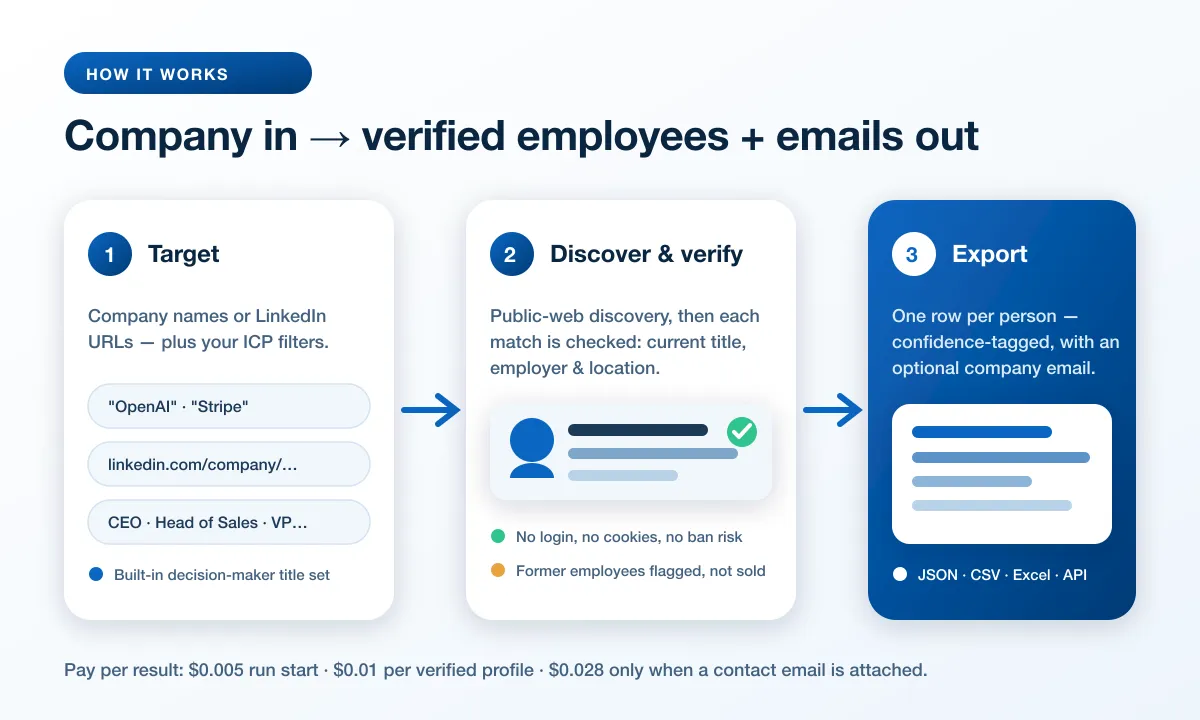
Give it one or more companies and, optionally, the titles/seniority you care about. The actor:
- Discovers public LinkedIn profiles associated with each company via the public web index.
- Verifies each match from its own public result — pulling current title, employer, and location, and confirming (or refuting) that the person currently works at the target company.
- Optionally finds a contact email per company.
- Returns one clean, de-duplicated row per person, each tagged with a confidence level.
No LinkedIn login is used or required in the default mode.
Supported inputs
| You provide | Example |
|---|---|
| Company name | OpenAI |
| LinkedIn company URL | https://www.linkedin.com/company/stripe/ |
| A mix of both | ["OpenAI", "https://www.linkedin.com/company/stripe/"] |
| A different search phrase for one company | { "notionhq": "Notion", "105621": "Anthropic" } |
| Target titles (ICP) | ["CEO", "Head of Sales", "Recruiter"] |
| Seniority buckets | ["cxo", "vp", "director"] |
| Location hint | "San Francisco" |
Use cases
- Sales & lead-gen — build decision-maker lists at target accounts, filtered by title and seniority, ready for your CRM.
- Recruiting & talent mapping — see who works where by role and level; map a competitor's team.
- LATAM outreach — the built-in title set includes Spanish decision-maker titles (Gerente General, Presidente, Dueño, Fundador…) so Spanish-language headlines actually match.
- Market & competitive research — headcount by function, org composition, and hiring signals.
- AI agents & automation — a clean, structured, verified data source for autonomous prospecting via the Apify API.
How it works
- Discover — for each company × target title, the actor queries the public web index for LinkedIn profiles and parses them into a unified row shape (name, headline, profile URL).
- Verify — each row is graded from its own public result: the current title, employer, and location are extracted and the employer is cross-checked against the target company. Confidence is high (employer confirmed as your company AND the requested title matches), medium (works there but the heading does not carry the requested title, or the employer only resembles your company — "Stripe Media Inc." for a Stripe search — or the company is merely mentioned), or low (no trace of the company at all). "Former"/"ex-" roles are detected and never sold as current. Rows graded
loware withheld before billing;verifyProfiles: falseskips grading and returns every raw match instead, all taggedlow.mediumis the normal good outcome, not a weak one — see below. - Enrich (optional) — one contact email per company is discovered and stamped onto its rows.
- Return & bill — every
highandmediumrow is written to the dataset, one de-duplicated row per person, billed at the profile price, or the contact-email price when the row carries a found email.
An advanced deep-verify option additionally fetches each public profile page and re-grades the row from it by the same rules; because LinkedIn heavily gates those pages it is slow and best-effort, so it's off by default — a page that cannot be read leaves the row as the result graded it.
Input configuration
| Field | Type | Default | Description |
|---|---|---|---|
companies | array | — | Company names and/or LinkedIn company URLs, mixed. |
companySearchTerms | object | {} | Optional. Search a different phrase for one company: key = the company as you supplied it (handle, URL, typed name, or numeric id), value = the phrase to search. Your rows keep that company's key as their company value — the URL handle, the numeric id, or the slug of a typed name (Plus One Robotics → plus-one-robotics). |
targetTitles | array | built-in EN/ES set | ICP titles to search. Empty = built-in decision-maker set, unless seniorityFilter is set (then only those titles are searched). Runs over 50 companies never use the built-in set: set titles or seniority, or each company is searched with no title filter. |
seniorityFilter | array | [] | Seniority buckets expanded into titles: owner, partner, cxo, vp, director, manager, senior, entry, training, unpaid. |
location | string | "" | Optional location hint to improve relevance. |
maxItems | integer | 50 | Max employees returned per company. |
verifyProfiles | boolean | true | Read each row's employer, title and location from its own public result, grade the employer against your company (high / medium / low, with the reason) and withhold rows graded low (free, recommended). false skips grading and returns the raw matches, all tagged low (unless deepVerify re-grades them from the profile page). |
enrichEmails | boolean | false | Find one contact email per company; adds contactEmail, contactWebsite and an emailEnrichment object. |
fullProfiles | boolean | false | Add each employee's full public profile: experience (work history with dates), education, topSkills, about, followerCount and connectionCount. The profile also confirms the current employer, so a row whose profile shows someone working elsewhere is dropped before billing. Billed as the full-profile event on top of the row's price, only on rows that carry one. |
deepVerify | boolean | false | Advanced: re-grade each row from the person's public profile by the same rules. The profile is read through a public-profile source first and from LinkedIn's own page only when that fails; one neither can read leaves the row as the result graded it. No extra charge. |
googlePages | integer | 3 | Result pages per company × title (more = more candidates, higher cost). |
startUrls | array | — | Advanced: LinkedIn company URLs via a request list / Google Sheet. |
cookies | array | — | Optional: li_at + JSESSIONID to enable authoritative cookie mode. Cookie mode reads company URLs from startUrls only; companies, companySearchTerms, the title and seniority filters, location, googlePages, verifyProfiles and deepVerify apply to the no-cookie path. |
Free-tier runs search at most the first 3 companies (companies and startUrls combined) and cap maxItems at 200; the run log says what was trimmed.
Output
One row per person. Example (no-cookie, verified):
Every row carries all of the above. connectionDegree, insights and contactInfo are
populated only in cookie mode and are null/empty on the no-login path, where the public web
index does not expose them; image is likewise null unless deepVerify read the profile page.
Key output fields
| Field | Description |
|---|---|
fullName / firstName / lastName | Person's name |
headline | Profile headline as indexed |
currentTitle | Current job title as read from the result heading — the text before "at", or else the requested title the heading contains; titleMatchType says whether it matches a title you asked for |
currentEmployer | Current employer as read from the result, graded against your target company |
location | Location, when available from the public result |
profileUrl / publicIdentifier | LinkedIn profile URL and slug |
company | Target company key the row was discovered under |
verified | true only when the employer is an exact match for your target company, read from the search result or, with deepVerify, from the profile page. A near-miss like "Stripe Media Inc." for a Stripe search stays false — see confidenceReason |
confidence | high / medium / low |
confidenceReason | Plain-English explanation of the confidence |
matchedTitles / titleMatchType | Which requested titles matched, and how (exact / partial / none) |
contactEmail / contactWebsite / emailEnrichment | Present only when enrichEmails is on; emailEnrichment carries the full lookup (website, all emails found, source, confidence) |
source | GS (public web index) or linkedin-voyager (cookie mode) |
snippet | The search result text the verification was read from — the evidence behind confidence |
profileDepth | short from the search result, full when deepVerify or fullProfiles read the profile |
experience / education / topSkills / about / followerCount / connectionCount | Present only with fullProfiles on, on rows whose profile was read (fullProfile: true). Each experience entry has title, company, companyUrl, date and isCurrent; each education entry has school, degree and date |
image / connectionDegree / insights / contactInfo | Cookie-mode extras; null/empty on the no-login path, except image, which deepVerify fills from the profile page |
FAQ
Do I need a LinkedIn account or cookie? No. The default mode uses only the public web index — no login, no cookie, no ban risk. Cookie mode is an optional power-user feature.
How is this different from other LinkedIn employee scrapers? Most return raw search matches tagged "low confidence." This actor verifies each match against its own public result, confirms the current employer and title, flags former employees, and tells you why each row got its confidence level.
Will it include people who don't actually work there?
Some can. Rows with no trace of the company in their result are withheld before billing. Lookalikes ("Stripe Media Inc." for a Stripe search) and former staff (a "Former … at" or "ex-" heading) are returned at medium with verified: false and a confidenceReason naming the problem; filter on verified if you want only rows whose employer matched your company exactly.
Which confidence level should I filter on?
On a default run, none: rows graded low are withheld before billing, so the dataset holds high and medium only, and low means the company appeared nowhere in the result. Do not cut to high. high additionally requires the search result's heading to contain the title you asked for, and whether headings do that varies by company rather than by data quality: asking for "CEO" at OpenAI returns 0 high out of 20, because those people write "OpenAI" in their headline rather than their title, while the same query against Stripe returns a few, because Stripe-adjacent people write "CEO at …". Filtering to high can therefore discard an entire good run. For a stricter cut use verified: true, which means the employer matched your company exactly. With verifyProfiles: false nothing is graded and every row carries low.
Can I search by company name instead of URL? Yes. Type the name directly; URLs and names can be mixed in one run.
A company URL returned far fewer people than it should — why?
A LinkedIn URL carries a handle, not always the company name, and the search uses whatever the URL gives it: notionhq returned 2 profiles where Notion returned 20. Set companySearchTerms to search the name instead — { "notionhq": "Notion" } — and every row still comes back with company: "notionhq", so nothing downstream changes. The run log names any company whose yield looks thin for this reason.
Can I use a numeric company URL like linkedin.com/company/105621/?
Yes, with companySearchTerms. The id carries no name to search, so on its own it is skipped. Map it — { "105621": "Anthropic" } — and the search runs on the name while your rows keep company: "105621", the key your own system already stores. That means the company column can legitimately hold a numeric id; it is always the key of the company you supplied — the URL handle, the numeric id, or the slug of the name you typed — never a name we looked up. Note the phrase is also what results are verified against, and the optional email finder still looks the company up by your key rather than by the phrase.
How do I get contact emails?
Enable the email finder (enrichEmails). It's best-effort and adds contactEmail / contactWebsite plus an emailEnrichment object with the full lookup detail.
Can AI agents call it? Yes — structured JSON output and an API-first design. Call it from any LLM/automation framework via the Apify API.
Support
Questions, edge cases, or a custom field you need? Open an issue on the Apify actor page and we'll help.
Explore More Scrapers
Building a full lead-gen or recruiting pipeline? These pair well with this actor:
- LinkedIn Company Employees — Cookie / Full-Roster Mode — the authoritative version: paste a cookie to pull a company's complete employee roster from LinkedIn's own API.
- LinkedIn Jobs Scraper — job postings by keyword, location, and company. No cookies.
- LinkedIn Profiles Scraper — full profile detail (experience, education, skills) for a list of profile URLs.
- LinkedIn Company Profile Scraper — company size, industry, HQ, website, and overview.
- LinkedIn Posts Scraper — profile and company posts, no cookies.
- Email Finder & Verifier — find and verify person/company emails and phone numbers.
- Crunchbase Scraper — company profiles, funding rounds, and investors for account research.
🤖 For AI Agents & LLM Apps
Compact reference for AI agents calling this actor via the Apify MCP server or the Apify API (actor: memo23/linkedin-company-employees-scraper).
Purpose: Find a company's employees on LinkedIn (name, title, employer, location, profile URL) with no login, filtered by ICP title/seniority, with each match verified against the company from its own public web result and graded high / medium / low with the reason.
Minimal input:
Add "targetTitles": ["CEO", "Head of Sales"] to filter by ICP title, or pass LinkedIn company URLs directly in companies (e.g. "companies": ["https://www.linkedin.com/company/stripe/"]).
Output: one row per person — fullName, firstName, lastName, headline, currentTitle, currentEmployer, location, company, profileUrl, publicIdentifier, source, profileDepth, verified, confidence, confidenceReason, matchedTitles, titleMatchType, snippet, scrapedAt, plus connectionDegree, insights and contactInfo (null/empty without cookies) and image (from the profile page with deepVerify or in cookie mode, otherwise null); plus contactEmail, contactWebsite and an emailEnrichment object only when enrichEmails is on; plus fullProfile, experience[], education[], topSkills, about, followerCount and connectionCount only when fullProfiles is on and the profile was read.
Behaviors an agent should know:
maxItemsis per company (default 50); always set it — an uncapped multi-company run can return hundreds of rows.targetTitlesandseniorityFilterboth empty = built-in EN/ES decision-maker set (aseniorityFilteralone replaces it); that default is skipped for runs of >50 companies unless you set titles or aseniorityFilter.verifyProfiles(default true) grades each row's employer against the company from its public result for free, and withholds rows that come backlow— a search engine answers a company it cannot match by relaxing the query and returning unrelated people, and those are whatlowcatches. Set it tofalseto receive the raw matches instead, all taggedlow. Rows arrive ashighormedium; do not cut tohigh(see the FAQ), useverified: truefor the strict cut.- Billing is pay-per-event: a run-start fee on every run plus a flat price per delivered profile; empty/failed/duplicate/withheld results are never charged. A row bills at the contact-email price only when
enrichEmailsfound an address, and adds thefull-profileevent only whenfullProfilesread its profile. - Default mode uses only the public web index (no login/cookie); paste
li_at+JSESSIONIDincookiesfor authoritative full-roster mode, which reads company URLs fromstartUrlsonly.deepVerifyre-grades each row from its public profile and is off by default.fullProfilesadds work history, schools and skills per row for thefull-profileevent.
⚠️ Disclaimer
This Actor is an independent tool and is not affiliated with, endorsed by, or sponsored by LinkedIn Corporation or Microsoft. All trademarks mentioned are the property of their respective owners.
The scraper accesses only publicly available information — public web-index results and public profile data — with no authenticated LinkedIn endpoints, paid features, or content behind the LinkedIn login wall used in the default mode. Users are responsible for ensuring their use complies with LinkedIn's Terms of Service, applicable data-protection law (GDPR, CCPA, etc.), and any contractual obligations of their own organization. Scraped personal data must be processed on a lawful basis and used only for legitimate purposes.
SEO Keywords
LinkedIn company employees scraper, LinkedIn employee finder, scrape LinkedIn employees no login, LinkedIn people scraper no cookies, company employee list LinkedIn, LinkedIn lead generation scraper, LinkedIn decision maker finder, LinkedIn email finder, find employees by company, LinkedIn recruiter sourcing tool, LinkedIn org chart scraper, LinkedIn sales prospecting, LinkedIn ICP scraper, verified LinkedIn profiles, LinkedIn company people export, Apify LinkedIn scraper, LinkedIn B2B contact scraper, LinkedIn talent mapping, no-login LinkedIn scraper, LinkedIn company email finder


![Car & Classic [$1💰] | Full 46k catalogue | Beats 10k cap avatar](https://images.apifyusercontent.com/yR5ZcWq7huml1KRn39casUADIIm6kQumb9tA8E00od4/rs:fill:76:76/cb:1/aHR0cHM6Ly9hcGlmeS1pbWFnZS11cGxvYWRzLXByb2QuczMudXMtZWFzdC0xLmFtYXpvbmF3cy5jb20vbmduOHZSRVNUa3NleVdFNnAtYWN0b3ItbmRLcGNQOFNyWFNueW5Na3IteGE3RlJRTHRTVy1jYXJfYW5kX2NsYXNzaWMuanBlZw.webp)


