

LinkedIn Company Profile Scraper
Pricing
from $2.40 / 1,000 results
LinkedIn Company Profile Scraper
Extract detailed information from LinkedIn company pages in bulk — company name, website, domain, employee count, industry, headquarters, specialties, funding data and optional contact emails. Search by company URL or keyword with no login or cookies required.
Pricing
from $2.40 / 1,000 results
Rating
5.0
(2)
Developer

Muhamed Didovic
Maintained by CommunityActor stats
0
Bookmarked
30
Total users
2
Monthly active users
3 days ago
Last modified
Categories
Features
Share
Turn a list of LinkedIn company pages into clean company records: name, website, industry, headcount, headquarters, every office address, specialties, followers and more.
Paste company URLs, or type a keyword and a place to find companies that are hiring there. One row per company. No LinkedIn account, no cookies, no setup. $3 per 1,000 companies.
Why Use This Scraper?
- No login needed. Leave the cookie field empty. You never hand over a LinkedIn session.
- One row per company, ready for a CRM. Website, industry, company size, exact employee count on LinkedIn, follower count, founding year, company type, headquarters and full office list.
- Fast. A typical company comes back in 1-6 seconds, five companies at a time.
- Paste URLs as you find them.
/about/pages, country subdomains (nl.linkedin.com,de.linkedin.com) and tracking parameters are all cleaned up for you. - Bulk lists. Point the input at a Google Sheet, CSV or text file with one URL per line.
- Find companies by keyword. Type "fintech" and "Berlin" and get the companies with open LinkedIn jobs for it there, each with its full profile.
- Clear answers for bad inputs. A company that does not exist is reported as "not found" right away, instead of failing the whole run.
- Low, simple pricing. $0.003 per company ($0.0024 on Apify's Gold plan and above), $0.00005 per run. Nothing is charged for companies that return no data.
Overview
LinkedIn company pages are the most complete public directory of businesses: almost every company keeps its website, size, industry and offices up to date there. This actor reads those pages for you and returns them as structured data.
It is built for:
- Sales and lead-generation teams enriching account lists with size, industry and location
- Recruiters and HR analysts researching employers
- Market researchers building company databases by industry or region
- Data and RevOps teams keeping CRM firmographics fresh
The output is one dataset row per company, with the same fields for every company. Lists (industries, specialties, office locations) stay as arrays, and the address block is a small object, so the data drops straight into a spreadsheet, a database or an API.
Supported Inputs
URL types
| Input | Example | Notes |
|---|---|---|
| Company page | https://www.linkedin.com/company/microsoft/ | The standard form |
| Company About page | https://www.linkedin.com/company/apify/about/ | Same result as the company page |
| Country subdomain | https://nl.linkedin.com/company/hubspot | Any xx.linkedin.com works |
| URL with tracking parameters | https://www.linkedin.com/company/stripe?trk=public_profile | Parameters are removed |
| A file of URLs | Google Sheet, CSV or TXT link | Use "Link remote text file" in the Start URLs field; one URL per line |
| Keyword (+ location) | searchKeywords: ["fintech"], searchLocation: "Berlin" | Companies with open LinkedIn jobs matching the keyword in that place |
Copy-pasteable startUrls
Keyword search
Leave the URLs out (or add them too) and fill searchKeywords, optionally with searchLocation:
The actor finds the companies that currently have open LinkedIn jobs matching each keyword in that place, then returns each company's full profile, exactly like a URL input. Two things to know:
- It finds employers that are hiring, not every company in a field. A company with no open roles will not show up.
- Recruitment agencies that post jobs for a keyword show up too. Filter on
industriesif you want them out.
Each row found this way carries searchKeyword and searchLocation, so you can tell which search found it.
Unsupported inputs
- Personal profiles (
linkedin.com/in/...): use the LinkedIn Profile Scraper. - Search result pages and job posts. Give the company URL instead.
- Bare company names such as
microsoft. The input form accepts URLs only, so writehttps://www.linkedin.com/company/microsoft/. - Numeric company URLs (
linkedin.com/company/1035/). LinkedIn shows these only to signed-in members. The actor still tries them, but the URL with the company's name always works; the run log tells you which ones to switch.
Use Cases
| Who | What they do with it |
|---|---|
| Sales and SDR teams | Add size, industry, HQ and website to a target-account list before outreach |
| Agencies | Qualify prospects by headcount and industry in bulk |
| Recruiters | Profile employers: size, locations, company type, founding year |
| Market researchers | Build a company database for one industry or region |
| Investors and analysts | Track follower and headcount figures for a watch list over time |
| RevOps and data teams | Refresh firmographics in a CRM on a schedule |
How It Works
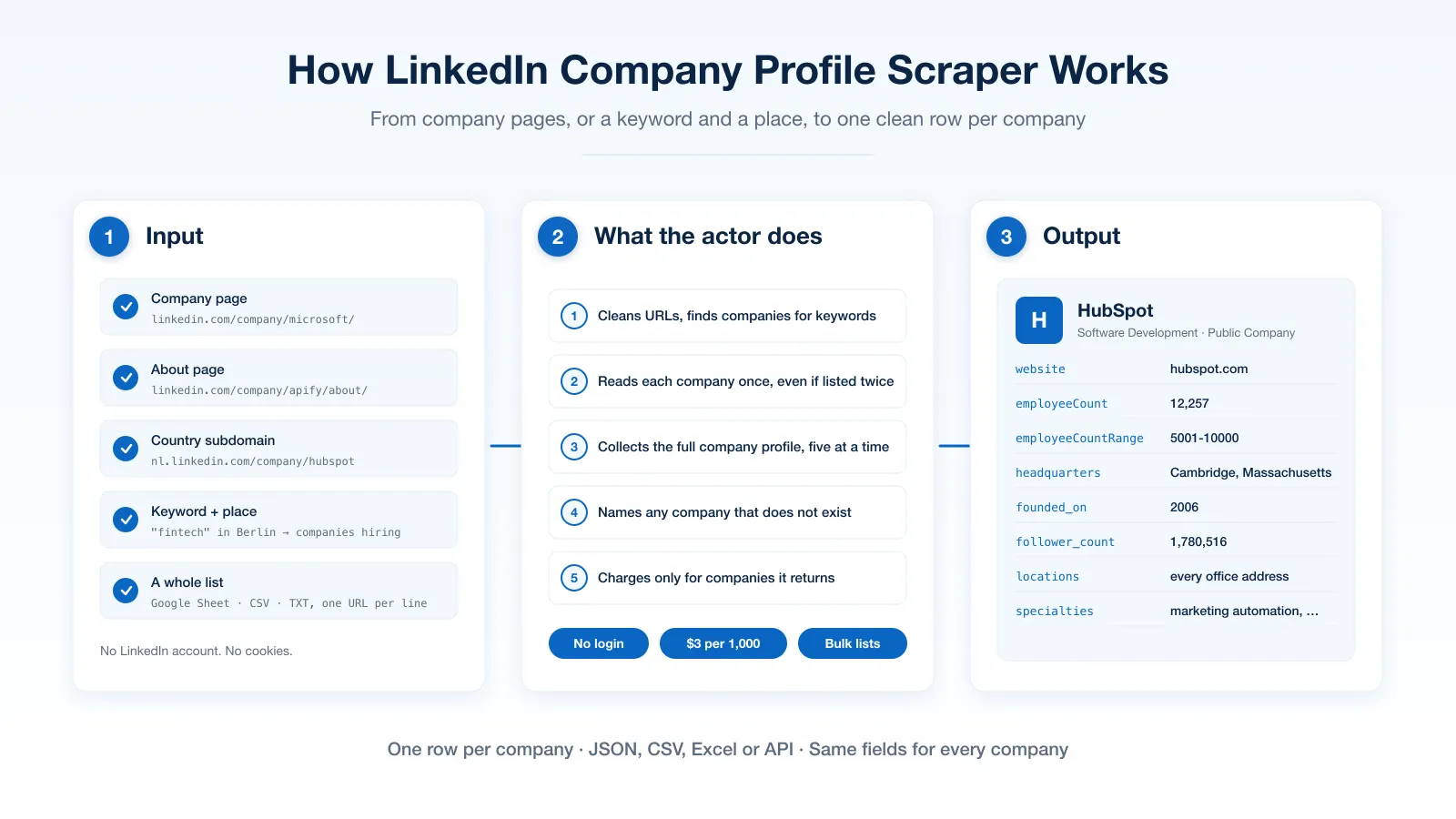
- Add company URLs (paste them, or link a sheet with one URL per line), or a keyword and a place.
- The actor cleans every URL down to the company's LinkedIn name, finds the companies hiring for each keyword, and drops duplicates.
- Each company is read, five at a time.
- One row per company is written to the dataset. Companies that do not exist are listed in the run's status message.
- Export as JSON, CSV, Excel or XML, or pull the data through the Apify API.
Input Configuration
Input fields
| Field | Type | Required | Default | What it does |
|---|---|---|---|---|
startUrls | array | One of the two | none | LinkedIn company URLs, one per entry, or a link to a file of them |
searchKeywords | array | One of the two | none | Keywords to find hiring companies by, such as fintech or data engineer |
searchLocation | string | No | any location | City, region or country for the keywords, such as Berlin or United Kingdom |
maxItems | integer | No | every URL listed, plus 100 with keywords | Stop after this many companies |
cookies | array | No | empty | Optional: your own LinkedIn li_at and JSESSIONID cookies. Not needed for any field in the output |
enrichEmails | boolean | No | false | Also look up a public contact email for each company. $0.001 per company where an email is found |
proxy | object | No | Apify residential | Connection settings. The default works as is |
Common scenarios
A few companies, nothing else set:
A long list from a Google Sheet, capped at 500 companies:
Fintech companies hiring in Berlin, up to 50:
Companies plus a contact email for each:
Output Overview
Each row is one company. Every row has the same keys:
- Identity:
name,universalName(the name in the URL),companyId,url - About:
description,website,industries,specialties,companyType,founded_on - Size:
employeeCount(members on LinkedIn),employeeCountRange(the size band the company chose),stats.follower_count - Location:
headquarters,primaryAddress(street, city, region, postal code, country),locations(every office) - Media:
logo,coverImage - Links:
jobSearchUrl(the company's open jobs on LinkedIn) - Search:
searchKeyword,searchLocation(filled when a keyword search found the company,nullfor URL inputs)
A field the company left empty on LinkedIn comes back as null (or [] for lists). phoneNumber, tagline and hashtags are part of the row for compatibility but are usually empty.
Output Samples
Company page input (HubSpot, shortened)
Small company (aalbers|wico, shortened)
Key Output Fields
Company identity
name: company name as shown on LinkedInuniversalName: the company's name in its LinkedIn URLcompanyId: LinkedIn's numeric company idurl: canonical company page URL
About the company
description: the full About textwebsite,websiteUrl: the company's own websiteindustries: industry as an arrayspecialties: the company's listed specialtiescompanyType: Public Company, Privately Held, Nonprofit, Self-Employed and so onfounded_on: founding year
Size and reach
employeeCount: number of LinkedIn members who list the company as their employeremployeeCountRange: the size band the company picked, such as51-200or10001+stats.follower_count: page followers
Locations
headquarters: city and region of the head officeprimaryAddress:streetAddress,city,region,postalCode,countrylocations: every office address, the head office first
Media and links
logo,coverImage: image URLsjobSearchUrl: LinkedIn job search filtered to this company
Search
searchKeyword,searchLocation: the keyword and place that found the company;nullfor URL inputs
With enrichEmails: true
contact_email,contact_websiteand anemailEnrichmentobject with the details of the match
FAQ
Do I need a LinkedIn account or cookies?
No. Leave the cookie field empty and every field in the output is filled. The cookie field exists for people who prefer to use their own session.
Which LinkedIn URLs are supported?
Company pages: linkedin.com/company/<name>/, with or without /about/, on any country subdomain, with or without tracking parameters. See Supported Inputs for what is not supported.
How much does it cost?
$0.003 per company returned ($0.0027 on the Silver plan, $0.0024 on Gold and above), plus $0.00005 per run. 1,000 companies cost about $3. Companies that return nothing (a misspelled URL, a deleted page) are not charged. The optional email lookup adds $0.001 per company where an email is found.
Can I find companies without having their URLs?
Yes. Put a keyword in searchKeywords and, optionally, a place in searchLocation. You get the companies that have open LinkedIn jobs matching the keyword there. It is a list of employers that are hiring, so companies without open roles will not appear, and recruitment agencies can. Pricing is the same as for URL inputs: you pay per company row returned.
What happens with a company that does not exist?
It is skipped and named in the run's status message, for example no profile for acme-typo (not found). The other companies in the run are not affected.
Why is employeeCount different from employeeCountRange?
employeeCountRange is the size band the company chose for its page. employeeCount counts the LinkedIn members who list the company as their current employer. Both are useful; they rarely match exactly.
Is the phone number included?
Only when LinkedIn shows one publicly, which is rare. Turn on enrichEmails for a contact email from the company's own website.
How fast is it, and how many companies can I run?
Each company takes about 1-6 seconds, and five run in parallel. In our test, 8 companies finished in about 35 seconds. There is no upper limit on the list size; set maxItems if you want a cap. On Apify's free plan a run reads the first 3 companies in the list.
Can I run it on a schedule?
Yes. Save your input as a task in Apify Console and add a schedule. Each run writes a fresh dataset, so you can compare follower counts or headcounts over time.
Support
- Found a bug or need a new field? Open an issue on the actor's Issues tab.
- Questions and feature requests are welcome.
Additional Services
Need a different export shape, extra fields, a scheduled feed into your CRM or warehouse, or a company list built for you? Custom work is available. Reach out through the Issues tab.
Explore More Scrapers
- LinkedIn Company Employees Scraper & Email Finder: everyone who works at a company
- LinkedIn People Search: find people by company, title and industry
- LinkedIn Posts Scraper: what a company or person publishes
- LinkedIn Jobs Scraper: who is hiring, and for what
- LinkedIn Ad Library Scraper: a company's ads, impressions and targeting
Full list at apify.com/memo23.
🤖 For AI Agents & LLM Apps
Compact reference for AI agents calling this actor via the Apify MCP server or the Apify API (actor: memo23/linkedin-company-profile-scraper).
Purpose: LinkedIn company page URLs (or a keyword + place, which finds companies with matching open jobs) in, one firmographic row per company out, without a LinkedIn login.
Minimal input:
Output: one dataset row per company: url, companyId, name, universalName, description, website, industries[], specialties[], companyType, founded_on, employeeCount, employeeCountRange, stats {employee_count, follower_count}, headquarters, primaryAddress {streetAddress, city, region, postalCode, country}, locations[] {index, isPrimary, fullAddress}, logo, coverImage, jobSearchUrl, searchKeyword, searchLocation.
Behaviors an agent should know:
- Give
startUrls(full URLs,https://www.linkedin.com/company/<name>/; bare names are rejected) and/orsearchKeywords(+ optionalsearchLocation). Keyword search returns companies with open jobs matching the keyword, including recruitment agencies; rows carrysearchKeyword/searchLocation. - Numeric-id URLs (
/company/1035/) may come back empty; prefer the name URL. - A missing company is skipped and named in the status message; the run still succeeds if any company returned.
- Billing: $0.003 per company row ($0.0024 on higher plans) plus $0.00005 per run; empty results are free.
enrichEmailsadds $0.001 per company where an email is found. - Free Apify plan: first 3 companies per run.
⚠️ Disclaimer
This Actor is an independent tool and is not affiliated with, endorsed by, or sponsored by LinkedIn Corporation or any of its subsidiaries. All trademarks mentioned are the property of their respective owners.
The scraper reads only publicly available company pages, with no paid features and nothing from members' private profiles. Users are responsible for making sure their use complies with LinkedIn's User Agreement, applicable data-protection law (GDPR, CCPA, etc.), and any contractual obligations of their own organization.
SEO Keywords
linkedin company scraper, linkedin company profile scraper, linkedin company search, find companies hiring, scrape linkedin company pages, linkedin company data, linkedin company api, Apify linkedin, linkedin company about scraper, linkedin firmographics, company enrichment, company data extraction, b2b company database, account list enrichment, lead enrichment tool, company headcount data, employee count by company, company headquarters data, industry company list, crm data enrichment, sales intelligence data, market research company data, recruiter employer research
Related LinkedIn Scrapers (No Login / No Cookies)
| Actor | Best For |
|---|---|
| LinkedIn Profile Scraper | Full person profile details, experience, education, skills & work email |
| LinkedIn People Search Scraper | Search LinkedIn profiles by keywords, job title, company, location & seniority |
| LinkedIn Profile Search by Name | Exact firstName + lastName lookup with location & company filters |
| LinkedIn Reverse Email Lookup | Find the LinkedIn profile behind any work email address (Reverse Email Lookup) |
| LinkedIn Profile Search by Services | Find LinkedIn freelancers, consultants, and B2B service providers |
| LinkedIn Company Employees Scraper | Extract employees and decision-makers from any company with ICP filters |
| LinkedIn Company Profile Scraper | Company details, website, headcount, headquarters, funding & specialties |
| LinkedIn Company Insights Scraper | Company headcount growth, department stats, hiring velocity & Crunchbase funding |
| LinkedIn Company Search Scraper | Search companies by keyword, industry, headcount & location |
| LinkedIn Posts Scraper | Search LinkedIn posts by keyword, hashtag, date range, or URL |
| LinkedIn Profile Posts Scraper | Scrape all posts published by specific LinkedIn person profiles |
| LinkedIn Company Posts Scraper | Scrape all posts and updates published by LinkedIn company pages |
| LinkedIn Group Posts Scraper | Scrape LinkedIn group discussions, posts, authors, and group metadata |
| LinkedIn Post Comments Scraper | Extract full comment threads and commenter profiles from any post |
| LinkedIn Post Reactions Scraper | Extract everyone who liked or reacted to a LinkedIn post |
| LinkedIn Profile Comments Scraper | Scrape all comments written by a LinkedIn profile across LinkedIn |
| LinkedIn Profile Reactions Scraper | Scrape all posts a LinkedIn profile has liked or reacted to |
| LinkedIn Jobs Scraper | Search and extract active LinkedIn job postings at scale |
| LinkedIn Ads Library Scraper | Extract active and historical LinkedIn ads by company or keyword |


