

YouTube Channel Email Scraper: Creator Contacts
Pricing
from $2.00 / 1,000 channels
YouTube Channel Email Scraper: Creator Contacts
Build a YouTube creator outreach list: paste channels or search a niche, and get each creator's public email with where it was found, plus website, socials, subscribers and country. Dead mail domains are dropped and filtered-out channels are never charged. Only-with-email mode included.
Pricing
from $2.00 / 1,000 channels
Rating
0.0
(0)
Developer

Muhamed Didovic
Maintained by CommunityActor stats
0
Bookmarked
2
Total users
1
Monthly active users
a day ago
Last modified
Categories
Features
Share
Find the public contact email of YouTube creators in bulk. Paste channel links or handles, or search a niche by keyword, and get one row per channel with the best email we could find, where it was found (the channel description, the creator's link-in-bio page or their own website), the website, phones, social profiles and the channel's stats.
Every address is checked for a working mail server before it is saved, and an address that fails is dropped and never billed. Channels you filter out are never billed either.
✨ Why use this scraper?
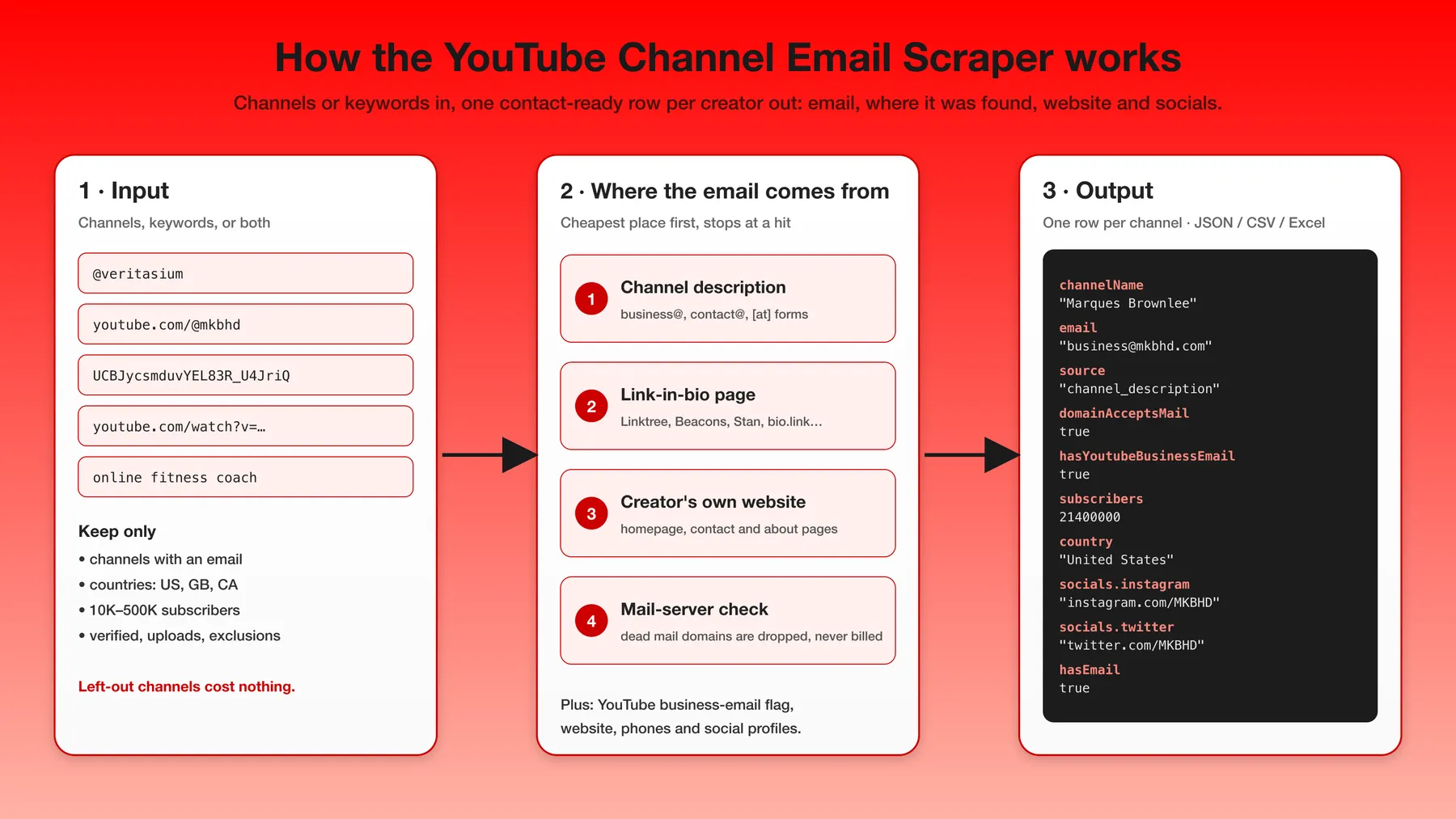
- Three places checked, cheapest first. The channel description, then the creator's Linktree / Beacons / Stan / bio.link page, then their own website (homepage, contact and about pages). It stops at the first email unless you ask for all of them.
- You see where each email came from. Every address carries its source and the page it was read from, so you can judge it before you write.
- Dead addresses are dropped. An email whose domain cannot receive mail is removed and not charged.
- Platform inboxes are filtered out. Addresses that belong to the tools creators use (press@linktr.ee, a form builder's support inbox, a coaching app's helpdesk) never show up as the creator's email.
- Channels or keywords, or both. Paste @handles, channel links, channel IDs or even video links, and add niche keywords to discover new creators in the same run.
- Outreach filters. Only channels with an email, only certain countries, a subscriber range, a minimum number of uploads, verified-only, and a list of channels to skip.
- The YouTube business-email flag.
hasYoutubeBusinessEmailtells you whether the channel also set an email behind YouTube's "View email address" button.
📋 Overview
This Actor turns a list of YouTube channels, or a set of niche keywords, into a contact list of creators. For each channel it reads the public About page (description, links, country, join date, subscriber, video and view counts) and then looks for a public email in the places creators actually publish one.
It is built for influencer marketers, agencies, sponsorship teams, podcast bookers and sales teams who need reachable creators, not just channel names. Turn on Save only channels with an email and the dataset becomes an outreach list.
The dataset has one row per channel. hasEmail separates channels with an address from those without one, and emailDetails lists every address with its source.
📥 Supported inputs
| Input | Example | Notes |
|---|---|---|
| Handle | @veritasium or veritasium | With or without the @. |
| Channel link | https://www.youtube.com/@mkbhd, /channel/UC…, /c/name, /user/name | Any channel URL form. |
| Channel ID | UCBJycsmduvYEL83R_U4JriQ | 24 characters, starts with UC. |
| Video or Shorts link | https://www.youtube.com/watch?v=…, youtu.be/…, /shorts/… | The channel that uploaded it is checked. |
| Keyword | online fitness coach | Discovers channels from YouTube search. |
| Results page | https://www.youtube.com/results?search_query=… | Searched like a keyword. |
| Keyword list | a text/CSV file or public Google Sheet | One keyword per line. |
Not supported: the email behind YouTube's "View email address" button (it needs a signed-in account and a CAPTCHA; this Actor reads public pages only), private or members-only channels, and anything behind a login. hasYoutubeBusinessEmail tells you when that button exists.
🎯 Use cases
| Who | What they get |
|---|---|
| Influencer marketers | A niche list of creators with an email, sized by subscribers and filtered by country |
| Agencies | Contact lists for creator campaigns, with website and socials for a second channel of outreach |
| Sponsorship and brand teams | Reachable mid-size creators in a category, ready for a CRM |
| Podcast and event bookers | Guests' business inboxes and websites |
| B2B sales | Creators who run a business (courses, coaching, stores) with their company email |
| Researchers | Who in a niche publishes a contact address, and where |
🔄 How it works
- Collect channels from the channels you paste and from keyword searches, keeping each channel once.
- Read the About page for description, links, country, join date and exact video and view counts. Your subscriber, upload, verified and country filters apply here, before anything is billed.
- Look for an email: the description first, then the link-in-bio page, then the creator's own website. Links written in the description count as well.
- Check the mail server of each address and drop the ones that cannot receive mail.
- Save one row per channel, with the best email first and every address's source.
⚙️ Input configuration
| Field | Type | Default | What it does |
|---|---|---|---|
channels | array | — | Handles, channel links, channel IDs or video links. |
searchTerms | array | — | Keywords; each one is a YouTube search. |
searchUrls | array | — | youtube.com/results links, searched like keywords. |
searchTermsFiles | array | — | Links to text/CSV files or Google Sheets with one keyword per line. |
maxChannelsPerSearchTerm | integer | no limit | Saved channels per keyword. |
discoveryMode | string | both | channelFilter, videoResults or both: which search results feed the list. |
languageHint / countryHint | string | en / US | Language and country of keyword searches. |
followLinkInBio | boolean | true | Read the channel's link-in-bio page. |
scanWebsite | boolean | true | Read the creator's website (homepage, contact and about pages). |
collectAllEmails | boolean | false | Keep reading after the first email to list every address. |
verifyEmailDomains | boolean | true | Drop addresses whose domain cannot receive mail. |
onlyWithEmail | boolean | false | Save only channels where an email was found. |
countries | array | — | Keep channels whose About page names one of these countries (names or two-letter codes). |
minSubscribers / maxSubscribers | integer | 0 | Subscriber range; 0 means no limit. |
minVideos | integer | 0 | Fewest uploads. |
verifiedOnly | boolean | false | Only verified channels from searches. |
excludedChannels | array | — | Channels to skip in searches. |
maxTotalResults | integer | no limit | Saved channels in the whole run. |
maxConcurrency | integer | 30 | Channels looked up in parallel. |
Example: niche discovery that keeps only reachable creators in three countries.
📊 Output overview
One row per channel. The Overview tab shows channel, handle, best email, the YouTube business-email flag, website, subscribers and country. Contacts lists every email with its source, the link-in-bio page, phones and social profiles. All fields has everything.
📦 Output sample
🗂 Key output fields
| Group | Fields |
|---|---|
| Contact | email (best address), emails[], emailDetails[{email, source, foundOn, domainAcceptsMail, quality}], hasEmail, hasYoutubeBusinessEmail |
| Reach the creator elsewhere | website, linkInBioUrl, phones[], socials{instagram, tiktok, twitter, facebook, linkedin, twitch, discord, threads, patreon, other[]} |
| Channel | channelId, handle, channelName, channelUrl, subscribers, subscriberText, videos, totalViews, country, joinedDate, isVerified, description, keywords[], externalLinks[], avatarUrl |
| Provenance | discoverySource{sourceKind, value, discoverySurface, rank, sourceUrl}, sourceVideo, scrapedAt |
source is channel_description, link_in_bio or website. quality is ok, freemail (Gmail, Outlook and similar) or disposable.
❓ FAQ
How many channels come back with an email?
It depends on the niche. In our test runs, 6 of 13 well-known channels and 10 of 34 fitness-coaching channels had a public email. Creators who sell something (coaching, courses, services) publish one more often; large entertainment channels often keep theirs behind YouTube's sign-in button only. Turn on onlyWithEmail to save just the reachable ones.
Do you get the email behind "View email address"?
No. YouTube shows it only to signed-in viewers who pass a CAPTCHA, and this Actor reads public pages only. hasYoutubeBusinessEmail: true tells you the channel has one, so you can reveal it by hand for the creators that matter.
Are the emails verified?
Each address's domain is checked for a working mail server, and addresses that fail are dropped and not charged (verifyEmailDomains, on by default). The Actor does not send mail to the address.
What does a channel without an email cost? See the Pricing tab. A channel you filter out (subscribers, uploads, country, verified, exclusions, or Save only channels with an email) is not saved and not charged.
Why is email a Gmail address?
Many smaller creators publish a Gmail or Outlook address as their business contact. quality: "freemail" marks those so you can sort them.
Can I paste channels and keywords together? Yes. Pasted channels are checked first, then each keyword is searched. A channel found twice is saved once.
Why did I get fewer channels than my limit?
Filters may have left many out, or the keyword ran out of results. The run's RUN_SUMMARY record shows how many channels were checked, how many had an email, and how many each filter left out.
Can I schedule it?
Yes. Use an Apify schedule with the same input. Add channels you already contacted to excludedChannels to keep later runs to new creators.
💬 Support
Found a wrong email or a missing field? Open an issue on the Actor's Issues tab with the channel link and the run ID.
🛠 Additional services
Need a scheduled creator feed into your CRM, a custom niche list, or extra fields? Ask through the Issues tab.
🔎 Explore more scrapers
- YouTube Channel Search & Influencer Finder: channel discovery with full stats, no contact lookup.
- YouTube Video Downloader, YouTube Comments Scraper and YouTube Transcript Scraper for the videos themselves.
🤖 For AI Agents & LLM Apps
- Purpose: return the public contact email, website and socials of YouTube channels, from channel links or keyword discovery.
- Minimal input:
{ "channels": ["@veritasium", "https://www.youtube.com/@mkbhd"] }
- Discovery input:
{ "searchTerms": ["home espresso"], "onlyWithEmail": true, "maxTotalResults": 25 }
- Key output:
email,emails[],emailDetails[].source(channel_description|link_in_bio|website),hasEmail,hasYoutubeBusinessEmail,website,socials,subscribers,country,channelUrl. - Behaviors: one row per channel; filters apply before billing; addresses on domains without a mail server are dropped; platform inboxes (link-in-bio services, form builders, coaching apps) are excluded.
⚠️ Disclaimer
This Actor is an independent tool and is not affiliated with, endorsed by, or sponsored by YouTube, Google LLC, or any of their subsidiaries or affiliates. All trademarks mentioned are the property of their respective owners.
It reads only publicly available pages: YouTube channel pages, the link-in-bio pages and websites those channels link to. It does not sign in, does not reveal emails hidden behind YouTube's sign-in button, and does not send email. You are responsible for using the data in line with YouTube's Terms of Service, anti-spam law (CAN-SPAM, PECR, CASL), data-protection law (GDPR, CCPA and others) and your own organisation's policies.
SEO Keywords
youtube channel email scraper, youtube email scraper, youtube email extractor, youtube channel email finder, find youtube creator emails, youtuber email finder, youtube influencer email, youtube influencer contact, youtube creator contact list, youtube business email, youtube channel contact info, scrape youtube emails, youtube email list, youtube lead generation, influencer outreach youtube, youtube channel email extractor alternative, bulk youtube email finder, youtube creator emails by niche, youtube channel website and socials


