

YouTube Community Posts Scraper — Polls, Images & Comments
Pricing
from $3.00 / 1,000 community posts
YouTube Community Posts Scraper — Polls, Images & Comments
Scrape YouTube community posts from any channel with no login or API key: post text, likes, comment counts, images, poll choices with total votes, linked videos. Add the comments and replies under each post. Give a channel handle, link or id, or paste post links.
Pricing
from $3.00 / 1,000 community posts
Rating
0.0
(0)
Developer

Muhamed Didovic
Maintained by CommunityActor stats
0
Bookmarked
6
Total users
0
Monthly active users
2 days ago
Last modified
Categories
Features
Share
Turn any YouTube channel's community tab into a clean dataset of posts, polls, images and comments.
Give a channel handle, a channel link, a channel id or a post link. You get every community post as one row: text, likes, comment count, images, poll choices with total votes, the linked video, and when it was posted. Add the comments and replies under each post with one switch. No YouTube account and no API key needed.
Why Use This Scraper?
- Every kind of community post. Text-only posts, single images, image galleries, polls and shared videos, each marked by
attachmentType. - Polls as data. Every choice and the total number of votes, ready to compare across posts and channels.
- Comments and replies in the same run. Each reply points at its parent comment, and replies written by the channel owner are flagged.
- Any way of naming a channel.
@handle, a bare handle, a channel link or aUC…channel id all work. - Exact limits. Ask for 3 posts, 1 comment or 1 reply and that is what you get. No minimum batch size.
- Pay per row. A channel or post that is not found costs nothing, and you can set a spending cap per run.
- Ready for spreadsheets. Counts come as numbers (
likes: 104000) and as YouTube prints them (likesText: "104K"), with Posts and Comments views in the dataset.
Overview
This actor is for creator agencies, brand and sponsorship teams, marketers, poll researchers and AI teams who need what creators post on their community tab ("Posts" on the channel page) as structured rows.
One run returns one dataset. Every row has a type:
type | One row per | When |
|---|---|---|
channel | channel you listed | always, for each channel found |
post | community post | always |
comment | top-level comment under a post | with includeComments: true |
reply | reply under a comment | with includeComments and includeReplies |
Posts from a channel arrive newest first. Comment and reply rows carry the postId and postUrl of their post, so they join back to it in any spreadsheet or database.
Supported Inputs
Channels
| Form | Example |
|---|---|
Handle with @ | @MrBeast |
Handle without @ | MrBeast |
| Channel link | https://www.youtube.com/@mkbhd |
| Community tab link | https://www.youtube.com/@mkbhd/posts |
Channel id or /channel/ link | UCX6OQ3DkcsbYNE6H8uQQuVA |
| Old-style links | https://www.youtube.com/c/..., https://www.youtube.com/user/... |
Community posts
| Form | Example |
|---|---|
| Post link | https://www.youtube.com/post/UgkxZusu9I1Z-VuU5PGZNA2gclHi8V9CJVZk |
| Bare post id | UgkxZusu9I1Z-VuU5PGZNA2gclHi8V9CJVZk |
| Community tab link with a post selected | https://www.youtube.com/channel/UC.../community?lb=Ugkx... |
You can mix channels and post links in one run.
Not supported
- Search by keyword or hashtag across all of YouTube (give channels or post links instead)
- Posts visible only to channel members or signed-in viewers
- Video comments (use our YouTube Comments Scraper for those)
- Links outside youtube.com, and youtu.be short links
Use Cases
| Audience | Use case |
|---|---|
| Creator agencies | Report what each client posted on the community tab, how many likes and comments each post earned, and which formats work best. |
| Poll research | Collect poll questions, choices and total votes from many channels to see what audiences are asked and how many answer. |
| Sponsorship checks | Before a deal, review a creator's recent posts for brand mentions, giveaways, tone and audience engagement. |
| Brand monitoring | Track the posts of channels in your niche and read the comments for mentions of your product or competitors. |
| AI training data | Build labeled datasets of short creator posts, poll questions and comment threads, with authors and engagement counts. |
| Researchers | Export community post history for studies of creator communication and audience response. |
How It Works
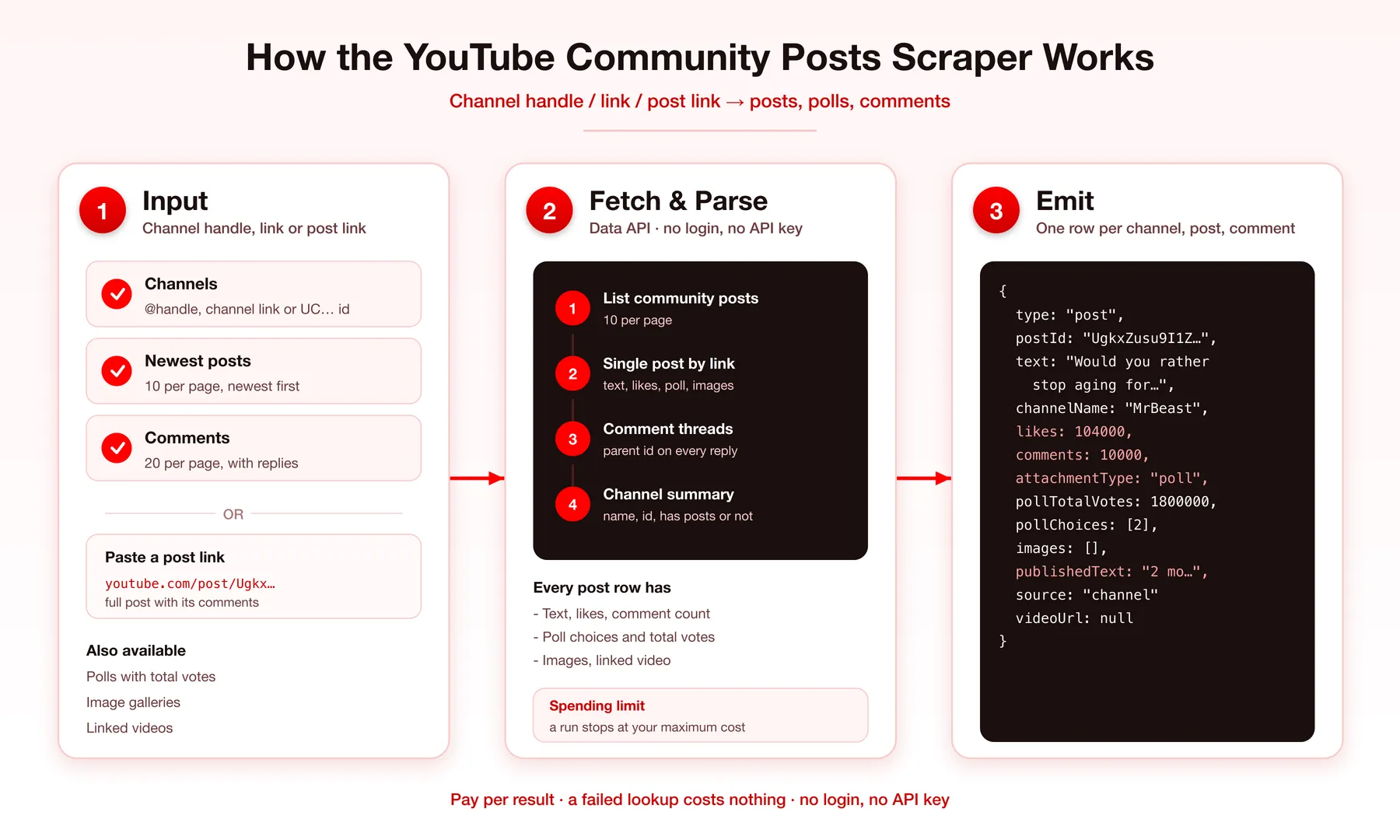
- You add channels or post links. Handles, links and ids are all accepted.
- Each channel is matched. You get one
channelrow saying whether the channel has community posts. - Posts are collected, newest first, up to your per-channel limit and your run limit.
- Comments and replies are added for every post when you turn them on, up to your per-post and per-comment limits.
- You export or connect the dataset: JSON, CSV, Excel, the Apify API, n8n, Make, Zapier or a schedule.
Input Configuration
| Field | Type | Default | Description |
|---|---|---|---|
channels | array of strings | ["@MrBeast"] (prefill) | Handles, channel links or channel ids. |
maxPostsPerChannel | integer | 20 | Newest posts per channel, from 1 to 5,000. |
postUrls | array of strings | none | Community post links or post ids. |
includeComments | boolean | false | Add a comment row for each comment under each post in the run. |
maxCommentsPerPost | integer | 40 | Top-level comments per post, from 1 to 20,000. |
includeReplies | boolean | false | Add a reply row for each reply. Needs includeComments. |
maxRepliesPerComment | integer | 10 | Replies per comment, from 1 to 1,000. A comment with fewer replies returns all of them. |
language | string | en | Language of the texts YouTube writes itself, such as "2 days ago". Two letters: en, de, es, ja. |
country | string | US | Two-letter country code: US, GB, DE. |
maxItems | integer | 1000 | Maximum post rows in the run, across all channels and post links. Channel, comment and reply rows do not count. |
Give at least one channel or one post link.
Example 1: a channel's latest posts
Ready to run as a saved example: MrBeast YouTube community posts with likes and polls.
Example 2: one post with its comments and replies
Example 3: recent posts plus a few comments each
Ready to run as a saved example: YouTube community post comments from MKBHD.
Polls
There is no poll-only switch. Poll posts come with every channel run, marked attachmentType: "poll", with pollChoices and pollTotalVotes filled. Filter on attachmentType after the run, or in the dataset view before you export.
Pricing
Pay per event. You pay only for the rows you receive; platform usage is included.
| Event | When | Price |
|---|---|---|
| Actor start | Once per run, per GB of memory (one event at the default 512 MB) | $0.005 |
| Channel | Each channel found, with or without posts | $0.005 ($5 per 1,000) |
| Community post | Each post row | $0.003 ($3 per 1,000) |
| Comment or reply | Each comment or reply row | $0.0015 ($1.50 per 1,000) |
| Run | Cost |
|---|---|
| 1 channel, 20 posts | $0.005 + $0.005 + 20 x $0.003 = $0.07 |
| 1 post link with 100 comments | $0.005 + $0.003 + 100 x $0.0015 = $0.158 |
| 10 channels, 10 posts each, 20 comments per post | $0.005 + $0.05 + $0.30 + 2,000 x $0.0015 = $3.355 |
A channel or post that is not found costs nothing. Set a maximum cost per run in the run options and the run stops at that amount with the rows it has.
Output Overview
Each row is one channel, post, comment or reply, told apart by type.
- Post rows: text, when it was posted, likes and comment count, the kind of attachment, image links, poll choices and total votes, the linked video, and the channel.
- Comment and reply rows: text, when it was written, likes, reply count, the author's name, channel and avatar, and whether the author is verified or is the channel owner.
- Channel rows: channel id, name, channel link, community tab link, and whether the channel has community posts.
The dataset has two views in Apify Console: Posts and Comments.
Output Samples
Poll post (channel run)
Image post (channel run, shortened)
Shared-video post (channel run, shortened)
Comment and reply
Channel row
Key Output Fields
Post rows (type: "post")
| Field | Description |
|---|---|
postId, url | Post id and link |
text | Full post text |
publishedText | When it was posted, as YouTube shows it ("2 months ago") |
likes, likesText | Likes as a number and as printed ("104K") |
comments, commentsText | Comment count as a number and as printed |
attachmentType | none, image, multi_image, poll or video |
images | Image links at the largest size, one per image in a gallery |
pollChoices | Poll choices: text, plus votes and percentage when YouTube shows them |
pollTotalVotes | Total votes on a poll |
videoId, videoTitle, videoUrl | The video shared in the post |
channelId, channelName, channelUrl | The channel that posted it |
source, input | channel or url, and the post link you gave (post-link runs) |
scrapedAt | When the row was collected (ISO time) |
Comment and reply rows (type: "comment" or "reply")
| Field | Description |
|---|---|
commentId | Comment or reply id |
postId, postUrl | The post it belongs to |
parentCommentId | For replies, the comment it answers; null on comments |
text, publishedText | The text and when it was written |
likes | Likes as a number |
replyCount | Replies under a comment; null on replies |
authorName, authorChannelId, authorUrl, authorAvatar | The author |
authorIsVerified, authorIsCreator | Verified badge; reply written by the channel owner |
Channel rows (type: "channel")
| Field | Description |
|---|---|
channelId, channelName, channelUrl | The channel (channelName is empty when it has no posts) |
communityUrl | Its community tab |
hasCommunityPosts | false when the channel has never posted, or has removed its posts |
input | What you typed for this channel |
FAQ
Do I need a YouTube account or an API key?
No. Add channels or post links and start the run.
Is there a minimum number of posts, comments or replies?
No. Every limit accepts 1. maxPostsPerChannel: 3 returns 3 posts, and maxCommentsPerPost: 1 returns one comment per post. Posts with no comments are skipped for comments at no cost.
Can I get only polls?
There is no poll-only switch. Poll posts arrive with the rest of a channel's posts, marked attachmentType: "poll". Filter on that field after the run.
Why are a poll's per-choice votes empty?
YouTube shows the split between choices only to signed-in viewers who have voted. The choices and the total number of votes are returned for every poll.
Why are dates texts like "2 months ago"?
YouTube shows community posts and their comments with relative dates only, so that is what exists. scrapedAt records when each row was collected, so you can work out an approximate date. Set language to get these texts in another language.
How many replies can I get per comment?
All of them, up to maxRepliesPerComment (1 to 1,000, default 10). A comment with 87 replies and maxRepliesPerComment: 100 returns about 87 reply rows. The count YouTube shows can be a little higher than the replies anyone can read, because it also counts replies YouTube hides, so expect a row or two fewer on busy comments. Replies need includeComments: true as well.
Why do some posts have no comment rows?
The post has no comments, the channel turned comments off, or your spending cap was reached. A post whose comments cannot be read is skipped and not charged.
The channel row says hasCommunityPosts: false.
The channel exists but has never posted on its community tab, or has removed its posts. That channel row is charged once; there are no post rows.
Can I scrape members-only or private posts?
No. The actor reads public community posts only. Posts limited to channel members are out of scope.
Can I monitor a channel for new posts?
Yes. Save your input as a task and schedule it in Apify Console, for example daily with maxPostsPerChannel: 10. Each run returns the newest posts again, so keep rows with a postId you have not seen before.
Are there limits on the Apify free plan?
Free-plan runs return up to 100 posts, 100 comments per post and 20 replies per comment. A paid Apify plan removes these caps.
How can I cap what a run costs?
Set a maximum cost per run in the run options. The run stops at that amount and keeps every row it collected.
Integrations
Apify API
Run the actor and get its rows in one call (good for runs that finish within 5 minutes):
For larger runs, start the run with POST /v2/acts/memo23~youtube-community-posts-scraper/runs, then read /v2/datasets/<defaultDatasetId>/items when it finishes. The Apify JavaScript and Python clients do the same in a few lines.
n8n
Add the Apify node, choose the actor memo23/youtube-community-posts-scraper, paste your input JSON, and read the dataset items in the next step. You can also call the run-sync link above from an HTTP Request node. Route rows by type to send posts and comments to different sheets or tables.
Make
Use the Apify app: the Run an Actor module with memo23/youtube-community-posts-scraper and your input JSON, then Get Dataset Items to pass each row on to Google Sheets, Airtable, Slack or your CRM.
Zapier, Google Sheets, webhooks
Any Apify integration works: Zapier, Google Drive and Sheets exports, Slack, and webhooks that fire when a run finishes.
Support
- For issues or feature requests, please use the Issues tab of this actor.
- If you need customization or have questions, feel free to contact the author:
- Author's website: https://muhamed-didovic.github.io/
- Email: muhamed.didovic@gmail.com
Additional Services
- Request customization or a whole dataset: muhamed.didovic@gmail.com
- If you need anything else scraped, or this actor customized, email: muhamed.didovic@gmail.com
Explore More Scrapers
- YouTube Comments Scraper — comments and replies under YouTube videos
- YouTube Video Details Scraper — video and Shorts details with subtitles
- YouTube Transcript Scraper — subtitles and captions as text
- YouTube Channel Email Scraper — creator contact details
- SocialBlade Scraper — channel stats, grades and growth
Full list at apify.com/memo23.
🤖 For AI Agents & LLM Apps
Compact reference for AI agents calling this actor via the Apify MCP server or the Apify API (actor: memo23/youtube-community-posts-scraper).
Purpose: YouTube community-tab posts (text, images, polls, shared videos) with optional comments and replies, as JSON rows, from channel handles, links, ids or post links.
Minimal input:
Output: rows told apart by type. post: postId, url, text, publishedText, likes, likesText, comments, attachmentType, images[], pollChoices[] {text, votes, percentage}, pollTotalVotes, videoId, videoTitle, videoUrl, channelId, channelName, channelUrl, source. comment / reply: commentId, postId, postUrl, parentCommentId, text, publishedText, likes, replyCount, authorName, authorChannelId, authorUrl, authorIsVerified, authorIsCreator. channel: channelId, channelName, channelUrl, communityUrl, hasCommunityPosts, input.
Behaviors an agent should know:
maxItems(default 1000) caps post rows only; setmaxPostsPerChannelandmaxCommentsPerPosttoo. Every limit accepts 1.- Comments need
includeComments: true; replies also needincludeReplies: true.maxRepliesPerComment(1-1,000, default 10) is a real cap: every public reply up to it is returned. - Dates are relative texts ("2 months ago"); per-choice poll votes are usually
null,pollTotalVotesis filled. - Billing: $0.005 per run start, $0.005 per channel found, $0.003 per post, $0.0015 per comment or reply. Not-found channels and posts are free.
- Free-plan runs: up to 100 posts, 100 comments per post, 20 replies per comment.
- No keyword search across YouTube; members-only posts are out of scope.
⚠️ Disclaimer
This Actor is an independent tool and is not affiliated with, endorsed by, or sponsored by YouTube, Google LLC or any of its subsidiaries. All trademarks mentioned are the property of their respective owners.
The scraper accesses only publicly available YouTube community posts and comments — no authenticated pages, members-only content or anything behind the YouTube login. Users are responsible for ensuring their use complies with YouTube's Terms of Service, applicable data-protection law (GDPR, CCPA, etc.), and any contractual obligations of their own organization.
SEO Keywords
youtube community posts scraper, youtube community tab scraper, scrape youtube community posts, youtube posts scraper, youtube community api, youtube poll scraper, youtube poll results data, youtube post comments scraper, youtube community comments export, youtube channel posts export, youtube creator posts data, creator agency reporting, influencer sponsorship research, brand monitoring youtube, youtube audience engagement data, social media poll research, youtube data for ai training, creator marketing data, youtube community post images, Apify youtube scraper


