

Hiring Leads Scraper: Companies Hiring Now & Decision Makers
Pricing
from $12.00 / 1,000 hiring companies
Hiring Leads Scraper: Companies Hiring Now & Decision Makers
Find companies hiring right now for any role, with job postings, hiring contacts and emails, e.g. software engineers in Texas, nurses in Florida or remote sales reps. $0.015 per company lead, $0.02 per decision-maker email. Company, website, open roles from Greenhouse, Lever, Ashby and more.
Pricing
from $12.00 / 1,000 hiring companies
Rating
0.0
(0)
Developer

mogged
Maintained by CommunityActor stats
0
Bookmarked
2
Total users
1
Monthly active users
9 days ago
Last modified
Categories
Share
Find companies hiring for a role right now, with the job postings, the hiring contacts and their emails: for example software engineers in Texas, nurses in Florida or remote sales reps.
For recruiters, staffing and recruitment agencies, and B2B sales teams. Tell it the roles and the place ("software engineer" in "Texas", "registered nurse" in "Florida", "account executive", "Remote"). You get one sales-ready lead per company that is hiring for those roles right now: the company, its website, the matching open roles with links to the postings on its own careers page, how many matching roles are open (hiring intensity), and, where the company publishes them, the decision makers to contact, with any email labelled by how it was found and a confidence level.
Price: $0.015 per company lead and $0.02 per decision-maker email (high or medium confidence only). Most leads cost $0.015; a lead with one confirmed email costs about $0.035. Platform usage is included. Companies with no matching roles, roles that have closed, names and titles, and low-confidence email guesses are free.
No LinkedIn, Indeed or Glassdoor scraping and no account or cookies needed: the roles come straight from the employers' own job boards.
What to expect
Measured on 215 leads from 12 test searches on 12 October 2026:
| What you get | How often |
|---|---|
| Matching open roles, checked again on the employer's live careers page during your run | every lead (14 of 14 also checked by hand) |
| At least one named decision maker (name, title, source page) | about half of companies (53%): 65% to 75% in UK, European and remote-sales searches, about 40% for US engineering roles, about 30% for healthcare employers |
| A charged email with high or medium confidence (published, or built from the company's confirmed email format) | about 2 in 100 companies |
| A free low-confidence email guess, to check with a verifier before use | about half of companies |
| Run time | 10 to 100 seconds for 5 to 50 companies |
So think of this as a list of companies hiring now with the right people named, not as a bulk email finder. Confirmed emails are a bonus where companies publish their staff addresses.
What one lead looks like
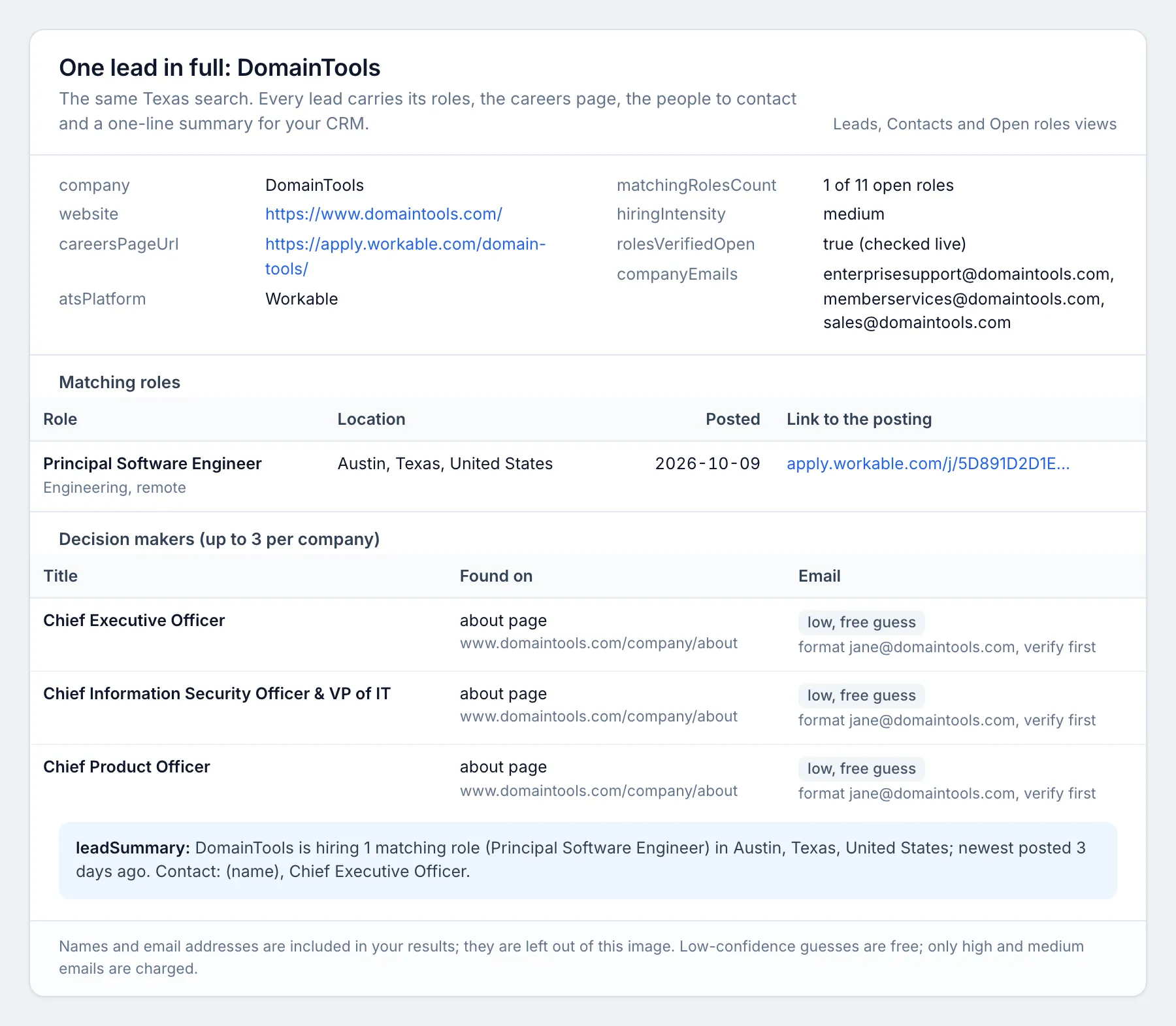
Real output from a test search on 12 October 2026 ("software engineer" in Texas, posted within 7 days). Contact names are in your results and left out of these pictures.
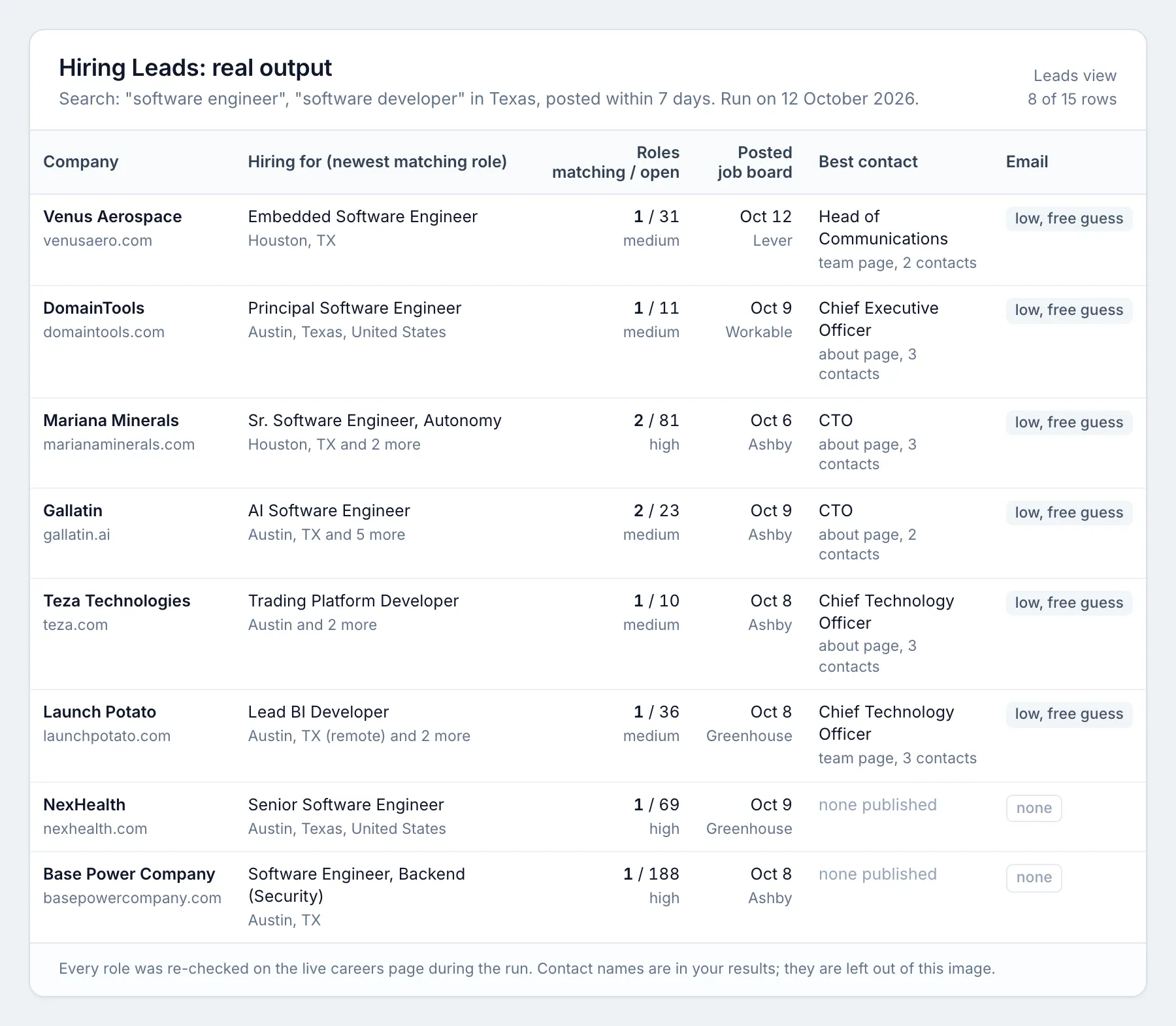
More rows from other test searches on the same day (people's names left out here; your results include them):
| Company | Hiring for | Location | Matching roles / all open | Posted | Best contact found | Email confidence |
|---|---|---|---|---|---|---|
| Pariveda | Software Engineer II | Dallas | 1 / 27 | 9 Oct | Managing Vice President, Central Region (team page) | low (free) |
| DomainTools | Principal Software Engineer | Austin, Texas | 1 / 11 | 9 Oct | Chief Executive Officer (about page) | low (free) |
| Saronic Technologies | Software Engineer, Forward Deployed | Austin, TX | 2 / 210 | 5 Oct | Chief People Officer (team page) | low (free) |
| VitalCaring Group | Home Health LVN | San Antonio, Texas | 54 / 427 | 11 Oct | Senior Vice President, Human Resources (about page) | low (free) |
| IVX Health | Infusion Registered Nurse | Brooklyn, New York | 10 / 73 | 8 Oct | Director of Nursing (team page) | low (free) |
| Wayve | Senior Software Engineer, Data | London | 4 / 157 | 6 Oct | Engineering Manager (team page) | low (free) |
Every row also includes the company website and description, a link to each posting on the employer's own careers page, the careers page itself, the total number of open roles, other published company addresses (careers@, hr@), the company's email format when we can confirm it, and a one-line leadSummary ready for your CRM or an AI agent.
How to use it
- Open the Actor and fill in the form. Click Try for free on this page (or open the Actor in Apify Console). Type the job titles you recruit or sell for, one per line ("software engineer", "data engineer"), and the location: a US state, city, country, region ("Europe", "DACH") or "Remote". Choose posted within (default 7 days) and how many companies you want.
- Press Start. 5 to 50 companies take 10 to 100 seconds.
- Download the results. When the run finishes, open the Output tab and click Export to download Excel or CSV (JSON, XML and Google Sheets work too). Use the Leads view for one company per row, Contacts for one row per person (ready for an outreach tool) or Open roles for one row per job posting.
Schedule it: a daily feed of companies newly hiring
Save your search as a task, set Posted within to 1 day and turn on Only companies not delivered before, then add a daily Schedule. Each morning you get only the companies that started hiring for your roles since yesterday. Connect the run to Google Sheets, Slack, HubSpot, Clay, Make, n8n or Zapier with Apify's integrations.
Where the data comes from
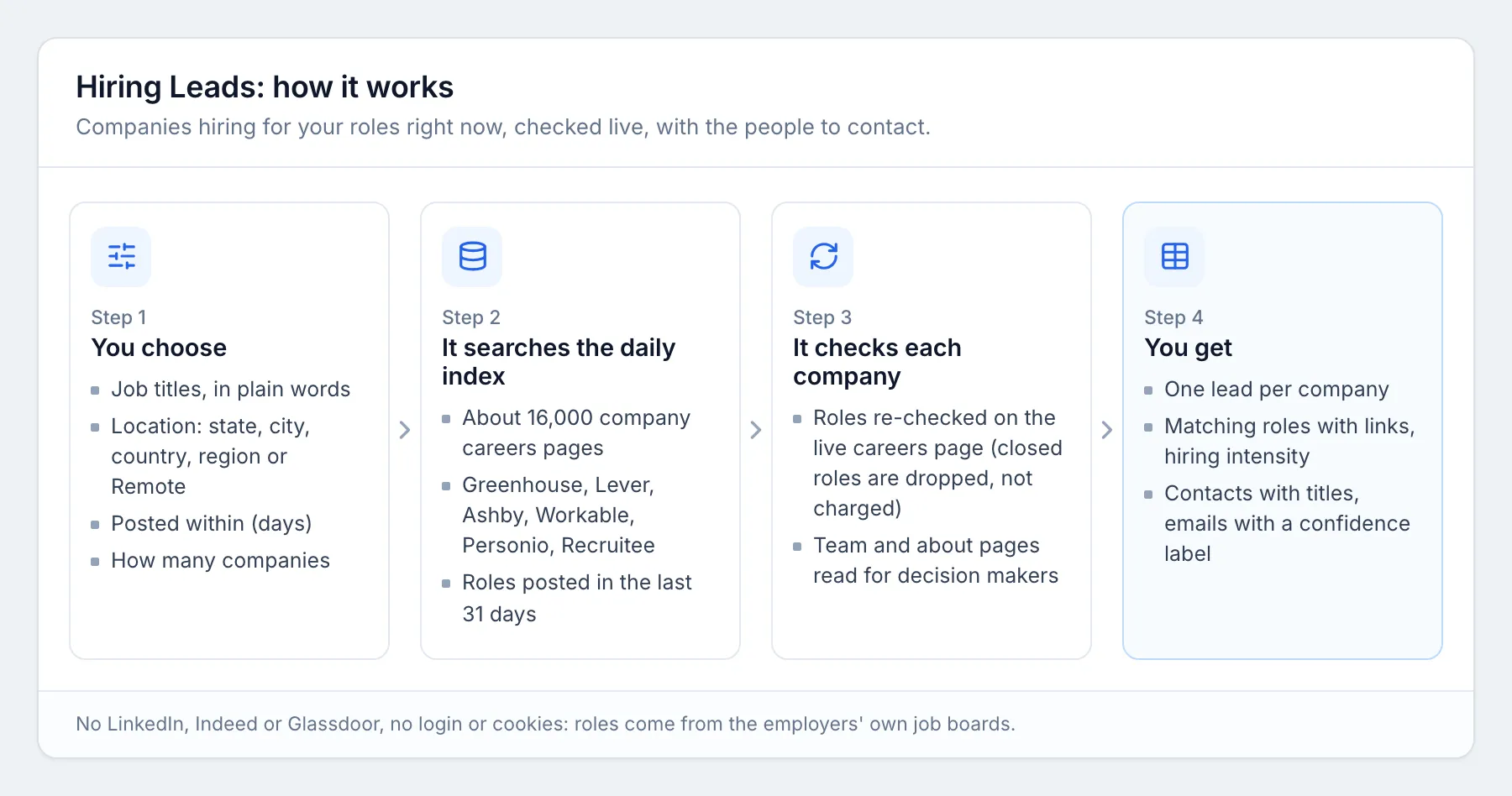
- Open roles: the public job boards companies run on Greenhouse, Lever, Ashby, Workable, Personio and Recruitee, through the public job-posting endpoints these platforms provide for careers pages. About 16,000 live company job boards are read into a daily index of roles posted in the last 31 days (around 10,000 companies with recent roles at any time); platforms that limit request rates are read in turns over two or three days. When you run a search, each company's roles are checked again on its live careers page, so closed roles are dropped before you pay.
- Contacts: the company's own website (team, about, leadership, contact and legal-notice pages, and schema.org data) and the job postings themselves (named hiring managers, recruiters and "you will report to" lines). LinkedIn is never visited; a LinkedIn profile link appears only when the company's own website links to it.
How emails are found, and what the confidence means
| Confidence | What it means | Charged |
|---|---|---|
| high | The address itself is published on the company's website or in its job posting, next to that person or spelt from their name. | yes, $0.02 |
| medium | Built from the company's own email format (for example first.last@), learnt from at least one published address on the same domain that spells the name of a person on the company's pages. City, office and team inboxes (dallas@, sales@) never count. The domain has mail servers. | yes, $0.02 |
| low | Built from the most common format for a company of that size. The domain has mail servers, but nothing published confirms the format. Check it with an email verifier before sending. | no, free |
Every email comes with emailSource, a sentence saying exactly where it came from. A guess is never presented as verified. Addresses are not tested by sending mail.
Who is chosen as the contact
Up to 3 people per company (change it with Maximum contacts per company), best first:
- the leader of the team that is hiring (CTO or VP Engineering for engineering roles, VP Sales for sales roles, Director of Nursing for nursing roles, and so on), and anyone named in the posting itself;
- HR, talent acquisition and recruiting leaders;
- founders, the CEO, owners and managing directors (first choice at small companies).
Input fields
| Field | What it does |
|---|---|
jobTitles | Roles to find, in plain words. Common variants are included ("nurse" also finds RN and LPN roles). Empty means every role. |
location | US state, city, country, region or "Remote". Separate several with a semicolon. |
postedWithinDays | Only roles posted in the last 1 to 30 days. |
maxCompanies | How many company leads to deliver. |
includeContacts | Find decision makers and emails (on by default). |
remote | Any, remote only, or on-site and hybrid only. |
companySize | Small, mid-size or large, estimated from how many roles the company has open in total (job boards do not publish headcount). |
industry | Only companies whose own description mentions these words ("healthcare", "fintech", "SaaS"). |
excludeTitles, excludeCompanies | Leave out roles or companies (for example "intern", or your existing clients). |
minMatchingRoles | Only companies with at least this many matching roles. |
excludeStaffingAgencies | Skip agencies that post jobs for their clients (on by default). |
skipCompaniesFromPreviousRuns | For scheduled feeds: only companies not delivered before. |
Example input:
Output fields
| Field | What it is |
|---|---|
company, website, domain, companyDescription, industry | The company that is hiring |
atsPlatform, careersPageUrl | The job board the roles come from and the company's careers page |
matchingRolesCount, openRolesTotal, hiringIntensity | How many roles match your search, how many are open in total, and high, medium or low intensity |
topRoleTitle, topRoleUrl, topRoleLocation, newestRolePostedAt | The newest matching role, its link, location and posting date |
roleTitles, matchingRoles | Every matching role with title, location, remote or on-site, department, posting date and link (up to 25) |
rolesVerifiedOpen | True when the roles were checked as still open on the live careers page during your run |
contacts | Up to 3 decision makers: name, title, the page they were found on, email, emailConfidence, emailSource and LinkedIn when the company site links it |
bestContactName, bestContactTitle, bestContactEmail, bestContactEmailConfidence | The best person to contact first |
companyEmails, emailFormat, emailDomainAcceptsMail | Published company addresses (careers@, hr@), the confirmed email format and whether the domain accepts mail |
leadSummary | One sentence about the lead, ready for a CRM note or an AI agent |
matchedKeywords, searchQuery, notes, chargedEmails, scrapedAt | Which titles matched, the search used, notes, emails charged and when the lead was built |
How much does it cost?
You pay per result, nothing for platform usage:
- $0.015 per company lead (a company with at least one matching open role, checked live).
- $0.02 per decision-maker email with high or medium confidence.
| You get | You pay |
|---|---|
| 100 companies, contacts off | $1.50 |
| 100 companies with contacts | $1.50 plus $0.02 per confirmed email: about $1.60 in our tests |
| 1,000 companies with contacts | about $16 |
Names and titles of decision makers come free with each lead. Emails are charged only at high or medium confidence, which we reach for the few companies that publish staff addresses; for the rest you get a free low-confidence guess to verify yourself.
Set Maximum cost per run in the run options and the Actor stops there. Higher Apify plans get a discount.
Hiring Leads compared with the alternatives
| Hiring Leads | LinkedIn Jobs scraper plus an email finder | Apollo, ZoomInfo | |
|---|---|---|---|
| Who is hiring, by role and place | yes | yes | partly |
| Decision makers | names and titles for about half of companies, in the same row; confirmed emails for a few | a second tool, matched by hand | yes, with emails |
| Job source | the employer's own careers page | LinkedIn listings (often reposts) | mixed |
| Confidence and source for every email | yes | varies | no |
| Price | $0.015 per company, $0.02 per confirmed email | two tools, two bills | seat licences, often thousands a year |
| Account or cookies needed | no | often | yes |
Use it from code (API)
Every example below starts a run, waits for it to finish and reads the results. Replace YOUR_APIFY_TOKEN with your token from Apify Console (Settings, API & Integrations). Each item is one company lead; the fields are listed under Output fields above.
Python (pip install apify-client, version 3 or later)
JavaScript / Node.js (npm install apify-client, save as main.mjs)
cURL (waits for the run and saves the results as a CSV file; use format=json or format=xlsx for other formats)
No-code: n8n, Make and Zapier
- n8n: add the Apify node, choose the Run Actor operation and pick
moggedhq/hiring-leads, or call the cURL address above from an HTTP Request node. - Make: use the Apify app's Run an Actor module, then Get Dataset Items to pass each row to Google Sheets, a CRM or email.
- Zapier: use the Apify app's Run Actor action, or the Finished Actor Run trigger to send every new result set to Sheets, Slack or your CRM.
Use with AI agents (MCP)
The Apify MCP server (https://mcp.apify.com) lets Claude, ChatGPT, Cursor, VS Code and other MCP clients call this Actor as a tool, fill in the input from a plain request, and read the rows back. Each row has a leadSummary sentence written for agents and CRM notes, and the inputs use plain words (jobTitles, location, postedWithinDays, maxCompanies).
Claude Code:
Cursor, VS Code and other clients that take a server URL (mcp.json):
Clients that only run local servers:
Example prompt:
Find 20 companies in Texas hiring software engineers this week, with the best person to contact at each and a link to the job posting.
The agent reads company, topRoleTitle, topRoleUrl, matchingRolesCount, bestContactName, bestContactTitle and leadSummary, and only treats emails with bestContactEmailConfidence high or medium as confirmed.
Use cases
- Staffing and recruitment agencies: find companies with open roles you can fill, and the hiring manager or head of talent to pitch.
- Recruiters: build a business-development list for your niche every morning.
- B2B sales: companies hiring sales reps need sales tools; companies hiring engineers need dev tools; companies hiring nurses need healthcare staffing and scheduling. Hiring is a buying signal.
- AI agents and automations: one call returns ready leads with a summary sentence per company.
FAQ
Is this legal? It reads public job postings that employers publish to attract applicants, and business contact details companies publish about their own staff. It does not log in or read LinkedIn, Indeed or Glassdoor. The results contain personal data (names, job titles, work emails), so you are responsible for having a lawful basis to use them (for example legitimate interest under GDPR) and for following anti-spam rules such as CAN-SPAM, CASL and the GDPR when you contact people. If in doubt, ask a lawyer.
Is this affiliated with LinkedIn, Greenhouse, Lever, Workday or any job board platform? No. Hiring Leads is an independent tool. It is not affiliated with, endorsed or sponsored by LinkedIn, Greenhouse, Lever, Ashby, Workable, Personio, Recruitee, Workday, Apollo, ZoomInfo or any other company named on this page. Their names are used only to describe where public job postings come from and how the tool compares.
Do I need an account anywhere? Only your Apify account. No LinkedIn or other logins, no cookies.
Why do some companies have no contacts? Large companies rarely publish their team on their website, and contacts are only taken from public pages. Small and mid-size companies, startups and European companies (which publish a legal notice naming their managing directors) give the best results. You only pay for emails that are high or medium confidence.
How fresh is it? The index of roles is rebuilt every day from about 16,000 company job boards (Workable and Lever boards are read in turns over two or three days because those platforms limit request rates), and the roles of every company you receive are checked again on its live careers page during your run, so closed roles are dropped.
Which countries? Any. Coverage is strongest in the United States, the United Kingdom and Europe, where these job boards are most used.
Why not Workday, BambooHR, Breezy HR or SmartRecruiters? The website terms of Workday, BambooHR and Breezy HR forbid automated access, and SmartRecruiters' robots.txt blocks its job API, so this Actor does not read them. Employers that only use those systems (or iCIMS, Taleo and similar) are not covered yet.
Can I use it from my code or an AI agent? Yes: through the Apify API, the Apify MCP server, or integrations such as Make, n8n, Zapier and Clay (see Use it from code and Use with AI agents above). Each row has a leadSummary sentence for agents and CRM notes.
More tools from mogged
- Recently Funded Startups: startups that just raised a round, with founders and contacts
- Google Ads Keyword Planner Scraper: Google search volume, CPC and keyword difficulty for any keyword list
- Google Maps Rank Tracker: geo grid rank checks and heatmaps for local SEO
- Technical SEO Audit Tool: a full website SEO audit with a score and a fix list


