
Google Keyword Planner Search Volume & CPC Scraper
Pricing
from $6.40 / 1,000 keywords
Google Keyword Planner Search Volume & CPC Scraper
Monthly search volume and CPC for your keyword list, e.g. 'running shoes' or 'plumber near me', from Google Keyword Planner. $0.008 per keyword. Also competition, top-of-page bids, difficulty, intent and 12-month trend, any country. No login or Google Ads account.

Get monthly Google search volume and CPC for your keyword list: for example "running shoes", "plumber near me" or "crm software".
For SEO agencies, marketers, content writers, PPC managers and AI agents who need a monthly search volume checker: Google keyword search volume and CPC for a list of keywords, without a Google Ads account.
Paste your keywords, pick a country, and get one row per keyword with Google Ads search volume data: monthly searches, CPC, low and high top-of-page bids, competition, keyword difficulty, search intent, the last 12 months of searches and a rising, stable or falling trend. $0.008 per keyword with data. No login.
- No Google Ads account, API key or login needed
- 94 countries and 46 languages
- Optional keyword ideas: long-tail keywords that contain your keyword, with the same metrics
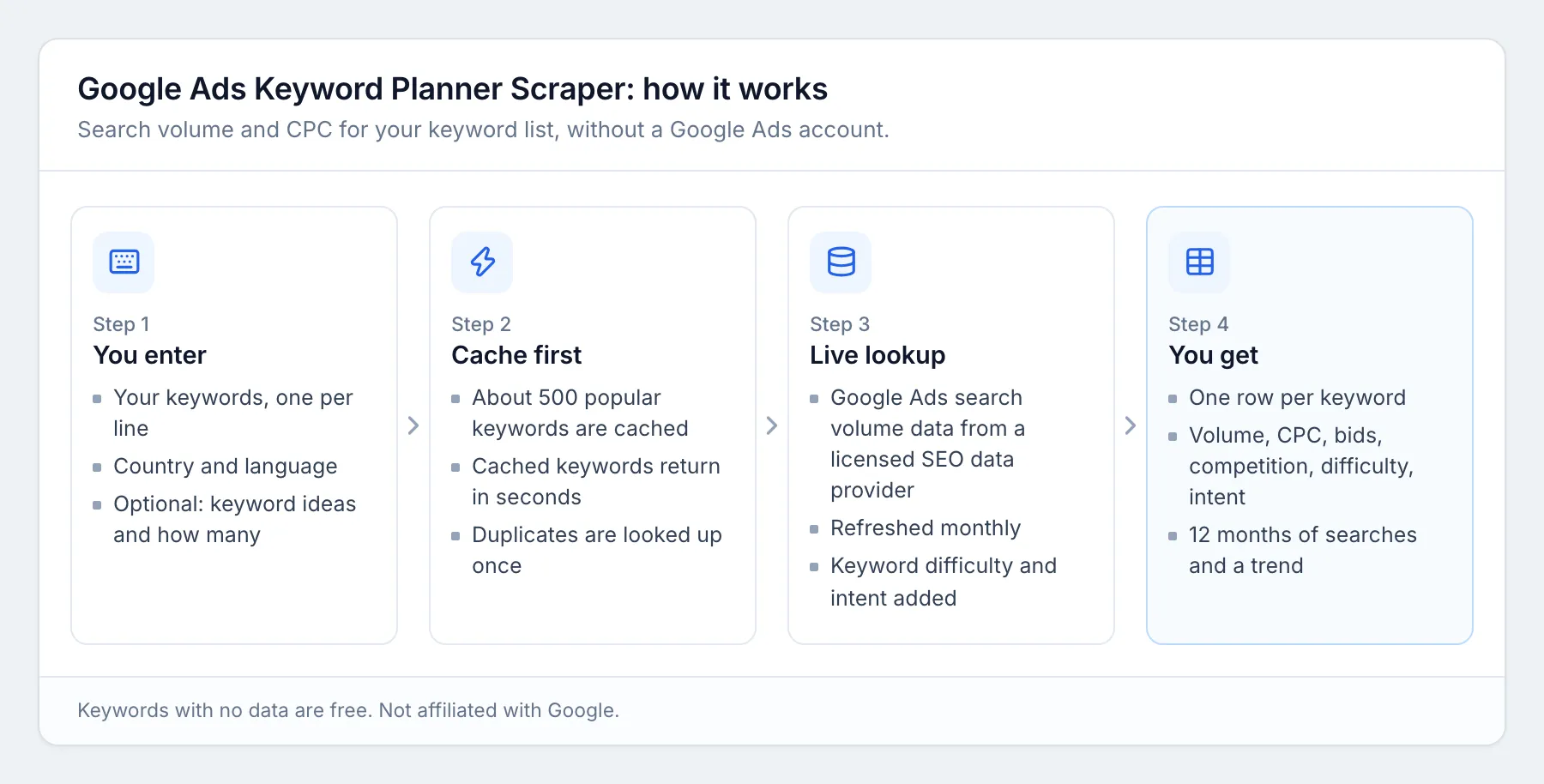
- About 500 popular keywords are pre-cached and return in seconds
- Export to CSV, Excel or JSON, or call it from the API or any MCP client
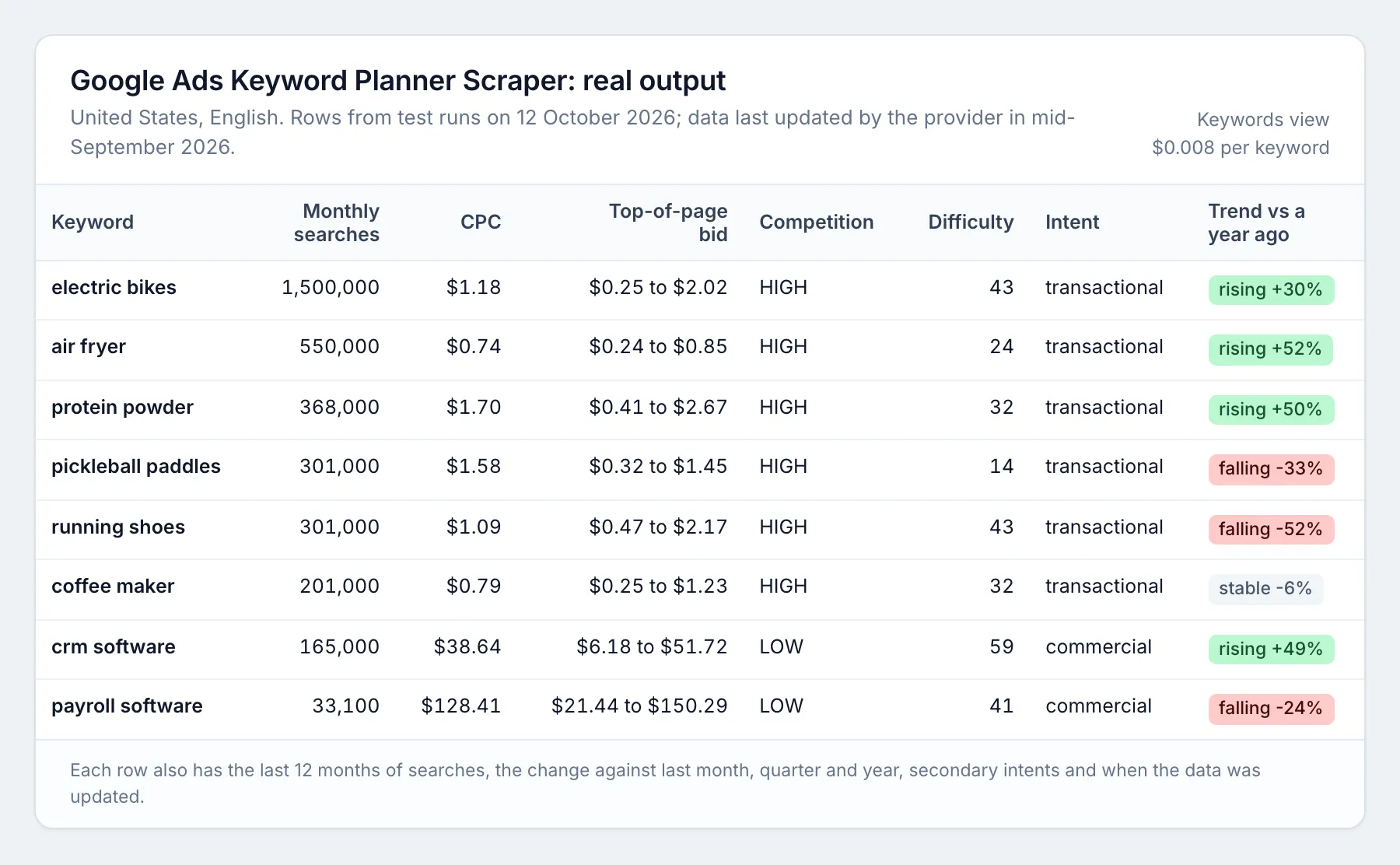
What you get for each keyword
| Field | Meaning |
|---|---|
keyword | The keyword as Google reads it (lower case) |
searchVolume | Average monthly Google searches over the last 12 months |
cpc | Average cost per click advertisers paid, in USD |
cpcLow, cpcHigh | Top-of-page bid range, low and high, in USD |
competition, competitionIndex | Advertiser competition: LOW, MEDIUM or HIGH, and 0 to 100 |
keywordDifficulty | How hard it is to rank in Google's organic top 10, 0 to 100 |
searchIntent, otherIntents | Main intent (informational, navigational, commercial or transactional) and secondary intents |
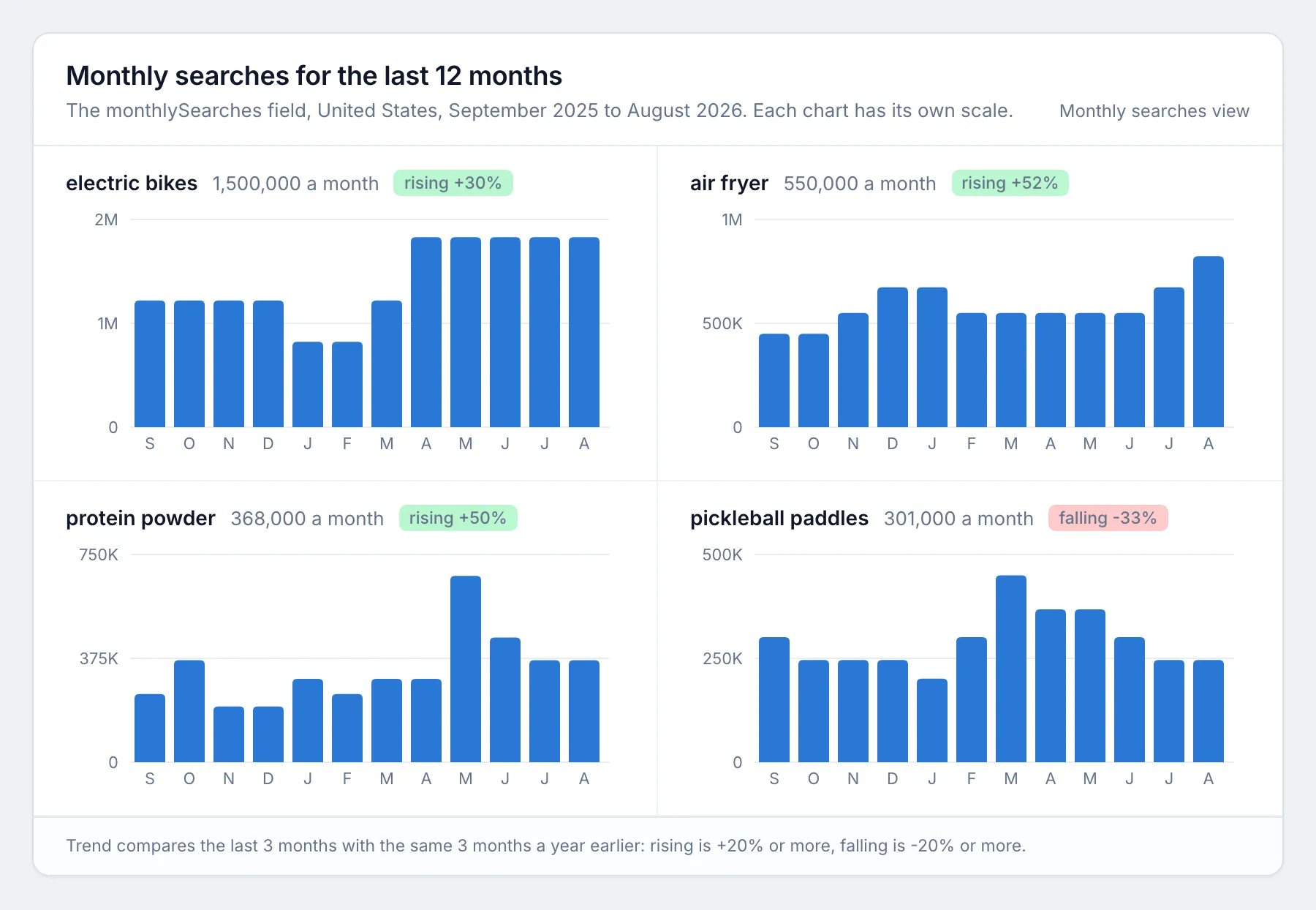
monthlySearches | Searches in each of the last 12 months, oldest first |
trend, trendChangePercent | The last 3 months against the same 3 months a year earlier: rising (+20% or more), falling (-20% or more) or stable |
searchVolumeChange | Change against the previous month, quarter and year, in percent |
dataUpdatedAt | When the data provider last updated this keyword |
country, language | Where the searches were counted |
type, seedKeyword | keyword for your own keywords, idea for keyword ideas, with the keyword it came from |
status | ok, no data, or why a keyword was skipped or not checked. Only ok rows are charged |
Every row carries 12 months of searches, so seasonality is easy to see:
Example and price
Input: running shoes, coffee maker, seo tools, United States, English.
| Keyword | Monthly searches | CPC (USD) | Top-of-page bid (USD) | Competition | Keyword difficulty | Search intent | Trend |
|---|---|---|---|---|---|---|---|
| running shoes | 301,000 | 1.09 | 0.47 to 2.17 | HIGH | 43 | transactional | falling (-52%) |
| coffee maker | 201,000 | 0.79 | 0.25 to 1.23 | HIGH | 32 | transactional | stable (-6%) |
| seo tools | 110,000 | 21.79 | 6.12 to 23.38 | LOW | 66 | commercial | rising (+150%) |
These three keywords cost $0.024.
| What | Price |
|---|---|
| Keyword with data (your keywords and ideas) | $0.008 |
| New-data fee, once per run, only when some keywords are not in the cache and must be fetched | $0.01 |
| Keyword with no data, skipped or not checked | free |
100 keywords = $0.81. 1,000 keywords = $8.01. You pay nothing for Apify platform usage. Higher Apify plans get a discount (Bronze 5%, Silver 10%, Gold 20%). Set a maximum charge per run in the run options and the Actor stops there.
Pricing examples
| Run | Rows with data | You pay |
|---|---|---|
| 3 cached keywords (the prefilled example) | 3 | $0.024 |
| 10 new keywords | 10 | $0.09 (includes the $0.01 new-data fee) |
| 100 keywords | 100 | $0.81 |
| 1 seed keyword plus 50 keyword ideas | 51 | $0.418 (includes the new-data fee) |
| 1,000 keywords | 1,000 | $8.01 |
The $0.01 new-data fee is charged at most once per run, and only when some keywords are not in the cache.
How to use it
- Open the Actor and fill in the form. Click Try for free on this page (or open the Actor in Apify Console). Paste your keywords into Keywords, one per line, and choose the Country and Language (default United States, English). Optional: turn on Add keyword ideas and set Maximum keyword ideas.
- Press Start. Most runs finish in under 30 seconds.
- Download the results. When the run finishes, open the Output tab and click Export to download Excel or CSV (JSON, XML and Google Sheets work too). The Monthly searches view shows the 12-month numbers side by side.
Keywords are cleaned the way Google expects them: lower case, no ?, !, commas or brackets, at most 80 characters and 10 words. Duplicates are looked up once.
Schedule it
To track keywords every month, save your input as a task, then open Schedules in Apify Console, create a schedule (for example monthly on the 20th, after the monthly data update) and add your task. Each run adds a new dataset you can compare or send to Google Sheets, Slack or a webhook through Apify integrations.
How it works
Use it from code (API)
Every example below starts a run, waits for it to finish and reads the results. Replace YOUR_APIFY_TOKEN with your token from Apify Console (Settings, API & Integrations). Each item is one keyword; the fields are listed under What you get for each keyword above.
Python (pip install apify-client, version 3 or later)
JavaScript / Node.js (npm install apify-client, save as main.mjs)
cURL (waits for the run and saves the results as a CSV file; use format=json or format=xlsx for other formats)
No-code: n8n, Make and Zapier
- n8n: add the Apify node, choose the Run Actor operation and pick
moggedhq/keyword-search-volume, or call the cURL address above from an HTTP Request node. - Make: use the Apify app's Run an Actor module, then Get Dataset Items to pass each row to Google Sheets, a CRM or email.
- Zapier: use the Apify app's Run Actor action, or the Finished Actor Run trigger to send every new result set to Sheets, Slack or your CRM.
Use with AI agents (MCP)
The Apify MCP server (https://mcp.apify.com) lets Claude, ChatGPT, Cursor, VS Code and other MCP clients call this Actor as a tool, fill in the input from a plain request, and read the rows back. AI agents can call this Actor in one step. The input is a plain keyword list and every row is flat JSON with named fields.
Claude Code:
Cursor, VS Code and other clients that take a server URL (mcp.json):
Clients that only run local servers:
Example prompt:
Get Google search volume, CPC and keyword difficulty in the United States for running shoes, coffee maker and seo tools, and tell me which one has the best search volume for its difficulty.
Input the agent sends:
For keyword ideas, add "includeKeywordIdeas": true and "maxResults": 50.
One output row:
(monthlySearches has 12 months; two are shown.)
Use cases
- SEO keyword research: size every keyword in a content plan, and find the ones with real demand and low difficulty.
- PPC planning: check CPC, bids and competition before you build a Google Ads campaign.
- Content planning: turn on keyword ideas to find long-tail topics with search volume, then sort by difficulty.
- Local and international SEO: compare the same keywords across countries and languages.
- Seasonality: the 12-month series shows when each keyword peaks.
Limits, honestly
- Data source. Google Ads search volume data (the numbers you would see in Google Keyword Planner), delivered through a licensed SEO data provider that also supplies keyword difficulty and search intent. It is refreshed monthly. This Actor is independent and not affiliated with, endorsed by or sponsored by Google.
- Rounded numbers. Google reports search volume in steps (for example 165,000, 201,000, 246,000), so every tool built on Google's data shows the same rounded values.
- Trend flag. It compares Google Ads volumes, which are rounded, so it can differ from Google Trends, which measures interest differently.
- No data. Very rare keywords and some regulated topics have no data. Those rows say
no dataand are free. - New lookups have a daily capacity. Keywords not in the cache are fetched live, up to about 1,500 per run. If the day's capacity is used up, those keywords come back as
not checked(free) and you can run them again the next day. Cached keywords are never limited. - Apify free plan. Each run can fetch up to 10 new keywords. Cached keywords are not limited.
FAQ
Do I need a Google Ads account? No. You need only an Apify account.
Which countries are supported? 94 countries, including the United States, United Kingdom, Canada, Australia, India, Germany, France, Spain, Italy, Brazil, Mexico, the Netherlands, Japan and South Africa. If a language is not available for a country, the country's main language is used and the run says so.
Can I get keyword ideas? Yes. Turn on Add keyword ideas. You get long-tail keywords that contain your first 5 keywords, biggest search volume first, with near-duplicate spellings removed. Each idea is charged like a keyword.
Is this affiliated with Google, Semrush or Ahrefs? No. This Actor is independent and is not affiliated with, endorsed by or sponsored by Google, Semrush or Ahrefs. Google, Google Ads and Keyword Planner are trademarks of Google LLC.
Something looks wrong? Open an issue on the Issues tab with the keyword and country, and we will look at it.
More tools from mogged
- Recently Funded Startups: startups that just raised a round, with founders and contacts
- Hiring Leads: companies hiring now, with open roles and the people to contact
- Google Maps Rank Tracker: geo grid rank checks and heatmaps for local SEO
- Technical SEO Audit Tool: a full website SEO audit with a score and a fix list


