
Google Maps Ranking & Rank Grid Tracker: Local Rank Grid Map
Pricing
from $8.00 / 1,000 grid points
Google Maps Ranking & Rank Grid Tracker: Local Rank Grid Map
Check where a business ranks on Google Maps for a keyword across a city grid, e.g. a plumber in Denver, a dentist in Austin or a pizza place in Chicago. $0.01 per grid point; a 5x5 geo grid costs $0.25. Each point: rank 1-20, top 3 competitors. Summary: average rank, top-3 share, heatmap. No login.

Check where a business ranks on Google Maps for a keyword across a city grid: for example a plumber in Denver, a dentist in Austin or a pizza place in Chicago.
For local SEO agencies, consultants and business owners who need to see where a business ranks on Google Maps across its whole area, not from one spot. Type a business name, a keyword and a city; get its Google Maps rank at every point of a grid, the top 3 competitors at each point, a summary and a heatmap. No login, no subscription, no API key.
Price: $0.01 per grid point. A 5x5 scan (25 points) for one keyword costs $0.25. Points that fail are free.
What you get
One row per grid point:
| Field | What it is |
|---|---|
keyword | The search checked at this point, for example "plumber" |
point | Grid position: rows A, B, C... run north to south, columns 1, 2, 3... west to east. The centre is the business |
latitude, longitude | Where the search was made |
distanceKm, direction | Distance and direction from the business |
rank | The business's position in the Google Maps results at this point (1 to 20), or empty when it is not in the top 20 |
rankLabel | The same as text: "1" to "20", or "20+" |
inTop3 | True when the business is in the top 3 (the map pack) here |
top3Competitors | The 3 best-ranked other businesses at this point, with rank, rating, review count, category and Google place ID |
status | "ok", or "failed" for a point that could not be checked (not charged) |
One summary row per keyword:
| Field | What it is |
|---|---|
summary | One plain sentence: top-3 share, average rank, strongest and weakest area, top competitor |
averageRank | Average rank over the points where the business is in the top 20 |
averageRankAllPoints | Average rank over all points, with "not in the top 20" counted as 21 |
top3SharePercent | Share of points where the business is in the top 3 (often called share of local voice) |
pointsFound, pointsInTop3, pointsInTop10 | Counts of points |
bestArea, worstArea | The compass area (north, south-west, centre...) with the best and worst average rank |
topCompetitors | The 5 competitors that are in the top 3 at the most points, with their average rank |
rankGrid, rankGridText | The whole grid of ranks, north at the top, ready for your own charts |
heatmapImageUrl | A PNG heatmap of the grid, ready for a client report |
business, businessAddress, businessPlaceId | The Google Maps listing that was tracked, so you can check it is the right one |
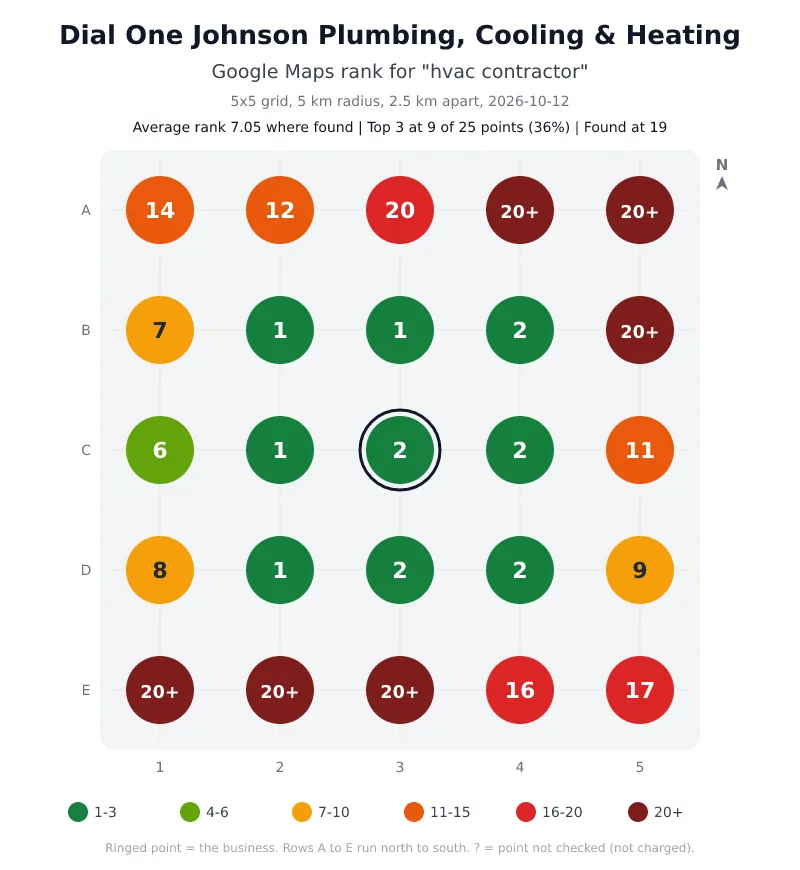
Every keyword also gets a PNG heatmap, ready to drop into a client report. This one is from a real scan of an HVAC company in Dallas for "hvac contractor": first or second around its office, outside the top 20 to the north-east and south.
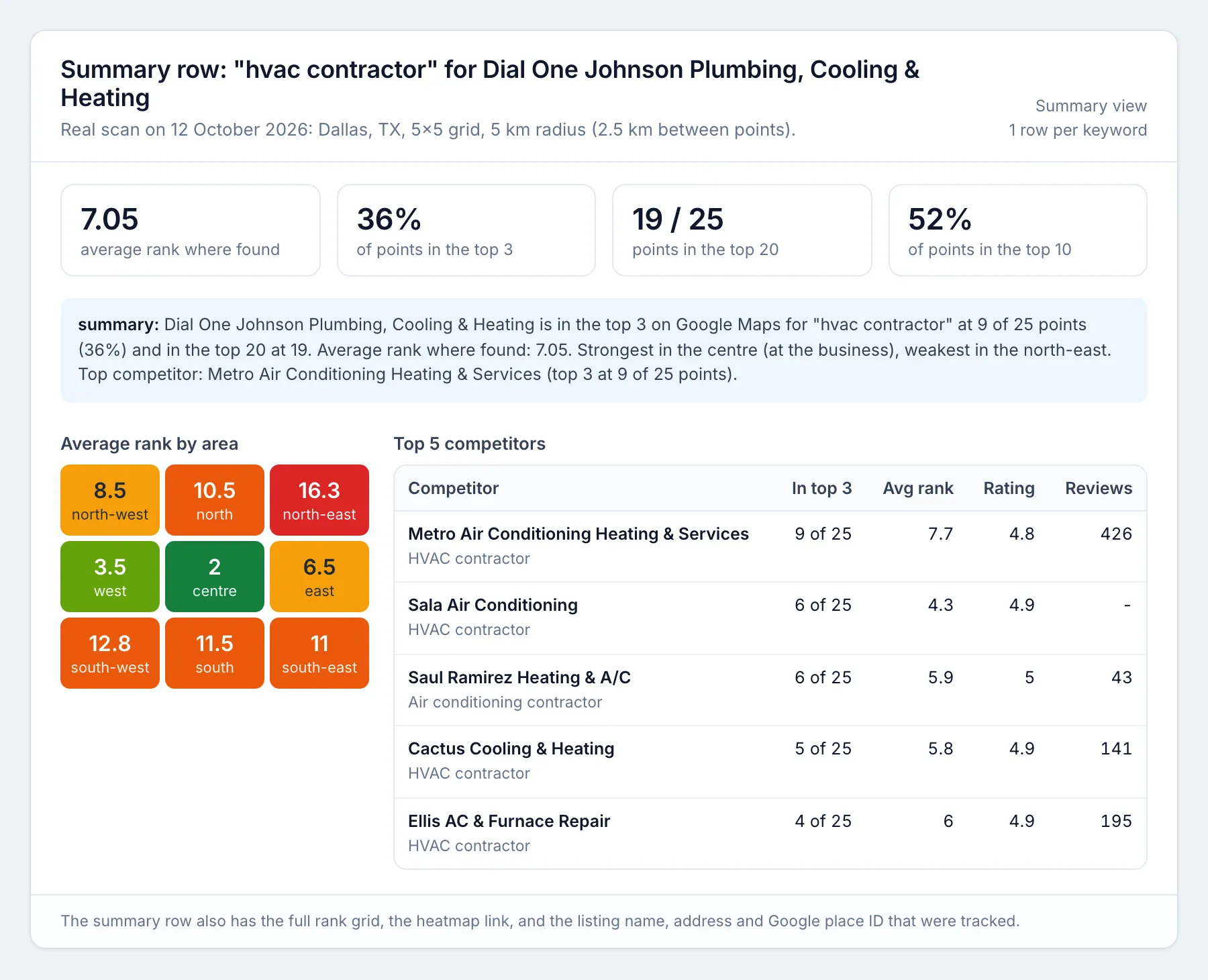
The summary row for the same scan, with the areas and the competitors that beat it:
Each run also saves report.html: every keyword on an interactive map with the rank at each point, the top competitors and the summary. The link is in the run's Output tab and in the OUTPUT record.
Pricing
You pay only for grid points that Google Maps answered: $0.01 per point per keyword, less with Apify's Bronze (5% off), Silver (10% off) and Gold (20% off) plans. Finding the business, summaries, heatmaps and the report are free. Points that fail, and points where Google Maps shows no places at all, are free.
| Scan | Points | Price |
|---|---|---|
| 3x3 grid, 1 keyword | 9 | $0.09 |
| 5x5 grid, 1 keyword | 25 | $0.25 |
| 7x7 grid, 3 keywords | 147 | $1.47 |
| 9x9 grid, 5 keywords | 405 | $4.05 |
A weekly 5x5 scan of 3 keywords for one client is $0.75 a week. The run stops before going over your maximum charge per run and only scans keywords that fit in it.
How to use it
- Open the Actor and fill in the form. Click Try for free on this page (or open the Actor in Apify Console). Enter the business name as it appears on Google Maps, one or more keywords your customers search for, and the location (city or address, used to find the right listing). Choose the grid size (3 to 9 points per side) and the radius in km or miles.
- Press Start. A 5x5 grid takes about 15 to 30 seconds.
- Download the results. When the run finishes, open the Output tab and click Export to download Excel or CSV (JSON, XML and Google Sheets work too). The Summary view has one row per keyword; the run's report.html shows every keyword on a map.
Input example
For a chain with several branches nearby, paste the branch's Google Maps link in googleMapsUrl to track exactly that listing. Coordinates work as a location too ("30.2580, -97.7598").
Output example (one grid point)
Schedule it
- Save your input as a task (one task per client works well).
- Open Schedules, click Create new, choose weekly (for example Monday at 08:00) and add your task.
- Optional: on the task's Integrations tab, send each finished run to Google Sheets, Slack, email or a webhook.
Keep the grid size, radius and zoom the same between scans so the weeks compare like with like.
Use it from code (API)
Every example below starts a run, waits for it to finish and reads the results. Replace YOUR_APIFY_TOKEN with your token from Apify Console (Settings, API & Integrations). Grid-point rows have type: "grid-point"; the summary row per keyword has type: "summary".
Python (pip install apify-client, version 3 or later)
JavaScript / Node.js (npm install apify-client, save as main.mjs)
cURL (waits for the run and saves the results as a CSV file; use format=json or format=xlsx for other formats)
No-code: n8n, Make and Zapier
- n8n: add the Apify node, choose the Run Actor operation and pick
moggedhq/google-maps-rank-tracker, or call the cURL address above from an HTTP Request node. - Make: use the Apify app's Run an Actor module, then Get Dataset Items to pass each row to Google Sheets, a CRM or email.
- Zapier: use the Apify app's Run Actor action, or the Finished Actor Run trigger to send every new result set to Sheets, Slack or your CRM.
Use with AI agents (MCP)
The Apify MCP server (https://mcp.apify.com) lets Claude, ChatGPT, Cursor, VS Code and other MCP clients call this Actor as a tool, fill in the input from a plain request, and read the rows back. An agent can call this Actor with plain inputs (businessName, keywords, location, gridSize, radiusKm).
Claude Code:
Cursor, VS Code and other clients that take a server URL (mcp.json):
Clients that only run local servers:
Example prompt:
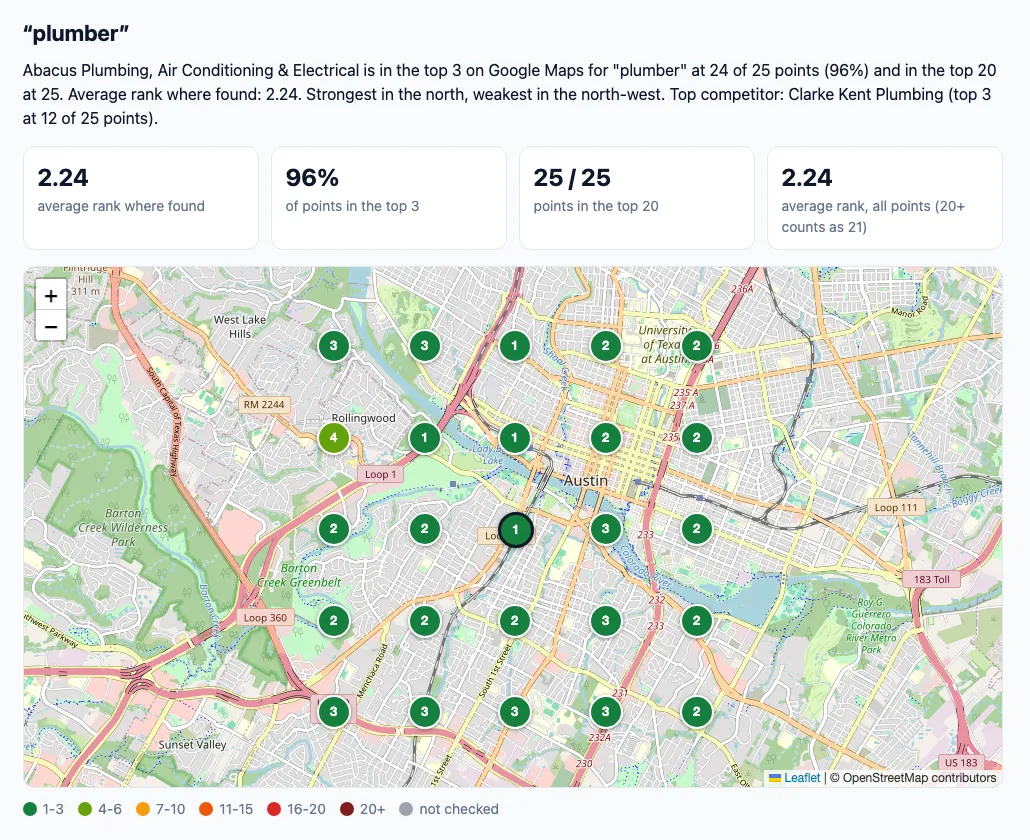
Check where Abacus Plumbing in Austin ranks on Google Maps for "plumber" across a 5x5 grid. Tell me which areas are weak and which competitors beat it there.
The agent reads the answer from the summary row: the summary sentence, averageRank, top3SharePercent, bestArea, worstArea, topCompetitors and rankGridText, plus heatmapImageUrl for a picture it can share.
How it works
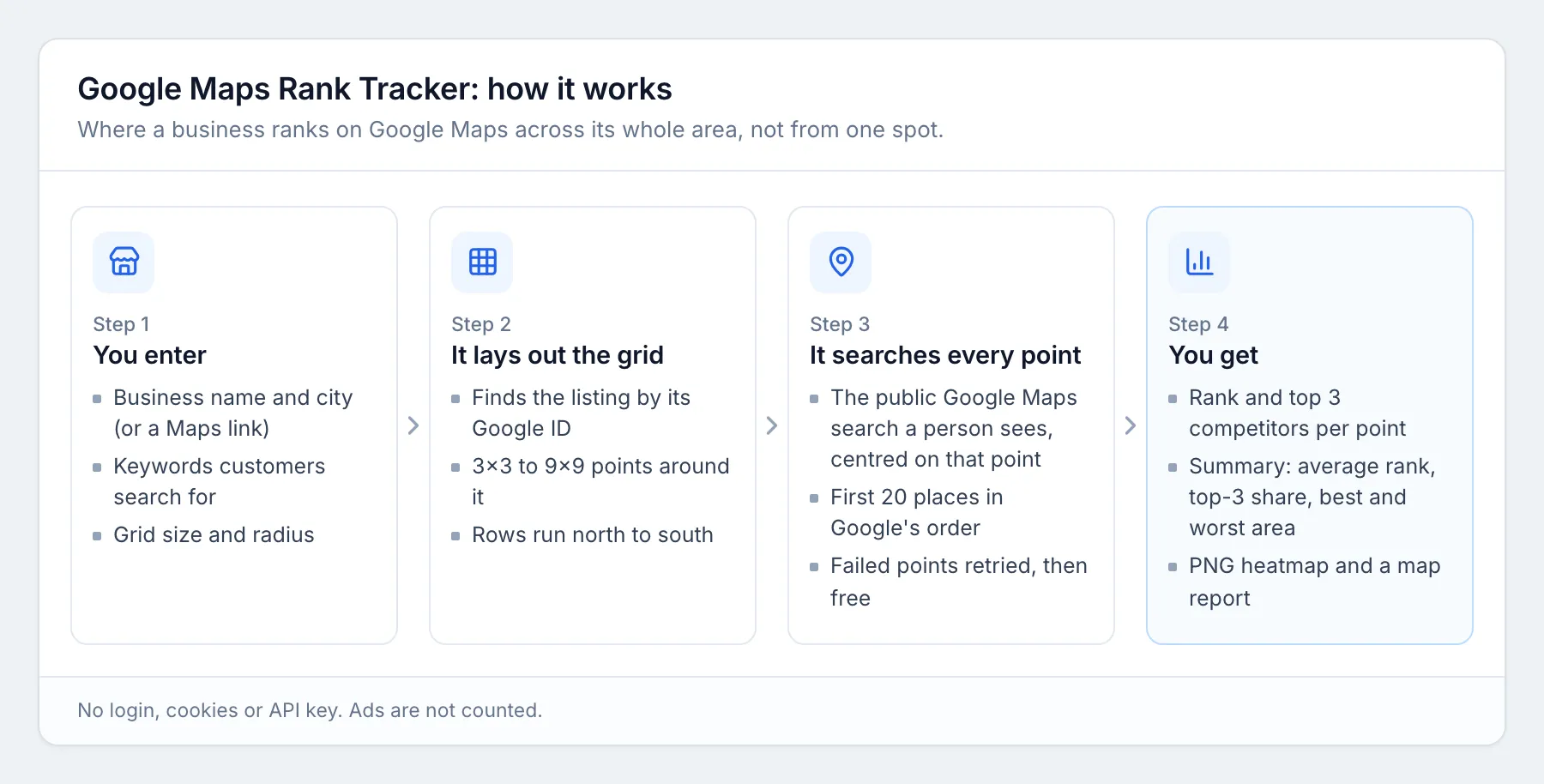
At each grid point the Actor runs the same public Google Maps search a person would see with the map centred on that spot, and reads the first 20 places in Google's order. The business is matched by its Google listing ID, so a competitor with a similar name is never counted by mistake. Searches use a neighbourhood-level map view (zoom 14) by default. Slow or failed requests are retried through other IPs, and a point is only marked failed (and not charged) when every retry fails. In 41 test runs (US, Canada, UK, Germany and Australia) 1,754 of 1,754 grid points were answered.
Limits
- Ranks are the first 20 Google Maps results. Positions past 20 show as "20+".
- Google Maps results change with time of day (opening hours count), personal history and the device. Scan at the same time each week to compare like with like.
- Points much farther from the business than about 3 km are outside the zoom-14 map view, so the business usually drops out there. For a metro-wide scan, set
zoomto 13; keep the zoom the same between scans you compare. - Sponsored (ad) places are not counted.
- For a service-area business with no public address, Google's pin may not be where it works. Use
gridCenterto centre the grid on the area it serves. - Up to 20 keywords and 81 points (9x9) per keyword in one run.
FAQ
Do I need coordinates or a Google account? No. The business name and city are enough. No login, cookies or API key.
How is this different from a single rank check? A single check gives one number from one place. A business can be first next to its office and missing two kilometres away. The grid shows where it wins and where competitors take over.
Is it the same as Local Falcon or other geo grid tools? It does the same kind of geo grid scan and charges per point instead of a monthly plan. It is not affiliated with Local Falcon or BrightLocal.
Can I track the same business every week? Yes. Save your input as a task and add a weekly schedule in Apify. Keep the grid size, radius and zoom the same so the scans compare.
What if the wrong branch is picked?
The summary shows the listing name and address. If it is the wrong one, paste the right branch's Google Maps link in googleMapsUrl.
What does "share in the top 3" mean? The percentage of grid points where the business shows in the top 3, which is what most people see first in the map pack.
Is it legal to scrape Google Maps? This Actor collects only public information that anyone can see on Google Maps without logging in: business names, categories, ratings, review counts, addresses and map positions, in the order Google shows them. It does not log in, use cookies or solve CAPTCHAs, and it sends searches at a modest rate. It does not collect reviews, reviewer names or any private user data. Some results can still count as personal data, for example a sole trader listed under their own name, which laws such as the GDPR protect. Use the results only for a legitimate purpose, and ask a lawyer if you are unsure.
Is this an official Google product? No. This Actor is not affiliated with, endorsed by or sponsored by Google. Google Maps is a trademark of Google LLC and is named here only to describe what the Actor checks.
More tools from mogged
- Recently Funded Startups: startups that just raised a round, with founders and contacts
- Hiring Leads: companies hiring now, with open roles and the people to contact
- Google Ads Keyword Planner Scraper: Google search volume, CPC and keyword difficulty for any keyword list
- Technical SEO Audit Tool: a full website SEO audit with a score and a fix list


