
Technical SEO Audit Crawler: Website SEO Checker & Fixes
Pricing
from $16.00 / 1,000 page audits
Technical SEO Audit Crawler: Website SEO Checker & Fixes
Run a technical SEO audit of a website and get a fix list, e.g. broken links, missing meta descriptions or slow pages on your site. $0.02 per page audited. Per page: title, meta description, H1, canonical, noindex, status, redirects, alt text, schema, speed and a 0-100 score. No login.
Pricing
from $16.00 / 1,000 page audits
Rating
0.0
(0)
Developer

mogged
Maintained by CommunityActor stats
0
Bookmarked
2
Total users
1
Monthly active users
9 days ago
Last modified
Categories
Share
Run a technical SEO audit of a website and get a fix list: broken links, missing meta descriptions, missing H1s, noindex pages, redirects and slow pages, for one site or a whole client list.
For SEO agencies, freelancers, site owners and AI agents who need a full SEO audit of one website or a whole client list, with a score and a fix list they can hand straight to a developer.
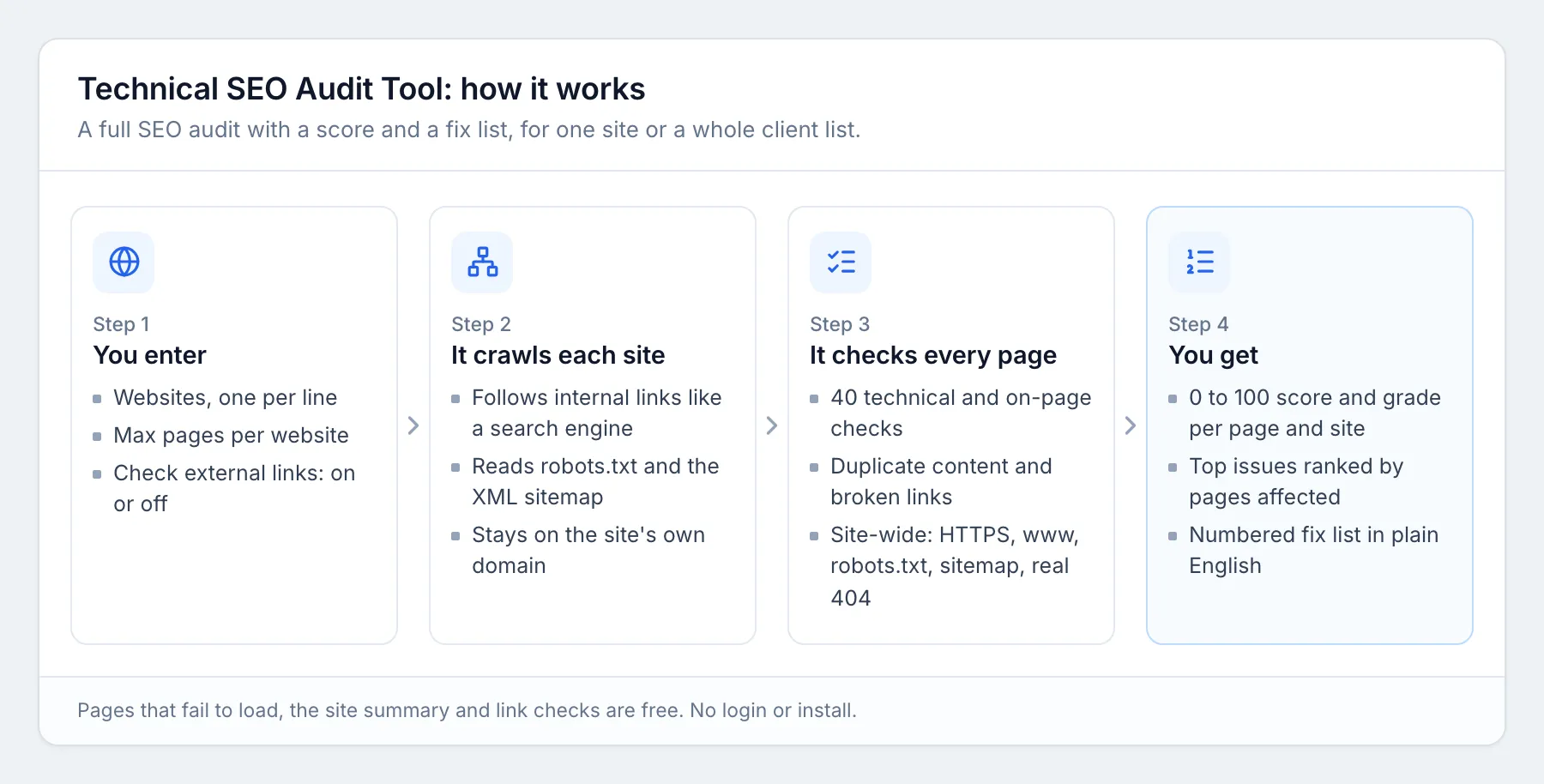
Give it a website. It crawls the site like a search engine, checks every page for 40 technical and on-page SEO issues, scores each page from 0 to 100, and writes a site summary with the top issues ranked by how many pages they affect and a plain-English fix list. No login, no API key, no Google account.
What you get
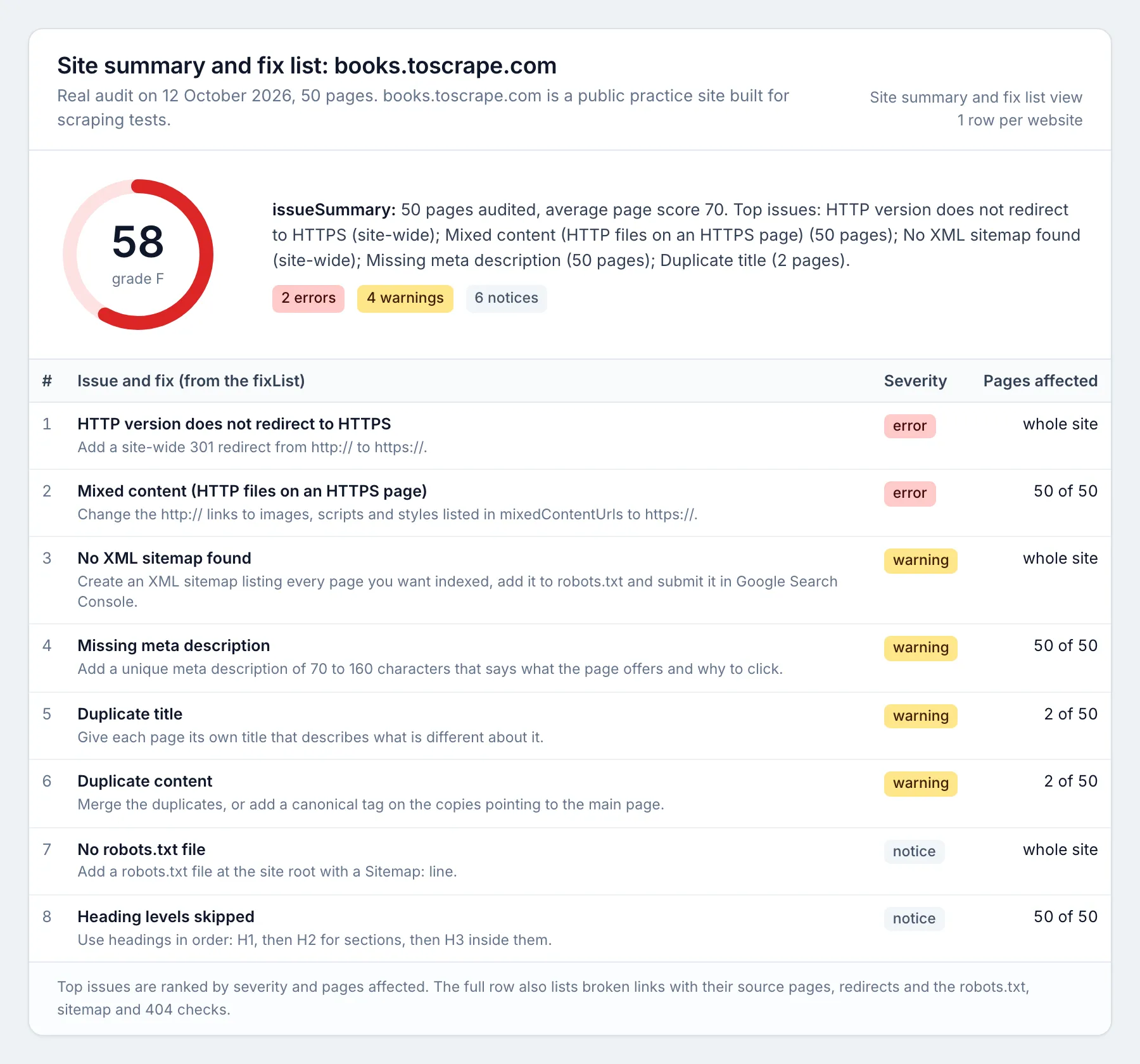
One row per page, plus one site-summary row per website (it comes first).
| Field | What it tells you |
|---|---|
score, grade | 0 to 100 SEO score and A to F grade, for each page and for the whole site |
issueSummary | The problems on the page in one readable line |
fixList | What to do about each problem, in plain English (site row: ranked fix list for the whole site) |
issues | Each issue with its code, severity (error, warning, notice), details and fix |
statusCode, redirectedFrom, redirectChain | HTTP status, redirects and redirect chains |
title, titleLength | Title tag: missing, too long, too short, duplicate |
metaDescription, metaDescriptionLength | Meta description: missing, too long, too short, duplicate |
h1, h1Count, headings | H1 and heading structure (missing H1, several H1s, skipped levels) |
canonicalUrl, canonicalStatus | Canonical tag: self, points elsewhere, missing, broken |
indexable, notIndexableReason, metaRobots, xRobotsTag | Noindex, nofollow, robots.txt blocks for Google, canonicalized pages |
brokenLinks, brokenLinksCount, linksToRedirects, redirectingLinks | Broken internal and external links on the page, and internal links that hit redirects |
imagesCount, imagesMissingAlt | Images without alt text |
wordCount | Thin content (under 200 words) and duplicate content |
structuredData | Schema.org types found (JSON-LD and microdata), and broken JSON-LD |
openGraph, twitterCard | Social sharing tags |
serverResponseMs, loadTimeMs, pageSizeKb | Server response time, download time and HTML size |
mobileViewport, https, mixedContentUrls | Mobile-friendliness, HTTPS and insecure files on secure pages |
lang, hreflangCount, inSitemap, depth, linkedFrom | Language, hreflang, sitemap membership, clicks from the start page and pages linking here |
The site-summary row adds: overall score and grade, topIssues (issue, severity, pages affected, percent of pages, fix, example URLs), a numbered fixList, broken links across the site with the pages they were found on, redirects, and site checks: HTTP to HTTPS redirect, www and non-www, robots.txt, XML sitemap (and how many URLs it lists), and whether missing pages return a real 404.
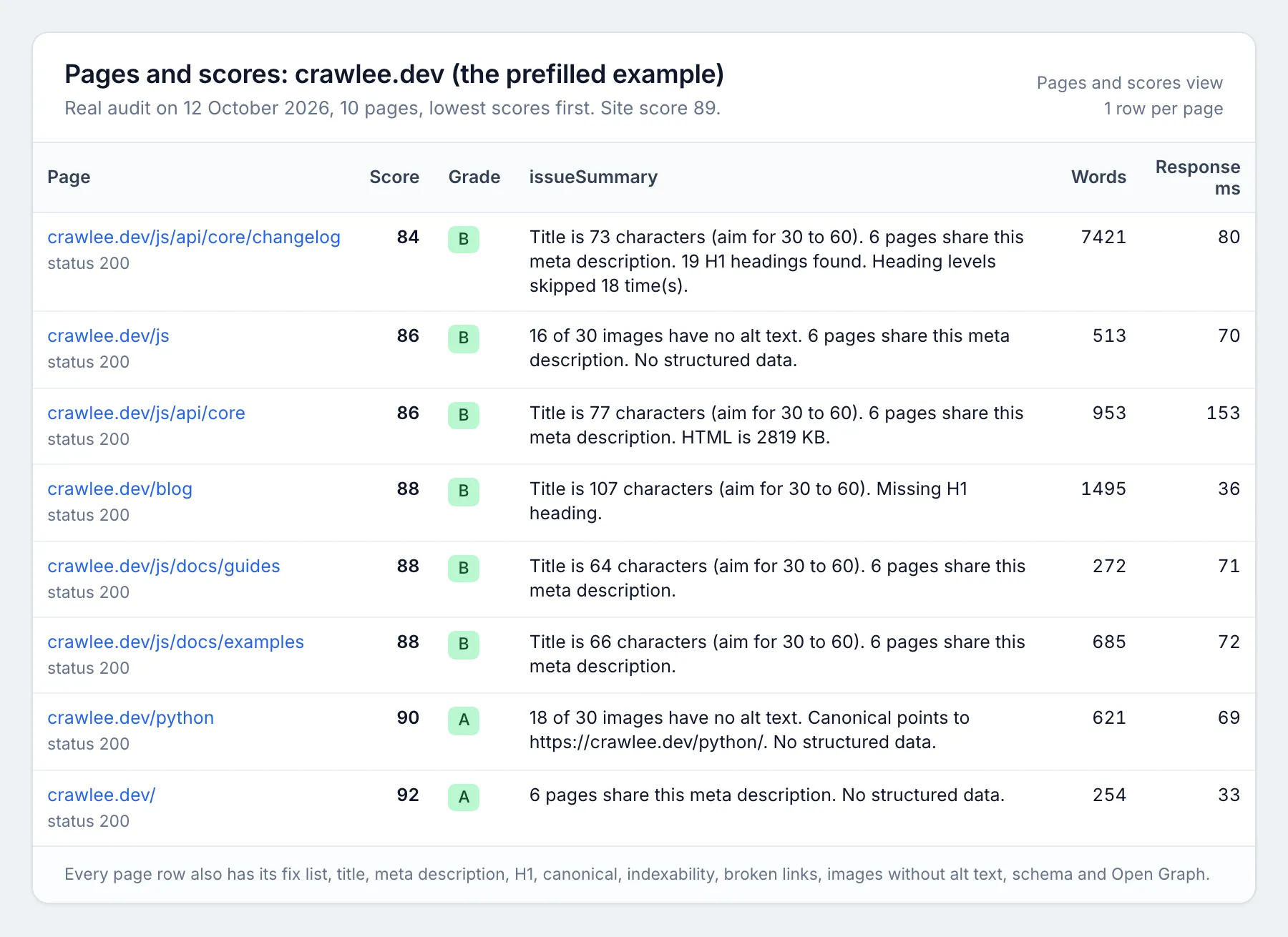
Page rows from the prefilled example, a real 10-page audit of crawlee.dev:
Price
$0.02 per page audited, cheaper with an Apify subscription (Bronze 5% off, Silver 10% off, Gold and above 20% off). The site summary, pages that could not load, and link checks are free. Apify platform usage is included.
| Audit | Cost |
|---|---|
| 1 website, 50 pages | $1.00 |
| 10 client websites, 50 pages each | $10.00 |
| 1 website, 1,000 pages | $20.00 |
maxPages caps the pages per website, and your maximum charge per run is always respected: the audit stops before going over it.
How to use it
- Open the Actor and fill in the form. Click Try for free on this page (or open the Actor in Apify Console). Add one or more websites to Websites to audit, one per line (a client list works: use Bulk edit to paste it). Set Max pages per website (50 is a good first audit) and leave Check external links on to find broken links to other sites, or turn it off for a faster audit.
- Press Start. The prefilled 10-page audit takes about 20 to 30 seconds.
- Download the results. When the run finishes, open the Output tab and click Export to download Excel or CSV (JSON, XML and Google Sheets work too). Open the Site summary and fix list view for the ranked fixes, or Pages and scores for every page.
Input example:
Output example (one page row, shortened):
Schedule it
- Save your input as a task (one task per client, or one task with the whole client list).
- Open Schedules, click Create new, choose weekly or monthly and add your task.
- Optional: on the task's Integrations tab, send each finished audit to Google Sheets, Slack, email or a webhook.
Each run is a new dataset, so you can compare scores from one month to the next.
How it works
What it checks
- Errors (15 points off each): page returns 4xx or 5xx, blocked for Google in robots.txt, missing title, broken internal links, page not on HTTPS, mixed content, no mobile viewport.
- Warnings (6 points off): noindex, content that needs JavaScript, missing meta description, title over 60 characters, duplicate title, duplicate meta description, duplicate content, missing H1, images without alt text, server response over 1 second, several canonical tags, canonical pointing to a broken or redirected URL, non-indexable page in the sitemap, broken JSON-LD, several title tags, nofollow page.
- Notices (2 points off): short title, meta description too long or too short, several H1s, skipped heading levels, missing canonical, canonical to another URL, under 200 words, no structured data, missing Open Graph, missing lang, internal links to redirects, redirect chains, URL over 115 characters, HTML over 1 MB, broken external links, pages found only in the sitemap.
- Site-wide: HTTP not redirecting to HTTPS, site loading on both www and non-www, missing pages returning 200 (soft 404), no XML sitemap, no robots.txt.
A page starts at 100 and loses points once per issue type; pages that return an error score 0. The site score is the average page score minus site-wide penalties.
Use it from code (API)
Every example below starts a run, waits for it to finish and reads the results. Replace YOUR_APIFY_TOKEN with your token from Apify Console (Settings, API & Integrations). The first row for each website is its site summary (type: "site-summary"); the rest are pages (type: "page").
Python (pip install apify-client, version 3 or later)
JavaScript / Node.js (npm install apify-client, save as main.mjs)
cURL (waits for the run and saves the results as a CSV file; use format=json or format=xlsx for other formats)
No-code: n8n, Make and Zapier
- n8n: add the Apify node, choose the Run Actor operation and pick
moggedhq/seo-audit-tool, or call the cURL address above from an HTTP Request node. - Make: use the Apify app's Run an Actor module, then Get Dataset Items to pass each row to Google Sheets, a CRM or email.
- Zapier: use the Apify app's Run Actor action, or the Finished Actor Run trigger to send every new result set to Sheets, Slack or your CRM.
Use with AI agents (MCP)
The Apify MCP server (https://mcp.apify.com) lets Claude, ChatGPT, Cursor, VS Code and other MCP clients call this Actor as a tool, fill in the input from a plain request, and read the rows back. AI agents can run a full audit in one call.
Claude Code:
Cursor, VS Code and other clients that take a server URL (mcp.json):
Clients that only run local servers:
Example prompt:
Audit example.com (25 pages) and give me the five most important fixes, with how many pages each one affects.
Input the agent sends:
Plain domains such as "example.com" work too, and so does the [{ "url": "https://example.com" }] form. Read the site-summary row first (type: "site-summary"): score, topIssues and fixList answer "how is this site's SEO and what should we fix first?". Page rows carry the details. A 25-page audit usually finishes in under a minute and costs $0.50.
Good to know (limits)
- It reads the HTML the server sends, like most SEO crawlers. It does not run JavaScript, so on sites built entirely in JavaScript it reports "Content only appears with JavaScript" instead of auditing text it cannot see.
- It stays on the website's own domain (www and non-www count as one). Subdomains are treated as other sites.
- It follows robots.txt: pages that robots.txt blocks for crawlers are skipped and counted, not audited.
- Login pages, carts, checkouts and admin areas are skipped.
- Sites behind bot walls (some Cloudflare or Akamai settings) may block the crawl. Pages that return 401, 403 or 429, time out or fail to load are listed in the site summary under
notLoadedand are never charged; if the start page itself is blocked, the summary says so and the run costs nothing for that site. - Links to LinkedIn, Facebook, Instagram, X, TikTok, Amazon and similar sites are not checked because they block automated checks; they are never reported as broken.
- Speed is measured from Apify's servers (US or Europe), so sites hosted far away look slower than they do locally. It is a server-response check, not a Core Web Vitals or Lighthouse test.
- Very large sites: set
maxPagesup to 5,000 per website. Uncrawled internal links are still checked for errors, up to a limit that grows withmaxPages.
FAQ
How is this different from Screaming Frog, Semrush or Ahrefs site audits? It runs in the cloud with nothing to install, needs no subscription, takes a list of websites in one run, and gives a plain-English fix list per page and per site. It is not affiliated with any of those tools.
Can I audit many client websites at once?
Yes. Add every website to the list. Each website gets its own summary row and its own pages, up to maxPages each.
Can I schedule it? Yes. Save the input as a task and add an Apify schedule to re-audit weekly or monthly, then compare scores over time.
Do I need a Google Search Console account or any login? No. It only reads public pages.
Does it audit pages that return 404? Yes. Internal links to missing pages show up as pages with status 404 and score 0, and as broken links on the pages that link to them.
Is crawling a website allowed? The tool reads public pages at a polite speed and follows robots.txt. Audit sites you own or have permission to audit, such as your clients' sites.
More tools from mogged
- Recently Funded Startups: startups that just raised a round, with founders and contacts
- Hiring Leads: companies hiring now, with open roles and the people to contact
- Google Ads Keyword Planner Scraper: Google search volume, CPC and keyword difficulty for any keyword list
- Google Maps Rank Tracker: geo grid rank checks and heatmaps for local SEO


