

Shopify Price & Stock Tracker: Failed Runs Cost Nothing
Pricing
from $0.70 / 1,000 variant priceds
Shopify Price & Stock Tracker: Failed Runs Cost Nothing
Watch a list of Shopify product pages and get the price, compare-at price, SKU and stock of every variant on every run, with no per-run fee. A run that fails or finds nothing costs nothing. A free dry run shows the cost first, and the run stops at a spend cap you set.
Pricing
from $0.70 / 1,000 variant priceds
Rating
0.0
(0)
Developer

Monty Burrows
Maintained by CommunityActor stats
0
Bookmarked
2
Total users
1
Monthly active users
a month ago
Last modified
Categories
Share
Shopify Price & Stock Monitor
Give it a list of Shopify product pages. Every run returns one row per variant for every product on the list, with the price, compare-at price, SKU, options and whether it is in stock.
Built to be scheduled. One request per watched product, ordered so that a watchlist spread across several shops is not slowed down by rate pacing, and priced so that running it hourly is a sensible thing to do rather than an expensive one.
What this is, and what it deliberately is not
It is a reader, not a change detector. It does not decide what counts as a change, does not keep state between runs, and does not send alerts. Every run gives you the current reading for every variant you are watching, stamped with the time it was taken.
That is on purpose. On Apify you already are the scheduler: you have schedules, webhooks, integrations and your own warehouse downstream. A black box that decides for you what a "price change" is takes away the part you actually want to control, and it gets it wrong the first time a merchant reprices in a different currency, renames a variant, or runs a sale for three hours.
So this Actor does the part that is hard to do yourself (reading forty shops politely, in parallel, in one schema, without being blocked) and leaves the diffing to you, where it belongs. Point it at a dataset with append mode and you have a price history.
SELECT ... GROUP BY variantId ORDER BY scrapedAtThe row is the same row as the catalogue scraper's
This is the other half of the design. The output schema here is identical, column for column,
to Shopify Product & Variant Scraper: same
fields, same types, same variantId.
The intended workflow is two Actors, not one:
- Once, run the catalogue scraper over a store to see everything it sells and pick what
matters.
www.bando.com, at 1,675 products, costs about $1.47 to read in full. - Every hour, run this one over the forty product pages you care about. 117 rows, $0.12.
The two datasets append to each other and join on storeDomain + variantId, so the catalogue
run is the baseline and the watchlist runs are the series. Nothing has to be reconciled by hand,
and there is a test that fails the build if the two ever drift apart: it runs both Actors over
the same product and requires every column to match, bar the four that cannot (see Limits).
What you get
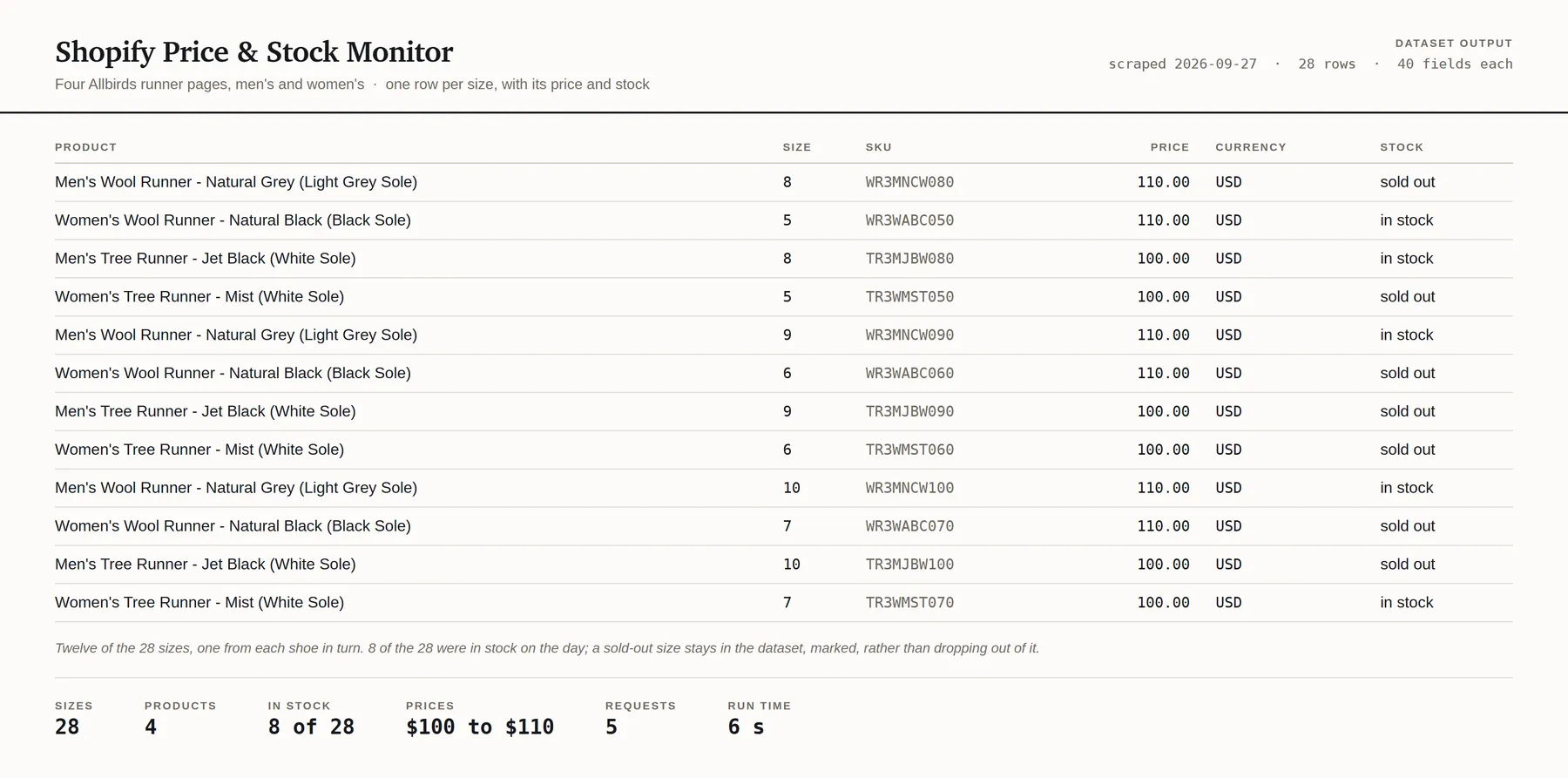
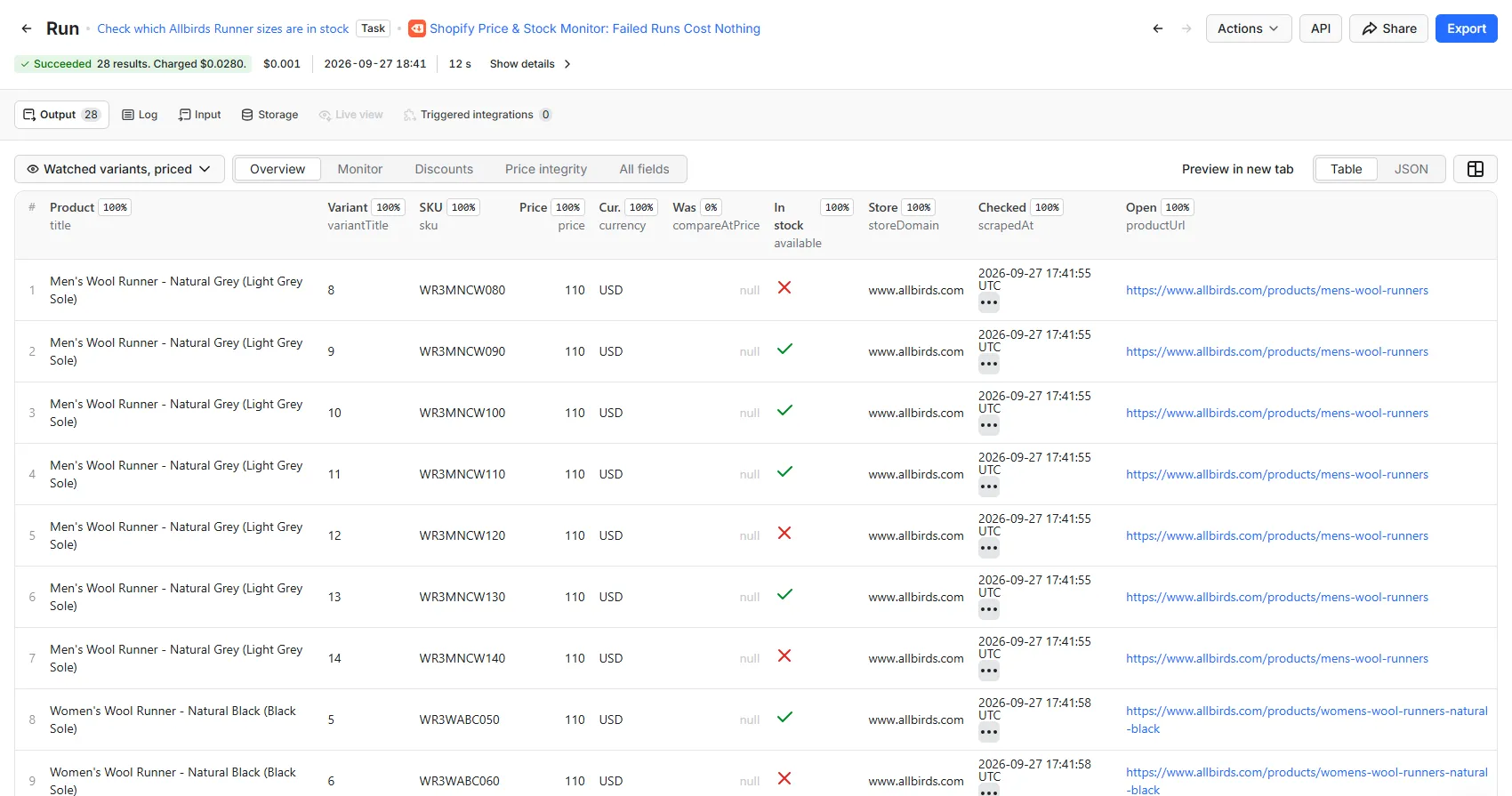
One row per variant per run:
| Group | Fields |
|---|---|
| Price | price, compareAtPrice, discountAmount, currency, priceRaw, compareAtPriceRaw, priceStatus |
| Stock | available, requiresShipping, grams, taxable |
| Identity | variantId, productId, handle, sku, title, variantTitle, optionNames, optionValues |
| Store | storeDomain, storeName, storeCountry, myshopifyDomain |
| Product | vendor, productType, tags, imageUrl, productUrl, publishedAt, createdAt, updatedAt |
| Provenance | scrapedAt, sourceUrl, runId, actorName, id |
scrapedAt is the column that makes this a monitor. Everything else is a reading; that is when it
was taken.
A price is never a number you cannot trust
priceStatus is on every row and says why the price columns hold what they hold:
priceStatus | What it means |
|---|---|
published | The shop published a price and stated its currency. price is a real number. |
currency_unresolved | The shop published a price but we could not read its currency. price is empty and priceRaw holds the string verbatim. |
unparseable | The price was not in a form we would stake a number on. priceRaw holds it verbatim. |
A number with no currency is not a price, and a monitor that emitted one would have you comparing pounds to dollars across a watchlist. It is withheld and labelled instead of guessed.
A product that has gone produces no row
If a watched handle stops resolving, you get no row for it and you are not charged for it. Its
absence from the run is the delisting signal, and the run report counts it under units.notFound.
If most of the watchlist stops resolving, the run fails and bills nothing, because at that point there is news to tell you rather than a smaller dataset to sell you.
Input
| Field | What it is |
|---|---|
| Product pages | The pages to watch, one per line, as they appear in the address bar. Up to 1,000 per run. |
| In-stock only | Drop out-of-stock variants. Off by default: a variant going out of stock is half of what you came for. |
| Description HTML | Adds each product's description to its rows. Off by default; it is the largest field and it does not change hourly. |
| Dry run | Read a sample, estimate the rows and the cost, charge nothing. |
| Maximum results | Hard row cap. The run stops cleanly on it. |
| Maximum spend | Hard spend cap in USD, per run. Multiply by your schedule. |
Paste the URL however you have it. allbirds.com/products/wool-runner,
https://www.allbirds.com/products/wool-runner?variant=4011, a collection-scoped URL and the
.json endpoint itself all mean the same product. A bare handle with no shop is refused rather
than guessed at, before any request goes out.
Run the dry run once before you schedule. A watchlist of single-variant products and one of size-by-colour grids can differ tenfold in rows, and therefore in cost, with the same number of lines in the box.
Pricing
From $0.70 per 1,000 variants, and nothing else. No per-run fee, no charge for compute or retries.
| Your Apify plan | Per variant | Per 1,000 variants |
|---|---|---|
| Free | $0.001 | $1.00 |
| Bronze | $0.0009 | $0.90 |
| Silver | $0.0008 | $0.80 |
| Gold | $0.0007 | $0.70 |
| Platinum | $0.0007 | $0.70 |
| Diamond | $0.0007 | $0.70 |
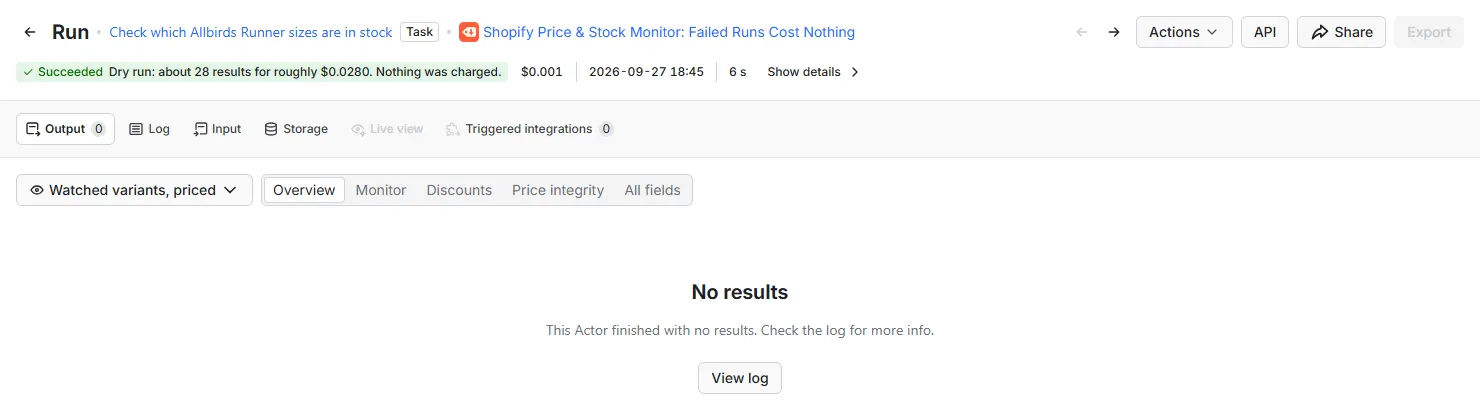
The status line is the estimate. A dry run writes no rows, so its results table stays empty, and it charges nothing.
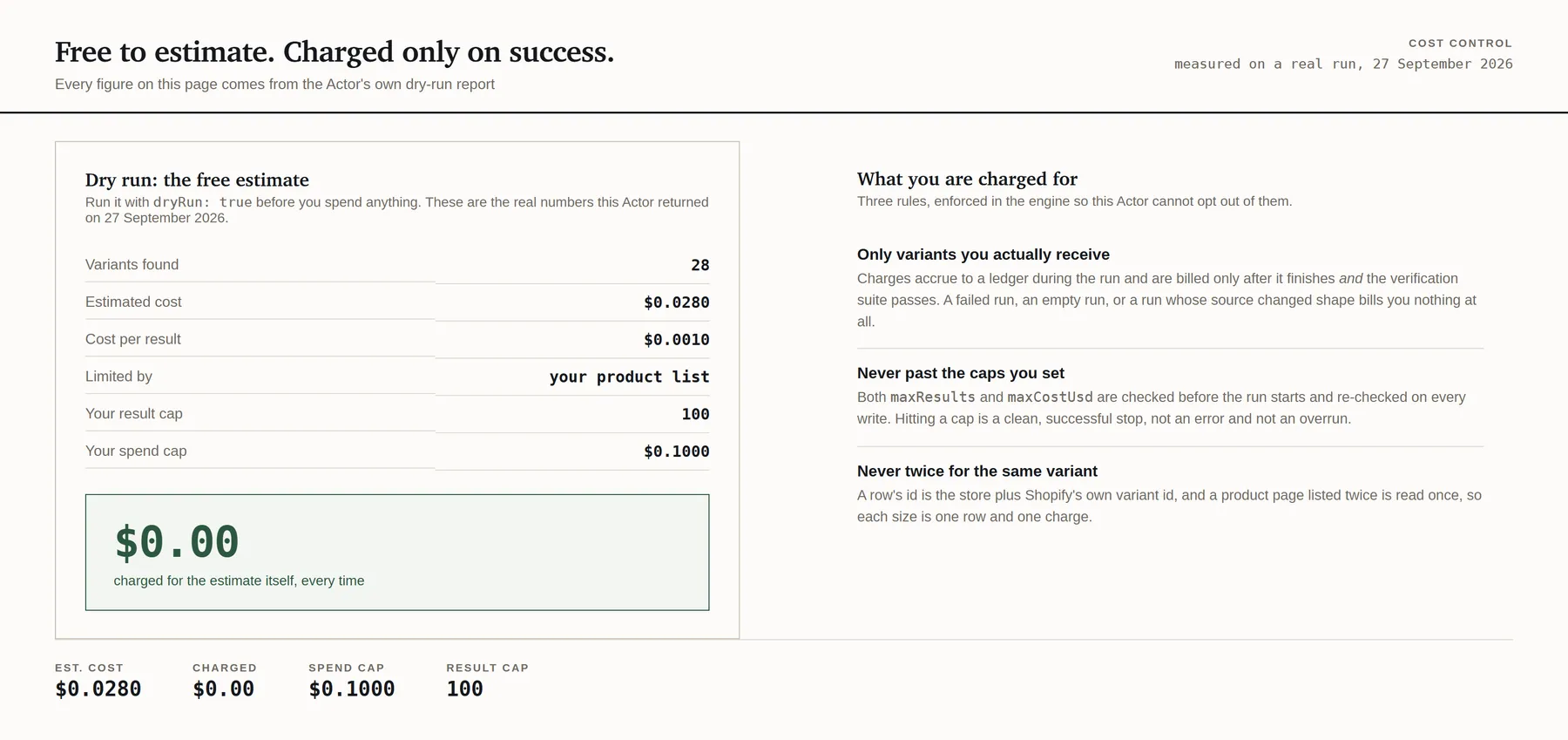
What that costs in practice
Forty watched products at roughly three variants each is 117 rows:
| Schedule | Per run | Per month (Free) | Per month (Gold to Diamond) |
|---|---|---|---|
| Hourly | $0.12 | $84 | $59 |
| Every 4 hours | $0.12 | $21 | $15 |
| Daily | $0.12 | $3.51 | $2.46 |
Why this costs more per row than the catalogue scraper
Because it is the same row bought a different way, and the difference is real:
| Catalogue scraper | This Actor | |
|---|---|---|
| Endpoint | /products.json?limit=250 | /products/{handle}.js |
| Products per request | up to 250 | 1 |
| Typical rows per request | ~730 | ~3 |
A catalogue read amortises one request over several hundred rows. A watchlist read cannot: every row here carries its own request. What you buy for the difference is targeting: you pay for the forty products you care about instead of the 1,635 you do not.
For the forty-product example, watching them here costs $0.12 a run against $1.47 to re-read all 1,675 products of the store they live on. That is per run, so on an hourly schedule it is the difference between $84 a month and $1,058.
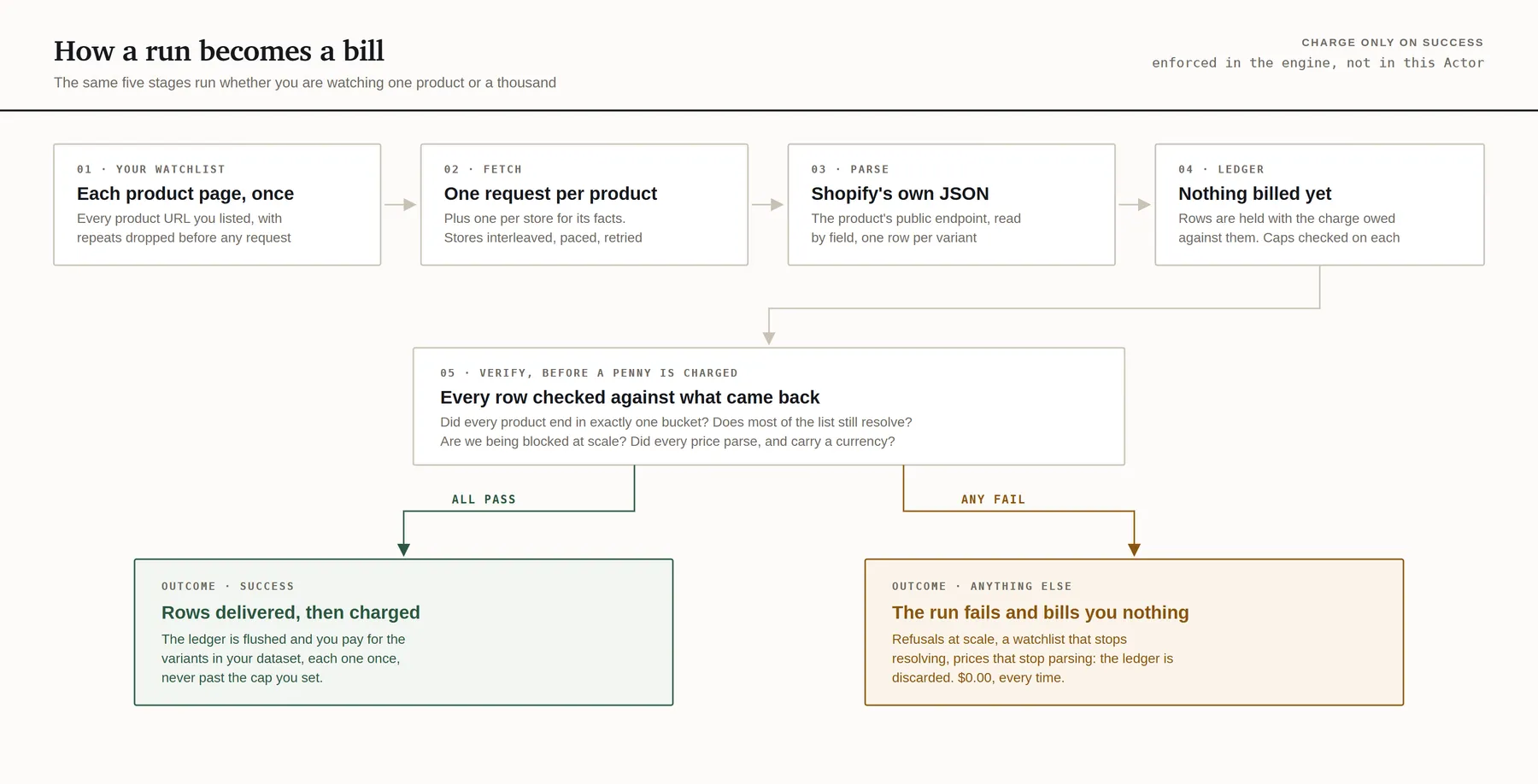
Charges settle only after the run succeeds and its health checks pass. A failed run, an empty run, or a run whose source changed shape bills nothing. Delisted products, duplicates and variants you filtered out are never charged.
Speed, and the one piece of engineering in here
Every store in this family is read at one request per second, which is our own rate limit rather than one any shop publishes. On a watchlist that is a problem: one request per product means a hundred-product watchlist on one shop is a hundred seconds of mostly waiting.
So the queue is interleaved rather than grouped: one product from each store in turn. The pacing gap on store A is spent reading stores B through J, and a watchlist spread over several shops waits almost not at all. No shop ever sees two requests inside a second, and the run fails its own health check if one ever does.
The practical consequence, and it is worth planning around: spread your watchlist across as many shops as you can in one run, and use one run rather than ten. Ten scheduled runs of ten products each pay ten container starts and ten sets of pacing; one run of a hundred products pays one.
What happens when the source changes
Every run is checked against what a healthy run looks like, and a run that fails a check is not billed:
- Every watched product ended in exactly one bucket. A run that priced "forty products" having read twenty-eight is a partial result that looks complete: the rows it returned are all correct, and the twelve it did not are indistinguishable from twelve prices that did not move.
- Two thirds of the watchlist still resolves. Every handle on it worked when it was added, so a mass failure is news rather than a smaller dataset.
- We are not being blocked at scale. A 404 is a merchant's decision about a product. A 403 is edge protection deciding about us, and that is not something to bill you for.
- The products matched Shopify's documented shape, the prices parsed, and the prices carry a currency.
- The pacing was honoured, and the interleaving is still doing its job.
How it reads the source
Through /products/{handle}.js, the public endpoint every Shopify storefront serves on the
merchant's own domain (the same one the shop's own theme reads), plus one /meta.json per shop
for its currency. No login, no token, no session, no browser, and no personal data of any kind.
Why .js and not .json. Shopify serves a product through both, and they are produced by
different serialisers. The .json form comes from the admin serialiser and its variant objects
carry no stock field at all (no available), so half of what this Actor is for cannot be
read from it. It also serves tags as a comma-separated string rather than a list. The .js
form is the storefront serialiser: stock on every variant, tags as a list, prices as integers in
the currency's minor unit. Both are permitted by every robots.txt checked.
A store that refuses us is reported, never worked around. On the seventeen stores whose
robots.txt was read on 2026-09-23, every path this Actor fetches is permitted, and none of them
publishes a crawl delay that applies to a general-purpose agent. A 403 from edge bot protection is
a shop saying no, and the answer to it is an outcome in your run report rather than a different
exit IP.
robots.txt is a crawling policy rather than a contract, and every merchant has their own terms.
The claim here is the narrow one that is actually true: this Actor fetches paths the store's own
robots.txt permits, at one request per second, with no login and no personal data.
Limits
- 1,000 watched products per run. More than that wants the catalogue scraper, which reads 250 products per request.
- It reads the whole list every run. There is no "only what changed" mode, because deciding what changed is the part you should own.
- One currency per store. A shop that serves different prices by geography states one currency, and what you get is the one it stated to the run.
- Three columns are always empty here, and each exists so rows from the two Actors share one
shape:
collectionHandleandinStoreSitemapbelong to a whole-catalogue read, andupdatedAt(when the merchant last edited the product) is simply not served by this endpoint. It is left empty rather than filled with the time of the read, which would be a column that looked fresh on every run and meant nothing. priceRawholds the vendor's own form, and the two endpoints publish different forms. Here it is an integer in the currency's minor unit (5900for £59.00); on the catalogue scraper it is a decimal string ("59.00"). Thepricecolumn is the same number on both, and it is the one to join and compare on.- A renamed handle looks like a delisting. Merchants rename handles and the old address 404s. If a product disappears from your dataset and you expected it not to, open the URL in a browser: a redirect means the handle moved, and the watchlist needs the new one.
Run it on a schedule
Save your input as a task and add an Apify Schedule to run it daily, weekly or hourly. When a run finishes, Apify's integrations can pass its rows to Google Sheets, Zapier, Make or n8n, and a webhook can call your own endpoint. A run that fails costs nothing and does not fire an integration or webhook set to run on success.
This Actor is built for it: forty watched products at about three variants each cost $0.12 a run,
or $3.51 a month checked daily on the free plan. Maximum spend is per run, so multiply it by
your schedule. It keeps no state and sends no alerts, so keep every run's rows together and
GROUP BY variantId ORDER BY scrapedAt is your price history.
Use it from an AI agent
Apify's MCP server loads this Actor as a single tool:
An agent with it can run the Actor with the same inputs as the form, dry run and spend cap included, and read the prices and stock it returns, billed to your Apify account at the prices above.
FAQ
How much does it cost to monitor Shopify prices?
$1.00 per 1,000 variants on Apify's free plan, and $0.70 per 1,000 on Gold and above, with no start fee. Forty watched products at roughly three variants each are 117 rows: $0.12 a run, or $3.51 a month checked daily on the free plan. Apify's free plan gives $5 of usage a month, which at $0.001 a variant is 5,000 variant readings. A failed run, an empty run and a delisted product all cost nothing, and the dry run, which estimates the rows and the cost first, is free.
Is it legal to scrape Shopify product pages?
This Actor reads /products/{handle}.js, the public endpoint every Shopify storefront serves on the
merchant's own domain and the one the shop's own theme reads, with no login, no token and no
personal data. A store that refuses a request is reported, never worked around. Every merchant has
their own terms, whether a particular use is lawful depends on what you do with the data and where
you are, and nothing here is legal advice.
Does it alert me when a price changes?
No. It is a reader, not a change detector: every run gives the current price and stock for every
variant you watch, stamped with scrapedAt, and the diffing is yours.
What happens when a watched product is delisted?
You get no row for it and are not charged, and the run report counts it under units.notFound. If
most of the watchlist stops resolving, the run fails and bills nothing.
Which product URLs can I paste?
Any form of the product's address: allbirds.com/products/wool-runner, the full URL with
?variant=, a collection-scoped URL or the .json endpoint. A bare handle with no shop is refused
before any request goes out.
Other Actors from this developer
Every one has the same free dry run and spend cap, and none charges for a failed run.
More for Shopify stores:
- Shopify Product Scraper: every product and variant from a list of Shopify stores, with SKU, price, compare-at price and stock
- Shopify Store Checker: which of your domains are readable Shopify stores, how many products each holds, and what a full scrape would cost
And for other data:
- Google Flights Scraper: live Google Flights fares for any route and date
- RSS Feed Reader: RSS, Atom and RDF feeds in one table
- Domain Expiry, WHOIS & DNS Lookup: expiry dates, registrar and live DNS for a list of domains
Support and feature requests
Found a bug, need another field, or want a different endpoint watched? Email actors@montyburrows.com. Feature requests are welcome and usually quick.


