Shopify Product Scraper: Failed Runs Cost Nothing
Pricing
from $0.21 / 1,000 product variant delivereds
Shopify Product Scraper: Failed Runs Cost Nothing
Export every product and variant from a list of Shopify stores: SKU, price, compare-at price, currency and stock. A failed or empty run costs nothing, and a run fails if a product the store lists publicly is missing. A free dry run estimates the cost first, and the run stops at a spend cap you set.
Pricing
from $0.21 / 1,000 product variant delivereds
Rating
0.0
(0)
Developer

Monty Burrows
Maintained by CommunityActor stats
0
Bookmarked
2
Total users
1
Monthly active users
a month ago
Last modified
Categories
Share
Shopify Product & Variant Scraper
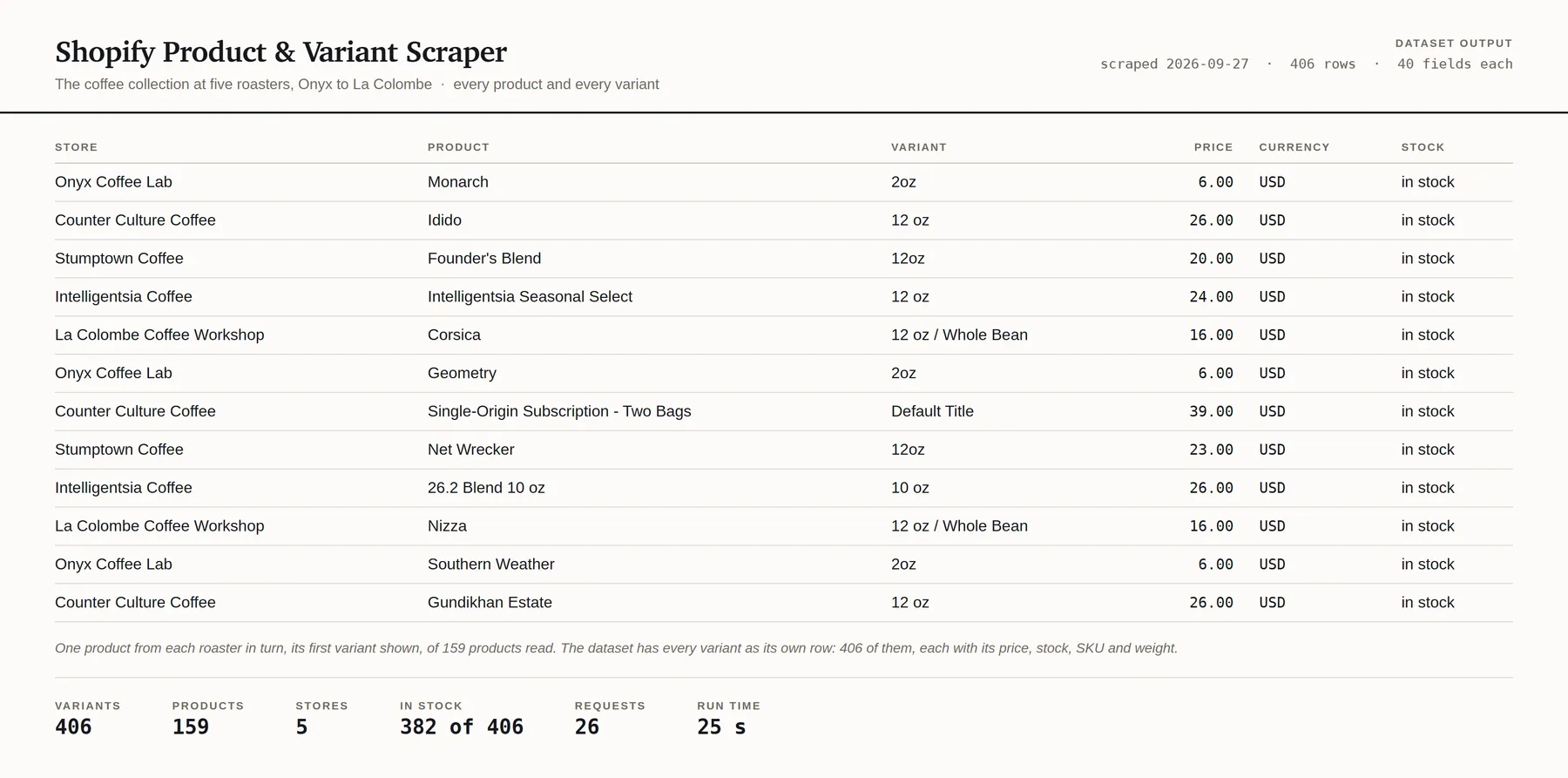
Give it a list of Shopify store domains. Get back every product and every variant from all of them, in one shape, as JSON, CSV or Excel.
One row per variant, which is one buyable option of one product: one size in one colour. That is the row that carries the SKU, the price, the compare-at price and the stock flag, which is to say the whole thing a price monitor or a repricing tool exists to watch.
What you get
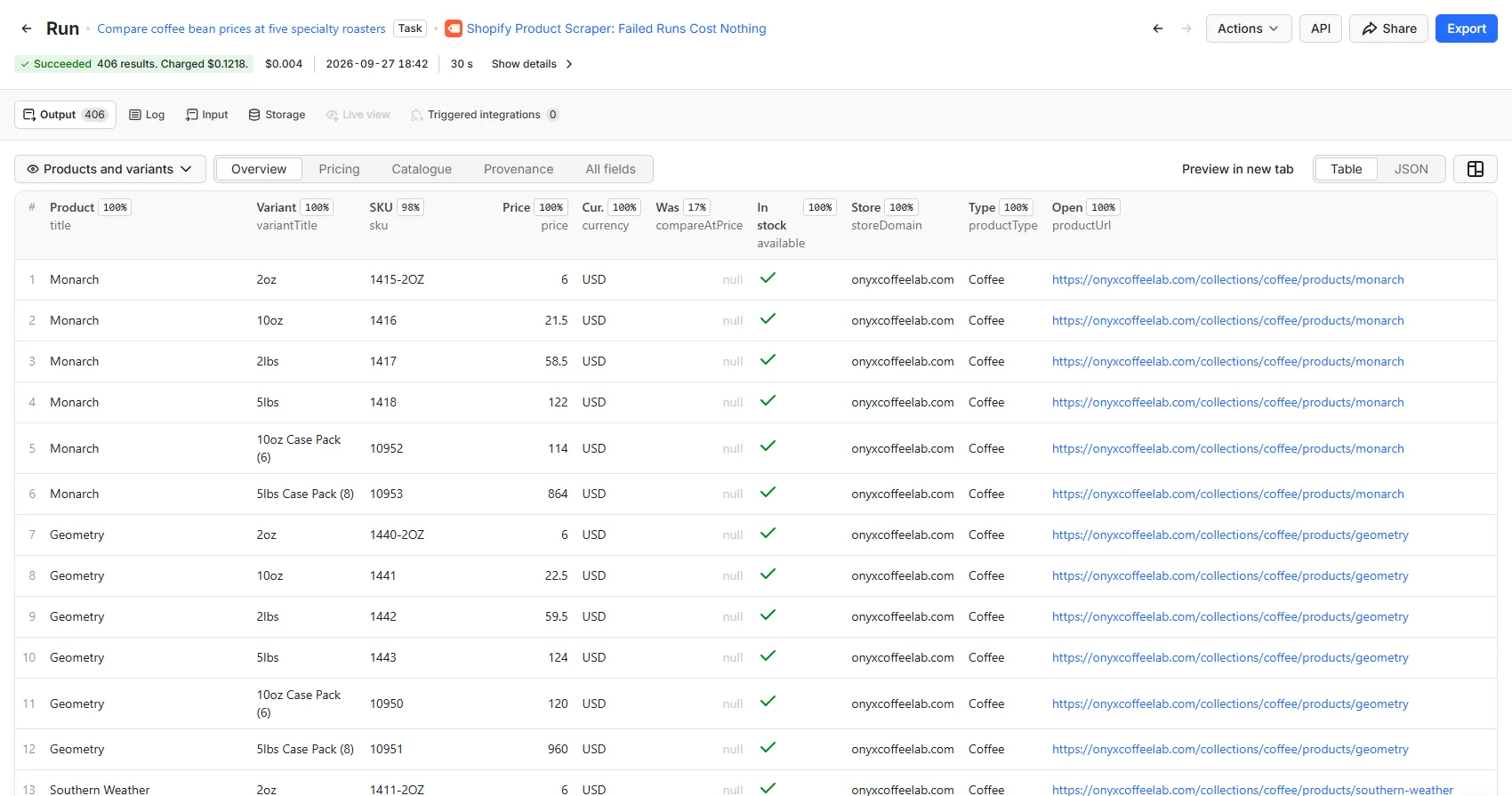
| Field | Description |
|---|---|
storeDomain / storeName / storeCountry | The shop, as it answered and as it describes itself |
myshopifyDomain | The shop's platform identity, stable when it changes its public domain |
productId / handle / title | The product |
vendor / productType / tags | The merchant's own taxonomy, as published |
productUrl / imageUrl | The public page, and the product's first image |
bodyHtml | The description, when you ask for it |
publishedAt / createdAt / updatedAt | ISO-8601 |
inStoreSitemap | Whether the merchant lists this product publicly. See below |
variantId / variantTitle / sku | The variant |
optionNames / optionValues | ["Colour","Size"] and ["Black","UK 6"], paired in order |
priceStatus | Why the price columns hold what they hold. Never empty, see below |
price / compareAtPrice / currency | The current price, the was-price, and the currency they are in |
priceRaw / compareAtPriceRaw | The shop's own strings, verbatim |
discountAmount | Was minus price, when the comparison is the right way up |
available / requiresShipping / taxable | The merchant's own flags |
grams | Shipping weight |
collectionHandle | The collection the row was read through, when you restricted the run to one |
Plus id, actorName, scrapedAt, sourceUrl and runId on every row.
Currency, and why it is not guessed
The catalogue endpoint states a price and no currency. "price": "130.00", and nothing
anywhere in the response says what 130 is. A number shipped under the wrong currency is a
plausible-looking figure that is wrong by whatever the exchange rate is, in a column you would
sort and filter on, so this Actor resolves the currency from the shop itself before it emits a
single price.
Every row carries priceStatus, which is never empty:
priceStatus | What it means |
|---|---|
published | The price and the currency are both known and are in the columns beside this one. |
currency_unresolved | The shop did not state its currency, so the figures are withheld. priceRaw still has it. |
unparseable | The shop stated something the money format would not read. priceRaw says what. |
On the twenty live stores measured on 2026-09-23, the currency resolved on all twenty, including
GBP and AUD shops. currency_unresolved is a guard against a case that has not yet happened
rather than a description of one that has.
inStoreSitemap, and why a "product" is not always a product
Every Shopify store publishes a product sitemap, and the catalogue endpoint returns more than the sitemap lists. Measured across six stores: the endpoint never returned fewer products, and on four of them it returned between one and ten more.
Every extra was read. None was a product a person can buy off a shelf:
- "Extend Protection Plan" and "Extend Shipping Contract" entries, each with 98 to 100 variants that are pure price points
- cashback line items installed by a rewards app
- bundle-builder placeholders and retired upsell SKUs
Apps install these into a merchant's catalogue to make checkout work, and the merchant excludes them from their own sitemap while leaving them published. So if you are counting a shop's assortment, the raw endpoint over-counts by up to 5%.
This Actor reads the sitemap by default and marks each row inStoreSitemap. Filter on it and you
have the merchant's own public catalogue. It does not filter for you, because deciding which of a
merchant's published products is a real one is not a decision a scraper should make on your
behalf.
A store that sells in several countries lists a separate product sitemap for each one:
liquiddeath.com lists 201 and www.aloyoga.com 1,290. This Actor reads the store's primary
market, which is the catalogue it reads from that domain, so a product sold only in another
country is neither a row nor counted as missing, and the check costs a few requests rather than
one for every country.
The same cross-check is a hard guarantee in the other direction. If a product the merchant lists publicly is ever missing from the feed, the run fails and you are charged nothing. That is the one failure a customer cannot see for themselves: a dataset that looks complete and is not.
Example output
One row, lifted verbatim from a run over three live stores on 2026-09-23.
"variantTitle": "Default Title" is Shopify's own wording for a product with only one option,
not a missing value. "sku": null is a merchant who did not fill one in.
Roughly half of stores will not answer, and that is the source
This is the first thing to know about this data, so it is not buried at the bottom.
Forty-three domains were tried on 2026-09-23, as brand-name guesses, the way anyone builds their first list. Twenty answered with a catalogue. The rest failed in six distinct ways, and the Actor reports each one separately because they mean different things to you:
| Outcome | Count | What it means for your list |
|---|---|---|
| Products returned | 20 | Usable |
notFound (404) | 10 | Not a Shopify store, or the merchant turned the endpoint off |
blocked (403) | 5 | Edge bot protection refused us. Not worked around |
unavailable (5xx) | 3 | The shop is having a bad day. Worth retrying later |
notShopify (200) | 2 | A live site that answered 200 and served a web page |
| Connection failure | 2 | The domain does not resolve |
rateLimited (429) | 1 | We were asked to slow down |
You are charged nothing for any store in the bottom six rows. No per-store fee, no actor-start fee: a store that did not answer costs you exactly nothing, and the run carries on to the next one.
Input
| Setting | What it does |
|---|---|
| Store domains | One per line. beardbrand.com, or any URL on the store. Up to 250 per run |
| Collections | Read only these collections, on every store. Leave empty for the whole catalogue |
| In-stock variants only | Drop variants the shop says are out of stock. A sold-out product still counts as read |
| Include the product description | Adds the description HTML. Off by default: it repeats on every variant |
| Cross-check the store's sitemap | On by default. Sets inStoreSitemap and guards against silent truncation |
| Dry run | Count the rows and the cost, then stop. Charges nothing |
| Maximum results | Hard cap on rows. The run stops the moment it is reached |
| Maximum spend (USD) | Hard cap on cost. The run stops before exceeding it |
Finding a store domain
It is the domain you would type into a browser. The apex and the www form of the same shop are
the same shop here, because redirects are followed and the row records the host that answered.
There is no lookup from a company name, and this Actor does not pretend otherwise: you supply the domains. Knowing which domains are Shopify stores is a different product.
Pricing
From $0.21 per 1,000 variants delivered, and nothing else. No per-run fee, no per-store fee, no charge for compute or retries.
| Your Apify plan | Per variant | Per 1,000 variants |
|---|---|---|
| Free | $0.0003 | $0.30 |
| Bronze | $0.00027 | $0.27 |
| Silver | $0.00024 | $0.24 |
| Gold | $0.00021 | $0.21 |
| Platinum | $0.00021 | $0.21 |
| Diamond | $0.00021 | $0.21 |
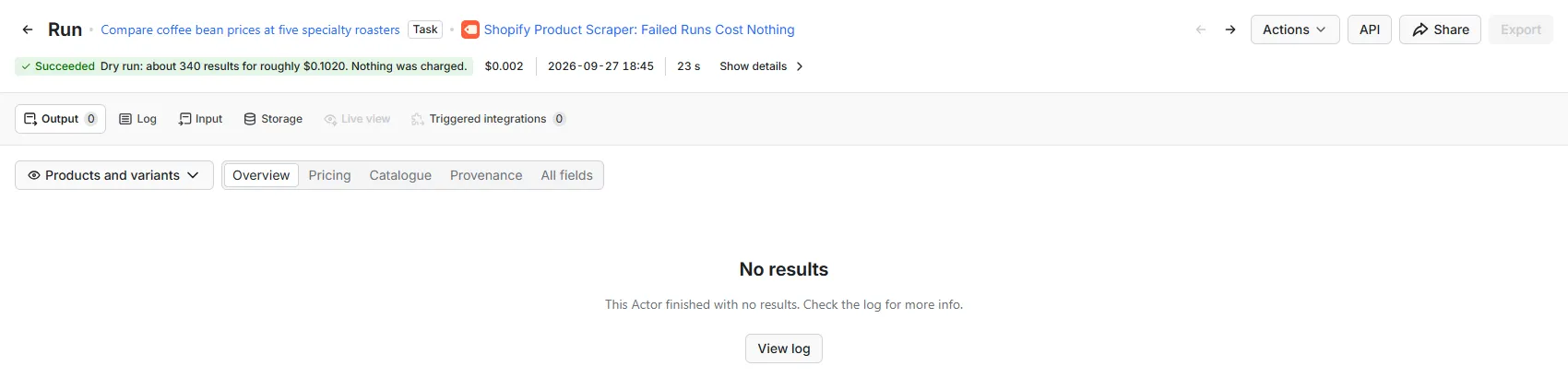
The status line is the estimate. A dry run writes no rows, so its results table stays empty, and it charges nothing.
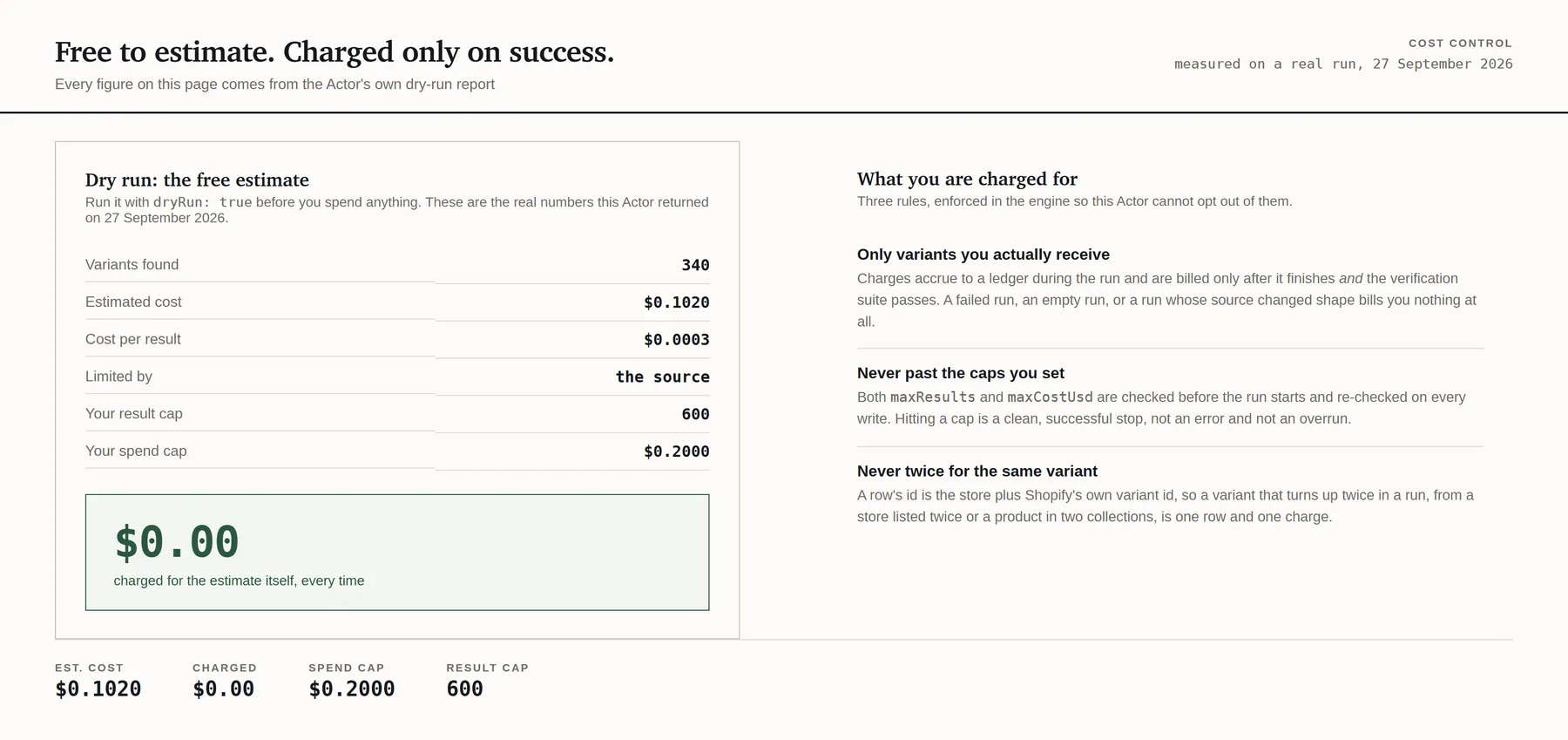
A row is a variant, not a product, and that matters when you compare prices. The twenty stores measured carried a median of 2.92 variants per product, so at the free-plan rate a median product costs about $0.00088, which is below every competing Shopify scraper on the Store. A shop at the top of the measured range, 14 variants a product, costs more per product than that and gives you fourteen times the rows. Run it with Dry run on first: the count is exact for 25 stores or fewer, so you know the number before you spend anything.
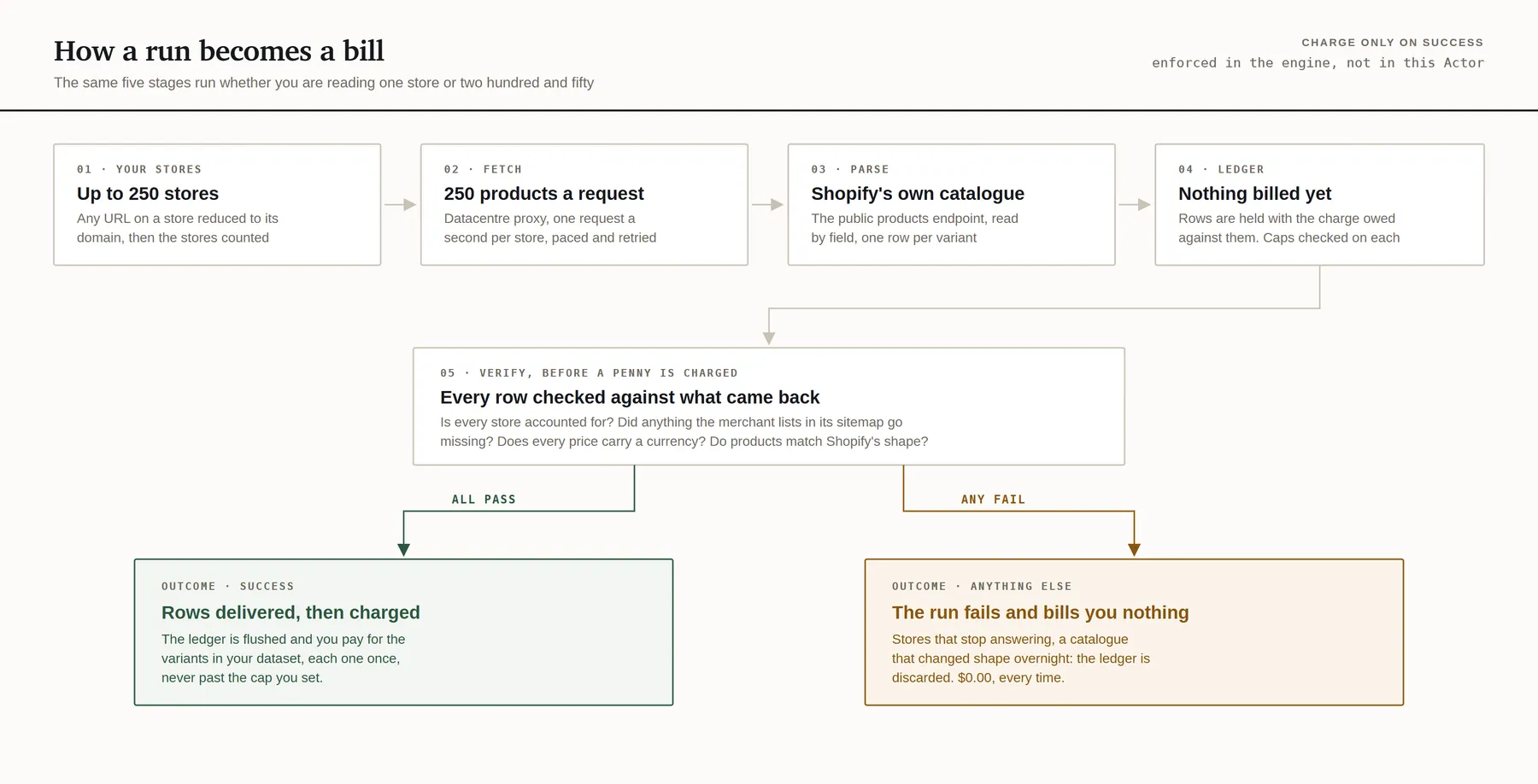
You only pay for variants you actually receive. If the run fails, returns nothing, or one of the health checks below catches the source having changed, you are charged nothing. The bill is settled after those checks, not before.
A store that did not answer costs nothing. A merchant who has published the same product twice costs you one row rather than two: measured on one live shop, 285 variant ids appeared under two product handles each, with identical SKUs and prices.
What happens when the source changes
A scraper's worst failure is not crashing. It is quietly returning three hundred variants instead of three thousand, or a full column of prices in the wrong currency, because the source changed while nobody was looking, and billing you for it.
Every run is checked against what a healthy run looks like, and a run that fails a check is not billed:
- Every store is accounted for. If 40 stores go in and only 28 come back accounted for by outcome, the run fails. A partial result that looks complete is the failure that turns into a refund.
- Nothing the merchant lists publicly went missing. The sitemap cross-check above, as a hard guarantee rather than a column.
- Every price carries a currency. A figure in a money column with no unit is refused rather than shipped.
- Prices are still plain decimals. Shopify has served
"130.00"on every store measured. A different format is a change in the source, not a number to coerce. - Products still match the documented shape, checked per run rather than per row, so one odd product costs one product and a changed response costs nothing.
- The pacing was honoured. One request per second per store, and the run fails its own health check if two ever go out closer together.
How it reads the sources
Through the public catalogue endpoint every Shopify storefront serves on the merchant's own
domain, at /products.json. It exists because themes, apps and sales channels consume it. No
login, no token, no session, no browser, and no personal data of any kind: it is a product
catalogue.
Requests go out one per second per store. The currency comes from the shop's own /meta.json and
the cross-check from its own sitemap, both on the same domain.
A store that refuses us is reported, never worked around. On the seventeen stores whose
robots.txt was read on 2026-09-23, every path this Actor fetches is permitted and none of them
publishes a crawl delay that applies to a general-purpose agent. A 403 from edge bot protection is
a store saying no, and the answer to it is a line in your run report rather than a different exit
IP.
robots.txt is a crawling policy rather than a contract, and every merchant has their own terms.
The claim here is the narrow one that is actually true: this Actor fetches a path the store's own
robots.txt permits, at one request per second, with no login and no personal data.
Limits
- 250 stores per run, 25 per dry run.
- 40 catalogue pages per store, which is at most 10,000 products. A catalogue longer than that is reported as cut short rather than silently truncated.
- No company-name lookup. You supply domains.
- No change detection. Every run returns the catalogue as it stands. You already have Apify schedules and webhooks, and this Actor is built to be cheap enough to run on them.
- One currency per store. A shop that serves different prices by geography states one currency, and what you get is the price served to the run, in the currency the shop stated.
Run it on a schedule
Save your input as a task and add an Apify Schedule to run it daily, weekly or hourly. When a run finishes, Apify's integrations can pass its rows to Google Sheets, Zapier, Make or n8n, and a webhook can call your own endpoint. A run that fails costs nothing and does not fire an integration or webhook set to run on success.
There is no change detection: every run returns, and bills, each catalogue as it stands. Each row
carries Shopify's own variantId, so runs kept over time line up into a price and stock history.
To bill less per run, narrow it with Collections or In-stock variants only.
Use it from an AI agent
Apify's MCP server loads this Actor as a single tool:
An agent with it can run the Actor with the same inputs as the form, dry run and spend cap included, and read the variants it returns, billed to your Apify account at the prices above.
FAQ
How much does it cost to scrape a Shopify store?
$0.30 per 1,000 variants on Apify's free plan, and $0.21 per 1,000 on Gold and above, with no start fee and no per-store fee. Across the twenty stores measured, the median product had 2.92 variants, which is about $0.00088 a product at the free-plan rate. Apify's free plan gives $5 of usage a month, which at $0.0003 a variant is about 16,666 variants. A failed run, an empty run and a store that did not answer all cost nothing. The dry run is free, and exact for 25 stores or fewer.
Is it legal to scrape Shopify stores?
This Actor reads the public catalogue endpoint every Shopify storefront serves on the merchant's
own domain, /products.json, which exists because themes, apps and sales channels use it. There is
no login, no token and no personal data: it is a product catalogue. A store that refuses a request
is reported, never worked around. Every merchant has their own terms, whether a particular use is
lawful depends on what you do with the data and where you are, and nothing here is legal advice.
Why did some of my stores return nothing?
Roughly half of domains will not answer: of forty-three brand-name guesses, twenty returned a catalogue. The rest were not Shopify, had the endpoint turned off, were behind bot protection or were down, and the run reports each outcome separately. None of them is charged.
Why are there more rows than products?
A row is a variant, one buyable option such as one size in one colour, because that is the row that carries the SKU, the price and the stock flag.
Which currency are the prices in?
The shop's own, read from its /meta.json before any price is written, because the catalogue
endpoint states a price with no currency. If the shop does not state one, the figures are withheld
and priceStatus says so.
Other Actors from this developer
Every one has the same free dry run and spend cap, and none charges for a failed run.
More for Shopify stores:
- Shopify Price & Stock Tracker: price and stock for the product pages you choose, one row per variant, built to run on a schedule
- Shopify Store Checker: which of your domains are readable Shopify stores, how many products each holds, and what a full scrape would cost
And for other data:
- Google Flights Scraper: live Google Flights fares for any route and date
- RSS Feed Reader: RSS, Atom and RDF feeds in one table
- Domain Expiry, WHOIS & DNS Lookup: expiry dates, registrar and live DNS for a list of domains
Support and feature requests
Found a bug, need an extra field, or want another storefront platform covered? Email actors@montyburrows.com. Feature requests are welcome and usually quick.