

RSS Feed Reader: No Start Fee, Failed Runs Cost Nothing
Pricing
from $0.28 / 1,000 item delivereds
RSS Feed Reader: No Start Fee, Failed Runs Cost Nothing
Read RSS, Atom and RDF feeds into one dataset with the same columns for all three: title, link, author, date, summary, full content and categories. No start fee, and a run that fails or finds nothing costs nothing. A free dry run shows the price first, and the run stops at a spend cap you set.
Pricing
from $0.28 / 1,000 item delivereds
Rating
0.0
(0)
Developer

Monty Burrows
Maintained by CommunityActor stats
0
Bookmarked
1
Total users
0
Monthly active users
a month ago
Last modified
Categories
Share
RSS, Atom & RDF Feed Reader
Give it a list of feed addresses. Every run returns one row per item (title, link, author, published date, summary, categories), whichever of the three feed formats the publisher uses.
All three formats, read into one shape. RSS 2.0, Atom and RDF disagree about where the link, the identity and the author live. This reader knows, and the Format column tells you which one each row came from.
No per-run fee. You pay for items and nothing else, which matters because this is an Actor people schedule.
The three formats, and why that is the whole listing
A feed reader that only really knows RSS does not fail on an Atom feed. It returns rows with empty columns. That is much worse than an error, because nothing tells you.
Measured on 2026-09-23 across sixteen news and blog feeds:
| Format | Share of that sample | What differs |
|---|---|---|
| RSS 2.0 | 8 | The baseline |
| Atom | 7 | The link is an href attribute, not the element's text. The id is <id>. The author is nested inside <author><name>. |
| RDF (RSS 1.0) | 1 | The items are siblings of <channel>, not children of it. A reader that looks inside the channel finds zero items and reports a healthy empty feed. |
Atom is 44% of that sample and 0% of a sample of twenty-four podcast feeds read the same day. So a reader built and tested on one kind of feed looks complete and quietly returns nulls for nearly half of another kind.
Every one of those differences has a test in this repository, and linksResolve fails the run if
a large share of items come back without a link, because that is exactly what a format
regression looks like from the inside.
What you get
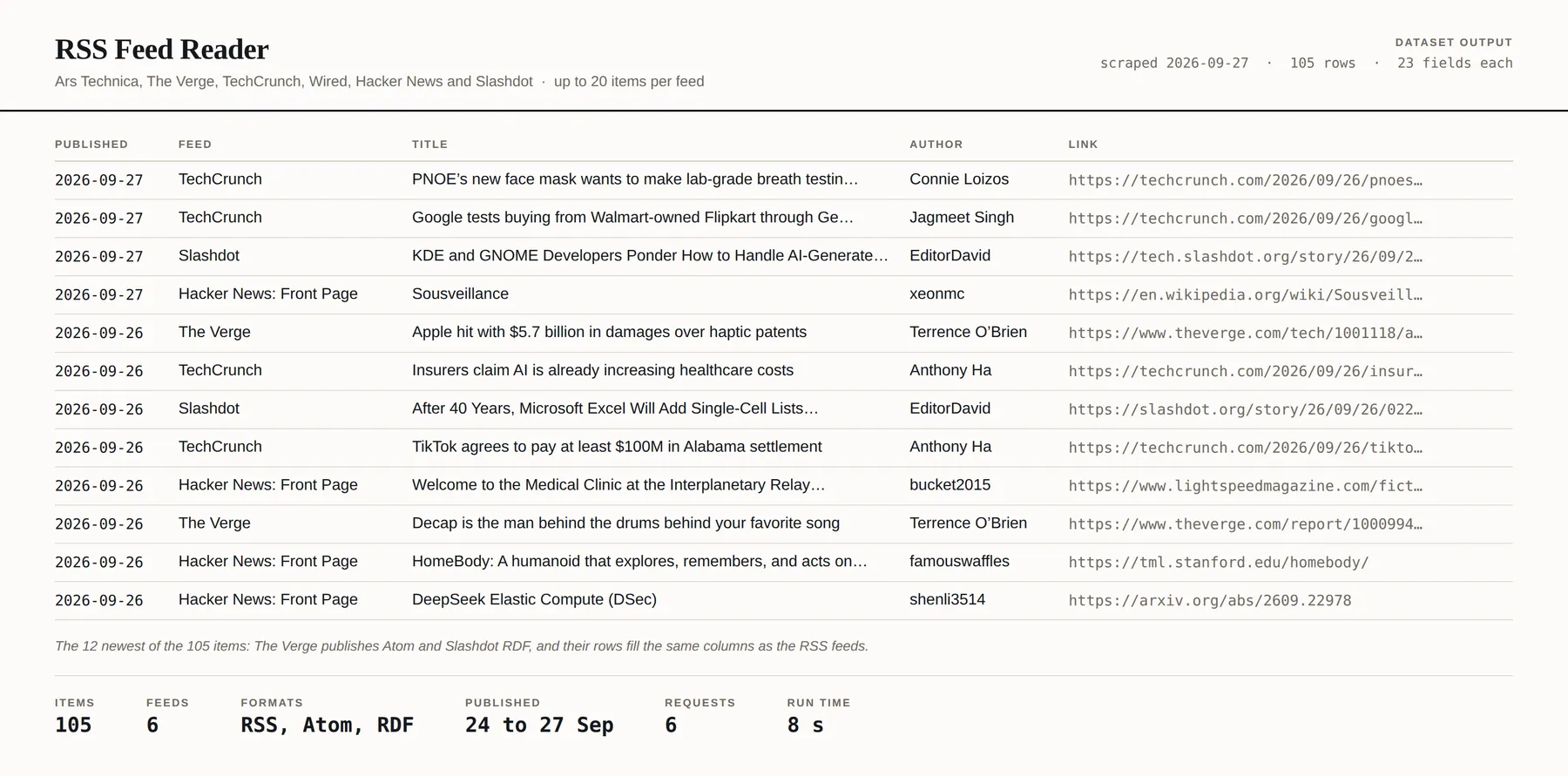
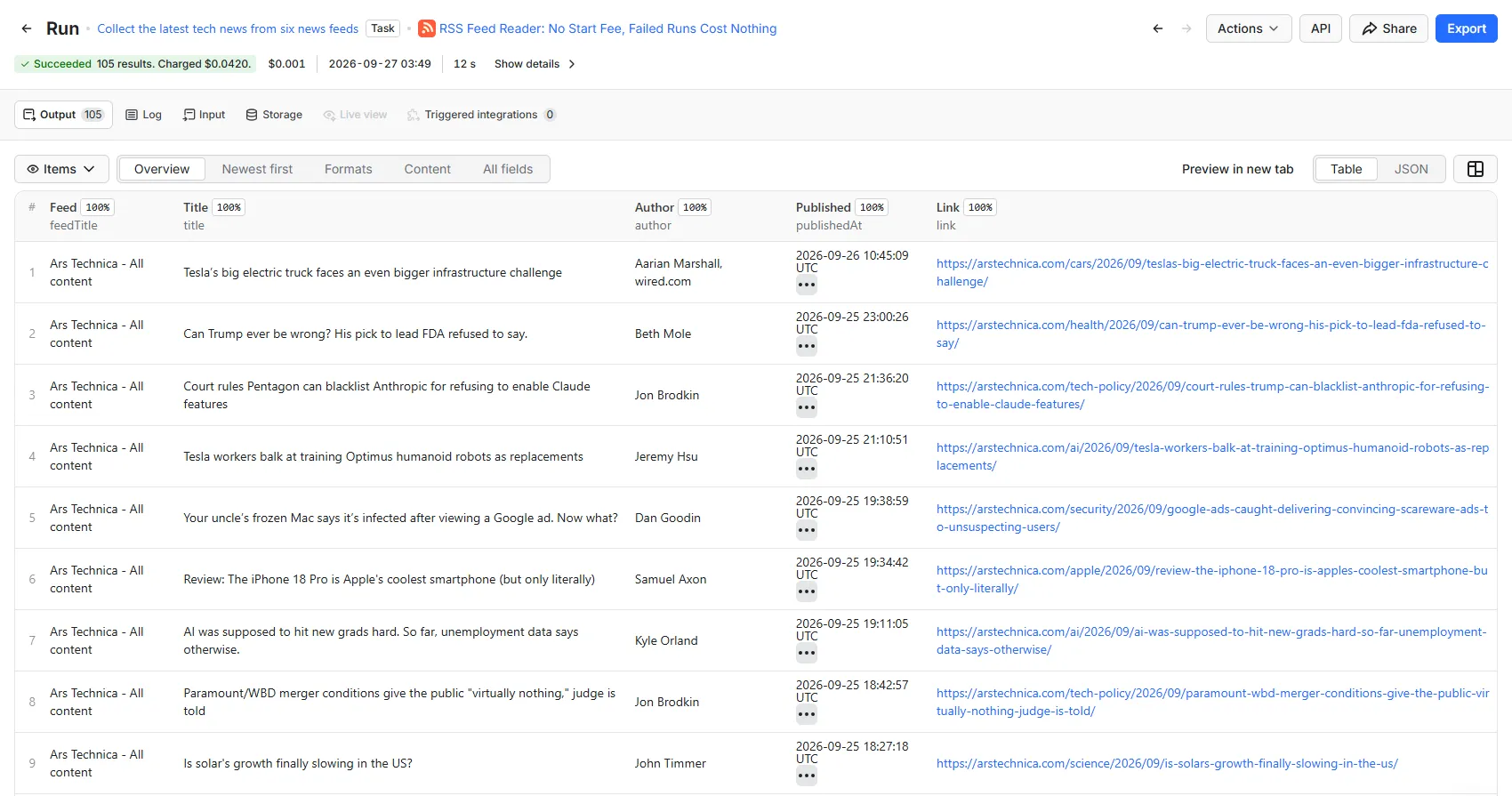
One row per item:
| Group | Fields |
|---|---|
| The feed | feedTitle, feedLink, feedLanguage, feedImageUrl, feedFormat |
| The item | title, itemId, link, publishedAt, author |
| The text | summary, contentHtml, categories |
| Attached media | mediaUrl, mediaType, mediaBytes |
| Provenance | feedUrl, resolvedFeedUrl, scrapedAt, sourceUrl, runId, id |
The feed is copied onto every item so a row stands on its own in a spreadsheet without a second table to join to.
A few things worth knowing about specific columns:
publishedAtprefers publication over revision. Atom publishes bothpublishedandupdated;updatedchanges when a typo is fixed, so preferring it would make a corrected article look new on every run of a monitor.itemIdis whatever the feed uses:guid,<id>,rdf:about, or the link where a publisher offers none of the three. It is half the dedupe key and it is an opaque string, not something to parse.contentHtmlis the full body andsummaryis the extract. Where a publisher offers both, the full body goes in the first. A reader that preferred the extract would silently truncate every feed that publishes both.authornever contains an email address. Atom nests one beside the name; it is not collected.
Input
| Field | What it is |
|---|---|
| Feeds | The addresses, one per line. Formats can be mixed freely. Up to 200 per run. |
| Newest items per feed | Default 100. |
| Only items published since | Optional. YYYY-MM-DD, or days back such as -1. This is what makes a schedule cheap. |
| Include full content HTML | Off by default; it is the largest field. |
| Keep items with attached media | On by default. |
| Dry run | Read a sample, estimate the rows and the cost, charge nothing. |
| Maximum results | Hard row cap. The run stops cleanly on it. |
| Maximum spend | Hard spend cap in USD, per run. Multiply by your schedule. |
The per-feed cap is not decoration. The feeds measured ranged from 4 items to 71, and feeds on this same reader run to over a thousand. Without it, one long feed spends most of your row cap.
Pricing
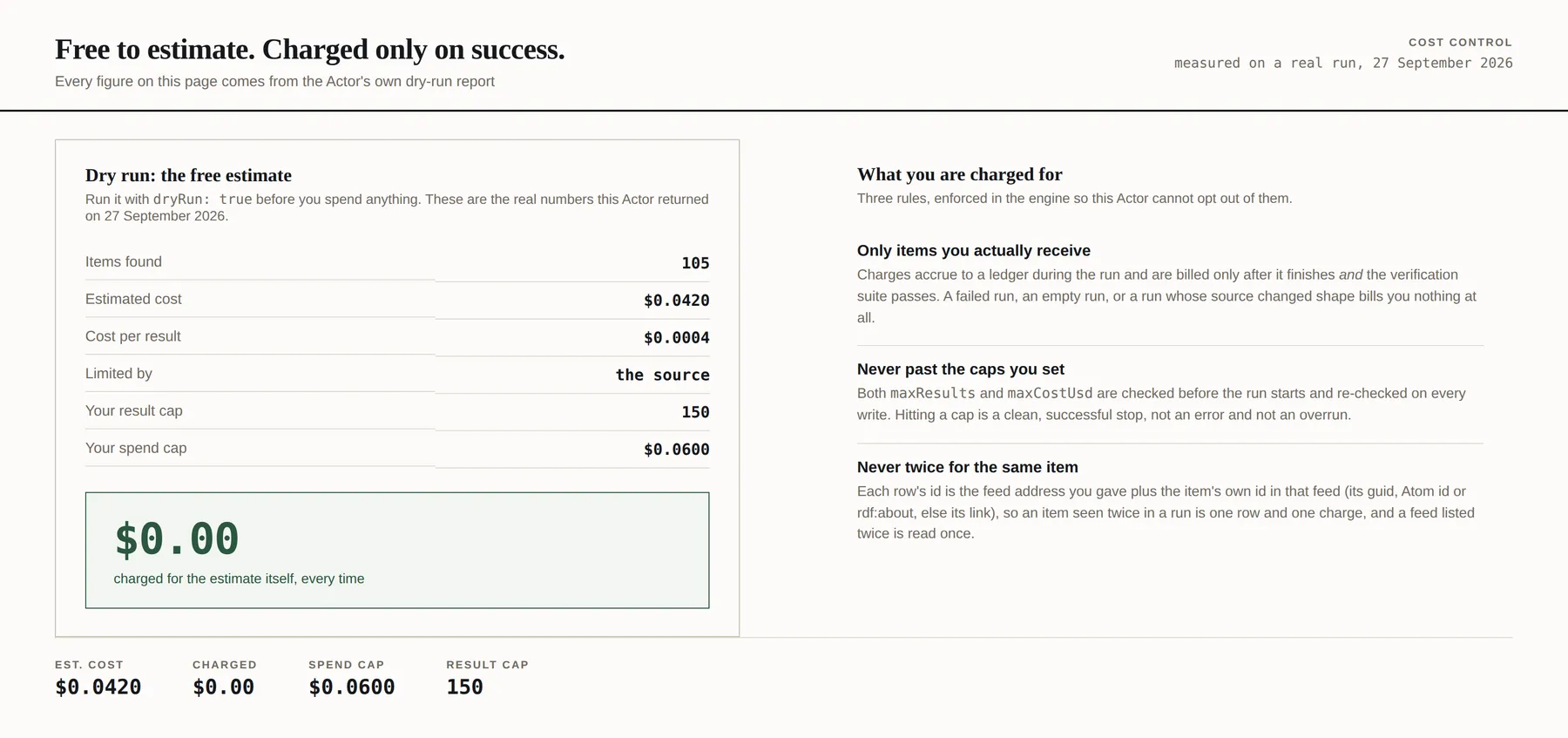
From $0.28 per 1,000 items, and nothing else. No per-run fee, no charge for compute or retries.
| Your Apify plan | Per item | Per 1,000 items |
|---|---|---|
| Free | $0.0004 | $0.40 |
| Bronze | $0.00036 | $0.36 |
| Silver | $0.00032 | $0.32 |
| Gold | $0.00028 | $0.28 |
| Platinum | $0.00028 | $0.28 |
| Diamond | $0.00028 | $0.28 |
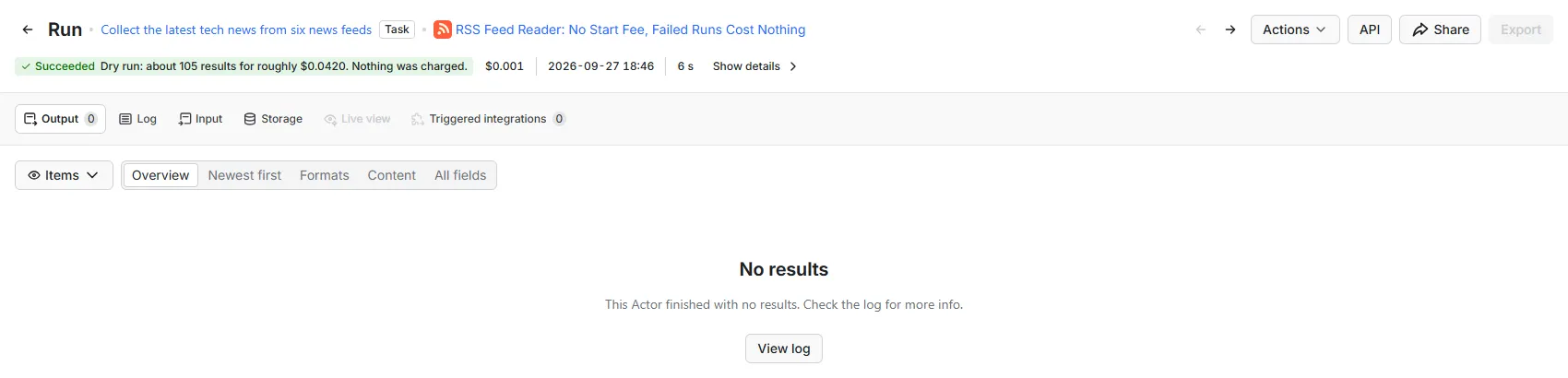
The status line is the estimate. A dry run writes no rows, so its results table stays empty, and it charges nothing.
The start fee is the part worth comparing
Most comparable Actors on the Store charge one: 62 of the 103 RSS and Atom feed readers found in a Store search on 2026-09-27. Four of them, as priced that day:
| Actor | Per run | Per row |
|---|---|---|
automation-lab/rss-feed-reader | $0.035 | $0.00115 to $0.00028 |
devilscrapes/rss-feed-scraper | $0.005 | $0.001 |
santamaria-automations/rss-feed-reader | $0.001 | $0.002 per feed |
technicaldost/rss-feed-scraper | none | $0.008 flat |
| this Actor | none | $0.0004 to $0.00028 |
A start fee is levied every run whether or not anything came back. At $0.035 a start, an hourly schedule costs $25 a month before a single row.
What it costs in practice
| What you are doing | Rows | Cost |
|---|---|---|
| First full read of 40 feeds, 28 items each | 1,120 | $0.45 |
| Daily run of those 40 feeds, last day only | ~120 | $0.05 a run, about $1.44 a month |
| Hourly run of 200 feeds, last day only | ~200 | $0.08 a run, about $58 a month |
The second row is the shape this is priced for: do one full read to seed your dataset, then set
Only items published since to -1 and schedule it.
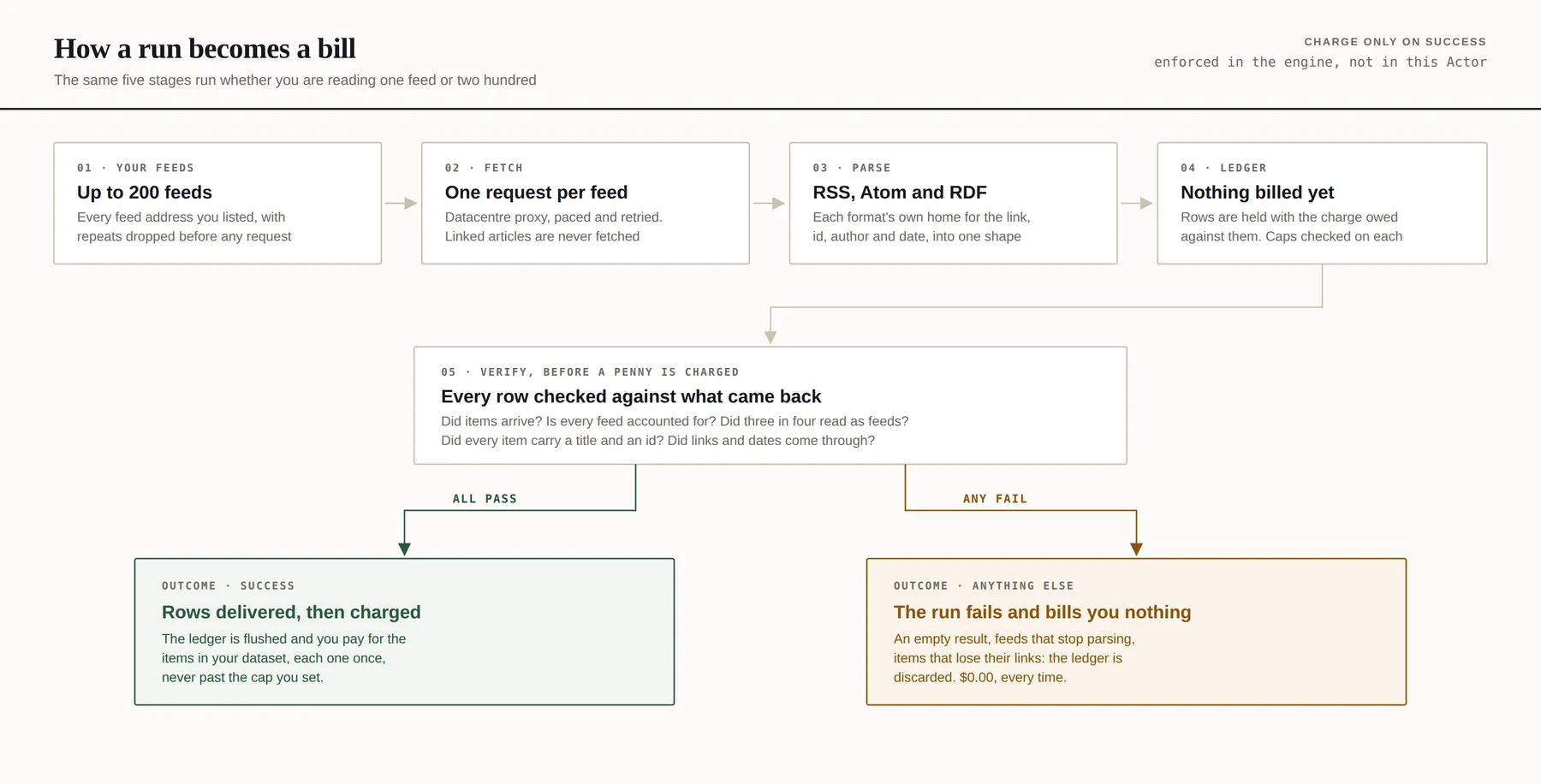
Charges settle only after the run succeeds and its health checks pass. A failed run, an empty run, or a run whose feeds changed shape bills nothing. Feeds that did not answer, feeds that turned out not to be feeds, duplicates and items your filters excluded are never charged.
Podcasts
A podcast feed is an RSS feed with a media file on every item, and this Actor reads them: the
mediaUrl column will be full. But it does not publish the duration, the episode number, the
season, the transcript or the chapter file, because those live in namespaces a general reader
ignores.
If your list is mostly podcasts, use Podcast Feed Reader instead. It reads the same documents through the same code and publishes all of it.
What happens when a feed changes
Every run is checked against what a healthy run looks like, and a run that fails a check is not billed:
- Every feed ended in exactly one bucket. A run that read "forty feeds" having read twenty-eight is a partial result that looks complete.
- At least three quarters of the feeds still parse. Every address on your list was a working feed when you added it.
- Items still carry a title and an identifier. Neither was absent on any feed measured.
- The links still resolve, per the section above. This is the one that catches a format regression.
- The dates still parse. Every date filter downstream depends on that column.
- The pacing was honoured: one request per second per host.
Limits
- 200 feeds per run, one request each.
- It reads the feed, and only the feed. It never follows the article link, the image or the attached media. Following them would make this a crawler, which is a different product with a different terms position.
- It keeps no state between runs. Every run returns the current reading; you decide what
changed.
GROUP BY itemId ORDER BY scrapedAtis a better diff than any this Actor could impose. - No contact details. Feeds carry author email addresses; they are not emitted.
- JSON Feed is not supported. It is a fourth format and no feed in the sample used it. Ask if you need it.
- A feed that has moved and left no redirect looks like a 404, because from outside it is one.
Run it on a schedule
Save your input as a task and add an Apify Schedule to run it daily, weekly or hourly. When a run finishes, Apify's integrations can pass its rows to Google Sheets, Zapier, Make or n8n, and a webhook can call your own endpoint. A run that fails costs nothing and does not fire an integration or webhook set to run on success.
Only items published since is what makes a schedule cheap. Set it to a number of days back
rather than a date: -1 means the 24 hours before each run starts, so a daily task keeps reading
only the last day without anybody editing it, and -7 does the same for a weekly one. An item its
publisher dates earlier than it reaches the feed can fall between two daily runs of -1; -2
reads each day twice and closes that gap, at the price of the overlap. A calendar date such as
2026-09-01 still works, but in a saved task it stays where you set it and every run returns, and
bills, everything since that day up to Newest items per feed. The run report states the moment
the window started, as run.publishedSince. A run with nothing new ends as failed, says why in its
status line, and costs nothing.
Use it from an AI agent
Apify's MCP server loads this Actor as a single tool:
An agent with it can run the Actor with the same inputs as the form, dry run and spend cap included, and read the items it returns, billed to your Apify account at the prices above.
FAQ
How much does it cost to scrape RSS feeds?
$0.40 per 1,000 items on Apify's free plan, and $0.28 per 1,000 on Gold and above, with no start fee. Apify's free plan gives $5 of usage a month, which at $0.0004 an item is 12,500 items. A daily run of 40 feeds for the last day's items is about $0.05 a run. A failed run, an empty run, a feed that did not answer and items your filters excluded all cost nothing, and the dry run, which estimates the rows and the cost first, is free.
Is it legal to scrape RSS feeds?
This Actor fetches the feed address you give it and nothing else: it never follows the article link, the image or the attached media, needs no login, and never collects an author's email address. Whether a particular use of the content is lawful depends on what you do with it and where you are, and nothing here is legal advice.
Does it read Atom and RDF feeds?
Yes. RSS 2.0, Atom and RDF (RSS 1.0) can be mixed in one list, and feedFormat says which each row
came from.
Can I get only new items?
Set Only items published since to a date, or to a number of days back such as -1, and items
before it are neither written nor charged. On a schedule use the number of days, which moves
with every run; see Run it on a schedule.
Does it support JSON Feed?
No. It is a fourth format and no feed in the sample used it. Ask if you need it.
Other Actors from this developer
Every one has the same free dry run and spend cap, and none charges for a failed run.
- Google Flights Scraper: live Google Flights fares for any route and date
- Shopify Product Scraper: every product and variant from a list of Shopify stores
- Shopify Price & Stock Tracker: price and stock on the Shopify product pages you choose
- Shopify Store Checker: which of a list of domains are readable Shopify stores
- Domain Expiry, WHOIS & DNS Lookup: expiry dates, registrar and live DNS for a list of domains
Support and feature requests
Found a bug, need another field, or want a format supported? Email actors@montyburrows.com. Feature requests are welcome and usually quick.


