

Tweakers Pricewatch Scraper
Pricing
from $8.00 / 1,000 results
Tweakers Pricewatch Scraper
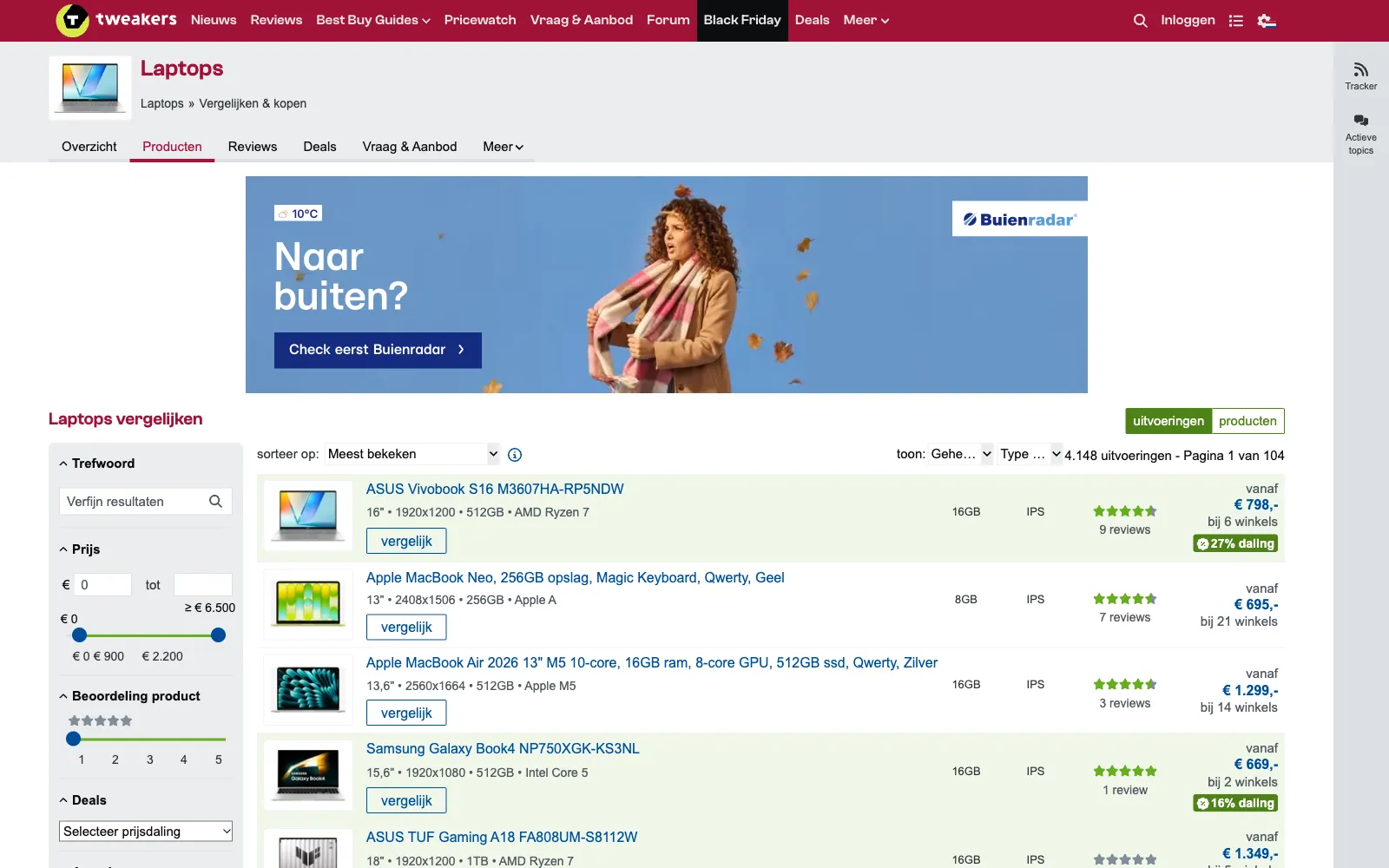
Scrape product listings from Tweakers Pricewatch, the Netherlands' leading technology price-comparison platform. Extract product names, prices, specifications, ratings, review counts, price ranges, and available shop offers. Ideal for price tracking, market research, and competitor analysis.
Pricing
from $8.00 / 1,000 results
Rating
0.0
(0)
Developer

MrDoe
Maintained by CommunityActor stats
0
Bookmarked
2
Total users
1
Monthly active users
7 days ago
Last modified
Categories
Features
Share
Turn Tweakers Pricewatch listings into structured data in minutes - no coding, no manual copy-pasting. Get price range, full specifications, ratings, and shop-offer counts for any product on Tweakers Pricewatch, the Netherlands' leading tech price-comparison site.
What does Tweakers Pricewatch & Product Scraper Netherlands do?
Tweakers Pricewatch & Product Scraper Netherlands collects product data from Tweakers Pricewatch. Give it one or more category URLs (e.g. laptops, monitors, smartphones) and it pages through every product, then visits each product's own page to pull its full specification table, category, brand, GTIN/MPN, and aggregate price range across every shop that lists it. Try it free on up to 10 products per run, or raise the limit for as many as you need.
Why use Tweakers Pricewatch & Product Scraper Netherlands?
- Price monitoring - track the lowest/highest price and number of shops offering a product over time.
- Spec comparison - pull Tweakers' detailed, standardized specification tables into your own comparison tool.
- Catalog enrichment - collect GTIN/MPN and brand data for product-matching.
- Market research - track ratings and review activity across a category.
How to use Tweakers Pricewatch & Product Scraper Netherlands
- On Tweakers Pricewatch, browse to a category (e.g.
tweakers.net/laptops/vergelijken/), optionally applying Tweakers' own filters and sort order, and copy the URL. - Paste it into Start URLs in the Input tab. Add as many as you like, or paste direct product URLs (
tweakers.net/pricewatch/...). - Leave Enrich with detail pages on to collect full specifications per product (recommended), or turn it off for a faster listing-only run.
- Set Max items / Max pages if you want to cap the run, or leave empty to collect everything.
- Click Start and wait for the run to finish.
- Open the Dataset tab to preview, filter, and export your results.
Input
| Field | Type | Description |
|---|---|---|
startUrls | Array | Tweakers Pricewatch category URLs or direct product URLs. Required. |
includeDetails | Boolean | Visit each product's own page for full specifications (default: true). |
maxItems | Integer | Maximum products to collect across all start URLs. Free: 10 by default. Set a higher number, or 0 for unlimited, to collect as many as you need. |
maxPages | Integer | Safety cap on result pages per start URL (default: unlimited). |
useCache | Boolean | Skip products already collected by a previous run (default: true). |
proxyConfiguration | Object | Proxy settings. Residential proxy is used by default - Tweakers blocks datacenter IPs. |
Example input:
Output
Each product is saved as one item in the dataset, for example:
Field reference
| Field | Description |
|---|---|
productId / sku | Tweakers' internal product ID |
title, brand, series, model, gtin, mpn | Product identity |
category, categoryPath | Tweakers' own category for the product (e.g. "Laptops") |
color, weight, dimensions | Physical attributes, when the category publishes them (e.g. laptops and phones; not every category has these) |
price, lowestOffer, highestOffer, offerCount, currency | Aggregate price range and how many shops list the product |
rating, reviewCount | Tweakers' own user rating (detail pages) |
specifications | Every specification Tweakers publishes, flattened to one key/value map |
attributes.specGroups | The same specifications, grouped as Tweakers itself organizes them (e.g. "Beeldscherm", "Werkgeheugen") |
features | The handful of spec highlights shown directly on the listing card |
images | Product photo URLs |
url, source, scrapedAt | Provenance |
Fields with no public data for a given product are returned as null (or []/{} for arrays/objects) - never fabricated or guessed.
Detail-page enrichment
Category pages only carry a price summary, a spec-line snippet, and a rating star score. The full specification table, GTIN/MPN, and complete price range only exist on the product's own page. With Enrich with detail pages on (default), the Actor visits each new product's page once to fill these in. Turn it off for a cheaper, faster run if search-result-level data is enough.
Pagination
The Actor pages through each start URL's category results until the last page (read from Tweakers' own page counter), maxPages, or maxItems - whichever comes first.
Cache behavior
With useCache on (default), every successfully collected product's ID is stored permanently in the Actor's key-value store - no expiration, no TTL. Re-running the Actor with the same or overlapping start URLs will skip products already collected and only return new ones. Disable useCache to re-collect everything.
Cost / performance
Tweakers sits behind a cookie-consent step that only needs to clear once per run, and the permanent cache keeps repeat runs cheap by skipping already-collected products. Turn off Enrich with detail pages for a faster, lower-cost run when listing-level data (price, rating, spec-line snippet) is enough - you only pay more when you ask for the full per-product page.
Troubleshooting
A run returns 0 products. Make sure the default residential proxyConfiguration is enabled, and confirm the start URL is a real Tweakers category URL ending in /vergelijken/ (copy it directly from the site - not every category slug matches its display name).
Some fields are null. Not every product publishes every specification (e.g. a tablet won't have a "Toetsenbord" section). The Actor never invents data - it returns what Tweakers publishes for that specific product.
FAQ / Disclaimer
Is this legal? This Actor only collects publicly visible product data. You are responsible for using the data in accordance with Tweakers.net's Terms of Service and applicable law in your jurisdiction.
Found a bug or have a feature request? Please use the Issues tab on this Actor's page - feedback directly shapes future updates.


