SERP Rank Tracker Lite avatar

SERP Rank Tracker Lite

Pricing

from $12.00 / 1,000 keyword rank checkeds

Go to Apify Store
SERP Rank Tracker Lite

SERP Rank Tracker Lite

Track Google, Bing, and DuckDuckGo rankings for any keyword/domain with native AI Overview detection. Pay-per-keyword alternative to Ahrefs, SEMrush, and SE Ranking for SEO freelancers and agencies.

Pricing

from $12.00 / 1,000 keyword rank checkeds

Rating

0.0

(0)

Developer

Stephan Corbeil

Stephan Corbeil

Maintained by Community

Actor stats

0

Bookmarked

2

Total users

1

Monthly active users

3 days ago

Last modified

Share

SERP Rank Tracker Lite β€” with native AI Overview detection

Track Google, Bing, and DuckDuckGo rankings for any keyword/domain with the one thing Ahrefs and SEMrush still get wrong: clean, native AI Overview (AIO) detection.

Built for SEO freelancers, in-house content marketers, and small-to-mid agencies who want pay-as-you-go SERP tracking without the $59-$139/month subscriptions β€” and who refuse to fly blind on the SERP feature that now eats 30-50% of informational query clicks.

Pay only for what you track. No seats. No monthly minimum. Around $0.012 per keyword check β€” roughly 5x to 25x cheaper than Ahrefs Webmaster, SEMrush, or SE Ranking at equivalent volumes.


Why AI Overview detection matters in 2026

Google's AI Overview (formerly SGE) now triggers on a substantial portion of informational queries β€” internal SEO industry tracking puts the figure between 30% and 50% depending on vertical, with health, finance, and how-to content seeing the highest rates.

This breaks classic rank tracking in three ways:

  1. Position #1 organic no longer means top-of-fold. When an AIO box renders, the first blue link gets pushed below 600-800px of generated answer + citations. Your "rank #1" report to the client looks great while their click-through halves.
  2. AIO citations are a separate optimization target. Being cited inside the AIO is increasingly more valuable than ranking #1 below it. You need to track citation presence, not just rank.
  3. AIO triggers are volatile. A keyword that triggered AIO last week may not today. Without continuous AIO tracking, you can't tell whether a CTR drop is your fault or the SERP's.

Most incumbents β€” Ahrefs, SEMrush, SE Ranking, Serpstat β€” added AIO detection late, mark it inconsistently, or hide it behind premium tiers. This actor surfaces AIO presence, the summary text, and the citation count on every Google check, included in the base per-keyword price. When detection is genuinely ambiguous, we return null rather than guessing false β€” so your reports stay honest.


Use cases

  1. SEO freelancer client reporting. Track 50-200 keywords per client on a weekly cron. Generate a CSV that shows rank, AIO presence, and competitor delta. No per-seat license fees per client.
  2. Marketing agency portfolio tracking. Run nightly for every account, dump to BigQuery / Snowflake / S3 via Apify integrations. Pay only for keywords actually checked β€” no waste on inactive accounts.
  3. Content marketer competitive analysis. Pull top-10 competitors for every target keyword. Spot which domains are eating your category and which pages are getting AIO-cited.
  4. Brand monitor for new content rollouts. Drop in your domain + 20 target queries the day a new landing page ships. Re-run weekly. Watch rank climb (or not).
  5. AIO-citation tracking. Pull the AIO summary + citation count on every check. If your domain disappears from the citations, you'll see it in the diff.
  6. Localized SERP tracking. Same keyword set across us, gb, de, ca, au, etc. β€” no extra per-market license.
  7. Mobile vs desktop SERP delta. Run the same keyword twice with device: "desktop" then device: "mobile". Different AIO trigger rates, different competitors, different opportunities.

How it works

  1. You submit a list of keywords + your target domain + an engine choice.
  2. For Google, we invoke Apify's official apify/google-search-scraper as an upstream actor. That actor handles all the rendering, anti-bot, and proxy heavy-lifting at Google. We parse its JSON output.
  3. For Bing and DuckDuckGo, we scrape HTML directly through Apify residential proxy (BUYPROXIES94952) using httpx + BeautifulSoup. Bing and DDG are both permissive and stable; this is the cheap path.
  4. We parse organic results, extract your domain's rank (1-100 or null), pull the top 10 competitors, detect featured snippets, scan for AI Overview presence, and pull People-Also-Ask + related searches when available.
  5. We emit one structured dataset item per keyword with all the fields below. Stream them to your warehouse, your spreadsheet, or your dashboard.

We never hit Google directly β€” it's expensive, unreliable, and against Google's ToS. Bright Data is not used. Everything runs inside Apify's compliance perimeter.


Input schema

FieldTypeDefaultNotes
keywordsarray of stringsrequiredMax 100 keywords per run
domainstringrequiredWithout protocol. Example: thenextgennexus.com
searchEngineenumgooglegoogle | bing | duckduckgo
countrystringusISO 2-letter country code
languagestringen2-letter language code
deviceenumdesktopdesktop | mobile
includeCompetitorsbooleantrueEmit top-10 organic per keyword
detectAIOverviewbooleantrueGoogle only; ignored elsewhere
maxKeywordsinteger100Hard safety cap (1-100)

Minimal input

{
"keywords": ["best crm 2026", "ai writing tools"],
"domain": "salesforce.com"
}

Full input

{
"keywords": ["best crm 2026", "ai writing tools", "headless cms 2026"],
"domain": "salesforce.com",
"searchEngine": "google",
"country": "us",
"language": "en",
"device": "desktop",
"includeCompetitors": true,
"detectAIOverview": true,
"maxKeywords": 100
}

Output schema

Each dataset item:

FieldTypeDescription
keywordstringEcho of the input keyword
searchEnginestringgoogle / bing / duckduckgo
countrystringISO code
languagestringLanguage code
devicestringdesktop / mobile
domainRankint | nullRank position 1-100, or null if not in top 100
domainUrlstring | nullThe matching URL on your domain, if found
domainSnippetstring | nullSearch snippet preview for that URL
hasAIOverviewbool | nullGoogle only. null = ambiguous, don't guess
aiOverviewSummarystring | nullFirst ≀500 chars of AIO body text
aiOverviewSourcesCountintNumber of citation chips in the AIO box
featuredSnippetobject{present, url, text}
peopleAlsoAskarrayUp to 10 PAA question strings
relatedSearchesarrayRelated query strings
topCompetitorsarrayTop-10 organic, each {rank, url, title, snippet, domain}
searchedAtISO stringUTC timestamp
errorstring(Optional) Set only if fetch failed

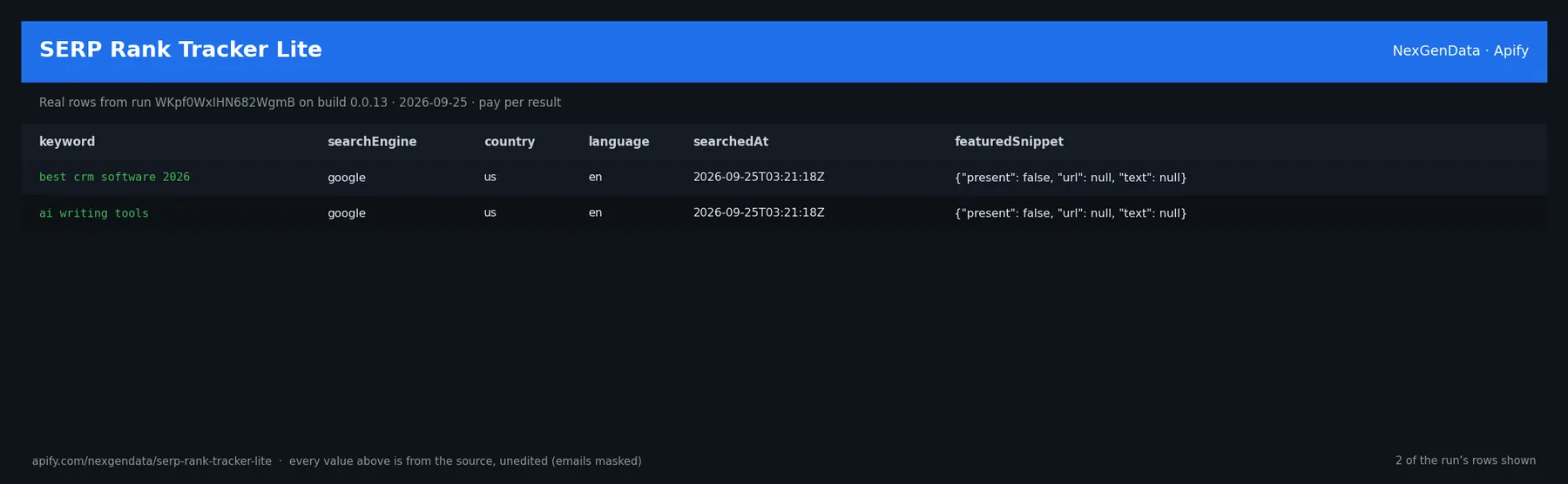
Sample item

{
"keyword": "best crm 2026",
"searchEngine": "google",
"country": "us",
"language": "en",
"device": "desktop",
"domainRank": 4,
"domainUrl": "https://www.salesforce.com/crm/",
"domainSnippet": "Salesforce CRM helps sales teams close more deals…",
"hasAIOverview": true,
"aiOverviewSummary": "The best CRM in 2026 depends on company size and industry. For SMBs, HubSpot and Pipedrive offer strong free tiers…",
"aiOverviewSourcesCount": 7,
"featuredSnippet": {"present": false, "url": null, "text": null},
"peopleAlsoAsk": [
"What is the best CRM for small business?",
"Is Salesforce worth it in 2026?"
],
"relatedSearches": ["best free crm", "salesforce vs hubspot 2026"],
"topCompetitors": [
{"rank": 1, "url": "https://www.hubspot.com/products/crm", "title": "HubSpot CRM β€” Free…", "snippet": "…", "domain": "hubspot.com"},
{"rank": 2, "url": "https://pipedrive.com/", "title": "Pipedrive…", "snippet": "…", "domain": "pipedrive.com"}
],
"searchedAt": "2026-05-16T12:34:56Z"
}

More JSON examples

Single-keyword smoke (Bing, no AIO)

{
"keywords": ["best crm 2026"],
"domain": "salesforce.com",
"searchEngine": "bing",
"maxKeywords": 1
}

Batch (50 keywords, Google US desktop)

{
"keywords": ["keyword 1", "keyword 2", "...50 total"],
"domain": "thenextgennexus.com",
"searchEngine": "google",
"country": "us",
"device": "desktop",
"detectAIOverview": true
}

Mobile vs desktop diff (run twice, same keywords)

{
"keywords": ["how to lose weight", "best mortgage rates"],
"domain": "nerdwallet.com",
"searchEngine": "google",
"device": "mobile"
}

Calling from your code

Python (Apify SDK)

from apify_client import ApifyClient
client = ApifyClient("YOUR_APIFY_TOKEN")
run = client.actor("nexgendata/serp-rank-tracker-lite").call(run_input={
"keywords": ["best crm 2026", "ai writing tools"],
"domain": "salesforce.com",
"searchEngine": "google",
"detectAIOverview": True
})
for item in client.dataset(run["defaultDatasetId"]).iterate_items():
print(item["keyword"], item["domainRank"], item["hasAIOverview"])

cURL

curl -X POST "https://api.apify.com/v2/acts/nexgendata~serp-rank-tracker-lite/run-sync-get-dataset-items?token=YOUR_APIFY_TOKEN" \
-H "Content-Type: application/json" \
-d '{
"keywords": ["best crm 2026"],
"domain": "salesforce.com",
"searchEngine": "google"
}'

FAQ

1. How accurate is AI Overview detection? For Google queries via the upstream actor we use a defensive multi-field detection chain (current and legacy field names from apify/google-search-scraper) plus a fallback marker scan. When detection is genuinely ambiguous, hasAIOverview is null β€” we never guess false. Bing and DDG do not have AIO; the field is always null there.

2. Why is domainRank sometimes null? Either (a) your domain is not in the top 100 results, (b) the SERP didn't return that many organic results, or (c) the upstream call failed and an error field is set on the item. Check error first.

3. Does mobile actually give different results? Yes. Mobile SERPs have different AIO trigger rates (typically higher), different ad density, and often re-ordered organic results. For client reporting, run both.

4. Which countries and languages do you support? Any ISO country code and 2-letter language code that the upstream scrapers accept. Google: ~190 countries via the upstream actor. Bing: most major markets. DuckDuckGo: region pairs like us-en, de-de.

5. How often should I re-track? Weekly is the sweet spot for most agencies. Daily makes sense for high-volatility verticals (news, finance, e-commerce launches). With pay-per-keyword pricing, you decide.

6. Why are you so much cheaper than Ahrefs / SEMrush? Three reasons: (1) you only pay for keywords you actually check, not a flat seat license; (2) we don't run a UI, dashboards, link index, or content team β€” just the SERP fetch; (3) we use Apify's existing compliance + proxy infrastructure so we don't carry that overhead.

7. Do you scrape Google directly? No. We invoke Apify's official apify/google-search-scraper as an upstream actor β€” that actor handles all the rendering and anti-bot work inside Apify's compliance perimeter. We never bypass Google's protections.

8. What if I need >100 keywords per run? Split into multiple runs or use the Apify scheduler to fan out batches. The 100-keyword cap is a safety guard against accidental cost blow-ups.


Comparison vs incumbents

SERP Rank Tracker LiteAhrefs WebmasterSEMrushSE RankingSerpstatAccuRanker
Monthly costPay-per-keyword (~$0.012/check)$7-$29/mo$139/mo+$55/mo$59/mo$129/mo+
Keywords includedUnlimited (you pay per check)10-1005002505001,000
AIO detectionNative, free, on every checkLimited / laggingPremium tierLimitedLimitedYes, premium
Mobile vs DesktopYesYesYesYesLimitedYes
Country coverage~190 (via upstream)~170~150~190~230~170
Top-10 competitor extractionYes, every checkYesYesYesYesYes
Direct API / programmaticYes, Apify APIAPI in higher tiersYes (paid add-on)YesYesYes
Monthly commitmentNoneRequiredRequiredRequiredRequiredRequired
Multi-engine (Bing, DDG)Yes, all threeGoogle onlyGoogle primarilyGoogle + YahooGoogle + YandexGoogle + Bing
Cost at 50 kw / week~$2.40/mo$7-$29/mo$139/mo$55/mo$59/mo$129/mo
Cost at 500 kw / week~$24/mon/a (tier cap)$139/mo (cap)$55-99/mo$59/mo$129/mo

The break-even. If you track fewer than ~2,400 keyword-checks per month (which covers most freelancers and a lot of agencies), this actor is dramatically cheaper. Above that, dedicated platforms with bundled link/content data may make sense β€” but you'll still want this for AIO sanity checks.


Sister actors from NexGenData

Build a full SEO + analytics stack on Apify, no monthly subscriptions:


Pricing detail

EventPriceWhen
Run start$0.02Once per run, covers init + aggregation
Keyword tracked$0.012Per keyword β€” SERP fetch, rank lookup, competitor extract, AIO detect
AI Overview detected+$0.005Bonus only when AIO is genuinely present and parsed with sources

Example bills:

  • 50 keywords, 1 run, 10 trigger AIO: $0.02 + (50 Γ— $0.012) + (10 Γ— $0.005) = $0.67
  • 200 keywords weekly = ~$10/month all-in for a freelancer's full client list

Don't have an Apify account?

Sign up free β€” $5 free credits to test. No card required.