

Dataset Transformer — Filter, Dedupe, Sort & Reshape Data
Pricing
from $33.50 / 1,000 output rows
Dataset Transformer — Filter, Dedupe, Sort & Reshape Data
Transform Apify datasets or JSON / CSV links: filter rows, remove duplicates, sort, flatten nested fields, unwind lists, pick and rename columns. Merge several datasets into one clean result for export as JSON, CSV or Excel. Part of NexGen Signal — data tools and official-source data products
Pricing
from $33.50 / 1,000 output rows
Rating
0.0
(0)
Developer

NexGen Signal
Maintained by CommunityActor stats
0
Bookmarked
2
Total users
1
Monthly active users
20 hours ago
Last modified
Categories
Share
🧮 Dataset Transformer — Filter, Dedupe, Sort & Reshape Data
Take rows from your Apify datasets, JSON / JSON Lines / CSV links, or pasted JSON, and get a clean new dataset: unwind list fields into rows, flatten nested objects into columns, filter with 17 operators, remove duplicates, sort, keep and rename fields, skip and limit.
Several datasets merge into one. Field names can be dot paths (properties.mag, offers.0.price). Numbers compare as numbers even when they arrive as text from CSV; text matching ignores case unless you ask otherwise. The result exports from Apify as JSON, CSV, Excel or XML like any dataset.
The unit of output is one output row delivered. Rows you filter out are not billed.
Who buys this and for what job
- Apify users cleaning or merging the output of scrapers before export or integration.
- Analysts turning nested JSON from an API into a flat table.
- Automation builders adding a filter / dedupe step between two actors.
- Data teams sorting and trimming large CSV files without writing code.
Buyers usually search for this as "dataset transformer", "merge datasets" or "JSON to CSV flatten".
📊 Sample Output
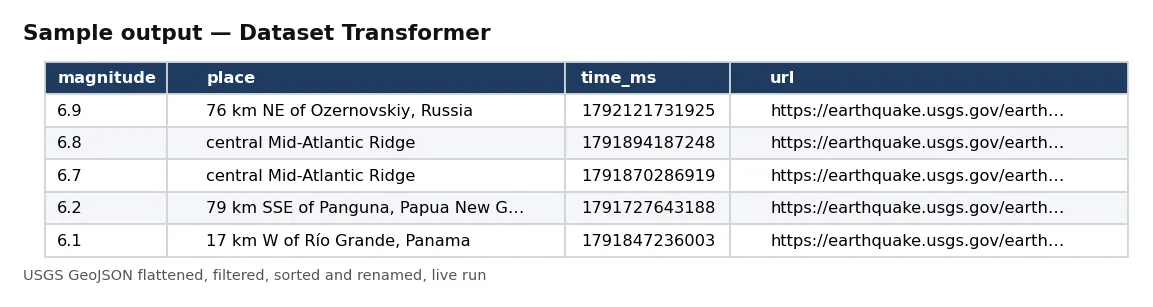
| magnitude | place | time_ms | url |
|---|---|---|---|
| 6.9 | 76 km NE of Ozernovskiy, Russia | 1792121731925 | https://earthquake.usgs.gov/earthquakes/eventpage/us6000u2mq |
| 6.8 | central Mid-Atlantic Ridge | 1791894187248 | https://earthquake.usgs.gov/earthquakes/eventpage/us6000u214 |
| 6.7 | central Mid-Atlantic Ridge | 1791870286919 | https://earthquake.usgs.gov/earthquakes/eventpage/us6000u1z5 |
| 6.2 | 79 km SSE of Panguna, Papua New Guinea | 1791727643188 | https://earthquake.usgs.gov/earthquakes/eventpage/us6000u1kv |
| 6.1 | 17 km W of Río Grande, Panama | 1791847236003 | https://earthquake.usgs.gov/earthquakes/eventpage/us6000u1wn |
Rows from live run 8LuJln2xafXxCOetY on Apify (the Store example: the USGS magnitude 4.5+ weekly GeoJSON, flattened, filtered to magnitude 5 and above, sorted strongest first, with four renamed columns). Notice how nested GeoJSON features became four flat, named columns.
✅ What you get
Every field of each record:
Your fields— the output has the fields you choose; with no field list, every field of each row is kept.
⚙️ Sample inputs
Strongest recent earthquakes (the Store example)
From GeoJSON to a flat table.
Merge two of your datasets and dedupe
Pick the datasets in the Source datasets field.
One row per order line
Unwind a list, then flatten.
Input fields:
| Field | Meaning |
|---|---|
datasetIds | your Apify datasets (picked in the input form). |
dataUrls | JSON, JSON Lines or CSV links (up to 100). |
rows | pasted JSON array (up to 100,000). |
rowsPath | where the row list sits inside a JSON object. |
unwind | list field to split into one row per element. |
flatten | nested fields to dot-named columns. |
filters, filterMode | conditions (eq, ne, gt, gte, lt, lte, contains, notContains, startsWith, endsWith, in, notIn, exists, notExists, empty, notEmpty, regex), all or any. |
dedupeBy | keep the first row per combination of these fields. |
sortBy, sortDescending | sort field and direction. |
fields, rename, dropFields | pick, rename and drop columns. |
offset, maxRows, maxInputRows | skip, limit (default 100,000 output rows; each billed) and input cap (default 200,000). |
🧾 JSON sample record
🔧 How it works
Steps run in this order: unwind, flatten, filter, de-duplicate, sort, pick / rename / drop, skip and limit. Apify datasets are read through the API with the access you grant in the input form (the actor runs with limited permissions and cannot see other storages). Links are read with a robots.txt check.
Delivery is pushed in batches of 500 and charged after each batch. The run receipt (RUN_RECEIPT) lists every source with rows read and used, the row count after each step, and the delivered and charged counts.
💰 Pricing example
Per row delivered, no start fee, no monthly charge:
| Apify plan | Price per row |
|---|---|
| Free | $0.05 |
| Bronze | $0.045 |
| Silver | $0.04 |
| Gold, Platinum, Diamond | $0.0335 |
- 10 rows: $0.50 on the Free plan, $0.335 on Gold.
- 10,000 rows: $500.00 on Free, $335.00 on Gold.
- 100,000 rows: $5,000.00 on Free, $3,350.00 on Gold.
Coverage and size. Proof runs on 17 Oct 2026: 622 USGS rows read and 40 delivered in about 3 seconds; one of our own Apify datasets (30 rows) read through the dataset picker; a 139-row USGS CSV deduplicated by magnitude type to 4 rows.
⚖️ Legal & ToS
It processes data you supply or point it at. You choose the links. Make sure you have the right to download and use the content you point it at; the actor fetches only what you give it (and, where you turn it on, what those pages link to).
❓ FAQ
Does it change my source datasets? No. Sources are only read; the result is a new dataset.
How large can the input be? Up to 2 million rows read in one run (maxInputRows); give the run more memory for large inputs.
Can I filter on nested fields? Yes, with dot paths, with or without flatten.
🆘 Troubleshooting
- dataset not found or not shared with this run — Pick the dataset in the Source datasets field so the run is allowed to read it.
- rowsPath not found — Check where the list sits inside the JSON; leave empty when the JSON has one list of objects.
- SOURCE UNAVAILABLE — None of your sources could be reached after retries. Nothing was charged.
🔗 Related Actors
- Website Contact Scraper — contact details from website lists
- PR Newswire Scraper — press releases by company or topic
- Website Tech Stack Detector — what a site is built with
🏢 About NexGen Signal — data tools and official-source data products on Apify. Browse the catalog: apify.com/nexgensignal
⭐ Found this useful?
If this actor saved you time, a rating on its Apify Store page helps other buyers find it.
Part of NexGen Signal — data tools and official-source data products.


