

Review Sentiment Analysis — Customer Review Themes & Trends
Pricing
from $335.00 / 1,000 100 reviews analyzeds
Review Sentiment Analysis — Customer Review Themes & Trends
Review sentiment analysis for any review set you supply: customer review analysis into themes, complaint clusters, sentiment percentages and trends, with deterministic scores that do not drift run to run. Pay per 100 reviews analyzed.
Pricing
from $335.00 / 1,000 100 reviews analyzeds
Rating
0.0
(0)
Developer

NexGen Watch
Maintained by CommunityActor stats
0
Bookmarked
3
Total users
2
Monthly active users
6 days ago
Last modified
Categories
Share
🌐 Review Sentiment Analysis — Customer Review Themes & Trends
Review sentiment analysis on reviews you already have: pass an Apify dataset ID or inline reviews and get customer review analysis — themes, complaint clusters, sentiment percentages and trends.
Extractors stop at raw reviews. Product, CX, and reputation teams pay for the analysis — themes, complaint clusters, sentiment percentages, and trends they can act on this week.
Output is one None row per result; billing is pay-per-event, the value event being one 100 reviews analyzed (a $0.05 start fee per run, then $0.50 per 100 reviews analyzed).
No login, no API key and no CAPTCHA solving are involved: the source is read logged-out.
Who buys this — use cases by team
- Anyone who needs review sentiment analysis or customer review analysis on a review set they already collected.
- Product: See which features drive praise vs. churn without reading thousands of reviews by hand.
- Customer experience: Surface the top complaint clusters for this release and track whether they shrink next release.
- Reputation / brand: Quantify sentiment movement over time with reproducible numbers you can put in a report.
- Analysts: Get auditable, deterministic scores that don't drift run-to-run — safe for regulated or repeatable reporting.
📊 Sample Output
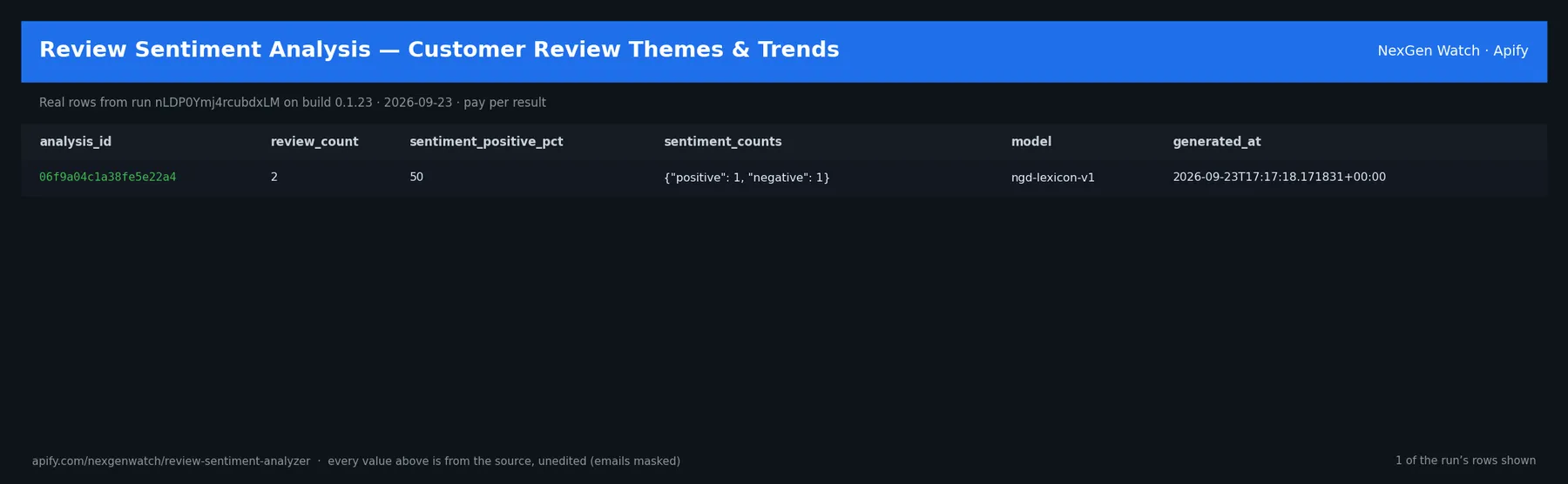
Real rows from run nLDP0Ymj4rcubdxLM on build 0.1.23 (2026-09-23), the same input as the Quick start below — every value is as the source published it (emails masked, long text shortened):
| analysis_id | review_count | sentiment_positive_pct | sentiment_counts | model | generated_at |
|---|---|---|---|---|---|
| 06f9a04c1a38fe5e22a4 | 2 | 50 | {"positive": 1, "negative": 1} | ngd-lexicon-v1 | 2026-09-23T17:17:18.171831+00:00 |
The run finished with the status message: SUCCEEDED: emitted 1 item(s)
✅ What you get
Each row is flat JSON with these fields (from the dataset schema and the sample run; a field the source does not publish for a given row is null):
analysis_id(string/null) — Output field: analysis_idreview_count(number/null) — Output field: review_countdata_start(string/null) — Output field: data_startdata_end(string/null) — Output field: data_enddata_freshness(string/null) — Output field: data_freshnesssentiment_positive_pct(number/null) — Output field: sentiment_positive_pctsentiment_neutral_pct(number/null) — Output field: sentiment_neutral_pctsentiment_negative_pct(number/null) — Output field: sentiment_negative_pctsentiment_counts(object/null) — Output field: sentiment_countsaverage_sentiment_score(number/null) — Output field: average_sentiment_scoreaverage_rating(number/null) — Output field: average_ratingthemes(array/null) — Output field: themescomplaint_clusters(array/null) — Output field: complaint_clusterstrend_buckets(array/null) — Output field: trend_bucketsdeveloper_response_coverage_pct(number/null) — Output field: developer_response_coverage_pctexamples(array/null) — Output field: examplesmethod(string/null) — Output field: methodmodel(string/null) — Output field: modelgenerated_at(string/null) — Output field: generated_atpartial(boolean/null) — Output field: partialsource_dataset_id(string/null) — Output field: source_dataset_id
✅ What you get
What you get
- Themes and bigram topics ranked by mention count
- Complaint clusters that group the recurring pain points
- Sentiment split (positive / neutral / negative %) plus counts and an average sentiment score
- Time-bucketed trend data and a stable analysis ID for like-for-like delta comparisons later
- Developer-response coverage %, representative example reviews, and run metadata
⚙️ Sample inputs
1. Quick start — the Store example (this is what the sample above came from)
The sample run charged exactly: 1 × $0.05 apify-actor-start + 1 × $0.50 reviews-analyzed-100 = $0.55 on the Free tier — every delivered row was billed.
If you leave max_items out, the run delivers at most 10 rows (the schema default); pass a number up to 50000 for a bigger export. An explicit value is always honoured up to that maximum.
2. A smaller, narrowed run
Caps the run at 5 rows — about $2.55 on the Free tier ($0.05 start + 5 × $0.50).
3. A full-size run
Up to 5000 rows — about $2,500.05 on the Free tier ($0.05 start + 5000 × $0.50) if the source has that many; max_items goes up to 50000.
🧾 JSON sample record
One real record from run nLDP0Ymj4rcubdxLM, exactly as it lands in the dataset (emails masked, long text shortened):
🔧 How it works
Transport. Requests go through Apify residential proxy.
Terminal states. A run ends NORMAL, CAPPED (your cap was reached), PARTIAL (something was withheld and the message says what), GENUINE_EMPTY (the source was read and truly had nothing in scope) or BLOCKED (the source refused or changed shape — the run FAILS loud and bills nothing). A zero-row run is never reported as a silent success.
Charging. Each 100 reviews analyzed is charged at the moment it is pushed (reviews-analyzed-100); a row that fails to charge is not delivered, so the dataset count always equals the charged count.
🔧 How it works
Transport. Requests go through Apify residential proxy.
How it works
Feed it inline reviews or a user-authorized Apify dataset ID. It scores every review with a transparent deterministic lexicon-plus-rating-prior model (ngd-lexicon-v1) — not an LLM. The same reviews in produce the same analysis out, every time: no model drift, no API key, no per-token fees. Every score is reproducible and auditable. No external review source is fetched — you bring the data, it does the analysis.
Compliance & honest limits
- You supply the review data (inline or an Apify dataset you authorize); this actor does not scrape a review source itself.
- Deterministic lexicon model — powerful for reproducibility, but it is not a generative summarizer and will not write freeform narratives.
- A source-confirmed empty input returns
SUCCEEDED-0: GENUINE_EMPTY; truncated runs are labeledPARTIAL.
About
Part of the NexGen Watch App Intelligence cluster — a closed web of review, metadata, ranking, and keyword actors that share one honest, deterministic contract. Questions or need a custom feed? Open an issue on the Actor page.
What is not done. No login, no cookie or CAPTCHA bypass, no private or personal-account data, no browser automation.
⏰ Optional: run it on a schedule
A single run returns the current records. If you also want to be told what changed over time, open the actor in Apify Console → Schedules → Create new, add this actor with the input you want, and pick a cadence:
- Daily —
0 7 * * *(07:00 UTC): catch changes within a day. - Weekly —
0 7 * * 1: a Monday digest.
Each run is independent; keep the same input on the schedule so the results stay comparable. Schedules can also POST results to a webhook (Console → Integrations).
💰 Pricing example
| Event | Free | Bronze | Silver | Gold |
|---|---|---|---|---|
Actor Start (apify-actor-start) | $0.05 | $0.05 | $0.05 | $0.05 |
100 reviews analyzed (reviews-analyzed-100) | $0.50 | $0.45 | $0.40 | $0.335 |
Worked at the live Free-tier price:
- 1 100 reviews analyzeds: $0.05 start + 1 × $0.50 = $0.55
- 10 100 reviews analyzeds: $0.05 start + 10 × $0.50 = $5.05
- 25 100 reviews analyzeds: $0.05 start + 25 × $0.50 = $12.55
A run that delivers zero rows charges the $0.05 start fee only. A BLOCKED run (source refused) fails loud and charges no value event. The start fee is charged once per GB of run memory; the default run memory is 1024 MB.
Yield on the sample run: SUCCEEDED: emitted 1 item(s). max_items is a hard ceiling on what is delivered and billed, never a target.
⚖️ Legal & ToS
This actor reads public data only. It collects only what the source publishes to any visitor, identifies itself, and does not access accounts, private data or anything behind authentication. Use the output in line with the source's terms and your local law; the intended use is B2B research and monitoring.
❓ FAQ
Q: Do I need an API key or a login?
A: No. the input schema has no key field and the actor carries no secrets.
Q: Why did my run return 0 rows?
A: Read the run's status message. GENUINE_EMPTY means the source was read and had nothing in scope for your input; BLOCKED means the source refused and the run failed without billing a value event — retry later or narrow the input. A zero-row run bills the start fee only.
Q: How many rows can one run return?
A: Up to max_items (default 10). Raise the cap for a bigger run; you pay per delivered row.
Q: How fresh is the data?
A: Every run reads the source live at run time; nothing is cached between runs. Put it on a schedule for a continuous feed.
Q: What formats can I export?
A: The dataset downloads as JSON, CSV, Excel, XML or RSS from the run's Dataset tab or the Apify API, and any run can push to a webhook or integration.
Q: How is this different from the other web QA and enrichment tools actors?
A: Same output shape and billing model; this one covers Review Sentiment Analyzer — Themes, Trends & Complaints. The siblings under Related Actors cover the other sources or slices — run several on one schedule for a combined feed.
Q: Are there rate limits?
A: The actor paces itself against the source; there is no per-buyer limit beyond your Apify plan's concurrency.
🆘 Troubleshooting
- Run FAILED with BLOCKED → the source refused the request or changed its page shape → nothing was billed beyond the start fee; retry after a while, and if it persists open an Issue with the run id.
- Status says CAPPED → your cap (
max_items) was reached → raise it for a bigger run. - Input validation error on start → a field is outside the schema's allowed values → start from the Quick start block and change one field at a time.
- Run TIMED-OUT → a very wide request on a slow day → raise the run timeout in Run options or narrow the input; what was delivered before the timeout is still in the dataset.
🔗 Related Actors
- Marketing Stack Enricher — Give it a list of company domains; it returns one CRM-ready record per domain describing the marketing stack (analytics, tag managers, CRM/marketing…
- PDF Text Intake Auditor — Judges whether a PDF is ingestible before you spend on extraction: text-layer presence, page count, encryption, scan likelihood, per-page text densit…
- Responsive Visual QA Matrix — Runs a headless-Chromium responsive QA pass on each URL across a desktop/tablet/mobile matrix and returns ONE verdict per URL: per-viewport layout me…
- RSS Feed Health Checker — Check any RSS, Atom or RDF feed: shape validation, freshness score, duplicate detection and a feed-level health verdict with item samples. One record…
- Sitemap Indexability Auditor — Audit whether the URLs in your sitemaps (or a plain URL list) are actually indexable — sitemaps are expanded (bounded nested depth + a hard URL cap)…
- Social Preview Card Verifier — Verifies how a page will unfurl on social platforms. Reads Open Graph + Twitter Card tags, validates each declared image for reachability, MIME and p…
- 🏢 About NexGen Watch — NexGen Watch is a catalog of more than 300 public data actors built on official sources, pay-per-result. Browse the catalog at apify.com/nexgenwatch.
⭐ Found this useful?
If this actor saved you a manual check, a quick review on the Apify Store helps other teams find it. Feature request or a source that changed? Open it from the Issues tab — every one is read.


