

Austria Case Law Search & Ruling Alerts (OGH, VfGH, VwGH)
Pricing
from $0.80 / 1,000 court decisions
Austria Case Law Search & Ruling Alerts (OGH, VfGH, VwGH)
$1 per 1,000 court decisions. Search Austrian case law (Judikatur, Rechtsprechung, Entscheidungen) from the official RIS open-data API: OGH, VfGH, VwGH, BVwG, LVwG, OLG/LG and the data protection authority, with full text and new-ruling alerts. CC BY 4.0.
Pricing
from $0.80 / 1,000 court decisions
Rating
0.0
(0)
Developer

Fast Agent
Maintained by CommunityActor stats
0
Bookmarked
2
Total users
1
Monthly active users
5 days ago
Last modified
Categories
Share
Price: $1 per 1,000 court decisions ($0.90 on Apify Scale, $0.80 on Business and above) + $0.00005 per run · full text at no extra cost · official RIS API, no key or proxy
Auf Deutsch
Österreichische Judikatur durchsuchen und neue Entscheidungen abonnieren. Dieser Actor liefert Entscheidungen von OGH, VfGH, VwGH, BVwG, den Landesverwaltungsgerichten, OLG/LG und der Datenschutzbehörde aus dem Rechtsinformationssystem des Bundes (RIS, Bundeskanzleramt) über die offizielle OGD-RIS-API – als JSON, CSV oder Excel. Die Daten stehen unter CC BY 4.0; jeder Datensatz enthält die nötige Quellenangabe.
So suchen Sie:
- Suchworte in RIS-Syntax: Phrasen,
ORund ein*als Platzhalter pro Wort, z. B."keywords": "Mietzins*", "courts": ["OGH"]. - Optional nach Geschäftszahl, Norm (z. B.
ABGB §1295), Entscheidungsdatum oder Aufnahme ins RIS filtern; statt Entscheidungstexten auch Rechtssätze abrufen. - Entscheidungs-Alert: Only new since last run einschalten und den Lauf regelmäßig planen – Sie erhalten nur neue Dokumente.
Wichtige Ausgabefelder: court (Gericht), decisionDate (Entscheidungsdatum), decisionType (Erkenntnis, Beschluss …), fileNumbers (Geschäftszahlen), ecli, norms (zitierte Normen), headnote (Leitsatz, soweit vorhanden), fullText (Volltext, optional), url/htmlUrl (Link zum RIS-Dokument), attribution (Quellenangabe nach CC BY 4.0).
Preis: 1 $ pro 1.000 Entscheidungen plus 0,00005 $ pro Lauf; der Volltext kostet nichts extra. Der Actor hält die RIS-Zugriffsregeln ein (höchstens eine Anfrage alle 2 Sekunden). Mit KI-Assistenten: Funktioniert auch in ChatGPT, Claude und Cursor über den Apify-MCP-Server – siehe Use it from ChatGPT, Claude or Cursor unten.
Search Austrian case law (Judikatur, Rechtsprechung, Entscheidungen) from the official Rechtsinformationssystem des Bundes (RIS) of the Federal Chancellery, through its open-data OGD-RIS API. Get decisions of the Oberster Gerichtshof (OGH), Verfassungsgerichtshof (VfGH), Verwaltungsgerichtshof (VwGH), Bundesverwaltungsgericht (BVwG), the Landesverwaltungsgerichte (LVwG), the higher regional and regional courts (OLG, LG) and the Datenschutzbehörde (DSB) as clean JSON with ECLI, file numbers, cited norms, keywords and optional full text. Switch on alert mode and schedule it to get only new rulings.
Lawyers, legal publishers, compliance teams, researchers and legal-AI builders can follow Austrian case law without searching RIS by hand, or load it into a RAG index.
What does Austria Case Law Search do?
- Calls the official OGD-RIS API v2.6 at data.bka.gv.at, open data under CC BY 4.0. It needs no API key, login or proxy.
- Searches decision texts (Entscheidungstexte) by default, and optionally the courts' legal principles (Rechtssätze), each linking to the decisions that apply it.
- Filters by search words (RIS syntax: phrases,
OR, one*wildcard per word), courts, file number (Geschäftszahl), statute or provision (Norm, e.g.ABGB §1295), decision dates and when documents were added to RIS. - Returns ECLI, court, file numbers, decision date and type, cited norms, keywords, legal areas, headnotes where available, and links to the RIS document in HTML and PDF.
- Full text on request, as plain text, for research and RAG.
- Alert mode remembers what each search has already delivered and returns only new documents, newest first. It's off by default, so one-off searches always return results; the example alert task switches it on.
- Follows the RIS access rules: one request every 2 seconds, no parallel connections, and runs over 200 results are capped during Austrian office hours (Mon–Fri 05:00–20:00 Vienna time), as RIS asks for larger downloads to run in the evening, at weekends or on public holidays.
Why use it?
- All the main Austrian courts in one tool, with consistent English field names.
- Built for alerts and AI: clean JSON, ECLIs and full text, ready for monitoring, research or retrieval-augmented generation.
- Cheap: a search returning 200 decisions costs about $0.20.
Use it from ChatGPT, Claude or Cursor
Give your AI assistant real Austrian court decisions to cite (OGH, VfGH, VwGH, BVwG and more) from the official RIS open-data API, with file numbers (Geschäftszahlen) and ECLIs.
This Actor works as a tool in any AI assistant that supports the Model Context Protocol (MCP), through the official Apify MCP server. You ask in plain language; the assistant fills in the filters, runs the Actor and answers from the results.
MCP server URL (this Actor only):
Set it up once (you need a free Apify account):
- Claude (claude.ai and Claude Desktop): open Settings → Connectors → Add → Add custom connector. Enter a name (for example
Austrian case law), paste the URL above as the Remote MCP server URL, select Continue, keep the detected settings and select Add. Sign in to Apify when your browser opens. On Team and Enterprise plans, an Owner adds the connector for the organisation. - ChatGPT: custom connectors need ChatGPT Developer mode (beta). Go to Settings → Apps & Connectors → Create, paste the URL above as the MCP Server URL, choose OAuth authentication and select Create, then sign in to Apify. In a new chat, select + → More and pick the connector.
- Cursor: add this to
~/.cursor/mcp.json(or.cursor/mcp.jsonin a project). Cursor opens your browser to sign in to Apify:
- VS Code, Windsurf and other MCP clients: add the same URL as a remote (Streamable HTTP) MCP server. If a client can't do OAuth, send the header
Authorization: Bearer <YOUR_APIFY_TOKEN>instead (token from Apify Console → Settings → API & Integrations).
Already connected to the full Apify server (https://mcp.apify.com) or the Apify plugin for Cursor, Claude Code or VS Code? Just mention orange_briefcase_hrj/austria-case-law-search in your request.
Try asking:
"Find the 10 most recent OGH decisions on Mietzinsminderung and summarise them in English, with file numbers and ECLIs."
"Find VwGH decisions on § 5 AsylG added to RIS in the last month and list the key points of each."
"Find VfGH decisions on Datenschutz since 1 January 2025 and summarise the main findings."
Cost: a run started by your assistant is a normal run of this Actor, billed to your Apify account at the usual pay-per-event price ($1 per 1,000 decisions, see the pricing section below). This Actor charges nothing extra for runs that come through an assistant. Asking for a small number of results (for example "the top 20") keeps runs cheap, and the Apify Free plan's monthly credit covers plenty of tests.
Screenshots
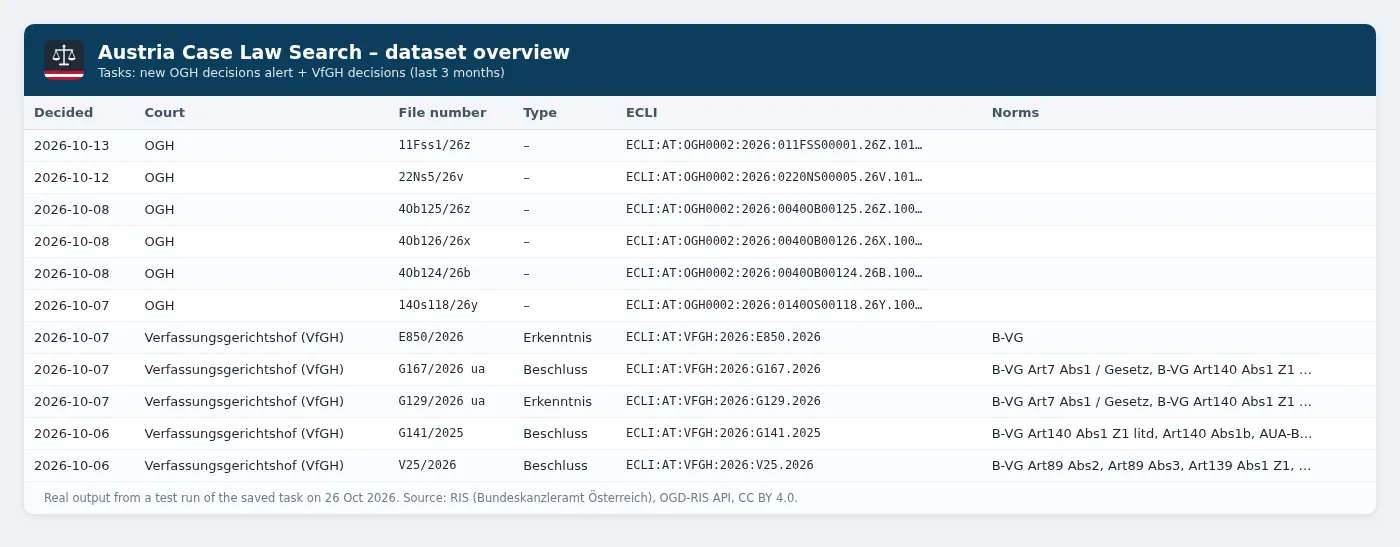
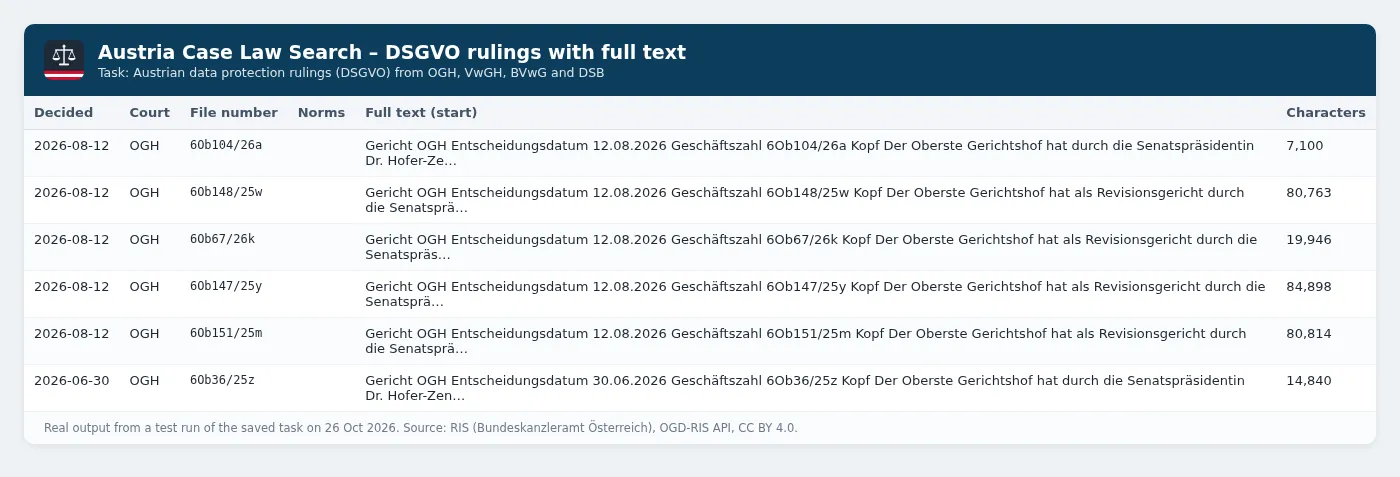
Real output from the saved example tasks (test runs on 26 October 2026):
Ready-made example tasks
- New Austrian Supreme Court (OGH) decisions alert: court
OGH, alert mode on. Schedule it daily or weekly. - Austrian data protection rulings (DSGVO) with full text: search
DSGVOin the OGH, VwGH, BVwG and DSB, with full text. - Austrian Constitutional Court (VfGH) decisions, last 3 months: court
VFGH, added to RIS in the last 3 months.
How to use it
- Pick the courts (OGH by default) and optionally enter search words, a file number or a statute (Norm).
- Optionally limit decision dates or added to RIS within, and switch on Include full text.
- For alerts, switch on Only new since last run and add a daily or weekly schedule in Apify Console.
- Download the results as JSON, CSV or Excel, or send them to Slack, email, Google Sheets, Zapier or Make.
Input example
Output example
The dataset has an overview table view (decided, court, file numbers, type, document type, ECLI, norms, link).
Output fields
| Field | Description |
|---|---|
documentNumber, ecli, url, htmlUrl, pdfUrl | RIS document number, European Case Law Identifier and links |
court, source, state | Court or authority, RIS application and (LVwG) federal state |
documentType, decisionType, fileNumbers, decisionDate | Decision text or legal principle, Erkenntnis/Beschluss/..., file numbers and date |
norms, keywords, legalAreas, index, headnote | Cited provisions, keywords, legal areas, index entries and headnote where RIS has them |
legalPrincipleNumbers, relatedDecisions | For legal principles: RS numbers and the decisions that apply them |
publishedAt, modifiedAt | When RIS published or last changed the document |
fullText | Full text, when Include full text is on |
attribution | CC BY 4.0 attribution to keep when you republish |
How much does it cost?
This Actor uses pay-per-event pricing. You pay only for what it delivers, and Apify platform costs are included.
| Apify plan (Store discount tier) | Price per court decision | Per 1,000 |
|---|---|---|
| Free, Starter (Bronze) | $0.001 | $1 |
| Scale (Silver) | $0.0009 | $0.90 |
| Business (Gold) and above | $0.0008 | $0.80 |
Each run also has an Actor start charge of $0.00005 (at the default 256 MB memory). Full text doesn't cost extra per decision, but each document takes about 2 seconds more because of the RIS rate limit.
Worked examples (Free/Starter prices):
- Research search returning 200 decisions: $0.00005 + 200 × $0.001 = about $0.20.
- Weekly OGH alert with about 40 new decisions a week: 4 runs × $0.00005 + 160 × $0.001 = about $0.16 a month.
- Bulk export of 1,000 decisions with full text for a RAG index (run it in the evening or at the weekend): $0.00005 + 1,000 × $0.001 = about $1.00.
The Apify Free plan includes $5 of platform usage every month (see apify.com/pricing), and pay-per-event charges are paid from that credit. That covers about 5,000 decisions a month, for example a daily OGH alert for a whole month or several large exports (30 daily runs add only $0.0015 in start charges). Use Max results and Apify's maximum cost per run to cap spend.
Use via API (Python, JavaScript, cURL)
You can start the Actor from your own code with the official Apify API clients. Get your API token from Apify Console → Settings → API & Integrations.
Python
Install with pip install apify-client.
JavaScript / Node.js
Install with npm install apify-client.
cURL
This runs the Actor and returns the dataset items in the same request (best for short runs):
For longer runs, call POST /v2/acts/orange_briefcase_hrj~austria-case-law-search/runs and read the dataset when the run finishes. You can also add the Actor to Zapier, Make, n8n or a webhook from the Integrations tab.
Data source, licence and attribution
- Source: Rechtsinformationssystem des Bundes (RIS), Bundeskanzleramt Österreich, via the public OGD-RIS API listed on data.gv.at. No registration is needed.
- Licence: RIS data via OGD is licensed under Creative Commons Attribution 4.0 (CC BY 4.0). Every record carries an
attributionfield naming the source and licence; keep it when you republish. - Not official: only the authentic RIS publications are legally binding, and RIS gives no guarantee of accuracy, completeness or availability. This tool is not affiliated with the Federal Chancellery or RIS.
- Fair use of the API: the Actor keeps to the RIS technical rules (at most one request every 2 seconds, no parallel connections, large downloads outside office hours).
- Data protection: RIS publishes court decisions in anonymised form. Use the data in line with the GDPR and don't try to re-identify the people involved.
Related tools
Other tools from the same publisher, all built on official open-data APIs:
| Tool | What it does |
|---|---|
| UK Public Tender Alerts | Daily alerts for new UK government tenders and contract awards from Find a Tender and Contracts Finder. |
| Netherlands Public Tender Alerts (TenderNed) | Daily alerts for new Dutch government tenders from TenderNed, filtered by keyword, CPV and province. |
| Ukraine Prozorro Tender Alerts | New Ukrainian public tenders from the official Prozorro API, filtered by keyword, CPV, oblast and value. |
| Germany Public Tender Alerts (oeffentlichevergabe.de) | Daily alerts for new German public tenders (Ausschreibungen) from the official Bekanntmachungsservice open data, filtered by keyword, CPV and federal state. |
| France Public Tender Alerts (BOAMP) | Daily alerts for new French public tenders (appels d'offres) from BOAMP open data, filtered by keyword, CPV, department and contract type. |
| UK Company Check & Change Monitor | Bulk Companies House checks with a RED/AMBER/GREEN risk flag, plus a monitor mode that outputs only changes. |
| German Case Law Search & Ruling Alerts | Search BGH, BVerfG, BAG, BFH and other German federal court decisions, with full text and new-ruling alerts. |
| Sweden Job Ads API (Platsbanken) | Swedish job ads from Arbetsförmedlingen's official JobTech API, with English labels and daily alerts. |
| Czech Job Ads API (Úřad práce ČR) | Czech job vacancies from the official MPSV / Úřad práce ČR open data, filtered by keyword, region, CZ-ISCO, salary and foreign-worker eligibility, with English labels and daily alerts. |
Tip: for German federal case law in the same format, use German Case Law Search.
FAQ
Is this legal? Yes. The Austrian federal government publishes RIS case law as open data under CC BY 4.0 and provides the OGD-RIS API for programmatic access. The Actor only uses that API and attributes the source.
Do I need an API key? No.
Which courts are covered? OGH, OLG and LG (ordinary courts), VfGH, VwGH, BVwG, the nine LVwG and the Datenschutzbehörde. District court (BG) decisions are only in RIS where the courts publish them, and come with the JUSTIZ option.
How do I get all decisions on a topic? Use search words with RIS syntax, for example Mietzins* or "grobe Fahrlässigkeit", and raise Max results (up to 1,000). Runs over 200 results are capped during Austrian office hours, so schedule big ones for the evening or weekend.
Why are some headnotes or norms missing? New decisions are often marked Auswertung in Arbeit (still being indexed) in RIS; those placeholders are left empty and filled in once RIS adds them.
Where can I see what changed? See the Changelog tab. Each release is listed there.


![🚦 Traffic Genius — Analytics QA & Load Tester [💰$0.40/1K] avatar](https://images.apifyusercontent.com/SulmF_J6HA5J0mw5tyi6HphkB40IdeUTjhAjcxulnmw/rs:fill:76:76/cb:1/aHR0cHM6Ly9hcGlmeS1pbWFnZS11cGxvYWRzLXByb2QuczMudXMtZWFzdC0xLmFtYXpvbmF3cy5jb20vVEJCdlpYUzZsbVhXRE9NeGctYWN0b3ItVENIb0tla0ZWT2QyakpJa3gtbmgwMDhKT3dlMC1nb29nbGUtYW5hbHl0aWNzLTEwMjQucG5n.webp)

![🇦🇹 ImmoScout24 Austria Scraper [From 💰$0.75/1K] avatar](https://images.apifyusercontent.com/_cDTqPY4GVG7sANn_saf5cEdJsyKmX_iwKDRZI1boIg/rs:fill:76:76/cb:1/aHR0cHM6Ly9hcGlmeS1pbWFnZS11cGxvYWRzLXByb2QuczMudXMtZWFzdC0xLmFtYXpvbmF3cy5jb20vbmduOHZSRVNUa3NleVdFNnAtYWN0b3ItY2lUZEhmZ09ra3dmRXpURTktYlhkWFNmQUtndy1pbW1vLnBuZw.webp)
