

Germany Public Tender Alerts - oeffentlichevergabe.de
Pricing
from $1.20 / 1,000 tender notices
Germany Public Tender Alerts - oeffentlichevergabe.de
$1.50 per 1,000 notices. Daily German public tender alerts (Ausschreibungen, öffentliche Aufträge) from the official Bekanntmachungsservice open data (CC0). Filter by keyword, CPV, federal state, contract type, value and deadline; only new notices are returned.
Pricing
from $1.20 / 1,000 tender notices
Rating
0.0
(0)
Developer

Fast Agent
Maintained by CommunityActor stats
0
Bookmarked
2
Total users
1
Monthly active users
5 days ago
Last modified
Categories
Share
Price: $1.50 per 1,000 tender notices ($1.35 on Apify Scale, $1.20 on Business and above) · no API key, login or proxy · official German open data (CC0)
Auf Deutsch
Tägliche Alerts für öffentliche Ausschreibungen in Deutschland. Der Actor liest die amtlichen täglichen Bekanntmachungsexporte von oeffentlichevergabe.de (Datenservice Öffentlicher Einkauf) und liefert EU-weite und nationale Ausschreibungen als JSON, CSV oder Excel.
Die Daten stehen unter CC0; jeder Datensatz nennt trotzdem Quelle und Abrufdatum.
Filtern Sie nach Suchbegriff, CPV-Code, Bundesland, Auftragsart, Auftragswert und Angebotsfrist. Mit Only new since last run erhalten Sie bei täglicher Planung nur neue Bekanntmachungen.
Beispiel: "keywords": ["Software"], "regions": ["Bayern"] liefert IT-Ausschreibungen aus Bayern.
Preis: 1,50 $ pro 1.000 Bekanntmachungen plus 0,00005 $ pro Lauf.
Mit KI-Assistenten: Funktioniert auch in ChatGPT, Claude und Cursor über den Apify-MCP-Server – siehe Use it from ChatGPT, Claude or Cursor unten.
Get daily German public tender alerts (Ausschreibungen, öffentliche Aufträge, Bekanntmachungen) from the Bekanntmachungsservice of the Datenservice Öffentlicher Einkauf at oeffentlichevergabe.de, the federal hub that collects EU-wide and national procurement notices from every German e-tendering platform. You get clean JSON, CSV or Excel, filtered by keyword, CPV code, federal state (Bundesland), contract type, value and deadline. In "only new since last run" mode, a scheduled run works as a tender alert service: you only get notices you haven't seen.
Bid teams, SMEs, consultancies and international suppliers can follow German public sector opportunities (Vergabe) without checking dozens of portals by hand, and send them to email, Slack, Google Sheets or a CRM.
What does Germany Public Tender Alerts do?
- Reads the official daily notice exports of the Bekanntmachungsservice open-data API (
/api/notice-exports), published under CC0 1.0. It needs no API key, login or proxy, and downloads one OCDS file and one eForms file per publication day. - Returns contract notices (Auftragsbekanntmachungen) by default, plus contract award notices (vergebene Aufträge, with winning suppliers and values where published), prior information notices, contract modifications, voluntary ex-ante notices and corrections if you want them.
- Covers EU-wide procedures (above the EU thresholds) and national procedures under UVgO and VOB/A that never reach TED.
- Filters by keywords (any or all; case-, accent- and umlaut-insensitive substring match, so
reinigungalso finds Gebäudereinigung), excluded words, CPV prefixes, federal states or NUTS codes (buyer or place of performance), contract type, EU or national scope, minimum estimated value, buyer name and open deadlines. - Adds the submission deadline from the eForms notice, the procedure type, legal basis, CPV codes with English descriptions, lots, the link to the tender documents on the e-tendering platform (DTVP, Vergabe Bayern, evergabe-online and others) and the notice link on oeffentlichevergabe.de.
- Merges re-published and corrected notices: versions of the same procedure (OCID) and stage are combined into one record, keeping the latest, so you don't pay twice. Award notices for different suppliers stay separate.
- "Only new since last run" mode remembers what each alert has already delivered. It's off by default, so one-off searches always return results; the example alert tasks switch it on.
- Saves an optional summary digest with counts by type, contract type and state, top buyers, the largest notices and those closing soonest.
Why use it?
- One source for all of Germany: federal, state and municipal buyers from every platform, EU-wide and national, in one consistent format.
- English field names and normalised codes (
tender,works,open) next to the German originals, so non-German teams can filter easily. - Cheap and fast: official bulk files with no browser, so a daily run takes seconds.
Use it from ChatGPT, Claude or Cursor
Ask your AI assistant about German public tenders (Ausschreibungen) and get live answers from the official oeffentlichevergabe.de open data, in English if you like.
This Actor works as a tool in any AI assistant that supports the Model Context Protocol (MCP), through the official Apify MCP server. You ask in plain language; the assistant fills in the filters, runs the Actor and answers from the results.
MCP server URL (this Actor only):
Set it up once (you need a free Apify account):
- Claude (claude.ai and Claude Desktop): open Settings → Connectors → Add → Add custom connector. Enter a name (for example
German tenders), paste the URL above as the Remote MCP server URL, select Continue, keep the detected settings and select Add. Sign in to Apify when your browser opens. On Team and Enterprise plans, an Owner adds the connector for the organisation. - ChatGPT: custom connectors need ChatGPT Developer mode (beta). Go to Settings → Apps & Connectors → Create, paste the URL above as the MCP Server URL, choose OAuth authentication and select Create, then sign in to Apify. In a new chat, select + → More and pick the connector.
- Cursor: add this to
~/.cursor/mcp.json(or.cursor/mcp.jsonin a project). Cursor opens your browser to sign in to Apify:
- VS Code, Windsurf and other MCP clients: add the same URL as a remote (Streamable HTTP) MCP server. If a client can't do OAuth, send the header
Authorization: Bearer <YOUR_APIFY_TOKEN>instead (token from Apify Console → Settings → API & Integrations).
Already connected to the full Apify server (https://mcp.apify.com) or the Apify plugin for Cursor, Claude Code or VS Code? Just mention orange_briefcase_hrj/germany-tender-alerts in your request.
Try asking:
"Find open German tenders for software development or IT services in Bayern or Berlin published in the last 2 days, with buyer, deadline and link."
"List new German construction tenders (CPV 45000000) in Nordrhein-Westfalen with an estimated value over €500,000."
"Which tenders for building cleaning (Gebäudereinigung) were published this week, and when do they close?"
Cost: a run started by your assistant is a normal run of this Actor, billed to your Apify account at the usual pay-per-event price ($1.50 per 1,000 notices, see the pricing section below). This Actor charges nothing extra for runs that come through an assistant. Asking for a small number of results (for example "the top 20") keeps runs cheap, and the Apify Free plan's monthly credit covers plenty of tests.
Screenshots
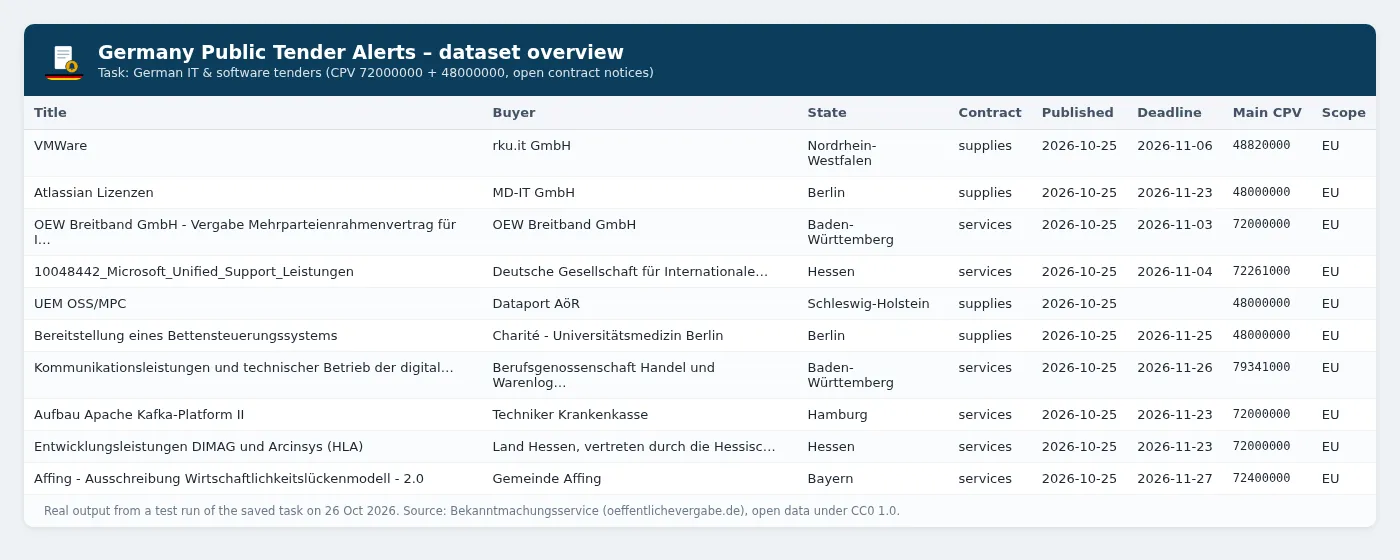
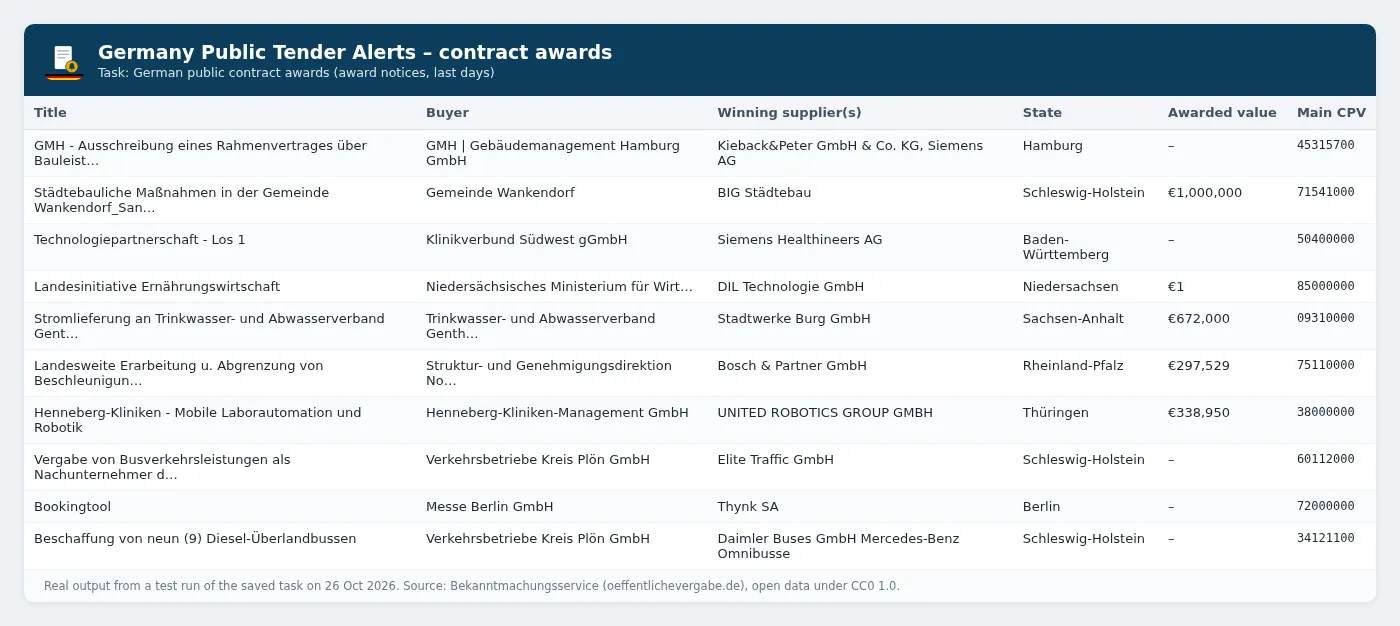
Real output from the saved example tasks (test runs on 26 October 2026):
Ready-made example tasks
- German IT & software tenders, daily alert: CPV
72000000+48000000, open contract notices, only new. - Construction tenders in Bavaria (Bauleistungen Bayern): CPV
45000000, regionBayern, only new. - German public contract awards: award notices from the last 7 days, with winners and values, for market intelligence.
How to use it
- Enter keywords (German terms find the most:
Software,Reinigung,Planungsleistungen,Straßenbau) and/or CPV codes (for example72000000for IT services). - Optionally pick federal states, contract types, EU or national procedures and the notice types you want (contract notices by default).
- Switch on Only new since last run and add a daily schedule in Apify Console. Each day's export is complete after midnight German time, so a morning run catches the whole previous day.
- Connect the output to email, Slack, Google Sheets, Zapier or Make, or download it as CSV, Excel or JSON.
Input example
Output example
The dataset has an overview table view (title, buyer, state, type, contract type, published, deadline, estimated value, main CPV, link). The SUMMARY record in the run's key-value store holds the digest.
Output fields
| Field | Description |
|---|---|
noticeId, noticeVersion, ocid, noticeUrl, ocdsUrl | Notice id and version, procurement id (shared by all notices of one procedure) and links |
noticeType, eformsNoticeType, procedure, legalBasis, european | Normalised stage and procedure, eForms subtype, legal basis (EU directive or de-vob / de-vol / de-uvgo) |
title, description, lots, lotCount | What is being bought |
buyerName, buyerCity, buyerPostCode, buyerNuts, buyerState | Contracting authority and location |
contractType, estimatedValue, currency, deadline, publishedAt | Contract type, value where published, submission deadline and publication time (UTC) |
mainCpvCode, cpvCodes, cpvDescriptions, placeOfPerformanceNuts, placeOfPerformance | Classification and place of performance |
tenderDocumentsUrl | Where to download the documents and submit |
suppliers, awardedValues | Winning suppliers and awarded values (award notices) |
mergedNoticeIds, matchedKeywords, firstSeenAt, dataLicence | De-duplication, alert metadata and attribution |
Tips
- CPV prefixes:
72000000matches every code starting with72, and45000000matches all construction work. - Regions: use federal states in German or English (
Bayern/Bavaria,NRW) or NUTS codes for districts (DE21= Oberbayern,DEA2= Köln). A notice matches if the buyer or the place of performance is in the region. - Values: most German notices don't publish an estimated value, so the Minimum estimated value filter narrows results a lot.
- Award notices often name the winning suppliers; values are only included where the buyer published them.
- Several alerts: give each one its own Alert name (state key), or use different filters. Each filter set keeps its own memory.
How much does it cost?
This Actor uses pay-per-event pricing. You pay only for what it delivers, and Apify platform costs are included.
| Apify plan (Store discount tier) | Price per notice | Per 1,000 |
|---|---|---|
| Free, Starter (Bronze) | $0.0015 | $1.50 |
| Scale (Silver) | $0.00135 | $1.35 |
| Business (Gold) and above | $0.0012 | $1.20 |
Each run also has an Actor start charge of $0.00005, and a run summary charge of $0.002 when Save a summary is on (the default). With Only new since last run switched on (as in the example alert tasks) you never pay twice for the same notice.
Worked examples (Free/Starter prices):
- Daily IT & software alert, about 10 new notices a day: 30 runs × ($0.00005 + $0.002) + 300 notices × $0.0015 = about $0.51 a month.
- Every construction tender in Bavaria, about 40 a working day, daily: 30 × $0.00205 + 880 × $0.0015 = about $1.38 a month.
- One-off 30-day export of 5,000 notices: $0.00205 + 5,000 × $0.0015 = about $7.50.
The Apify Free plan includes $5 of platform usage every month (see apify.com/pricing), and pay-per-event charges are paid from that credit. That covers the daily IT alert above about nine times over. Use Max notices per run and Apify's maximum cost per run to cap spend.
Use via API (Python, JavaScript, cURL)
You can start the Actor from your own code with the official Apify API clients. Get your API token from Apify Console → Settings → API & Integrations.
Python
Install with pip install apify-client.
JavaScript / Node.js
Install with npm install apify-client.
cURL
This runs the Actor and returns the dataset items in the same request (best for short runs):
For longer runs, call POST /v2/acts/orange_briefcase_hrj~germany-tender-alerts/runs and read the dataset when the run finishes. You can also add the Actor to Zapier, Make, n8n or a webhook from the Integrations tab.
Data source, licence and attribution
- Source: Bekanntmachungsservice of the Datenservice Öffentlicher Einkauf, operated for the German federal government (Beschaffungsamt des BMI), at oeffentlichevergabe.de. Its open-data API (documentation) offers the daily notice exports used here for bulk download.
- Licence: the notice data is published under CC0 1.0 (stated in every OCDS file). Every record carries a
dataLicenceattribution anyway, and we recommend keeping it. - Not affiliated with the German government or any e-tendering platform. Always check the official notice and tender documents before you bid.
- Data protection: buyer contact details are only included if you switch on Include buyer contact details. They can be personal data; use them only to take part in the procurement, in line with the GDPR.
Related tools
Other tools from the same publisher, all built on official open-data APIs:
| Tool | What it does |
|---|---|
| UK Public Tender Alerts | Daily alerts for new UK government tenders and contract awards from Find a Tender and Contracts Finder. |
| Netherlands Public Tender Alerts (TenderNed) | Daily alerts for new Dutch government tenders from TenderNed, filtered by keyword, CPV and province. |
| Ukraine Prozorro Tender Alerts | New Ukrainian public tenders from the official Prozorro API, filtered by keyword, CPV, oblast and value. |
| France Public Tender Alerts (BOAMP) | Daily alerts for new French public tenders (appels d'offres) from BOAMP open data, filtered by keyword, CPV, department and contract type. |
| UK Company Check & Change Monitor | Bulk Companies House checks with a RED/AMBER/GREEN risk flag, plus a monitor mode that outputs only changes. |
| German Case Law Search & Ruling Alerts | Search BGH, BVerfG, BAG, BFH and other German federal court decisions, with full text and new-ruling alerts. |
| Austria Case Law Search & Ruling Alerts (RIS) | Search OGH, VfGH, VwGH, BVwG and other Austrian court decisions from the official RIS API, with full text and new-ruling alerts. |
| Sweden Job Ads API (Platsbanken) | Swedish job ads from Arbetsförmedlingen's official JobTech API, with English labels and daily alerts. |
| Czech Job Ads API (Úřad práce ČR) | Czech job vacancies from the official MPSV / Úřad práce ČR open data, filtered by keyword, region, CZ-ISCO, salary and foreign-worker eligibility, with English labels and daily alerts. |
Tip: for EU-wide tenders in other countries, combine this with Netherlands, France and UK tender alerts using the same keywords or CPV codes.
FAQ
Is this legal? Yes. The Bekanntmachungsservice publishes the notices as open data under CC0 and provides the export API specifically for bulk downloads. The Actor only uses that official API, with no scraping of e-tendering platforms.
Do I need an API key or account at oeffentlichevergabe.de? No.
How fresh is the data? Each publication day is exported as one file that is complete after midnight German time, so the newest notices are from yesterday. A daily morning schedule gives you every notice the day after it's published.
Does it cover national (below-threshold) tenders? Yes, notices published through the Bekanntmachungsservice under UVgO and VOB/A are included, not only EU-wide ones. Coverage depends on what buyers and platforms publish there.
Can I get all German tenders in bulk? Yes. Leave the filters empty and set Look back up to 31 days and Max notices per run up to 20,000.
Why is a field empty? Many notices don't publish values, and national notices don't always state a contract type. The Actor never invents data.
Where can I see what changed? See the Changelog tab. Each release is listed there.


