

UK Public Tender Alerts - Find a Tender & Contracts Finder
Pricing
from $1.20 / 1,000 new tender notices
UK Public Tender Alerts - Find a Tender & Contracts Finder
$1.50 per 1,000 notices. Daily UK government tender alerts from Find a Tender and Contracts Finder. Filter by keyword, CPV code, region, value and deadline; cross-posted notices are merged and an alert mode returns only new notices.
Pricing
from $1.20 / 1,000 new tender notices
Rating
0.0
(0)
Developer

Fast Agent
Maintained by CommunityActor stats
0
Bookmarked
2
Total users
1
Monthly active users
16 hours ago
Last modified
Categories
Share
Price: $1.50 per 1,000 new tender notices ($1.35 on Apify Scale, $1.20 on Business and above) · no API key, login or proxy · official UK government data under the Open Government Licence
Get daily UK government tender alerts from both official procurement services, Find a Tender and Contracts Finder, in one clean feed. You can filter by keyword, CPV code, region, contract value, deadline and notice type. The Actor merges notices that were posted on both services and returns only the tenders that are new since your last run, so a scheduled run works as an alert service for UK public sector contracts.
Bid writers, SMEs, consultancies and sales teams can use it to stop checking two government websites by hand. It returns structured JSON, CSV or Excel that you can send to email, Slack, Google Sheets or a CRM.
What does UK Public Tender Alerts do?
- Queries the official Find a Tender (FTS) OCDS API and the Contracts Finder OCDS API. Neither needs an API key, a login or a proxy.
- Converts both into one consistent schema: title, buyer, value, deadline, CPV codes, regions, SME suitability, contract dates, notice link and more.
- Filters by keywords (any or all, title or full text), excluded words, CPV prefixes, UK regions, minimum and maximum value, deadline, buyer name, SME suitability and notice type (open tenders, pipeline or planning notices, awards, updates, cancellations).
- Removes duplicates when the same opportunity appears on both services. The Find a Tender version is kept and the other link goes in
alsoPublishedOn. Re-published or corrected notices for the same procurement and stage (same OCID) are merged too, keeping the latest. A tender and its later award stay separate. - "Only new since last run" mode (switch it on for alerts). The Actor remembers what it has already delivered for each alert, so a daily schedule gives you only fresh notices.
- Saves an optional summary digest with counts, top buyers, the largest contracts and those closing soonest.
- Paces its requests to the government APIs (1 request per second per service by default) and retries automatically with back-off.
Why use it?
- Win more public sector work: see relevant tenders on the day they are published, not days later.
- One feed instead of two websites: above-threshold and below-threshold opportunities across England, Wales, Scotland and Northern Ireland.
- Market intelligence: switch on award notices to see who is winning which contracts, at what value, and when they end.
- Cheap and fast: the data comes straight from official APIs with no browser or proxy, so a daily run takes seconds.
Use it from ChatGPT, Claude or Cursor
Ask your AI assistant about UK public sector contracts in plain English and get live answers from Find a Tender and Contracts Finder, not stale training data.
This Actor works as a tool in any AI assistant that supports the Model Context Protocol (MCP), through the official Apify MCP server. You ask in plain language; the assistant fills in the filters, runs the Actor and answers from the results.
MCP server URL (this Actor only):
Set it up once (you need a free Apify account):
- Claude (claude.ai and Claude Desktop): open Settings → Connectors → Add → Add custom connector. Enter a name (for example
UK tenders), paste the URL above as the Remote MCP server URL, select Continue, keep the detected settings and select Add. Sign in to Apify when your browser opens. On Team and Enterprise plans, an Owner adds the connector for the organisation. - ChatGPT: custom connectors need ChatGPT Developer mode (beta). Go to Settings → Apps & Connectors → Create, paste the URL above as the MCP Server URL, choose OAuth authentication and select Create, then sign in to Apify. In a new chat, select + → More and pick the connector.
- Cursor: add this to
~/.cursor/mcp.json(or.cursor/mcp.jsonin a project). Cursor opens your browser to sign in to Apify:
- VS Code, Windsurf and other MCP clients: add the same URL as a remote (Streamable HTTP) MCP server. If a client can't do OAuth, send the header
Authorization: Bearer <YOUR_APIFY_TOKEN>instead (token from Apify Console → Settings → API & Integrations).
Already connected to the full Apify server (https://mcp.apify.com) or the Apify plugin for Cursor, Claude Code or VS Code? Just mention orange_briefcase_hrj/uk-tender-alerts in your request.
Try asking:
"Find NHS IT tenders closing in the next 30 days worth over £100,000, and list the buyer, value and deadline."
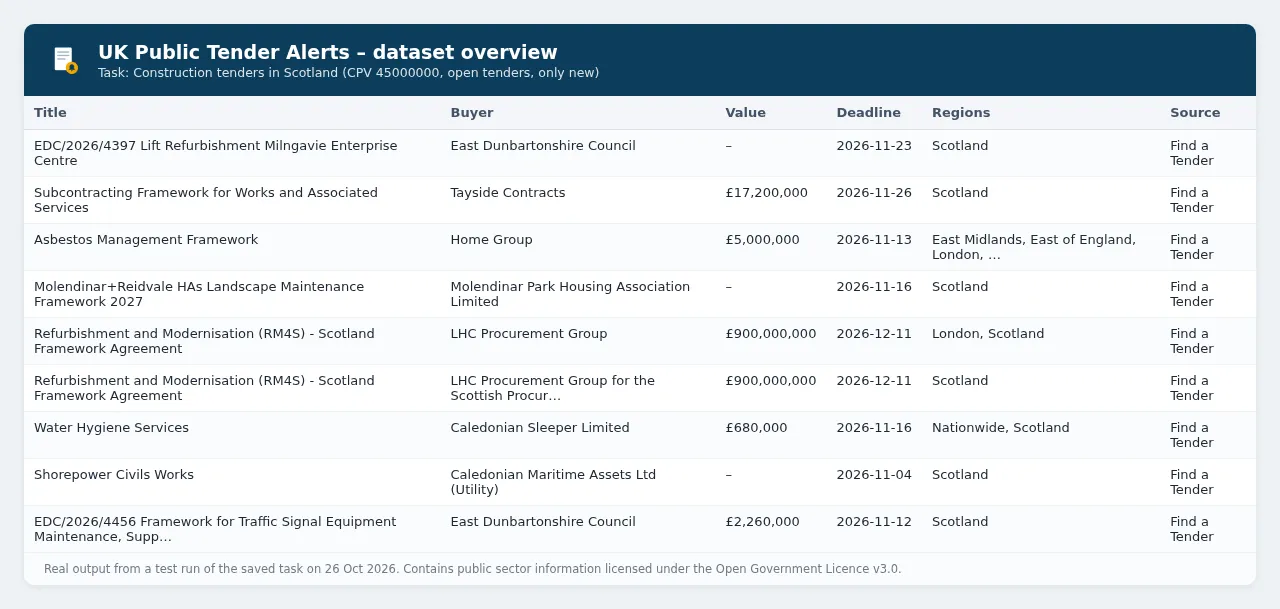
"Show me construction tenders in Scotland published in the last 7 days that are marked suitable for SMEs."
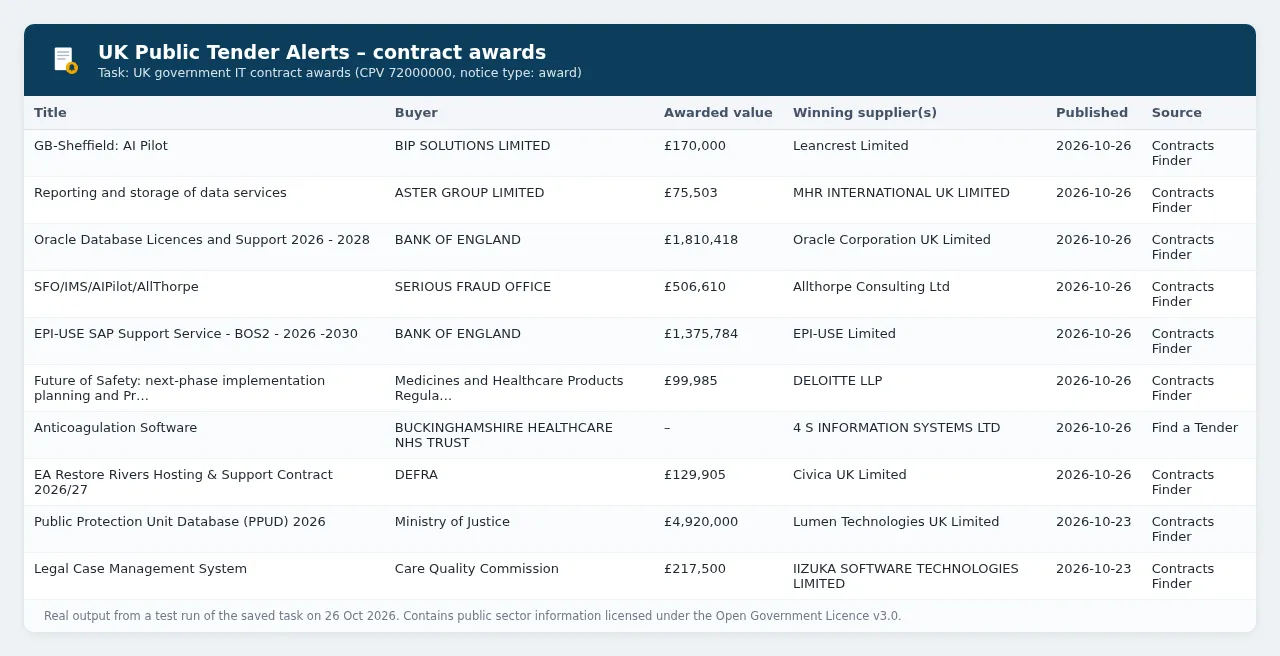
"Who won UK government IT services contracts (CPV 72000000) in the last 30 days, and for how much?"
Cost: a run started by your assistant is a normal run of this Actor, billed to your Apify account at the usual pay-per-event price ($1.50 per 1,000 notices, see the pricing section below). This Actor charges nothing extra for runs that come through an assistant. Asking for a small number of results (for example "the top 20") keeps runs cheap, and the Apify Free plan's monthly credit covers plenty of tests.
Screenshots
Real output from the saved example tasks (test runs on 26 October 2026):
Ready-made example tasks
- NHS IT tenders daily alert: CPV
72000000+48000000, buyer name containsNHS, open tenders only, only new. - Construction tenders in Scotland: CPV
45000000, regionScotland(UK-wide notices excluded), only new. - UK government IT contract awards: CPV
72000000, notice typeaward, to see who won what and for how much.
How to use it
- Enter your keywords (for example
software,cyber security,grounds maintenance) and, if you like, CPV codes (for example72000000for IT services). - Optionally pick regions, a value range and the notice types you want (open tenders by default).
- For alerts, switch on Only new since last run (it is off by default, so a one-off run returns everything in the look-back window) and add a daily schedule in Apify Console.
- Connect the output to email, Slack, Google Sheets, Zapier or Make through Apify integrations, or download the data as CSV, Excel or JSON.
Input example
Output example
Award notices also include the winners and the awarded value, for example "awardedValue": 269500, "awardedSuppliers": [{"name": "ERNST & YOUNG LLP", "id": "GB-COH-OC300001"}].
The dataset has an overview table view (title, buyer, type, value, deadline, regions, CPV, source, link). The SUMMARY record in the run's key-value store holds the digest.
Output fields
| Field | Description |
|---|---|
title, description | Notice title and full description |
buyerName, buyerPostcode, buyerReference | Contracting authority and its reference |
noticeType | tender, tenderUpdate, tenderCancellation, planning, award, contractTermination |
source, noticeUrl, alsoPublishedOn | Which service published it, and links to the official notice |
publishedAt, deadline, deadlineType | Publication time and submission (or expression-of-interest) deadline, in UTC |
valueAmount, valueCurrency, awardedValue, awardedSuppliers | Estimated value; for awards, the winners and awarded value |
cpvCodes, cpvDescriptions, regions, mainCategory | Classification and location |
suitableForSme, suitableForVcse, procurementMethod, contractStart, contractEnd | Procurement details |
ocid, noticeId, dedupeKey, firstSeenAt, matchedKeywords | Identifiers and alert metadata |
buyerContactName, buyerContactEmail, buyerContactPhone, buyerWebsite | Only if Include buyer contact details is switched on |
Tips
- CPV prefixes:
72000000matches every code starting with72(IT services), and45000000matches all construction work. Combining CPV codes with keywords gives the most precise alerts. - Precision: set Search keywords in to Title only if full-text matching returns too many loosely related notices.
- Several alerts: give each alert its own Alert name (state key), or simply use different filters. Each filter set keeps its own memory.
- Coverage since 2025: under the Procurement Act 2023, most new procurements are published on Find a Tender, including below-threshold ones. Contracts Finder still carries legacy and some below-threshold notices, so querying both gives the fullest picture.
- Regions: Find a Tender uses ITL/NUTS codes. Where Contracts Finder gives only a postcode, the Actor maps it to a region using the free postcodes.io service.
How much does it cost?
This Actor uses pay-per-event pricing. You pay only for what it delivers, and Apify platform costs are included.
| Apify plan (Store discount tier) | Price per new notice | Per 1,000 |
|---|---|---|
| Free, Starter (Bronze) | $0.0015 | $1.50 |
| Scale (Silver) | $0.00135 | $1.35 |
| Business (Gold) and above | $0.0012 | $1.20 |
Each run also has an Actor start charge of $0.00005, and a run summary charge of $0.002 when Save a summary is on (the default). With Only new since last run switched on you never pay twice for the same notice.
Worked examples (Free/Starter prices):
- Daily alert, about 5 new notices a day: 30 runs × ($0.00005 start + $0.002 summary) + 150 notices × $0.0015 = about $0.29 a month.
- One-off export of 1,000 notices (for example a 30-day backfill for a broad CPV code): $0.00005 + 1,000 × $0.0015 + $0.002 = about $1.50.
- Weekly market scan of 200 contract awards: 4 runs × $0.00205 + 800 × $0.0015 = about $1.21 a month.
The Apify Free plan includes $5 of platform usage every month (see apify.com/pricing), and pay-per-event charges are paid from that credit. That's enough for the daily alert above several times over, or about 3,250 notices a month on a daily schedule. Use Max notices per run and Apify's maximum cost per run to cap spend.
A typical 7-day search uses roughly 30 requests to the government APIs and finishes in a few minutes, mostly spent waiting politely for their rate limits. A daily "only new" run is usually quicker.
Use via API (Python, JavaScript, cURL)
You can start the Actor from your own code with the official Apify API clients. Get your API token from Apify Console → Settings → API & Integrations.
Python
Install with pip install apify-client.
JavaScript / Node.js
Install with npm install apify-client.
cURL
This runs the Actor and returns the dataset items in the same request (best for short runs):
For longer runs, call POST /v2/acts/orange_briefcase_hrj~uk-tender-alerts/runs and read the dataset when the run finishes. You can also add the Actor to Zapier, Make, n8n or a webhook from the Integrations tab.
Data source, licence and attribution
All data comes from UK government sources: Find a Tender (https://www.find-tender.service.gov.uk) and Contracts Finder (https://www.contractsfinder.service.gov.uk), both run by the Cabinet Office. Their notice data is published under the Open Government Licence v3.0 (https://www.nationalarchives.gov.uk/doc/open-government-licence/version/3/). Every record carries the attribution statement:
Contains public sector information licensed under the Open Government Licence v3.0.
If you republish the data, keep this attribution. This Actor is an independent tool. It is not affiliated with or endorsed by the Cabinet Office, Find a Tender or Contracts Finder. Always check the official notice before you bid.
Personal data: buyer contact names, emails and phone numbers are left out by default. If you switch them on, use them only to respond to the procurement, in line with UK GDPR. The OGL does not cover personal data.
Related tools
Other tools from the same publisher, all built on official open-data APIs:
| Tool | What it does |
|---|---|
| UK Company Check & Change Monitor | Bulk Companies House checks with a RED/AMBER/GREEN risk flag, plus a monitor mode that outputs only changes. |
| German Case Law Search & Ruling Alerts | Search BGH, BVerfG, BAG, BFH and other German federal court decisions, with full text and new-ruling alerts. |
| Sweden Job Ads API (Platsbanken) | Swedish job ads from Arbetsförmedlingen's official JobTech API, with English labels and daily alerts. |
| Netherlands Public Tender Alerts (TenderNed) | Daily alerts for new Dutch government tenders from TenderNed, filtered by keyword, CPV and province. |
Tip: run the buyers or winning suppliers from award notices (awardedSuppliers[].id can hold a Companies House number such as GB-COH-01782505; enter it without the GB-COH- prefix) in UK Company Check to vet them before you bid or partner.
FAQ
Do I need an API key or a government login? No. Both APIs are public.
How often should I run it? Once a day is ideal. Use an Apify schedule with "Only new since last run" switched on.
Can I get contract award data? Yes. Add award to Notice types to see winning suppliers and awarded values.
Something is missing or wrong? Open an issue on the Actor's Issues tab and include your input. We usually reply within a few days.
Where can I see what changed? See the Changelog tab. Each release is listed there.


