

UK Company Check & Change Monitor - Companies House API
Pricing
from $2.40 / 1,000 company checks
UK Company Check & Change Monitor - Companies House API
$3 per 1,000 company checks. Due-diligence reports on UK companies from the official Companies House API: status, overdue filings, directors, PSCs, charges, insolvency and a RED/AMBER/GREEN risk flag. Monitor mode outputs only changes.
Pricing
from $2.40 / 1,000 company checks
Rating
0.0
(0)
Developer

Fast Agent
Maintained by CommunityActor stats
0
Bookmarked
2
Total users
1
Monthly active users
16 hours ago
Last modified
Categories
Share
Price: $3 per 1,000 company checks ($2.70 on Apify Scale, $2.40 on Business and above) · monitor re-checks $2 per 1,000 · official Companies House data · no API key needed
Run due-diligence checks on UK companies in bulk and monitor them for changes. Give it company numbers or names. For each company you get one clean JSON record built from the official Companies House register, plus a simple RED / AMBER / GREEN risk flag with the reasons behind it.
Use it for supplier and customer onboarding (KYB), credit control, B2B sales qualification, M&A screening, or to keep a watchlist of debtors and partners.
What each company check includes
- Name, status (including proposal to strike off), type, incorporation date, SIC codes and registered office
- Overdue accounts and overdue confirmation statements, with next due dates
- Directors and secretaries: active counts, appointments and resignations in the last 12 months, plus the officer list
- Persons with significant control (beneficial owners)
- Charges (secured lending): total and outstanding
- Insolvency cases recorded at Companies House
- The 10 most recent filings
riskRatingandriskReasons
Note on Gazette notices: Gazette notices (such as winding-up petitions) are not currently included when the Actor runs in the Apify cloud, because The Gazette doesn't accept requests from cloud servers. The
includeGazetteoption is off by default. If you turn it on and The Gazette can't be reached, the record saysgazetteChecked: false. Insolvency cases that Companies House records are still included.
Use it from ChatGPT, Claude or Cursor
Let your AI assistant vet UK suppliers, customers and partners against the live Companies House register, with a RED/AMBER/GREEN risk flag and the reasons behind it.
This Actor works as a tool in any AI assistant that supports the Model Context Protocol (MCP), through the official Apify MCP server. You ask in plain language; the assistant fills in the filters, runs the Actor and answers from the results.
MCP server URL (this Actor only):
Set it up once (you need a free Apify account):
- Claude (claude.ai and Claude Desktop): open Settings → Connectors → Add → Add custom connector. Enter a name (for example
UK company check), paste the URL above as the Remote MCP server URL, select Continue, keep the detected settings and select Add. Sign in to Apify when your browser opens. On Team and Enterprise plans, an Owner adds the connector for the organisation. - ChatGPT: custom connectors need ChatGPT Developer mode (beta). Go to Settings → Apps & Connectors → Create, paste the URL above as the MCP Server URL, choose OAuth authentication and select Create, then sign in to Apify. In a new chat, select + → More and pick the connector.
- Cursor: add this to
~/.cursor/mcp.json(or.cursor/mcp.jsonin a project). Cursor opens your browser to sign in to Apify:
- VS Code, Windsurf and other MCP clients: add the same URL as a remote (Streamable HTTP) MCP server. If a client can't do OAuth, send the header
Authorization: Bearer <YOUR_APIFY_TOKEN>instead (token from Apify Console → Settings → API & Integrations).
Already connected to the full Apify server (https://mcp.apify.com) or the Apify plugin for Cursor, Claude Code or VS Code? Just mention orange_briefcase_hrj/uk-company-check in your request.
Try asking:
"Check these suppliers on Companies House: 00445790, 04366849 and Greggs plc. Flag any that are RED or AMBER and explain why."
"Which of these company numbers have overdue accounts, an overdue confirmation statement or a proposal to strike off? (paste your list)"
"Who are the directors and persons with significant control of 04366849, and did any directors join or leave in the last 12 months?"
Cost: a run started by your assistant is a normal run of this Actor, billed to your Apify account at the usual pay-per-event price ($3 per 1,000 company checks, see the pricing section below). This Actor charges nothing extra for runs that come through an assistant. Asking for a small number of results (for example "the top 20") keeps runs cheap, and the Apify Free plan's monthly credit covers plenty of tests.
Screenshots
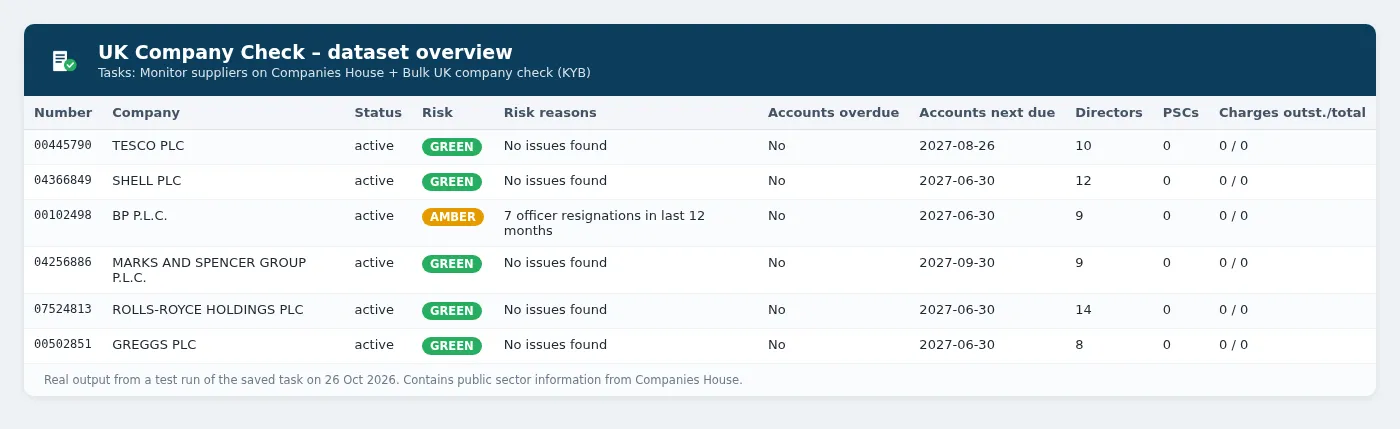
Real output from the saved example tasks (test runs on 26 October 2026):
Ready-made example tasks
- Monitor suppliers on Companies House: a watchlist in monitor mode. Replace the example numbers with your own suppliers and schedule it weekly.
- Bulk UK company check (KYB due diligence): a one-off report for a mixed list of company names and numbers.
Monitor mode: get only what changed
Turn on Monitor mode and schedule the Actor daily or weekly. The first run saves a baseline. After that, each run outputs only change events:
| changeType | severity |
|---|---|
| statusChanged, strikeOffProposal, insolvencyCaseAdded | high |
| accountsOverdue, confirmationStatementOverdue, officerAppointed/Resigned (directors), pscAdded/Ceased, chargeCreated, nameChanged, registeredOfficeChanged, riskRatingChanged | medium |
| accountsFiled, chargeSatisfied, sicCodesChanged, and others | low |
Connect a webhook, Slack, email or Zapier integration to get alerted. Use Watchlist name to keep separate watchlists.
Input example
Checking lots of companies? Use your own free Companies House key
By default the Actor uses a shared Companies House API key. Companies House allows 600 requests per 5 minutes per key, and a full check uses about 5–7 requests per company. If you run large batches or frequent schedules, add your own free key in the Companies House API key field. It takes about two minutes to create one at developer.company-information.service.gov.uk. The key is stored encrypted, and your runs then get the full rate limit to themselves.
Output example (shortened)
Pricing
Pay per event, with Apify platform costs included:
| Apify plan (Store discount tier) | Price per company check | Per 1,000 |
|---|---|---|
| Free, Starter (Bronze) | $0.003 | $3 |
| Scale (Silver) | $0.0027 | $2.70 |
| Business (Gold) and above | $0.0024 | $2.40 |
| Other events | Price |
|---|---|
Company re-checked in monitor mode (company-monitored) | $0.002 per company |
Change detected in monitor mode (change-event) | $0.01 per change |
| Actor start | $0.00005 per run |
"Not found" and error records are free, and so is the optional full report that is output again when a watched company changes.
Monitor mode or plain checks? In monitor mode, the first run charges a full check for each company. After that, each re-check costs $0.002, less than a full check, plus $0.01 for each change found, and the Actor outputs only what changed. If you want a fresh full report on every company each time, run without monitor mode.
Worked examples (Free/Starter prices):
- One-off KYB check of 500 companies: $0.00005 + 500 × $0.003 = about $1.50.
- Weekly monitoring of 100 suppliers: the first run is 100 baseline checks ($0.30). After that, each weekly run is 100 × $0.002 + $0.00005 = about $0.20, plus $0.01 per change found. With about 5 changes a week, that's about $1.00 a month after the first run.
- Checking 25 new customers a month during onboarding: 25 × $0.003 + $0.00005 = about $0.08 a month.
The Apify Free plan includes $5 of platform usage every month (see apify.com/pricing), and pay-per-event charges are paid from that credit. That covers about 1,650 company checks, or weekly monitoring of a watchlist of 100 companies. Use Max companies per run and Apify's maximum cost per run to cap spend.
Use via API (Python, JavaScript, cURL)
You can start the Actor from your own code with the official Apify API clients. Get your API token from Apify Console → Settings → API & Integrations.
Python
Install with pip install apify-client.
JavaScript / Node.js
Install with npm install apify-client.
cURL
This runs the Actor and returns the dataset items in the same request (best for short runs):
For longer runs, call POST /v2/acts/orange_briefcase_hrj~uk-company-check/runs and read the dataset when the run finishes. You can also add the Actor to Zapier, Make, n8n or a webhook from the Integrations tab.
Data sources, licence and privacy
- Contains public sector information from Companies House. Companies House data has no reuse restrictions.
- If Gazette lookups are enabled and work, only corporate notices are output, under the Open Government Licence v3.0. Personal insolvency notices are never included.
- Officer nationality, occupation and country are off by default. Dates of birth are never output. Officer and PSC names are personal data under UK GDPR, so you need a lawful basis (such as due diligence or legitimate interest) to process them. Don't use them for unsolicited marketing.
- The risk flag is a simple rule-based summary of public records. It isn't a credit score or advice.
- This Actor is not affiliated with Companies House or The Gazette.
Related tools
Other tools from the same publisher, all built on official open-data APIs:
| Tool | What it does |
|---|---|
| UK Public Tender Alerts | Daily alerts for new UK government tenders and contract awards from Find a Tender and Contracts Finder. |
| German Case Law Search & Ruling Alerts | Search BGH, BVerfG, BAG, BFH and other German federal court decisions, with full text and new-ruling alerts. |
| Sweden Job Ads API (Platsbanken) | Swedish job ads from Arbetsförmedlingen's official JobTech API, with English labels and daily alerts. |
| Netherlands Public Tender Alerts (TenderNed) | Daily alerts for new Dutch government tenders from TenderNed, filtered by keyword, CPV and province. |
Tip: use UK Public Tender Alerts with notice type award to see which suppliers are winning public contracts, then run them through this Actor.
FAQ
Do I need a Companies House API key? No. The Actor works out of the box with a shared key. For large batches or frequent schedules, add your own free key in Companies House API key. It takes a couple of minutes to create one at developer.company-information.service.gov.uk. The field is a secret input, so Apify stores it encrypted and doesn't show it in logs or in the run input.
How many companies can I check in one run? Up to Max companies per run (500 by default; you can raise it). The Actor waits 0.55 seconds between Companies House requests to stay under the limit of 600 requests per 5 minutes, and a full check uses about 5–7 requests. That's roughly 15–20 companies a minute. Turning off officers, PSCs, charges or filings makes each check faster.
Can I use company names instead of numbers? Yes. An exact name match is used if there is one. Otherwise the Actor takes the closest Companies House search result and explains this in matchNote. Use company numbers when you need certainty.
Is this legal? What about GDPR? Companies House data is public and has no reuse restrictions. However, director and PSC names are personal data under UK GDPR. You need a lawful basis to process them (for example due diligence, KYB/AML checks or legitimate interest), and you shouldn't use them for unsolicited marketing. To reduce what you collect, officer nationality, occupation and country are off by default, and dates of birth are never output.
Is the risk flag a credit score? No. It's a simple rule-based summary of public records (status, strike-off proposals, overdue filings, insolvency, officer churn and similar). It isn't financial advice.
How does monitor mode know what changed? It saves a snapshot of each company in a named key-value store under the Watchlist name. Each run compares against that snapshot and outputs only the differences. Use a different watchlist name for each list.
Something is wrong or missing? Open an issue on the Actor's Issues tab and include your input. The Changelog tab lists every release.


