

Google Maps Reviews Scraper
Pricing
from $0.20 / 1,000 results
Google Maps Reviews Scraper
🔥$0.20/1K Results 🔥 Get all Google Maps reviews - fast and at scale. Scrape millions of reviews with text, ratings, dates, reviewer profiles, owner replies, photos & business data. Powerful Google Maps Reviews Scraper & API with bulk scraping and structured exports.
Pricing
from $0.20 / 1,000 results
Rating
0.0
(0)
Developer

PoiData
Maintained by CommunityActor stats
1
Bookmarked
16
Total users
2
Monthly active users
8 days ago
Last modified
Categories
Share
Google Maps Reviews Scraper & API
Extract Google Maps reviews at scale and get clean, structured data ready for analysis, databases, applications, or AI.
Enter one or thousands of Google Maps URLs or Place IDs and collect up to 1 million reviews per place, including review text, star ratings, exact publication dates, reviewer profiles, owner replies, photos, business details, addresses, coordinates, and more.
Run the Google Maps Reviews Scraper directly from Apify, or integrate it into your application as a Google Maps Reviews API / Google Maps Reviews Scraper API.
| What you can do | Supported |
|---|---|
| 🗺️ Scrape one or thousands of places | ✅ |
| 🗂️ Collect all available reviews | ✅ |
| 🔍 Filter reviews by date or keyword | ✅ |
| 🌐 Translate reviews | ✅ |
| ↕️ Sort reviews | Newest, relevant, highest or lowest rated |
| 📅 Get exact review dates | ✅ |
| 💬 Collect owner responses | ✅ |
| 📸 Collect review photos | ✅ |
| 👤 Collect reviewer profiles | Optional |
| ⚡ Process places in parallel | ✅ |
| 📦 Fixed structured output | 55 fields |
| 📤 Export | JSON, CSV, Excel, XML, HTML |
| 🔌 API access | ✅ |
| ⏰ Schedules, webhooks & MCP | ✅ |
📦 What data can you scrape?
Each result combines review, reviewer, business, address, and input data in one structured record.
| Data | Included fields |
|---|---|
| Reviews | Text, translated text, 1–5 star rating, exact and relative dates, review ID, review URL, likes, photos, owner response, source, visit date, language, detailed ratings |
| Reviewer | Name, ID, Google Maps profile URL, review count, profile photo, Local Guide status |
| Business | Name, Place ID, address, coordinates, categories, rating, review count, Maps URL, price level, CID, image, hotel stars, closed status |
| Address | Neighborhood, street, city, state/region, ZIP/postal code, country |
| Trace data | Input URL, input Place ID, search URL, search string, language, rank, Knowledge Graph ID, scraping timestamp |
Reviewer personal data can be disabled when it is not needed.
🚀 How to scrape Google Maps reviews
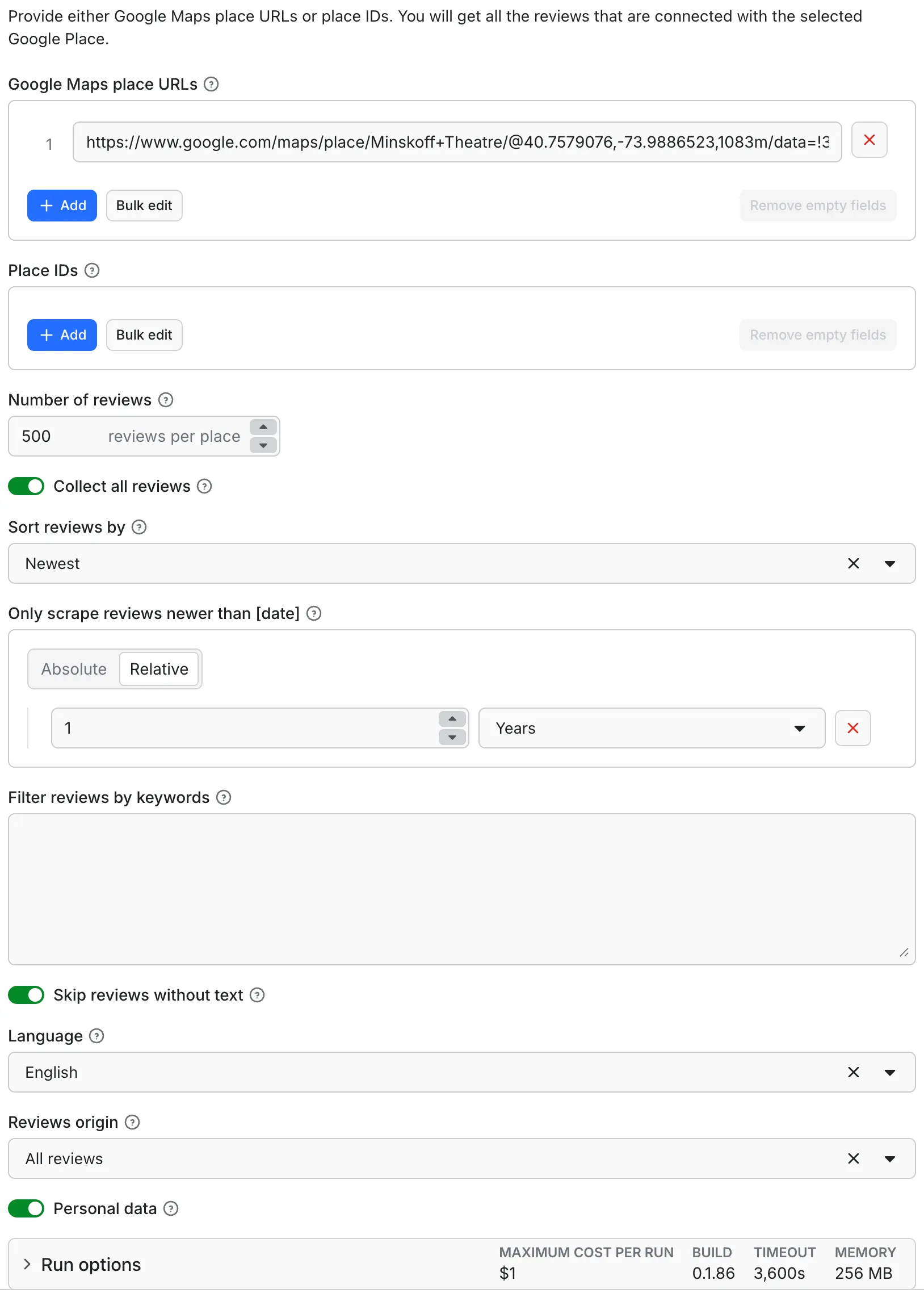
1. Add Google Maps places
Provide one or multiple:
- Place IDs — recommended
- Google Maps place URLs
- Google Maps search URLs
- Google Maps
?cid=URLs
Example Place ID:
2. Configure the scraper
| Option | What it does |
|---|---|
| Number of reviews | Maximum reviews to fetch per place, up to 1 million |
| Collect all reviews | Collect every available review |
| Sort reviews by | Newest, most relevant, highest rated, or lowest rated |
| Only reviews newer than… | Exact date such as 2024-01-01 or relative period such as 3 months |
| Filter by keywords | Keep reviews containing specified words |
| Skip reviews without text | Enabled by default |
| Language | Translate reviews into this language. Each review comes back with its original text plus a translation into the chosen language (e.g. a Chinese review plus its English translation). Defaults to English; choose All languages to keep the API default |
| Reviews origin | Google only or all supported sources |
| Personal data | Include reviewer names, IDs, profile URLs, and photos |
Note: Date filtering requires reviews to be sorted by newest.
3. Run and export
Run the Actor from the Apify Console or through the Apify API.
Results are stored in an Apify dataset and can be exported as:
JSON · CSV · Excel · XML · HTML
🔌 Google Maps Reviews API
Need Google Maps reviews programmatically?
This Actor also works as a Google Maps Reviews API and Google Maps Reviews Scraper API. Send Google Maps places from your application, start the scraper automatically, and retrieve structured review data from the resulting Apify dataset.
cURL example
Python example
The example requests up to 100 Google Maps reviews and returns them as structured dataset records.
Example Google Maps review output
The dataset opens with an overview table, and each record can be expanded to see all available fields.
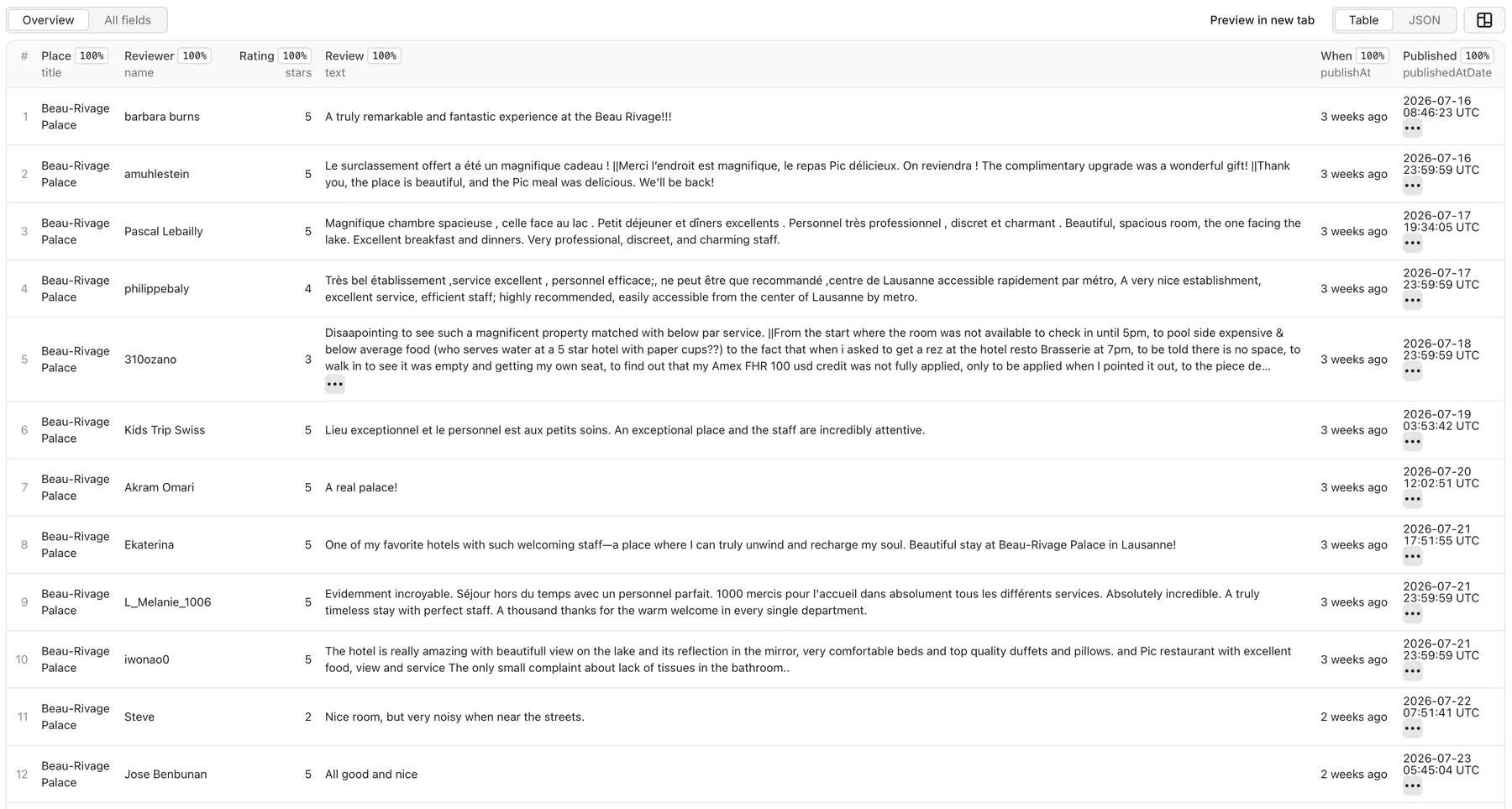
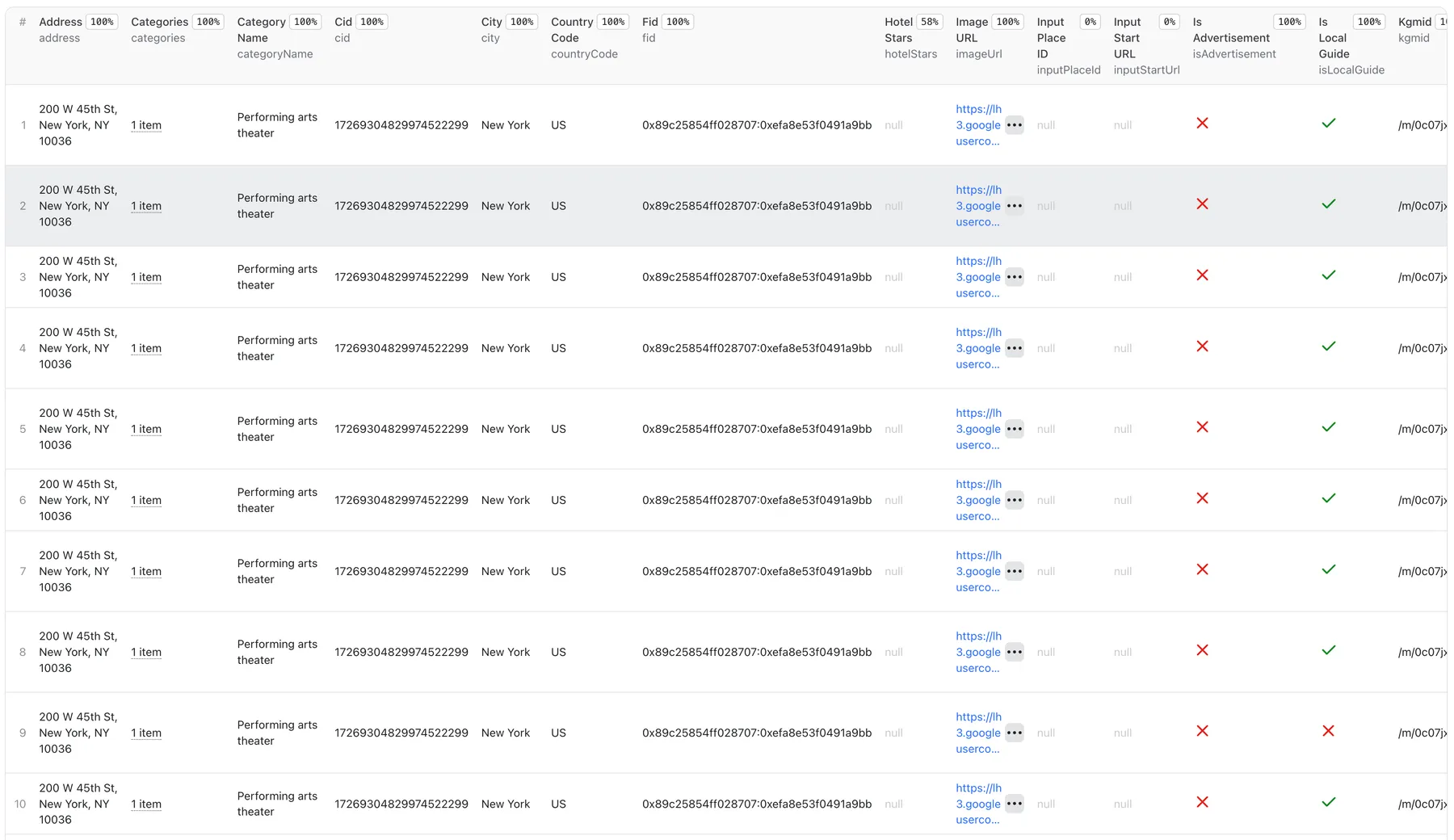
Example record:
Google Maps Reviews Scraper output schema
Every result follows a predictable 55-field schema.
45 fields are always present. If Google Maps does not provide a value, the field contains null. Another 10 fields are emitted when relevant.
This consistent structure makes the output easy to use with APIs, databases, ETL pipelines, dashboards, analytics systems, and AI applications.
Review fields
| Field | Type | Description |
|---|---|---|
text | string / null | Review text |
textTranslated | string / null | Translated review text |
publishAt | string / null | Relative publication time |
publishedAtDate | string / null | Exact ISO 8601 publication date |
likesCount | number | Number of likes (optional) |
reviewId | string | Unique review identifier |
reviewUrl | string / null | Direct review URL |
stars | number | Star rating from 1–5 |
rating | number / null | Rating from another platform when present |
responseFromOwnerDate | string / null | Owner response date |
responseFromOwnerText | string / null | Owner response |
reviewImageUrls | array / null | Review photos (optional) |
reviewContext | object | Context supplied by Google (optional) |
reviewDetailedRating | object | Per-aspect ratings (optional) |
reviewOrigin | string | Review source, such as "Google" |
visitedIn | string / null | Visit date |
originalLanguage | string / null | Original language |
translatedLanguage | string / null | Translation language |
Reviewer fields
| Field | Type | Description |
|---|---|---|
name | string / null | Reviewer display name |
reviewerId | string | Google profile ID |
reviewerUrl | string / null | Google Maps profile URL |
reviewerNumberOfReviews | number / null | Number of reviews written |
reviewerPhotoUrl | string / null | Profile photo |
isLocalGuide | boolean | Google Local Guide status (optional) |
Google Maps place fields
| Field | Type | Description |
|---|---|---|
title | string | Business name |
placeId | string / null | Google Maps Place ID |
address | string / null | Full address |
location | object / null | { lat, lng } |
categories | array | Google Maps categories |
isAdvertisement | boolean | Whether result is an advertisement |
categoryName | string / null | Primary category |
totalScore | number / null | Average rating |
permanentlyClosed | boolean | Permanently closed status |
temporarilyClosed | boolean | Temporarily closed status |
reviewsCount | number / null | Total business reviews |
url | string / null | Google Maps business URL |
price | string / null | Price level |
cid | string / null | Google Maps customer ID |
fid | string / null | Google Maps place ID |
imageUrl | string / null | Main business image |
hotelStars | string / null | Hotel star rating |
scrapedAt | string | ISO 8601 scraping timestamp |
Address & input fields
| Field | Type | Description |
|---|---|---|
neighborhood | string / null | Neighborhood |
street | string / null | Street |
city | string / null | City |
state | string / null | State or region |
postalCode | string / null | ZIP / postal code |
countryCode | string / null | Two-letter country code |
searchPageUrl | string / null | Associated search page (optional) |
searchString | string / null | Place ID or search string (optional) |
inputPlaceId | string / null | Supplied Place ID (optional) |
inputStartUrl | string / null | Supplied Google Maps URL (optional) |
language | string / null | Requested translation language (empty for "All languages") |
rank | number / null | Result position (optional) |
kgmid | string / null | Google Knowledge Graph ID |
⚡ Built for bulk Google Maps review scraping
Submit large lists of locations in a single run instead of processing each business individually.
Multiple Google Maps places are processed in parallel. If a timeout or slow response interrupts processing, the Actor retries and continues from where it stopped, helping prevent duplicate or lost reviews during long-running jobs.
Parallel processing by Apify plan
| Apify plan | Places in parallel |
|---|---|
| Free | 3 |
| Bronze | 12 |
| Silver | 32 |
| Gold and higher | 64 |
Parallelism is automatic—no additional setup or input is required.
Higher plans process more places simultaneously, allowing large Google Maps review datasets to finish faster.
If the caller's plan cannot be determined, a safe default is used. The Actor owner can also configure a fixed value.
💡 What can Google Maps review data be used for?
| Use case | What you can do |
|---|---|
| Reputation monitoring | Track new reviews, ratings, and customer feedback |
| Competitor research | Analyze competitors' strengths, complaints, and customer preferences |
| Voice-of-customer analysis | Find recurring praise, complaints, preferences, and feature requests |
| Local SEO analysis | Monitor ratings, review counts, dates, and newly published reviews |
| AI & ML datasets | Export structured reviews for sentiment analysis, classification, research, and other data-processing workflows |
Integrations
Use the Google Maps Reviews Scraper manually or connect it to automated workflows.
| Integration | What you can do |
|---|---|
| Apify API | Run scraping programmatically |
| Schedules | Automatically run the scraper at specified intervals |
| Webhooks | Trigger another system when a run finishes |
| Zapier | Send review data into automated workflows |
| Make | Connect review data with other applications |
| n8n | Build custom automation pipelines |
| MCP | Let compatible AI agents run the Actor |
| Your backend | Integrate directly through the API |
Schedules
Use Apify schedules to run the scraper automatically, such as a nightly job for reputation monitoring.
Each run creates a fresh dataset that you can query or export.
Webhooks
Use Apify webhooks to notify another service when a run finishes.
Webhooks can connect to Zapier, Make, n8n, Slack, or your own backend.
Example:
Use defaultDatasetId to retrieve the records through the Apify API.
For a machine-readable run summary without parsing logs, read the run-summary key from the run's key-value store or use the single-line {"event":"run-complete", ...} JSON log entry.
Zapier, Make, n8n and other no-code tools
The input schema maps directly to no-code workflow forms.
Provide Google Maps URLs or Place IDs, configure review limits and filters, then send the output dataset to your next step.
Results can be exported as JSON, CSV, Excel, XML, or HTML.
MCP and AI agents
Use the Actor from compatible AI assistants such as Claude Desktop, Cursor, or ChatGPT through Apify's official MCP server.
Example configuration:
An AI agent can then:
- Accept Google Maps URLs or Place IDs
- Configure
maxReviews, sorting, and filters - Run the Actor
- Read the resulting dataset
This allows users to request Google Maps reviews in plain language and receive structured data.
🔒 Personal data and GDPR
Reviewer names, IDs, profile URLs, and photos can constitute personal data.
Only collect and process this information when you have an appropriate legitimate reason. If reviewer information is unnecessary for your use case, disable Personal data.
reviewId is always included.
💰 Google Maps Reviews Scraper pricing
The Actor uses pay-per-event pricing.
| Event | When you are charged |
|---|---|
| Dataset result | Once for every review successfully written to the dataset |
| Actor start | Once when a run starts |
Reviews removed by filters or not successfully collected are not charged.
Current prices are shown on the Actor's Pricing tab.
❓ Frequently asked questions
What is a Google Maps Reviews Scraper?
A Google Maps Reviews Scraper automatically extracts customer reviews from Google Maps and converts them into structured data.
This Actor can collect review text, ratings, exact dates, review URLs, reviewer information, owner replies, photos, and business details.
Is there a Google Maps Reviews API?
Yes. This Actor works as a Google Maps Reviews API through the Apify API.
Applications can submit Google Maps locations, start scraping runs, and retrieve structured review datasets programmatically.
What is a Google Maps Reviews Scraper API?
A Google Maps Reviews Scraper API provides programmatic access to Google Maps review extraction.
Instead of manually running the scraper, your application can submit places through the API and retrieve the resulting review data automatically.
Can I scrape all reviews for a business?
Yes. Set a specific limit or enable Collect all reviews. The configured maximum supports up to 1 million reviews per place.
Can I scrape multiple Google Maps places?
Yes. Submit multiple Place IDs, Google Maps URLs, or both in one run. Places are processed in parallel.
Can I filter reviews by date?
Yes. Use Only reviews newer than… with an exact date or relative period.
Date filtering requires reviews to be sorted by newest.
Can I filter reviews by keyword?
Yes. Use the keyword filter to return reviews containing specified words.
Can I sort Google Maps reviews?
Yes. Reviews can be sorted by:
- Newest
- Most relevant
- Highest rated
- Lowest rated
The default is newest.
Can I get exact review dates?
Yes. publishedAtDate returns the exact ISO 8601 publication date when available, while publishAt contains Google's relative date, such as "a month ago".
Does the scraper collect owner responses?
Yes. When available, results include the owner's response text and response date.
Does it collect review photos?
Yes. Review photos are included when available.
Does it collect reviewer profiles?
Yes, when Personal data is enabled.
Results can include reviewer names, IDs, profile URLs, photos, review counts, and Google Local Guide status.
What fields does the Google Maps Reviews API return?
Each review follows a consistent 55-field schema covering:
- Review data
- Reviewer data
- Business details
- Address data
- Input and trace information
What formats can I export?
Results can be exported as JSON, CSV, Excel, XML, or HTML.
They can also be retrieved programmatically through the Apify API.
Can I use it for bulk Google Maps review scraping?
Yes. Submit multiple locations in a single run and process them in parallel.
Can I use Google Maps reviews for sentiment analysis?
Yes. Export review text and ratings to your sentiment-analysis, classification, AI, or text-processing workflow.
The Actor collects the data; downstream systems perform the analysis.
Can I use reviews for competitor research?
Yes. Collect competitor reviews and analyze ratings, recurring complaints, customer feedback, and commonly mentioned strengths.
Can I use the data for local SEO analysis?
Yes. Review count, average rating, review dates, review text, and newly published reviews can be used for local SEO monitoring and analysis.
Can I use Zapier, Make, or n8n?
Yes. Provide URLs or Place IDs, configure the review count and filters, and send the resulting dataset to a spreadsheet, database, notification system, or another workflow step.
Can AI agents use the scraper through MCP?
Yes. Expose the Actor through Apify's official MCP server so compatible AI assistants can configure the input, start the Actor, and read the resulting dataset.


