

Booking Scraper API - Hotels, Leads, Emails, Reviews
Pricing
from $0.70 / 1,000 properties
Booking Scraper API - Hotels, Leads, Emails, Reviews
Booking.com scraper and unofficial Booking API: hotel listings, per-night prices, discounts, emails room availability, guest reviews with category scores, property details (room size, beds, facility names, policies, licences), host profiles and owner contacts. JSON, CSV, Excel. From $0.70/1k hotels.
Pricing
from $0.70 / 1,000 properties
Rating
0.0
(0)
Developer

Raven
Maintained by CommunityActor stats
0
Bookmarked
27
Total users
9
Monthly active users
2 days ago
Last modified
Categories
Share
Booking.com Scraper — Hotels, Prices, Reviews & Host Data
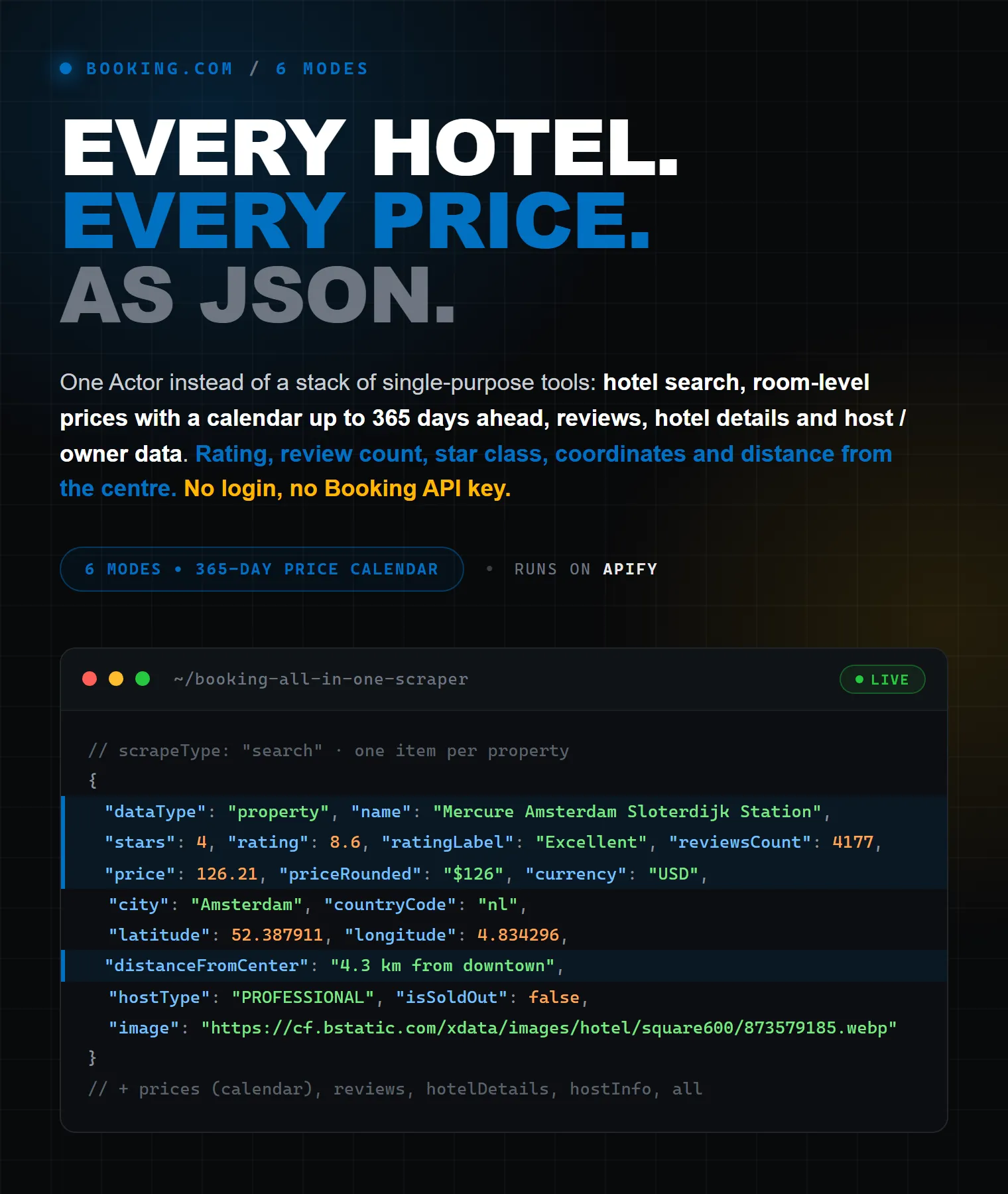
Scrape Booking.com hotel data by destination or URL: live room prices, availability, guest reviews, ratings, full property details and professional host contacts. Point the scraper at a city (like Amsterdam) or paste Booking.com URLs, and export clean, structured data to JSON, CSV, Excel, XML or via API — for rate shopping, revenue management, market research or B2B lead lists.
One actor replaces a whole stack of single-purpose tools: a Booking hotels scraper, a Booking price scraper (room-level, with a price calendar up to 365 days ahead), a Booking reviews scraper, and a host / owner contact scraper.
✅ No login, no cookies, no API key, no browser setup. The scraper handles Booking.com's anti-bot protection (AWS WAF) and pagination automatically.
| Raven · Travel & hospitality suite • Booking.com, TripAdvisor, Google Maps, Trustpilot | |||
 Booking.com Scraper Booking.com Scraper➤ You are here |
 TripAdvisor Scraper TripAdvisor ScraperHotels, restaurants, reviews |
 Google Maps Google MapsPlaces, emails, reviews |
 Trustpilot Scraper Trustpilot ScraperReviews, companies, scores |
What does Booking.com Scraper do?
It extracts public data from Booking.com search results and hotel pages and returns it as clean dataset records (each tagged with dataType):
- 🏨 Hotel search results — every property for a destination: name, price, price per night, price before discount, price in the hotel's own currency, deal badges & applied discounts, star rating, review score plus the secondary (location) score, meal plan included, free-cancellation / no-prepayment flags, unit layout (bedrooms, bathrooms, beds, kitchens, living rooms, A/C), address, district, GPS coordinates, distance to downtown and to public transport, photo, Preferred / Preferred Plus status, sustainability certifications, and sold-out / permanently-closed status.
- 💶 Prices & availability — room-level offers by room type: current price, original (pre-discount) price, occupancy, bed count, room-type id, meal plan, crib availability, child-stays-free flag, free-cancellation deadline and rooms left at this price (scarcity signal) for your dates — plus a multi-day price calendar (up to a full year ahead).
- ⭐ Guest reviews — every review with score, title, positive/negative text, reviewer name, country and avatar, review history, stay dates, room type with its description and the owner's reply — plus aggregate category scores with the number of reviews behind each category.
- 📋 Hotel details — description, stars, rating, per-category review scores, featured reviews, full postal address, coordinates, location breadcrumbs, facility & amenity names (not just slugs), photos, check-in/out windows, accepted payment methods, smoking / quiet-hours / parties policies, per-age-band child & extra-bed pricing, short-term rental license numbers, languages spoken, room-by-room configuration (size in m², bed types, max guests, bathrooms, amenities, photos), Q&A, chain & brand, sustainability — plus hotel surroundings ("what's nearby"): landmarks, top attractions, restaurants & cafes, public transport, closest airports and beaches with walking/driving distances.
- 🧑💼 Host / owner contacts — the legally published professional-host block (company name, registration number, email, phone, address) plus the host profile: host name, photo, years on Booking.com, number of managed properties, host review score and the about-the-host / welcome / neighbourhood texts. Ready for B2B outreach to property managers.
Why use this Booking.com Scraper?
- All Booking.com data in one actor — hotels, prices, reviews, details and host contacts in a single run, instead of juggling three or four separate scrapers.
- HTTP-only, no browser — it talks to Booking.com's pages and internal GraphQL API directly. Faster and cheaper than browser-based scrapers, with no JavaScript-rendering failures.
- Anti-bot handled for you — Booking.com gates non-browser clients behind an AWS WAF challenge; this actor solves it automatically. No tokens, no CAPTCHA solving, nothing to configure.
- Real pagination — search results and reviews are fetched through Booking's GraphQL API page after page, up to your limits (the plain
offset=URL trick other scrapers rely on silently returns page 1). - Sequential crawl — scrape a search, then auto-drill into each hotel for its details / reviews / prices / host contact, returned as one tidy record per hotel with nested data.
- No coding required — run it from the Apify Console, schedule it, or call it via API and MCP.
- Clean, structured output — flat fields ready for spreadsheets, BI tools and databases; export to JSON, CSV, Excel, XML, HTML.
Who is it for?
- Revenue managers & hoteliers — rate shopping: monitor competitor room prices, discounts and availability.
- Travel agencies & OTAs — power apps and price-comparison sites with fresh accommodation data.
- Market researchers & analysts — build datasets of hotel inventory, ratings and reviews by city or country.
- Data scientists — collect review text and category scores for sentiment analysis and NLP models.
- Sales & lead-gen teams — gather professional host / property-manager contacts (email, phone, company).
- Developers — a practical Booking.com API alternative: no partner agreement, no scraping infrastructure to maintain.
What data can you extract from Booking.com?
Data type (dataType) | Key fields you get |
|---|---|
| property (search result) | name, url, pageName, ufi, stars, rating, ratingLabel, reviewsCount, externalRating, externalRatingLabel, externalReviewsCount, secondaryScore, secondaryScoreLabel, checkIn, checkOut, price, priceRounded, pricePerNight, priceBeforeDiscount, originalPrice, currency, priceInHotelCurrency, hotelCurrency, taxesAndCharges, discountBadges, discounts, mealPlan, freeCancellation, noPrepayment, petsAllowedForFree, roomName, beds, bedrooms, bathrooms, kitchens, livingRooms, units, hasAirConditioning, address, city, district, countryCode, latitude, longitude, displayLocation, distanceFromCenter, publicTransportDistance, isCentrallyLocated, hostType, isPreferred, isPreferredPlus, geniusRateAvailable, isSustainable, sustainabilityCertifications, isNewlyOpened, isClosed, isSoldOut, image, discountPercentage, bookingUrl, searchQuery / inputUrl |
| price (room offer) | hotelName, checkIn, checkOut, roomId, roomName, roomTypeId, beds, bedrooms, bathrooms, occupancy, mealPlanId, mealPlan, price, originalPrice, currency, roomsLeft, freeCancellationUntil, hasCrib, childStaysForFree, isThirdPartyInventory, discountPercentage, url, bookingUrl |
| review | score, title, positiveText, negativeText, language, reviewDate, userName, userCountry, userAvatar, userReviewCount, userJoinedDate, guestType, customerType, roomType, roomDescription, numNights, checkInDate, checkOutDate, stayStatus, ownerReply, photos, helpfulVotesCount, stayDate, isAnonymous |
| reviewScores | totalReviews, scores[] (name, label, value, reviewsCount, lowerBound, higherBound) |
| hotel (details) | description, stars, rating, categoryScores, reviewSummary (pros/cons with mention counts), reviewTopics, reviewTopicScores, bedComfortScore, bedComfortReviewsCount, breakfastScore, featuredReviews, isTravelProud, questionsCount, partnerResponseTimeSeconds, photosCount, roomTypesCount, brandLogo, address, addressShort, isCityCenter, latitude, longitude, breadcrumbs, checkInFrom, checkInUntil, checkOutFrom, checkOutUntil, checkInAgeRestriction, requireCreditCardAndId, acceptedCreditCards, acceptsCash, petsAllowed, child & crib policy, childPolicies, groupLimit, groupPolicy, smokingPolicy, hasDesignatedSmokingArea, quietHours, partiesPolicy, licenseNumbers, licensePhrases, languagesSpoken, highlights + highlightNames, popularFacilities, facilities + facilityNames, amenities + amenityNames, isPrivateBathroomInAllRooms, meals, finePrints, roomTypes (size m², bed types, max guests, bathrooms, amenities, photos), questionsAnswers, image, photos, chainId, brandName, sustainability & certifications, host profile, surroundings (whatsNearby, topAttractions, restaurants, cafesBars, publicTransport, closestAirports, beaches, naturalBeauty — each POI with distance, walking/driving time and GPS) |
| priceCalendar (Prices mode with days ahead) | hotelName, currency, totalDays, availableDays, soldOutDays, occupancyRate, minPricePerNight, avgPricePerNight, maxPricePerNight, cheapestDate, mostExpensiveDate, firstAvailableDate, lastAvailableDate, url, bookingUrl |
| host / hostContact | companyName, personName, registrationNumber, tradeRegisterName, email, phone, addressLine1/2, city, state, postalCode, countryCode, subjectType, hostName, hostImage, hostDescription, hostWelcomeMessage, hostNeighbourhoodInfo, hostLanguages, hostReviewScore, hostReviewsCount, yearsOnPlatform, managedProperties |
How much does it cost to scrape Booking.com?
You pay per result — platform usage, proxies and compute are included. Prices per 1,000 results (plus a negligible actor-start fee of $0.00005 per run); higher Apify plans get a discount, up to the Gold rate:
Result (dataType) | Price / 1,000 | Gold discount |
|---|---|---|
| Property (search result) | $1.50 | $0.70 |
| Room price offer | $3.00 | $1.20 |
| Guest review | $2.00 | $0.40 |
| Review category scores (per hotel) | $3.00 | $1.00 |
| Hotel details | $4.00 | $2.00 |
| Host / owner contact | $5.00 | $2.50 |
Worked examples:
- List 1,000 hotels for a city → $1.50 (from $0.70 on paid plans)
- 1,000 guest reviews → $2.00 (from $0.40 on paid plans)
- 100 hotels with full details and host contacts → $0.90 (from $0.45)
- 1,000 room-price offers for rate monitoring → $3.00 (from $1.20)
Apify's free plan includes $5 of usage every month — enough to list roughly 3,300 hotels per month for free. Start free and scale as you go.
How to scrape Booking.com hotels (step by step)
Option A — by destination (no URLs needed):
- Click Try for free / Start.
- Leave What to scrape on Search results (or pick another mode).
- In Destinations, type one or more places, e.g.
Amsterdam,Paris, France. - (Optional) set check-in/check-out dates, guests, currency, language, star/price filters and Max properties.
- (Optional) tick Also scrape for each result (Hotel details, Prices, Reviews, Host) to drill into every hotel.
- Click Save & Start, then download your data as JSON, CSV or Excel.
Option B — by URL (specific hotels or a filtered search):
- Open the search or hotel page you want on booking.com and copy its URL.
- Paste it into Booking.com URLs (
startUrls) and clear Destinations — anything left there is searched in addition to your URL. - Pick the mode — hotel URLs feed Reviews / Hotel details / Host / Prices; search URLs feed Search results / Prices.
- Click Save & Start.
How to scrape a filtered Booking.com search (apartments, holiday homes, price, score…)
Build the search on booking.com exactly as you want it — destination, dates, guests, and any filters in the left sidebar (e.g. Property type → Apartments / Holiday homes / Villas, price range, review score, facilities), plus the sort order — then copy the address bar URL. The Actor runs that search: the destination, checkin/checkout, group_adults/group_children/age/no_rooms, selected_currency, lang, order and every nflt filter are kept on every results page, and each record carries the URL's dates and guests. Leave Destinations empty — with nothing to scrape the run stops with an error instead of falling back to a default city.
No URL at hand? Use Property types (propertyTypes) with a destination instead — e.g. ["201", "220"] for apartments and holiday homes, ["219"] for aparthotels. It is also added to a pasted URL that has no property-type filter of its own. Every result reports its type in accommodationType (Apartment, Holiday home, Aparthotel, Hotel, …). Note that Booking itself lists aparthotels under both "Hotels" and "Apartments".
Common Booking property-type ids: 201 Apartments · 220 Holiday homes · 219 Aparthotels · 213 Villas · 216 Guest houses · 208 Bed and breakfasts · 204 Hotels · 203 Hostels · 222 Homestays.
How to scrape Booking.com hotel prices
Set What to scrape → Prices, enter destinations (or hotel/search URLs) and your dates. Each room offer is returned as its own record with room name, occupancy, meal plan, current and original price, the free-cancellation deadline and roomsLeft — how many rooms remain at that price when Booking shows its "We have X left" scarcity message. For a rate calendar, set Price calendar — days ahead (daysAhead, up to 365) to scrape one-night prices for consecutive dates — a full-year price calendar in one run.
How to scrape Booking.com reviews
Set What to scrape → Reviews and paste hotel URLs (or a destination, whose top hotels are used). You get every guest review with text, score, reviewer details, stay info and the owner's reply, plus one aggregate category-scores record per hotel. Control volume with Max reviews per hotel and order with Sort reviews by (newest, oldest, highest/lowest score).
How to scrape hotel surroundings ("what's nearby")
Whenever hotel details are scraped (Hotel details / All modes, or the Hotel details enrich option), the actor also collects the property's surroundings block: what's nearby, top attractions, restaurants & cafes, public transport stops, closest airports, beaches and natural-beauty spots — each with the localized distance, walking/driving distance and time, and GPS coordinates. Turn it off with Include surroundings (includeSurroundings: false) to save one request per hotel.
How to extract Booking.com host / owner contacts
Set What to scrape → Host / owner contact info and paste hotel URLs — or a filtered search URL (e.g. apartments only), whose properties are then processed one by one. In Search results mode the same data comes nested as hostContact when you tick Host / owner contact info under Also scrape for each result.
hostType—PROFESSIONAL(a trader) orPRIVATE(a private individual), exactly as Booking.com labels the listing.- Professional hosts: Booking.com is legally required (EU trader-transparency rules) to publish a business contact block —
companyName/personName,registrationNumber,tradeRegisterName,email,phoneand the postal address. - Host profile (apartments and holiday homes, both host types when Booking shows it):
hostName(the "managed by" name),hostDescription,hostWelcomeMessage,hostNeighbourhoodInfo,hostLanguages,hostReviewScore/hostReviewsCount,yearsOnPlatform,managedProperties. licenseNumbers— the short-term-rental licence / registration number(s) the property displays.
Private hosts get no name or contact details on Booking.com by law, so for them you get the host type, profile texts, score and licence. Ideal for property-manager and rental-agency lead lists.
Scrape modes
| Mode | What you get | Input |
|---|---|---|
search | List of properties for a destination | Destinations or Booking search URLs |
prices | Room-level offers (+ price calendar) | Destinations or Booking search URLs |
reviews | Every guest review + category scores | Hotel URLs or a destination |
hotelDetails | Full property profile | Hotel URLs |
hostInfo | Host / owner contact block | Hotel URLs |
all | Details + host + reviews per hotel (nested) | Hotel URLs |
Sequential crawl (search → details / reviews / prices / host)
In Search mode, use Also scrape for each result (enrichWith) to drill into every property automatically. The drilled-down data is returned nested inside one record per hotel — prices and reviews arrays, a reviewScores array and a hostContact object alongside the detail fields — so you get one row per property instead of scattered records. The all mode does the same starting from hotel URLs.
Input example
Other useful parameters: startUrls (hotel or search URLs, filters included), propertyTypes, starRating, minScore, minPrice / maxPrice, sortReviewsBy, children + childrenAges, daysAhead (price calendar), includeSurroundings (what's-nearby POIs with hotel details, on by default), maxConcurrency, proxyConfiguration (Apify Proxy by default; your own HTTP or SOCKS5 proxies are supported).
Output example
In the sequential / all modes one hotel record also carries nested prices[], reviews[], reviewScores[] and hostContact{}.
Understanding key fields
dataType— tags every record (property,price,review,reviewScores,hotel,host,priceCalendar) so you can filter mixed exports in one click.pricevsoriginalPrice— the current (possibly discounted) price vs the strike-through price before the discount; the gap is the active promotion.isSoldOut— the property has no availability for your dates; useful as a demand/occupancy signal for revenue management.roomsLeft— the number from Booking's "We have X left at this price" urgency message on a room offer; present only when Booking shows the scarcity banner. Combined withisSoldOut, a practical occupancy proxy.surroundings— nested per-category POI lists on hotel-detail records (whatsNearby,topAttractions,restaurants,cafesBars,publicTransport,closestAirports,beaches,naturalBeauty); each POI carriesdistance(localized),distanceKm, walking/driving distance and time, and GPS coordinates.freeCancellationUntil— the exact timestamp until which a room offer is refundable.reviewScores.lowerBound/higherBound— Booking's benchmark range for that category in the destination, so you can see how a hotel compares to its market.hostType— whether the property is run by aPROFESSIONALtrader (these have legal contact blocks) or aPRIVATEhost.accommodationType/accommodationTypeId— the property type (Apartment201,Holiday home220,Aparthotel219,Hotel204, …).pricePerNightvsprice—priceis the total for the whole stay,pricePerNightthe nightly average Booking shows; use the nightly value to compare stays of different lengths.priceBeforeDiscountanddiscounts— the pre-promotion total and the itemised discounts behind it (campaign name, amount, what it applies to), so you can measure the real depth of a deal.priceInHotelCurrency/hotelCurrency— the same stay total in the currency the property actually charges, next to the convertedpricein your requested currency.secondaryScore/secondaryScoreLabel— the sub-score Booking highlights on the card (most oftenLocation), useful when the headline score alone is too coarse.reviewTopicScores— per-category scores (staff, cleanliness, comfort, value, location, breakfast, Wi-Fi) taken straight from the hotel page, with the number of reviews behind each one — no separate reviews run needed.featuredReviews— the reviews Booking itself surfaces on the property page, included withhotelDetailsat no extra request.reviewSummary— Booking's own digest of the guest reviews:pros[]andcons[], each with thetopicit is about, thetext, how many reviewsmentionsit and thesentiment. It answers "why is this hotel rated 8.6?" without reading a single review, and no other Booking.com scraper on the store returns it.categoryScores— Staff, Facilities, Cleanliness, Comfort, Value for money, Location and Free WiFi, each with the destination average it is measured against, straight from the hotel page — you no longer need a Reviews run to get them.priceCalendarrows — withdaysAheadset, each hotel also gets one summary row:minPricePerNight,avgPricePerNight,maxPricePerNight,cheapestDate,mostExpensiveDate,availableDays,soldOutDaysandoccupancyRate(the share of the scanned window with no bookable offer). Rate shopping and occupancy tracking without post-processing the day-by-day rows.bookingUrl— the hotel page with your dates, guests, rooms and currency already applied, so the link opens on exactly the availability the record was priced against.searchQuery/inputUrl— which destination or input URL produced the row, so a run over many destinations can be split without guessing.isTravelProud— Booking's Travel Proud (LGBTQ+ friendly) badge.partnerResponseTimeSeconds— how fast the property answers guest questions, in seconds; a hard responsiveness signal next toquestionsAnswers.roomTypes— one entry per room withroomSizeM2,beds(bed type + count),maxGuests,bathrooms,isSmoking, in-roomamenitiesand room photos.licenseNumbers/licensePhrases— the short-term rental registration numbers (or the statement that none is required) that regulated markets force hosts to publish.facilityNames/amenityNames/highlightNames— human-readable labels alongside the machine-friendly slug lists, so exports are readable without a lookup table.- Empty fields are omitted — Booking.com doesn't publish every field for every property (e.g. host contacts exist only for professional traders).
Tips for best results
- Keep the default proxy setting — the Actor picks the right proxy pool on its own and switches automatically if it hits blocks.
- Booking.com search returns at most ~1,000 properties per query — split big cities by district or star rating (
starRating,minPrice/maxPricefilters) to cover the full inventory. - Set
checkIn/checkOutto get realistic prices and availability; without dates Booking shows default rates. - For price monitoring, start with a short
daysAheadwindow to validate your setup, then scale to 365. - Use
maxItemsandmaxReviewsto cap costs on large runs.
Integrations & export
Download results as JSON, CSV, Excel, XML or HTML, or fetch them through the Apify API. Connect the scraper to Google Sheets, Make, Zapier, n8n, Slack, Discord, or your own backend with webhooks. Use Schedules to keep data fresh — e.g. a daily price-monitoring run that appends to a Google Sheet.
Use with AI agents (MCP)
The scraper works as a tool for AI assistants via the Apify MCP server — let Claude, Cursor or any LLM agent pull Booking.com data on demand:
Then just ask your assistant:
"Scrape the top 20 hotels in Barcelona for next weekend with their prices and reviews from Booking.com."
How do I monitor Booking.com hotel prices over time?
Use Prices mode with your dates — or set Price calendar — days ahead for a multi-night calendar up to a full year — then schedule the run daily or hourly from the Apify Console. Pipe the output to Google Sheets or a database via integration/webhook to build a price-history dashboard, track competitor discounts and set up rate-shopping alerts.
Does Booking.com block scrapers?
Booking.com serves an AWS WAF anti-bot challenge to non-browser clients and hides pagination behind its internal GraphQL API. This actor handles both automatically — it solves the WAF challenge in about a second, re-solves it whenever it expires, and paginates through the GraphQL API — so you never deal with tokens, CAPTCHAs or empty page-2 results.
What are the best alternatives to the official Booking.com API?
Booking.com's official API is partner-only: you need a commercial agreement, and it exposes booking functionality rather than open data access. For public hotel, price and review data, a scraper like this one is the practical alternative — no partner contract, no rate-limit negotiations, pay only per result.
Is it legal to scrape Booking.com?
This scraper collects only publicly available information — the same data any visitor sees without logging in. Web scraping of public data is broadly legal, but you are responsible for how you use it: avoid collecting personal data without a lawful basis, respect GDPR/CCPA and Booking.com's Terms, and consult a lawyer for your specific use case. Host contact details are business information that Booking.com publishes under EU trader-transparency rules, i.e. data professional hosts are legally required to disclose.
FAQ
Do I need a Booking.com account, cookies, or a token? No. The scraper handles access and anti-bot protection automatically — no login, no API key, no setup.
Does it support pagination? Yes — search results and reviews are paginated through Booking's GraphQL API up to your maxItems / maxReviews.
Can I scrape all hotels in a city? Yes — enter the city in Destinations and raise Max properties. For markets with more than ~1,000 listings, split the search with star/price filters.
Can I scrape a specific hotel by name? Search the name as a destination, or paste the hotel's Booking.com URL into Booking.com URLs.
Can I get hotels, prices, reviews and host info together? Yes — use Search mode with Also scrape for each result, or all mode with hotel URLs. Everything for a hotel is nested in one record.
How many reviews can I scrape per hotel? All of them — set Max reviews per hotel as high as you need; the actor pages through the full review list.
Can I scrape reviews in a specific language or order? Use Sort reviews by (newest, oldest, best, worst); each review record includes its own language field.
Which export formats are supported? JSON, JSONL, CSV, Excel, XML and HTML, plus the Apify API and webhooks.
Which currencies and languages are supported? Any that Booking.com supports — set currency (USD, EUR, GBP, …) and language (en-us, en-gb, de, fr, es, it, ru, …).
Why are some fields empty? Booking.com doesn't publish every field for every property — e.g. host contacts exist only for professional traders, and star ratings are missing on some apartments. Empty values are omitted rather than returned as null.
Does it include hotel surroundings / "what's nearby"? Yes — hotel-detail records include the surroundings block: landmarks, top attractions, restaurants & cafes, public transport, closest airports, beaches and natural beauty, each with distances, walking/driving times and GPS coordinates. Disable with includeSurroundings: false.
Can I see how many rooms are left? Yes — room-price offers include roomsLeft whenever Booking shows its "We have X left at this price" message, and properties carry isSoldOut.
Can I use my own proxies? Yes — add HTTP or SOCKS5 proxy URLs in the proxy configuration. The built-in Apify Proxy is the default and works out of the box.
How fast is it? It's HTTP-only (no browser), so runs are quick and memory-light; hotel-level modes process several hotels in parallel (maxConcurrency).
Related scrapers
Combine Booking.com data with other sources in one pipeline:
- TripAdvisor Hotels & Reviews Scraper — cross-reference ratings and reviews from TripAdvisor.
- Google Maps Scraper — enrich hotels with Google reviews, photos and contact details.
- Apartments.com Scraper — rentals, prices and reviews from Apartments.com.
- Website Contact Scraper — turn hotel websites into emails, phones and socials for outreach.
Support & feedback
The actor is actively maintained. Found a bug, missing a field, or need a new filter? Open an issue from the actor's Issues tab — most requests are handled quickly.
Changelog
- July 2026 — added hotel surroundings ("what's nearby": landmarks, attractions, restaurants, transport, airports, beaches with walking/driving distances) to hotel details, and
roomsLeft(rooms remaining at a price) to room offers. - June 2026 — initial public release: 6 scrape modes (search, prices, reviews, hotel details, host contacts, all), sequential crawl with nested one-record-per-hotel output, 365-day price calendar, automatic AWS WAF handling, custom HTTP/SOCKS5 proxy support.
Tags
booking · booking.com · booking-scraper · booking-com-scraper · booking-api · booking-com-api-alternative · hotel-scraper · hotels · hotel-data · hotel-prices · room-prices · price-scraper · price-calendar · price-monitoring · rate-shopping · revenue-management · availability · rooms-left · sold-out-detection · booking-reviews · reviews-scraper · hotel-reviews · ratings · review-scores · hotel-surroundings · whats-nearby · landmarks · host-scraper · hotel-contacts · property-manager-leads · lead-generation · b2b-leads · travel · travel-data · hospitality · accommodation · ota · web-scraping · data-extraction · crawler · api · no-code · mcp · ai-agents · json · csv · excel


