
Google Play Scraper: App Details and Keyword Search
Pricing
from $0.75 / 1,000 apps
Google Play Scraper: App Details and Keyword Search
Get Google Play app data by package ID or search keyword: title, developer, rating, ratings count, installs, price, genre, last updated, version, icon, screenshots and description. Pay per app row. No login or API key.
Pricing
from $0.75 / 1,000 apps
Rating
0.0
(0)
Developer

Red Fox Scout
Maintained by CommunityActor stats
0
Bookmarked
2
Total users
1
Monthly active users
a day ago
Last modified
Categories
Share
Get full Google Play app details by package ID or Play Store URL, and keyword search results, in one Actor: more than 40 fields per app, including the rating histogram, installs, price, in-app purchases, ads flag, version and release and update dates. Pick the country and language for each run. No login and no API key.
Price: $1.00 per 1,000 apps. Failed lookups are free. Apify's free plan ($5 monthly credit) covers about 5,000 apps.
Questions it answers
- How many installs and what rating does an app have right now?
- Which apps does Google Play show for a keyword, and in what order?
- When was an app last updated, and what does its What's new text say?
- Which apps offer in-app purchases or show ads?
- What does an app cost in a given country?
Who uses this
- 📱 App developers and ASO teams: compare ratings, installs and update frequency with competitors.
- 📈 Market researchers: list the apps that appear for a keyword, with installs and prices by country.
- 🧭 Product managers: read what changed in a competitor's latest version.
- 🔎 Researchers: build datasets of public app listings.
Why this Google Play Scraper
- 📊 Details and search in one Actor: pass package IDs, Play Store links, keywords or all of them.
- 🔎 More than 40 fields per app: rating histogram, installs as a range and as a number, price and currency, in-app purchase range, ads flag, release and update dates.
- 🌍 Country and language per run: the store region sets prices and availability, the language sets the listing text.
- 💵 One price: $1.00 per 1,000 apps, failed lookups free.
How to use the Google Play Scraper
- Click Try for free (a free Apify account is enough).
- Enter package IDs or Play Store links (
com.spotify.music) and/or search keywords (habit tracker), one per line. - Optional: set the country and language, for example
deandde. - Click Start, then download as JSON, CSV or Excel, or schedule the run.
Input
| Field | Default | What it does |
|---|---|---|
appIds | – | Package IDs or Play Store links, one per line. Invalid entries show up as free error rows. |
searchTerms | – | Keywords to search, one per line. Each keyword reads one Google Play results page. |
maxItems | 50 | Apps per keyword (max 250). A search cannot return more than its results page holds. |
country | us | Two-letter store region, for example us, de or gb. |
language | en | Listing language, for example en, de or pt-BR. |
Example (the input behind the output row below):
Output
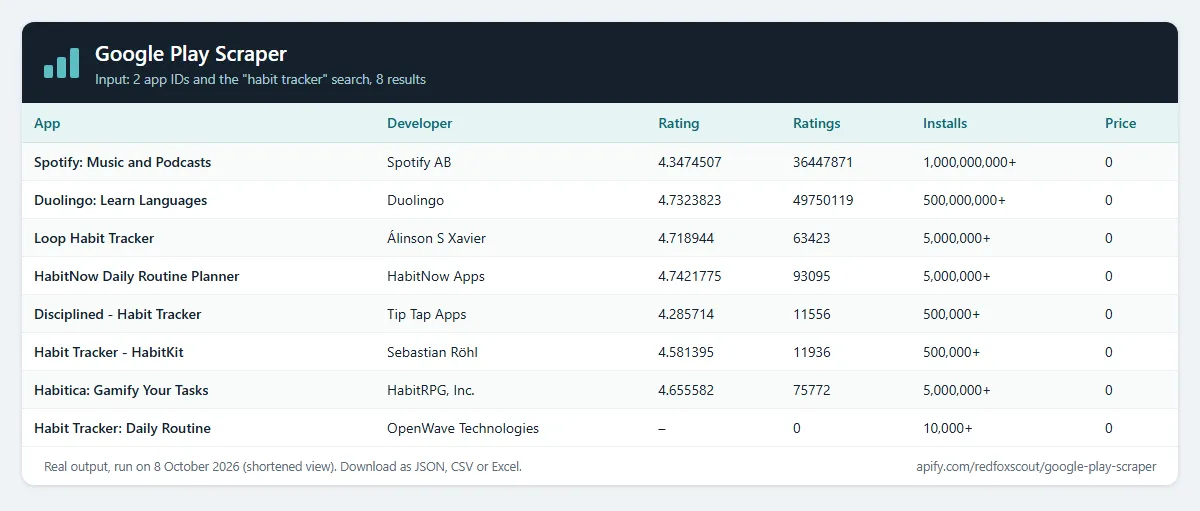
One row per app. Search rows also carry searchRank, the app's position on the results page. searchQuery holds the app ID or keyword that produced the row. The run above returned 10 rows: 2 apps by ID and 8 from the search. A real row (Spotify, shortened):
Example tasks
Ready-made inputs you can open, change and run:
How much does it cost?
$1.00 per 1,000 apps.
- 100 apps: about $0.10
- 10,000 apps: about $10
- Failed lookups and error rows: free
- A package ID repeated in the same input: charged once
Apify's free plan gives $5 of credit every month, enough for about 5,000 apps.
FAQ
Is this legal? It reads the public app pages that Google Play shows to any visitor, without signing in. It uses no login, cookies, CAPTCHA solving or private data. Developer contact fields are only what the developer publishes on the listing. This is not legal advice: check the rules that apply where you store and use the data.
How many apps does a search return? One search reads the one results page that Google Play shows for that keyword, in Google's order. In our test runs that page held 19 to 30 apps. Raising maxItems cannot get more than the page holds. For a longer list, use several narrower keywords.
Can I get reviews? Not in this Actor. You get the rating summary instead: score, ratings count, reviews count and the one-to-five star histogram. Review text, reviewer names and developer replies are not included.
Why does an app come back as "not found"? The ID is wrong, the app was removed, or it is not available in the country you chose. Try another country code. The failed lookup is free.
Related Actors
- Tech Stack Detector: what a website runs on, including its CMS, analytics and marketing tools.
- Company Social Links Finder: official social profiles and contact pages from a list of company websites.
- Bulk URL Status & SSL Checker: status, redirects and SSL expiry for many URLs, such as the developerWebsite field from this Actor.


