

Broken Link Checker – Find 404s and Dead Links API
Pricing
from $0.60 / 1,000 crawled pages
Broken Link Checker – Find 404s and Dead Links API
Pay per crawled page, not per link: crawl a site within robots.txt and check every link on each page for 404s, 5xx errors, DNS and TLS failures and redirects. Anti-bot and robots.txt refusals are never called broken. No personal data.
Pricing
from $0.60 / 1,000 crawled pages
Rating
0.0
(0)
Developer

Rowcraft
Maintained by CommunityActor stats
0
Bookmarked
2
Total users
1
Monthly active users
2 days ago
Last modified
Categories
Security
Limited permissionsShare
Broken Link Checker: Find 404s and Dead Links API
Find the broken links of a website before your visitors and search engines do. Give the actor a site or a page; it crawls the pages of that site, verifies every link on each page (internal and external) and returns one row per page with the links that are broken, the links that redirect, and honest counts of the ones it could not verify. The result comes as JSON, CSV or Excel, ready for a spreadsheet, a ticket queue or a weekly alert.
The price is per crawled page, not per link: a page with 300 links costs the same as a page with 3, and the links themselves are free. The actor reads robots.txt on every host before it sends a single request to it, so a link to a site that disallows robots is reported as not_checked_robots instead of being hit anyway, and an answer that only means "I do not talk to bots" (401, 403, 429) is never reported as broken.
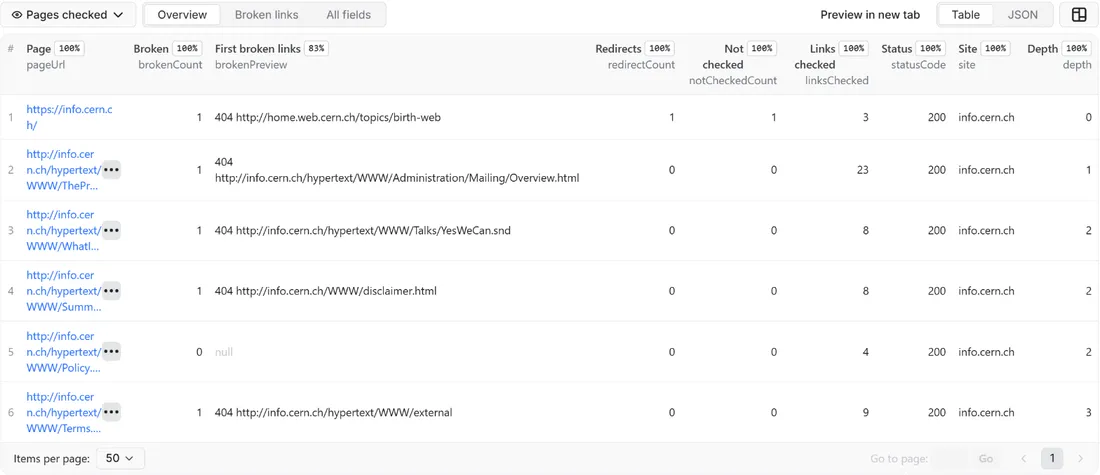
What you get
Price: $0.90 per 1,000 pages on the Free plan, $0.60 on the Business plan, paid per row delivered; the $5 monthly credit of a free Apify account covers about 5,500 pages. Details in Pricing below.
One row per page that was read and checked:
- The page: its address after redirects, the site, the depth from your start address, the HTTP status and the page title
- Counts that add up:
linksFoundis the number of unique web addresses on the page,linksCheckedthe ones that got a verdict (working, redirected or broken),notCheckedCountthe ones that could not be verified, with the reasons innotCheckedReasons, written as text such asblocked_antibot: 2, not_checked_robots: 1. Working plus redirected plus broken equalslinksChecked; addingnotCheckedCountgiveslinksFound. brokenPreview: the first three broken addresses with their HTTP status or state as one line of text, so a table or a spreadsheet column reads without opening anything; the whole list is inbrokenLinks. Empty when the page has no broken linkbrokenLinks: every broken link with its address, the state (broken_4xx,broken_5xx,dns_error,timeout,tls_error,connection_error,redirect_loop), the HTTP status or the error text, the anchor text (cut to 80 characters, without e-mail addresses and phone numbers), whether the link isinternalorexternal, the tag it came from (a,linkorimg) and, when it redirected first, the address where the chain endedredirectedLinks: every link that redirects to a working page: the address you link to, the address it ends on, the number of hops and the status of the first redirect (301 or 302), so you can update the old addresses- Change tracking: a
brokenHashthat changes when the set of broken addresses of the page changes, and the time of the check
The run also writes a COVERAGE record with one line per site you asked for (ok, blocked, robots_disallowed, not_found, error or not_checked, with the reason and the first pages that were not read) and a RUN_SUMMARY with the number of addresses in every state, the external hosts and robots.txt files read, and why the run stopped.
Limits, up front. By default 50 pages per site (up to 1,000,000), the first 2 MB of each page, the first 2,000 links of a page, at most 1,000 external websites per run (adjustable), up to 1,000 sites per run, at most 5 redirects followed per link, and one request per second to any one host. Pages that build their links with JavaScript show only the links that are in the HTML. The details are in Limits and fair use.
Why this actor
- Pay per page, not per link. The unit is the crawled page. The price does not grow with the number of links on it, and you see the cost before the run: pages to crawl times the price per page.
- robots.txt on every host. The crawl obeys the robots.txt of your site, and the external links are verified only after the robots.txt of their own host was read and allows the address. A host that disallows is counted as not checked, not as broken. Crawl-delay is honoured up to 10 seconds.
- No false alarms from bot protection. Many large sites answer 403 or 429 to anything that is not a browser. Those links are listed as
blocked_antibotin the counts and never as broken. An error answer to a HEAD request is repeated with a GET before the link is reported, because some servers answer HEAD wrongly. - Redirect chains with their end. Redirects are followed by hand, up to five hops, and every hop is checked against robots.txt. A link that redirects to a page that is gone is reported as broken with the address where the chain ended.
- Every address once per run. A link in the menu of 500 pages is verified once and the verdict is reused, so the load on the sites you link to stays small.
- Only what changed. With Only new rows a page is delivered again only when its set of broken links changed since the last run, so a weekly schedule costs only the pages whose problems are new or fixed.
- No personal data. Links to e-mail addresses, phone numbers and messaging apps are skipped completely, anchor texts are stripped of e-mail addresses and phone numbers, and personal profile pages are never requested.
How to use it
- Open the Actor and paste your site into Websites or pages, a domain (
example.com) or a page address (https://www.example.com/blog), one per line. - For a first try keep Pages to crawl per site at 5. Every page read is one row and one charge, and the links on it are free, so a small number shows you the result for a few cents.
- Click Start. The status line shows the pages read and the broken links found so far. The run stops cleanly at your page limits or at the charge limit you set in the run options.
- Open the Dataset tab. The Overview view lists the pages with the number of broken links, the first broken addresses as text, redirects and links not checked; the Broken links view shows the broken links of each page. Download JSON, CSV, Excel, XML or HTML, or send the rows to Google Sheets, Slack, Make, n8n or Zapier with the Integrations tab.
- Open the
COVERAGErecord in the key-value store to see which sites could not be read and why, and which pages were left out. - Raise Pages to crawl per site to cover the whole site. To watch a site over time, run it on a schedule with Only new rows since the last run turned on.
Checking your own site and want it faster? Lower Delay between requests to one host to 200 ms: it is your server and your decision. Links to other websites are always checked in parallel across hosts, one request at a time per host.
Input
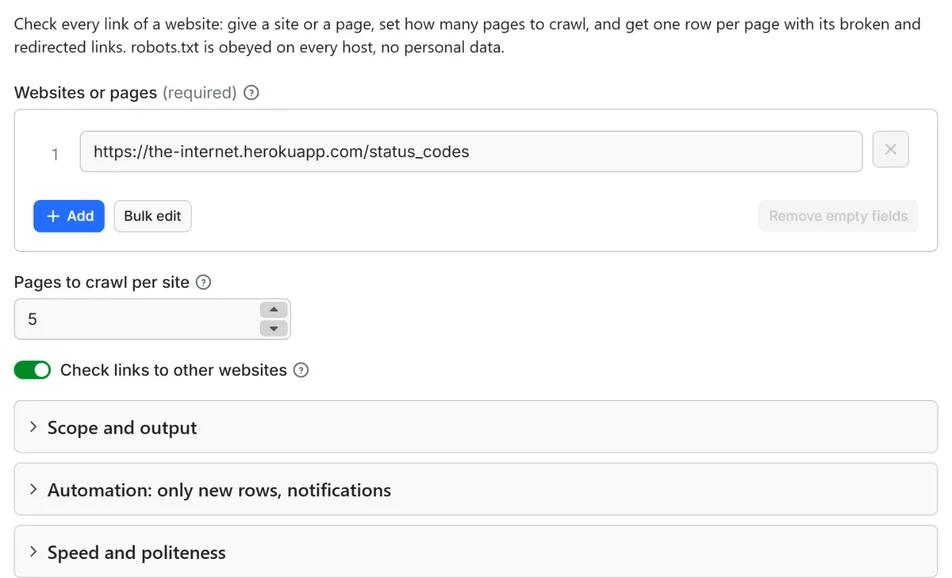
Quick start. This input is ready to run (it is also the example in the API tab):
One real row it returns (long texts shortened here):
| Field | What it does |
|---|---|
startUrls | Domains (example.com) or page addresses (https://www.example.com/blog), one per line. Several addresses of one site are crawled together as one site. Up to 1,000 sites per run. |
maxPagesPerSite | How many pages of each site are read, breadth first from the start address. Default 50, up to 1,000,000. Each page read is one charged row. |
checkExternalLinks | Also verify links to other websites. Default on. Off: only the links inside the site are verified; links to other sites are counted as not_checked_limit. |
includeImages | Also verify the address of every image on the pages. Default off: images multiply the number of requests. |
onlyPagesWithBrokenLinks | Deliver (and charge) only the pages where a broken link was found. Clean pages are still read and checked, but skipped. |
includeSubdomains | Treat blog.example.com and shop.example.com as part of example.com: their pages are crawled and their links count as internal. Default off. |
maxItems | Stop after this many delivered rows in total. 0 = no limit. |
maxExternalHosts | At most this many different external websites are verified in one run (default 1,000); links to further websites are counted as not checked. |
onlyNew, stateName | Deliver a page only when its set of broken links changed since the last run with the same state name |
notifyUrl, notifyWhenEmpty | A webhook that receives one message when the run ends; see Automation below |
requestIntervalMs | Pause between requests to the same host, default 1000 ms, minimum 200 ms |
Example: the first five pages of one site.
Example: a weekly check of two sites that delivers only pages with new or changed problems, with a Slack message.
What counts as a link
a href: every link in the text of the pagelinkforcanonical,alternate(language versions),next,prevandamphtml: the addresses search engines useimg src(and the lazy-loadingdata-src) only withincludeImages
Skipped completely, not counted and not requested: mailto:, tel:, sms:, javascript:, data: and every other address that is not http or https, links that only point to a place on the same page (#top), addresses that hold an e-mail address, and pages of personal profiles. The part after # is dropped: the actor checks that the page exists, not that the anchor on it does. Scripts, style sheets, fonts, iframes and forms are not checked.
The states of a link
| State | Meaning | Counted as |
|---|---|---|
ok | The address answers with a success status | working |
redirect | The address redirects (up to 5 hops) to a page that works | redirected, listed in redirectedLinks |
broken_4xx | 404, 410 or another client error (an error answered to a HEAD request is repeated with a GET before it is reported) | broken |
broken_5xx | The server answers with an error and still does so on the second try | broken |
dns_error | The host does not exist | broken |
timeout | The server did not answer in 15 seconds | broken |
tls_error | The secure connection failed (expired or wrong certificate, no TLS) | broken |
connection_error | The connection was refused or reset | broken |
redirect_loop | More than 5 redirects, or the redirects lead back to themselves | broken |
blocked_antibot | 401, 403, 429 or 999, or an anti-bot page: the server refuses automated readers | not checked |
not_checked_robots | The robots.txt of that host disallows the address, or the robots.txt could not be read | not checked |
not_checked_private | The address points to a private or local network (refused on the Apify platform) | not checked |
not_checked_limit | External links are switched off, the limit of external hosts was reached, or the page has more than 2,000 links | not checked |
Output
17 fields per row. Empty values are null, never missing, so CSV and Excel columns are stable.
| Field | Type | Example |
|---|---|---|
id | string | https://the-internet.herokuapp.com/status_codes |
pageUrl | string | https://the-internet.herokuapp.com/status_codes |
site | string | the-internet.herokuapp.com |
depth | integer | 0 |
statusCode | integer | 200 |
pageTitle | string | The Internet |
linksFound | integer | 7 |
linksChecked | integer | 7 |
brokenCount | integer | 2 |
redirectCount | integer | 3 |
notCheckedCount | integer | 0 |
notCheckedReasons | string | blocked_antibot: 2, not_checked_robots: 1 |
brokenPreview | string | The first three broken addresses as one line of text with their HTTP status or state (empty when none are broken) |
brokenLinks | array | Every broken link: address, state, HTTP status or error, anchor text, internal or external, tag (a, link, img) and the final address when it redirected first |
redirectedLinks | array | Every link that redirects: address, final address, number of hops, status of the first redirect, anchor text, internal or external, tag |
brokenHash | string | c86a60f74210 |
checkedAt | string | 2026-10-14T17:33:47.630Z |
Example rows
Two real rows from a run (long texts shortened here, complete in the dataset):
Results can be downloaded as JSON, CSV, Excel, XML or HTML from the Dataset tab, or read through the Apify API.
Pricing
The unit is the crawled page: one page of the site read and checked with all of its links. A page with 3 links and a page with 3,000 links cost the same, and a link that is checked on 200 pages is still verified once and still free. Cost of a run = pages delivered times the price per page; set Pages to crawl per site and you know the most it can cost. Sites that could not be read, pages skipped by Only pages with broken links, pages with an unchanged set of broken links under Only new rows, and pages that the charge limit stopped are not charged.
Pay per result. You pay for each page delivered to your dataset, nothing else: no subscription, no minimum, no charge for rows your filters drop or for the requests behind them.
| Your Apify plan | Price per 1,000 rows | Price per row |
|---|---|---|
| Free plan | $0.90 | $0.0009 |
| Starter plan | $0.80 | $0.0008 |
| Scale plan | $0.70 | $0.0007 |
| Business plan and above | $0.60 | $0.0006 |
Example: 1,000 pages cost $0.90 on the Free plan and $0.60 on the Business plan. Platform usage of the run (compute, storage) is included in that price and is not billed to you separately (pay per event: the actor covers it).
A start event of $0.00005 is charged once per run (Apify default).
Cap your spend: set Maximum total charge in the run options. The actor stops cleanly when the cap is reached and you keep everything delivered until then. The run summary (RUN_SUMMARY in the key-value store) says why a run stopped.
Automation: only new rows, notifications, schedules
Only new rows since the last run. Turn on onlyNew and the actor remembers, for every page it delivered to you, the set of broken addresses it had (in a key-value store named rowcraft-broken-link-checker-state in your Apify account). The next run with the same stateName delivers a page again only when that set changed: a link broke, or a broken link was fixed or removed. A page whose problems are the same as last time is skipped and not charged. The first run delivers every page it can read. Use a different stateName for each site or schedule so they keep separate memories.
Only pages with broken links, together with Only new rows. Set both: the run delivers a page only when it has broken links that are new or different since the last time. When a page becomes clean it is not delivered, but its old memory is cleared, so if it breaks the same way again later you are told again.
Notification when the run ends. Put a webhook address in notifyUrl and the actor sends one JSON POST with the number of delivered rows, links to the dataset (JSON and CSV) and the run. It works with Slack and Discord incoming webhooks (the message is in text and content), with Make, n8n and Zapier catch hooks, and with your own endpoint. By default it is sent only when at least one row was delivered; notifyWhenEmpty sends it every time.
Schedules. Create a schedule in Apify Console (daily, weekly, monthly or cron) with onlyNew on and you get a feed of the pages whose broken links changed, for the price of those pages only.
Integrations. Send the results to Make, n8n, Zapier, Google Sheets, Slack, Google Drive, Airtable or any webhook from the Integrations tab of the Actor, with no code.
API, SDKs and AI agents. Every run is available through the Apify API and the official JavaScript and Python clients; the Actor can also be called by AI agents through the Apify MCP server. The example input in the API tab is a working call.
Use with AI agents (MCP). Add the Apify MCP server to Claude, Cursor, VS Code or any MCP client and the agent can run this Actor as a tool:
Call it from a shell or any language. One request runs the Actor with the input below and returns the rows as JSON:
Python (pip install apify-client):
JavaScript / Node.js (npm install apify-client):
Use cases
- Site owners and webmasters: a monthly list of the pages that link to dead addresses, with the anchor text so the link is easy to find in the editor.
- SEO and content teams: find broken internal links, canonical and language-version links that point nowhere, and redirect chains that should be updated to the final address, before they cost crawl budget and rankings.
- Agencies: a scheduled check of every client site with Only pages with broken links and a Slack message, so only the sites with new problems cost attention.
- After a migration or redesign: crawl the new site and list every link that leads to a missing page or to a redirect, then fix the old addresses.
- Editors of large archives: external links rot. Run the site on a schedule and replace the dead references before readers find them.
- Quality checks in a pipeline: call the Actor from CI after a deploy and fail the build when
brokenCountis above zero.
Ready-made examples, each with the input filled in (open one and press Start, or save it as your own task):
What this actor does not do
- Run JavaScript: links that a script builds after the page loads are not in the HTML and are not seen. Single-page apps that render their menus in the browser show only the links they send in the first HTML.
- Log in: pages behind a login are not read, and a link to such a page that answers 401 or 403 is counted as not checked.
- Check anchors: a link to
page.html#sectionis verified aspage.html; the actor does not look for the section. - Check scripts, style sheets, fonts, iframes, forms or downloads inside pages; images only when you switch
includeImageson. - Read sitemaps: the crawl follows the links of the pages, it does not read the addresses listed in a sitemap file.
- Audit SEO: it does not judge titles, meta tags, headings or page speed.
- Collect contacts: no e-mail addresses, phone numbers, names of people or social profiles, and no page text apart from the title and the short anchor texts.
- Bypass protections: no proxies, no CAPTCHA solving, no browser disguise. A server that refuses automated readers is reported as not checked.
- Fix the links or write to the site owners.
Limits and fair use
- One request per second per host by default (minimum 200 ms). Different hosts are served in parallel, with at most eight requests in flight at once. Links to other websites each cost one robots.txt request per host and one or two requests per address, so a page that links to hundreds of other websites takes a while: they are checked in parallel, but each host only once a second.
- Crawl-delay. A
Crawl-delayin the robots.txt of a host is honoured up to 10 seconds between requests to that host. - Pages per site: 50 by default, up to 1,000,000. The crawl is breadth first from the start address and covers only the same site:
example.comandwww.example.comare one site, other subdomains only withincludeSubdomains. Addresses beyond the limit are still verified as links on the pages that were read; they just do not become rows. - Page size: the first 2 MB of a page are read and the rest is cut. Pages that are not HTML (PDF files, images, downloads) are checked as links, not crawled.
- Links per page: the first 2,000 unique addresses of a page are checked; the rest are counted as
not_checked_limitand the run summary says so. - External websites: at most 1,000 different external hosts per run by default; raise
maxExternalHostsfor large sites. Links beyond the limit are counted as not checked. - Redirects: up to five hops per link, every hop checked against robots.txt.
- Time-outs: 15 seconds for a link, 25 seconds for a page. A host that does not answer is tried once for all the links that point to it.
- robots.txt is obeyed for every address the actor requests, on your site and on every external host. If the robots.txt of your own start page disallows it, the site is reported as
robots_disallowedand nothing is read. If a robots.txt answers with a server error the host is not read, as the robots.txt standard (RFC 9309) requires. - Anti-bot pages. If five pages of a site in a row answer with an anti-bot page the crawl of that site stops and says so in
COVERAGE; those pages are not charged. - Time limit. The run stops 90 seconds before its timeout with the summary, the coverage and the Only new rows memory saved. A page whose links were not all checked by then is not delivered and not charged. For large sites raise the timeout, lower the delay on your own site, or split the crawl.
Data source and licence
The data is what each website sends to every visitor: the HTML of its pages and the answer line and headers of the addresses it links to. The actor requests the pages and addresses once per run, after reading robots.txt, with an honest User-Agent that names Rowcraft, and keeps only the address, the state, the status code, a short anchor text and the page title. Page text, images, headers and cookies are not stored or delivered.
Rowcraft is independent: this actor is not provided, endorsed or authorised by the websites it reads or by search engines. The robots.txt handling follows RFC 9309 (https://www.rfc-editor.org/rfc/rfc9309). You decide which sites to crawl and answer for the list you give: crawl your own sites, or sites whose owners allow it.
Privacy: no personal data
Rowcraft actors are built not to collect personal data:
- Links to e-mail addresses, phone numbers, text messages and
javascript:are skipped completely, so they are neither requested nor counted nor listed. - Addresses that contain an e-mail address, and addresses of personal profile pages, are skipped too.
- Anchor texts are cut to 80 characters and an e-mail address or phone number inside one is replaced by a marker. Page titles get the same treatment.
- The actor sends no cookies, fills no forms and never logs in.
You are responsible for using the data in line with the law that applies to you.
Other Rowcraft actors
Related Rowcraft actors. All of them read official or public sources, deliver flat rows without private contact details and support only-new runs and notifications; the full list is on the Rowcraft profile:
- Lighthouse Audit API: Core Web Vitals and Performance Scores — Run Lighthouse on any public page and get Performance, Accessibility, Best Practices and SEO scores, lab Core Web Vitals and the biggest savings.
- SEO Audit Tool: Titles, Meta Tags, Headings and Links API — Audit the on-page SEO of any list of pages or websites: titles, meta descriptions, headings, canonicals, indexing, links, images and structured data, with a score and the issues found per page.
- Sitemap URL Extractor: Every Page with Last-Modified Dates — Get every page a site lists in its sitemaps, with last-modified dates, from robots.txt through sitemap indexes and .gz files.
- Structured Data Extractor: JSON-LD, Schema.org, Open Graph — Pull the schema.org JSON-LD, Microdata, RDFa and Open Graph of any page list into flat rows: types, product price, availability, ratings, organization, breadcrumbs, with validation issues.
- Bulk URL Status and Redirect Chain Checker API — Check the status code, redirect chain, canonical and indexing signals of every URL in a list, with the final destination and a loop flag.
- Google Autocomplete Suggestions Scraper – Keyword Ideas — Get Google search suggestions for a list of keywords in bulk: a-z, question and preposition expansion, any language and country.
FAQ
What exactly does it call a broken link? An address that answers 404, 410 or another client error, a server error that is still there on the second try, a host that does not exist, a secure connection that fails, a connection that is refused or does not answer in 15 seconds, and a redirect chain that loops or is longer than five hops. Answers that mean "I do not serve robots" (401, 403, 429, 999) and hosts whose robots.txt disallows the address are counted as not checked, because the page may be perfectly fine for a visitor.
Why does it need two requests for some links? A HEAD request is cheap and answers most links. Some servers answer HEAD with 405, 404 or 403 but serve the same address fine with a normal request, so the actor repeats any error answer with a one-byte GET before it calls a link broken. That keeps false alarms down.
Why is the result empty? The site could not be read, or every page was skipped. The COVERAGE record gives the reason per site: an anti-bot page (blocked), robots.txt (robots_disallowed), no website at that address (not_found), an invalid entry or a connection problem (error). With Only pages with broken links a site without broken links delivers nothing, and with Only new rows pages whose broken links did not change are skipped. Nothing is charged for those, apart from the start event. The RUN_SUMMARY shows how many pages were read and skipped.
Is it legal? The actor reads public pages the way a browser or a search engine does, obeys robots.txt on every host, identifies itself, and collects links and statuses, not personal data. Crawling your own site is your decision; for sites of others, follow their terms. Whether and how you may use the results depends on the law that applies to you.
Does it collect personal data? No personal data: no e-mail addresses, phone numbers or people's names. Links to e-mail addresses and phone numbers are skipped completely and never listed, and anchor texts are cleaned. See the Privacy section.
Do I pay for links? No. You pay for crawled pages. Links, redirects and checks of other websites are included, and a link that appears on many pages is verified once.
Do I pay for pages that fail? No. A page that answers with an error, an anti-bot page or a robots.txt refusal is not a row and is not charged. With Only pages with broken links clean pages are skipped and not charged either.
Why is a link not checked? Its host disallows robots in robots.txt (not_checked_robots), the server refuses automated readers (blocked_antibot), it points to a private network (not_checked_private), external links are switched off or beyond your limits (not_checked_limit). They are counted in notCheckedCount with the reason in notCheckedReasons, so you know what was not verified.
A page with a broken link in the browser is shown as working. Why? Some pages answer 200 for a missing page and show a message instead (a soft 404). The actor goes by the HTTP status, so it cannot tell. Pages that need JavaScript to load their content are read as the HTML the server sends.
How long does a crawl take? At the default speed a site is read at about one request per second to its own host: every page read, and every internal address that is not read as a page, costs one request. Links to other websites run in parallel across hosts. A small site of 50 pages takes a few minutes; your own site can be checked faster by lowering the delay.
Can I check only some pages? Yes: give the page addresses you want as start addresses and set Pages to crawl per site to the number of pages. The crawl starts at your address and follows the links of the same site, breadth first.
Can I call it from code or from CI? Yes, through the Apify API, the JavaScript and Python clients and the Apify MCP server. The API tab shows a working call with the input of this Actor.
Support and reviews
Problems, missing fields, questions: open an issue on the Issues tab of this Actor. We answer within one working day and fix confirmed bugs in the next release; the changelog lists every change.
If this Actor saved you time, a short review on its page helps other users find it and helps us keep improving it.


